Szervezd Meg az Összes Kreatív Eszközödet Egy Helyen
Egy erőteljes eszköztár, amely automatikusan tárolja mindazt, amit AI-val hozol létre. Hierarchikus mappák, húzd és ejtsd szervezés, kötegelt műveletek és valós idejű tárhely követés — mindezt egy helyen.
- Hierarchikus mappák szín kódolással és húzd és ejtsd funkcióval
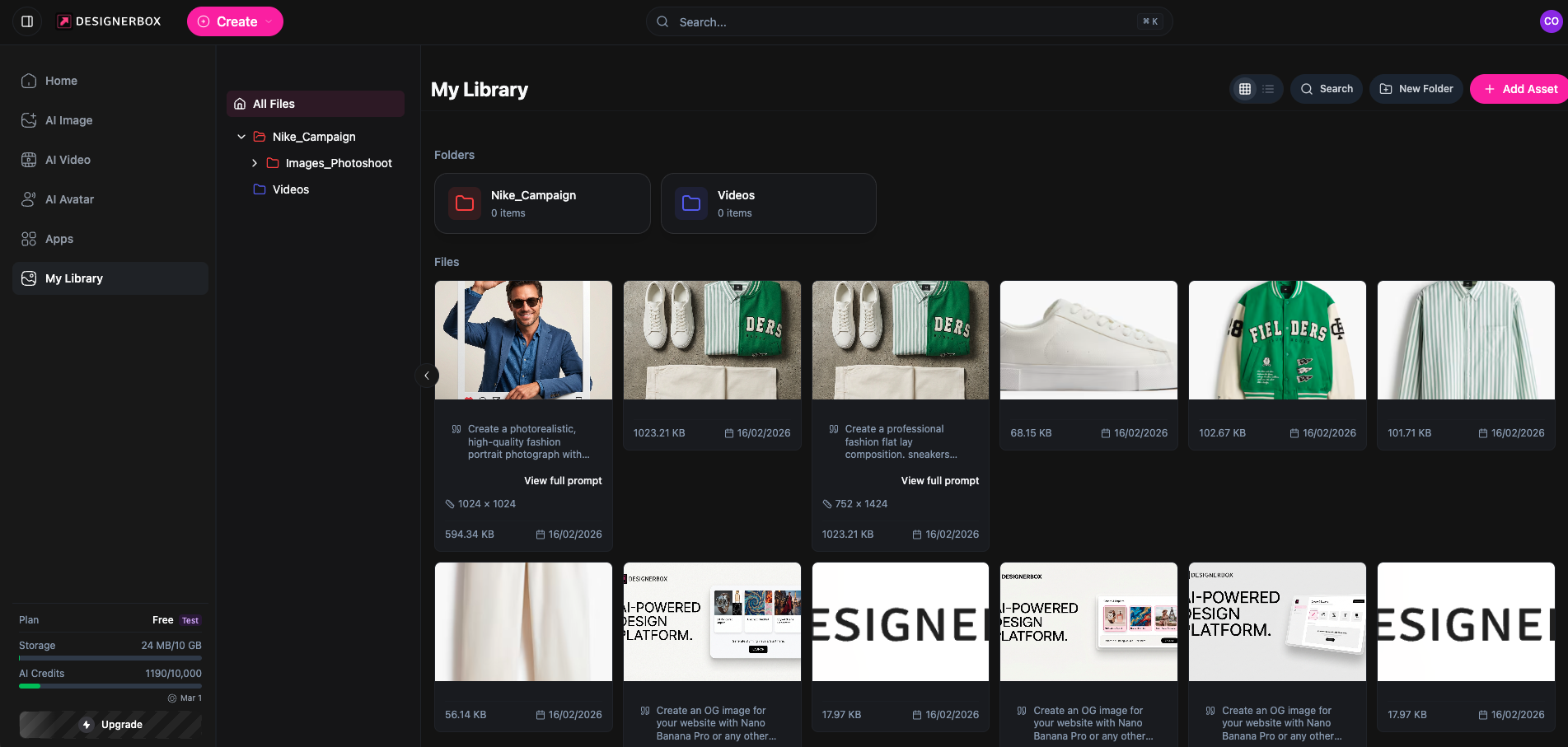
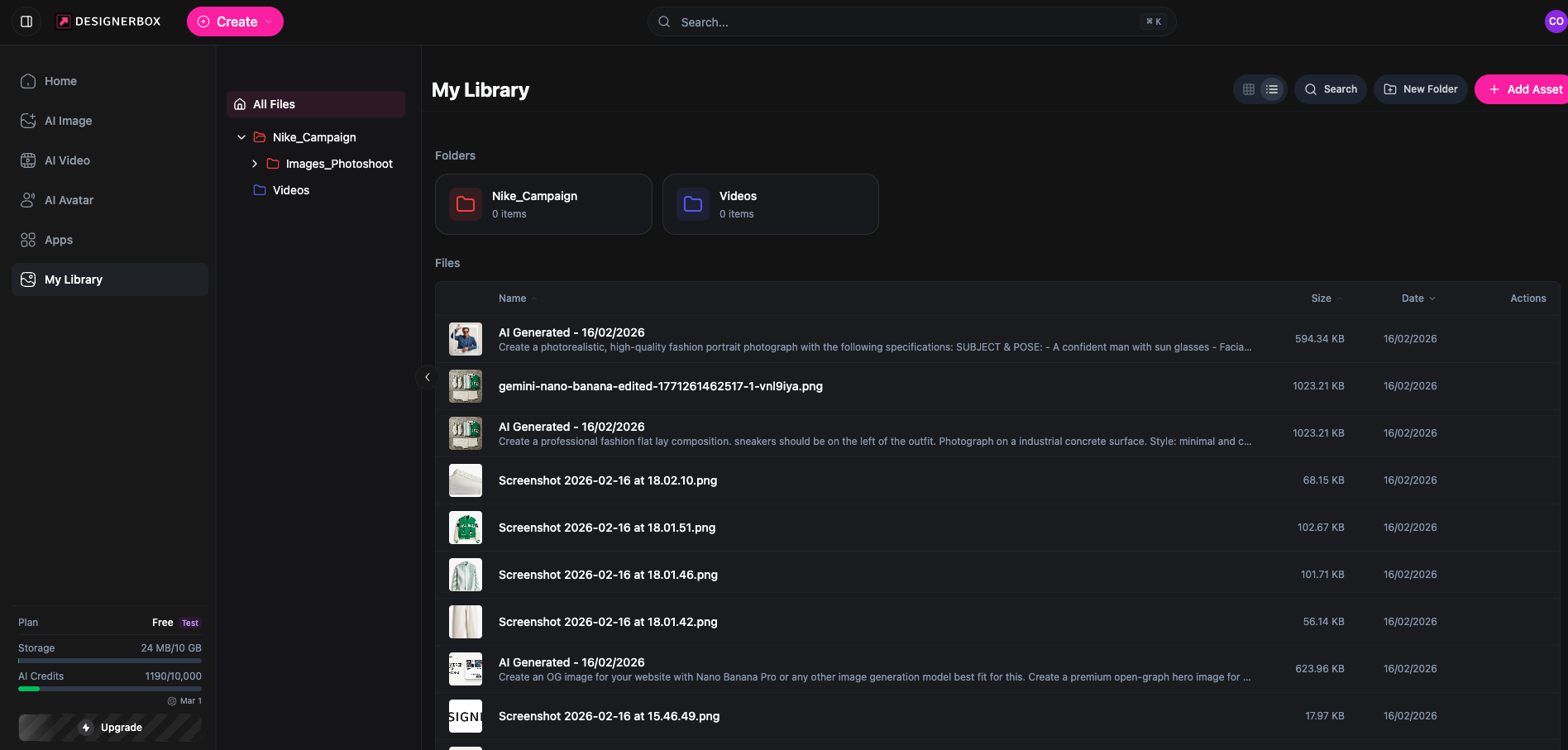
- Rács és lista nézetek rendezéssel, szűréssel és kereséssel
- Automatikus feltöltés az összes AI eszközből
- Többszörös kiválasztás kötegelt műveletekhez és ZIP letöltéshez
How It Works
Okos Szervezés
Hierarchikus mappa rendszer szín kódolással, kenyérmorzsa navigációval és húzd és ejtsd funkcióval mappák között. Tartsd a kreatív eszközeidet rendezetten.
Erőteljes Böngészés
Rács és lista nézetek, rendezés név, dátum, méret vagy típus szerint. Szűrés fájltípus, mappa vagy dátum tartomány szerint. Keresés az összes eszközben azonnal.
Kötegelt Műveletek
Több eszköz kiválasztása kötegelt törléshez, kötegelt áthelyezéshez mappák között, vagy minden letöltése ZIP archívumként egy kattintással.
Key Features
Everything you need to manage your creative assets
Mappa Rendszer
Hozz létre, nevezz át, törölj és mozgass mappákat szín kódolással a vizuális szervezésért
Húzd és Ejtsd
Mozgass eszközöket mappák között intuitív húzd és ejtsd funkcióval — gyorsan és könnyedén
Minden Eszköztípus
Képek, videók és dokumentumok — az AI alkotásaidból minden fájltípus támogatott
Előnézeti Ablakok
Teljes méretű kép előnézet és videó lejátszás közvetlenül a könyvtárban letöltés nélkül
Metaadatok Megjelenítése
Tekintsd meg a fájlméretet, méreteket, létrehozási dátumot és MIME típust minden eszköznél
Automatikus Feltöltés
Az összes AI által generált kép, videó és avatar automatikusan mentődik a könyvtáradba
Two Ways to Browse Your Assets
Switch between Grid and List views to find what you need. Grid view shows visual thumbnails for quick scanning, while List view displays detailed metadata — file names, creation dates, sizes, and AI generation prompts — so you always have full context.
- Grid view with visual thumbnails for quick browsing
- List view with file details, dates, and AI prompts
- Sort by name, date, size, or type
- Filter and search across your entire library
How It Works
Detailed Features
Professional asset management for every creative need
Szín Kódolt Mappák
Rendelj színeket mappákhoz a gyors vizuális azonosításért és jobb szervezésért
Rács és Lista Nézetek
Válts vizuális bélyegkép rács és részletes lista nézet között az eszközök böngészéséhez
Okos Rendezés
Rendezd az eszközöket név, dátum, méret vagy típus szerint növekvő vagy csökkenő sorrendben
Azonnali Keresés
Találj meg bármilyen eszközt a teljes könyvtáradban fájlnevek keresésével
ZIP Letöltés
Töltsd le az egyedi eszközöket vagy az egész könyvtáradat ZIP archívumként
Tárhely Követés
Valós idejű tárhely kvóta frissítések minden feltöltés vagy törlés után
Tárhely Csomagonként
Minden csomag dedikált tárhelyet tartalmaz a kreatív eszközeidhez
Nincs kredit költség a könyvtár műveleteknél — csak tárhely
Gyakran Ismételt Kérdések
Minden, amit tudnod kell az Eszköztárról
Milyen fájltípusokat tárolhatok az Eszköztárban?
A könyvtár képeket (PNG, JPG, WebP), videókat (MP4) és dokumentumokat támogat. Az összes AI által generált tartalom — fotók, videók és avatarok — automatikusan tárolódik a könyvtáradban.
Hogyan működik az automatikus feltöltés az AI eszközökkel?
Minden kép, videó vagy avatar, amelyet a DesignerBox AI eszközökkel generálsz, automatikusan mentődik az eszköztáradba. Nincs szükség manuális feltöltésre — egyszerűen megjelenik a könyvtáradban szervezésre kész.
Szervezhetem az eszközöket mappákba?
Igen! Hozz létre hierarchikus mappákat szín kódolással, nevezd át vagy mozgasd őket, és húzd és ejtsd az eszközöket mappák között. Mappákat beágyazhatsz összetett projekt struktúrákhoz.
Mi a tárhely korlátja a csomagomnak?
A tárhely csomagonként változik: Ingyenes (10 MB), Alap (500 MB), Pro (2 GB), Prémium (10 GB) és Ultra (Korlátlan). A jelenlegi használatodat valós időben követjük.
Letölthetem az összes eszközömet egyszerre?
Igen, letölthetsz egyedi eszközöket, vagy használhatod a Mindet Letölt funkciót, hogy mindent ZIP archívumként kapj meg. Több eszközt is kiválaszthatsz kötegelt letöltéshez.
Hogyan mozgathatok eszközöket mappák között?
Használd a húzd és ejtsd funkciót az eszközök mappák közötti mozgatásához, vagy válassz ki több eszközt és használd a kötegelt áthelyezés párbeszédablakot a cél mappa kiválasztásához.
Készen állsz a kreatív eszközeid rendezésére?
Kezdj el tárolni, szervezni és kezelni az összes AI által generált médiaanyagodat egy erőteljes könyvtárban.
Kezdj Hozzá