An AI agent builder is a platform where you assemble a multi-step AI job without writing the orchestration code yourself. You set a trigger, lay out the steps, pick which tools the agent may call, and say where the output lands. Marketing teams use them for research, routing, briefing and asset production.
Three of the five platforms on the shortlist below keep a free tier, and the other two offer a trial. Pick on the shape of the platform first, then read each vendor’s own pricing page.
A team buying one of these platforms is buying two things at the same time. The first is a place to draw the steps. The second is a bill for every step that runs, forever. The second one moves, and it moves faster than the first. OpenAI launched a visual agent canvas at its DevDay 2025 event and has already scheduled it to close: Agent Builder shuts down on 30 November 2026 (developers.openai.com, October 2026). Whatever you draw today has to outlive the editor you drew it in.
This guide covers the platforms a marketing team would shortlist, with every feature and metering fact read from each vendor’s own pricing page in September 2026. It prints no vendor price, because these tiers move month to month and each company’s own page is the place to read the live figure. Then it covers the five pieces you still have to supply yourself, what the running cost looks like once creative work is involved, and which jobs are worth building versus buying outright. It is written for a marketing lead with a small team, a real budget line, and no ML engineer.
Key Takeaways
- The canvas is one line of the bill. Each vendor lists its plans on its own pricing page. The generation, the storage and the person who maintains the graph are separate costs.
- Most builders orchestrate text, not pixels. Zapier, Make and n8n move data between systems very well. Producing an on-brand product image or a video ad is a separate tool and a separate bill.
- Platform risk is real. OpenAI’s own visual builder is scheduled to shut down on 30 November 2026, which is a fair warning about how much logic to trap inside any one canvas.
- Five parts have to exist before an agent is useful: model access, brand context, a review gate, storage, and a way to rerun the job for the next product.
- Creative production is the part a general builder does not carry. DesignerBox keeps the image models, the video models, the brand rules, the editors and the asset library in one place, so the creative half of the chain is one integration.
What is an AI agent builder?
An AI agent builder is a visual environment for defining an agent: what starts it, which model reasons over the input, which tools it may call, how it branches, and what it returns. It removes the orchestration code, not the design work. You still decide the sequence, the guardrails and the failure behavior. The output is a graph you can version, test and rerun.
Two shapes sit under the same phrase. The first is an automation platform that added agents to an existing trigger-and-action product, which is where Zapier and Make sit. The second is a canvas designed around agents from the start, which is where Gumloop and n8n’s agent tooling sit. Both produce something that runs on a schedule or on an event. The difference is in how much branching and looping you can express before the graph stops being readable.
The vocabulary is more standardized than it looks. OpenAI publishes eleven node types for Agent Builder across four groups: Start, Agent and Note; File search, Guardrails and MCP; If/else, While and Human approval; Transform and Set state (developers.openai.com, September 2026). Almost every other builder ships some version of that same list under different names, so learning one vocabulary transfers. Creative canvases run on the same parts, and what each node on a workflow canvas does maps those jobs across six tools.
What is the difference between an AI agent and an AI workflow?
A workflow runs the steps you wrote, in the order you wrote them, every time. An agent decides part of the sequence itself: which tool to call, whether to loop, when it has finished. The same canvas usually builds both, and the distinction matters because it changes what can go wrong and what you have to test.
Most production marketing automation is a workflow with one agentic step inside it. The trigger, the routing and the delivery are fixed. The judgment call sits in the middle, where a model reads a brief and picks a treatment, which is the branch stage in the five stages a creative chain runs through. That shape is deliberately conservative, and it is the right default: fixed steps are cheap to debug, and the agentic step is contained to the one place where judgment is actually needed.
Full agent autonomy is worth reaching for when the input varies more than the process can anticipate. Sorting a mixed inbox of supplier photos into the right treatment is a genuine agent job, because you cannot enumerate the cases in advance. Resizing an approved image into six placements is not, because you can. Paying agent prices for work a fixed workflow handles adds cost and a class of failure you did not need.
The practical read: start with the fixed sequence, find the one step that keeps needing a human decision, and give that step to a model. Expanding outward from a working workflow produces something maintainable. Building a fully autonomous agent first and constraining it afterwards rarely does.
Which AI agent builders should a marketing team shortlist?
Five platforms cover most of what a marketing team needs, and they split cleanly by shape. Zapier and Make are automation products with agents added. n8n is a node graph you can self-host. Gumloop is a canvas built around agents. Lindy is assistant-shaped and priced per user. Every fact below was read from the vendor’s own pricing page in September 2026, and each vendor’s prices stay on that page.
| Platform | How it meters use | Free tier | Shape | Where the prices are |
|---|---|---|---|---|
| Make | Credits per operation | Monthly credits, no time limit | Visual scenario canvas, AI agents in beta on all plans | make.com/pricing, September 2026 |
| n8n | Workflow executions, unlimited users and workflows | Community edition, self-hosted, Fair-code license | Node graph, cloud or self-hosted | n8n.io/pricing, September 2026 |
| Zapier | Tasks and agent activities, metered separately | A monthly task and agent-activity allowance | Trigger and action automation with agents layered on | zapier.com/pricing, September 2026 |
| Lindy | Credits, priced per user | A first week free when joining through Slack | Assistant with skills, priced per seat | lindy.ai/pricing, September 2026 |
| Gumloop | Credits, with unlimited seats on the entry paid plan | A time-limited Pro trial | Node canvas designed around agents | gumloop.com/pricing, September 2026 |
Make keeps AI Agents in beta on every plan, including the free one (make.com/pricing, September 2026). The free plan has no time limit, so a team can leave a small agent running indefinitely on it.
n8n is the one to reach for when data handling or hosting rules matter. The community edition is free, self-hosted and published under n8n’s Fair-code license, and the paid cloud plans meter workflow executions with unlimited users and workflows on every tier (n8n.io/pricing, September 2026). Self-hosting needs someone to run the server, so a two-person marketing team may prefer the cloud plans.
Zapier meters two things separately, which is the term to read before you buy: tasks and agent activities each carry their own monthly allowance, on the free plan and on Professional (zapier.com/pricing, September 2026). A busy agent can exhaust one allowance while the other sits unused, so budget against both numbers rather than the headline price.
Lindy prices per user rather than per run, and each seat carries its own monthly credit allowance that rises with the tier (lindy.ai/pricing, September 2026). Per-seat pricing suits a team where several people each want their own assistant. It fits less well when one shared agent runs a scheduled job for the whole team, because you pay by head rather than by run.
Gumloop puts unlimited seats on its entry paid plan, behind a time-limited trial, with Enterprise priced on request (gumloop.com/pricing, September 2026). Unlimited seats on the entry paid tier is the standout term for an agency that wants many people touching one shared set of agents.

Two more belong on the list even though neither is priced like the five above. OpenAI documents AgentKit as three interconnected building blocks, Agent Builder, ChatKit and Evals (developers.openai.com, September 2026). The visual builder is scheduled to shut down on 30 November 2026. ChatKit remains available, and OpenAI points users to the Agents SDK or ChatGPT Workspace Agents (OpenAI API deprecations, October 2026). Google’s Gemini Enterprise Agent Platform runs a managed serverless agent runtime with sessions, a Memory Bank for long-term context, an evaluation service and IAM agent identity, and it accepts agents built with the Agent Development Kit, LangChain, LangGraph, LlamaIndex, AG2 or Agent2Agent (docs.cloud.google.com, October 2026). Both are billed through their parent platform rather than a flat monthly seat.
Code-first frameworks sit one layer below all of this. LangChain, LangGraph and CrewAI are open source and give you full control of the loop, at the cost of an engineer who owns it. They are the right answer when the agent is a product feature. They are a heavier commitment than the job needs when the agent’s only work is saving a marketing manager a few hours a week.
What do you actually have to assemble to build a marketing agent?
A builder gives you the graph and the connectors. It does not give you the five things that decide whether the agent produces anything worth shipping: access to the right models, your brand context, a review gate, storage the team can search later, and a way to rerun the whole job for the next product. An agent missing two of them will demo well and stall in production.
Model access is the first gap, and it is bigger than it looks. Most builders connect you to text models by default. A marketing agent that writes ad copy is fine on that. A marketing agent that produces the ad needs image and video models, which means either separate API keys and separate bills per provider, or a platform that already carries the catalog. DesignerBox carries image and video models behind one workflow, including Nano Banana Pro, Seedream 5 and FLUX 2 Flex for stills, and Veo 3.1, Kling 2.6 Pro and Seedance 2.0 for video. The model becomes a setting on a step rather than another key, another bill and another integration to maintain.
The rest of the creative half sits with it: brand profiles, the image editor, the video editor, batch and the asset library, all in one account.
Brand context is the second, and it is the one that separates a demo from production. The agent needs the same reference assets, colors, tone rules and product photos on every run, or the tenth output drifts from the first. Storing that as a paragraph in a prompt does not hold. It has to be a structured thing the agent reads, which is why brand profiles exist as a first-class object rather than a text field.
A review gate is third. Human approval sits in the same node list as If/else and While, so treating it as ordinary infrastructure is the accurate read, and it belongs wherever the output goes somewhere public. Put it after generation and before publication, and give the approver enough context to decide quickly.
Storage is fourth, and teams often skip it. An agent that produces 200 images a month and drops them in a folder has created a search problem rather than solved a production one. The output needs to land somewhere with tags, versions and search, so that next quarter’s campaign starts from what already exists. The failure mode is quiet: nobody notices for three months, then somebody regenerates an asset the team already paid for because finding it took longer than remaking it. Volume turns a naming convention from a nice habit into a hard requirement, and an agent raises volume from the first day.
A rerun path is fifth, and it is the one that decides whether any of this was worth building. The agent that took a week to build has to run for the next product without being rebuilt. That means the product-specific parts are inputs rather than hard-coded values. If you have to open the graph to change the SKU, you built a script, not an agent. Build it once, then run it on the rest of the catalog. Saved reusable workflows exist so the second run needs no new setup. The two hundredth run meets the same standard as the first.
What does an AI agent cost to run, not to build?
The subscription is rarely the largest line. An entry plan on any of these platforms buys the orchestration only. The model calls, the storage and the person maintaining the graph are separate, and for any agent that produces images or video the model calls dominate everything else by a wide margin.
Put a real number on it before you commit. In DesignerBox the model on each step sets the rate, and the cost of the run is shown before the run. An 8-second clip costs 40 to 560 credits, depending on the model. On the same shot, the video line moves a long way.
Uploading your own photos and the commercial license start on the Pro plan. AI video starts on the Premium plan. Team features, shared brand kits and white label are on the Ultra plan, and every plan below Ultra is one seat. Plans and credits are on the pricing page.
Now run a real job through that. A catalog agent handling 40 new SKUs at four angles each produces 160 images. The model on that step decides what those 160 images cost, and the same brief on a different model can land several times higher. One dropdown changes the bill for the same brief. Swap a deliverable to video and the spread widens again. Budget a stills agent and a video agent as separate projects. The same arithmetic runs at catalog scale in five creative jobs an ecommerce store can hand over: a six-image listing set across 200 SKUs is 1,200 images.
One other cost deserves a line. Your plan caps how many jobs run at once, so a batch agent on a low plan queues its jobs. The concurrency limits are on the same pricing page. Read them before you promise a finance team a number.
Build or buy: which jobs belong on each side?
Build in a general-purpose agent builder when the job moves information between systems. Buy a published app when the job produces a finished creative asset. The line is unusually clean, because the hard part of a routing agent is the connectors and the hard part of a creative agent is the model choice, the brand context and the reject rate. For the same choice at the level of code, see build vs buy AI for creative production.
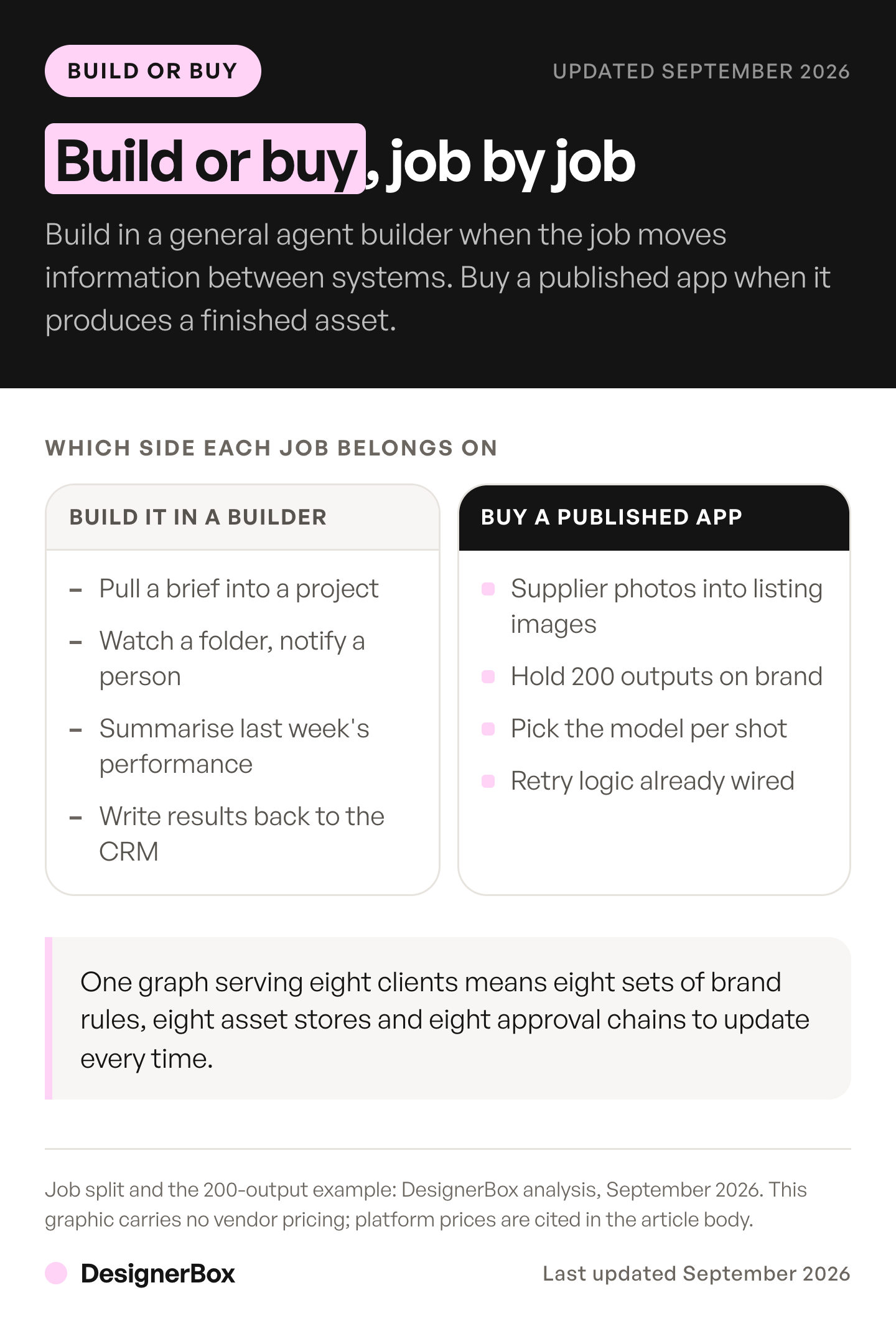
General builders win on everything that is not creative production, and they win comfortably. Pulling a brief out of a form and creating the project. Watching a folder and notifying the right person. Summarizing last week’s performance into a document. Writing back to a CRM. Chasing an approval that has been sitting for three days. These are jobs with clear inputs, clear outputs and no taste involved, and Zapier, Make and n8n do them well.
Published creative apps win where taste and consistency decide the outcome. A job that turns a supplier photo into on-brand listing images has a graph behind it that somebody already debugged, with the model selection, the retry logic and the brand rules already wired, and you run it again for the next product rather than rebuilding it. The Pictures for a listing app in DesignerBox is one example: it makes six marketplace pictures from one product photo. A published DesignerBox app has that shape: a job definition a colleague or an AI chat runs, rather than a canvas you maintain.
Agencies sit in an awkward middle, and the deciding factor is client separation rather than capability. One graph serving eight clients needs eight sets of brand rules, eight asset stores and eight approval chains, and the usual way to express that in a general builder is eight near-identical copies of the same graph. Every rule change then has to be applied eight times, and that repeated work is the maintenance cost. A platform with brand profiles as first-class objects lets one job definition read a different client’s context per run, and that is worth more than any single feature on a comparison table.
Build custom only when the agent is part of what you sell. If the agent’s behavior is the differentiator a client is paying for, own the code. If it is internal plumbing that saves your team a few hours a week, buying it is almost always cheaper than the engineering time plus the maintenance tail. The AI creative agents guide covers where agents are worth the cost for creative teams, and the marketing agents roundup ranks finished agent products.
How do you connect an agent builder to your creative models?
Model Context Protocol is the connector layer to ask about, because it removes the per-pair integration work. A platform that exposes an MCP server can be called by any MCP client, so the same tools work from Claude, ChatGPT, Cursor or a builder’s MCP node. That removes the bespoke integration a builder would otherwise need per creative platform. Our guide to MCP servers and connectors for marketing, by job lists the servers a marketing team can connect.
OpenAI’s Agent Builder ships MCP as one of its three tool nodes, described as calling third-party tools and services through connectors or custom servers (developers.openai.com, September 2026). That means a creative platform’s tools appear inside the agent graph as callable steps rather than as a separate manual stage a person has to run.
On the DesignerBox side that surface is 75 tools. They cover designs and search, image and video generation, avatars, brand profiles, assets and packs and templates, pipelines and workflows, whiteboards and chats, and teams, plan and discovery. One run can read the active brand profile, generate against it, and file the result in the library without a person moving files between tabs. The full MCP tool reference lists what each group exposes, and our launch write-up covers the connection steps. How to make your AI agent creative covers the same connection for Claude, Codex or an agent you built.
One caution about connectors. Every tool you expose to an agent is a permission you have granted, and an agent that can write to your asset library can also overwrite. Grant the narrow scope first and widen it when the agent has earned it.
What breaks when a marketing agent runs without a person watching?
Three failures repeat. The agent produces confidently wrong output because its context was stale. The agent loops, either literally or by regenerating variations nobody asked for. And the agent publishes something that needed a second opinion. All three are cheap to prevent at design time and expensive to clean up after.

Stale context is the most common. An agent holding last season’s brand rules will keep producing last season’s assets and never flag it, because nothing in the run looks like an error. The fix is to make brand context a live reference the agent reads on every run rather than a value copied into the graph once. Anything you paste into a prompt is a snapshot, and snapshots rot.
Runaway loops are the most expensive. A While node with a weak exit condition, pointed at a paid generation step, is how a team discovers its credit ceiling on a Sunday. Cap the iterations explicitly, log every run, and set a spend alert at the platform level rather than trusting the graph’s own logic.
Unreviewed publication is the most damaging. The Human approval node exists for this, and it costs one person a short review. Put it before anything customer-facing leaves the system. The Guardrails node covers a different risk, checking a step’s output for personally identifiable information, jailbreaks, hallucinations and other misuse (developers.openai.com, September 2026), and is worth turning on in the same pass. Keeping the output consistent across runs is a separate discipline, and the creative workflow guide covers where those chains break in practice.
How do you test an agent before it touches a live campaign?
Test on real inputs before the agent has permission to publish anything. Run the graph in preview against last quarter’s actual briefs and actual product photos, compare the output to what your team shipped, and count how many results you would have sent to a client. That number, not the demo, tells you whether the agent is ready. For image jobs, an AI proof of concept on 100 of your own products writes the pass line before the first run.
Version the graph before every material change, and keep the previous version runnable. Serious platforms support this directly: OpenAI documents Agent Builder as a visual canvas for creating and versioning agent workflows, with Evals as a sibling building block (developers.openai.com, September 2026), and Google’s platform provides an Example Store and an evaluation service alongside its runtime (docs.cloud.google.com, October 2026). Use those rather than keeping a copy of the good version in a screenshot.
Then count the reject rate and budget for it. If an agent produces four images to get one you would ship, your real cost per asset is four generations rather than one, so a 200-asset campaign is an 800-generation campaign. Take your own ratio from a week of real briefs and multiply the run cost by it, because that multiplier is what a plan gets scoped against. What retries do to the cost of an image works through the same multiplier.
Finally, keep the agent’s scope small enough to reason about. A graph that does one job with six nodes is testable. A graph that does five jobs with forty nodes is a system, and it needs an owner, a changelog and a rollback plan. Splitting one large agent into three small ones costs a little more to run. Each small one is easier to maintain. The four inputs an agent needs before any of this holds are set out in the agentic content guide.
FAQ
What is the best AI agent builder for a marketing team?
There is no single winner, because the shapes differ. Make keeps AI Agents on every plan, including the free one. Zapier meters tasks and agent activities separately. n8n suits teams with hosting or data-residency rules. Gumloop includes unlimited seats on its entry paid plan. Pick on the job first, then on price.
How do I build my own AI agent?
Start with the fixed sequence of the job. Set a trigger, lay out the steps, pick which tools the agent may call, and say where the output lands. Then give one step, the one that keeps needing a human decision, to a model. Before it runs for real, supply model access, brand context, a review gate, storage and a way to rerun it.
Do I need to know how to code to build an AI agent?
No, for the platforms covered here. Make, Zapier, Gumloop, Lindy and n8n’s cloud product are all visual, and you assemble the agent from nodes rather than writing the orchestration loop. You will still meet expressions and data shapes, which is closer to spreadsheet formula work than to programming. Code-first frameworks like LangChain and CrewAI are a different commitment entirely.
How much does an AI agent builder cost?
Three of the five keep a free tier, and the other two offer a trial. Each vendor lists its own plans: make.com/pricing, zapier.com/pricing, n8n.io/pricing, lindy.ai/pricing and gumloop.com/pricing, all read September 2026. Model usage is billed separately, and for creative work it is the larger line.
Can an AI agent generate images and video?
Only if you connect it to models that do. General agent builders orchestrate the steps and call a generation service for the asset itself. The model on each step sets the cost of each image or clip, so budget the generation separately from the platform.
What happens if the agent builder I chose shuts down?
You lose the canvas, not necessarily the logic. OpenAI has scheduled Agent Builder to shut down on 30 November 2026. ChatKit remains available, and OpenAI points users to the Agents SDK or ChatGPT Workspace Agents (OpenAI API deprecations, October 2026). Keep the prompts, the step sequence and the tool list documented outside the platform, and prefer builders whose connectors follow open standards like MCP.
How many people does it take to maintain an AI agent?
For a small marketing team, one named owner who checks the run log weekly. That person handles broken connectors, refreshes brand context each season, and reviews the reject rate. Set aside fixed time each week for every active agent. Agents without a named owner drift quietly and are usually discovered when somebody notices the output stopped matching the brand.
Sources
- developers.openai.com/api/docs/guides/agent-builder. Agent Builder definition and the 30 November 2026 shutdown notice. Accessed October 2026.
- developers.openai.com/api/docs/deprecations. Agent Builder deprecated on 3 June 2026, shutdown scheduled for 30 November 2026, ChatKit remains available, migration to the Agents SDK or ChatGPT Workspace Agents. Accessed October 2026.
- developers.openai.com/api/docs/guides/node-reference. The eleven Agent Builder node types across four groups. Accessed September 2026.
- developers.openai.com/cookbook/examples/agentkit/agentkit_walkthrough. AgentKit launched at DevDay 2025 and described as three interconnected building blocks: Agent Builder, ChatKit and Evals. Accessed October 2026.
- docs.cloud.google.com/gemini-enterprise-agent-platform/scale. Gemini Enterprise Agent Platform runtime, sessions, Memory Bank, Example Store, evaluation service, IAM agent identity, and supported frameworks. Accessed October 2026.
- zapier.com/pricing. Tasks and agent activities metered separately on the free plan and on Professional. Accessed September 2026.
- make.com/pricing. A free plan with monthly credits and no time limit; AI Agents in beta on all plans. Accessed September 2026.
- n8n.io/pricing. Cloud plans metered by workflow executions with unlimited users and workflows; Community edition free, self-hosted, Fair-code license. Accessed September 2026.
- gumloop.com/pricing. Unlimited seats on the entry paid plan, behind a time-limited trial; Enterprise custom. Accessed September 2026.
- lindy.ai/pricing. Priced per user, with a credit allowance per seat that rises with the tier. Accessed September 2026.
- DesignerBox pricing page (designerbox.ai/pricing), September 2026, and MCP page (designerbox.ai/mcp), October 2026. Plans, the video credit range, the avatar price, the MCP tool count and the plan gates.
Platform metering, node vocabularies and agent capabilities verified from OpenAI, Google Cloud, Zapier, Make, n8n, Gumloop and Lindy documentation as of September 2026. The OpenAI Agent Builder guide, node reference and AgentKit walkthrough, and the Google Cloud agent platform page, were re-checked on 2 October 2026. The OpenAI deprecations page and the DesignerBox MCP tool count were re-read on 7 October 2026. This guide prints no vendor price, because these tiers change often, so read each company’s own page before you buy. Individual results vary.