An AI agent for ecommerce takes a goal, plans the steps, runs them against your store’s real data, and hands back finished work instead of a suggestion. Support bots are one half of the term. The other half is product content: listing sets, colorways, product video, seasonal reshoots and ad crops, built once and then run across the whole catalog.
Google raises the minimum product image size for Shopping listings to 500 x 500 pixels, enforced from 31 January 2027, and recommends 1,500 x 1,500 or larger (support.google.com, October 2026). A 200-SKU catalog assembled from supplier JPEGs now has a dated deadline attached to it, and roughly 1,200 image slots behind it. Nobody is booking a studio day for that.
This guide maps where agents run across a store, then covers the product-content half in detail. That half is five agents a 200-SKU brand can run. For each one, the guide shows what it takes as input, what it returns and who reviews the output. It also shows what a full catalog pass costs. It is written for ecommerce and DTC owners deciding what to automate first. For every AI job in a store, agents or not, see where AI is used in ecommerce.
Anyone can make an AI picture. Making hundreds that still look like your brand is the hard part. At 1,200 files, the agent has to read one brand record on every run. In DesignerBox the models, the brand rules, the editors and the asset library sit in one account, so the whole chain stays in one place.
Key Takeaways
- Support agents are the familiar half. Customer service work is billed per resolved conversation. Product content is the zone with no default answer.
- The model row moves the bill more than the SKU count does. One full pass over 200 products is the same 1,660 files whichever model runs the step. The model choice moves the price several times over.
- The review gate decides whether it works. Generation takes minutes. Checking 1,660 files against the real product takes days, and that is the cost you quote on.
- Five jobs are worth handing over: the listing set, colorways, PDP video, the seasonal reshoot, and ad resizing. Build each one once, then run it on every row.
- Three plan gates decide the tier before the credits do. Pro includes the commercial license. Premium adds AI video. Ultra adds team collaboration and shared brand kits. Every plan below Ultra is one seat.
What is an AI agent for ecommerce?
An AI agent for ecommerce is a program you hand an outcome to instead of a click path. It reads a trigger, pulls your own data, decides which steps to run, calls the tools it needs, and returns finished work. A chatbot answers a question. A script repeats fixed instructions. An agent picks a different branch for each row of your catalog, then reports what it did.
A trigger starts every agent run, usually a new row in a sheet or a new product in the store. Five stages follow. An input step fetches the real material, meaning your photo, your brand rules and your product data. A branch decides which path each item takes. A generate step calls the model. A review gate holds the output until a person approves it. An export step names, sizes and files the approved set. Those are the five stages of an agentic workflow, and each one fails in its own way.
The review gate is the part teams cut first and miss most. Without it an agent is a very fast way to publish 1,200 files nobody checked. For the wider question of what to delegate and what to keep, see what to hand a creative agent and what to keep.
Where do AI agents actually run in an ecommerce store?
Five zones, priced five different ways. Support agents resolve tickets and bill per resolution. Search and merchandising agents decide what a shopper sees first. Operations agents update orders, tags and fulfillment rules. Media agents split budget across placements. Content agents produce the images and video the other four zones assume already exist.
| Zone | What the agent decides | How it is usually priced |
|---|---|---|
| Customer support | which reply resolves the ticket | per resolved conversation |
| Search and merchandising | what a shopper sees first | platform fee or per session |
| Store operations | order edits, tagging, fulfillment rules | bundled into the platform |
| Media buying | budget and placement splits | share of spend, or per seat |
| Product content | which shots exist for which SKU | per generated asset |
The first four zones own most of the writing on this term, and the pricing follows the shape of the work. The media zone has a guide of its own: what each of five ecommerce ad channels automates. Fin bills on resolution rather than on seats, with a monthly outcome minimum when it runs alongside your existing helpdesk (fin.ai/pricing, September 2026). Gorgias states that its AI Agent is on every plan and that you pay when it resolves a conversation, with the helpdesk scaling on ticket volume rather than per agent (gorgias.com/pricing, September 2026). Both price the support job by outcome, and both do it well. Product imagery sits outside that scope.
Store operations already ships inside the platform for many brands. Shopify’s Sidekick analyzes store data, manages orders, edits products, writes content such as product descriptions and blog posts, and builds custom apps from plain language. Shopify documents that it “presents changes for your review before applying them” (help.shopify.com, September 2026). That approval step is the same review gate the content zone needs, written into the product. For the tools behind each zone, and the order to add them, see the AI ecommerce automation tools worth comparing.
Zone five is the one with no default answer. Your listing images, your on-model shots, your PDP clips and your ad crops are still produced by hand, per product, by whoever has the file open. The free AI tools inside Shopify, Google and TikTok cover some simple image jobs, and where those free platform tools stop sets out what they leave to you.
Which creative jobs are worth handing to an agent?
A creative job suits an agent when three things are true. The input is one file you already have, the output is the same shape every time, and a person can approve a batch faster than they could make one. Anything requiring a new creative decision per item stays with a human. That test rules out campaign concepts and rules in the five jobs below.
| Agent | Input it needs | What it returns per SKU | Who reviews |
|---|---|---|---|
| Listing set | one clean product photo | six catalog images | merchandiser, spot check |
| Colorway | one photo plus the color list | one image per color | product owner, every file |
| PDP video | the approved hero still | one 5-second clip | brand lead, every file |
| Seasonal reshoot | last season’s approved set | one restyled scene | brand lead, spot check |
| Ad resize | the approved hero still | three platform crops | paid social, spot check |
1. The listing set agent
This is the highest-volume job in the store and the one supplier photos break first. The agent takes one product image, cleans the background, produces the angles and the detail crops, and writes each file at the size the destination wants. Shopify recommends 2048 x 2048 for square product images and accepts up to 5000 x 5000 or 25 megapixels, under 20 MB (help.shopify.com, September 2026).
Feed it a 900-pixel supplier JPEG and the whole set inherits that ceiling. Stores that sell supplier stock meet this first, and dropshipping product photos covers how to restage those files into one look. The AI product photography page covers that input, and the Photo angles app covers the angle half on its own (photo angles). On slot counts, how many listing images each marketplace actually shows matters more than how many you can generate. Selling on Amazon adds a second set on top of the gallery, because A+ Content modules have to be unique to that block and carry their own minimum sizes.
2. The colorway agent
One garment shot, five colors, five files that have to read as the same product. This job is worth automating because the decision is already made: the color list comes from your product data, not from a creative call. The agent branches on the colorway field and returns one image per value.
Review every file rather than spot checking. Color is the thing a customer measures the delivered product against, and a shade that drifts on the product page comes back as a return.
3. The PDP video agent
A five-second clip on the product page, built from the still you already approved. Video is priced per second of output, so the model row moves the bill far more than the SKU count does. An 8-second clip costs 40 to 560 credits, depending on the model. That is a 14x spread on the same brief.
Pick the model first, then set the list length. AI video starts on the Premium plan, so the gate arrives before the credit count does. Start on your top 20 SKUs by revenue, measure, then widen. The AI video ads page is the version of this job already built.
4. The seasonal reshoot agent
Every quarter the same 200 products need a new backdrop, a new prop set, and a new light. The agent reads last season’s approved set, applies the new scene brief, and returns the restyled version. Nothing about the product changes, which is what makes the output checkable at a glance.
This job is where a saved brand brief earns its keep. Build the look once, save it as a workflow, and each quarter is a rerun against new inputs. Start from blank every season and you rebuild the same look four times a year, badly.
5. The ad resize agent
One approved hero still, three placements, three crops. Meta’s ads guide gives 1440 x 1800 at 4:5 as the recommended Facebook Feed image, with a 600 x 750 minimum (facebook.com, September 2026). The crop is mechanical, the subject placement is not, and that is the only judgment the reviewer has to make.
What does an AI agent for ecommerce cost at 200 SKUs?
There is no single per-image price to multiply. The model on each step sets the rate, and the cost is shown before the run. The five agents above produce 1,660 files across a 200-SKU catalog, and the file count is the part you can work out on paper.
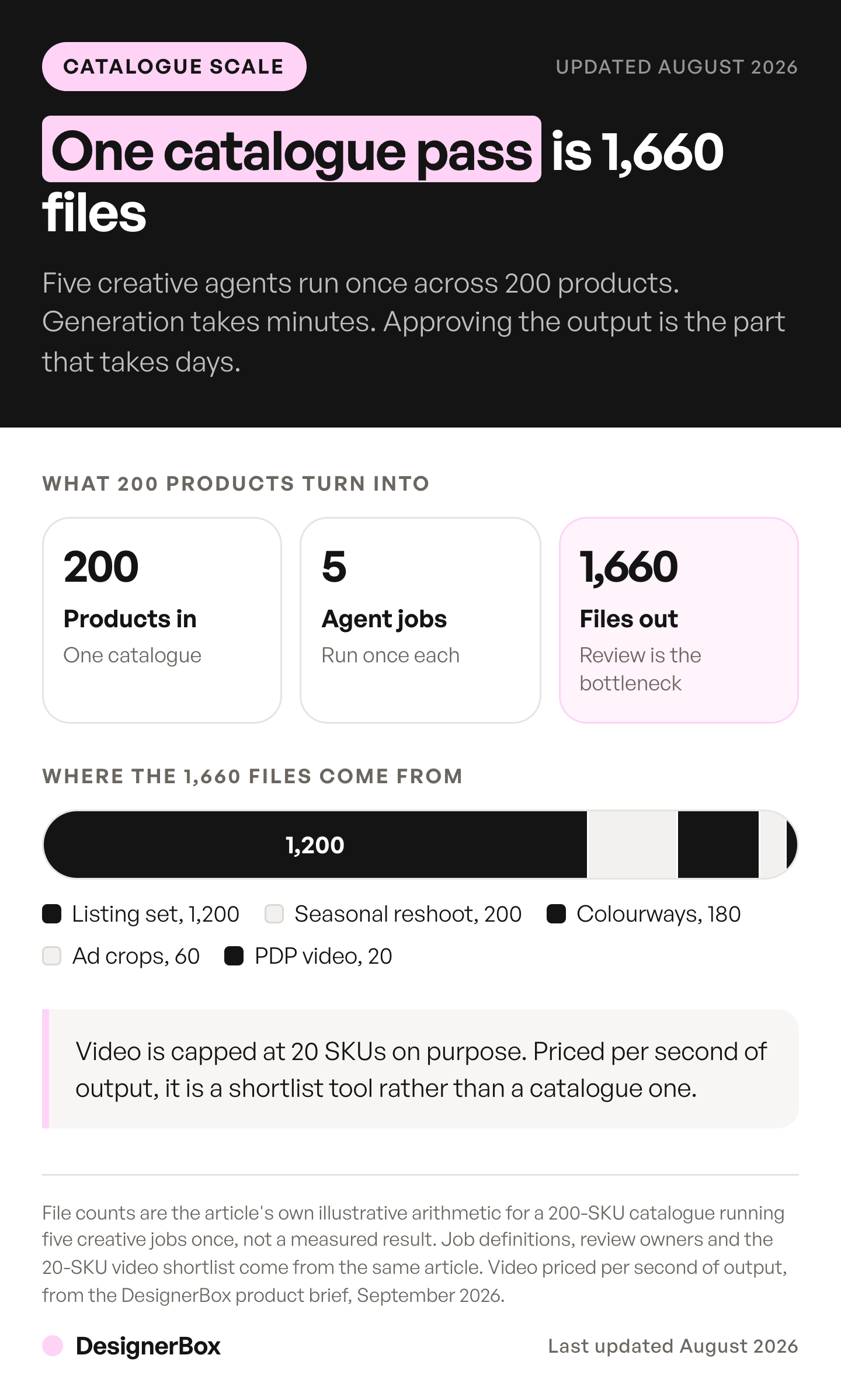
The file count below is illustrative, built from a 200-SKU catalog. Your slot counts and your model mix will differ.
| Job | Assets produced |
|---|---|
| Listing set, 6 images x 200 SKUs | 1,200 images |
| Colorways, 3 per SKU x 60 SKUs | 180 images |
| Seasonal reshoot, 1 scene x 200 SKUs | 200 images |
| Ad resize, 3 crops x 20 SKUs | 60 images |
| PDP video, one 5s clip x 20 SKUs | 20 clips |
| Total | 1,660 files |
Read that total against the model you pick, because the same 1,660 files cost several times more on one set of models than on another. Run the listing set against ten real SKUs first, read the cost the run shows you, then multiply by twenty. An AI proof of concept on your own catalog covers how to write the pass line before that test.
Plans and credits are on the pricing page. If the first full pass is bigger than one month of credits, phase it. Run the listing set first, then the rest in the next month.
Three gating facts belong in the budget before you commit. Uploading your own photos and the commercial license start on the Pro plan. AI video starts on the Premium plan. Every plan below Ultra is one seat. Those gates decide the tier long before the credit count does. DesignerBox sets out the fit for ecommerce brands separately.
What breaks when an agent runs on a real catalog?
Three things, reliably. The input quality caps the output, so a supplier JPEG under 500 pixels produces 1,200 files that all fail the same spec. The batch drifts, because a model given 200 chances will change one detail somewhere. And review becomes the bottleneck the moment generation stops being one.

Input first. Google’s Merchant Center currently accepts 100 x 100 pixels for non-apparel and 250 x 250 for apparel. It moves everything to a 500 x 500 minimum on 31 January 2027, with warnings already appearing in Merchant Center ahead of that date (support.google.com, September 2026). Any agent reading those files inherits the problem rather than solving it, unless the first step in the chain is a rescue pass.
Drift is the second one, and it is invisible per file. Every image looks correct alone. Put 40 of them in a category grid and one product has a slightly different stitch, a slightly different shadow, a slightly different gray. The fix is a fixed reference set per product and one set of brand rules the job reads on every row, not a better prompt typed each time. Row one and row two hundred have to come back to the same standard, and that is a property of the job definition rather than of the operator’s patience.
Review is the third and the one that decides your margin. Budget on approval hours, not on credits. Where batch generation falls over covers the throughput math in detail, and the short version is that a 1,200-file run is a multi-day review, not an afternoon.
How do you connect an agent to your store’s data?
An agent needs four things it cannot generate for itself: your real product photo, your brand rules, a model catalog, and somewhere to put the output. Connect those four and the agent stops producing generic work. Skip one and you get output that looks fine in a chat window and fails brand review in a deck.
DesignerBox exposes that connection over MCP with 75 tools, so Claude, ChatGPT or Cursor drive the same models and apps you use in the browser. Brand profiles carry the rules. The asset library holds the output and stays searchable. A DesignerBox app turns a saved workflow into a form, so a colleague can run the listing set job without wiring the chain. The Pictures for a listing app does this job: one product photo in, six marketplace pictures out. For other servers a store can connect, see MCP servers and connectors for marketing, by job. If you want to price the platforms that host the chain instead, five AI agent builders compared on how they meter use sets out what you still supply yourself.
The reverse direction matters as much. Your agent’s export step needs the destination spec written into it, because a file that is perfect and 400 pixels wide is a rejected listing. The shopper’s side of this, where an AI system reads your catalog, is covered in which agentic commerce jobs stay with the store. For the connection layer in general, the four inputs an agent has to reach goes a level deeper than this section does.
When is an agent the wrong tool for the job?
When the creative decision changes per item, when the volume is under about 30 files, and when nobody owns the approval. A launch campaign with a new concept is a brief for a person. Twelve hero images for a single drop is faster by hand than it is to configure. And an agent without a named reviewer produces output that sits in a folder because nobody is allowed to sign it off.
The deeper constraint is that agents automate repetition, and most stores have less genuine repetition than they think. Run the audit in the four costs that repeat on every asset before you build anything, because the job you automate should be the one you do 200 times.
Start with one job, not five. Pick the listing set, build it once against ten real SKUs, read the credit total, then point the same definition at the remaining 190. DesignerBox’s product photography use case covers that first job with templates you can start from. Once one result is approved, you run the same workflow on the whole catalog.
FAQ
What is the difference between an AI agent and a chatbot for ecommerce?
A chatbot answers a question inside a conversation. An agent takes an outcome, plans the steps, calls tools, and returns finished work without being walked through it. In practice the difference is in what comes back: a chatbot gives you an answer to read, an agent gives you 1,200 product images to approve or reject.
Can an AI agent generate my product listing images?
Yes, when it can reach a usable source photo. The agent cleans the background, produces the angles and detail crops, and writes each file at the destination’s required size. Quality is capped by the input, so a low-resolution supplier image produces a low-resolution set. Run a rescue pass on the source files before the listing set job.
How much does an AI agent for ecommerce cost?
Each zone prices differently. Support agents bill per resolved conversation. Content agents bill per asset, and the per-asset rate is set by the model. In DesignerBox the model on each step sets the rate, and the cost is shown before the run. The file count is the part you can work out first: five jobs over 200 SKUs come to 1,660 files.
Do AI-generated product images meet Google Shopping requirements?
They can, if they keep their AI metadata and meet the size rule. Google says every image made with generative AI must carry metadata that says AI made it, such as the IPTC DigitalSourceType value TrainedAlgorithmicMedia. It also says not to remove embedded metadata tags (support.google.com, October 2026). Product images also need to clear 500 x 500 pixels from 31 January 2027, and Google recommends 1,500 x 1,500 or larger. Set the agent’s export step to the recommended size rather than the minimum, and check that the exported files still carry the metadata tag.
Can an agent run on supplier photos instead of my own?
Yes, and it is the most common starting point for a catalog built from wholesale products. The constraint is resolution and consistency, not permission. Supplier files arrive at mixed sizes, mixed backgrounds and mixed lighting, so the first step in the chain has to normalize them before any downstream job runs on top.
How much does AI video cost per product?
Video is priced per second of output, and the rate is set by the model. An 8-second clip costs 40 to 560 credits, depending on the model, a 14x spread on the same brief. Pick the model first, then set the clip count. AI video starts on the Premium plan.
Does an ecommerce AI agent need API access?
Not to run. You can drive an agent from a workspace or from an AI chat over MCP without writing code. API access matters when the agent has to trigger from your own systems, such as a new product row in your PIM. DesignerBox does not have a public API. An AI chat runs it over MCP, and a workflow can send results with a webhook or an S3 step.
Sources
- Google Merchant Center, image link specification: minimum 500 x 500 pixels from 31 January 2027, 1,500 x 1,500 recommended, and the rule that images made with generative AI keep their AI metadata (support.google.com, October 2026)
- Google Merchant Center, image too small: current 100 x 100 and 250 x 250 minimums, enforcement date (support.google.com, September 2026)
- Shopify Help Center, product media types: 2048 x 2048 recommended, 5000 x 5000 and 20 MB caps (help.shopify.com, September 2026)
- Shopify Help Center, Sidekick: capabilities and the review-before-applying step (help.shopify.com, September 2026)
- Meta ads guide, Facebook Feed image ad: 1440 x 1800 at 4:5, 600 x 750 minimum (facebook.com, September 2026)
- Fin: charged on resolution rather than per seat (fin.ai/pricing, September 2026)
- Gorgias: AI Agent included on every plan, charged on resolution, helpdesk scaled on ticket volume (gorgias.com/pricing, September 2026)
- DesignerBox video credit range, the plan gates and the MCP tool count: DesignerBox pricing page (designerbox.ai/pricing), September 2026, and MCP page (designerbox.ai/mcp), October 2026
Platform image specifications and agent pricing models verified from Google Merchant Center, Shopify Help Center, Meta’s ads guide, fin.ai and gorgias.com as of September 2026. The Google Merchant Center image link page was re-checked on 2 October 2026. DesignerBox plan gates and the video credit range from the DesignerBox pricing page, September 2026. Image specification deadlines are general information rather than legal advice, so check the live policy page for your market. Individual results vary.