Marketing asset management is how a team keeps every file it makes findable, current, and safe to ship. It runs in four stages: intake, production, approval, retirement. Storage sits inside stage two and is the cheapest part of it to fix. A team of five needs one location, one naming rule, and four extra fields. It does not need a DAM platform.
The approved file is v4. The one on the site is v2. Nobody can prove which is which.
That failure has a measured version at enterprise scale. CreativeX ran its Creative Lifecycle tool across 1,284 core assets tied to 422,272 posts in more than 50 markets. Over half of that content never reached market at all (creativex.com, January 2024). The company put the waste at more than $25 million a year for the average Fortune 500 brand. A five-person team does not have Fortune 500 volume. It has the same failure at a smaller scale: files made, signed off by nobody in particular, used once, then lost inside a thread.
This guide covers the four stages, the two that small teams skip, the three places files actually go missing, and the folder structure and naming rule that do a platform’s job at this size. It is written for a marketing lead running three to ten people who has a shared drive, a naming habit, and a growing suspicion that neither is holding. Where the files come out of one place to begin with, as they do when the whole production run sits in one workspace, half of stage two solves itself.
Key Takeaways
- It runs as a lifecycle in four stages. Intake, production, approval, retirement. Small teams build the first two and skip the last two, because approval and retirement only prevent things and prevention has no artifact.
- Files go missing in three places, and none is the shared drive. Attachments, local drives, and the newest version posted as a reply twelve messages into a thread.
- A naming rule does most of the work a DAM would. Date, subject, variant, version, in a fixed order, applied on save.
- Four fields finish the system. Approval state and expiry date answer whether you can ship it. Rights term and provenance answer what you are allowed to do with it.
- 500 files is the break point. Under 50, memory works. Past 500, nobody can say what is still licensed or still true.
- Generated creative moves the bottleneck to provenance. Volume stops being the constraint, and the model on each step sets what a run costs.
- Buy a platform when search has stopped working and rules have not fixed it. Below that, four spreadsheet columns carry a team of five further than most people expect.
What is marketing asset management?
Marketing asset management is the practice of governing every file a marketing team produces across its whole life: how it gets requested, made, named, approved, stored, found, and retired. It covers logos, templates, product photography, video, ad creative, and finished campaign files. For the file types themselves, see what creative assets are. The system is the rules and the states attached to each file, not the drive the file sits on. The same words get used in finance to mean marketing done by asset management firms. That is a different subject. This guide is about the files.
The vendors that own this term define it the same way. Bynder’s glossary calls it “the process through which businesses collect, create, organize, and manage a centralized library of all of their marketing assets” (bynder.com/en/glossary/marketing-asset-management-definition, September 2026). That is accurate, and it describes the middle of the lifecycle. The stages either side of it are where small teams lose files.
Digital asset management names the software category: a repository with metadata, permissions, versioning, and distribution. Managing marketing assets is the job that software is bought to do, and the job exists whether or not the software does. A team can run the full lifecycle on a shared drive and a spreadsheet. A team can also own a DAM license and still lose the current logo. The brand asset management side of this, meaning the kit and the rules that keep output consistent, is a separate system that sits beside the lifecycle rather than inside it. A brand guidelines template lists what that kit should hold.
What are the four stages of a marketing asset’s life?
There are four: intake, production, approval, retirement. Intake turns a request into a brief with an owner and a date. Production makes the file, names it, and puts it somewhere one person can point at. Approval records who signed it off. Retirement expires it, archives it, or replaces it with the version that supersedes it.
| Stage | What happens | What breaks without it | Smallest thing that works |
|---|---|---|---|
| Intake | A request becomes a brief with an owner and a ship date | Two people start the same work from two different briefs | One form, one queue |
| Production | The file is made, named on save, and stored in one location | Four near-identical files and no way to tell which is current | One naming rule |
| Approval | A named person marks the file ready to ship, with a date | Version 2 goes live while version 4 sits approved in a thread | One field: draft, approved, live |
| Retirement | The file is expired, archived, or replaced | Lapsed licenses and out-of-date claims stay in market | One expiry date per file |
The last column is the whole system at a team of five. None of it needs software. All of it needs one person to set the rule and apply it on every file, which is the part that fails.
Where do marketing assets actually go missing?
Three places, and none of them is the shared drive. Attachments detach a copy from its original. Local drives hold work that has not been uploaded yet. Threads bury the newest version as a reply. In all three cases the current file is harder to reach than an old one, which is a findability problem rather than a storage one.

Attachments. A file emailed or posted to chat is a copy, detached from its original the moment it is sent. Every recipient now holds a version that will never update. Most brand drift starts here: someone uses the logo attached to a message from March because that is what they have. Why AI assets drift and how to fix it covers the same problem for generated creative.
Local drives. Work in progress lives on the machine it was made on. It moves to the shared location when someone remembers, and the gap between finished and uploaded is where version confusion gets created. The person who made it knows which is current. Nobody else does.
Threads. The newest version posted as a reply, twelve messages into a conversation. It is technically shared and practically invisible, because finding it means reading the thread rather than looking in a folder. None of the three gets solved by adding storage or by asking people to be more careful. They get solved by making the current file the fastest one to reach.
Why do small teams skip approval and retirement?
Because neither stage produces anything. Intake and production have visible output, so they get attention and tooling. Approval and retirement only prevent things: the wrong file shipping, an expired image staying live, a claim that was true in March running in September. Prevention has no artifact, so it loses to the next deadline every week.
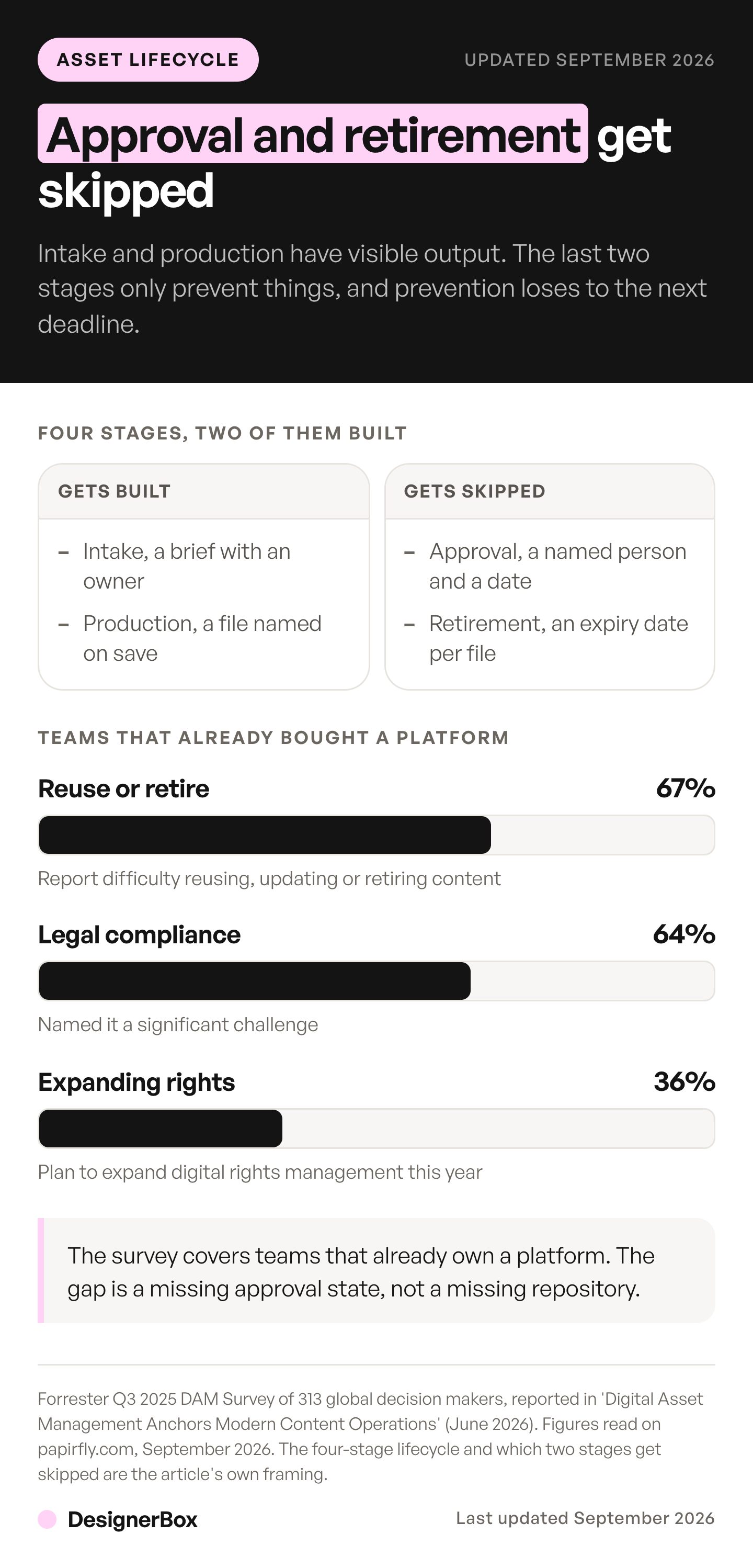
The skipping is not a small-team quirk. Forrester’s Q3 2025 DAM Survey of 313 global decision makers found 67% report difficulty reusing, updating, or retiring existing content. In the same survey, 64% named legal or regulatory compliance as a significant challenge (Forrester, “Digital Asset Management Anchors Modern Content Operations”, June 2026; figures read on papirfly.com, September 2026). Teams with a platform and a budget have the same gap at the same stages.
Resourcing is the honest reason underneath. In the 2026 B2B content research from Content Marketing Institute and MarketingProfs, 39% of marketers named resource constraints of time, people, or budget as a top challenge. In the same research, 28% named producing enough quality content (contentmarketinginstitute.com, fielded 24 June to 14 August 2025, 1,015 respondents). A team already short on hours does not add a governance stage voluntarily. It adds one after something ships wrong.
What folder structure and naming rule work at five people?
Four top-level folders, shallow, organized by what people search for rather than by how the work was produced. One naming rule with a fixed field order, applied at the moment a file is saved. Depth is the enemy: every extra level is a decision at save time and a guess at search time.
| Folder | What lives in it |
|---|---|
| /brand | Logo, colors, type, templates. The kit |
| /products/(sku) | Everything for one product, all variants |
| /campaigns/(yyyy-mm-name) | Campaign-specific work |
| /archive | Superseded, kept but out of the way |
Two rules make that structure hold. Products are the primary axis, not campaigns, because people search for a product long after they have forgotten which campaign an asset belonged to. And superseded files move to archive rather than staying put, because a retired logo left in the brand folder will be used. Moving it out removes the wrong option instead of labeling it, which is why archiving beats any naming convention as a prevention step.
The naming rule is one fixed order with the version at the end: date, subject, variant, version. In practice, 2026-08-31-oak-chair-front-white-v3.jpg. It sorts by date because the date leads and is written year first. It is searchable by product because the subject is in the name. It is unambiguous because the variant and version are explicit. Four rules keep it working:
- Lowercase, hyphens, no spaces. Spaces break in URLs and in scripts, and mixed case creates duplicates on some systems.
- Dates as YYYY-MM-DD. It sorts correctly and it reads the same in every country, unlike 31-08-2026.
- Version as v1, v2, v3, never “final”. Final is always followed by final-2. A number has somewhere to go.
- Never rename a file to mark approval. Renaming breaks every link that already points at it, so the approval state belongs in a field beside the filename, not in the filename itself.
The rule only works if it is applied on save, because renaming later never happens. Long names and character limits have their own answers, which are in the image file naming convention.
What breaks at 500 assets that did not break at 50?
Retrieval fails first, and it fails quietly. Under 50 files everyone remembers where things are, so no system is visible and none is needed. Between 200 and 500 the near-duplicates outnumber the originals. Past 500 the question stops being where a file is and becomes whether it is still allowed to run.
| Files in the library | What starts failing | The fix that holds |
|---|---|---|
| Under 50 | Nothing. Memory covers it | A shared folder and one owner |
| 50 to 200 | Finding by memory stops working for anyone who was away | A naming rule applied on save |
| 200 to 500 | Near-duplicates outnumber originals, and nobody trusts search | An approval state on every file |
| Over 500 | Nobody can say what is still licensed, current, or true | An expiry date and a named owner per file |
Those counts are an operating rule of thumb rather than a measured threshold, and a fast-turnover library crosses each line earlier. The volume that pushes a team across them is rarely a hiring decision now. It is a production decision, and producing a whole variant set from one template is what fills a library this fast. One product photo turned into a listing set, three ad variants, and two social crops is six files from one shoot. The same brief run for the next drop makes six more. That is how a library goes from 80 files to 500 in two quarters of ordinary ecommerce creative production.
What four fields make a folder an asset library?
Four, in two pairs. Approval state and expiry date answer whether the file can ship today. Rights term and provenance answer what you are allowed to do with it and how it was made. All four fit in spreadsheet columns beside the filename, and none of them needs software.
Approval state. Three values, draft, approved, live. It is the field that makes the approval stage exist at all. It belongs beside the filename rather than inside it, so that marking a file approved does not break the links pointing at it.
Expiry date. Set one on every file at creation, even if the date is a guess. A guessed date triggers a review. A blank field triggers nothing.
Rights and term. For any licensed image, record the media, term, territory, and expiry. A licensed photograph sitting in a folder with no recorded term is an easy way for a brand to run an image past its license, because nothing about the file itself shows a limit. It applies to stock, to commissioned photography, and to anything with a person in it, where a model release carries its own separate expiry. Forrester’s survey puts 36% of DAM decision makers planning to expand digital rights management in the next year. That is the same gap, showing up in teams that already bought a platform.
Provenance. Whether the asset was shot, edited, or generated. This used to be trivia and is now operationally necessary. Google Merchant Center states that “all images created using generative AI must contain meta data indicating that the image was AI-generated”. It also tells sellers not to remove embedded metadata tags (support.google.com, September 2026). Under Article 50 of the EU AI Act, providers of systems generating synthetic image, audio, or video output must mark that output in a machine-readable format. Article 50 has applied since 2 August 2026. A grace period to 2 December 2026 covers only that marking duty, and only for systems placed on the market before 2 August 2026 (artificialintelligenceact.eu, September 2026). That marking duty sits with the provider of the tool. New York’s synthetic performer law amends General Business Law section 396-b. It requires a conspicuous disclosure when an advertisement uses a digitally created human, and it took effect on 9 June 2026 (nysenate.gov, September 2026). If you cannot answer how an image from four months ago was made, you cannot answer a compliance question about it. More on the AI disclosure rules now in force. This is general information, not legal advice. These rules differ by country and by state, so have a lawyer read your own case.
How does generated creative change the numbers?
It changes them in one direction. In DesignerBox the model in each step sets what a run costs, and the cost is shown before you start it. Volume stops being the constraint. Provenance becomes the hard part: which of the files was approved, which product photo it came from, and whether the file on the site is the one that was signed off.
The storage ceiling is the second thing that moves. Plans differ in storage as well as in credit allowance, and a library that grows by hundreds of files a quarter needs both checked. Compare them on the pricing page against the volume you actually make, not the volume you plan to make.
Uploading your own photos and the commercial license start on the Pro plan. Team features, shared brand kits and white label are on the Ultra plan, and every plan below Ultra is one seat, which matters for a team of five.
A production run can also do some of the sorting for you. Inside a workflow, critic steps score the results of a run and best-of-N keeps the best one, so the list a person reviews is shorter than the list the run produced. The review itself is still yours. Brand compliance lists the three checks to run on each file, and what belongs inside an automated run and what does not sets out where the line falls.
The larger change is what happens at retirement. A finished JPEG is a dead end: when a platform changes a required size, or a product gets a new colorway, a flattened export cannot be adapted and someone rebuilds it from nothing. Two things preserve the value. Keep the source, meaning the layered file, the original camera file, or the editable layout, because storage costs less than the labor to rebuild. And keep the setup, meaning the settings, crops, references, and rules that produced it. Saving a campaign as one of your saved workflows puts that setup somewhere it outlives the asset, so a retired file can be remade to a new spec rather than reconstructed from a brief nobody kept.
That is also what keeps the library manageable as it grows. Build the job once for one product. Decide the naming rule, the approval state and the provenance note for its results, then run the same job again for the next product and the two hundred after it. Batch runs that workflow over a whole sheet at once, and you keep or discard per row. The standard holds on row one and on row two hundred, which is the difference between a library you can review and a pile you cannot.
There is a related reason the file count runs away from a small team. Anyone can make an AI picture. Making hundreds that still look like your brand is the hard part. Knowing afterwards which ones were approved is hard too. Every picture and video you make in DesignerBox lands in Assets, in folders. Open a picture there to see its prompt and model, which answers the provenance field. The workflows, the brand rules and the editors sit in the same account. Whatever tool makes the files, keep the four fields beside each one.
When should a small team buy a DAM platform?
Buy when search has stopped working and rules have not fixed it. The clean signals are a library past a few thousand files, assets distributed to people outside the company, licensed material with terms someone must track, and a named person whose job includes the library. Below that, a platform adds a migration and an admin surface without removing the failure, because the failure is a missing approval state rather than a missing repository.

Enterprise DAM is genuinely good at what it is for: hundreds of users, formal approval workflows, granular permissions, and legal sign-off gates. All of that is overhead when five people can see everything and one person approves. The real cost is the setup. Someone has to tag the existing library, define the taxonomy, and keep both current, and at five people that work lands on the person who was already the bottleneck. A half-tagged repository is worse than a well-named folder, because it implies a completeness it does not have. The honest threshold is roughly when you have more approvers than you can name in one breath, or when someone outside the team needs access without seeing everything.
Two structural questions decide more than the tool does. The first is who owns which stage of the work, because an unowned stage is the one that gets skipped. The second is whether the library is one library or several: agency teams and anyone handling several brands at once need separation by client before they need features, and retrofitting that split later is expensive.
One test settles the timing faster than a feature list. Take the five files your team reached for most last quarter and ask someone who did not make them to find the current approved version of each. If they can, the rules are holding and a platform buys convenience. If two people surface different files, retrieval has already failed and the purchase is overdue.
FAQ
What is marketing asset management in simple terms?
It is how a team keeps track of every file it makes, from the request that starts it to the day it is retired. That includes naming, storing, approving, and expiring assets. The goal is that any person can find the current approved version of anything in under a minute, without asking a colleague which file is the right one.
Is marketing asset management the same as digital asset management?
No. Digital asset management names a software category, a repository with metadata, versioning, and permissions. Managing marketing assets is the job that software is bought to perform, and the job exists on a shared drive too. A team can run the whole lifecycle without a platform, and a team can own a platform and still lose the current logo.
How should a small team organize its marketing assets?
Shallow and by product rather than by campaign, because people search for products long after they have forgotten which campaign an asset belonged to. Four top-level folders is enough: brand, products, campaigns, and archive. Move superseded files into archive rather than leaving them where someone can pick them up by accident.
How do you stop people using old versions of files?
Make the current file easier to find than the old one, and remove the old one from where people look. Renaming does not help while the old file is still in the folder, and asking people to check does not survive a deadline. Archiving a superseded file on the day its replacement is approved is the single most effective step.
How many assets can a team manage without software?
Roughly 500, though the number depends on turnover more than headcount. Under 50 files, memory handles it. Between 200 and 500, near-duplicates start outnumbering originals and search stops being trusted. Past 500, the failing question is whether a file is still licensed and still accurate, which memory cannot answer at all.
What information should be recorded about each asset?
Four things beyond the filename: the approval state, the expiry date, the rights, meaning media, term, territory and expiry for anything licensed, and the provenance, meaning whether it was shot, edited, or generated. The first two say whether it can ship. The last two say what you may do with it. All four fit in spreadsheet columns.
Does AI-generated creative make asset management harder?
It makes volume cheap and provenance hard. A team that generates creative can end up with hundreds of files a month, and each one arrives without a record of which brief and which source photo made it. The lifecycle stages do not change. Intake and retirement carry more weight because more files pass through them.
Sources
- CreativeX, “Unused content can’t wear in, let alone wear out” (creativex.com, January 2024). 1,284 core assets, 422,272 posts, 50-plus markets; over half never activated; over $25 million a year for the average Fortune 500 brand.
- Content Marketing Institute and MarketingProfs, “B2B Content and Marketing Trends: Insights for 2026” (contentmarketinginstitute.com). 1,015 B2B marketers, fielded 24 June to 14 August 2025. 39% resource constraints, 28% quality content volume.
- Forrester, “Digital Asset Management Anchors Modern Content Operations” (June 2026), on the Q3 2025 DAM Survey of 313 global decision makers. 67% difficulty reusing, updating or retiring content; 64% legal or regulatory compliance; 36% expanding digital rights management. Forrester’s report is paywalled; figures read on papirfly.com, September 2026.
- Google Merchant Center, image link requirements on generative AI metadata (support.google.com, accessed September 2026).
- EU AI Act, Article 50 transparency obligations, applicable from 2 August 2026 (artificialintelligenceact.eu, accessed September 2026).
- New York S8420-A, amending General Business Law section 396-b on synthetic performer disclosure, effective 9 June 2026 (nysenate.gov, accessed September 2026).
- Bynder glossary definition of the term, quoted verbatim (bynder.com/en/glossary/marketing-asset-management-definition, September 2026).
- DesignerBox plans, credits, storage limits and feature gating: DesignerBox pricing page (designerbox.ai/pricing), September 2026.
Asset lifecycle figures verified from CreativeX, Content Marketing Institute and Forrester, and platform and regulatory requirements verified from Google, the EU AI Act and New York State, as of September 2026. This is general information, not legal advice. Individual results vary.