


AI digital marketing is the use of AI models across the six functions of a digital marketing operation: creative production, copy, personalization, media buying, search, and reporting. AI does three different jobs across those six. It produces the asset, it decides where the asset goes, or it explains what happened after. Only the first one has a per-unit cost you control.
Adoption is widespread, and the results did not follow. 75% of marketers have adopted AI, and 84% still say their own campaigns are generic. 78% say they need more personalized content than they are able to produce (salesforce.com, February 2026, a survey of 4,450 marketing decision makers fielded October to November 2025).
That gap is the whole subject. This guide sorts the six functions by what AI does in each. That decides where your money goes and which parts you still have to own. It is written for marketing leads and agency creative directors who have the budget approved and need to pick the first function to fund.
Key Takeaways
- Three jobs, not one. Across digital marketing AI either produces an asset, decides where it goes, or explains what happened. Producing is the only one with a per-unit price you set.
- The deciding half is already automated and mostly not yours. Bidding, placement and audience matching moved inside the ad platforms years ago. There is little left to buy there.
- Creative production is where the volume gap sits. 78% of marketers say they need more personalized content than they can produce. That is a production constraint.
- AI creative performs at parity, conditionally. In a matched study of 4,633 ads with more than 369 million impressions, AI images showed no average click-through disadvantage. AI ads that did not look like AI outperformed human-made ads (SSRN working paper, revised August 2026). The data came from Taboola, which built the tool the study examines, so read it as vendor-adjacent.
- The repeat is where the money is. The first campaign costs what it costs. The saving arrives when the same setup runs again for the next product, at the same standard, without rebuilding the brief.
What is AI digital marketing?
AI digital marketing is the application of generative and predictive models to the work of running digital campaigns: making the creative, writing the copy, choosing who sees what, buying the placement, ranking in search, and reading the result. Calling it one product category is the mistake. It covers six different jobs, and the tools that serve them share almost nothing except the label.
The confusion is worth naming because it costs money. A team may say “we need AI for marketing” and buy an orchestration platform. Its actual constraint is that it cannot produce enough ad variants. That team has bought the wrong thing at a higher price.
The six functions AI touches in digital marketing
AI touches six functions in digital marketing: creative production, copy, personalization, media buying, search and reporting. The table sorts them by what AI does rather than by department. Read the third column first. It is the one that tells you whether there is anything to buy.
| Function | What AI does | AI’s job | Who owns the tooling |
|---|---|---|---|
| Creative production | Generates product shots, on-model images, video, ad frames | Produces | You choose the tool |
| Copy and content | Drafts ad copy, product descriptions, briefs, scripts | Produces | You choose the tool |
| Personalization | Picks the message and the moment per person | Decides | Your CRM or ESP |
| Media buying | Bidding, budget allocation, placement, audience matching | Decides | The ad platform |
| Search | Retrieval and answer generation across Google, ChatGPT, Perplexity | Decides | Nobody. You optimize for it |
| Reporting | Summarizes performance, flags anomalies, drafts the client update | Explains | Your analytics stack |
The table shows two things. The deciding column has mostly happened without you. Meta and Google absorbed bidding and placement into their own automated products. That leaves no separate purchase to make and limited control to exercise. And the producing column is the only one where the volume you get is a direct function of what you spend. The campaign type that does the deciding on each platform is listed in what each ecommerce advertising channel automates.
Produce, decide, explain: the split that decides your budget
AI does three jobs in digital marketing: it produces the asset, decides where it goes, or explains what happened. Only the producing job grows with what you spend, so this split shows where an extra dollar buys something.
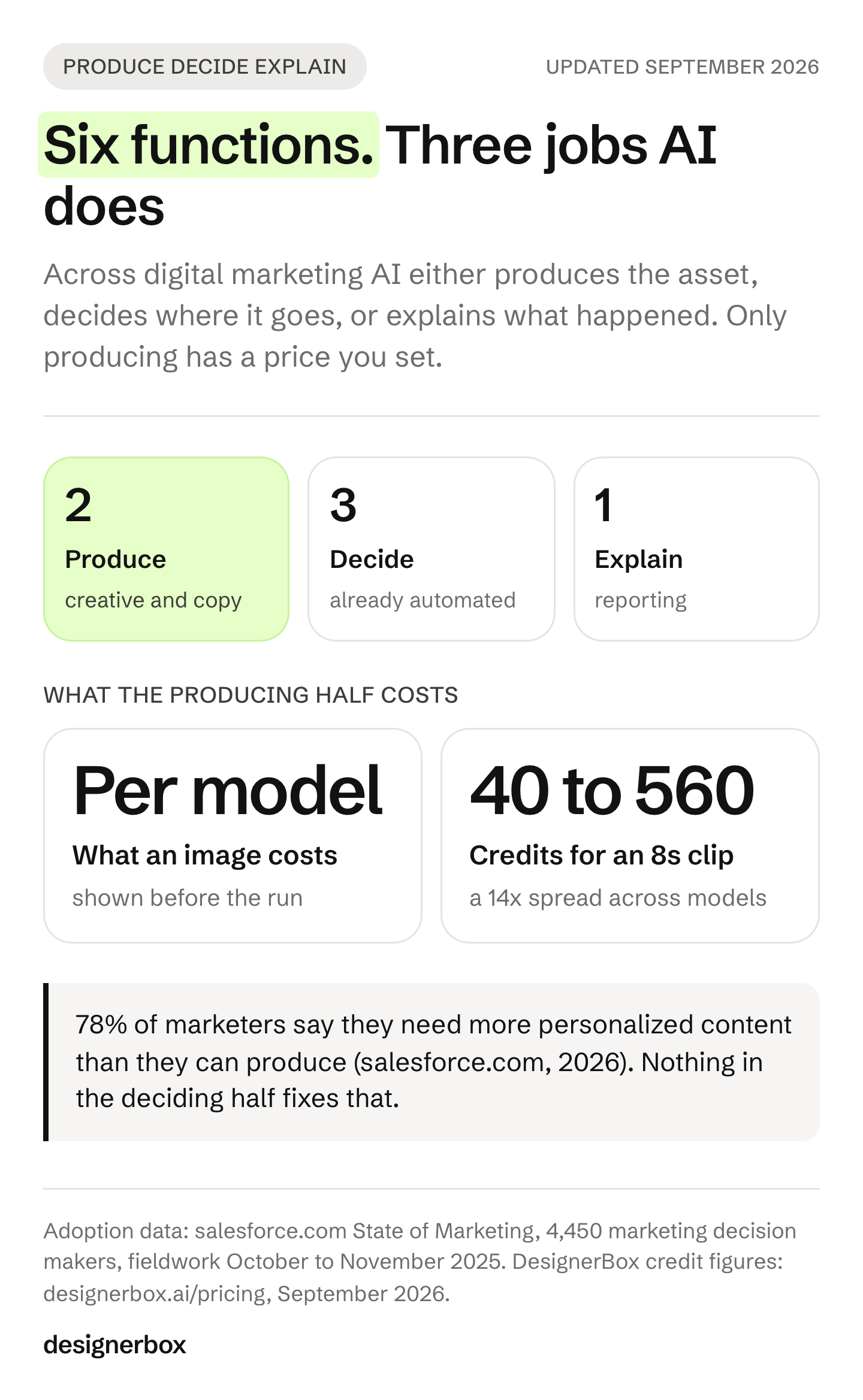
Produce. Creative and copy. AI makes a thing that did not exist. Output scales with spend, quality scales with what you feed the model, and you set both. This is where a team short on assets should look first.
Decide. Personalization, media buying, search. AI is choosing among things that already exist. The ad platforms own most of this and improve it whether you engage or not. What you still control here is the quality of the inputs you hand it.
Explain. Reporting. AI compresses what happened into something a person reads. It saves hours and it changes no outcome by itself. It has real value, and it belongs in the budget as a time saving rather than a performance line.
Enterprise vendors market hardest in the deciding column. Many teams are short in the producing column instead. A layer by layer read of AI marketing automation reaches the same conclusion from the data side. Check which one is true for you before anything else. If your campaign calendar slips because assets are late, a smarter bidding layer will not fix it.
Creative production is where the volume gap lives
78% of marketers say they need more personalized content than they can produce (salesforce.com, 2026). Nothing in the deciding column fixes that. A bidding algorithm cannot test a creative you never made.

The arithmetic behind it is unforgiving. One product, four placements, three aspect ratios, and two messages is 24 assets before anyone has tested anything. Multiply by a monthly drop calendar and the number a small team needs per quarter runs into the hundreds. How many files one Google campaign takes is in creative assets by type and count. That was a photoshoot budget problem for a decade, and it is now a generation problem, which has a different cost shape. For a small shop on social media, what AI changes for a small business follows the same shape.
What changed specifically is that the asset can start from your real product photo rather than a text prompt. A result that starts from your photo keeps your product as the starting point. A text prompt starts from your category. For the fuller version of this argument, see where generative AI for marketing pays back, which maps the same territory by bottleneck.
Does AI ad creative perform as well as human-made ads?
AI ad creative performs at parity with human-made ads, with one condition attached. Researchers from the Technical University of Munich, Carnegie Mellon, Harvard Business School and Columbia Business School compared 4,633 “sibling ads”. Sibling ads are AI-generated and human-made images launched by the same advertisers, in identical campaign settings, at the same time. The ads span more than 369 million impressions and 2.5 million clicks, and the researchers found no detectable average click-through-rate disadvantage for the AI images (SSRN 5096969, last revised 12 August 2026). In Taboola’s summary of the study, raw click-through rates were 0.76% for AI ads against 0.65% for human-made ads. The two were comparable once the tightest statistical controls were applied (taboola.com, January 2026).
The condition is the part worth reading twice. Ads with AI-generated images outperformed human-made ads when the AI images did not look like AI. One caveat belongs on that finding: the data came from Taboola, which built the AI ad tool the study examines, so treat the topline as vendor-adjacent. The study is covered in full in AI generated ads: what 369 million impressions show.
Output that looks like AI loses the gain. Starting from a real product photo is our own advice, not a finding of the study. We expect a real photo to give the model more to work from than a text description does.
Creative cost by model and plan
There is no single per-image price. The image model in the step sets the credit cost, and DesignerBox shows that cost before the run. So the useful question is which model each shot needs.
What the plan you are on changes is which jobs you can reach at all:
| Plan | What it adds |
|---|---|
| Free | A first test on sample products. Results carry a watermark |
| Basic | Room for tests and drafts |
| Pro | Uploading your own photos, and the commercial license |
| Premium | AI video, virtual try-on, upscaling, the image editor and the video editor |
| Ultra | Team features, shared brand kits and white label |
Plans and credits are on the pricing page.
Video follows the same logic with a wider spread. An 8-second clip costs 40 to 560 credits, depending on the model, so model choice is a budget decision as well as a taste one. More detail on video sits in what an AI video clip costs.
One more limit is easy to miss. Every plan below Ultra is one seat, so several people working in the same brand setup need the Ultra plan.
The cost nobody puts in the spreadsheet
Generation is the cheap half, and it stopped being the constraint. Checking the results and setting the job up again next month is what still costs, and neither line appears in a creative budget.

Review. Forty assets that each look fine alone can fail as a set. Somebody has to open all forty, catch the warped print, the wrong crop and the label that came back unreadable, and send those back. That pass grows with volume, and it limits how many variants a team can ship. The AI image retry rate shows what rejected results add to the cost of each usable one.
Rebuild. Next month’s drop starts from a blank brief, because last month’s setup lived in one person’s head and a chat history. The work you already did is not the work you get to reuse.
One habit helps with both. Set the brand, the model, the light and the framing once, and save the job as a workflow. A saved workflow runs the same way on the next product. Inside the workflow, critic steps score the results of a run, and best-of-N keeps the best one, so your review starts from a shorter list. What a six-tool creative stack costs prices the subscriptions and the setup you repeat for each product.
Where AI in digital marketing still fails
Four failure modes are worth planning around rather than discovering.
Generic output. A model given a text prompt and no brand input returns the average of its training data. That is one plausible reason for the 84% who say their own campaigns are generic. The fix is the input: a real product photo, a brand kit, and a fixed reference set. A better model on the same empty brief returns the same average.
Brand drift across a set. Each run can drift a little from the last one, because nothing holds separate runs to the same look. Reusable workflows exist for this reason, and brand consistency across AI output covers the mechanics.
Disclosure labels became a setting in July 2026. In July 2026, Google added an AI label setting to Google Ads, Display and Video 360, Campaign Manager 360, Merchant Center and Google Ads Editor (support.google.com, as of September 2026). Advertisers can use the setting or add their own label to the creative. Google says “AI regulations in the European Union, India, and New York require that ads with certain AI-generated or edited assets include disclosures and/or labels” (support.google.com, as of September 2026). Google also says that using its label setting “doesn’t guarantee your compliance with specific regulations”. This is general information, not legal advice. Read the current policy of the platform you are shipping to, in the month you ship.
Consumer trust, and a marketer blind spot. 82% of ad executives believe Gen Z and Millennial consumers feel positive about AI-generated ads. 45% of those consumers actually do. The perception gap is 37 points, up from 32 in 2024 (iab.com, January 2026, 505 consumers and 104 ad executives surveyed October 2025 to January 2026). The more useful half of the same study: 73% said knowing an ad was made with AI would either increase or make no difference to their likelihood of buying. That is what people say in a survey, and behavior in a live campaign can differ. What AI content does to brand trust covers where it helps and where it hurts.
How to start with AI in digital marketing
Pick the function with the worst ratio of what you need to what you can make. For most teams that is creative production, and the sequence below starts there.
- Count the gap. Assets needed next quarter, minus assets you can currently produce. If the number is large, your constraint is production capacity and the strategy work can wait.
- Fix the input before the tool. Collect the real product photos, the brand rules, and three reference assets you would be happy to ship. Models cannot invent these.
- Run one real campaign end to end. Not a test prompt. One product through to finished placements, so you learn what breaks at the last 10%.
- Save the good one as a workflow. The gain is rerunning that campaign for the next product without rebuilding the setup. In DesignerBox, a saved workflow runs the same way on the next product, and campaign concepts is where the moodboard and storyboard half of a launch sits.
- Only then look at the deciding column. Automated bidding rewards more creative to choose from. Feeding it is worth more than tuning it.
For teams evaluating the agent layer above all of this, the ten AI marketing agents ranked by the layer they own covers who does what across orchestration, production, publishing and lifecycle. For the platforms that plan and run campaigns from a goal, see agentic marketing platforms compared by layer.
If creative production is your constraint, start where the assets get made. The AI ad generator covers the static campaign set. The White background photos template and the Product in several places template cover the product shots underneath it.
One last thing decides whether any of this compounds. Anyone can make an AI picture. Making hundreds that still look like your brand is the hard part. In DesignerBox, you set your brand once, and every template, app and workflow reads it on every run. The static ads, the video cuts and the product photos come from the same account and the same brand rules. Batch runs a workflow over a whole sheet of products, up to 200 rows.
Build the first job you would want to run every month, then run it every month. Open a template, add your brand and your product photo, and run it. See the templates.
FAQ
How is AI used in digital marketing?
AI is used across six functions. It produces creative and copy, decides personalization, media buying and search retrieval, and explains performance in reporting. Producing is where you choose the tool and control the per-unit cost. Deciding largely happens inside the ad platforms already. Explaining saves time without changing outcomes.
Is AI digital marketing worth it?
It is worth it where your constraint is producing enough creative. In a matched study of 4,633 ads with more than 369 million impressions, AI images showed no average click-through disadvantage against human-made images (SSRN 5096969, August 2026). The saving grows when the same setup runs again for the next product. Bidding and placement are already automated inside the ad platforms.
Will AI replace digital marketers?
Not on current evidence. 75% of marketers have adopted AI and 84% still say their own campaigns are generic (salesforce.com, February 2026), which suggests the constraint moved rather than disappeared. Producing assets got cheap. Deciding which asset deserves to ship, and whether it reads as your brand, is the part that did not get automated.
What does AI digital marketing cost?
For creative, each image model has its own credit cost, and DesignerBox shows the cost before the run. Plans and credits are on the pricing page. For video, the model sets the cost: an 8-second clip costs 40 to 560 credits, depending on the model. Copy, reporting and personalization tools price separately.
Which digital marketing tasks should you not give to AI?
The judgment calls: whether a set holds together as a campaign, whether an image reads as your brand rather than your category, whether a claim is true, and anything with a legal or disclosure consequence. AI produces the candidates. Deciding which ones ship is still the job.
Do you have to disclose AI-generated content in ads?
Sometimes. The rules differ by region and by platform. Google says AI regulations in the European Union, India and New York require labels on some ads with AI-generated or edited assets (support.google.com, as of September 2026). In July 2026 Google added an AI label setting across its advertising products, and advertisers can use it or add their own label to the creative. Google also says the setting does not guarantee compliance. Treat it as one step, and check your platform’s current policy before you launch the campaign.
Do you need a data team to start using AI in digital marketing?
No, if you start in the producing column. Generating campaign creative needs a product photo and brand rules, not a data warehouse. The deciding and explaining columns are the ones that need clean data. A team that starts there can spend its time on data work before it sees a result.
Sources
- 75% of marketers have adopted AI, 84% confess to running generic campaigns, 78% need more personalized content than they can produce, and 81% would trust AI to respond to customers. From the tenth edition State of Marketing report, 4,450 marketing decision makers surveyed across North America, Latin America, Asia-Pacific and Europe, fieldwork 8 October to 17 November 2025: (salesforce.com, 19 February 2026)
- Google Ads policy, AI labels in ad creatives, the label setting rollout across Google Ads, Display and Video 360, Campaign Manager 360, Merchant Center and Ads Editor: (support.google.com, posted July 2026, accessed September 2026)
- Google Ads Help, AI disclosures and labels, the stated regulatory drivers in the European Union, India and New York and the caveat that the label setting does not guarantee compliance: (support.google.com, accessed September 2026)
- Exner, Hartmann, Ding, Zhang and Netzer, “AI in Disguise: Quasi-Experimental Analysis of a Large-Scale Deployment of AI-Generated Ads,” SSRN 5096969, 4,633 sibling ads, more than 369 million impressions and 2.5 million clicks, last revised 12 August 2026: (papers.ssrn.com, accessed September 2026)
- Taboola press release on the same study, raw click-through rates of 0.76% and 0.65% (taboola.com, 28 January 2026)
- Ad executive and consumer perception gap on AI-generated ads, 82% against 45%, plus the 73% disclosure finding. 505 Gen Z and Millennial consumers and 104 ad executives, fieldwork October 2025 to January 2026: (iab.com, January 2026)
- DesignerBox pricing page (designerbox.ai/pricing), plans, credit allocations and feature gating, September 2026
Marketing adoption figures, ad performance data and platform policy verified from primary sources as of September 2026. DesignerBox product facts current as of September 2026. This is general information, not legal advice. Individual results vary.