




AI brand consistency breaks at the handoffs, not inside the models. Every time an asset moves between tools, the color shifts, the type substitutes, and the product detail softens. No single step looks wrong. The drift only surfaces once the campaign is assembled and the assets sit side by side. Keeping the brand kit and the assets in one workspace removes the handoff, which is where the drift happens.
Picture the version of this that hurts. A launch has eleven assets, generated across four tools over two weeks, all approved individually. Then someone puts them side by side in the deck. The hero image is a half-shade warmer than the paid social. The packaging shot has invented a seam that does not exist on the real product. The logo has gained a background that was never in the brand kit.
Nobody made a mistake. Each asset passed its own review. The drift accumulated in the gaps between the reviews, which is the one place a review does not look.
This covers where brand drift originates, why written guidelines do not catch it, what the data says it costs, and the structural fix. It is for brand teams and agencies running AI in production, not evaluating it.
Key Takeaways
- Drift is a handoff problem, not a model problem. Each export, re-upload, and re-prompt is a lossy translation. The models are fine in isolation. The gaps between them are not.
- Guidelines do not enforce themselves. 81% of companies face off-brand content even with guidelines in place (Lucidpress State of Brand Consistency, 2019), and 59% of brand professionals say content ships without finishing the approval cycle (experienceleague.adobe.com, accessed October 2026).
- The failure rate is measurable. 70% of surveyed advertising executives reported at least one AI incident including off-brand content, and 40% had to pause or pull ads as a result (iab.com, accessed October 2026).
- Building every asset from the real product photo removes the biggest drift source, because the product stops being re-described in text at each step.
- Shared brand kits and team collaboration are Ultra only. Below that, brand kits are single-seat, and that is the honest constraint.
What is AI brand consistency, and why does it break?
AI brand consistency means every generated asset carries the same colors, type, product detail, and treatment as the rest of your brand. It breaks because generation is a chain of exports, re-uploads, and re-prompts across tools that do not share state. Each link translates your brand into a slightly different description, and translations lose fidelity every time.
Be precise about the mechanism, because “AI is inconsistent” is the wrong diagnosis and it leads to the wrong fix.
A model given the same brand kit, reference, and prompt is broadly repeatable within one session. The instability enters when the next tool has to define the brand again. Tool A knows your hex value because you loaded it. Tool B gets told “warm coral” by a person typing into a prompt box. Tool C receives a JPEG that already baked in Tool B’s interpretation.
That is three definitions of one color, and the brand kit was correct at every step. The gap is between the tools, not inside them.
Where does brand drift happen?

Drift accumulates at four predictable points. At the export, color profile and compression alter the file. At the re-prompt, a person restates the brand in words instead of values. At the reference swap, an already-generated asset becomes the source for the next one. In the library, nobody can find the approved version, so someone regenerates it.
None of those four is a model failure. All four are handoffs. Agencies get each of them once per client, which is why running one workflow per client brand is the version of this problem at multi-brand scale. On a product catalog, the same drift appears in six layers of the photos, set out in consistent product images.
A fifth handoff is a person. Agencies and small brands bring freelance designers in for a project and lose them when it ends. Each new designer learns the brand from a PDF and from the last few posts. The look then changes a little with every change of designer. A brand that sits in a record the tool reads on every run gives the next designer the same start as the last one. AI brand guidelines shows what that record holds.
Brand drift compounds, and that is the part teams miss. Take a made-up number to see the shape: one export at 98% fidelity is invisible, and four chained exports at 98% each land near 92%. That is where a brand guardian senses a problem without being able to say why. The asset is off, and “off” survives individual review because review happens per asset, not across the set. Ordering that per-asset review so the costly defects surface first is a separate discipline, set out in the four checks before creative ships.
The reference swap deserves separate attention because it is the most damaging and the least noticed. When an AI-generated image becomes the input for the next generation, every invented detail in it gets promoted to ground truth. A seam the model hallucinated in step two is now a documented feature of your product in step five. That is how a campaign becomes confidently, consistently wrong.
Why don’t brand guidelines fix this?
Guidelines are a reference document, not an enforcement layer. They describe the target and rely on a person to hit it under deadline. The data says that reliance fails at scale: 81% of companies face off-brand content despite having guidelines, and the approval process meant to catch it is routinely skipped when the calendar tightens.
There is also a version of this that guidelines never covered in the first place. Most brand books specify color, type and logo, and say nothing about how a product is always presented: which crop, which angle, which ground. For clothing labels that omission is the main source of drift, which is why the six decisions an apparel brand locks before any shoot start with a written presentation rule. A brand guidelines template in 12 sections writes each rule as a number, a do-and-don’t pair or a named file.
The approval numbers are the uncomfortable part. 71% of brand professionals report it takes seven or more people to approve a single on-brand asset, and 59% say content is often published without completing that approval cycle (experienceleague.adobe.com, accessed October 2026). A control that seven people must clear and that gets bypassed under pressure is a queue.
The same limit applies outside the building. Affiliates and partners never see your guidelines at all, which is why the working control there is an approved creative pack rather than a document.
Volume is what breaks it. Lucidpress found 50% of organizations producing more content than the prior year, alongside that 81% off-brand figure (prnewswire.com, Lucidpress 2019). Those numbers are from 2019, so treat them as directional. The trend has only steepened: 83% of ad executives now report deploying AI in creative processes, up from 60% in 2024 (iab.com, published January 2026, accessed October 2026).
Volume went up. The manual check did not scale with it. Guidelines describe the standard, and a PDF has never once stopped an export. A guideline becomes checkable when you write each visual motif as a rule with a yes-or-no check, as the wellness branding guide does for supplements and skincare. For a one-person store, ecommerce branding turns the same idea into a 10-point check for every new product.
What does off-brand AI creative cost?
It costs pulled campaigns and rework. In an IAB survey of 125 US advertising executives, 70% reported at least one AI incident, including off-brand content, and 40% had to pause or pull ads as a result. More than a third faced brand damage or a PR issue, and nearly 30% ran an internal audit afterwards.
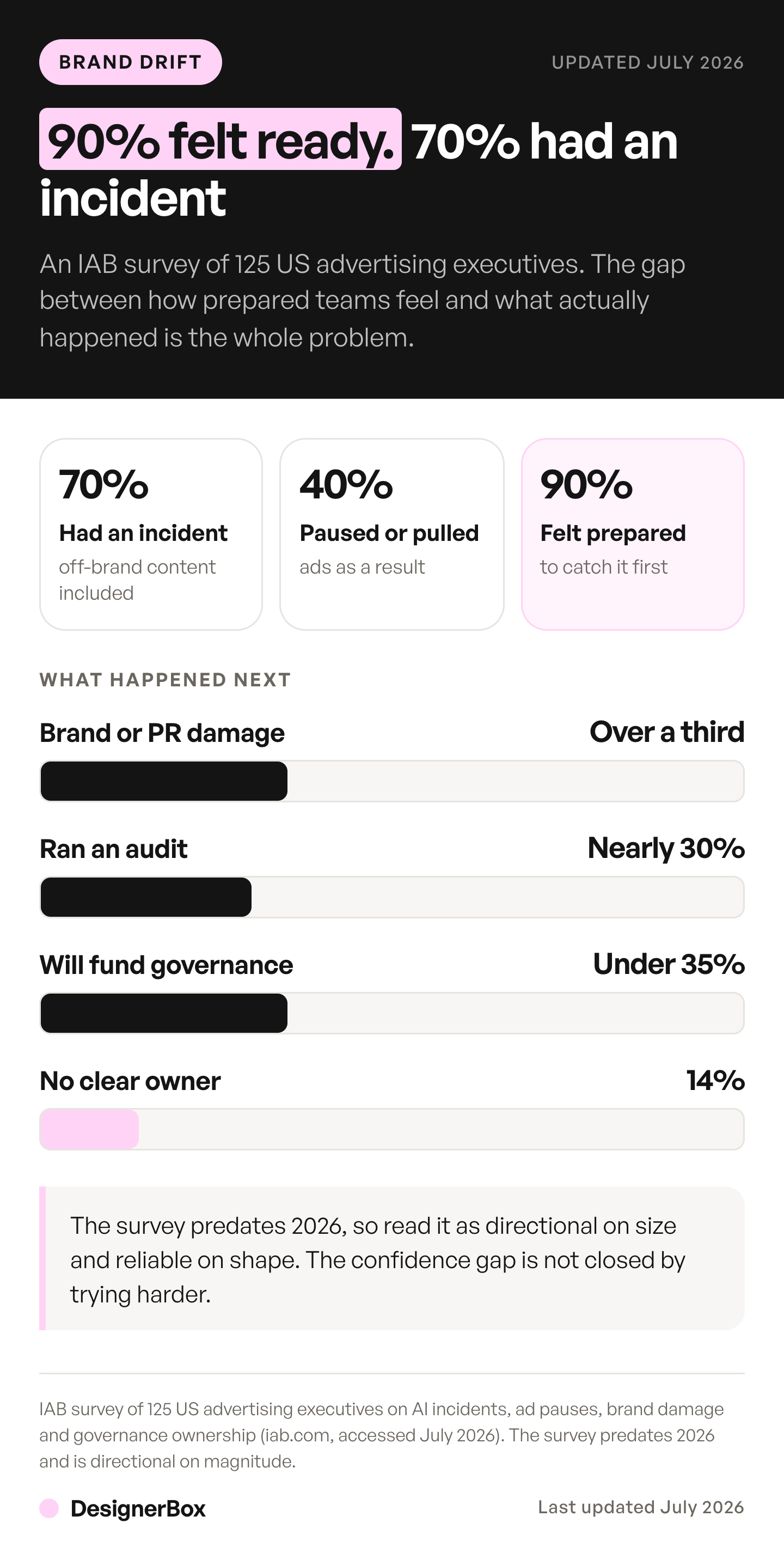
The same research shows a confidence gap. Nearly 90% of those executives said they felt prepared to catch AI issues before launch. 70% had already had an incident (iab.com, accessed October 2026). Note that this survey predates 2026, so read it as directional on magnitude and reliable on shape.
Governance investment has not moved to match. Fewer than 35% plan to increase investment in AI governance or brand integrity oversight, and 14% report no clear ownership of it at all (iab.com, accessed October 2026). Trying harder does not close the gap between “we are confident” and “we had an incident”.
Then there is the cost no incident count captures. Every asset caught late burns the hours meant for the next campaign. It is never billed as a line item, and it is always paid. The rework a failed image adds to each usable asset is priced in the AI image retry rate guide.
How do you keep AI assets on brand?

Remove the handoff. If the brand kit, the models, and the asset library live in one workspace, there is no export, no re-prompt from memory, and no reference swap to a lossy copy. The brand definition is loaded once and read by every generation. Consistency becomes the default state of the system rather than an outcome somebody has to police per asset. Where a recurring person carries the creative, the same logic applies to the face: build it once as an AI brand character and version the reference set.
This is the argument DesignerBox is built on. Build the job once with your brand, your products and your rules, then run that same job again on the next product and the next hundred. DesignerBox for brand teams shows the setup for an in-house team.
Three structural things do the work.
Build every asset from your actual product photo. This removes the biggest drift source and needs no prompt technique. When the source is a photograph of the real thing, the model edits a fact instead of inventing from a description. Your packaging is far less likely to grow a seam it does not have, because the seam is not in the input. A model can still change a detail, so a person checks each result against the real product.
Workflows rerun. Save the campaign that worked, then run it again for the next product, the next drop, and the rest of the catalog. The settings, models, and brand references are held by the workflow rather than by whoever ran it last. Workflows are where that setup lives. Row one and row two hundred get the same standard, because nothing is being restated between them.
One library, one search. Approved assets are findable, so nobody regenerates a version that already exists. That kills the fourth drift source outright. The brand profile is the record the workflow reads, so the standard is a stored value rather than something a person remembers.
Drift hits video hardest, where a recurring character can change face between clips. The same reference-anchor fix applies there too, covered in how to keep characters consistent in AI video. Our guide to the best AI tools for brand videos sorts them by the part of the brand each one holds steady.
Model choice stays yours throughout. The image and video models sit in the same workspace, including Nano Banana Pro, Seedream 5, Kontext Multi, Veo 3.1 and Kling 2.6 Pro. Changing the model on one step no longer means moving to another tool, so a model change stops being a handoff. The rest of the workspace works the same way. The Brand guide shows what a brand holds: products, a logo, named colors, up to 6 fonts, voice and rules, and up to 12 reference pictures. Templates, workflows, apps, batch and your Assets read that brand, so the whole job stays in one account. To see whether one workspace holds your brand, start from a template.
What changes with one workspace?
| Drift source | Separate tools | One workspace |
|---|---|---|
| Brand definition | Restated by a person in each tool’s prompt box | Loaded once, read by every generation |
| Color and type | Re-interpreted per tool, compounds on export | Held as values, not adjectives |
| Product detail | Re-described in text, or copied from a generated file | Built from your actual product photo |
| Repeat campaigns | Rebuilt from memory each time | Saved as a workflow the team reruns |
| Approved assets | Scattered across drives and DMs | One searchable library |
| Model swap | A new tool, a new login, a new handoff | Pick a different model, same canvas |
| Cost of the handoff | Paid in rework and pulled ads | Removed rather than managed |
The same logic applies to where designers work. Generating inside the layout instead of exporting into it removes one more paste step, which is what the Figma AI plugin guide covers.
Who owns that setup is a separate question from how it works. The operating side of it, including how approval gets redesigned once volume grows, is in AI for brand managers.
What this does not fix
One workspace removes the handoff. It does not remove the need for a decision about what on-brand means, and it does not make brand governance free.
Be clear about the gating, because it is the part that decides whether this works for a team. Team features, shared brand kits and white label are on the Ultra plan, and every plan below Ultra is one seat. If four people need the same brand kit, Ultra is the plan, and pretending otherwise would waste your evaluation. Uploading your own photos and the commercial license start on the Pro plan. There is a free plan. It runs on sample products.
Do the credit math before you commit. The image model in the step sets the rate, and the cost is shown before the run. A brand can price the set in advance. Plans and credits are on the pricing page.
You also still need one accurate photo of the real product. That constraint does not disappear, and any tool that claims otherwise is selling you the same drift problem. What goes away is the handoff drift downstream of that photo.
Three neighboring problems have their own guides. Why AI output reads as generic and how to stop it covers the aesthetic failure mode rather than the consistency one. What a six-tool AI stack costs puts a price on the handoffs. Scaling creative production without adding headcount covers the volume side of the same pressure. For a brand team, content scaling without losing the brand sets out five steps that hold one look across hundreds of files. If you are handing campaign production to an agent, what to hand an AI creative agent and what to keep covers where drift shows up in an agent-generated batch.
If your team already works in an AI chat, the DesignerBox MCP server lets that chat read the same brand profile and run the same workflow. The rules follow the work rather than the window.
FAQ
What is brand drift in AI-generated content?
Brand drift is the gradual divergence of generated assets from your brand standard across a campaign. It happens at handoffs between tools, where color is re-interpreted, type is substituted, and product detail is re-described in words. Each asset passes its own review. The drift only becomes visible once the set is compared side by side.
Why do AI tools produce inconsistent brand assets?
Usually not because the model is unstable. A model given the same brand kit and reference is broadly repeatable within one session. Inconsistency enters when the brand definition gets rebuilt in the next tool from a prompt or a lossy export. Three tools produce three interpretations of one hex value, and each is confident.
Do brand guidelines prevent AI brand drift?
Not on their own. Guidelines describe the target but do not enforce it. 81% of companies face off-brand content despite having guidelines (Lucidpress, 2019), and 59% of brand professionals say content is often published without completing the approval cycle meant to catch it (experienceleague.adobe.com, accessed October 2026). A reference document is not a control.
How much does off-brand AI creative cost?
In an IAB survey of 125 US advertising executives, 70% reported at least one AI incident including off-brand content, 40% had to pause or pull ads, and more than a third faced brand damage or a PR issue (iab.com, accessed October 2026). The unbilled cost is the rework hours taken from the next campaign.
Does using one AI workspace guarantee brand consistency?
No, and any tool claiming a guarantee is overselling. One workspace removes the handoff, which is where most drift originates. It does not decide what on-brand means for you, and it does not remove the need for one accurate photo of the real product. It makes consistency the default rather than something policed per asset.
Which DesignerBox plan do I need for shared brand kits?
Ultra. Shared brand kits, team features and white label are all on the Ultra plan. Every plan below Ultra is one seat, so a brand kit below Ultra serves one person rather than a team. Seat counts and plans are on the pricing page.
How do saved workflows help with brand consistency?
A workflow holds the settings, models, and brand references that produced a campaign, so the next drop reruns that setup instead of reconstructing it from memory. Nothing gets restated, so nothing gets re-interpreted. Reruns are the cheapest consistency mechanism available, because they remove the human translation step.
Sources
- AI incidents in advertising, paused or pulled ads, brand damage, governance investment and ownership gaps, from a survey of 125 US advertising executives, published 21 August 2025: iab.com (accessed October 2026)
- Share of ad executives deploying AI in creative processes, 83% against 60% in the 2024 study, from “The AI Ad Gap Widens”, published 15 January 2026: iab.com (accessed October 2026)
- Off-brand content despite guidelines (81%) and organizations producing more content year on year (50%), Lucidpress State of Brand Consistency: (prnewswire.com, 2019)
- Brand approval load, 71% needing seven or more approvers and 59% publishing without completing the cycle, from Adobe’s “Brand consistency at scale: Why guidelines fail”: (experienceleague.adobe.com, accessed October 2026)
- DesignerBox plan gates, credit mechanics and the video credit range: DesignerBox pricing page (designerbox.ai/pricing), September 2026
Brand consistency and AI adoption data verified from iab.com, experienceleague.adobe.com, and the Lucidpress State of Brand Consistency report via prnewswire.com as of July 2026. The two IAB pages and the Adobe page were re-checked on 2 October 2026. The Lucidpress figures date from 2019 and the IAB responsible-AI survey predates 2026, so both are directional rather than current. DesignerBox plan gates and credit mechanics verified against the DesignerBox pricing page, September 2026. Individual results vary.














