


AI social media marketing for small business changes one thing first: making a post is no longer the hard part. AI now writes captions, makes product images and cuts short clips in minutes, and Meta, TikTok and YouTube offer some of it free. So posting more stops being an advantage. The advantage moves to posts that show your real product, in one look, checked before you post them.
Nearly half of small business owners (47%) run all of their social media themselves, according to a Constant Contact survey of 3,340 small and medium businesses (Constant Contact, June 2026). The same person packs the orders, answers customers and does the bookkeeping. For that person, AI looks like the answer to one question: how do I post every day?
AI does answer that question. It also creates a new one. When every shop can post every day, a daily post proves nothing about your shop. This guide covers what AI does well for a small team, what the platforms changed in 2025 and 2026, what they now label, and a weekly routine that keeps your posts about your product. It is written for small brands that sell physical products.
Key Takeaways
- Making a post got cheap. AI drafts captions, makes product images from one photo and cuts short clips. Time is no longer the main limit for a one-person team.
- The platforms offer it free. Meta says 9 million small businesses use at least one of its AI ad creative tools. TikTok offers free AI video tools, and YouTube added a free one to Shorts in 2025.
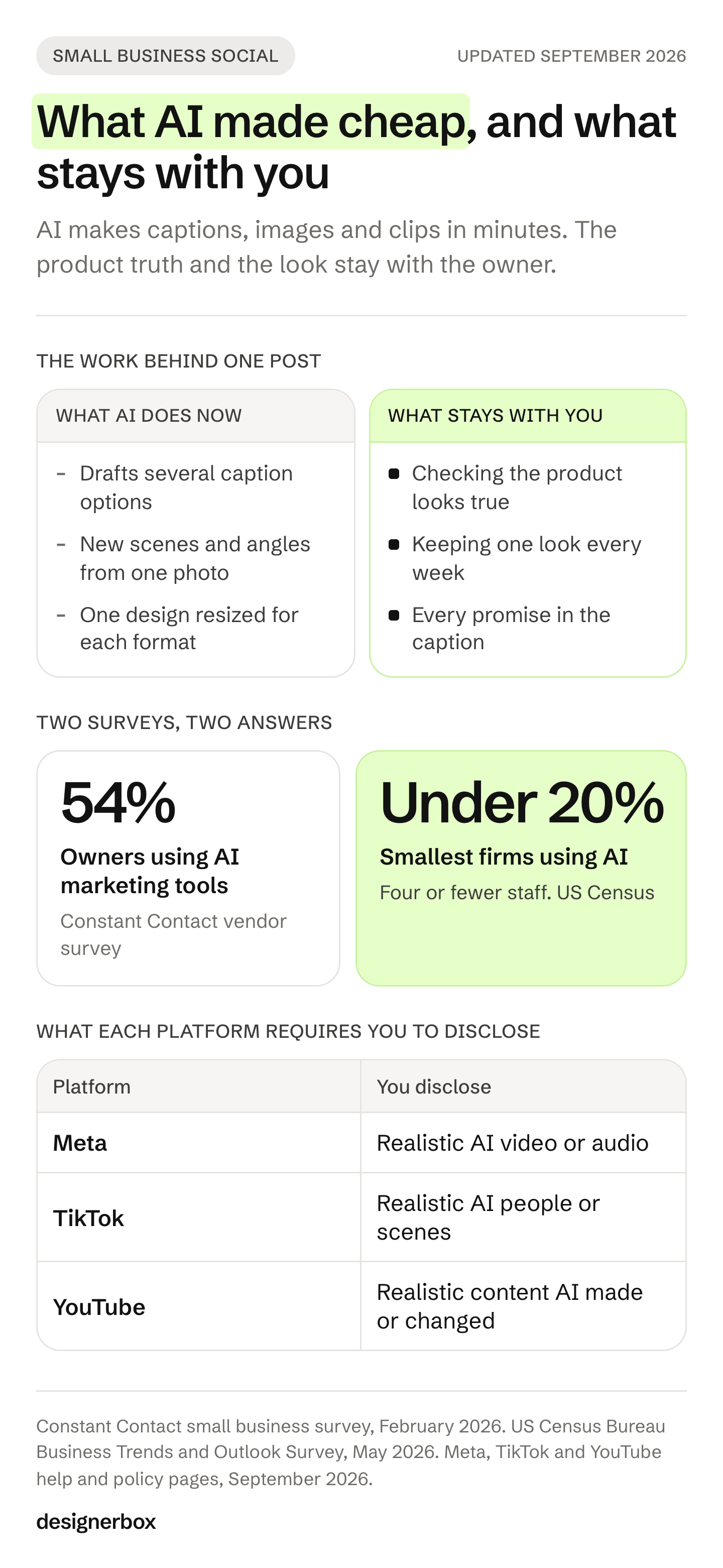
- Adoption numbers disagree. A vendor survey reports that 54% of small business owners use AI marketing tools. The US Census Bureau finds AI use under 20% at firms with four or fewer employees.
- The platforms label AI content. Meta, TikTok and YouTube each add AI labels, and each requires you to disclose some realistic AI content, in its own way.
- Buyers want to know. 52% of social media users are concerned about brands that post AI content without disclosing it, in a Sprout Social survey.
- Your real product is the scarce part. Build posts from your own product photos, keep one look, and check every result before you post it.
How AI changes social media marketing for a small business
AI moves the limit on a small business’s social media from time to judgment. One owner can now draft a week of captions, images and clips with AI. The new work is deciding what is true, what looks like the brand, and what is worth posting. Those decisions still need a person who knows the product.
Here is how each part of a post changed.
| Part of a post | What AI does now | What stays with you |
|---|---|---|
| Ideas and captions | Drafts several options at once | Picking the one that sounds like you |
| Product images | New scenes, angles and crops from one photo | Checking that the product still looks true |
| Short video | A clip from a photo or a short brief | Checking that the motion shows the real product |
| Sizes for each platform | One design resized for each format | Checking that the text still fits the frame |
| The look of the feed | Any style you describe | Keeping one look every week |
Social media is one of the main ways small businesses reach buyers. In an October 2025 survey of 530 small employers, 54% said they use social media to reach customers (SBE Council, October 2025).
Why posting more stopped being the edge
Posting more stopped being an edge because the tools that make posts are now in front of every business, often for free. Meta, YouTube and TikTok build AI generation into their own apps. When every shop can make a polished post in minutes, a polished post no longer makes a shop different. What other shops cannot copy is your product, your shop and your look.
The platforms build AI in
Meta’s Advantage+ creative page lists AI features such as background generation, image expansion, image animation, text generation and image generation (Meta for Business, accessed October 2026). On its July 2026 earnings call, Meta said 9 million small businesses on its platforms use at least one of its AI ad creative tools (Meta Q2 2026 earnings call, July 2026).
Meta may go further. In June 2025, Reuters reported, citing the Wall Street Journal, that Meta aims to let brands fully create and target ads with its AI tools by the end of 2026 (Reuters via Investing.com, June 2025). That is a report of Meta’s plans, not a Meta announcement.
YouTube added Veo 3 Fast to YouTube Shorts in September 2025. At launch, it made 480p clips with sound, free, in the US, UK, Canada, Australia and New Zealand (YouTube Official Blog, September 2025). TikTok’s Symphony Creative Studio offers free AI video tools, including avatar videos, script writing and dubbing, to every logged-in TikTok for Business user (TikTok for Business, June 2025, accessed October 2026). The guide to free AI tools from the platforms covers where Shopify Magic, Google Product Studio and TikTok Symphony stop.
What the head of Instagram said
On 31 December 2025, Instagram head Adam Mosseri wrote on Threads that “authenticity is becoming infinitely reproducible” and that “the feeds are starting to fill up with synthetic everything” (Threads, December 2025). He added that it “will be more practical to fingerprint real media than fake media.”
For a small shop, that is a useful warning. A generic scene from a free tool looks like the scene every other shop can make with the same tool. A photo of your real product, in its real colors, is much harder to copy.
How many small businesses use AI
The numbers depend on who asks. Constant Contact surveyed more than 1,500 small business owners in five countries. 54% said they use AI marketing tools, and 44% use AI to write content (Constant Contact, February 2026).
The US Census Bureau’s Business Trends and Outlook Survey found AI use at 17% to 20% of firms between December 2025 and May 2026. At firms with four or fewer employees, it was under 20% (US Census Bureau, May 2026). The first is a vendor survey. The second is a national survey of US businesses in every industry, so the two measure different groups.
Both numbers lead to the same point. The tools are easy to reach, so having them is no advantage on its own.
What Meta, TikTok and YouTube label
As of September 2026, Meta, TikTok and YouTube all label AI content, and each requires you to disclose some of it. Meta requires you to disclose realistic AI video and audio in posts. TikTok requires you to label AI content that shows realistic people or scenes. YouTube requires you to disclose realistic content that AI made or changed in a meaningful way. Small edits such as color correction or cropping need no label.
| Platform | What the platform labels itself | What it requires you to disclose |
|---|---|---|
| Facebook, Instagram, Threads | Posts with signals that AI made them, such as C2PA or IPTC data | Posts with realistic AI video or realistic AI audio. Images are not included |
| TikTok | Content made with TikTok AI effects or carrying Content Credentials | AI-generated or heavily edited content that shows realistic people or scenes |
| YouTube | Content made with YouTube’s AI tools, content with C2PA data, and content its systems detect | Realistic content that AI made or changed in a meaningful way, with the “AI use” setting |
Meta explains its labels for posts on its help page (Meta Help, September 2026). The rule for realistic video and audio is in its Community Standards (Meta Transparency Center, September 2026). For ads, Meta says it began checking for signs of third-party AI on 1 June 2026. When it finds them, it adds an “AI info” label under “About this ad” (Meta ad standards, September 2026). Meta says this may not be available in every region (Meta Business Help, September 2026).
TikTok requires you to label AI-generated or heavily edited content that shows realistic people or scenes. TikTok says content with no label may be removed, restricted or labeled by its team (TikTok Community Guidelines, October 2026). TikTok says it has labeled over 3 billion videos as AI-generated (TikTok Newsroom, July 2026). It also says that turning on its AI-generated content setting does not affect a video’s distribution (TikTok Support, September 2026). Every video you export from Symphony Creative Studio gets an AI-generated label (TikTok Ads Help, last updated June 2026, accessed October 2026).
YouTube needs no disclosure for production help such as an AI thumbnail or script. It says disclosing AI content does not limit a video’s audience or its eligibility to earn money (YouTube Help, September 2026).
If you sell in the EU, Article 50(4) of the EU AI Act has applied since 2 August 2026. It requires deployers, usually the business that uses the AI tool, to disclose deep fakes: realistic AI images, audio or video that could seem real (European Commission, October 2026). The Commission published guidelines on 20 July 2026, and they are not binding. They give a real product shown against an AI-generated background as an example of what is not a deep fake, as long as the image does not mislead about the product. They also say a realistic person who never existed can still count as a deep fake (European Commission guidelines, July 2026).
This is general information, not legal advice. The platforms changed these rules several times in 2025 and 2026, so check each linked page before you post. The guide to AI disclosure rules for ads covers paid posts in more detail.
What buyers think of AI posts
Buyers feel less positive about AI content than the businesses that make it. Many want to know when content is AI, and many trust human-made content more. A small shop can still use AI. The product in the post has to be true, and a realistic AI scene needs the label the platform asks for.

IAB surveyed 505 Gen Z and Millennial consumers and 104 advertising executives between October 2025 and January 2026. 45% of those consumers felt positive about AI-generated ads, while 82% of the executives thought they did (IAB, January 2026).
Sprout Social’s Q3 2025 Pulse Survey found that 52% of social media users are concerned about brands that post AI-generated content without disclosing it (Sprout Social, April 2026). In the same survey, 55% said they are more likely to trust brands that publish human-generated content (Sprout Social, December 2025).
An older study found a similar result. In a 2024 Washington State University study of more than 1,000 US adults, mentioning “artificial intelligence” in a product description lowered emotional trust, which lowered purchase intention. The effect was stronger for high-risk products (Washington State University, July 2024).
For a small shop, the lesson is practical. Use AI for the work around the product: the scene, the crop and the caption draft. Keep the product itself true to what the buyer receives.
Where AI posts go wrong for a small shop
AI posts go wrong for a small shop in five common ways. The product changes, the look changes, the scene looks like every other shop’s, a realistic person appears with no label, or the caption promises something the shop cannot keep. Each problem has a simple check. Run all five checks before you post.
| What goes wrong | What it looks like | The check |
|---|---|---|
| The product changes | A warped print, a garbled logo, a missing handle, the wrong color | Put the result next to your product photo and compare |
| The look changes | A different light, background and font every week | Write down one look and use it for every post |
| The scene is generic | The same bright kitchen or marble table other shops post | Show your product in a setting that fits your brand |
| A realistic person has no label | An AI model or a realistic scene posted as real | Add the label where the platform asks for one |
| The caption promises too much | A claim about results, materials or delivery nobody checked | Read every caption the way a customer would |
The first row costs the most. A buyer who receives a product that does not match the post can return it. For ads, the article on four checks before AI creative ships gives a review order for large sets.
The routine below assumes a posting rate you can keep. How often to post on social media covers how the per-platform ranges translate into assets a month.
A weekly AI social media routine for a small business
A weekly routine keeps AI posts about your product. Photograph each new product once. Set one look and write it down. Make the week’s images, clips and caption drafts from that photo. Check each result against the real product. Resize for each platform, add labels where needed, and post. From the second week, the look already exists, so the work is the photo and the check.
- Photograph the product once. Take one clear photo on a plain background, in daylight. Every post that week starts from it.
- Set the look once. Write down your colors, fonts and logo, the kind of scene, and the words you never use. Keep it on one page. The layers to write down are in ecommerce branding for a one-person store.
- Make the week’s posts from that photo. Make scenes, angles, a short clip and caption drafts. Use the same look for all of them. Which clip fits each channel is in AI video marketing for small business.
- Check every result. Compare the print, logo, color, shape and any text with the real product. Delete what does not match.
- Fit each platform. Resize for the feed, Stories and Reels, and check that text stays inside the frame. The guide to one master for every platform lists what each platform wants.
- Label and post. Add the platform’s AI label where it asks for one. Then post with the app you already use. If you do not have one, PostNext is a scheduler built by the same team as DesignerBox. It posts to Instagram, TikTok, YouTube and four more channels, and it has a free plan (postnext.io, September 2026).
- Keep what sold. Once a month, look at which posts led to orders. Keep that look for the next month.
A post that works on Instagram brings comments that ask for the link. CreatorFlow, built by the same team as DesignerBox, answers a keyword comment with a DM that holds the link. It works on Reels, posts and Stories, and on Instagram only (creatorflow.so, October 2026).

One look for every product post
DesignerBox is AI creative production for brands and agencies. For a small brand, it fits steps 2, 3 and 5 of the routine above. You still do step 4, the check against the real product. Build a workflow once with your brand, products and rules. Run it on every new product. For a one-person brand, the solo founders page starts from a phone photo of the real product.
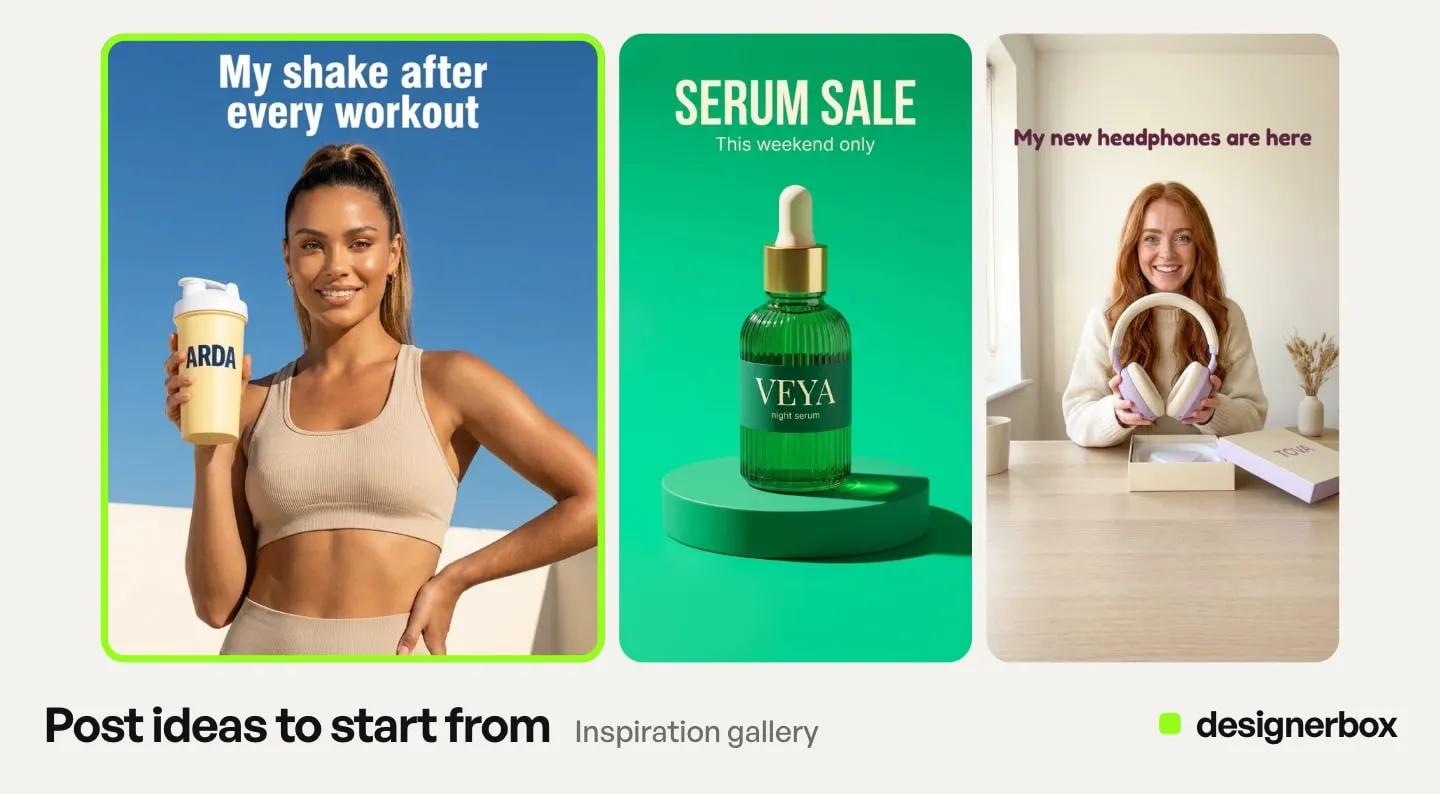
The images, the sizes and the clip for a week of posts come from one account and the same brand rules. Four parts of DesignerBox fit a weekly social routine:
- Posts. The Social post skill in Create makes a post from a product photo. The Social media posts template and the Instagram carousel template are workflows somebody already built. Open one of the social creatives templates, add your product photo and run it. Remix a reel or a carousel builds a workflow that keeps a format you found and puts your product in it.
- Brand rules. You set the brand once, with your logo, fonts, palette and rules. The workflow reads your brand profile on every run, so each week starts from the same rules.
- Review. Critic steps score the results of a run, and best-of-N keeps the best one. You still compare the result with your real product before you post it.
- Sizes and video. The Ad in other sizes app turns one ad into four sizes. The Video from a photo app makes a short clip from a product photo. The video editor is a timeline with several tracks, captions, voiceover, music and transitions.
If a part-time helper makes your posts, publish the workflow as an app. An app is a workflow with a form. Your helper completes the form and presses Run, and never opens the workflow.
Batch runs one workflow over a whole sheet of products in one pass. A saved workflow runs the same way on the next product and on every row of the sheet.
Limits and plans
DesignerBox makes the images and clips for your posts. Posting stays with you: you download the results and post them with the app you already use.
- Free plan. There is a free plan, and it runs on sample products. Its results carry a watermark, and it cannot make video.
- Commercial license. It starts on the Pro plan. Uploading your own photos starts there too.
- AI video and the editors. AI video, the image editor and the video editor start on the Premium plan. An 8-second clip costs 40 to 560 credits, depending on the model.
- Cost. Every run shows its cost before you start it. Plans and credits are on the pricing page.
The fit depends on what you sell. If your posts show a service, a caption draft and the app you post with may cover most of your needs. DesignerBox fits a business whose posts show products. For a first month built around product listings, see AI creative tools for small business.
First social post from a template
Pick one of the templates, add your brand and your product photo, and run it. Then check the result against the real product, as in step 4 of the routine.
FAQ
How is AI changing social media marketing for small businesses?
AI makes posts fast and cheap to produce. Captions, product images and short clips take minutes, and Meta, YouTube and TikTok offer some AI tools free. Because every business has the same tools, posting more no longer makes a business different. The posts that work show the real product, in one look, checked before you post them.
Should a small business use AI for social media?
Yes, for the work around the product: caption drafts, scenes, crops, sizes and short clips. Keep a person on the product itself and on every promise in a caption. Check each result against the real product before you post it.
Do I have to label AI posts on Instagram, TikTok or YouTube?
Sometimes. Meta requires you to disclose organic posts with realistic AI video or realistic AI audio, and this does not apply to images. TikTok requires a label on AI content that shows realistic people or scenes. YouTube requires its “AI use” setting on realistic content that AI made or changed in a meaningful way. The rules change often, so check each platform’s page before you post.
Does an AI label reduce the reach of a post?
TikTok and YouTube both say it does not. TikTok says turning on its AI-generated content setting does not affect a video’s distribution. YouTube says disclosing AI content does not limit a video’s audience or its eligibility to earn money. Both statements are on the platforms’ help pages as of September 2026.
How many small businesses use AI for social media?
The surveys disagree. In a Constant Contact survey of more than 1,500 small business owners, 54% said they use AI marketing tools and 44% use AI to write content (February 2026). The US Census Bureau found AI use under 20% at firms with four or fewer employees (May 2026).
What should a small business not leave to AI?
The truth about the product and the promises in the caption. AI can make the scene, the crop and the draft. A person should confirm that the print, color, shape and any text match what the buyer receives, and that every claim is one the shop can keep.
What does DesignerBox cost for social media posts?
The model each step uses sets the cost of a post, and you see that cost before each run. There is a free plan. It runs on sample products and cannot make video.
Sources
- Constant Contact, 47% of small business owners run all social media themselves, survey of 3,340 small and medium businesses in the US, UK, Canada, Australia and New Zealand (news.constantcontact.com, June 2026, accessed September 2026)
- Constant Contact, 54% of small business owners use AI marketing tools and 44% use AI to write content, survey of more than 1,500 owners in five countries (news.constantcontact.com, February 2026, accessed September 2026)
- US Census Bureau, AI use by businesses from the Business Trends and Outlook Survey (census.gov, May 2026, accessed September 2026)
- SBE Council, small business survey of 530 employers, fielded 3 to 9 October 2025 (sbecouncil.org, October 2025, accessed September 2026)
- Meta for Business, Advantage+ creative features (facebook.com, accessed 2 October 2026)
- Meta, Q2 2026 earnings call transcript (Meta investor relations PDF, July 2026, accessed September 2026)
- Reuters, citing the Wall Street Journal, on Meta’s plans for AI-made ads (investing.com, June 2025, accessed September 2026)
- YouTube Official Blog, Veo 3 Fast in YouTube Shorts (blog.youtube, September 2025, accessed September 2026)
- TikTok for Business, Symphony Creative Studio (ads.tiktok.com, June 2025, accessed 7 October 2026)
- TikTok Ads Help, the AI-generated label on Symphony Creative Studio exports (ads.tiktok.com, last updated June 2026, accessed 2 October 2026)
- Adam Mosseri on Threads, 31 December 2025 (threads.com, accessed September 2026), reported by Engadget (engadget.com, December 2025)
- Meta Help, AI info on posts (meta.com, accessed September 2026)
- Meta Community Standards, misinformation and AI disclosure (transparency.meta.com, accessed September 2026)
- Meta ad standards, AI detection in ads from 1 June 2026 (transparency.meta.com, accessed September 2026)
- Meta Business Help, AI info labels on ads and regional availability (facebook.com, accessed September 2026)
- TikTok Community Guidelines, integrity and authenticity (tiktok.com, accessed 2 October 2026)
- TikTok Support, AI-generated content (tiktok.com, accessed September 2026)
- TikTok Newsroom, over 3 billion videos labeled (newsroom.tiktok.com, July 2026, accessed September 2026)
- YouTube Help, disclosing altered or synthetic content (support.google.com, accessed September 2026)
- European Commission, transparency obligations under Article 50 of the AI Act (digital-strategy.ec.europa.eu, accessed October 2026)
- European Commission, guidelines on the transparency obligations of Article 50, published 20 July 2026 (digital-strategy.ec.europa.eu, accessed September 2026)
- IAB, “The AI Gap Widens”, survey of 505 Gen Z and Millennial consumers and 104 advertising executives (iab.com, January 2026, accessed September 2026)
- Sprout Social, Q3 2025 Pulse Survey findings on AI content and trust (sproutsocial.com, April 2026; sproutsocial.com, December 2025; both accessed September 2026)
- Washington State University, “artificial intelligence” in product descriptions and purchase intention (news.wsu.edu, July 2024, accessed September 2026)
- DesignerBox pricing page (designerbox.ai/pricing), plans, credits and feature gating, September 2026
- PostNext channels, bulk scheduling and publishing method: postnext.io, accessed 26 September 2026
- CreatorFlow comment-to-DM on Reels, posts and Stories: creatorflow.so, accessed 2 October 2026
Survey figures, platform policies and study results verified from the linked sources as of September 2026. DesignerBox plans and feature gating from the DesignerBox pricing page as of September 2026. Meta’s Advantage+ creative page, TikTok’s Community Guidelines and the TikTok Symphony help page were re-checked on 2 October 2026. The TikTok Symphony Creative Studio launch page was re-checked on 7 October 2026. This is general information, not legal advice. Individual results vary.