


An AI tool stack costs you two separate things. The subscriptions are a fixed monthly number: six line items, one card statement, simple to total. The second cost is charged per product, and it grows. Every new SKU means setting the same job up again in each tool, then checking by hand what comes back. Forty products is that work forty times.
A stack audit has to measure both.
The first number is flat. It reads the same at 40 products and at 400, so it tells you nothing about whether your stack still works when the catalog doubles. The second number is the one that decides that, and it never gets invoiced, because it is your own team’s hours.
This piece prices both, and gives you the arithmetic to run on your own stack.
Key Takeaways
- Your subscription total is fixed. It costs the same at 40 products and at 400, so on its own it says nothing about how the stack scales.
- The cost that scales is per product: the setup you repeat in each tool, and the review pass on everything that comes back.
- Handoffs are the visible half. Six tools in a chain is five crossings per asset. In an illustrative 40-asset campaign, that is 200 crossings, or roughly sixteen hours at five minutes each.
- Consistency is the invisible half. Product one and product five hundred get set up by different people on different days, so they often do not match.
- Generation is the cheap part of the bill. Reviewing 500 assets and catching the wrong ones is the expensive part. Put it in the budget.
What does an AI tool stack cost per month?
Add your six line items. Whatever that total is, hold it still, because it does not move. A stack priced per seat charges the same in a quiet month and in a launch month. It charges the same for a brand with 20 products as for a brand with 500. Before you add a line item, check which AI tools for advertising the ad platforms already include, and read the best AI ad generator guide for the free ones. Then run three checks before a team buys a content creation tool.
A representative stack has six jobs in it: generate images, generate video, remove backgrounds, upscale, design and lay out, and store the results. Six jobs is often six vendors.
| Job in the stack | What that layer is good at | What it hands to the next tool |
|---|---|---|
| Image generation | Producing a frame from a brief or a reference | A file, with none of the settings that made it |
| Video generation | Motion, timing, and audio | A clip, priced by the second |
| Background removal | Clean cut-outs at speed | A transparent PNG and a new color decision |
| Upscaling | Resolution for print and large placements | Sharper pixels, and sometimes a changed texture |
| Design and layout | Type, composition, and the final crop | The shipped asset |
| Storage and search | Finding last quarter’s hero shot | Whatever somebody remembered to upload |
Two layout tools that many teams already use are worth naming for scope. Adobe Creative Cloud Pro includes more than 20 creative apps, among them Photoshop, Illustrator, InDesign and After Effects, so it covers deep layout and compositing (adobe.com/creativecloud/pro.html, September 2026). Canva lists brand kits, brand templates, locked elements and design approval requests among its brand tools for teams. People who are not designers can then make assets inside the brand rules (canva.com/solutions/brand-management-tools, September 2026). Both do their layer well. The question here is what happens to a generated asset on its way into them.
If the design layer is the seat you are reconsidering first, the Canva alternatives comparison puts seven of them side by side. If your team lays out in Figma, what Figma AI tools add covers that layer.
What scales with your catalog
Two things, and neither appears on an invoice.
The setup you repeat. A hero shot needs a background, a light direction, a crop, a color treatment and a file spec. You decide all five for product one. Nothing in a per-asset tool remembers them, so you decide all five again for product two, and again for product forty. The decisions are the work. Generating the pixels takes seconds.
The review pass. Five hundred assets have to be looked at by a person before they go on a product page. Somebody opens them, spots the warped print, the garbled logo, the collar ribbing the model lost, and sends those assets back. That pass is not optional and it does not get faster with a better model.
Volume stopped being the hard part in this category. Keeping 500 assets to one standard, catching the wrong ones, and delivering the right files is the part that costs money. The mechanics of keeping generated assets on brand across a campaign are worth understanding separately, because the failure mode is specific and it is fixable.
Why product five hundred does not match product one

Because a file carries pixels and nothing else. Your brand lives in a palette, a set of type rules, a lighting preference, and a hundred judgments nobody wrote down. A file crossing from a generator to an editor to a layout tool carries none of that. Each tool re-decides, and each re-decision drifts a little further from the thing you approved.
Drift is a compounding series of small failures, and the compounding is what makes it expensive.
The generator picks a warmth. The upscaler sharpens in a way that changes the texture. The layout tool applies a color profile. No single step is wrong enough to reject. Six steps later the asset is off, nobody can point to which step did it, and the fix is to redo the chain rather than repair the output. Keeping the finishing step next to the generation removes one place where drift can start.
The same thing happens across time rather than across tools. Take product one, set up in March by a designer who has since moved teams. Now take product five hundred, set up in September by somebody reading a PDF of the brand guidelines. A brand guidelines template shows how to write each rule so two people read it the same way. Both products are defensible on their own. Side by side on a category page, they are two different brands.
How to count the handoffs
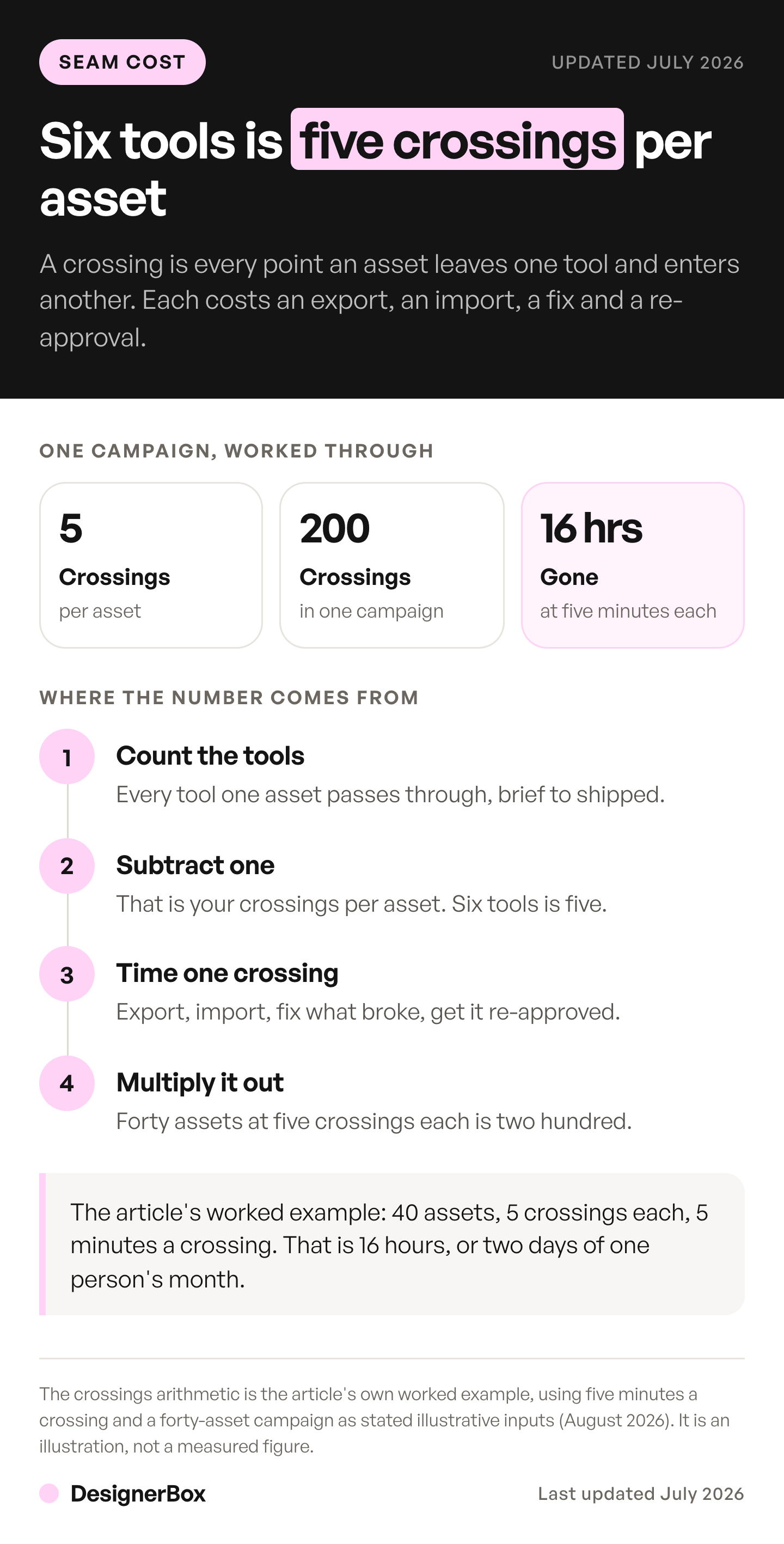
Count crossings, not tools. A crossing is any point where an asset leaves one tool and enters another, and each one has a predictable cost: an export, an import, a re-decision, and a review. Six tools in a linear chain is five crossings per asset. Multiply by assets per campaign and campaigns per quarter, and the number can be larger than you expect.
Try it on your own numbers.
- Count the tools an asset passes through from brief to shipped. Not the tools you own, the ones a single asset touches.
- Subtract one. That is your crossings per asset.
- Time one crossing. Export, import, fix what broke, get it re-approved. Five minutes is optimistic.
- Multiply by assets per campaign. A campaign with 40 assets and 5 crossings each is 200 crossings.
- Multiply by your loaded hourly rate. That is the handoff cost of one campaign.
Step 4 is often where the number becomes hard to ignore. In this illustrative example, two hundred crossings at five minutes is about sixteen hours. That is two full days of somebody’s month, spent moving files between tools that all work fine on their own. The count peaks in a seasonal push, when the same catalog ships a sale version and a holiday version in one quarter. That is why the tools a seasonal launch needs are worth comparing on the handoffs they add as well as on price.
An agency that bills by the hour bills for those crossings, so removing them shrinks the invoice as well as the waste. That is why pricing creative work per asset instead of per hour has to come first. Agencies also lose hours in the third revision round on a fixed-fee job, which they often do not bill. Teams under deadline feel it earliest, and the work behind a faster launch sets out how tool count affects launch dates.
What learning six prompt boxes costs
It costs your team’s attention, and it depreciates faster than the subscriptions do. Every model has its own prompt habits. What works in one can produce something different in another. The skill your team builds in tool three does not carry over fully to tool four. Some of it stops working when tool three ships a new model version.
A model update is not a neutral event when your team has built habits on the previous one. Prompts that produced a reliable result can stop producing it. Nobody schedules the relearning, so it happens ad hoc, mid-campaign, under deadline. Multiply by six vendors on six release cycles and some part of every month is spent recovering fluency somebody already had.
None of that is the vendors behaving badly. Shipping better models is the job. Google, OpenAI, ByteDance, Black Forest Labs, Kuaishou, Runway and Lightricks build many of the models teams use. What costs you is absorbing every release cycle on your own, one prompt habit at a time.
The stack question sits inside a bigger one. Where AI digital marketing pays and what it costs sorts the six functions of a marketing team by what AI does in each.
One workflow for every product

DesignerBox is AI creative production for brands and agencies. You set the background, the light, the crop and the file spec once, and save them as a workflow. Then you run it again for the next product. The workflow keeps the decisions, so the next product gets the same settings as the first one. You set the brand once, and the workflow reads it on every run. Batch runs one workflow over a whole sheet of products, so a whole catalog is one pass. A sheet takes up to 200 rows. You keep or discard each result.
The claim has a limit. A workflow does not lower any subscription price. It removes the setup you repeat for each product.
You pick the model for each step when you build the workflow, and every run after that uses it. A template comes with its model already picked. The image model you pick changes the cost of a run, and the cost is shown before the run. DesignerBox keeps the stills, the editors, Brand and Assets in one account. The stack in this article has six subscriptions.
Video costs sit in a range. An 8-second clip costs 40 to 560 credits, depending on the model. The range matters when you price a whole campaign.
Two more things help here. Critic steps score the results, and best-of-N keeps the best one, so your own review starts from the strongest result. DesignerBox has 75 tools over MCP, so an AI chat such as Claude, ChatGPT or Cursor can run the same workflows. Read the model list, the workflow page and a template before you decide. If your team works mostly in a chat app today, ChatGPT vs Gemini for product images covers the limits at 40 products.
A broader plan to get more creative output without adding headcount is often the reason a team audits its stack. If the audit comes down to comparing plans, how AI ad generator pricing works explains how the plans are metered. The Ads from a product photo template is one job to try first.
At the smaller end, a one-person business feels the setup cost first, because the same person does every step. AI creative tools for small business covers that case.
When a separate tool fits better
A saved workflow is a trade, and it does not fit every team. Here are three cases where keeping the separate tool is the better answer.
You need one image now and then. If your team makes an occasional image on a single model, a single-model subscription may fit better.
You rarely repeat the same job. A saved workflow pays back when the same setup runs on product after product. If every asset is a one-off, there is little setup to save. Teams with a developer sometimes weigh a third route, their own code on a model API, and the build vs buy AI guide covers that choice.
You need deep layout and compositing. DesignerBox does not replace a page-layout and compositing application. If your final step is a complex multi-layer composite, keep that seat.
Plan limits matter too. Uploading your own photos and the commercial license start on the Pro plan. AI video, virtual try-on, upscaling, the image editor and the video editor start on the Premium plan. Team features, shared brand kits and white label are on the Ultra plan, and every plan below Ultra is one seat. Plans and credits are on the pricing page.
If one of those limits means DesignerBox does not fit, take it seriously. A workflow pays when your problem is repetition. If your problem is something else, buy the tool that solves that problem. An AI proof of concept on your own catalog tests any image tool before you move a job to it. Check what AI video costs at your clip volume before you move video, because video pricing by length behaves differently from pricing by asset.
For one worked example of a stack built tool by tool, see how a fashion and beauty brand assembles its stack across on-model, video, presenter and versioning stages. The cost lands differently depending on your team shape, which we break down across the five team types that use AI creative tools.
To try one workflow on your own products, start from a template, add your brand and your products, and run it. See the templates.
FAQ
How much does a six-tool AI creative stack cost per month?
Add the six line items and you have the whole subscription answer. That number is flat: it reads the same at 40 products and at 400. The cost that separates a stack that scales from one that does not is charged per product. It sits in the setup you repeat in each tool and the review pass on what comes back.
What are the hidden costs of running multiple AI tools?
Four, and none appear on an invoice: the setup you rebuild for every product, the review pass on 500 outputs, the time spent locating assets that sit in six different tools, and the relearning cost each time one of six vendors ships a model update on its own release cycle. All four are paid in your team’s hours.
Is consolidating AI tools cheaper?
Not automatically, and per seat it may not be. Consolidation removes repeated setup and handoffs rather than reducing rates. The saving is real when the same job gets rebuilt for every product, or when an asset passes through several tools before shipping. Our shortlist of eleven consolidated and single-purpose tools compares both sides of that decision.
How do I calculate what tool sprawl costs my team?
Count the tools one asset passes through from brief to shipped, then subtract one. That is your crossings per asset. Time a single crossing, including the export, import, fix and re-approval. Then multiply by assets per campaign and your loaded hourly rate. In an illustrative example, a 40-asset campaign with 5 crossings each is 200 crossings, or roughly sixteen hours at five minutes each.
Does DesignerBox replace my whole creative stack?
No. You save a job as a workflow and run it again on the next product. It has an image editor, a video editor and Assets, the file library. It does not replace a page-layout and compositing application. It does not remove the need for one accurate photo of the product you are selling.
Why does brand consistency break across AI tools?
A file carries pixels and no context. Palette rules, type rules and lighting preferences do not cross between tools, so each tool re-decides on its own. No single step is wrong enough to reject, and after several steps the compounded result is off with no identifiable cause, so the chain gets redone rather than repaired.
What does a run cost before I run it?
In DesignerBox the cost is on screen before you run it. The image model you pick changes the cost of an image run. An 8-second video clip costs 40 to 560 credits, depending on the model, and AI video starts on the Premium plan.
Sources
All product figures accessed September 2026.
- DesignerBox pricing page (designerbox.ai/pricing), September 2026: plans, credits, seats and feature gates
- Adobe Creative Cloud Pro apps (adobe.com/creativecloud/pro.html, September 2026) and Canva brand tools for teams (canva.com/solutions/brand-management-tools, September 2026), described by scope only. No third-party price is quoted in this article
- Crossing counts, setup counts and review time are your own numbers. The worked example uses 40 assets, 5 crossings each and 5 minutes a crossing, and is labelled as illustrative
DesignerBox plans, credits, seats and feature gates from its pricing page, September 2026. Adobe’s Creative Cloud Pro page was re-checked on 2 October 2026. Stack composition, crossing counts and review time vary by team. Individual results vary.