
AI video generation is billed per second of output, which makes it the most expensive operation in any AI creative tool by a wide margin. In DesignerBox, an image costs 5 credits. A 5-second clip on a fast model costs 150. An 8-second clip with audio costs 6,400, which is more than the Premium plan’s entire monthly allocation. Knowing that ratio before you generate is the whole job, and it is why the fastest way to make an AI video is the one that decides everything in stills first.
That last number is not a typo, and it is the reason this article exists. A team on a Premium plan can generate 500 product images in a month. That same team cannot generate one 8-second video with audio, because a single clip costs more credits than the plan issues.
Nobody tells you this before you click generate. You open a video tool with a month of credits in the bank, run four takes of an 8-second hero clip because the first three had the wrong camera move, and the plan is gone by lunch. Not overspent. Gone.
This breaks down what AI video costs in credits, what each plan buys in clips, and where the cliff sits. The numbers below are DesignerBox’s live pricing configuration, not estimates.
Key Takeaways
- Video is priced per second, everything else is priced per action. That single structural difference is why video costs 30x to 1,280x what an image costs.
- An image is 5 credits. An 8-second clip with audio is 6,400. The same spend buys either one clip or 1,280 product images.
- A Veo 3 with audio clip at 8 seconds exceeds the entire Premium allocation. Premium issues 2,500 credits a month. One clip needs 6,400. You cannot make it on that plan.
- The spread between video models is 26x, from 30 credits per second on a fast model to 800 on a top-end model with audio. Model choice matters more than clip length.
- AI video needs Premium at $75/month or higher. Free, Basic, and Pro do not include it at any credit balance.
- Per-second billing is the category standard, not a DesignerBox quirk. Google, OpenAI, and Runway all meter video the same way.
- Budget in clips, not in credits. Credits hide the cliff. Clips per month is the number that tells you whether a plan works.
What does each operation cost in credits?
Every operation in DesignerBox has a fixed credit price except video, which is calculated as credits per second multiplied by duration. Text operations cost 1 to 2 credits. An image costs 5. Video starts at 150 for a short clip on a fast model and climbs into the thousands. The rightmost column below is the ratio that governs every budgeting decision you will make.
| Operation | Credits | Same cost in images |
|---|---|---|
| Simple text op (translate, hashtags) | 1 | 0.2 |
| Complex text (thread, image analysis) | 2 | 0.4 |
| Research or basic image upscale | 3 | 0.6 |
| Generate or edit an image | 5 | 1 |
| Generate post plus image | 6 | 1.2 |
| Instagram 3D Frame | 8 | 1.6 |
| Magnific upscale | 10 | 2 |
| Brand storyboard (2x2 to 5x5) | 10 to 25 | 2 to 5 |
| Create avatar (9 images) | 25 | 5 |
| Video, 5 seconds on a fast model | 150 | 30 |
| Video, 8 seconds with audio, top model | 6,400 | 1,280 |
Read the bottom two rows again. Everything above them lives between 1 and 25 credits. Video does not live in that range, and no amount of careful prompting moves it there.
One useful detail in the other direction: an avatar produces 9 images for 25 credits, which works out to 2.8 credits per image against the standalone rate of 5. Batch operations are the only place the pricing bends in your favour.
Why is AI video priced per second?
Video is metered per second because that is how the compute bills. Each second of output is a fresh set of frames the model has to generate and keep consistent with the frames before it. Audio adds another synchronized track on top. Doubling clip length genuinely doubles the work, so providers bill it linearly rather than pricing a clip as a single action.
This is not specific to DesignerBox. It is how the model providers themselves sell video, and their public rate cards make the structure plain.
Google prices Veo 3.1 at $0.40 per second of output at 720p and 1080p with audio included, and $0.60 per second at 4K. The Fast variant drops to $0.10 per second at 720p and $0.12 at 1080p, also with audio (ai.google.dev/gemini-api/docs/pricing, July 2026).
OpenAI prices Sora 2 at $0.10 per second. Sora 2 Pro runs $0.30 per second at 720p, $0.50 at 1024x1792, and $0.70 at 1080p (developers.openai.com, July 2026).
Runway bills Gen-4.5 at 12 credits per second of generated video, and API credits sell at $0.01 each, which puts it around $0.12 per second (docs.dev.runwayml.com, July 2026).
Three providers, three architectures, one billing unit. When every vendor in a category converges on the same meter, that is the physics of the thing, not a pricing strategy. Plan around it instead of shopping for a way out of it. The full provider rate card, model by model, is broken down in what the models themselves charge per second. The rest of this article stays on what those seconds cost you inside a subscription.
What does one AI video clip cost?

A clip’s cost is credits per second multiplied by duration, so two variables drive it: which model you pick and how long the clip runs. Model choice dominates. The gap between the cheapest and most expensive per-second rate in the catalog is roughly 26x, which means a 5-second clip on one model can cost more than a 20-second clip on another.
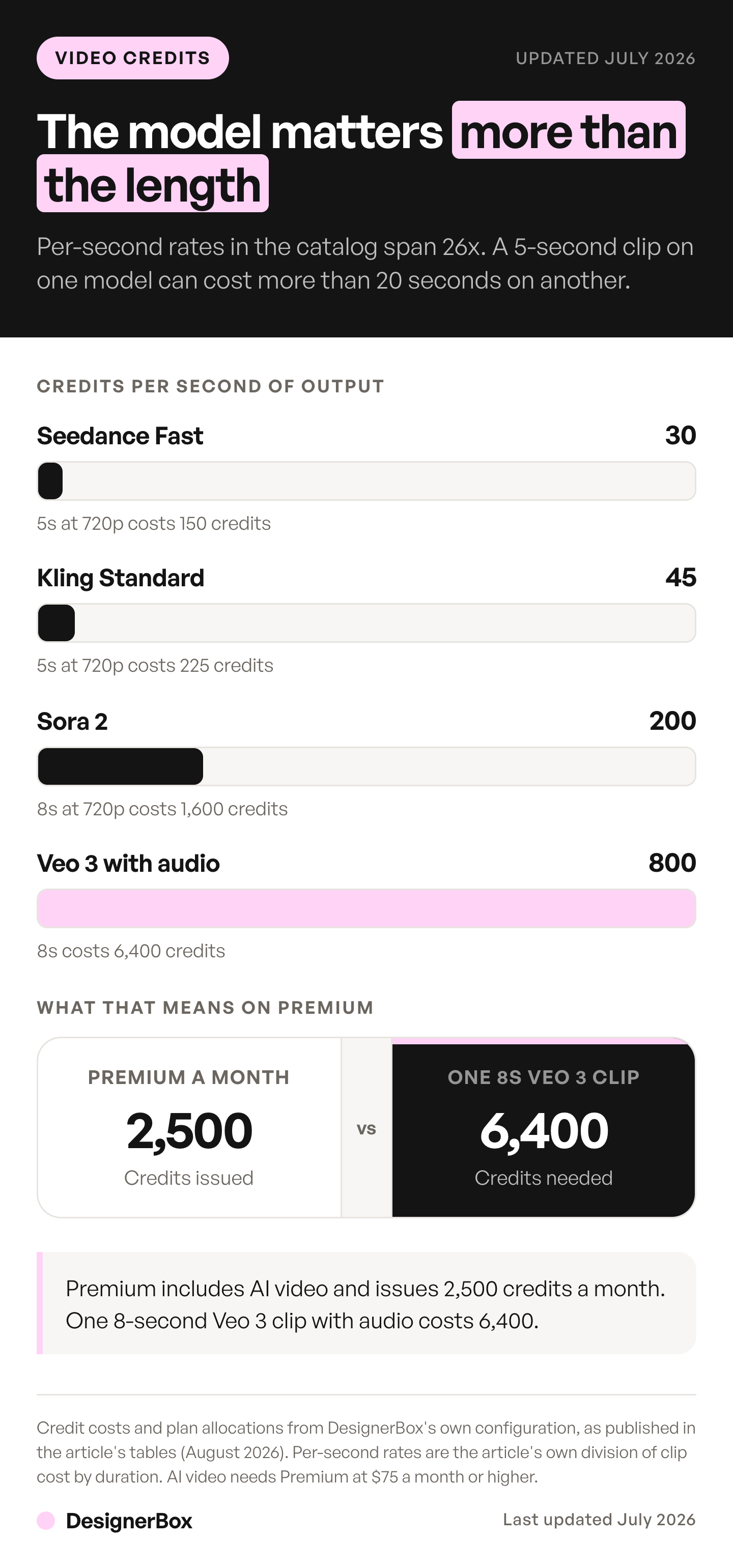
Here are four real configurations with the per-second rate derived:
| Video generation | Duration | Credits | Credits per second | Same cost in images |
|---|---|---|---|---|
| Seedance Pro Fast, 720p | 5s | 150 | 30 | 30 |
| Kling Standard, 720p | 5s | 225 | 45 | 45 |
| Sora 2, 720p | 8s | 1,600 | 200 | 320 |
| Veo 3 with audio | 8s | 6,400 | 800 | 1,280 |
The jump from 45 credits per second to 200 is not a small upgrade. It is a 4.4x price change for three extra seconds and a different model. The jump from 200 to 800 is another 4x.
Duration is the smaller lever, and it is still a real one. Every second you cut off a Veo clip with audio saves 800 credits, which is 160 product images. Trim before you generate, not after.
How many clips does each plan buy?
Credits are an abstraction. Clips are the number that tells you whether a plan works for your campaign. AI video requires Premium or higher, so Free, Basic, and Pro are out regardless of their balance. The full plan and credit breakdown covers what the lower tiers do include. That leaves two plans, and the difference between them is not subtle.
| Plan | Price | Credits/mo | AI video | 5s fast (150) | 5s Kling (225) | 8s Sora 2 (1,600) | 8s Veo 3 + audio (6,400) |
|---|---|---|---|---|---|---|---|
| Free | $0 | 112 | No | n/a | n/a | n/a | n/a |
| Basic | $15 | 500 | No | n/a | n/a | n/a | n/a |
| Pro | $35 | 1,000 | No | n/a | n/a | n/a | n/a |
| Premium | $75 | 2,500 | Yes | 16 | 11 | 1 | 0 |
| Ultra | $200 | 8,000 | Yes | 53 | 35 | 5 | 1 |
That bolded zero is the most important cell in this article. Premium includes AI video as a feature and issues 2,500 credits a month. A single 8-second Veo 3 clip with audio costs 6,400. The feature is switched on and the plan cannot pay for one use of it.
Ultra buys exactly one such clip and has 1,600 credits left over, which is one 8-second Sora 2 clip and nothing else. At the other end of the catalog, Ultra buys 53 five-second clips on a fast model. Same plan, same month. The model you pick moves your output by 53x.
The honest read: if your work is short-form clips on fast models, Premium is generous. If your work is hero video with audio, no subscription tier covers it at volume, and you should budget video as a line item rather than expecting a plan to absorb it.
What does a 10-clip campaign cost?
Ten clips is a realistic set for one campaign: a few hooks, a few variants per placement, a couple of cutdowns. Here is what that costs against each plan’s monthly allocation.
| 10-clip campaign | Credits needed | Against Premium (2,500) | Against Ultra (8,000) |
|---|---|---|---|
| 10 x 5s fast clips | 1,500 | 60% of the month | 19% of the month |
| 10 x 5s Kling Standard | 2,250 | 90% of the month | 28% of the month |
| 10 x 8s Sora 2 | 16,000 | 6.4 months | 2 months |
| 10 x 8s Veo 3 + audio | 64,000 | 25.6 months | 8 months |
The top two rows are a normal month’s work. The bottom two are not a plan question, they are a procurement question. A ten-clip campaign of 8-second Veo shots with audio needs 64,000 credits, which is eight months of the highest subscription tier.
And this table assumes every generation lands first time. It will not. Budget two to three takes per finished clip and the numbers above move with it. Four takes of one Veo 3 clip with audio is 25,600 credits, which is more than three months of Ultra for a single 8-second shot.
Ten is also on the low side for a paid social test. If you are batching a full set of ad variants rather than a single campaign, what a video ad pack costs before it runs works the same arithmetic at 6, 12 and 18 clips.
How do the credits price out in dollars?
Effective cost per credit varies by where the credits come from. Subscription credits are cheaper than pack credits, and the largest plan has the cheapest credit.
| Source | Price | Credits | Cost per credit |
|---|---|---|---|
| Basic | $15/mo | 500 | $0.030 |
| Pro | $35/mo | 1,000 | $0.035 |
| Premium | $75/mo | 2,500 | $0.030 |
| Ultra | $200/mo | 8,000 | $0.025 |
| Starter pack | $5 once | 100 | $0.050 |
| Standard pack | $20 once | 500 | $0.040 |
| Bulk pack | $50 once | 1,500 | $0.033 |
Ultra credits cost $0.025 each. Starter pack credits cost $0.050, exactly double. If you buy top-ups routinely, you are paying a premium for the privilege, and moving up a tier is cheaper than patching a gap with small packs.
Credit packs are one-time purchases, they require an active paid subscription, and they expire after 12 months. They are a buffer for a busy month, not a way to run a video program.
Two more mechanics worth knowing before you commit. Yearly plans lower the monthly rate but grant the same monthly allocation, resetting monthly. Annual billing does not hand you twelve months of credits upfront, so it does not solve a video budget. And the 7-day trial on paid signup grants 5 credits on every tier, which is exactly one image and no video at all. The trial tests the interface, not the video pipeline. Free tiers elsewhere come with their own terms, and what each free plan issues, watermarks and commercial rights included goes through them provider by provider. Full plan mechanics are on the DesignerBox pricing page.
Which models are in the catalog?
DesignerBox includes 13 models, 6 of them video: Veo 3.1, Veo 3.1 Fast, Sora 2 Pro, Seedance 2.0, Kling 2.6 Pro, and Runway Gen-4.5. They come from Google, OpenAI, ByteDance, Kuaishou, and Runway, and they are all included in the subscription rather than licensed separately. You can see per-model detail on the model catalog.
The reason the catalog matters to a budget conversation is the 26x spread. A single-model tool gives you one per-second rate and you either afford it or you do not. An open catalog lets you match the model to the shot: a fast model for the twelve variants nobody will watch twice, a top-end model with audio for the one hero clip that carries the campaign.
That is the actual cost control available in AI video. Not prompting tricks, and not clip length. Deciding, per shot, which shots deserve the expensive model. Most teams discover this after burning a month’s credits on B-roll.
The alternative is a subscription per model, which is its own bill and its own arithmetic. That maths is worked through in the real cost of a six-tool AI stack, and the short version is that the subscriptions are the cheap part.
Every clip still starts from your real product photo, which is why nothing comes out looking generic AI. The output gallery is the fair test of whether that holds.
How do you keep a video budget from evaporating?

Five rules, in the order they save you the most credits.
- Pick the model per shot, not per campaign. This is a 26x lever. Nothing else in this list comes close.
- Storyboard before you generate. A brand storyboard costs 10 to 25 credits and is 250x cheaper than an 8-second Veo clip with audio. Get the framing wrong on paper. The full sequence is in how to turn a script into a storyboard.
- Test at 5 seconds on a fast model. Prove the concept for 150 credits, then spend 6,400 once you know the shot works.
- Cut the duration before you generate. Every second removed from a top-end clip with audio saves 800 credits. Most hero shots do not need eight seconds.
- Count clips, not credits. Take your monthly allocation, divide by the per-clip cost of the model you use, and look at the number. If it is less than your campaign needs, the plan is wrong and no discipline fixes it.
Rule five bites hardest on a posting schedule, where the same arithmetic runs every week instead of once. We ran it against a month of short vertical video in where an AI TikTok content pipeline breaks at volume.
The pattern behind all five: video is the only operation where the decision to generate is worth more deliberation than the prompt. Everywhere else you iterate cheaply. Here you commit.
Which is why the cheapest credit you spend is the one that stops a re-render. A broken hand or a drifting face means the whole take is regenerated, not patched, so the checks in why AI video breaks hands and faces pay for themselves the first time they catch something at the still stage.
One caveat this article does not cover: where the clip is going. Marketplaces set their own floors, and Amazon’s shoppable video slot needs between 1 and 12 minutes, which no single generation reaches. That arithmetic is worked through in affordable AI video for product listings.
The same logic decides which quality fixes are worth buying at all. Upscaling, relighting and reframing all cost a fraction of a re-render when applied to the source still, which is the argument in UGC video quality ranked by cost.
If you are running the same maths on stills, the cost of a product photoshoot works the same way, with one difference. Images are cheap enough that iteration is free. Video never is. If the clip is destined for a paid placement, the wider tier comparison sits in AI ad generator pricing, which puts the per second rates next to what the ad tools charge.
For per-asset rates across the whole creative stack rather than video alone, the AI creative cost benchmark puts them next to studio and agency equivalents.
FAQ
How much does AI video generation cost per second?
It depends entirely on the model. In DesignerBox the range runs from 30 credits per second on a fast model at 720p to 800 credits per second for a top model with audio, a 26x spread. At the providers themselves, Google lists Veo 3.1 at $0.40 per second with audio and OpenAI lists Sora 2 at $0.10 per second (ai.google.dev and developers.openai.com, July 2026).
Why is AI video so much more expensive than AI images?
Because video is billed per second while an image is billed per action. An image costs 5 credits. An 8-second clip with audio costs 6,400, which is the same spend as 1,280 images. Each second of video is a fresh set of frames the model generates and keeps consistent with what came before, and audio adds a synchronized track on top.
Which DesignerBox plans include AI video?
AI video requires Premium at $75/month or higher. It is not available on Free, Basic, or Pro at any credit balance. Premium issues 2,500 credits a month and Ultra issues 8,000. Try-on clothes, hyper realism, and the upscaler sit behind the same Premium gate.
Can I make a Veo 3 video with audio on the Premium plan?
Not within a month’s allocation. An 8-second Veo 3 clip with audio costs 6,400 credits and Premium issues 2,500 a month. The feature is available on the plan, but a single clip costs more than the plan grants. Ultra’s 8,000 credits cover exactly one such clip with 1,600 left over.
Do credit packs solve a video budget?
Not at volume. Packs are one-time top-ups, they need an active paid subscription, and they expire after 12 months. The Bulk pack is 1,500 credits for $50, so covering a ten-clip campaign of 8-second Veo shots with audio at 64,000 credits would take 43 Bulk packs. Packs are a buffer for a busy month, not a video program.
Does an annual plan give me more credits for video?
No. Yearly billing lowers the monthly rate but grants the same monthly allocation, reset monthly. It is not a lump sum of twelve months’ credits released upfront, so it does not change what a single expensive clip costs you against a month’s balance.
How many AI video clips can I generate per month?
On Premium at 2,500 credits: 16 five-second clips on a fast model, 11 on Kling Standard, one 8-second Sora 2 clip, or zero 8-second Veo 3 clips with audio. On Ultra at 8,000 credits: 53, 35, 5, and 1 respectively. Model choice moves your monthly output by more than 50x.
Sources
All accessed July 2026.
- Veo 3.1 per-second pricing at 720p, 1080p and 4K, and the Fast variant’s rates: (ai.google.dev/gemini-api/docs/pricing, July 2026)
- Sora 2 and Sora 2 Pro per-second pricing by resolution: (developers.openai.com, July 2026)
- Runway Gen-4.5 credits per second of generated video and the API credit price: (docs.dev.runwayml.com, July 2026)
- DesignerBox credit costs, plan allocations, credit-pack pricing, trial mechanics and feature gating verified against live product configuration, July 2026
DesignerBox credit costs, plan allocations, and feature gating verified against the live product configuration as of July 2026. Model provider per-second pricing verified from ai.google.dev/gemini-api/docs/pricing, developers.openai.com, and docs.dev.runwayml.com as of July 2026. Provider pricing and model specifications change frequently. Individual results vary.