Transformez votre meilleure campagne en pipeline reproductible
Enchaînez génération, édition et livraison dans un seul workflow visuel doté de 18 types de nœuds. Enregistrez-le comme une technique que votre équipe relance à chaque lancement.
Qu'est-ce qu'un workflow DesignerBox ?
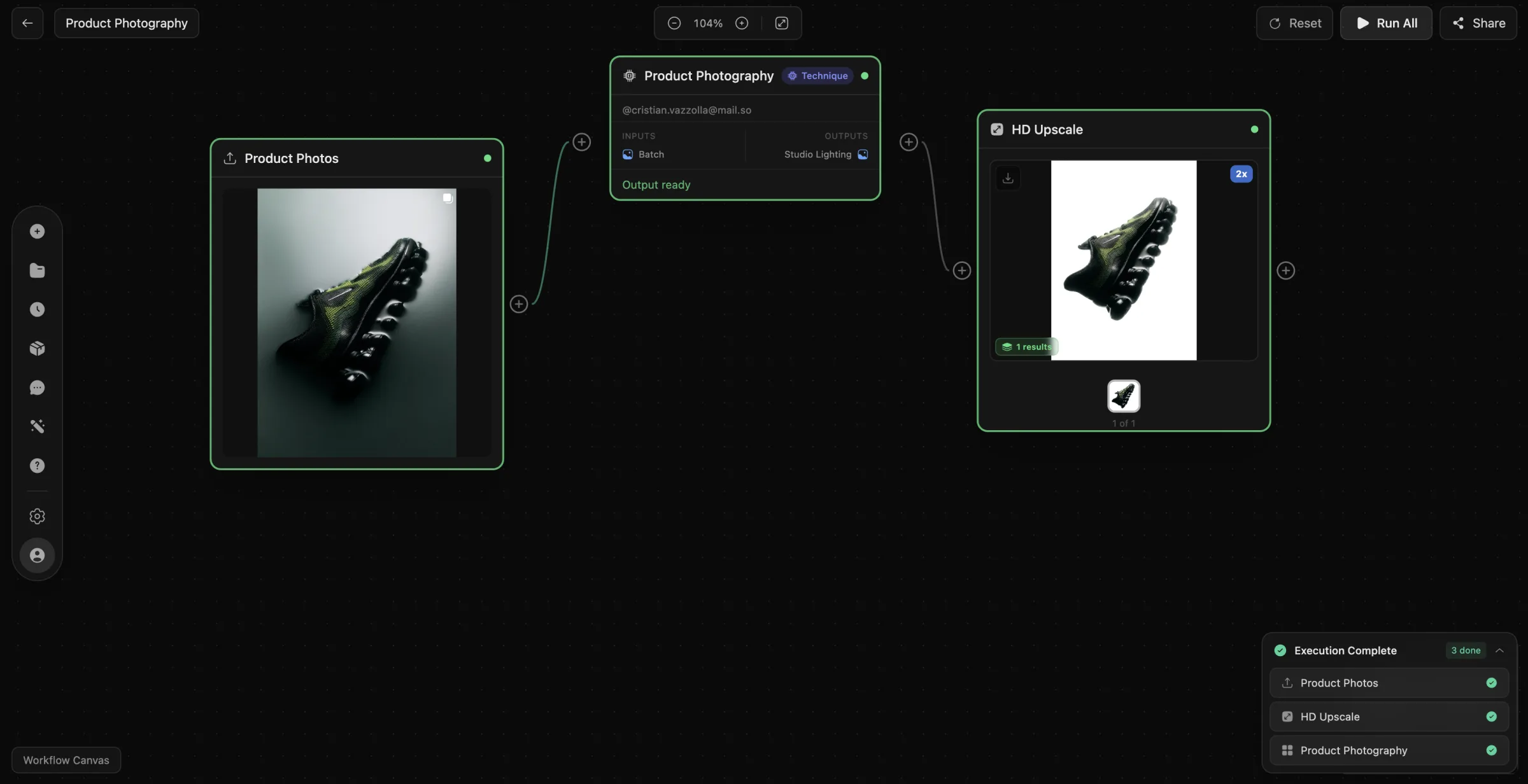
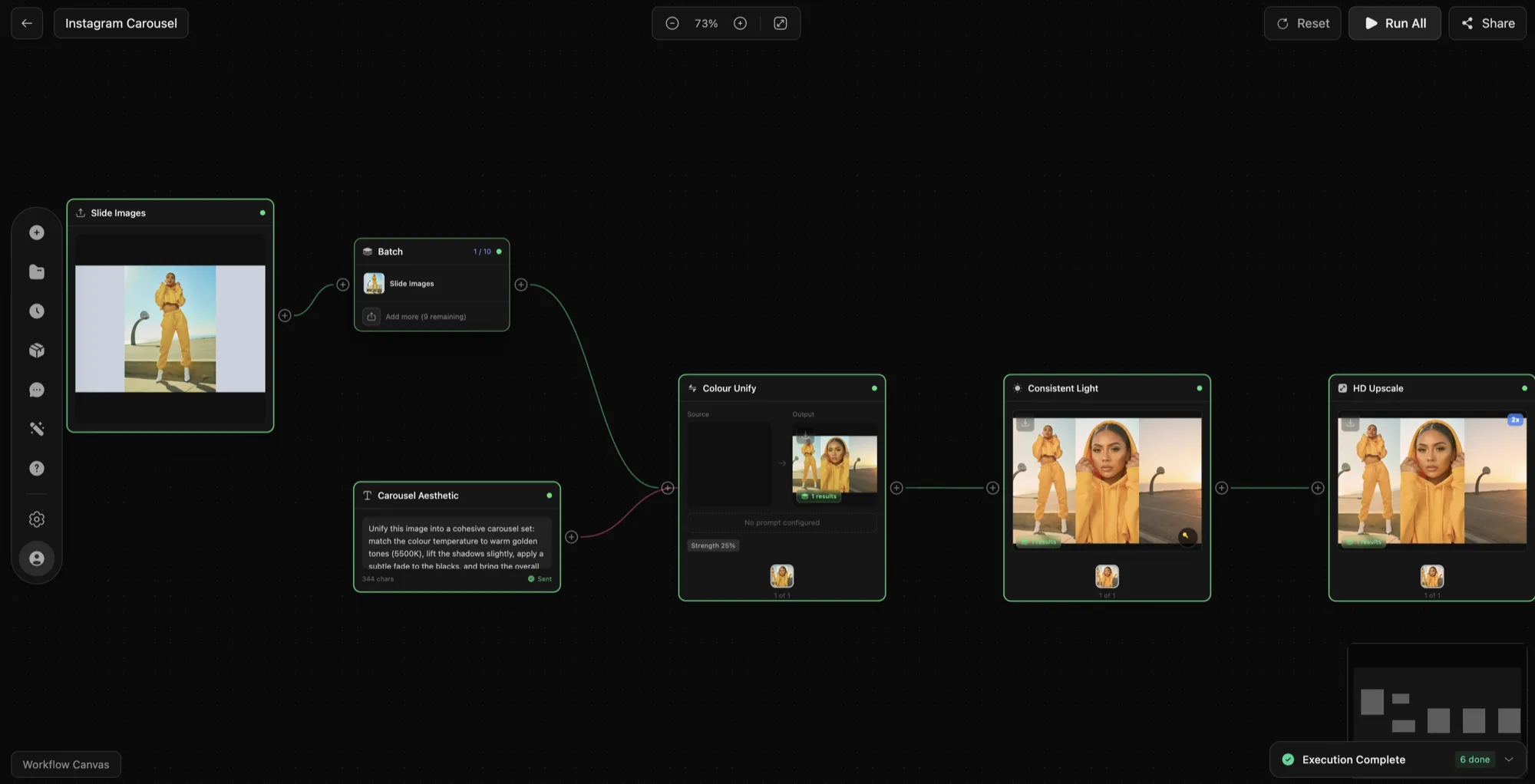
Un workflow DesignerBox est un pipeline par nœuds qui applique à vos fichiers une séquence fixe d'opérations IA. Vous posez les nœuds sur un canvas, reliez chaque sortie à l'entrée suivante, réglez les paramètres une seule fois, puis appuyez sur Exécuter. Les 18 types de nœuds couvrent la génération, la suppression d'arrière-plan, l'agrandissement d'images, le rééclairage et la livraison : un travail qui passe habituellement par quatre outils distincts se termine ainsi en un seul passage. Les fichiers sources viennent directement de votre bibliothèque de ressources ou d'un dossier importé.
Tout l'intérêt est dans la répétition. Un pipeline conçu pour une campagne est enregistré, versionné, puis relancé par n'importe quel membre de l'équipe sur de nouvelles entrées. C'est ce qui maintient la cohérence des personnages et les règles de votre kit de marque tout au long d'un lancement, au lieu de les laisser dériver visuel après visuel.
18 types de nœuds, des possibilités illimitées
Tout ce qu'il vous faut pour créer n'importe quel pipeline IA
Génération d'images
Créez des images à partir de prompts texte avec Stable Diffusion, FLUX et plus encore.
Image vers image
Transformez des images existantes avec des modifications de style et de contenu guidées par l'IA.
Composition
Fusionnez plusieurs images avec un compositing intelligent.
Génération vidéo
Générez de courtes vidéos à partir de texte ou d'images.
Suppression d'arrière-plan
Supprimez instantanément les arrière-plans avec une détection des contours au pixel près.
Retouche
Remplissez ou remplacez des zones sélectionnées grâce à l'IA générative.
Agrandissement
Améliorez la résolution jusqu'à 4x tout en préservant les détails.
Rééclairage
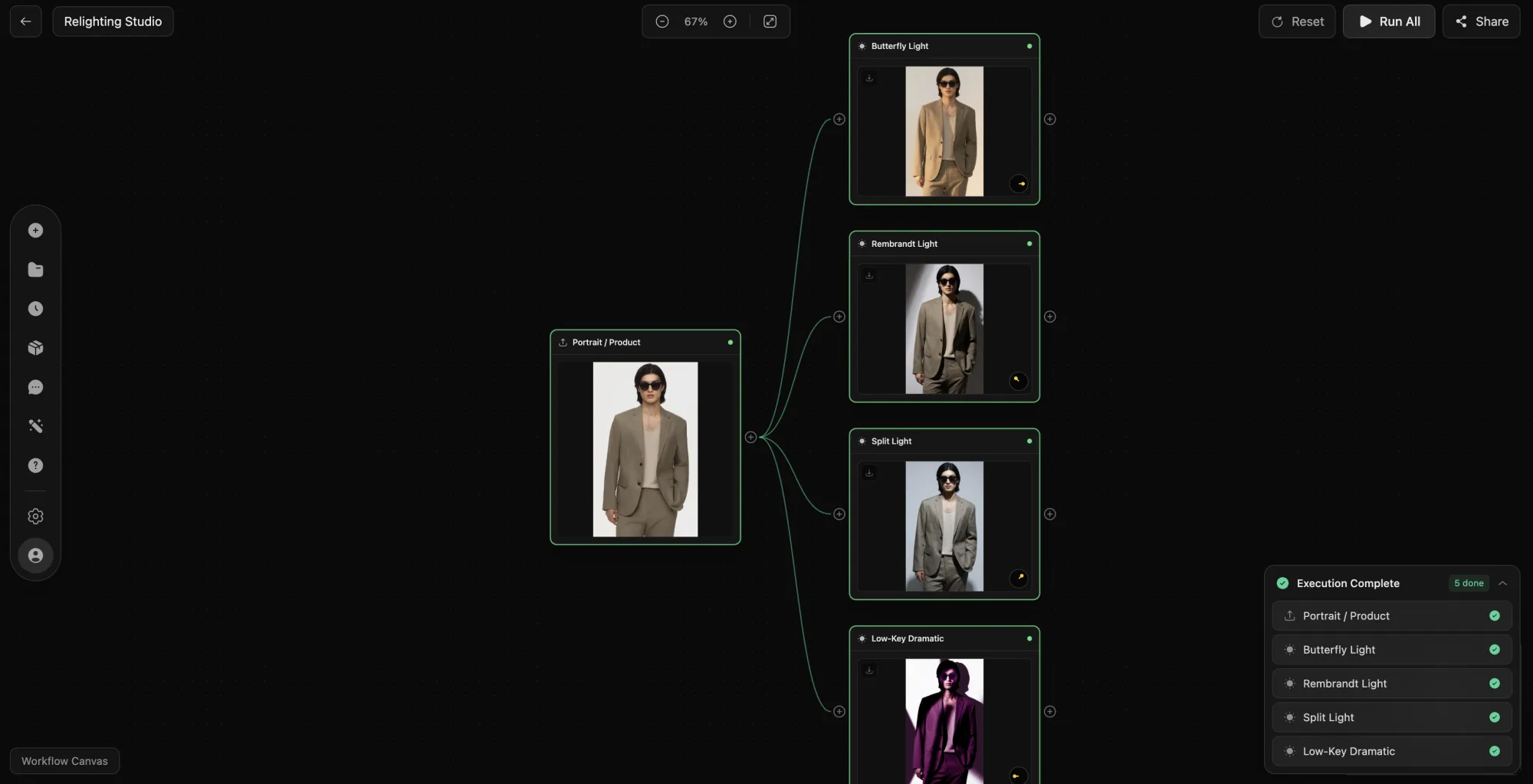
Modifiez la direction et l'intensité de l'éclairage dans n'importe quelle photo.
Transfert de style
Appliquez des styles artistiques d'une image à une autre.
Échange de visage
Échangez les visages entre images avec un mélange réaliste.
Agrandissement vidéo
Augmentez la résolution vidéo tout en maintenant la qualité.
Découpage vidéo
Découpez des clips vidéo aux points de début et de fin exacts.
Superposition de texte
Ajoutez du texte stylisé, des légendes et des filigranes sur les images.
Texte / Prompt
Définissez des entrées texte, des prompts et des paramètres pour les nœuds en aval.
Import d'image
Importez des images depuis votre appareil ou votre bibliothèque comme entrées du pipeline.
Enregistrer dans la bibliothèque
Enregistrez les résultats directement dans votre bibliothèque de ressources DesignerBox.
Envoyer vers S3
Envoyez automatiquement les résultats dans votre bucket Amazon S3.
Envoyer via Webhook
Envoyez les résultats par POST vers n'importe quelle URL pour des intégrations personnalisées.
4 façons d'exécuter votre pipeline
Contrôle total sur l'exécution de votre workflow
Tout exécuter
Exécutez chaque nœud en séquence du début à la fin. Le mode par défaut pour les exécutions complètes du pipeline.
Exécuter depuis un nœud
Démarrez l'exécution depuis n'importe quel nœud, en sautant les étapes en amont. Réutilise les entrées en cache pour économiser du temps et des crédits.
Exécuter jusqu'ici
Exécutez uniquement jusqu'à un nœud sélectionné. Prévisualisez les résultats intermédiaires avant de lancer le pipeline complet.
Exécuter ce nœud
Exécutez un seul nœud de manière isolée. Testez des opérations individuelles avec des entrées spécifiques.
Comment ça marche
De l'idée au résultat en quelques minutes
Créer
Ouvrez l'éditeur de workflows et créez un nouveau canvas de pipeline.
Construire
Glissez des types de nœuds depuis la barre latérale sur votre canvas.
Connecter
Tracez des connexions entre les sorties et les entrées des nœuds.
Configurer
Définissez les paramètres, prompts et options de chaque nœud.
Exécuter
Appuyez sur Exécuter et regardez votre pipeline s'exécuter étape par étape.
Enregistrer
Vérifiez les résultats et enregistrez-les dans votre bibliothèque.
Conçu pour les workflows professionnels
Chaque détail pensé pour l'efficacité
Connexions intelligentes
Les nœuds détectent automatiquement les types d'entrée et de sortie compatibles. Les connexions invalides sont bloquées avant que vous ne les fassiez.
Traitement par lots
Alimentez plusieurs entrées dans un seul workflow. Traitez des dossiers entiers d'images en une seule exécution.
Groupes de nœuds
Regroupez les nœuds liés dans des sections repliables. Gardez les workflows complexes propres et organisés.
Sauvegarde automatique
Chaque modification est sauvegardée en temps réel. Reprenez exactement là où vous vous êtes arrêté, sur n'importe quel appareil.
Raccourcis clavier
Naviguez, connectez et exécutez avec des raccourcis clavier. Les utilisateurs avancés peuvent travailler sans toucher la souris.
Annuler / Rétablir
Historique d'annulation complet avec des niveaux illimités. Chaque action est réversible avec Ctrl+Z.
Bibliothèque de recettes de workflows
Ouvrez une recette en un clic. Modifiez les entrées, verrouillez les variables, exécutez.
Générateur de variantes de campagne
20 à 40 variantes publicitaires à partir d'un seul master, en 90 minutes environ.
Vidéo de porte-parole fidèle à la marque
Le même présentateur sur chaque campagne, dans chaque langue, sans nouveau tournage.
Moodboard d'images de concept
50 images de concept sur 5 directions visuelles en un après-midi.
Traitement de catalogue en masse
Des centaines, voire des milliers de SKU mis aux spécifications des marketplaces en un seul lot.
Créateur de scènes lifestyle
Une seule photo produit réelle déclinée en 50 contextes lifestyle.
Infographie de contenu A+
Un jeu complet de modules Amazon A+ par SKU, prêt à être mis en ligne.
Sauvetage d'images fournisseur
D'une photo fournisseur médiocre à une fiche produit aux standards des marketplaces en 10 minutes.
De la prévisualisation à l'animatique
Du dépouillement de scénario à une animatique prête pour la validation du réalisateur, en une journée.
Entraînement d'un LoRA de personnage
Entraînez une fois, réutilisez sur tout le projet. 30 à 60 minutes d'entraînement.
Rééclairage cinématographique
Un nouvel éclairage sur des rushes existants, sans nouveau tournage.
Agrandissement pour la livraison
4K et au-delà, netteté du mouvement préservée, couleurs gérées de bout en bout.
Générateur de contenu quotidien par lots
Une semaine de contenu créateur en une seule session de 3 à 4 heures.
Générateur de miniatures en lot
20 concepts de miniatures par vidéo en 5 minutes, prêts pour l'A/B test.
Export multiplateforme
Un seul master vers TikTok, YouTube, Instagram, Shorts, le blog et la newsletter.
Réaction éclair aux tendances
De la tendance repérée au post publié en moins d'une heure, image de marque intacte.
Lot hebdomadaire d'affiliation
LTK, ShopMy et TikTok Shop, une semaine complète en 3 à 4 heures.
OOTD mode
Du contenu tenue du jour en 15 à 20 minutes par look.
Semaine du coach sportif
Une production hebdomadaire pensée pour le tunnel de conversion, du contenu au client.
Décoration d'intérieur avant / après
Reels phares, lots Pinterest et carrousels de transformation.
Carrousel de recette
Une seule session de cuisine transformée en contenu recette multiplateforme.
Photo de profil pour LinkedIn
C'est bien vous, dans un bon jour, pour une fraction du prix d'un studio.
La place des workflows dans DesignerBox
Les apps IA à usage unique traitent une tâche à la fois : un visuel produit, un essayage virtuel, un agrandissement. C'est exactement l'outil qu'il faut quand vous n'avez besoin que d'un seul fichier. Cela ne suit plus dès qu'un même produit doit devenir un packshot, trois variantes lifestyle, un montage vidéo vertical et une série de recadrages aux formats des marketplaces, tous cohérents entre eux.
Le workflow est l'endroit où ces étapes deviennent un seul objet. Les entrées proviennent de votre bibliothèque de ressources ou d'un dossier importé, chaque nœud applique son opération, et les branches permettent à une seule image source de produire plusieurs formats finis dans la même exécution. Comme le pipeline est explicite, vous voyez quelle étape a introduit le problème et vous relancez depuis ce nœud au lieu de reprendre tout le travail.
Les exécutions ne se limitent pas au navigateur. Un workflow enregistré est appelable via le model context protocol : Claude ou tout autre client MCP peut donc lancer une exécution de production avec vos paramètres et vous renvoyer les fichiers finis. Vous pouvez créer et exécuter des pipelines avec le forfait gratuit avant de décider ce qui mérite d'être automatisé.
Chaque nœud appelle les mêmes modèles IA que le reste de la plateforme : le résultat d'un workflow est donc identique à celui de l'outil unique équivalent. La différence, c'est que la séquence, les réglages et la convention de nommage survivent à l'exécution et sont encore là la fois suivante.
FAQ de l'éditeur de workflows
Ce que fait le canvas, ce que ça coûte et comment un pipeline se réutilise.