Vibe directing is making a video with AI by talking to it. You describe the film in plain words. An AI agent writes the script, plans the shots and generates them. Then you give notes in the chat until the cut matches what you had in mind. The term borrows from vibe coding, and OpenArt made it popular in June 2026 with a tool called Director.
The promise is a change in how you fix a video. With a single prompt, a clip that is 80% right has one way forward: generate it again and hope the good part survives. In vibe directing you say “end on her face, not the rocket”, and the tool changes that one thing.
This guide explains where the term came from, how a session runs, and how to write notes an AI can act on. It also covers where the method stops working, which matters most if you make video for a brand every week.
Key Takeaways
- Notes take the place of re-rolls. You change one thing in a chat, and the tool is meant to keep the rest. Test that claim on your own project.
- The term is older than the product. Steve Newcomb wrote about “Vibe Directing” in April 2025, and a UC San Diego lab used it in March 2026. OpenArt’s Director launched in June 2026.
- It comes from vibe coding. Andrej Karpathy named vibe coding on February 2, 2025, and called it “not too bad for throwaway weekend projects”.
- The skill is the note. A note that names the shot, the change and what stays gets acted on. “Make it better” does not.
- First drafts are rough. A Hollywood Reporter test drive found the first script “pretty rudimentary”.
- Video you make every week needs saved decisions. Write the look, the brand and the steps down once, so each new video starts from them.
What is vibe directing?
Vibe directing is a way to make AI video through conversation. You give the idea, the mood and the story in plain language, and an AI agent turns it into a script, a storyboard and a finished cut with sound. You then shape the result with notes, the way a director gives notes to an editor. You make the creative calls. The AI does the production work.
OpenArt’s product page puts it in one line: “Vibe direct your next video by chatting with AI” (openart.ai/features/director, October 2026). A creator quoted by The Hollywood Reporter described the tool as “a lot like giving notes to an editor” (Yahoo Tech, June 2026).
The method sits inside a wider group of tools: AI video agents that take a brief by chat and run the video models for you. Our guide to the AI video agent covers the three forms those agents take.
Where the term came from
The word comes from vibe coding. On February 2, 2025, Andrej Karpathy described “a new kind of coding I call ‘vibe coding’, where you fully give in to the vibes, embrace exponentials, and forget that the code even exists” (x.com, read October 2026). In the same post he said it was “not too bad for throwaway weekend projects”.
The term spread fast. Collins Dictionary named “vibe coding” its Word of the Year 2025 (collinsdictionary.com, read October 2026). Merriam-Webster now has an entry for it, and dates the term to Karpathy’s post (merriam-webster.com, read October 2026).
Vibe directing applies the same idea to film. Three uses are on record:
| When | Who | What they meant |
|---|---|---|
| April 3, 2025 | Steve Newcomb, in an essay on Substack | A future way to make films, with a team taking turns to shape a scene through AI (stevenewcomb.substack.com) |
| March 15, 2026 | The FastVideo team at Hao AI Lab, UC San Diego | A research interface called Dreamverse: “Vibe directing is to video what vibe coding is to software” (haoailab.com) |
| June 23, 2026 | OpenArt | The launch of Director, a product built around the term (openart.ai/blog, June 2026) |
OpenArt’s launch is what made the term common. OpenArt says it is “calling” the method vibe directing in its own explainer (openart.ai/blog, July 2026). It does not claim to have invented the phrase, and the two earlier uses show it did not.
How vibe directing differs from prompting a video model
The difference is in how you change a result. A prompt produces one clip, and a change means a new generation. A vibe directing tool keeps a project with scenes, and a note is meant to change one part of it.
| Prompt and generate | Vibe directing | |
|---|---|---|
| What you write | One detailed prompt per clip | A short idea, then notes |
| How you change a result | Generate the clip again | Give a note on one shot |
| What you review | Separate clips | A cut, scene by scene |
| What you leave with | Clips to cut and score elsewhere | One video with voice, music and sound |
| Who plans the shots | You | The AI agent first, then you |
OpenArt’s product page claims the note-level control: “If you don’t like a single frame or the whole video, just tell Director what to change and it does exactly that, nothing more” (openart.ai/features/director, October 2026). We found no independent test of that claim. Run your own: change one shot, then compare every other shot frame by frame.
Prompt craft still matters. Each shot in a vibe directing project is still a prompt that a video model reads, and our AI video prompting guide explains what those models respond to.
How a vibe directing session runs
A session has five stages. The names below come from OpenArt Director, the product most people mean by the term. Other tools use different labels for the same stages.
- Describe the idea. Type the film in a sentence or two, with the mood. You can add a reference image, a music track or a saved character.
- Choose how often the AI asks. OpenArt’s explainer describes two modes: “Ask me first”, where the AI checks resolution, aspect ratio and tone with you, and “Run automatically” (openart.ai/blog, July 2026).
- Read the plan. The agent drafts the script, the characters, the look and a storyboard. Fix the plan here, before any shot is made.
- Watch the cut. OpenArt’s explainer describes two views: Scenes for the storyboard and Timeline for the finished video.
- Give notes until it fits. One note at a time, from a single frame up to the whole film.
Director’s product page says it makes “videos up to five minutes long” and is “Powered by Seedance 2.0, GPT Image 2, and more”. It calls its AI agent Ori (openart.ai/features/director, October 2026). Seedance 2.0 is a ByteDance video model and GPT Image 2 is an OpenAI image model, so the agent plans with an image model and animates with a video model.
Stage 3 is where most of the time is saved. A wrong plan makes every later note a repair. Our guide to script to storyboard covers how to read a storyboard before anything is generated.
How to give notes an AI director can act on
A good note names one shot, asks for one change, and says what must stay. The AI then has nothing to guess. A vague note such as “make it better” gives the agent the whole film to change, and it may change the parts you liked.
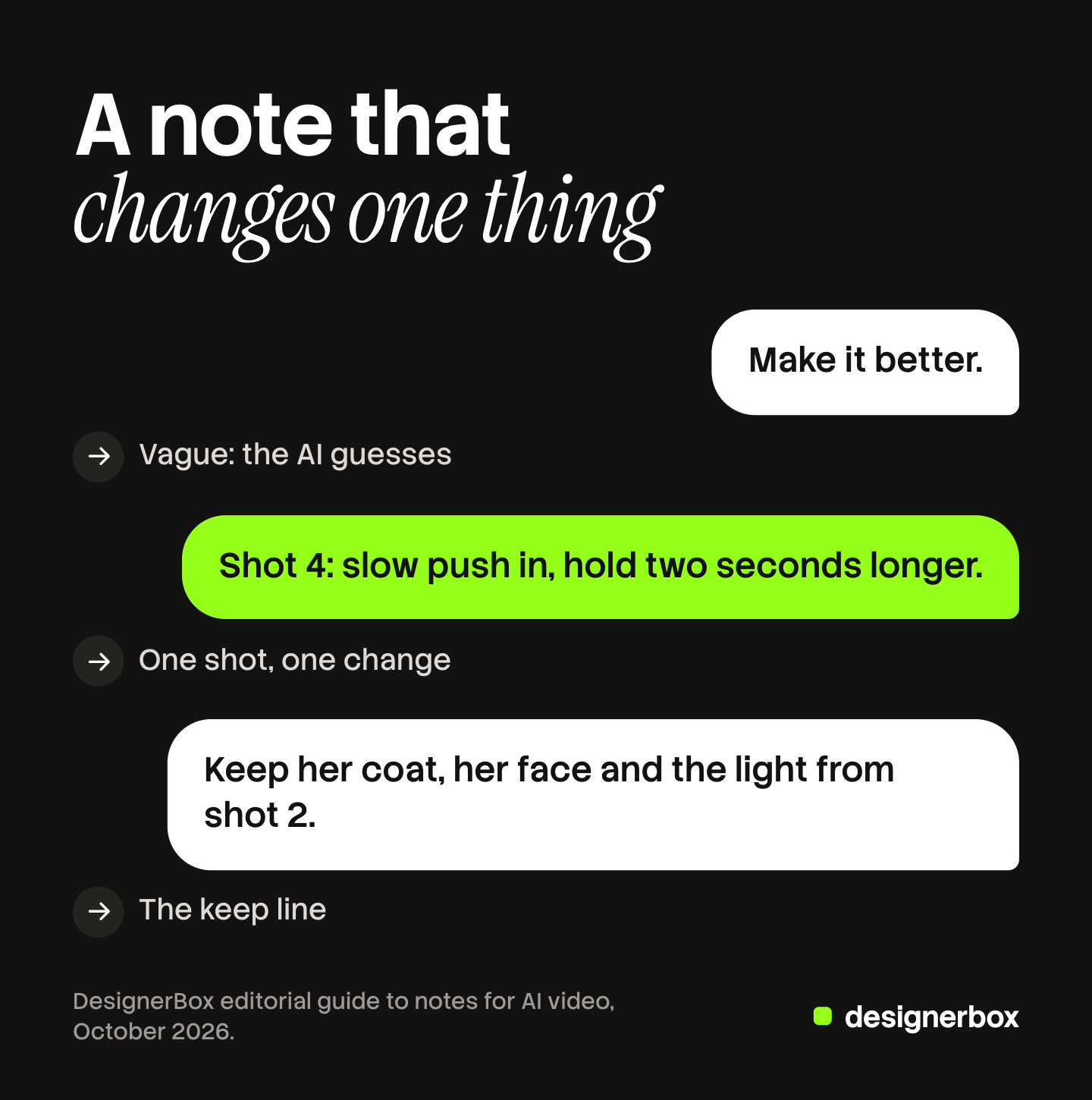
Six rules make notes work:
- Name the shot. Say “shot 4” or “the opening”, never “the video”.
- Ask for one change per note. With two changes in one note, you cannot tell which one failed.
- Add a keep line. “Keep her coat, her face and the light from shot 2.” The AI keeps what you name.
- Use shot words. Framing (wide, close-up), camera move (push in, pan left), light (soft window light), pace (hold two seconds longer) and sound.
- Point at a reference. An earlier shot in the project, or a still you have the rights to use.
- Approve a scene before you move on. Notes on scene 5 should not reopen scene 2.
Keep a short log of each note and what changed. When a later note breaks something, the log shows which note did it. For a person who appears in many shots, our guide to character consistency in AI video explains why a face drifts and how a reference image holds it.
Where vibe directing fits, and where it stops
Vibe directing fits one-off video with a story: a brand film, a music video, an animatic for a pitch, an episode of a short series. Those jobs need a beginning, a middle and an end, and a chat that plans scenes suits them.
It stops working well in five places:
- First drafts. The Hollywood Reporter’s test found “a first generation of a script, for instance, was pretty rudimentary and only vaguely captured what had been intended”. Many rewrites came before something usable (Yahoo Tech, June 2026).
- Complex scenes. eWeek noted that “maintaining perfect consistency across complex scenes” remains a challenge for AI filmmaking (eweek.com, July 2026).
- Budget. Each new version is new generation work. On a credit-based tool, every round of notes spends credits, so set a limit on rounds before you start. Our guide to AI video generation cost covers how those costs add up.
- Your product. A product in a generated shot has to match the real product, label and color included. A note can fix the mood of a scene. It cannot promise the label comes out letter-perfect.
- Repeat work. Karpathy scoped vibe coding to throwaway projects. A video you make every week for every new product is the opposite. Directing each one again by chat repeats the work, and the look drifts a little each time.
Labels still apply to the finished cut. A realistic AI person or scene needs the platform’s AI label, as our guide to AI disclosure in advertising explains.
Repeat brand video in a saved workflow
DesignerBox is AI creative production for brands and agencies. Scale your images, ads and video with AI and keep your brand on every piece: build the workflow once with your brand rules, run it on every product, see the cost before each run, and keep everything from the first product photo to the finished ad in one place.
Anyone can make an AI picture. Making hundreds that still look like your brand is the hard part. Vibe directing makes one good film. A brand that needs the same video for 40 products needs the decisions to stay the same.
You can still start by talking. In DesignerBox, Create is a chat: you type one sentence, it asks one to three short questions, then shows the plan and the price before it makes anything. You ask for changes in the same chat, such as “make the light warmer”. The video editor can also make a full video from your brief, with a storyboard, shots, voiceover, music and captions, on a timeline with several tracks.
The difference is what happens next week. You build the decisions once as a workflow: the steps, the models, the framing and your brand profile, which the workflow reads on every run. Batch runs it over a sheet of products, so row one and row two hundred get the same standard. An 8-second clip costs 40 to 560 credits, depending on the model.
DesignerBox has 75 tools over MCP, so an AI chat such as Claude, ChatGPT or Cursor can run those workflows too. The chat, the workflow and the video editor sit in one account, so your notes and your brand rules stay together.
The limits, stated plainly. DesignerBox does not post to a channel: you download the results, or send them with a webhook or an S3 step. AI video and the video editor start on the Premium plan. Plans and credits are on the pricing page.
For a first video, open the Short product videos template, add your product photo, and run it. The cost is shown before the run. See the templates
FAQ
What does vibe directing mean?
Vibe directing means making a video with AI through conversation. You describe the film in plain words, an AI agent builds the script, storyboard and cut, and you shape it with notes. The name borrows from vibe coding, where software is built by describing it.
Who coined the term vibe directing?
Steve Newcomb used “Vibe Directing” in a Substack essay on April 3, 2025. The FastVideo team at UC San Diego used it for a research interface on March 15, 2026. OpenArt made the term common when it launched Director on June 23, 2026.
Is vibe directing the same as vibe coding?
They share an idea, not a medium. Vibe coding builds software by describing it, a term Andrej Karpathy introduced on February 2, 2025. Vibe directing builds a video by describing it and giving notes. Both hand the technical work to AI.
What tools let you vibe direct?
OpenArt Director is the product built around the term. It plans scenes in a chat and makes videos up to five minutes long, according to OpenArt. FastVideo’s Dreamverse was a research interface. Other AI video agents also take a brief by chat and run the video models for you.
Do you need to know film terms to vibe direct?
No, but they help. Notes with shot words, such as close-up, push in, soft window light or hold two seconds longer, give the AI one clear change to make. A note like “make it better” leaves the AI to guess.
Can you vibe direct a brand ad?
Yes, for a one-off ad. Check that the product matches the real one, label realistic AI content where the platform asks, and set a limit on rounds of notes. For the same ad on every product, a saved workflow keeps the decisions fixed.
Sources
- Andrej Karpathy, post introducing vibe coding, February 2, 2025 (x.com, read October 2026)
- Collins Dictionary, Word of the Year 2025 (collinsdictionary.com, read October 2026)
- Merriam-Webster, entry for vibe coding (merriam-webster.com, read October 2026)
- Steve Newcomb, “Vibe Directing”, Substack, April 3, 2025 (stevenewcomb.substack.com, read October 2026)
- FastVideo team, Hao AI Lab at UC San Diego, “Into the Dreamverse: Vibe Directing in FastVideo”, March 15, 2026 (haoailab.com, read October 2026)
- The Hollywood Reporter, report on OpenArt’s Director, June 23, 2026, republished by Yahoo Tech (tech.yahoo.com, read October 2026)
- eWeek, “OpenArt Debuts Director, Bringing AI Video Creation to Chat”, July 9, 2026 (eweek.com, read October 2026)
- OpenArt, Director product page (openart.ai/features/director, October 2026)
- OpenArt blog, launch post of June 23, 2026 and explainer of July 10, 2026 on vibe directing (openart.ai/blog, read October 2026)
- DesignerBox workflows, video editor, MCP and pricing pages (designerbox.ai/product/workflows, designerbox.ai/product/video-editor, designerbox.ai/mcp, designerbox.ai/pricing), October 2026
Term history and product claims verified on the pages above in October 2026. OpenArt’s claims about Director are the company’s own; we found no independent test of them.