
An AI product video works when the build respects the constraints that only exist because it was generated. Decide the shot list in stills. One generation is short. The product has to survive being redrawn in every shot. The placement sets the frame, not the model. The model you pick moves the cost of every clip. And TikTok rejects or restricts an undisclosed AI ad.
Search “AI product video best practices” and you get the same nine tips on every page. Open with a strong hook. Show the product early. Sell benefits, not features. Shoot vertical. Keep it short. Test more variants. Stay on brand. Refresh the creative. All of that is true, and all of it was true in 2015 for a video shot on a camera.
None of it tells you why your four generated clips cut together into something that reads as four different products. This guide covers the constraints that appear the moment a model draws the frame instead of a lens capturing it, with the spec, the cost and the policy behind each one.
Key Takeaways
- Your clip ceiling is shorter than the length you are told to aim for. Until 24 September 2026, Sora 2 Pro generates up to 20 seconds (developers.openai.com, accessed September 2026). OpenAI is removing Sora 2 and Sora 2 Pro from its API on 24 September 2026 (OpenAI API deprecations, accessed September 2026). The longest single generation among the other models here is 15 seconds, on Seedance 2.0 and Kling 3.0. TikTok’s own guide says 21 to 34 seconds performs best (ads.tiktok.com, September 2026). Most ads at those lengths are several clips cut together.
- Amazon’s listing video has a one-minute floor. Shoppable videos run between 1 and 12 minutes (sell.amazon.com, September 2026). No model reaches that in one pass, so a listing video is assembled or it is not eligible.
- Placements want different frames. Amazon Sponsored Brands video is 6 to 45 seconds and 16:9 only (advertising.amazon.com, September 2026), while Reels ads want 9:16 (facebook.com, September 2026). Pick the placement before the aspect ratio.
- Product identity is the failure mode. Each generation redraws the product, and motion is the part models already handle well. Anchor every shot to the same source photo rather than describing the product again in words.
- The model sets the cost. In DesignerBox, an 8-second clip costs 40 to 560 credits, depending on the model. The cost of a run is shown before you press Run.
- TikTok rejects or restricts undisclosed AI ads. Its ads policy says undisclosed AI-generated content “will be rejected or restricted” (ads.tiktok.com, September 2026). Meta asks advertisers to disclose AI only in ads about social issues, elections or politics.
- Cosmetic edits need no label on TikTok or YouTube. Lighting and color changes are exempt on both. TikTok also exempts background removal, and YouTube exempts upscaling, in each platform’s own words.
What makes an AI product video work?
An AI product video works when the shot list is decided in stills before any clip is generated, the product stays identical across every shot, the assembled length matches the placement’s spec rather than the model’s ceiling, and the creative is labelled where the platform requires it. Motion quality matters least. It is the part the model already does well.

It is common to work in the opposite order: upload the product photo, write a motion prompt, generate, and judge the result on whether the movement looks convincing. The movement usually does. The problems arrive at the edit, when four convincing clips refuse to become one ad.
The best practices that apply to any video
Worth saying plainly, because they are real and they are not the subject of this guide. Open on something that stops the scroll. Get the product on screen early. Talk about the outcome rather than the specification. Shoot vertical for feeds. Say one thing. Keep the branding consistent across variants. Retire a creative when performance decays.
Those hold for a phone video, an agency production and a generated clip alike. TikTok attaches measured numbers to several of them, and we cover the format-level detail in our TikTok product ad examples guide.
The six rules below are different. Each one exists only because a model drew the frame.
Six rules that only apply to generated video
1. Decide the shot list in stills before you generate a clip
Image-to-video models animate the frame you hand them and return one continuous shot. Most do not cut. So a four-shot ad is usually four separate generations, and the cheapest place to decide what those four shots are is in stills. In DesignerBox a still costs a small part of what a clip costs, and an 8-second clip costs 40 to 560 credits, depending on the model.
Generate the four compositions as images first, approve them, then animate each approved still. The full two-hop method is in our guide to going from a still to a finished clip, shot by shot.
Sorting the list matters as much as writing it. Camera moves around a static product animate cleanly, because the model is working from pixels it can already see. Shots where a hand opens or works the product have to be invented, and that is where results break. Our guide to making a product video without a studio splits a shot list along that line.
Skipping this step produces a common failure: five generations that are all a slow push-in on the composition you started with, which cut together into one long shot that changes speed.
2. Your model’s clip ceiling is shorter than the platform’s floor
This constraint decides the whole build. Here is what six current video models produce in a single generation, from each provider’s own documentation.
| Model | Single generation | Native audio | Notes |
|---|---|---|---|
| Sora 2 Pro | Up to 20 seconds | Yes, synced | Removed from OpenAI’s API on 24 September 2026 |
| Seedance 2.0 | 4 to 15 seconds | Yes, on by default | Multi-shot within one generation |
| Kling 2.6 Pro | 5 or 10 seconds | Yes, opt-in at 1080p | No reference images. Kling 3.0 runs 3 to 15 seconds |
| Veo 3.1 | 4, 6 or 8 seconds | Yes, always on | 1080p, 4K and reference images need the full 8 seconds |
| Veo 3.1 Fast | 4, 6 or 8 seconds | Yes, always on | Draft speed, same ceiling |
| Runway Gen-4.5 | 2 to 10 seconds | Not documented as shipped | 720p output, 24 or 25fps |
Sources: ai.google.dev, developers.openai.com, docs.byteplus.com, kling.ai and help.runwayml.com, all accessed September 2026.
Now set that against what the placements ask for. Amazon’s shoppable listing video runs between 1 and 12 minutes (sell.amazon.com, September 2026). Among the models that stay after 24 September 2026, the longest single generation is 15 seconds. That is a four-times gap on the most generous of them, and it means a listing video is an assembly job or it is not an upload.
Extension paths close part of the gap. In the Gemini API, Veo 3.1 and Veo 3.1 Fast extend a Veo clip by 7 seconds at a time, up to 20 times, for up to 148 seconds, at 720p only (ai.google.dev, accessed September 2026). Google Cloud documents a different limit of 37 seconds. Until 24 September 2026, a Sora video extends up to six times, up to 20 seconds each, to 120 seconds total (developers.openai.com, accessed September 2026). After that date, only the Veo route of these two remains, and in the Gemini API it trades resolution for length.
Length is not the only way to reduce stitching. Seedance 2.0 and Kling 3.0 both cut between shots inside one generation, so a three-shot sequence can arrive as one file (kling.ai, September 2026). If you want fewer joins in the edit, start with one of those two. The model list shows both in the DesignerBox catalog.
3. Lock the product, not the prompt
Every generation redraws your product from scratch. Describe a “matte black water bottle with a brushed steel cap” four times and you get four water bottles that are cousins. The label moves, the cap proportion shifts, the finish changes under different light.
The fix is to stop describing and start anchoring. Feed the same source photo into every shot as the reference image rather than rewriting the description, and keep the continuity instruction explicit in the prompt: hold this shape, this label, this finish across all frames. Our guide on keeping characters consistent in AI video covers the same mechanic for people, and it transfers directly.
This is also the argument for starting from a real product photo rather than a text brief. A generated product is a plausible product. A photographed one is yours.
4. Match the frame to the placement, not the model default
Models default to what their documentation lists first, which is usually 16:9 wide or 9:16 vertical depending on the provider. Placements disagree with each other, sometimes on the same platform.
| Placement | Length | Frame |
|---|---|---|
| Amazon Sponsored Brands video | 6 to 45 seconds, 20 or less recommended | 16:9 only |
| Amazon listing video | 1 to 12 minutes, 30 to 90 seconds recommended | Not specified |
| Instagram Reels ad | Up to 15 minutes | 9:16, 1440x2560 recommended |
| TikTok in-feed auction ad | Up to 10 minutes, 21 to 34 seconds recommended | 9:16, minimum 540x960 |
| YouTube Shorts | Up to 3 minutes | Square or vertical |
| Shopify product media | Up to 10 minutes | Not specified |
Sources: advertising.amazon.com, sell.amazon.com, facebook.com, ads.tiktok.com, ads.tiktok.com, support.google.com and help.shopify.com, all accessed September 2026.
Two things in that table are worth reading twice. Amazon’s own two video surfaces want a 16:9 frame in one place and say nothing about ratio in the other, so a single vertical master does not serve both. And where a platform recommends a length, its technical ceiling is far longer. Build to the recommendation, not the ceiling.
Instagram Reels adds a resolution rule that catches generated clips specifically: minimum width is 250 pixels under 30 seconds and 500 pixels at 30 seconds or longer (facebook.com, September 2026). Runway Gen-4.5 outputs 720p, so a 720x1280 vertical clip clears both thresholds. A clip downscaled during a stitch might not.
5. Read the cost before you run it
Video cost is set by the model as much as by the length. In DesignerBox, an 8-second clip costs 40 to 560 credits, depending on the model. The cost of a run is shown before you press Run, so you choose the model with the number in front of you.
The model vendors’ own API price lists show the same spread for 32 seconds of video, the length of a four-shot ad.
| Model and setting, per the vendor’s API price list | Price per second | 32 seconds of video |
|---|---|---|
| Veo 3.1 Lite, 720p with audio | $0.05 | $1.60 |
| Veo 3.1 Fast, 720p with audio | $0.10 | $3.20 |
| Runway Gen-4.5, 720p | $0.12 | $3.84 |
| Kling 2.6, 1080p with audio | $0.14 | $4.48 |
| Veo 3.1, 720p with audio | $0.40 | $12.80 |
Sources: ai.google.dev, docs.dev.runwayml.com and kling.ai, all accessed September 2026. These are vendor API list prices. DesignerBox bills in credits.
The arithmetic is illustrative, and its shape is the point: the same 32 seconds costs eight times as much on Veo 3.1 as on Veo 3.1 Lite. What the model choice buys you is versions. On the same monthly credits, a cheaper model leaves room for more versions of the ad. AI video starts on the Premium plan.
Stills are priced per model too, so there is no flat figure to budget on. The cost is shown before the run for stills as well. The full breakdown is in our AI video cost in credits guide, and current plans are on the pricing page.
6. Label it where the platform requires it
Disclosure rules for AI creative differ by platform, and it is easy to assume every platform now demands a label. Here is what each one says, as of September 2026. This is general information, not legal advice.
- TikTok asks for a label on AI ads. It asks for disclosure on ads with fully AI-generated or heavily AI-edited images, video or audio. Its advertising policy allows that content when you “apply the AIGC label, or by adding a clear disclaimer, caption, watermark, or sticker of your own”, and says undisclosed AI content “will be rejected or restricted” (ads.tiktok.com, last updated April 2026).
- Meta asks advertisers to disclose AI only in ads about social issues, elections or politics. For other ads, Meta adds an “AI info” label itself when its own AI tools made or heavily changed the ad, or when it detects signals of third-party AI such as C2PA metadata. Meta says this may not be available in every region (facebook.com, September 2026).
- YouTube asks the creator. Creators disclose realistic altered or synthetic content with the “AI use” setting in YouTube Studio, and YouTube can also add the label itself (support.google.com, accessed September 2026). The trigger is realistic content.
- In the EU, Article 50 of the AI Act has applied since 2 August 2026. It requires deployers to disclose deep fakes: realistic AI images, audio or video that could pass as real. A product photo with no misleading change is not a deep fake. Tool makers whose systems were on the market before 2 August 2026 have until 2 December 2026 to add machine-readable marks. The deployer duty to label deep fakes has no grace period (digital-strategy.ec.europa.eu, accessed September 2026).
- We found no federal US rule that requires an “AI-generated” label on ads, as of September 2026. FTC rules against deception still apply. The FTC’s Consumer Reviews and Testimonials Rule covers AI-generated fake reviews and took effect on 21 October 2024, and the FTC says the rule “has no blanket prohibition on the use of AI-generated avatars in marketing” (ftc.gov, accessed September 2026). At state level, New York’s synthetic performer law has applied since 9 June 2026. If you make an ad and know it contains a synthetic performer, the ad must say so (nysenate.gov, accessed September 2026).
The exemption is the part product teams need most. Adjustments to lighting, brightness and color saturation, removing or modifying backgrounds, and denoising are all named as not significantly modified by AI in TikTok’s own policy (ads.tiktok.com, September 2026). YouTube’s list of edits that need no disclosure includes color adjustment or lighting filters, and video sharpening, upscaling or repair (support.google.com, accessed September 2026). On TikTok, relighting a packshot and cutting out a background do not put you in labelling territory. Generating the scene around the product can.
How long should an AI product video be?
Build to 21 to 34 seconds for TikTok, 20 seconds or less for Amazon Sponsored Brands, and 30 to 90 seconds for an Amazon listing video, which are each platform’s own recommendation rather than its technical ceiling. The longest single generation is 20 seconds until 24 September 2026, and 15 seconds after it, so all three of those lengths need at least two clips assembled.
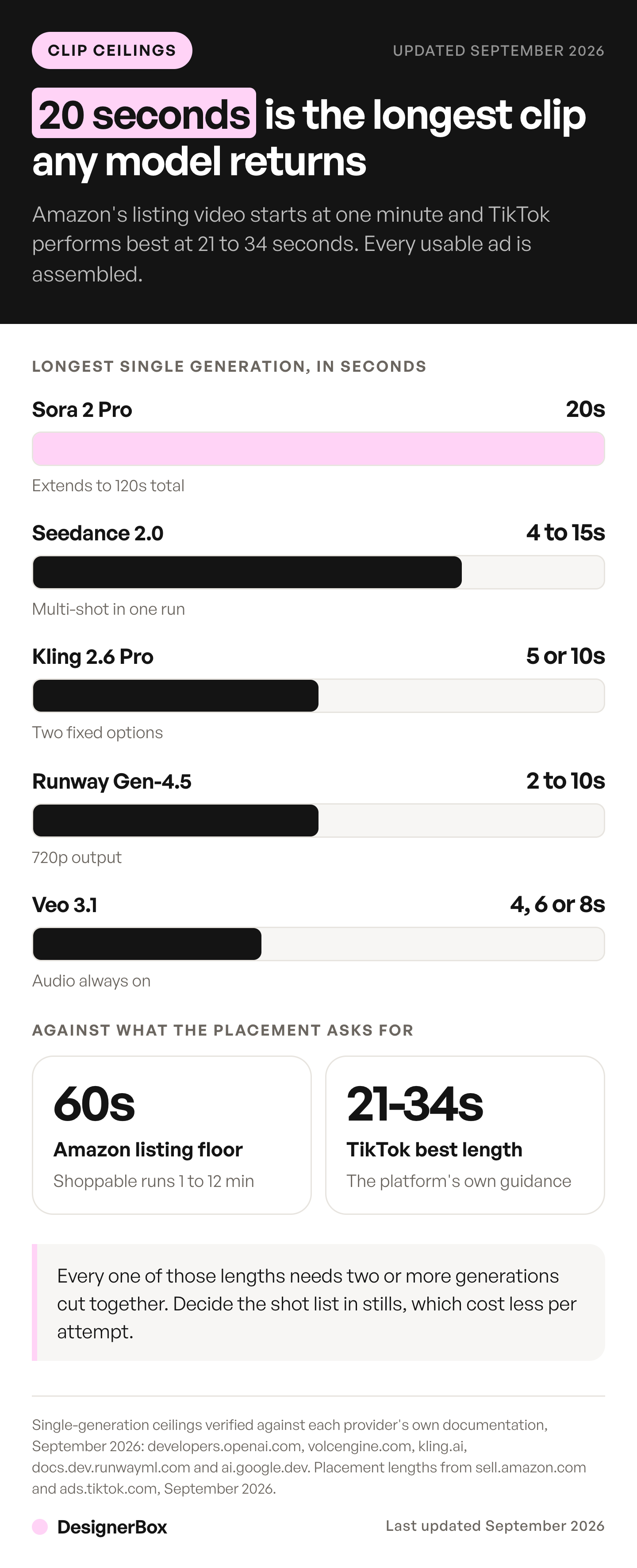
That is the practical shape of the job. Two to four generations, cut together, sized for one placement. A team that plans for one generation per ad will be surprised at the edit, and a team that plans for four will not. What happens after the clips arrive, including the trims and the audio pass, is covered in our guide to editing AI-generated video.
What does an AI product video cost?
In DesignerBox, an 8-second clip costs 40 to 560 credits, depending on the model. A four-shot ad is four runs, plus any retakes. The cost is shown before each run, so you can compare models before you spend.

Fixing the shot list in stills first is still a large saving, because a discarded still costs far less than a discarded 8-second take. The product video template makes a clip from one product photo, and the video ad templates cover the shots an ad needs. Stills and clips sit in the same workspace, so the approval pass and the clips happen in one place. For a wider view of which tools suit which job, the roundup of AI product video generators compares the options.
One workflow for every product
DesignerBox is AI creative production for brands and agencies. Once the four shots work for one product, save them as a workflow. A saved workflow runs the same way on the next product, with the same source-photo anchoring, the same frames and the same lengths. You set the brand once, and the workflow reads it on every run. Publish the workflow as an app, and a colleague adds the next product photo and presses Run. Batch runs one workflow over a whole sheet of products.
Start from a template, add your brand and your products, and run it. The cost is shown before the run. See the templates.
FAQ
What is an AI product video?
An AI product video is a short marketing clip generated from a product photo or a text brief rather than filmed. A model animates the supplied frame and returns one continuous shot, typically 4 to 15 seconds. Multi-shot ads are usually assembled from several generations, since most current models produce a single shot per pass.
How long can an AI-generated product video be?
Until 24 September 2026, Sora 2 Pro generates up to 20 seconds, the longest single generation of the models compared here. OpenAI is removing it from its API on that date. After that, the longest single generation among the other models is 15 seconds, on Seedance 2.0 and Kling 3.0. In the Gemini API, Veo 3.1 clips extend by 7 seconds at a time up to 20 times, reaching 148 seconds at 720p. Anything longer than a single generation is stitched or extended.
Do generated product videos need an AI label?
Each platform sets its own rule. TikTok asks for an AIGC label or your own clear disclosure on ads with fully AI-generated or heavily AI-edited media, and rejects or restricts undisclosed ones. Meta asks advertisers to disclose AI only in ads about social issues, elections or politics, and labels other ads itself when it detects AI signals. YouTube asks creators to disclose realistic AI content. In the EU, Article 50 of the AI Act has required deployers to label deep fakes since 2 August 2026. This is general information, not legal advice.
Does relighting or removing a background count as AI-generated content?
Not on TikTok, and relighting needs no disclosure on YouTube either. TikTok’s advertising policy names lighting, brightness and color saturation adjustments, background removal and denoising as edits that are not significantly modified by AI. YouTube’s exempt list includes color adjustment or lighting filters, and video sharpening, upscaling or repair. Generating a new scene around the product is a different matter.
Why does my product look different in each generated shot?
Because each generation redraws it. A text description of the product gives the model room to reinterpret the label, the proportions and the finish every time. Anchor each shot to the same source photo as a reference image rather than re-describing the product, and state the continuity requirement in the prompt.
How much does an AI product video cost in credits?
In DesignerBox, an 8-second clip costs 40 to 560 credits, depending on the model. A four-shot ad is four runs, and each run shows its cost before you start it. AI video starts on the Premium plan. Deciding the shots in stills first keeps the spend on takes you already know work.
What length should an AI product video be for TikTok?
TikTok’s own advertising guide recommends 21 to 34 seconds, though in-feed auction ads accept video up to 10 minutes. No single generation among these models runs past 20 seconds, and none past 15 once Sora 2 Pro leaves OpenAI’s API on 24 September 2026. A 21 to 34 second ad needs at least two clips cut together.
Can one generated video serve every placement?
No. Amazon Sponsored Brands video accepts 16:9 only and runs 6 to 45 seconds, while Instagram Reels ads want 9:16 and Amazon listing videos need at least a full minute. Plan the placement first, then generate to that frame and length rather than resizing a single master afterwards.
Sources
- Google AI for Developers, Generate videos with Veo: ai.google.dev (accessed September 2026)
- Google AI for Developers, Gemini API pricing: ai.google.dev (accessed September 2026)
- OpenAI, Video generation with Sora: developers.openai.com (accessed September 2026)
- OpenAI, API deprecations (Sora 2 and Sora 2 Pro removal on 24 September 2026): developers.openai.com (accessed September 2026)
- BytePlus ModelArk, Seedance 2.0 video generation documentation: docs.byteplus.com (accessed September 2026)
- Kling AI, video capability map: kling.ai (accessed September 2026)
- Kling AI, Video 3.0 API reference: kling.ai (accessed September 2026)
- Kling AI, video API pricing: kling.ai (accessed September 2026)
- Runway, Creating with Gen-4.5: help.runwayml.com (accessed September 2026)
- Runway, API pricing: docs.dev.runwayml.com (accessed September 2026)
- TikTok Ads Manager Help Center, TikTok Auction In-Feed Ads, last updated June 2026: ads.tiktok.com (accessed September 2026)
- TikTok For Business, Video advertising guide: ads.tiktok.com (accessed September 2026)
- TikTok Advertising Policies, Misleading and false content, last updated April 2026: ads.tiktok.com (accessed September 2026)
- Meta Ads Guide, Instagram Reels video ads: facebook.com (accessed September 2026)
- Meta Business Help Center, AI info labels on ads: facebook.com (accessed September 2026)
- Amazon, Product video specifications: sell.amazon.com (accessed September 2026)
- Amazon Ads, Sponsored Brands video ad specs: advertising.amazon.com (accessed September 2026)
- Shopify Help Center, Product media types: help.shopify.com (accessed September 2026)
- YouTube Help, Shorts classification: support.google.com (accessed September 2026)
- YouTube Help, Disclosing altered or synthetic content: support.google.com (accessed September 2026)
- European Commission, Transparency obligations under Article 50 of the AI Act: digital-strategy.ec.europa.eu (accessed September 2026)
- US Federal Trade Commission, Consumer Reviews and Testimonials Rule questions and answers: ftc.gov (accessed September 2026)
- New York General Business Law section 396-b, synthetic performers in advertising: nysenate.gov (accessed September 2026)
- DesignerBox plans, monthly credits and the video credit range: DesignerBox pricing page (designerbox.ai/pricing), September 2026
Model clip ceilings, platform video specifications and AI disclosure requirements checked against each provider’s, platform’s and regulator’s own published pages as of September 2026. The DesignerBox credit range comes from the DesignerBox pricing page. The 32-second price arithmetic uses the vendors’ API list prices and is illustrative, not a measured result. Model specifications and platform policies change without notice, so confirm against the current documentation before a launch. This is general information, not legal advice. Individual results vary.