The cheapest AI video generator is the one with the lowest cost per usable clip. That cost is the list price of one attempt, multiplied by the attempts a shot needs. At list price, the lowest rates from model vendors start near $0.04 a second in October 2026. Four things move the real number: the price unit, the resolution and length, audio, and attempts.
A cheap AI video generator by monthly fee can be expensive per finished clip. Resolution, sound and rejected clips change the result several times over.
This guide uses only prices that model vendors publish for their APIs. Each one was read on the vendor’s own page on 4 October 2026. It then shows how to turn any price, in dollars or in credits, into a cost per usable clip.
Key Takeaways
- Cheapest means cost per usable clip. Multiply the price of one attempt by the attempts you need for one clip you keep.
- The lowest list rates sit between $0.04 and $0.05 a second. Alibaba, Kuaishou, Google and Runway each publish a rate in that range for a low resolution or a silent clip.
- Resolution moves the price most. Kling 3.0 lists $0.084 a second at 720p and $0.42 at 4K, which is five times as much.
- Audio can double the rate. Runway’s API lists Veo 3.1 at $0.20 a second without audio and $0.40 with audio.
- Attempts decide the bill. In the worked example below, a model at $0.05 a second costs more per kept clip than one at $0.12.
- An open model on your own hardware has no fee per second. You pay for a graphics card, electricity and waiting time.
What is the cheapest AI video generator?
By list price per second, five model vendors publish a rate of about ten cents or less. The table shows the lowest video rate on each vendor’s API price page. It also shows what that rate buys, because the lowest rate is never the top setting.
| Model | Vendor page | Lowest listed rate | What that rate buys |
|---|---|---|---|
| Wan 3.0 | Alibaba Cloud | $0.041 a second, list | 480p |
| Kling 2.6 | Kuaishou | $0.042 a second | 720p, no audio |
| Veo 3.1 Lite | $0.05 a second | 720p, audio included | |
| Gen-4 Turbo | Runway | $0.05 a second | 5 credits at $0.01 each |
| Seedance 2.5 | BytePlus | $0.103 a second | 480p, 5 seconds, no video input |
Sources: Alibaba Cloud model pricing (alibabacloud.com), Kling API pricing (kling.ai), Gemini API pricing (ai.google.dev), Runway API pricing (docs.dev.runwayml.com) and BytePlus ModelArk pricing (docs.byteplus.com), all October 2026. Alibaba’s page showed a limited-time 30% discount on the Wan 3.0 list price that day.
The rows do not rank quality, and they do not last. Google lists 22 October 2026 as the shutdown date for the Veo 3.1 preview models in the Gemini API, with Gemini Omni Flash as the replacement (ai.google.dev, October 2026). The rows show that the lowest rates are close across vendors. One model’s own settings move the price more than the choice of vendor does. Our guide to AI video generation cost holds the full table of rates by resolution for Veo 3.1, Kling and Runway.
The same model can also carry a different price at a different seller. Google lists Veo 3.1 Fast at $0.10 a second at 720p with audio. Runway’s API lists the same model with audio at 15 of its $0.01 credits, which is $0.15 a second. Runway’s page does not split that rate by resolution. Read the price on the page where you will pay.
The price unit: per second, per clip or per credit
Vendors use three units, and you can only compare two prices after you convert them to one unit.

Per second. Google and Kuaishou quote dollars for each second of video. This is the easiest unit to compare.
Per credit. Runway sells API credits at $0.01 each and prices every model in credits. One second of Gen-4.5 takes 12 of them, so it costs $0.12. Most apps you subscribe to also use credits, with their own exchange rate.
Per token or per clip. Google bills Gemini Omni Flash on output tokens, at 5,792 tokens for each second of 720p video. Google says this equals about $0.10 a second.
Check for a minimum charge. Runway’s API sets an 80 credit minimum per generation on Seedance 2.5, which is $0.80. At 480p the rate is $0.20 a second, so any clip under 4 seconds still costs $0.80.
For any credit plan, do one sum. Divide the price you paid by the credits you received. Then multiply by the credits one clip costs at your settings. The result is dollars per attempt, and it is the only number worth comparing.
Resolution and clip length
Resolution is the largest price step inside one model. Clip length multiplies whatever rate you chose.
| Model | Low setting | High setting | Difference |
|---|---|---|---|
| Kling 3.0, no audio | $0.084 a second at 720p | $0.42 a second at 4K | 5 times |
| Wan 3.0, list price | $0.041 a second at 480p | $0.165 a second at 1080p | 4 times |
| Veo 3.1 Fast | $0.10 a second at 720p | $0.30 a second at 4K | 3 times |
| Seedance 2.5, 5 seconds | $0.514 a clip at 480p | $1.156 a clip at 720p | 2.25 times |
Rates from the same five vendor pages, October 2026. The last column is our arithmetic.
One exception is useful. Google lists Veo 3.1 at $0.40 a second for both 720p and 1080p. On that model, the higher resolution costs nothing extra until 4K.
Match the resolution to the place the clip runs. A vertical ad on a phone rarely needs 4K. Run drafts at the lowest setting, then run the chosen shot once at the delivery setting.
Length works the same way. A 10-second clip costs twice a 5-second clip at the same rate. If the edit uses 3 seconds of a shot, a 5-second clip is enough. Product pages are a special case, and affordable AI video for product listings covers the length each marketplace asks for.
Audio on or off
Some vendors include sound in the rate. Others charge more for it. A price comparison that mixes silent and sound rates is wrong before it starts.
- Included. Google labels its Veo 3.1 rates the “video with audio price (default)”. The $0.05 Lite rate already has sound.
- Charged. Kling 3.0 at 720p lists $0.084 a second without native audio and $0.126 with it. That is 1.5 times the silent rate.
- Charged at double. Runway’s API lists Veo 3.1 at $0.20 a second without audio and $0.40 with audio, in credits of $0.01 each.
- Limited by resolution. Kling 2.6 lists native audio at 1080p only, at $0.14 a second. Its $0.042 rate is for silent 720p.
Decide whether the model’s sound will be in the final cut. Many ads use a voiceover or music added in the edit. In that case the silent rate is the right one to compare. If the clip needs speech that matches a mouth, pay for native audio and count it in the price. The guide to AI video generators with sound covers which models make audio natively.
Attempts per usable clip
AI video is not repeatable. The same prompt gives a different clip on each run, and you pay for each one. The cost per usable clip is the price of one attempt multiplied by the attempts for one clip you keep.
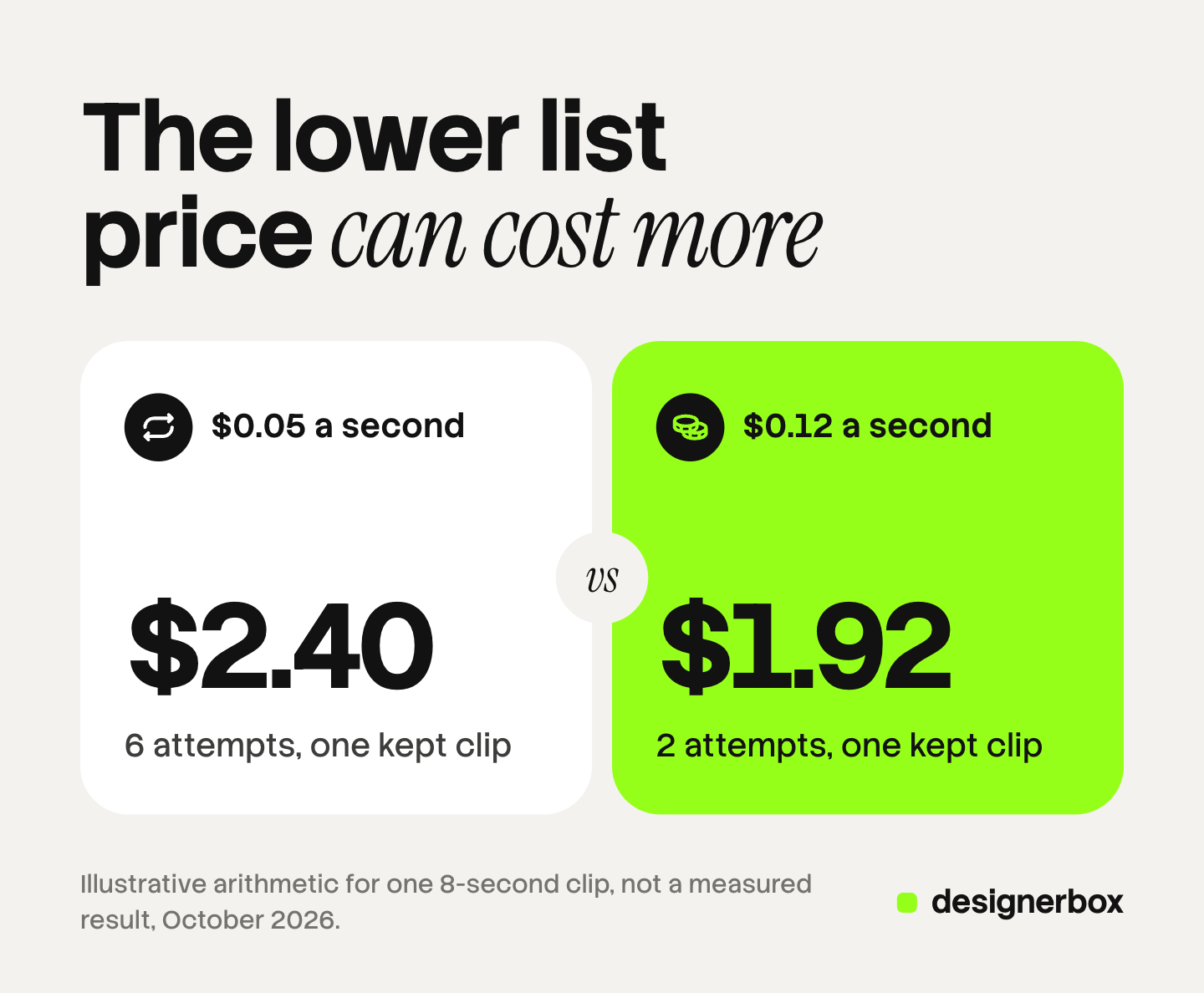
Here is an illustrative sum. It is arithmetic, and it is not a measured result. Take one 8-second clip at 720p.
- Model A costs $0.05 a second, so one attempt is $0.40. The shot needs 6 attempts. The kept clip costs $2.40.
- Model B costs $0.12 a second, so one attempt is $0.96. The shot needs 2 attempts. The kept clip costs $1.92.
Model B has more than twice the list price and the lower cost per usable clip. The numbers of attempts are assumptions. Your own shots give the real ones.
Three things raise the number of attempts: hands, readable text on a product, and a specific camera move. A simple product turn on a plain background needs fewer. The most reliable AI video generator compares models on how often the same input gives a usable clip.
You can lower attempts before you pay for video. Start from a finished still image, because image-to-video keeps the product closer to the photo. Fix the framing in the still. Write one action per clip. Test at the lowest resolution first.
Open models on your own hardware
An open model has no fee per second. You download the weights and run them on your own graphics card. For some teams this is the cheapest answer, so it belongs in any honest list.
Alibaba’s Wan 2.2 is the clearest example. Its repository says the models “are licensed under the Apache 2.0 License”. The small model, TI2V-5B, runs “on a GPU with at least 24GB VRAM (e.g, RTX 4090 GPU)”. Alibaba states that it makes “a 5-second 720P video in under 9 minutes on a single consumer-grade GPU” (github.com/Wan-Video/Wan2.2, October 2026). The larger Wan 2.2 models need a GPU with at least 80GB of memory.
Lightricks also publishes open weights for LTX-2, a model that makes video and audio together (github.com/Lightricks/LTX-2, October 2026). It has its own license. Read the license before you use any open model for paid work.
The trade is time for money. Nine minutes for one 5-second attempt is slow when a shot needs six attempts. You also pay for the card, the electricity and the hours of setup. The newest hosted versions are not always open. The Wan 2.5 API guide explains which Wan versions have open weights and which exist only as an API.
Free plans and app subscriptions
A free plan has a list price of zero and its own costs. Free clips often carry a watermark, a low resolution or terms that exclude commercial use. Free AI video generation compares six providers’ free plans on those three points.
App subscriptions sell credits. The app adds an editor, storage and often several vendors’ models in one place. The plan price pays for those too, so a plan and an API rate are different products. Each app lists its plans on its own pricing page. Use the sum from the price unit section to convert any plan to dollars per attempt.
Check three lines on a plan before you compare it: whether unused credits expire each month, whether the lowest plan allows commercial use, and whether downloads have a watermark.
How to find your cheapest AI video generator
Five steps turn a price list into your own number.
- Write the clip you need. Length, resolution, sound or silent, and where it runs.
- Convert each price to dollars per attempt. Use the rate for your settings, and check for a minimum charge.
- Run the same shot five times on two or three models. Use the lowest resolution. Count the clips you would keep.
- Divide. Dollars spent, divided by clips kept, is the cost per usable clip for that model and that kind of shot.
- Repeat for each kind of shot. A model that wins on product turns can lose on hands.
Do the test again every few months. Vendors change rates and retire models often. If the clips become paid ads, AI video ads cost continues this sum from one clip to one finished ad.

Video clips in a saved workflow
DesignerBox is AI creative production for brands and agencies. It is built for a team that makes the same kind of clip for 20 to 500 products. A team that needs one clip does not need it. Anyone can make an AI picture. Making hundreds that still look like your brand is the hard part.
Attempts are where a saved workflow lowers cost. You build the workflow once with your brand, your product photo and the model for each step. Every run after that uses the same settings, so the test you did on product one applies to product two hundred. Batch runs the workflow over a sheet of up to 200 rows, and you keep or discard each row. The AI video ads page shows the video workflows, and the batch page shows a sheet run.
In DesignerBox, an 8-second clip costs 40 to 560 credits, depending on the model. You see the cost of a run before you press Run. The clip then goes to the video editor in the same workspace. The full workflow from the first product photo to the finished ad, in one subscription.
Here are the limits. DesignerBox has no public API, and it does not send clips to an ad account. You download the results, or send them with a webhook or an S3 step. Every plan below Ultra is one seat. Uploading your own photos and the commercial license start on the Pro plan. AI video, virtual try-on, upscaling, the image editor and the video editor start on the Premium plan. Plans and credits are on the pricing page.
A free plan for a first look
There is a free plan, and it runs on sample products. It cannot make video. Use it to see how a template and a workflow fit together. Get started free
FAQ
What is the cheapest AI video generator?
By list price, Wan 3.0 on Alibaba Cloud at $0.041 a second for 480p and Kling 2.6 at $0.042 a second for silent 720p were the lowest API rates we read (alibabacloud.com and kling.ai, October 2026). By real cost, the cheapest is the model that needs the fewest attempts for your kind of shot.
How much do AI video generators cost?
Model vendors list API rates from about $0.04 to $0.60 a second, depending on the model, the resolution and audio. Google lists Veo 3.1 Lite at $0.05 a second at 720p and Veo 3.1 at $0.60 a second at 4K (ai.google.dev, October 2026). Apps sell the same models through credit plans at their own rates.
Is there a free AI video generator?
Yes, several apps have a free plan, and an open model such as Wan 2.2 has no fee at all. Free app plans usually limit resolution, add a watermark or exclude commercial use. An open model needs your own graphics card with at least 24GB of memory for the small Wan 2.2 model (github.com/Wan-Video/Wan2.2, October 2026).
Does audio make AI video more expensive?
It depends on the vendor. Google includes audio in every Veo 3.1 rate. Kling 3.0 at 720p costs $0.084 a second without native audio and $0.126 with it. Runway’s API charges $0.40 a second for Veo 3.1 with audio and $0.20 without (ai.google.dev, kling.ai and docs.dev.runwayml.com, October 2026).
Is running an open-source video model cheaper than an API?
It can be, if you already own the hardware and make many clips. You pay nothing per second, and you pay in time. Alibaba states that the small Wan 2.2 model makes a 5-second 720p clip in under 9 minutes on one consumer GPU. An API returns the clip faster and needs no setup.
What does an AI video clip cost in DesignerBox?
An 8-second clip costs 40 to 560 credits, depending on the model, and the cost is shown before the run. AI video starts on the Premium plan. Plans and credits are on the DesignerBox pricing page (designerbox.ai/pricing, October 2026).
Sources
- Google, Gemini API pricing: Veo 3.1, Veo 3.1 Fast and Veo 3.1 Lite rates per second, the “video with audio price (default)” label, and Gemini Omni Flash token billing: ai.google.dev, October 2026
- Kuaishou, Kling API pricing: Kling 2.6 and Kling 3.0 rates by resolution and native audio: kling.ai, October 2026
- Runway, API pricing and costs: the $0.01 credit, Gen-4.5, Gen-4 Turbo, Veo 3.1 with and without audio, and the Seedance 2.5 minimum per generation: docs.dev.runwayml.com, October 2026
- Alibaba Cloud, model pricing: Wan 3.0 list price per second by resolution: alibabacloud.com, October 2026
- BytePlus, ModelArk pricing: Seedance 2.5 example prices per video: docs.byteplus.com, October 2026
- Alibaba, Wan 2.2 repository: Apache 2.0 license, 24GB and 80GB memory notes, and the 9-minute figure: github.com/Wan-Video/Wan2.2, October 2026
- Lightricks, LTX-2 repository: open weights for a video and audio model: github.com/Lightricks/LTX-2, October 2026
- DesignerBox plans, the 8-second video credit range and feature gating: DesignerBox pricing page (designerbox.ai/pricing), October 2026
Model vendor prices were read on each vendor’s own API pricing page on 4 October 2026. Rates in this category change often, so check the page before you budget. The worked example is illustrative arithmetic. Individual results vary.