




An AI video agent is software that takes a brief, plans the video, writes the prompts, chooses the model and settings, and runs a video tool. It takes three forms: an agent built into a video tool, a general AI chat connected to a video tool, and a coding agent in a terminal. In all three, a video model renders the frames and the tool’s credits pay for them.
The name covers products that work in different ways. One vendor’s agent builds a finished video with a presenter. Another vendor’s agent is a connector that lets Claude or ChatGPT call its tools. This guide explains the three forms and what the agent decides for you. It then gives a brief you can copy and five checks to run before a clip ships.
Key Takeaways
- An AI video agent plans and runs the work. You write a brief. The agent writes the prompts, picks the model and starts the run.
- It takes three forms. An agent inside a video tool, an AI chat with a connector, and a coding agent with a command-line tool.
- The chat model does not render video. Claude and ChatGPT call a video tool. The tool’s model makes the clip, and the tool’s credits pay for it.
- The agent makes choices you used to make. The prompt, the model, the length and the aspect ratio. State the ones you care about in the brief.
- A brief has seven lines. Subject, setting, length, aspect ratio, model, references and a cost check.
- Check five things before a clip ships. The brief, the product and logo, the text, the aspect ratio and which model ran.
What is an AI video agent?
An AI video agent is a program that receives a goal for a video and then decides the steps itself. It writes each prompt, chooses a video model, sets the length and the format, and calls the tool that renders the clip. You review the result and ask for changes.
Anthropic’s engineering guide draws the line between an agent and a workflow. Workflows are “systems where LLMs and tools are orchestrated through predefined code paths”. Agents are “systems where LLMs dynamically direct their own processes and tool usage” (anthropic.com, October 2026). In a workflow, you fixed the steps in advance. In an agent, the model chooses the next step.
A video generator takes one prompt and returns one clip. A video agent takes a brief and may run many steps before you see anything. Agent orchestration explains the patterns behind those steps.
The three forms of AI video agent
The three forms differ in where you type and in how the agent reaches the video tool. Each row was read on the vendor’s own pages on 4 October 2026.
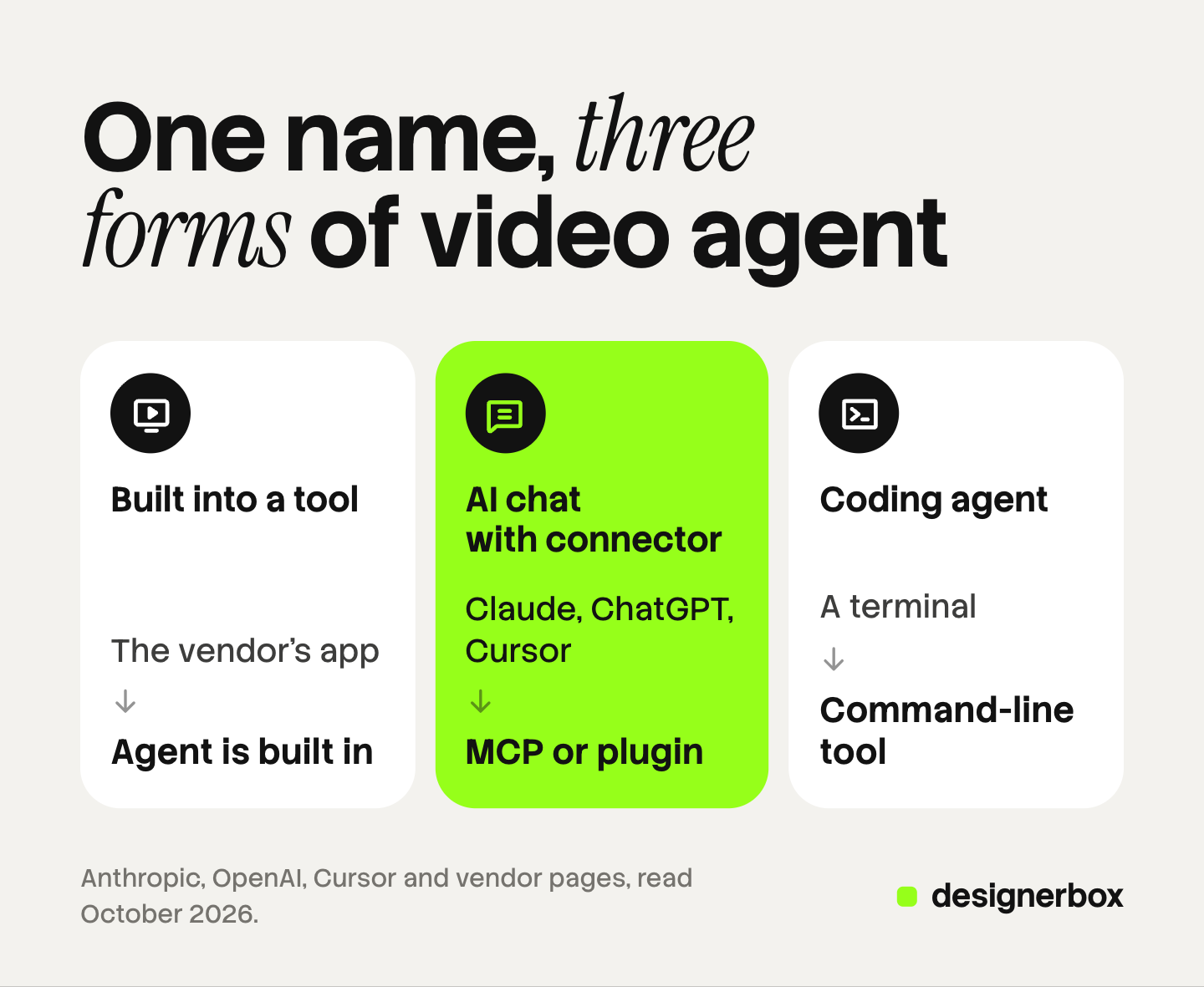
| Form | Where you work | How it reaches the video tool | Fits |
|---|---|---|---|
| Agent built into a video tool | The vendor’s app | It is part of the tool | A team that wants one finished video from one brief |
| AI chat with a connector | Claude, ChatGPT or Cursor | An MCP connector or a plugin | A team that already works in an AI chat |
| Coding agent with a command-line tool | A terminal | A command-line tool or an MCP server | A developer who makes video as part of a script |
No form is better than the others. The first hides the most choices. The third shows the most.
Agents built into a video tool
In this form the agent is a feature of a video product. You type a brief, and the agent builds the video inside that product.
HeyGen’s Video Agent turns a prompt into a video with a presenter. HeyGen says it “produces motion graphics, visual overlays, explanatory animations, and B-roll footage as part of a cohesive narrative”, with a preview before you render (heygen.com, October 2026).
Agent Opus, from the company behind OpusClip, makes videos for social media. Its page says it can “generate full story videos from your scripts, voice, and brand assets” (opus.pro, October 2026).
The invideo agent works on longer productions. Invideo says it runs the script breakdown, storyboards, shot generation, voices and music, and “selects the model per shot”. In its Always Ask mode, you approve every prompt before a generation spends credits (invideo.io, October 2026).
A built-in agent knows its own tool well. It works only inside that tool, with the models that vendor offers.
An AI chat connected to a video tool
In this form the agent is a general AI chat. You connect it to a video tool once. After that, the chat calls the tool when your message asks for a video.

The connection usually runs over the Model Context Protocol. Anthropic’s documentation calls MCP “an open source standard for AI-tool integrations” (code.claude.com, October 2026). Each chat adds a connector in its own way:
- Claude. Open Customize, then Connectors. Click ”+ Add”, then “Add custom connector”. Enter a name and the server’s URL (support.claude.com, October 2026).
- ChatGPT. Turn on Developer mode under Settings, then Security and login. Then create an app for the remote MCP server from the Plugins page (developers.openai.com, October 2026). Some vendors publish a ready plugin, so there is no URL to paste.
- Cursor. Install a server from the Customize page, or add it to the mcp.json file. Cursor “asks for approval before using MCP tools by default” (cursor.com, October 2026).
Several video vendors now publish a connector. Invideo announced an MCP server on 30 September 2026 (invideo.io, October 2026). HeyGen’s site links a HeyGen plugin for ChatGPT (heygen.com, October 2026). Higgsfield connects to Claude as a custom connector, to ChatGPT as a plugin and to terminal agents through a command-line tool (higgsfield.ai, October 2026).
The chat model does not make the video. Anthropic’s help center says “Claude doesn’t generate photos or illustrations the way image-generation tools do” (support.claude.com, October 2026). OpenAI closed its own video product: “As of April 26, 2026, the Sora product is no longer available” (openai.com, October 2026). OpenAI also removed the Sora 2 models from its API on 24 September 2026 (developers.openai.com, October 2026). So in both chats, a connected tool renders the clip.
For the setup in one client, see how Claude works as a video generator and how to add an MCP server to ChatGPT.
A coding agent with a command-line tool
In this form the agent runs in a terminal, as Claude Code does. It reads files, runs commands and calls tools on your computer.
A coding agent reaches a video tool in two ways. It can add an MCP server with one command that takes a name and a URL (code.claude.com, October 2026). Or the vendor ships a command-line tool, and the agent runs it like any other program.
This form suits video that is part of a larger job. Anthropic says Claude Code can run “programmatically from the CLI, Python, or TypeScript” (code.claude.com, October 2026). A script can ask for ten clips, save the files and name them. The cost is setup: someone has to be comfortable in a terminal.
A coding agent often needs written instructions as well as tools. Skills vs MCP covers how the two fit together.
What does a video agent decide for you?
An agent makes the choices you made by hand in a video generator. That saves time, and it means a choice can be made without you.
| Decision | What the agent does | What it costs you in control |
|---|---|---|
| Prompt | Rewrites your brief into a detailed prompt | You may never read the prompt that ran |
| Model | Picks a video model for each shot | Price and look change with the model |
| Length and resolution | Sets the seconds and the pixel size | Longer and larger clips cost more credits |
| Aspect ratio | Picks landscape, square or vertical | A wrong ratio means a new run |
| Number of takes | Decides how many versions to make | Each take spends credits |
Anthropic’s guide says it plainly: “The autonomous nature of agents means higher costs, and the potential for compounding errors” (anthropic.com, October 2026). A wrong prompt in step one becomes a wrong clip in step three.
You keep control in two ways. State the choices you care about, and tell the agent to ask before it spends. Both go into the brief below.
How to brief an AI video agent
A brief for a video agent has seven lines. Each line removes one choice from the agent.
- Subject. What is in the frame. Name the product and attach its photo.
- Setting. Where it is, and the light. One sentence is enough.
- Length. The seconds you need. Ask for one shot per clip.
- Aspect ratio. Vertical 9:16 for Reels and TikTok, 16:9 for a website, 1:1 for a feed.
- Model, if you care. Name it. If you do not name one, ask the agent to tell you which model it picked.
- References. The product photo, the logo file and a frame you like.
- Cost check. End with “show me the cost and wait for my yes”.
Here is a brief that uses all seven lines:
Make one 8-second clip of the attached ceramic mug on a wooden kitchen counter in morning light. Slow push-in, no people, no text on screen. Vertical 9:16. Use the attached photo and logo file as references. Tell me which model you will use. Show me the cost and wait for my yes before you run it.
The last line matters most. ChatGPT asks before a write action by default (OpenAI developer mode guide, above). The line in your brief makes the agent state the cost in words as well.
The prompt still decides most of the result. The AI video prompting guide covers camera moves, light and motion words.
Five checks before the clip ships
An agent cannot judge the clip for you. A chat model reads the tool’s answer, and that answer is often a link to the file. Watch every clip yourself, at full size, before it ships.
- It matches the brief. The subject, the setting, the length and the camera move are the ones you asked for.
- The product and the logo are not warped. Compare the shape, the color and the label against the real photo. Stop on three frames: the first, the middle and the last.
- Every word on screen is correct. Video models can misspell text. Read the label and any caption letter by letter.
- The aspect ratio is right. Open the file and check the pixel size. Do not trust the preview in the chat.
- You know which model ran. Write it down with the cost. The next brief can then name the model that worked.
A clip that fails a check goes back with one clear note, such as “the logo bends in the last second, run it again with the same settings”. AI creative agents covers which parts of the quality check a team keeps.

Limits of agentic video generation
Four limits apply to every form.
- The chat does not make the video. A video model inside the connected tool renders the frames, and the quality depends on that model.
- Each run spends the tool’s credits. Your chat subscription does not pay for the clip. Invideo, for example, says generation “uses invideo credits, and your chosen assistant’s plan requirements still apply” (invideo.io, October 2026). Higgsfield says runs through its connector, command-line tool and plugin use its credits (higgsfield.ai, October 2026).
- One clip at a time. A chat works through a list row by row. For a whole catalog, look for a batch feature in the tool itself.
- The agent does not see the clip the way you do. It reads the tool’s answer. Your eyes are still the review.
Agentic video editing has the same limits. An agent that cuts clips on a timeline still needs you to watch the final cut.
Video workflows from an AI chat
DesignerBox is AI creative production for brands and agencies. Anyone can make an AI picture. Making hundreds that still look like your brand is the hard part.
DesignerBox runs inside an AI chat such as Claude, ChatGPT or Cursor over MCP, which is the second form in this guide. The chat runs a workflow you built once, with your brand, your products and your rules. The workflow reads your brand profile before every run, so the tenth product video follows the same rules as the first. The DesignerBox MCP page shows how to connect each chat.
Other vendors offer an MCP server too. In DesignerBox, the chat runs the same templates, workflows and apps that your colleagues run in the app. The full workflow from the first product photo to the finished ad, in one subscription.
The cost is shown before the run. Your chat can read what each model costs and how many credits you have left, and your chat app asks you to confirm the call. An 8-second clip costs 40 to 560 credits, depending on the model. Video runs in the background: the chat sends the job, checks its status and then gives you the file (DesignerBox MCP page, October 2026).
Here are the limits. A chat works one row at a time. For a sheet of products, batch runs one workflow over every row, from row one to row two hundred. You download the results, or send them with a webhook or an S3 step. Every plan below Ultra is one seat.
Uploading your own photos and the commercial license start on the Pro plan. AI video, virtual try-on, upscaling, the image editor and the video editor start on the Premium plan. Plans and credits are on the pricing page.
An agency that makes video for several clients can keep one workflow for each client. See DesignerBox for agencies
FAQ
What is an AI video agent?
An AI video agent is software that takes a brief in plain words and does the steps to make a video. It writes the prompts, picks the model and the settings, and runs a video tool. You review the result and ask for changes.
Can Claude or ChatGPT make a video on their own?
No. Anthropic says Claude does not generate photos or illustrations the way image tools do, and OpenAI’s Sora product has been closed since 26 April 2026 (support.claude.com and openai.com, October 2026). Both chats make video by calling a connected tool.
What is the best AI agent for video creation?
It depends on where you work. A built-in agent fits a team that wants one finished video from one brief. A chat with a connector fits a team that already works in Claude, ChatGPT or Cursor. A coding agent fits a developer who makes video inside a script.
What does an AI video agent cost?
You pay twice. The AI chat or the coding agent has its own plan. Each video run then spends credits in the video tool. Ask the agent to show the cost before every run, and check each vendor’s own pricing page.
Can a video agent make many clips at once?
A chat works through a list one clip at a time. For many products, use a batch feature in the video tool itself. In DesignerBox, batch runs one workflow over a sheet of up to 200 rows.
Sources
- Anthropic, “Building effective agents”: the definitions of workflows and agents, and the note on cost and compounding errors: anthropic.com, October 2026
- Anthropic, “Get started with custom connectors using remote MCP”: support.claude.com, October 2026
- Anthropic, “Can Claude produce images?”: support.claude.com, October 2026
- Claude Code documentation, connecting tools through MCP: code.claude.com, October 2026
- Claude Code documentation, running Claude Code from scripts: code.claude.com, October 2026
- OpenAI, ChatGPT developer mode: plans, menu path and confirmation of write actions: developers.openai.com, October 2026
- OpenAI, “Sora 2 is here”, with the notice that the Sora product closed on 26 April 2026: openai.com, October 2026
- OpenAI API deprecations, the Sora 2 models and the Videos API removed on 24 September 2026: developers.openai.com, October 2026
- Cursor documentation, Model Context Protocol: cursor.com, October 2026
- Vendor pages for HeyGen Video Agent, Agent Opus, the invideo agent and invideo MCP, and Higgsfield’s connection guide (heygen.com/agent, opus.pro/agent, invideo.io/faq, invideo.io/news, higgsfield.ai help center), October 2026
- DesignerBox MCP page (designerbox.ai/mcp) and DesignerBox pricing page (designerbox.ai/pricing), October 2026
Vendor features and menu paths checked against each company’s own pages as of October 2026. Chat clients change their menus often, so check your own settings. Individual results vary.


