Character consistency in AI video comes from anchoring every clip to the same reference image instead of describing the character in words. Reuse one identity image across generations, keep the description line identical, hold motion and lighting modest, and chain the last frame of each clip into the next. The model you pick sets how strong that anchor holds.
You generate a presenter for a product video. The first clip looks right. The second clip, same prompt, gives you a face that is close but wrong: the jaw is heavier, the hair parts the other way, the person is a sibling of the one you approved. Cut them together and the drift is obvious. Nobody watching believes it is the same person.
Character drift is one of the hardest things to get right in AI video, and you can fix most of it. This guide covers why a character drifts between clips, the one rule that stops it, which models hold a face and how, what each approach costs, and the specific failures that still happen. It is written for agencies and brand teams producing character-driven or presenter-led video.
Key Takeaways
- Consistency is a reference problem more than a prompt problem. A text description of a face is reinvented on every clip. A reference image is reused. The fix is a picture. If the character recurs across a whole campaign rather than one video, build it as an AI brand character first.
- Anchor every clip to the same image. One identity image, fed into every generation, is what keeps the face from resetting between shots.
- The models hold a character through different inputs. Veo 3.1 uses Ingredients to Video with up to three images, Seedance 2.0 takes up to nine images, and Kling 3.0 uses Elements. Some models take only a first frame. Same idea, different limits.
- Chain the frames for a sequence. Export the last frame of one clip and use it as the reference for the next. The character carries forward instead of resetting after a cut.
- Keep motion and light modest. Aggressive camera moves and jumping color temperature give the model more room to drift. Spread big motion across several clips.
- Build the anchor on the cheap step. An image run costs less than even the cheapest 8-second clip, and an avatar run returns nine fixed poses of one person. Iterate the reference, then spend once on the anchored take.
- Expect a strong hold with some drift. The reference features in the table below moved this from experimental to production-ready. They did not make it flawless. Check every shipping clip.
Why a character drifts between clips
An AI video model redraws the character in every frame, 24 or more times a second, and each frame is a new estimate of what the character looks like. Give it only a text description and it guesses slightly differently each time. Over a five-second clip that is 120 chances to drift, and the drift compounds the longer the sequence runs.
Character drift is a known, measured problem across tools. The EntityBench benchmark found that “cross-shot entity consistency degrades sharply with recurrence distance” in existing methods, meaning the further apart two appearances of a character are, the more they diverge (arXiv:2605.15199, May 2026). Text-to-video models generate each shot independently, with no persistent identity for a recurring subject, so small variations accumulate into visible identity drift.
A prompt alone cannot fix drift, because words are lossy. “A woman in her thirties, brown hair, green jacket” describes a million faces. The model picks a different one from that space every time you run it. You cannot write a face precisely enough to pin it. You have to show the model the face.
Character consistency in AI video: anchor to a reference image
Every reliable consistency workflow reduces to the same move. Stop describing the character and start feeding the model a fixed image of them on every clip. The reference is the anchor. The prompt only controls what the anchored character does and where.
That splits the work into four moves.
Build one reference, then reuse it
Generate or shoot a single clean image of the character: front-facing, even lighting, neutral expression. This is the identity every clip inherits. For a character that needs to hold across angles, build a small set instead of one frame. In DesignerBox, Kontext Multi, one of the image models, combines several reference images into one image of the character. An avatar run returns nine fixed poses, so you get the same face from several angles to draw on. Spend your iteration here, on the cheap image step, before the video step.
Lock the identity line in the prompt
Write the character description once and paste it identically into every clip. Change only the scene, the action, and the camera. The instant you rewrite “brown hair” as “chestnut hair” between clips, you have told the model to pick a new face. Keep the identity half of the prompt frozen and let the environment half move. Where that identity line sits in the prompt depends on the model, because the major guides document five different prompt structures.
Keep motion and framing restrained
Fast camera moves and dramatic action force the model to redraw more, and more redraw is more drift. Shorten the clip, slow the move, and keep the character at a similar distance from camera across shots. When a shot genuinely needs big motion, build it across several linked clips rather than asking one generation to do everything.
Chain frames for a sequence
For narrative video where clips run back to back, export the final frame of each clip and feed it as the reference or start frame for the next. The character carries forward with its exact appearance from the previous shot, so the identity does not reset at the cut. This is the difference between a sequence that reads as one person and a montage of near-copies.
Which models hold a character, and how
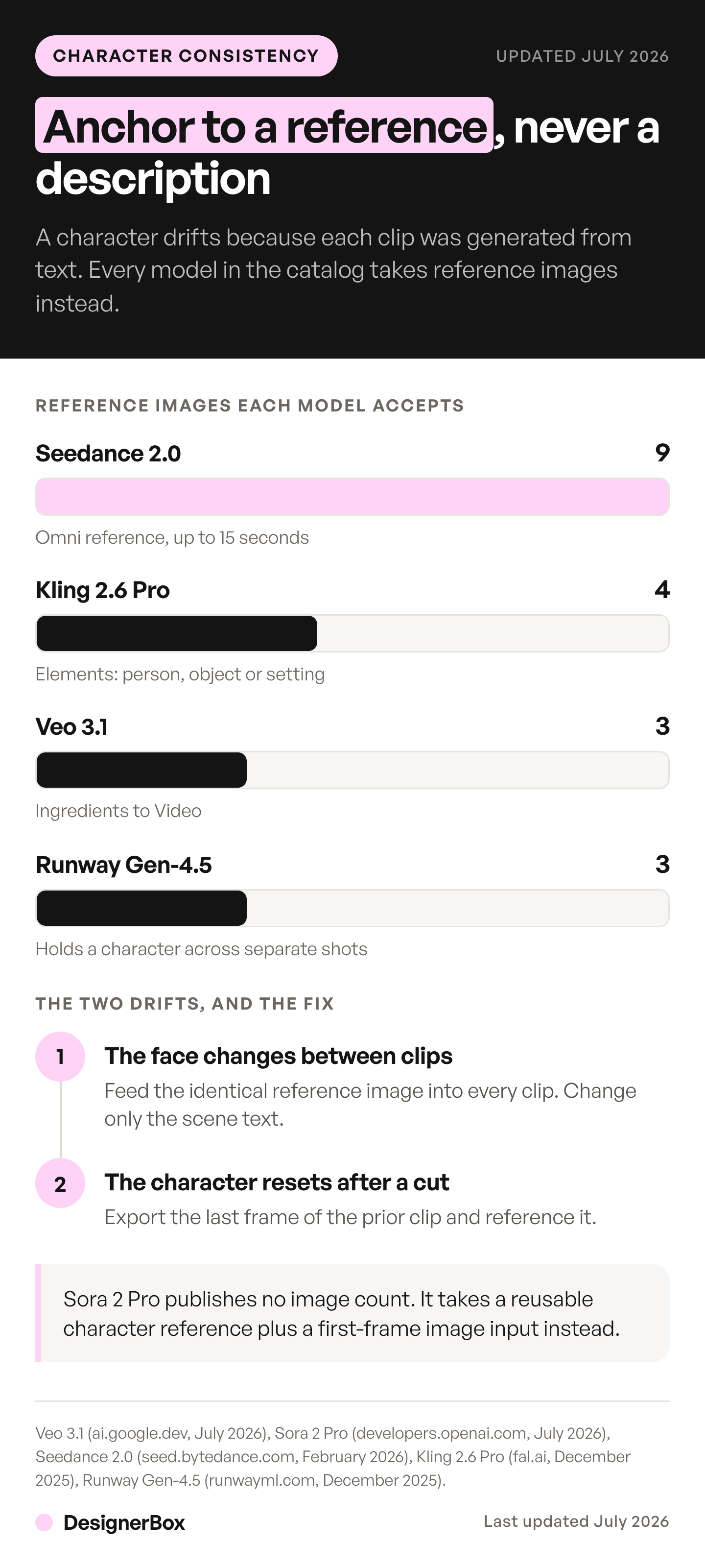
Most current video models accept an anchor, either reference images or a first frame, but the feature has a different name and a different limit on each. Pick the anchor per shot, so the decision follows the shot rather than whichever tool the clip happens to be in. Specs verified against each provider’s documentation on the dates shown. For the wider view, the video models are scored on planability, where reference count is one of four axes. Anchors get chosen once, at the planning stage, so locking a character before you generate the frames is where this decision belongs.
| Model | Provider | How you anchor a character | Best for |
|---|---|---|---|
| Veo 3.1 | Ingredients to Video: up to 3 reference images of a single person, character, or product (ai.google.dev, October 2026) | Narrative shots where the face and the audio both have to match | |
| Veo 3.1 Fast | Same reference input, at a lower price per second in the Gemini API (ai.google.dev, September 2026) | Blocking a sequence before you commit credits | |
| Seedance 2.0 | ByteDance | Up to 9 images, 3 video clips and 3 audio clips as reference, in takes of up to 15 seconds. Real human faces need ByteDance’s consent and face check (seed.bytedance.com and docs.byteplus.com, September 2026) | Longer takes that hold a single character |
| Kling 3.0 | Kuaishou | Elements: up to 3 per clip, each built from 2 to 4 reference images or a video (kling.ai, September 2026) | A character across a multi-shot clip, with dialogue |
| Kling 2.6 | Kuaishou | A first frame and an optional last frame, and no reference images (kling.ai, September 2026) | Chaining clips with the last-frame method above |
| Runway Gen-4.5 | Runway | A first frame only. Runway’s three-image references run on its image model (docs.dev.runwayml.com, September 2026) | Animating a frame you already anchored as a still |
| Sora 2 Pro | OpenAI | A reusable character reference, which must be non-human, plus a first-frame image input (developers.openai.com, September 2026) | Removed from OpenAI’s API on 24 September 2026 |
OpenAI removed Sora 2 and Sora 2 Pro from its API on 24 September 2026 (OpenAI API deprecations, accessed October 2026). Sora alternatives by job lists what replaces it for each kind of shot. For takes longer than 8 seconds, Seedance 2.0 and Kling 3.0 run up to 15 seconds.
Two notes come from the providers themselves. Google frames Ingredients to Video as keeping “your characters looking the same even as the setting changes” (blog.google, published January 2026, accessed October 2026), which is the exact job here. Read that phrasing carefully, because it marks the boundary of the technique. Holding the person is a different problem from holding the location across shots. A sequence needs both to read as one shoot, and physics failures form a third category that neither anchor touches. ByteDance, launching Seedance 2.0, noted “room for optimization regarding multi-subject consistency” (seed.bytedance.com, published February 2026, accessed October 2026), which is your warning that two characters in one shot is still the hard case. For a fuller breakdown of which video model suits which job, see our guide to picking an AI model for product video.
Reference anchoring also raises a rights question the technique itself does not answer. If your “character” is a real person’s face, holding it consistent across a campaign is a likeness use, so get the person’s consent first. A standard model release often does not cover it. This is general information, not legal advice. We cover that line in detail in how AI head swap works and what commercial use requires.
The cost of each approach
The economics reward the reference-first workflow, because the two steps are priced very differently and you see both costs before you run them.
Building the anchor is inexpensive. An image run costs less than even the cheapest 8-second clip, and a nine-pose avatar run is enough to hold a character across angles. You can iterate on a reference several times before you spend anything on video.
Video costs more, and the model sets the price. An 8-second clip costs 40 to 560 credits, depending on the model. So the sequence has three steps. Lock the reference on the cheap image step. Block the shot on a lower-cost video model to confirm the character holds through the motion. Then run the premium model once, on the take you ship.
There is a free plan. It runs on sample products and cannot make video. AI video and the video editor start on the Premium plan. The full per-second math is in our breakdown of what AI video costs. Plans and credits are on the pricing page.
Where characters still drift, and the fix
Even with a reference in place, a few failures recur. Each has a specific cause and a specific fix, and none of them is “write a better prompt.”
| What you see | Why it happens | The fix |
|---|---|---|
| The face changes shape between two clips | Each clip was generated from the text description instead of a shared image | Feed the identical reference image into every clip. Change only the scene text. |
| The character resets after a scene cut | The new clip had no visual anchor from the previous shot | Export the last frame of the prior clip and use it as the reference for the next. |
| Features smear when the camera moves fast | Aggressive motion gives the model more frames to redraw and drift through | Shorten the clip and slow the move. Spread big motion across several linked clips. |
| The character ages or restyles between shots | Lighting direction and color temperature jumped between generations | Keep the light and color the same, and describe them the same way every time. |
| Two characters blend traits in one shot | The model merged two identities with no separation | Anchor each with its own reference, name them distinctly, and generate them in separate passes when you can. |
The last row is the current frontier. Single-character consistency is production-ready with the reference features above. Two or more recurring characters in the same frame is where even the models in the table above still slip, which the Seedance launch note says outright. When a shot needs two consistent characters, isolate them: generate each against its own reference, then composite, rather than asking one generation to hold both.
The same presenter on the next product
Character consistency is a chain: build a reference, hold it across clips, and run the same setup again for the next campaign. DesignerBox is AI creative production for brands and agencies. It is built around the whole chain.
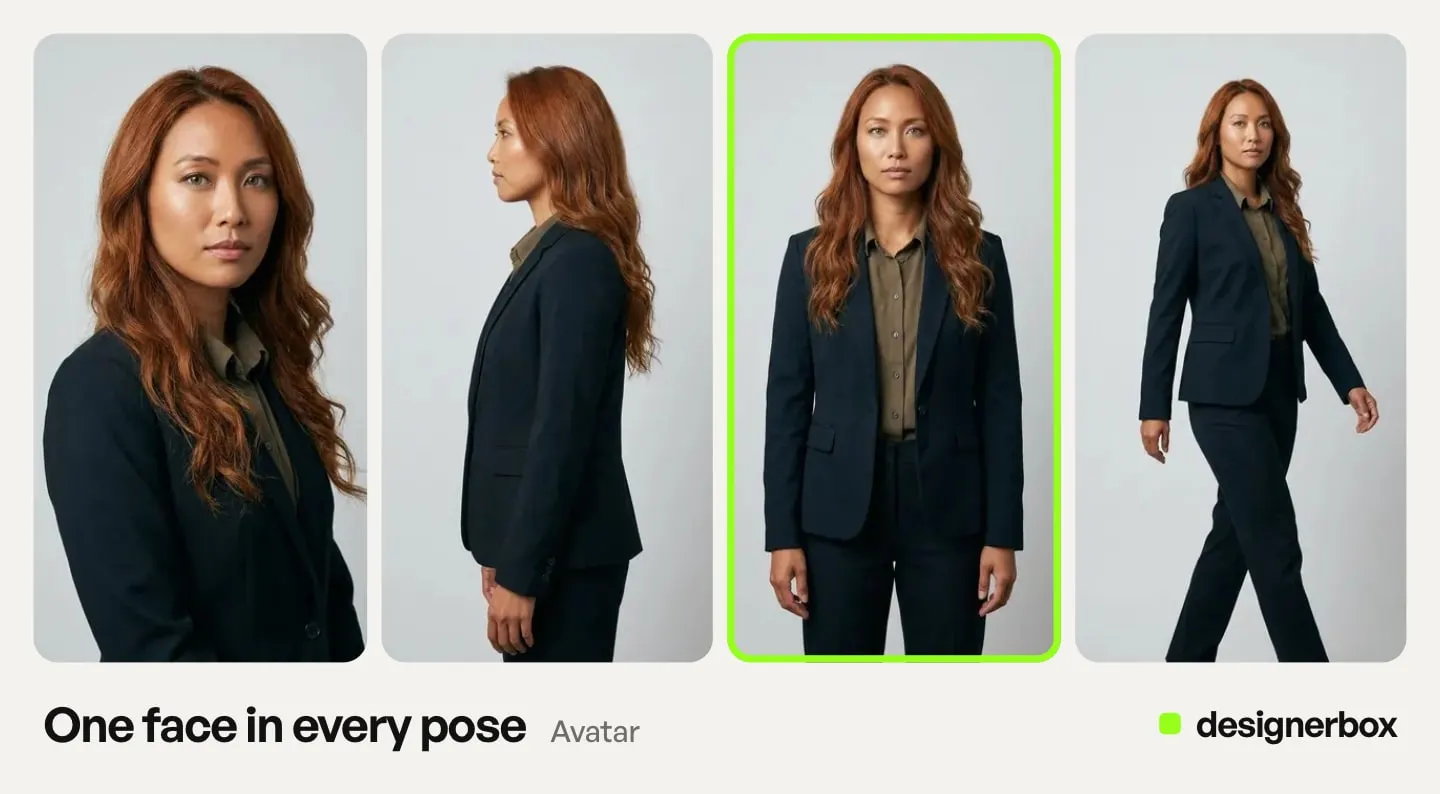
Make the character in Avatars. Every avatar is a set of nine poses, and you use it in Generate, Video with a person and the video editor. The reference, the clips, the brand rules, the video timeline and the finished files sit in one account. The presenter you approved is stored next to the clips that used it. You set the brand once, and the workflow reads it on every run. The workflow then applies the same brand rules to every clip in the set.
You build the job once as a workflow. The reference, the identity line, the model and the motion settings live in the workflow. Every later clip reads the same record instead of a person remembering which photo to start from. Kontext Multi builds the reference on the image side, and you choose the video model per shot in its own step. The model list shows what each one does.
Run it again for the next product, drop, or client, and the presenter you locked once comes back the same. For a drawn or stylized brand character, how to keep an AI mascot consistent applies the same method. For a virtual presenter that fronts paid campaigns, AI influencer marketing covers how to test a character before you keep one. Publish the workflow as an app, and a colleague completes a form and presses Run. This is the video-length version of the same argument in our piece on why AI brand assets drift and how to stop it.
The limit: a reference keeps a character close to it, with some drift left. Check every clip against your reference before it ships.
To start, make an avatar, then run the Video with a person app with it. See the templates.
FAQ
Why do AI video models struggle with character consistency?
Because a video model redraws the character in every frame. Without a shared visual anchor, it re-estimates the character on each frame and each clip, and the small differences compound. Research on the problem finds that cross-shot consistency “degrades sharply with recurrence distance,” meaning the further apart two shots of a character are, the more they drift (arXiv:2605.15199, May 2026).
Do all AI video models support reference images?
No. Many do, under different names, and some take only a first frame. Veo 3.1 has Ingredients to Video, with up to three images. Seedance 2.0 takes up to nine images, and Kling 3.0 has Elements. Kling 2.6 and Runway Gen-4.5 take a first frame and no reference images. The number of references and the strength of the hold differ by model, so verify the current limits before you rely on one.
How many reference images do I need?
One clean, front-facing image is enough to hold a single look. To keep a character consistent across angles and expressions, use a small set. Veo 3.1 accepts up to 3 subject images (ai.google.dev, September 2026), and a DesignerBox avatar run returns nine fixed poses of the same face to draw from. Runway’s 3-reference feature runs on its image model rather than on Gen-4.5. Kling 2.6 takes no reference images, so Kling publishes no reference cap for it. The per-model breakdown is in AI character reference images.
Can I keep the same character across multiple clips?
Yes. Feed every clip the same reference image, keep the identity description identical, and for back-to-back sequences export the last frame of each clip to anchor the next. That frame chaining is what carries the exact appearance forward instead of letting it reset at the cut.
Can I keep a brand presenter or avatar consistent across a campaign?
Yes, and it is the strongest use of the technique. Build the presenter once as a reference or a nine-pose avatar set, then reuse that anchor on every clip and save it as a workflow. The same face comes back for the next video without rebuilding it.
Can I keep two characters consistent in the same video?
This is the hard case. Current models hold one anchored character well but still blend traits when two recurring characters share a frame, which ByteDance acknowledged at the Seedance 2.0 launch. The workaround is to anchor each character with its own reference, name them distinctly, and generate them in separate passes where the shot allows. The full method, and what each model documents about character counts, is in the guide to putting two characters in one AI image.
Is perfect character consistency possible yet?
No. The reference features in the model table moved character consistency from experimental to production-ready, and some drift remains. Expect a strong hold with occasional drift, especially on long takes, fast motion, and multi-character shots. Check every clip you plan to ship against your reference.
Sources
- Cross-shot entity consistency degrading with recurrence distance, from the EntityBench benchmark: arXiv:2605.15199 (arxiv.org, May 2026)
- Veo 3.1 Ingredients to Video and its limit of three reference images: ai.google.dev, accessed October 2026. Veo 3.1 Fast pricing: Gemini API pricing, September 2026
- Google’s own framing of Ingredients to Video keeping characters the same as the setting changes: blog.google, published 13 January 2026, accessed October 2026
- Sora 2 Pro non-human character reference and first-frame image input: OpenAI video generation guide, September 2026
- Sora 2 and Sora 2 Pro removal from OpenAI’s API on 24 September 2026: OpenAI API deprecations, accessed October 2026
- Seedance 2.0 reference limits and ByteDance’s multi-subject consistency caveat: seed.bytedance.com, published February 2026, accessed October 2026
- Seedance 2.0 15-second clip length and real-face rules: docs.byteplus.com, September 2026
- Kling 3.0 Elements and Kling 2.6 first and last frame input: Kling capability map, September 2026
- Runway Gen-4.5 first-frame input, and Runway’s three-image references on its image model: docs.dev.runwayml.com, September 2026
- DesignerBox plans, credits and feature gating: DesignerBox pricing page (designerbox.ai/pricing), September 2026
Model reference and consistency features verified from provider documentation (Google, OpenAI, ByteDance, Kuaishou, Runway) and the EntityBench benchmark as of September 2026. Google’s Veo guide and Ingredients to Video post, ByteDance’s Seedance 2.0 launch post, OpenAI’s deprecations page and the EntityBench abstract were re-checked on 2 October 2026. This category moves monthly; re-verify a model’s features before you rely on them. Individual results vary.