The best ComfyUI alternative depends on one question: do you keep the GPU, or rent one? If you want free, local and fully controllable, SwarmUI, InvokeAI and Automatic1111 run the same open-weight models on your own hardware. If you want no install and no graphics card, hosted ComfyUI services run the same graphs on rented hardware. Brand teams usually need the second lane plus a licensing answer.
ComfyUI costs nothing to download. The rest of the setup does. The Comfy Registry lists 5,472 published custom node packs (Comfy Registry API, api.comfy.org/nodes, measured 6 September 2026), and a graph that calls a pack a colleague has not installed will not run until they install it. Then there is the card: FLUX.1 [dev] needs over 23 GB of VRAM in plain FP16, and the RTX 5090 starts at $1,999 (nvidia.com, September 2026).
This guide covers both lanes the search splits into: free local front ends, and hosted services that rent the GPU by the hour or the month. It is written for a brand or agency team with no ML engineer, and it also covers the model weights license. If you would rather not own a graph at all, how the four stages fit together is the hosted shape of the same job.
Key Takeaways
- Free and local still wins on control. SwarmUI (MIT), InvokeAI (Apache 2.0) and Automatic1111 (AGPL-3.0) cost nothing and keep every checkpoint on your drive.
- Hosted ComfyUI removes the install, not the graph. Comfy Org runs a first-party hosted version and lists its plans on its own pricing page (comfy.org/pricing, September 2026).
- The graphics card is the real bill. On RunPod Secure Cloud an RTX 4090 runs $0.74 an hour and an A100 80 GB $1.59 (runpod.io/pricing, September 2026). A local RTX 5090 starts at $1,999.
- Custom nodes are the strength and the maintenance load. Each of the 5,472 node packs runs Python with the same privileges as the server process. Workflow JSON only moves between tools running real ComfyUI.
- The weights carry their own license. FLUX [dev] weights are non-commercial only unless you buy a license from Black Forest Labs.
What is the best ComfyUI alternative for a brand team?
For a team with no ML engineer, the shortlist is short. Pick a hosted service if nobody wants to own Python, CUDA drivers and node updates. Pick a local front end if you have the hardware and want every checkpoint in the building. The interface matters less than who answers the licensing question in writing.
| Tool | Lane | Software license or price | Own GPU | Runs real ComfyUI | Model weights license |
|---|---|---|---|---|---|
| ComfyUI | Local | GPL-3.0, free | Yes | Yes | You obtain it |
| SwarmUI | Local | MIT, free | Yes | Yes, as backend | You obtain it |
| InvokeAI | Local | Apache 2.0, free | Yes | No | You obtain it |
| Automatic1111 | Local | AGPL-3.0, free | Yes | No | You obtain it |
| Fooocus | Local | GPL-3.0, free | Yes | No | You obtain it |
| Comfy Cloud | Hosted | Paid plans, see comfy.org/pricing | No | Yes | Stated as included by comfy.org |
| RunComfy | Hosted | Paid plans plus GPU hours, see runcomfy.com/pricing | No | Yes | Not stated on the pricing page |
| ThinkDiffusion | Hosted | Paid plans plus GPU hours, see thinkdiffusion.com/pricing | No | Yes | Not stated on the pricing page |
| Krea | Hosted canvas | Paid plans, see krea.ai/pricing | No | No | Included on paid plans per krea.ai |
| DesignerBox | Hosted | See the pricing page | No | No | Commercial license from Pro |
Two questions pick the row. Do you want the graphics card in the building or rented by the hour, and do you need arbitrary custom nodes or a simpler interface? A third one sorts a chunk of the people searching this term. If the real job is one approved layout in forty sizes and five languages, that is a template problem, and creative automation solves it without a graph at all.
What are the free alternatives to ComfyUI?
Three Stable Diffusion front ends cover most of the free lane, and all three are free software rather than a trial. SwarmUI is MIT licensed, InvokeAI is Apache 2.0, and Automatic1111 stable-diffusion-webui is AGPL-3.0 with roughly 165k GitHub stars and 7,689 commits on master (github.com/AUTOMATIC1111/stable-diffusion-webui, September 2026). None charges for the software. All still need a graphics card and the same Python and driver setup.
SwarmUI is the shortest step across, because it runs ComfyUI as its backend and puts a simpler Generate tab in front. The raw graph is still on a Comfy Workflow tab. Its own notes flag that connected projects bring their own terms: it can auto-install ComfyUI (GPL), use Automatic1111 as a backend (AGPL), and auto-install ultralytics (AGPL) for face detection (github.com/mcmonkeyprojects/SwarmUI, September 2026). InvokeAI ships a web interface with its own node editor under Apache 2.0 (github.com/invoke-ai/InvokeAI, September 2026).
Fooocus carries a caveat stated by the project itself. Its README describes it as built entirely on the Stable Diffusion XL architecture and now in limited long-term support with bug fixes only. It points users who want newer models such as Flux to WebUI Forge or ComfyUI (github.com/lllyasviel/Fooocus, September 2026).
Can you run ComfyUI in the cloud without a GPU?
Yes, in three shapes. Comfy Org runs the official hosted version. Third-party services run managed ComfyUI on rented hardware. Or you rent a bare GPU and install it yourself. All three remove the driver problem. None removes the maintenance problem, because you still run the same graph with the same custom packs behind it.

Comfy Cloud is the first-party option. Comfy Org is direct about why it exists: “Comfy Cloud is an optional hosted service for those who prefer convenience, accessibility, or don’t have powerful GPUs” (comfy.org/cloud, September 2026). It starts with a free tier, then a ladder of paid plans each carrying a credit allowance, listed on its own pricing page (comfy.org/pricing, September 2026). Credits are spent only while the GPU runs, so building a graph costs nothing.
RunComfy and ThinkDiffusion both run managed ComfyUI and bill machine time by the second on top of a monthly plan. Both list their plans and their hourly machine rates on their own pricing pages (runcomfy.com/pricing and thinkdiffusion.com/pricing, September 2026). Renting the bare card is cheaper and costs you the setup: RunPod Secure Cloud lists an RTX 4090 at $0.74/hour and an A100 80 GB at $1.59 (runpod.io/pricing, September 2026).
What does it cost to run ComfyUI yourself?
Running ComfyUI yourself costs three things the download page does not show. The hardware or the rented hours. The install work, since the docs list Python 3.13 recommended and PyTorch 2.7 or newer, with CUDA 13.0+ for NVIDIA 20-series and above (docs.comfy.org, September 2026). And the person who keeps the graph working after every core update. That third line is the one a five-person team does not have.
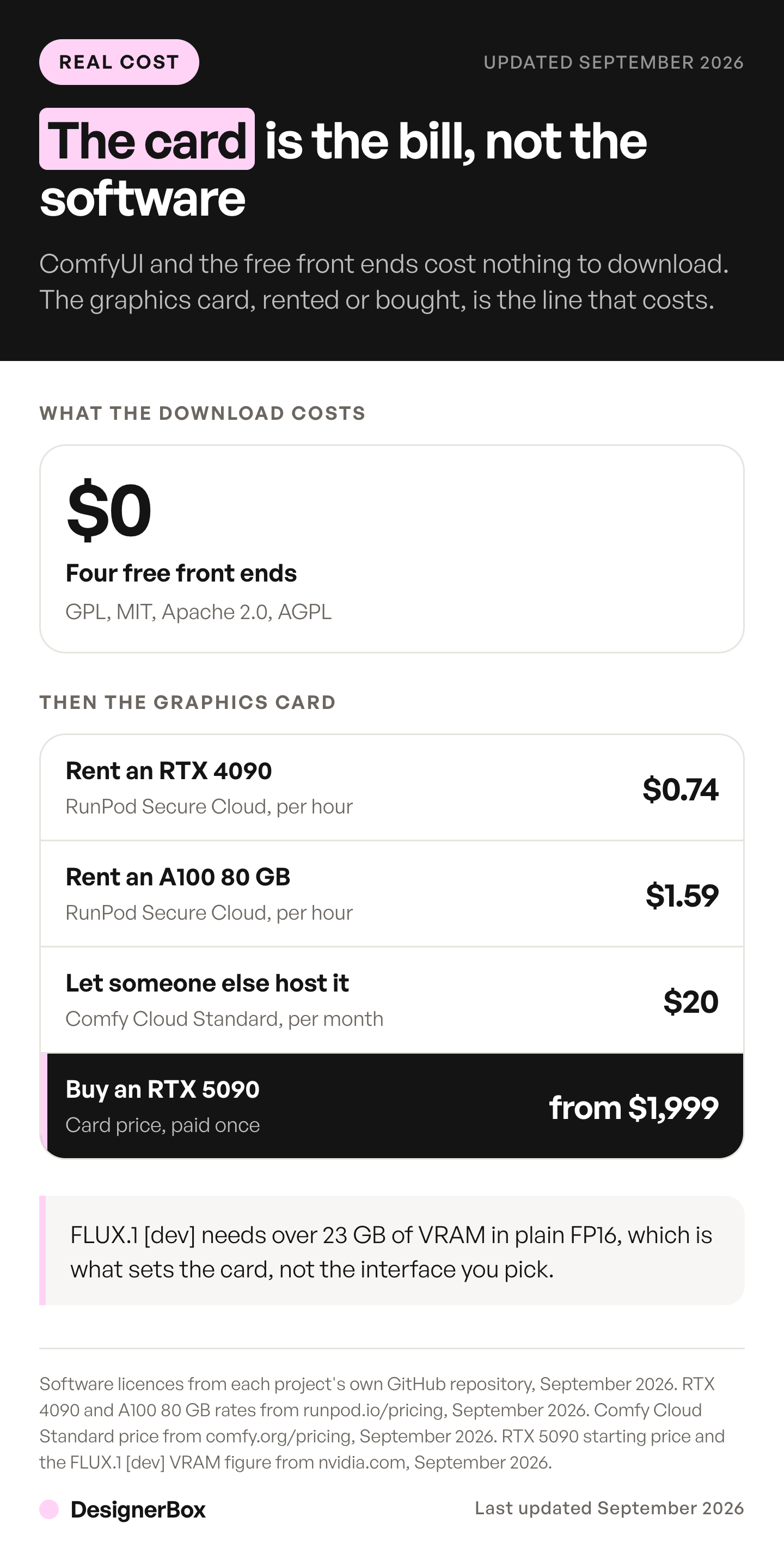
Hardware is the easiest number to anchor. NVIDIA states that FLUX.1 [dev] requires over 23 GB of VRAM in plain FP16. It generates an image in 15 seconds on an RTX 4090, and drops to just over five seconds on an RTX 5090 using FP4 (nvidia.com, September 2026). ComfyUI supports NVIDIA, AMD, Intel, Apple Silicon and Ascend hardware plus a CPU-only mode, and the docs state no minimum VRAM figure (docs.comfy.org/installation/system_requirements, September 2026).
The 2026 catch is that Veo, Kling and Seedance run as hosted APIs. A local setup is limited to the open-weight models you can obtain. Weighing that against a bundled subscription takes a full list of the bills, and what a six-tool AI stack really costs adds up each bill in that stack.
Who maintains the custom nodes, and is that a security question?
The custom node catalog is ComfyUI’s biggest strength and its largest maintenance surface. The Comfy Registry listed 5,472 published packs on 6 September 2026, and every one runs Python inside your server process, so a workflow shared from a forum is executable code, not a document. Comfy Org treats it that way and has shipped hardening for it, which is the right lens for a brand team.
Snyk found over 1,300 custom node extensions at the time of its research, and noted each runs with the same privileges as the server process. It reported three CVEs: CVE-2024-21574 in ComfyUI-Manager, CVE-2024-21575 in ComfyUI-Impact-Pack and CVE-2024-21576 in ComfyUI-Bmad-Nodes (labs.snyk.io, September 2026).
Comfy Org published its own January 2025 response: registry security checks that let the team ban a node quickly, removal of runtime pip installation, and a mechanism in ComfyUI-Manager to remotely disable a malicious node without updating ComfyUI (blog.comfy.org, September 2026). A Cloud Security Alliance note dated 8 April 2026 records a cryptomining campaign that used ComfyUI-Manager as a delivery path, plus that same hardening (cloudsecurityalliance.org, September 2026). Someone owns which packs are approved. On a team of three, that is the person who was supposed to be making ads.
Can you use images from open-weight models in commercial campaigns?
Check the model license, not the software license. They are two different documents. GPL, MIT and Apache cover the front end you installed. The weights you load carry separate terms, and some of the most-used open weights are not free for commercial work. Brand teams get asked about this line.

Black Forest Labs is explicit. The FLUX [dev] license states you may only use, distribute or create derivatives of the model for non-commercial purposes. It says commercial use requires a license from the company, which may carry a fee or revenue share. It covers FLUX.1 [dev], the Fill, Depth, Canny and Redux variants, Kontext [dev] and FLUX.2 [dev]. One precision point: the same license states outputs are not considered derivatives, so the restriction attaches to the weights (bfl.ai, September 2026).
Black Forest Labs licenses its weights for self-hosting in four tiers. Builder (fine-tuning and LoRA rights, 10,000 images a month, one domain) and Platform (100,000 images a month) can be bought on the page. Professional (for agencies, with the first three clients included) and Enterprise go through the sales team (bfl.ai, October 2026). Stability AI takes a different route: its Community License is free for research, non-commercial and commercial use while annual revenue stays under USD $1M (stability.ai, September 2026). Comfy Cloud’s own page states “All models. Commercial license guaranteed.” (comfy.org/cloud, September 2026).
Do your existing ComfyUI workflows transfer to another tool?
Only to tools running real ComfyUI underneath. Comfy Cloud, RunComfy and ThinkDiffusion execute the same engine, so an exported graph loads as it is, assuming every custom pack it references is installed. A native canvas is a different program with different node names, so moving there means rebuilding the graph and re-testing the output. The jobs behind the names barely move, and the eight node jobs every canvas is built from read the same across tools even when the labels do not.
Two other things travel badly. Community checkpoints and LoRAs, the kind shared on Civitai, stay on your drive, and Comfy Cloud’s Standard tier does not include importing your own models (comfy.org/pricing, September 2026). A graph depending on ten custom packs is only as portable as the least maintained one.
Some canvases are built as their own thing on purpose. Wireflow states on its own page that it uses a fixed hosted node set and a chosen model catalog rather than arbitrary custom Python nodes or local checkpoints. It lists its plans on that page (wireflow.ai, September 2026). NodeTool is AGPL-3.0 and runs on your own provider API keys at list prices with no markup (nodetool.ai, September 2026). Krea Nodes sits in the same family, and Krea states its paid plans include a commercial license while the free tier does not (krea.ai/pricing, September 2026). Flora’s node canvas is the same shape again, billed per seat and running other companies’ models rather than checkpoints you supply (flora.ai/pricing, September 2026). OpenArt alternatives sorts more hosted tools by job. For hosted image platforms, see Leonardo AI alternatives.
Where DesignerBox fits, and where it does not
DesignerBox is a hosted workflow tool with apps and templates, so you do not begin with an empty graph. You start from your product photo, then pick an app or write a brief. You pick the model for each step when you build the workflow, and every run after that uses it. A template comes with its model already picked. The image model in the step sets the rate. If you run content for a brand team, the brand team page shows the same job in the product.
A saved workflow runs the same job again for the next product. DesignerBox has 75 tools over MCP, so an AI chat such as Claude, ChatGPT or Cursor can drive the same models. The model catalog lists every one, and our guide to AI tools for graphic designers covers where each fits.
The templates, the workflows, the apps, batch, the editors, Brand and Assets sit in one account, so one subscription covers the job from the first product photo to the finished ad. A self-hosted setup spreads the same job across a graph, a GPU, a license and a file server. See how the four stages fit together.
Be clear about the trade. You do not get arbitrary custom Python nodes, and you do not load your own checkpoints or LoRAs. Video is billed by the model you pick. An 8-second clip costs 40 to 560 credits, depending on the model, which is a fourteenfold spread on the same eight seconds. The cost of a run is shown before you start it. Uploading your own photos and the commercial license start on the Pro plan. AI video starts on the Premium plan. Plans and credits are on the pricing page. The credit guide covers what a credit is spent on, and how a creative workflow gets built and rerun shows the repeatable half.
One more question sits under the tool choice: how many products does this job run on? A setup that someone adjusts by hand for each SKU is slow at forty products. Build the job once with your brand, your products and your rules. Then run it again for the next forty products. Row one and row forty meet the same standard.
If you want free, local and total control over every node, the answer is SwarmUI, InvokeAI, or ComfyUI itself with a friendlier front end on top. The hosted case holds when nobody wants to own the graph, several people need the same setup, and someone will ask for licensing terms in writing.
FAQ
Is ComfyUI free?
Yes, the software is free. ComfyUI is released under the GPL-3.0 license, and the repo carried 131.2k stars and 15.5k forks in September 2026 (github.com/comfyanonymous/ComfyUI). What costs money is the hardware or rented GPU time, and in some cases the license on the model weights you load. Comfy Org also sells an optional hosted version.
Is there a free ComfyUI alternative with a simpler interface?
SwarmUI is the usual answer, and it is free under the MIT license. It runs ComfyUI as its backend and puts a simpler Generate tab in front, with the full node graph still reachable on a separate tab. InvokeAI, under Apache 2.0, ships its own web interface and node editor. Both still need your own graphics card.
What is the best ComfyUI alternative without a GPU?
A hosted service. Comfy Cloud is the first-party hosted version of ComfyUI. RunComfy and ThinkDiffusion run managed ComfyUI on rented hardware. An exported graph loads as it is, if every custom pack it uses is installed. Renting a bare card, such as an RTX 4090 on RunPod Secure Cloud, is cheaper, but you do the install yourself.
How much VRAM do you need to run ComfyUI?
The docs state no minimum, because it depends on the model. NVIDIA gives the useful anchor: FLUX.1 [dev] needs over 23 GB of VRAM in plain FP16, generating an image in 15 seconds on an RTX 4090. Smaller and quantized models run on far less. Plan around the largest model in your shot list, not around the interface.
What does hosted ComfyUI cost per month?
Hosted ComfyUI has two bills. Every hosted service charges a monthly plan, and the GPU time on top of it is metered. Comfy Cloud starts with a free tier and then moves to paid plans that each carry a credit allowance. RunComfy and ThinkDiffusion charge a plan plus machine time by the hour. Each one lists its plans and its machine rates on its own pricing page (comfy.org/pricing, runcomfy.com/pricing and thinkdiffusion.com/pricing, September 2026). Read the machine rate as carefully as the plan, because that is the line that moves with your usage.
Can a marketing team run ComfyUI without an engineer?
Yes, but the setup becomes a standing job. Someone owns Python and driver updates, approves and installs custom node packs, and repairs graphs after core updates. The Comfy Registry listed 5,472 packs on 6 September 2026, and each executes code inside the server process. Teams without that person usually pick a hosted service instead.
Do I need a commercial license for images from open-weight models?
Check each model separately, because the terms differ. FLUX [dev] weights are licensed for non-commercial purposes only, with commercial licenses sold in four tiers by Black Forest Labs. Stability AI’s Community License allows commercial use free while annual revenue stays under USD $1M. Some hosted services state that a commercial license is included in the plan (comfy.org/cloud and krea.ai/pricing, September 2026).
Sources
- ComfyUI repository, license and feature list: github.com/comfyanonymous/ComfyUI, September 2026
- ComfyUI system requirements: docs.comfy.org/installation/system_requirements, September 2026
- Comfy Cloud positioning and commercial license claim: comfy.org/cloud, September 2026
- Comfy Cloud pricing and Team plan: comfy.org/pricing, September 2026
- Comfy Registry pack count: Comfy Registry API, api.comfy.org/nodes, measured 6 September 2026
- Comfy Org January 2025 security update: blog.comfy.org/p/comfyui-2025-jan-security-update, September 2026
- Custom node security research and CVEs: labs.snyk.io, September 2026
- Cryptomining campaign and platform hardening: cloudsecurityalliance.org, September 2026
- RunComfy plans and machine rates: runcomfy.com/pricing, September 2026
- ThinkDiffusion plans: thinkdiffusion.com/pricing, September 2026
- RunPod GPU rates: runpod.io/pricing, September 2026
- FLUX [dev] non-commercial license terms: bfl.ai, September 2026
- Black Forest Labs commercial license tiers: bfl.ai, October 2026
- Stability AI Community License revenue threshold: stability.ai, September 2026
- FLUX.1 [dev] VRAM requirement and RTX 5090 price: nvidia.com, September 2026
- InvokeAI license: github.com/invoke-ai/InvokeAI, September 2026
- SwarmUI license and backend behavior: github.com/mcmonkeyprojects/SwarmUI, September 2026
- Automatic1111 license and repository activity: github.com/AUTOMATIC1111/stable-diffusion-webui, September 2026
- Fooocus license and support status: github.com/lllyasviel/Fooocus, September 2026
- NodeTool license and pricing model: nodetool.ai/alternatives/comfyui, September 2026
- Wireflow node set, model catalog and plans: wireflow.ai/comfyui-alternative, September 2026
- Krea plans and commercial license terms: krea.ai/pricing, September 2026
- DesignerBox plans, credits and feature gating: designerbox.ai/pricing, September 2026
- DesignerBox model catalog and MCP server: designerbox.ai/models and designerbox.ai/mcp, September 2026
Tool licensing, pricing and hardware requirements verified from GitHub, comfy.org, RunComfy, ThinkDiffusion, RunPod, Black Forest Labs, Stability AI, NVIDIA, Snyk and the Cloud Security Alliance as of September 2026. The RunPod rates for the RTX 4090 and the A100 80 GB were re-checked on 2 October 2026. The Black Forest Labs licensing page was re-read on 7 October 2026. Individual results vary.