




Flora AI is a node-based creative canvas for teams. You chain prompt, generate and edit steps as connected nodes instead of typing into one box, and it runs other companies’ models rather than training its own. There is a free plan, and its paid plans are charged per seat. Flora lists its plans on its own pricing page (flora.ai/pricing, September 2026).
Search that name and you get two products. One is a plant identification app on the App Store (apps.apple.com, September 2026). The other raised a $42 million Series A led by Redpoint Ventures in January 2026 and is used by designers at Alibaba, Brex, Pentagram and Lionsgate (techcrunch.com, September 2026). This guide covers the second one.
This is for the person evaluating canvas tools with four pricing tabs open. It covers what the product does, whether the free plan is usable, how a seat is charged, who is behind it, and which five tools sit in the same bracket. Prices move in this category, so no figure is quoted here. Each vendor’s own pricing page is named instead, read in September 2026.
Key Takeaways
-
The free plan has a published ceiling. A project cap and a fixed number of free generations, with the video models on the paid tiers (flora.ai/pricing, September 2026).
-
Pricing is per seat, not per team. Every paid plan is charged per seat per month (flora.ai/pricing, September 2026). Five people cost five times the seat rate, before any usage.
-
The hosted canvases run vendor models. Flora’s founder states his company trains none of its own (techcrunch.com, September 2026). Veo, FLUX and Kling are built by Google, Black Forest Labs and Kuaishou.
-
Four pricing pages, four billing states. Krea preselects annual under a savings banner, Flora carries an annual discount toggle, Magnific quotes euros before VAT, and Figma Weave publishes both periods (each company’s pricing page, September 2026).
-
A canvas starts empty. It suits people who enjoy wiring graphs. A saved workflow starts from a job you already got right. That fits a team running the same four formats across a whole catalog every week.
What is Flora AI used for?
Flora is a node-based canvas for creative teams. You place a prompt, connect it to an image or video model, then branch that output into edits, upscales and variants on one infinite board. Its homepage states 50+ models and describes every text, image and video model sitting on one canvas (flora.ai, September 2026).

Two features are named on Flora’s own pages. Techniques are reusable workflows built by Flora and top creators that you run instantly or open in your own canvas (flora.ai, September 2026). Real-time collaboration is listed from the Starter tier upward (flora.ai/pricing, September 2026).
Is Flora AI free?
Yes, with a defined ceiling. The free plan is one seat, a small number of active projects, the text and image models, the full canvas and layer editor, and a fixed number of free generations (flora.ai/pricing, September 2026). Video models sit on the paid tiers, so the free plan covers still images and the canvas itself.
Flora states generations rather than credits there, and publishes no conversion between the two. Read the free generation count as the size of the trial, and check the current figure on the page before you rely on it.
How is Flora priced per seat?
Paid pricing is per seat per month, and larger teams buy Enterprise. Video models, unlimited projects, pooled team usage and API access start on the first paid plan. Higher plans add shared team assets, per-member usage caps and usage analytics (flora.ai/pricing, September 2026).
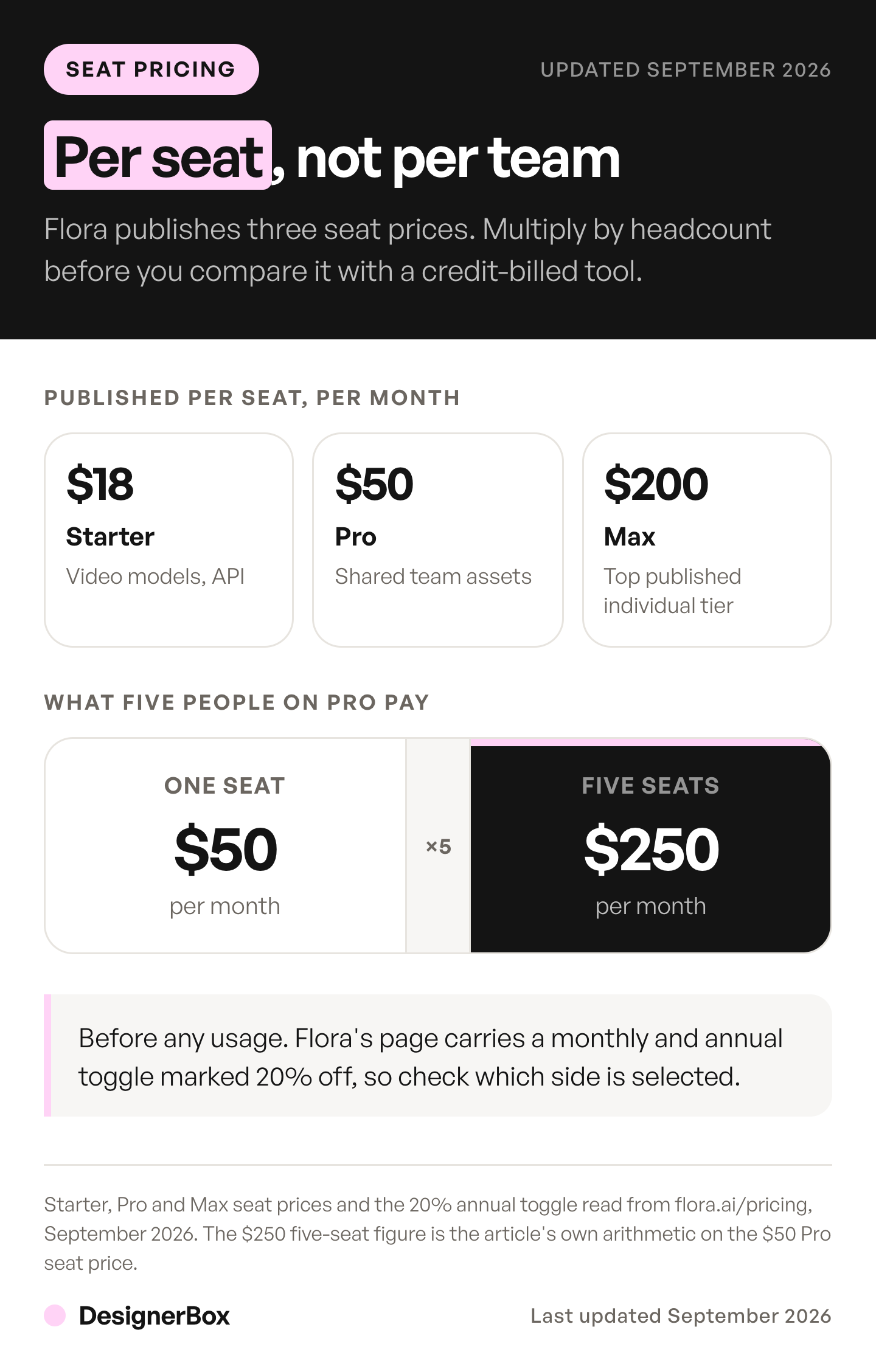
Per seat is the part that decides the bill. Multiply the seat rate by your headcount before anyone generates anything, and read that number rather than the tier name.
Flora’s pricing page carries a Monthly / Annual toggle, so the figure you read depends on which period is selected (flora.ai/pricing, September 2026). Check which side is on, then multiply by seats.
Is Flora legit, and who uses it?
Yes. Flora raised a $42 million Series A led by Redpoint Ventures, announced 27 January 2026, which took total funding to $52 million. TechCrunch names designers at Alibaba, Brex, Pentagram and Lionsgate as users (techcrunch.com, September 2026). The company was founded by Weber Wong, previously an investor at Menlo Ventures, and had 25 people at the time of that round.
The founder background and headcount come from NYU’s own note on the round (tisch.nyu.edu, September 2026). Wider client lists circulate in secondary posts. Only those four names are confirmed by primary reporting, which is the standard to apply to every tool below.
How a node-based AI canvas works
A canvas replaces the single prompt box with a board of connected steps. One node holds your prompt or uploaded image. An edge carries that output into a model node, which passes its result into an edit, an upscale or a second model. Branch it and one input becomes four variants. The graph is what you save and rerun. The eight node jobs, and how branching behaves once a graph gets long, sit in how an AI workflow builder chains nodes.

What sits underneath matters more than the wiring. Flora’s founder has said that models are not creative tools. That is why Flora integrates existing models rather than building them, and the company trains none itself (techcrunch.com, September 2026).
The hosted canvases here name the same vendors on their own pages (krea.ai/pricing and weave.figma.com, September 2026). Veo 3.1 generates video with native audio at 1080p and 4K (deepmind.google, September 2026). The FLUX.2 line from Black Forest Labs outputs up to 4MP at any aspect ratio (bfl.ai, September 2026). Through the API, FLUX.2 [pro], [flex] and [max] each take up to 8 reference images. Black Forest Labs’ own playground takes 10 (docs.bfl.ai, accessed September 2026).
Those capabilities belong to the vendors. What separates the tools is how work is saved, how a team shares it, and how you are billed, the same split we cover in AI creative agents. The all-in-one platforms that bundle the same vendors behind one subscription are shortlisted in OpenArt alternatives.
What are the alternatives to Flora AI?
Five tools sit in the same bracket, each shaped for a different buyer. ComfyUI is the open-source original, Krea and Figma Weave are hosted node editors, Magnific offers a shared canvas called Spaces, and DesignerBox starts from a job rather than a blank board.
| Tool | What it is | Free plan | How output is billed |
|---|---|---|---|
| Flora | Node canvas, 50+ models | Yes, one seat with a project cap | Per seat, pooled team usage |
| Krea | Canvas, Krea Nodes, app builder | Yes, with no commercial license | Compute units, no individual rollover |
| ComfyUI | Open-source node graph, GPL-3.0 | Self-hosted, plus a few free cloud runs | Your hardware, or a Cloud plan |
| Figma Weave | Node canvas, formerly Weavy | Yes, one seat with a workflow cap | Credits |
| Magnific | Spaces shared canvas, formerly Freepik | None listed | Credits, excluding VAT |
| DesignerBox | Apps, templates and saved workflows you rerun per product | Yes | Credits per run, cost shown before the run |
Free-plan and billing shapes from each company’s own pricing page, September 2026. Each one publishes its own figures there, and they move often enough that reading them at the source is the only safe comparison.
Krea
Krea publishes the most granular allowance table in this group. There is a free plan on a daily compute-unit budget, without a commercial license, and paid plans above it, each with a monthly unit allocation. Its Business plan puts a team under one flat price. The feature list includes Krea Nodes, an App Builder that turns a workflow into a reusable app, and a Nodes Agent that builds workflows from natural language (krea.ai/pricing, September 2026).
Two conditions decide whether the allowances work. Unused units on individual plans do not move to the next month, but units on Business and Enterprise plans do. One-time packs expire after 90 days. The page opens with annual billing preselected, so the rate on screen is the annual one (krea.ai/pricing, September 2026).
ComfyUI and Comfy Cloud
ComfyUI is the open-source project this category grew up around. It is released under GPL-3.0 and describes itself as the most powerful and modular diffusion model GUI, API and backend with a graph and nodes interface (github.com/comfyanonymous/ComfyUI, September 2026). The Community Edition is on GitHub and costs nothing.
Cost sits in hosting rather than licensing. Comfy Cloud lists its plans on its own pricing page, where Standard and Creator cap a run at 30 minutes and Pro at one hour (comfy.org/pricing, September 2026). Local front ends and hosted GPU rates are compared in the ComfyUI alternative shortlist.
Figma Weave, formerly Weavy
Weavy is now Figma Weave. The product says so on its own site and has moved to a new home at weave.figma.com (weave.figma.com, September 2026). Figma acquired Weavy in October 2025 and relaunched it under the new name. CEO Dylan Field announced the deal (linkedin.com, Dylan Field, September 2026). It still runs standalone, with its own billing.
Pricing is credit-based and published in full. There is a free tier with a monthly credit allowance and a workflow cap. A higher plan adds credit rollover, and the team plan charges per user against a shared pool. Figma Weave lists its plans on its own pricing page (weave.figma.com/pricing, September 2026).
Magnific, formerly Freepik
Freepik rebranded as Magnific on 28 April 2026, unifying its stock library and its AI tools under one name, and freepik.com/pricing now redirects to magnific.com/pricing (thenextweb.com, September 2026). Magnific lists a shared canvas called Spaces, described on its pricing page as built for workflows (magnific.com/pricing, September 2026). Generation paired with the stock library it already ran as Freepik is the distinguishing part of the offer.
No plan price is quoted here, as with every tool on this page. Magnific’s pricing page shows euro prices excluding VAT, with no free plan listed (magnific.com/pricing, September 2026).
DesignerBox
DesignerBox starts from a finished job instead of a blank board. You open an app or an image template, feed it your product photo and your brand rules, and get the asset. Save that run as a workflow, and the same setup runs again for the next product, the next colorway and the next drop. It holds the same standard on row one and row two hundred. Each step runs on an image or video model from the model list.
DesignerBox has 75 tools over MCP, so teams can run it from an AI chat such as Claude, ChatGPT or Cursor. Anyone can make an AI picture. Making hundreds that still look like your brand is the hard part. You set the brand once, and the workflow reads it on every run. The stills, the video, the editors and the batch sheet all sit in one account.
The model in each step sets the rate. The cost is shown before the run, and the AI video cost guide shows what the video models charge. Plans and credits are on the pricing page, and the comparison pages carry the detail.
Why four canvas prices are not comparable until you check the billing toggle
Every pricing page in this category loads in a different default state. Krea opens with annual billing preselected under a savings banner, so the large figure on screen is the annual rate. Flora carries a Monthly / Annual toggle with an annual discount. Magnific quotes euros excluding VAT. Compare those at face value and you are comparing discounts, not products.
| Tool | Default state of the pricing page | Check before comparing |
|---|---|---|
| Flora | Monthly / Annual toggle with an annual discount | Which side of the toggle is selected |
| Krea | Annual preselected, with a savings banner | The monthly rate is a different number |
| Figma Weave | Monthly and annual both published | Credits per plan, rollover window |
| Magnific | Euros, excluding VAT, no free plan | Currency, tax, any promo running |
| Comfy Cloud | Monthly and yearly both listed | The run-time cap on your tier |
| DesignerBox | Monthly tab selected, with an Annually tab beside it | The billing period on the selected tab |
Page states read on each company’s own pricing page, September 2026. The DesignerBox row was read again on 7 October 2026. Build the comparison on one billing period, in one currency, per seat. Then add the usage model. Per seat is predictable and scales with headcount. Credits scale with output, so a video-heavy month uses more of them.
Do you need a canvas at all, or does a saved workflow do the job?
A canvas is the right buy when the graph is the work: exploratory concepting, one-off art direction, technical image pipelines, or a team that enjoys wiring nodes. You get precision over each step, and the board is a shared artifact.
It is a different buy when your team ships the same four asset types every week, the job creative automation describes. A canvas starts empty. A saved workflow starts from the run that already worked, and a DesignerBox app puts that run behind a form a colleague completes. Picture 40 SKUs, a drop every month, and the same four formats to fill each time. That is 160 files a month. Making them is the cheap part. Keeping the last one to the standard of the first, and checking all 160, is the expensive part. Our guide to building a repeatable creative workflow helps with that decision. Saved workflows show the reusable version, and batch runs one workflow over a whole sheet of products. Price it per product rather than per month, with the arithmetic in what an AI tool stack costs.
DesignerBox has limits worth stating. Team features, shared brand kits and white label are on the Ultra plan, and every plan below Ultra is one seat. Uploading your own photos starts on the Pro plan. If you want to wire a graph step by step, a canvas fits better. Our alternatives roundup puts DesignerBox under the same test.
FAQ
What is Flora AI?
Flora AI is a node-based creative canvas for teams. You connect a prompt to an image or video model, then branch the result into edits, upscales and variants on one board. Flora runs other companies’ models, more than 50 by its own count, and its founder states it trains none itself (flora.ai and techcrunch.com, September 2026).
Does Flora have an API?
Yes. API and MCP access are listed from the Starter tier upward, alongside video models, unlimited projects, pooled team usage and real-time collaboration (flora.ai/pricing, September 2026). The free plan does not include them. Confirm the current scope on the pricing page before you build against it, since tier contents move.
Which models do these canvas tools run?
Largely the same vendor models. Veo, Kling, FLUX, Nano Banana and Seedream are built by Google, Kuaishou, Black Forest Labs and ByteDance, and the hosted canvases here name those vendors on their own pages. Flora’s founder states his company trains none itself (techcrunch.com, September 2026). Model access separates these tools less than billing does.
How much does a canvas tool cost for a five-person team?
The billing model decides this, more than the sticker price. Flora charges per seat, so five people is five times one seat (flora.ai/pricing, September 2026). Krea’s Business plan covers a team under one flat price (krea.ai/pricing, September 2026). Figma Weave Team charges per user against a shared credit pool. Every DesignerBox plan below Ultra is one seat, and Ultra includes five.
Which Flora alternative is free?
ComfyUI is free and open source under GPL-3.0, with cost moving to your own GPU (github.com/comfyanonymous/ComfyUI, September 2026). Figma Weave has a free tier of one seat with a monthly credit allowance (weave.figma.com/pricing, September 2026). DesignerBox has a free plan, and it runs on sample products. Krea’s free tier runs on a daily compute budget and carries no commercial license, so it suits testing rather than client work.
Can I use free-tier output in a paid ad?
Only if the plan’s license allows commercial use, and the plan name does not tell you. Krea’s free tier carries no commercial license (krea.ai/pricing, September 2026), so its output is for testing. In DesignerBox the commercial license starts on the Pro plan, and free-plan results carry a watermark. Read the terms before an asset reaches a live campaign.
Sources
- The plant identifier app of the same name: apps.apple.com, September 2026
- Flora free plan, per-seat plans, annual toggle: flora.ai/pricing, September 2026
- Flora 50+ models, Techniques: flora.ai, September 2026
- Flora’s funding, a $42 million Series A, and its named users: techcrunch.com, September 2026
- Founder thesis, no models trained: techcrunch.com, September 2026
- Founder background, headcount: tisch.nyu.edu, September 2026
- Krea plans, units, rollover, Krea Nodes: krea.ai/pricing, September 2026
- ComfyUI license: github.com/comfyanonymous/ComfyUI, September 2026
- Comfy Cloud pricing and run caps: comfy.org/pricing, September 2026
- Weavy to Figma Weave rename: weave.figma.com, September 2026
- Figma Weave pricing and credits: weave.figma.com/pricing, September 2026
- Figma’s acquisition of Weavy: linkedin.com, Dylan Field, September 2026
- Freepik rebrand to Magnific: thenextweb.com, September 2026
- Magnific Spaces, euro pricing, VAT: magnific.com/pricing, September 2026
- Veo 3.1 native audio, 1080p and 4K: deepmind.google, September 2026
- FLUX.2 resolution: bfl.ai, September 2026
- FLUX.2 reference-image limits, API and playground: docs.bfl.ai, accessed September 2026
- DesignerBox plans, the video credit range and feature gating: designerbox.ai/pricing, September 2026
Flora, Krea, ComfyUI, Figma Weave and Magnific features verified from each company’s own pages as of September 2026. No competitor price is quoted here, so read each vendor’s own pricing page before you buy. Individual results vary.














