
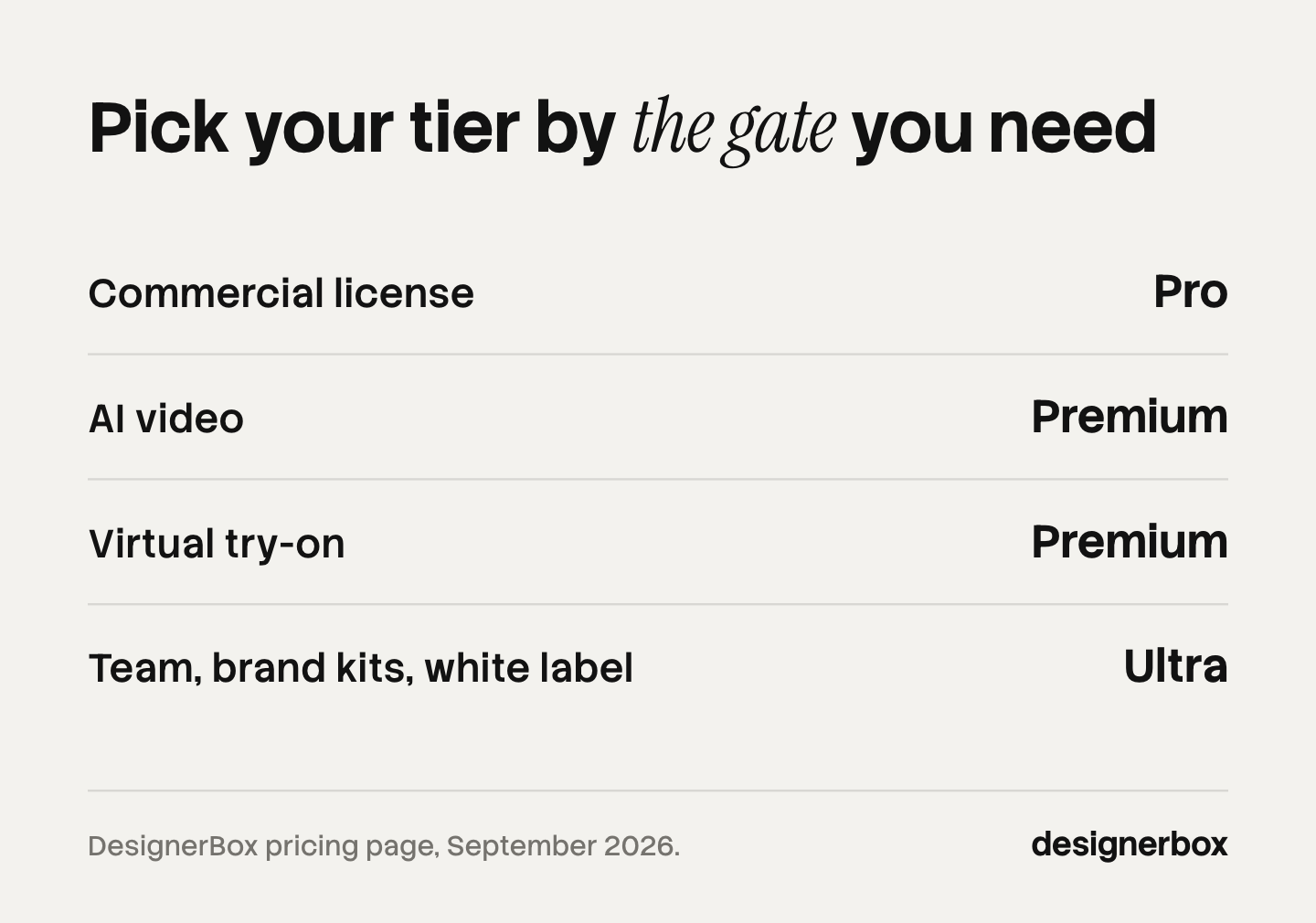
DesignerBox pricing runs across five plans, and one of them is free. The plans differ by more than how much you can make. Each plan opens a different part of the product. The commercial license, AI video and virtual try-on, and the team features each start on a different tier. Plans and credits are on the pricing page.
Many buyers compare the monthly figures and pick the cheapest plan that covers their volume. Then they find that the feature they signed up for sits a tier higher. Credits buy quantity. The plan buys permission. To see what each part of the app does first, read the tour of the rebuilt DesignerBox.
This article covers what each tier opens, what a credit buys, why there is no flat per-image price, and how to size a plan against the work you run each month.
Key Takeaways
- The plan decides what you can use. Credits decide how much.
- Uploading your own photos and the commercial license start on the Pro plan. The license matters the moment a result goes into a paid ad or a product page.
- AI video, virtual try-on, upscaling, the image editor and the video editor start on the Premium plan.
- Team features, shared brand kits and white label are on the Ultra plan. Every plan below Ultra is one seat.
- There is no flat per-image price. The image model in the step sets the rate.
- An 8-second clip costs 40 to 560 credits, depending on the model. That is a fourteenfold spread on the same eight seconds.
- Credit allocations reset every month on both billing cycles. An annual plan grants the same monthly allocation as a monthly one, not a year of credits at once.
What DesignerBox pricing looks like
Two things about the pricing page matter before a number from it reaches a budget.
It opens on the annual view, and shows annual billing as a per-month figure. Every paid plan costs more month to month than the number the card shows first. Switch the billing toggle to see the monthly rate before you quote one.
Annual rates are the ones DesignerBox runs promotions against. The figure you see may be a promotional rate rather than the standing one. Confirm it at checkout before you commit to twelve months of it.
The same numeric value is charged in dollars, pounds and euros. A European reader sees the same figure as a US reader on the same billing period. The free plan’s results carry a watermark, and it is the only plan that does.
What is a credit and what does one buy?
A credit is the unit every operation is priced in. One subscription covers the whole product: the image and video models, the image editor, the video editor, templates, workflows, apps and batch. Switching between models does not change your subscription. It changes the credit cost of the operation you run.
Some operations have a fixed price. An avatar run returns nine fixed poses for 25 credits, so nine finished frames come out of one operation.
Two operations have a price range instead of a fixed price: making or editing an image, and making video. Both ranges are wide. Most of a month’s credits go to these two, so they are the two to understand before you plan a run.
What does an image cost?
There is no single answer, and anyone who gives you one is quoting the wrong model. The image model you pick for the step sets the rate, and the cost is shown before the run.

The cheapest model and the most expensive one are several times apart, and both put a finished image on the canvas. Run background plates on a cheap model. Save the expensive one for the shots a customer zooms into. That choice moves a monthly bill more than any other.
So pick the model before you budget the run. The models DesignerBox runs are listed on one page. You pick the model for each step when you build the workflow, and every run after that uses it. A template comes with its model already picked. A draft step and a finished step do not have to use the same model.
What does a video clip cost?
An 8-second clip costs 40 to 560 credits, depending on the model. Same button, fourteen times apart.
Nothing about your brief moves that number. The model does. So storyboard on a cheap model and check the results. Then re-run only the shot that works, on the model the placement needs.
AI video starts on the Premium plan. The video ad templates show what the generator and the timeline cover. What an AI video clip costs explains what drives the figure.
What does each tier include?
Each tier adds features to the one below it. A bigger credit balance on a lower plan does not open a gated feature.
| Starts at | What the plan adds |
|---|---|
| Basic | Flux model, standard-resolution results, 1 run at a time |
| Pro | Commercial-use license, import your own photos, custom prompts, remix, 4 runs in parallel |
| Premium | AI video, virtual try-on, the image editor, the video editor, crop, zoom out, relight, upscaler, hyper realism, 8 runs in parallel |
| Ultra | Team collaboration, shared brand kits, white label, export brand models, priority queue, 16 runs in parallel, dedicated account manager |
The line with the biggest effect is the commercial license on the Pro plan. If a result goes into a paid ad, a product page or a client deliverable, start on Pro.
The second line is a limit: every plan below Ultra is one seat. Ultra includes several seats and sells extra ones. A three-person agency that wants shared brand kits has one plan to choose from.
Support follows the same ladder: email on Free and Basic, priority email on Pro, priority chat on Premium, and a dedicated account manager on Ultra.
Which plan fits which team?
Match the plan to the limit you reach first. That is usually a license or a gated feature, and less often credits.
- Free. Evaluating. It runs on the sample products, so you can judge the quality before you pay anything.
- Basic. One person making stills at a low monthly volume.
- Pro. The first plan for a business. It is also where you import your own photos and write your own prompts.
- Premium. Brands running always-on campaigns that need video, virtual try-on or relighting.
- Ultra. Teams and agencies. Several seats, shared brand kits, white label and unlimited storage.
Agencies should read the seat line before the credit line. DesignerBox for agencies shows how an agency runs the product. The tool cost belongs in your cost of goods. What to charge clients once production time drops is the harder question underneath it. If you are weighing a flat-fee design service instead, the queue math of an unlimited graphic design service shows what one delivers in a month.

One reference point helps with the value question. VSCO’s photography pricing guide puts product photography at $25 to $175 an image and commercial day rates at $800 to $5,000 (vsco.co, 9 September 2026). What a product photoshoot costs works through what those quotes leave out. Run the same comparison against a month of your own plan once you know which model you will use.
What happens when you have no credits left?
You buy a credit pack or change to a higher plan. Packs are one-time purchases, they need an active paid subscription, and they expire after 12 months.
A pack is the most expensive credit on either billing cycle. Use one for an unplanned campaign. If you buy packs two months in a row, change to a higher plan instead. The higher plan usually brings features that extra credits do not.
One note on the trial: a paid plan starts with a 7-day trial, and the credit grant on it is small enough to judge the interface rather than a production run. The free plan is the better way to judge quality.
How many credits do you need?
To size your credits, run one product through the workflow and note what the run costs. Multiply that by the number of products you make in a month. Compare the total with the monthly allocations on the pricing page.
Price the plan on capability first and credits second. Find the feature you need in the tier table, and start on the plan that opens it. Then check the credits against your monthly total.
Anyone can make an AI picture. Making hundreds that still look like your brand is the hard part. You set the brand once in a brand profile, and the workflow reads it on every run.
Seven workflows teams run shows what a month of credits looks like in practice. To see where DesignerBox lands against the rest of the market, compare eleven DesignerBox alternatives.
FAQ
Is there a free DesignerBox plan?
Yes. There is a free plan, and it runs on sample products. Its results carry a watermark, so it is built for judging quality before you pay.
Why does the pricing page show a lower number than the plan price?
Because the page opens on annual billing and shows it as a per-month figure. The month-to-month price is higher on every paid plan. Switch the billing toggle before you quote a number.
Do annual plans give you all the credits upfront?
No. An annual plan grants the same monthly allocation as a monthly plan, and it resets every month. Paying yearly lowers the rate you pay, not the pace at which credits arrive. Unused monthly credits are not a yearly pool you can save toward one large campaign.
How much does one image cost in credits?
It depends on the model in the step, and the spread across the models is several times wide. There is no flat per-image price. The cost of a run is shown before you start it, so pick the model first and read the number before you commit to a long run.
Can I use DesignerBox images in paid ads?
Yes, from the Pro plan, where the commercial license starts. Any result headed for a paid ad, a product detail page or a client deliverable needs Pro or higher.
Which plan do I need for AI video?
The Premium plan. AI video, virtual try-on, relighting, upscaling, the image editor and the video editor all start there.
Does DesignerBox charge extra for premium models?
No. You switch between models without a separate license or bill. What changes is the credit cost of the operation. The same subscription goes further on a cheap model than on an expensive one.
Sources
- DesignerBox plans, credit allocations, credit packs and the billing toggle that changes which figure the page shows: designerbox.ai/pricing, October 2026
- The models DesignerBox runs: designerbox.ai/models, September 2026
- Feature gating by plan, including the commercial license, AI video, virtual try-on and team features: DesignerBox pricing, September 2026
- Product photography market rates, $25 to $175 an image and $800 to $5,000 a commercial day: VSCO photography pricing guide (vsco.co/learn/photography-pricing-guide, accessed September 2026)
- No competitor prices or competitor capability claims are made in this article
DesignerBox plans, credit allocations, pack pricing and feature gating were read from the live pricing page in September 2026. The plan features, the trial terms and the 12-month rule for pack credits were re-read on 2 October 2026. Annual rates are promotion-sensitive. Pricing and feature availability change, so check designerbox.ai/pricing for current rates before budgeting.