





The closest Leonardo AI alternatives are Midjourney for art direction, Adobe Firefly for licensed training data, Krea for real-time drawing, Magnific for many models next to a stock library, Recraft for vectors, Ideogram for text in images, ComfyUI for full control, Scenario for game assets, and DesignerBox for product photos made from your own product. The right one depends on the job you gave Leonardo.
Leonardo is a broad image platform, so people leave it for different reasons. A game artist, a brand designer and an ecommerce team each want something else from the next tool.
A note on bias. DesignerBox makes AI creative production software, so it is one of the tools on this list. This guide says where the other tools are the better choice. It prints no vendor prices. Each vendor lists its plans on its own pricing page.
Key Takeaways
- Leonardo is a Canva brand. Canva announced the acquisition on 30 July 2024.
- Pick by job. Concept art, brand design, vectors, text in images, game assets and product photos lead to different tools.
- Read the ownership terms. On Leonardo’s free plan, ownership of the output vests in Leonardo. On a paid plan it vests in you.
- Many platforms now host the same models. Leonardo, Krea and Magnific each list Nano Banana and GPT Image models next to their own.
- Firefly makes a training-data claim. Adobe says its Firefly models are trained on licensed Adobe Stock content and public domain content.
- Midjourney has no general API. Its guidelines say it does not provide one, with rare exceptions.
- A new picture is not a product photo. If the image has to show your real product, start from your own photo.
What is Leonardo AI?
Leonardo.Ai is an AI image and video platform owned by Canva. Canva announced the acquisition on 30 July 2024, and Leonardo’s privacy policy names the company as “a Canva brand” (canva.com/newsroom and leonardo.ai/privacy-policy, October 2026).
Leonardo has its own image models, including Lucid Origin, Lucid Realism and Phoenix, and its own Motion models for video. It also hosts models from other vendors, such as GPT Image 2, Nano Banana Pro and Seedream 5.0 Pro (leonardo.ai, October 2026).
Around the models it lists a set of tools: Flow State, an image upscaler, background removal, Realtime Canvas, Elements and personal model training. Blueprints are ready-to-use workflows, for example Product In Scene and Asset Resize. There is a REST API, and Leonardo says API access is separate from the web app subscriptions (leonardo.ai and docs.leonardo.ai, October 2026).
So Leonardo does four jobs:
- Text to image in many styles, with its own and other vendors’ models.
- Custom looks through Elements and model training.
- Editing with an upscaler, a canvas and background removal.
- Building through an API.
Write down which of the four you use every week. That list is your filter for everything below.
Who owns a Leonardo image?
It depends on the plan, and this is the most useful thing to check before you choose an alternative. Leonardo’s terms split ownership by subscription type (leonardo.ai/terms-of-service, October 2026).
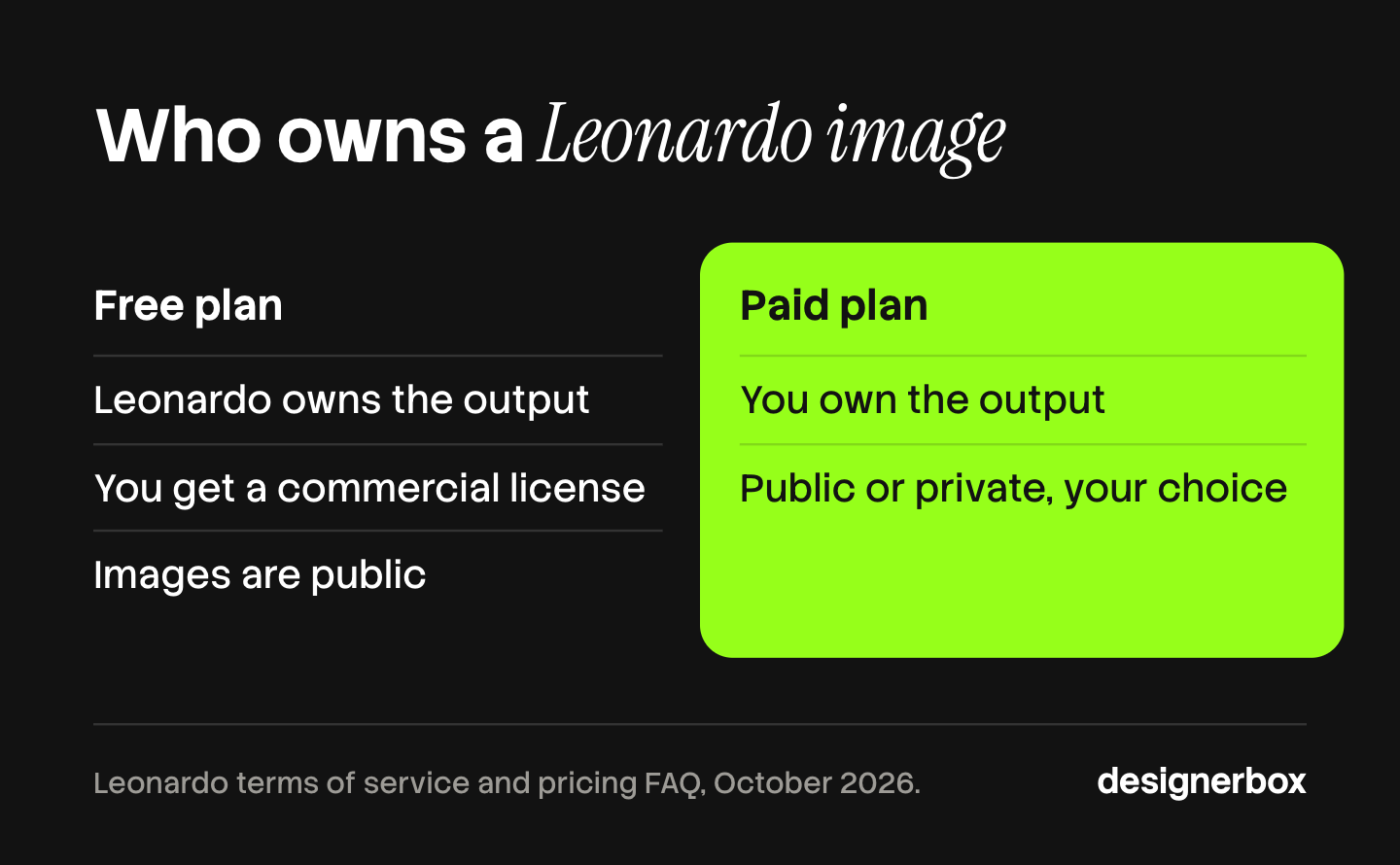
On a paid subscription, ownership of the intellectual property rights in the content you create vests in you on creation. Paid subscribers can choose whether content is public or private.
On a free subscription, ownership of the output vests in Leonardo on creation. Leonardo’s pricing FAQ says free users get a non-exclusive, royalty-free license to use the content for commercial purposes, and Leonardo’s own explainer says free-plan images are public (leonardo.ai/pricing, October 2026).
Both statements are true together: a free user holds a license, and a paid user holds the ownership. This is general information, not legal advice.
Ask the same two questions of every tool below. Who owns the result on the plan you will use? Is the result public by default? Commercial use of AI images covers the wider rules.
Which Leonardo AI alternative fits your job?
Start from the work you do most weeks. Each job below has a short list of tools that lead with it.

| Your job | Shortlist | Why |
|---|---|---|
| Concept art and mood | Midjourney, Krea | Strong style control and fast iteration |
| Brand and campaign design | Adobe Firefly, Magnific | Works next to design apps and stock |
| Logos, icons and vectors | Recraft, Ideogram | Editable SVG and text in images |
| Full control of the pipeline | ComfyUI with open models | Runs on your own hardware |
| Game assets | Scenario | Custom models and game pipelines |
| Product photos at catalog scale | DesignerBox | Starts from your own product photo |
The 9 best Leonardo AI alternatives in 2026
Each entry starts with what the tool does well. The facts come from the vendor’s own pages.
1. Midjourney
Midjourney is known for art direction. Its current default model is V8.2, released as the default on 24 July 2026. It works on the web and in Discord, with settings synced between the two. Style Reference captures the overall style of an image, and Omni Reference puts a person or an object into your images. Animate turns an image into a video (docs.midjourney.com, October 2026).
Two scope notes. Midjourney’s guidelines say it does not provide an API, with rare exceptions. Its terms say you own the assets you create to the fullest extent possible under the law, with some exceptions, and that content is publicly viewable by default (docs.midjourney.com, October 2026). If you are leaving Midjourney instead, see Midjourney alternatives sorted by job.
Best for art directors and designers who want a distinct look and work by hand.
2. Adobe Firefly
Firefly is Adobe’s family of generative models. Firefly Image Model 5 has native 4MP resolution and has been generally available since 19 March 2026. Adobe says its Firefly models are trained on licensed content from Adobe Stock and public domain content, and that it does not train on users’ content (adobe.com/products/firefly, October 2026).
Firefly also offers partner models from Google, OpenAI, Luma AI, Runway and others. Adobe says you are responsible for deciding whether content from partner models is right for your project. Firefly Boards is a visual workspace on an infinite canvas, and Generative Fill brings the models into Photoshop.
Best for teams already in Creative Cloud that need a clear training-data statement. Adobe Firefly alternatives covers the tools around it.
3. Krea
Krea is built around speed. Its realtime mode updates the image as you draw, type or adjust elements, with drawing, webcam and screen input. Krea has its own models: Krea 1, which you can fine-tune with Krea Train, and Krea 2, which it describes as open weights. It also hosts Nano Banana, GPT Image, Seedream, Flux and Ideogram models, plus an enhancer, video models, a node editor and an MCP server. Krea has a free plan (krea.ai, October 2026).
Best for designers who think by sketching and want the picture to follow the hand.
4. Magnific (formerly Freepik)
Freepik relaunched as Magnific on 28 April 2026, with the same team and technology. The suite lists more than 40 AI models, audio tools, collaborative Spaces and more than 250 million stock assets. Its image generator offers Nano Banana, Seedream, Flux, GPT and Ideogram models, and its upscaler handles bulk jobs. Magnific offers an API and an MCP server (magnific.com, October 2026).
Best for marketing teams that want AI images and licensed stock in one account. Magnific AI alternatives explains the rebrand and the upscaler.
5. Recraft
Recraft is the design-first choice. Its latest model generation is V4.1, with Standard, Pro, Vector, Utility and Flash variants. The Vector variant generates editable SVG files directly, ready for Figma or Illustrator. The Utility variant is built for mockups and product shots, and Recraft has a mockup generator (recraft.ai, October 2026).
Best for brand designers who need logos, icons and illustrations as real vectors.
6. Ideogram
Ideogram leads with text in images. Its docs say it excels at putting text into images for logos, branding, print on demand and design layouts. Ideogram 4.0 was released on 3 June 2026 as an open-weight model with a commercial license. Its tools include background removal, editable text layers, extend, upscale and Magic Fill. It has an API, an MCP server and custom models trained from your approved assets, and it is free to use (ideogram.ai, October 2026).
Best for posters, packaging mockups and any image where the words have to be right.
7. ComfyUI with open models
ComfyUI is an open source, node-based interface for diffusion models, under the GPL-3.0 license. Comfy lists a desktop app that runs on your own hardware, a cloud version and more than 60,000 nodes (comfy.org and github.com/comfyanonymous/ComfyUI, October 2026).
You bring the model. Stability AI’s flagship open model is Stable Diffusion 3.5. Its Community License allows commercial use for people and organizations with under 1 million US dollars of annual revenue, and an Enterprise license applies above that (Stability AI license, October 2026).
Best for technical teams that want every step under their own control. ComfyUI alternatives covers the options when the graph gets too heavy.
8. Scenario
Scenario is built for game studios. You train custom models on your art bible, style references and visual library. Its gaming page lists pipelines such as an 8-direction sprite generator and an isometric tile maker. Scenario says it never uses your training data or images to improve other models. It makes images, video, 3D, textures and skyboxes (scenario.com, October 2026).
Best for game teams that need many assets in one locked style.
9. DesignerBox
DesignerBox is AI creative production for brands and agencies. It does a different job from Leonardo. Leonardo makes a new image from a prompt. DesignerBox starts from your own product photo and makes the catalog set and the ads around it.
It is not a place for concept art, characters or game assets. The fit and the limits are in their own section below.
Best for brands and agencies whose images have to show the real product, and who repeat the same set for every new product.
Leonardo AI alternatives compared
Every cell is the vendor’s own published fact, read on the date in the Sources. Each vendor lists its current prices on its own pricing page.
| Tool | Main job | Own model | Other vendors’ models | API |
|---|---|---|---|---|
| Leonardo | Broad image and video platform | Lucid, Phoenix | Yes | Yes, separate from the app |
| Midjourney | Art-directed images | V8.2 | Not checked | No, with rare exceptions |
| Adobe Firefly | Images inside Creative Cloud | Firefly Image Model 5 | Yes | Not checked |
| Krea | Real-time drawing and enhancing | Krea 1, Krea 2 | Yes | Not checked |
| Magnific | AI suite with stock assets | Not checked | Yes | Yes |
| Recraft | Vectors and brand design | V4.1 | Yes | Not checked |
| Ideogram | Text in images | Ideogram 4.0 | Not checked | Yes |
| ComfyUI | Node-based open pipeline | None, you bring models | Yes | It is the backend |
| Scenario | Game assets | Your trained models | Not checked | Not checked |
| DesignerBox | Product photos and ads from your photo | None | Yes | No, 68 MCP tools |
“Not checked” means this guide did not confirm the fact on the vendor’s own page. Ask the vendor before you rely on it.
How many marketers use AI for images?
Most of them. HubSpot’s 2026 marketing statistics page says nearly 75% of marketers reported using AI for media creation, including video and images, which makes it one of the top five uses of AI (HubSpot, October 2026). HubSpot sells marketing software, and the page gives no sample size, so read the number as a direction.
When three in four teams can make an image, the image alone is no advantage. The questions that remain are consistency, rights and review. Consistent product images covers the first one.
How to pick a Leonardo AI alternative
- Name the job. Use the table above. A vector tool and a game tool do not compete.
- Read the ownership terms. Check who owns the result on the plan you will buy, and whether results are public.
- Check the training-data statement if your legal team asks for one. Note that hosted partner models carry their own terms.
- List the models you need. Several platforms host the same Google and OpenAI models. The platform around them is the difference.
- Check the API. If a developer will call the tool, confirm an API exists and which plan carries it.
- Test with your real brief. Use one real product or one real character, and count the tries it takes to get a usable image.
For product work, the best AI product photography tools compares the specialists, and OpenArt alternatives covers another broad image platform.

DesignerBox fit and limits
Anyone can make an AI picture. Making hundreds that still look like your brand is the hard part. DesignerBox fits when the image has to show your real product and the same set repeats for every new product.
You set the brand once: logos, fonts, palette and rules. The workflow reads that brand record on every run. A saved workflow takes one product photo and makes the hero, the angles, the styled scene and the ad. Clothing catalog turns one garment into four shots: front, three-quarter, back and a fabric close-up. The image editor makes one edit after another, and the picture keeps its detail and resolution. A colleague can run the same job through an app, which is a workflow with a form. Batch runs one workflow over a sheet of up to 200 products, so row one and row two hundred get the same standard. Three critic steps score the results, and best-of-N keeps the best one. You see the cost before each run. The full workflow from the first product photo to the finished ad, in one subscription.
The limits matter for a Leonardo user. DesignerBox is not a model playground. It does not train a custom style model, and it has no real-time canvas and no vector output. Midjourney or Krea is the better choice for concept art, Recraft for vectors, and Scenario for game assets. DesignerBox does not publish to a store. You download the results, or send them with a webhook or an S3 step. DesignerBox does not have a public API. It has 68 tools over MCP, so an AI chat such as Claude, ChatGPT or Cursor can run it.
Uploading your own photos and the commercial license start on the Pro plan. The image editor, upscaling and virtual try-on start on the Premium plan. There is a free plan, and it runs on sample products. For an agency, team features are on the Ultra plan, and every plan below Ultra is one seat. Plans are on the pricing page. The AI product photography page shows the product side, and the compare page sets DesignerBox next to other tools.
The first job is one product set, built once. Start from a template, add your brand and your products, and run it. See the templates.
FAQ
What is the best alternative to Leonardo AI?
It depends on the job. Midjourney fits art direction, Adobe Firefly fits teams in Creative Cloud, Recraft fits vectors, Ideogram fits text in images, Scenario fits game assets, and ComfyUI fits teams that want full control. DesignerBox fits product photos made from your own product.
Is there a free Leonardo AI alternative?
Krea has a free plan, and Ideogram describes itself as free to use (vendor pages, October 2026). ComfyUI is open source. DesignerBox has a free plan that runs on sample products. Check what each free tier allows, and who owns the result, before you use an image commercially.
Who owns Leonardo AI?
Canva. It announced the acquisition of Leonardo on 30 July 2024, and Leonardo’s privacy policy describes the company as a Canva brand (canva.com/newsroom and leonardo.ai/privacy-policy, October 2026).
Can I use Leonardo AI images commercially?
Leonardo’s pricing FAQ says free users get a non-exclusive, royalty-free license for commercial use, and its terms say ownership of free-plan output vests in Leonardo. On a paid plan, ownership vests in you (leonardo.ai, October 2026). This is general information, not legal advice.
Does Midjourney have an API?
Midjourney’s community guidelines say it does not provide an API, with a few rare exceptions that are explicitly granted (docs.midjourney.com, October 2026). Leonardo, Ideogram and Magnific each list an API on their own pages.
Which Leonardo alternative is best for text in images?
Ideogram leads with it. Its docs say it excels at putting text into images for logos, branding and design layouts (ideogram.ai, October 2026). Recraft is the choice when the text has to stay an editable vector.
Can DesignerBox replace Leonardo AI?
Only for product work. DesignerBox makes product photos and ads from your own product photo, and it shows the cost before the run. It does not make concept art or game assets, and it does not train custom style models.
Sources
- Canva’s acquisition of Leonardo, 30 July 2024: (canva.com/newsroom/news/leonardo-ai, October 2026)
- Leonardo models, hosted models, tools, Blueprints and API: (leonardo.ai, leonardo.ai/blueprints and docs.leonardo.ai, October 2026)
- Leonardo ownership terms for paid and free subscriptions, public and private content, and the free-plan commercial license: (leonardo.ai/terms-of-service and leonardo.ai/pricing, October 2026)
- Midjourney V8.2, web and Discord, Style Reference, Omni Reference, video, API statement and terms: (docs.midjourney.com, October 2026)
- Adobe Firefly Image Model 5, training-data statement, partner models, Firefly Boards and Generative Fill: (adobe.com/products/firefly and blog.adobe.com, October 2026)
- Krea realtime mode, Krea 1 and Krea 2, hosted models, enhancer, video, node editor, MCP and free plan: (krea.ai, October 2026)
- Freepik’s relaunch as Magnific on 28 April 2026, suite contents, image models, upscaler, API and MCP: (magnific.com, October 2026)
- Recraft V4.1 variants, SVG output and mockup generator: (recraft.ai, October 2026)
- Ideogram 4.0 release, text rendering, editing tools, API, MCP and custom models: (ideogram.ai and docs.ideogram.ai, October 2026)
- ComfyUI license, desktop app, cloud version and node count: (comfy.org and github.com/comfyanonymous/ComfyUI, October 2026)
- Stable Diffusion 3.5 and the Community License revenue threshold: Stability AI license, October 2026
- Scenario custom training, game pipelines, data use and output types: (scenario.com, October 2026)
- Marketers using AI for media creation: HubSpot, 2026 marketing statistics, October 2026
- DesignerBox plan gates, batch, editors and MCP tools: (DesignerBox pricing and product pages, October 2026)
Vendor facts verified from each vendor’s own pages as of October 2026. Individual results vary.

