Photo proofing is the step where a client looks at a set of unfinished pictures and chooses the ones to finish and deliver. The photographer or studio shares a private gallery link, often with smaller files or a watermark. The client marks favorites, adds notes and sends the choice back. Only the chosen pictures are then retouched, exported and delivered.
A product shoot for 40 products can return 600 frames. The contract covers six pictures per product, so the client needs 240 of them. Somebody has to pick those 240, and a long email thread is the slowest way to do it.
This guide explains what a proof is, how a proofing round runs, and the rules that stop a second round. It also covers what changes when the pictures are AI-made product pictures. It is written for studios, agencies and sellers who deliver finished sets to a client.
Key Takeaways
- Photo proofing is a choice step. The client picks from unfinished pictures, and you finish only the picks.
- “Proof” has two meanings. A client proof is a preview to choose from. A soft proof is a screen check of how a print will look.
- A proofing round has six steps: cull, set the limit, share the link, the client picks, record the choice, finish the picks.
- Fewer proofs make faster choices. Send the pictures you would deliver, not every frame.
- One person decides. Name the person who chooses before you send the link.
- AI-made sets change the order. Proof the look on one product first, then run the whole catalog.
What is photo proofing?
Photo proofing is the review round between the shoot and the delivery. You show the client a set of pictures before the final edit. The client chooses the ones they want, and you finish only those.
Pixieset, a gallery platform for photographers, calls proofing a way to “collaborate with them on choosing their favorite images” (blog.pixieset.com, September 2026). The same guide says the shared pictures are not the final version, and that photographers often share smaller sizes or add a watermark at this stage.
Proofing fits any job with a fixed number of pictures. Pixieset names commercial sessions, image licensing shoots and packages with a hard image limit as common uses. Product work fits that pattern well. A brand buys a set number of pictures per product, and the proof decides which ones.
What is a proof in photography?
A proof in photography is a preview that comes before the final file. The word has two meanings, and they are easy to mix up.
| Kind of proof | What it checks | Who looks at it |
|---|---|---|
| Client proof | Which pictures to finish and deliver | The client |
| Soft proof | How the colors of a picture will look in print, on screen | The photographer or the print studio |
| Hard proof | How a print looks on the real paper | The photographer and the client |
ShootProof, a gallery platform for photographers, explains the split. Technically, soft proofing is “all about color management” for prints. Many photographers also use the term for letting clients choose the images to edit from a gallery of proofs (shootproof.com, May 2024).
This guide covers the first meaning: the client proof.
How a proofing round works
A proofing round has six steps. You do the first three and the last one. The client does the two in the middle.
- Cull the set. Remove duplicates, blurry frames, closed eyes and anything you would not deliver. Pixieset’s guide makes the same point: a client who reviews 350 pictures instead of 500 chooses faster.
- Set the limit. Write down how many pictures the client gets. A product job usually has a number per product, such as six listing pictures.
- Share the link. Send a private link to the gallery. Turn off downloads or use smaller files until the client has chosen.
- The client picks. The client marks favorites or ticks the pictures they want. Most tools let them add a note.
- Record the choice. Save the answer with a date. It becomes your record of what the client asked for.
- Finish the picks. Retouch, crop and export only the chosen pictures, then deliver them.
Gallery tools for photographers support most of these steps, and our roundup of proofing software compares them with markup tools for agencies. PhotoDeck lists client selections, star ratings, comments and custom watermarks as features (photodeck.com, October 2026). Pixieset lets you limit how many photos a client can add to a Favorites list.

Five rules that save a second round
A second proofing round usually happens because the first one asked the wrong question. These five rules keep it to one.
1. Send fewer pictures. Every extra picture is another decision for the client. Send the pictures you would be happy to deliver, and nothing else. Two or three good options per slot is a reasonable start.
2. State the limit before the link. “Choose six per product” gets a faster answer than “tell us what you like”. The limit also keeps the choice inside the quote.
3. Give a deadline. A link with no end date gets answered last. Put the date in the message, and set the gallery to close after it.
4. Name one decision-maker. Two people who disagree give you two answers. In the BetterIdeas Project, a study of 1,034 agency and marketing staff in 54 countries, only 43% of agencies said the right people sign off on creative ideas (IPA, March 2025).
5. Ask for a choice, not an opinion. Ask “which ones”, then allow one note. The same study found that only 10% of respondents say ideas are always judged against clear criteria. A tick on a picture is a clear criterion.
The study looked at creative ideas in general, not only pictures. The pattern still holds for a proof: a vague question gets a vague answer. Our guide to the design approval process covers the same rules for ads and design work.
Proofing product pictures and a portrait session
Most proofing advice is written for portrait, wedding and family photographers. A product set works differently, and the differences change how you build the proof.
| Portrait or family session | Product set for a brand | |
|---|---|---|
| Who chooses | The people in the pictures | A brand manager, a buyer or a founder |
| What they choose | Favorite moments | One picture for each slot: hero, angles, detail, scene |
| What they check | Do they like it | Is the product correct: color, logo, shape, print |
| The limit | The package count | A number per product, often set by a marketplace |
| After the choice | Retouch and deliver | Retouch, crop to each channel and deliver |
The third row matters most. A brand client rejects a picture when the product is wrong, even if the picture is beautiful. Check the product yourself before the client sees the proof. Our brand compliance guide sets out that check in a fixed order: product truth, then brand rules, then channel rules.

Proof one product before you run the catalog
A shoot and an AI-made set put the cost in different places. That changes when you should proof.
After a shoot, the frames already exist. The shoot day is paid, and the cost that remains is the retouch. So photographers proof at the end, and they finish only the picks.
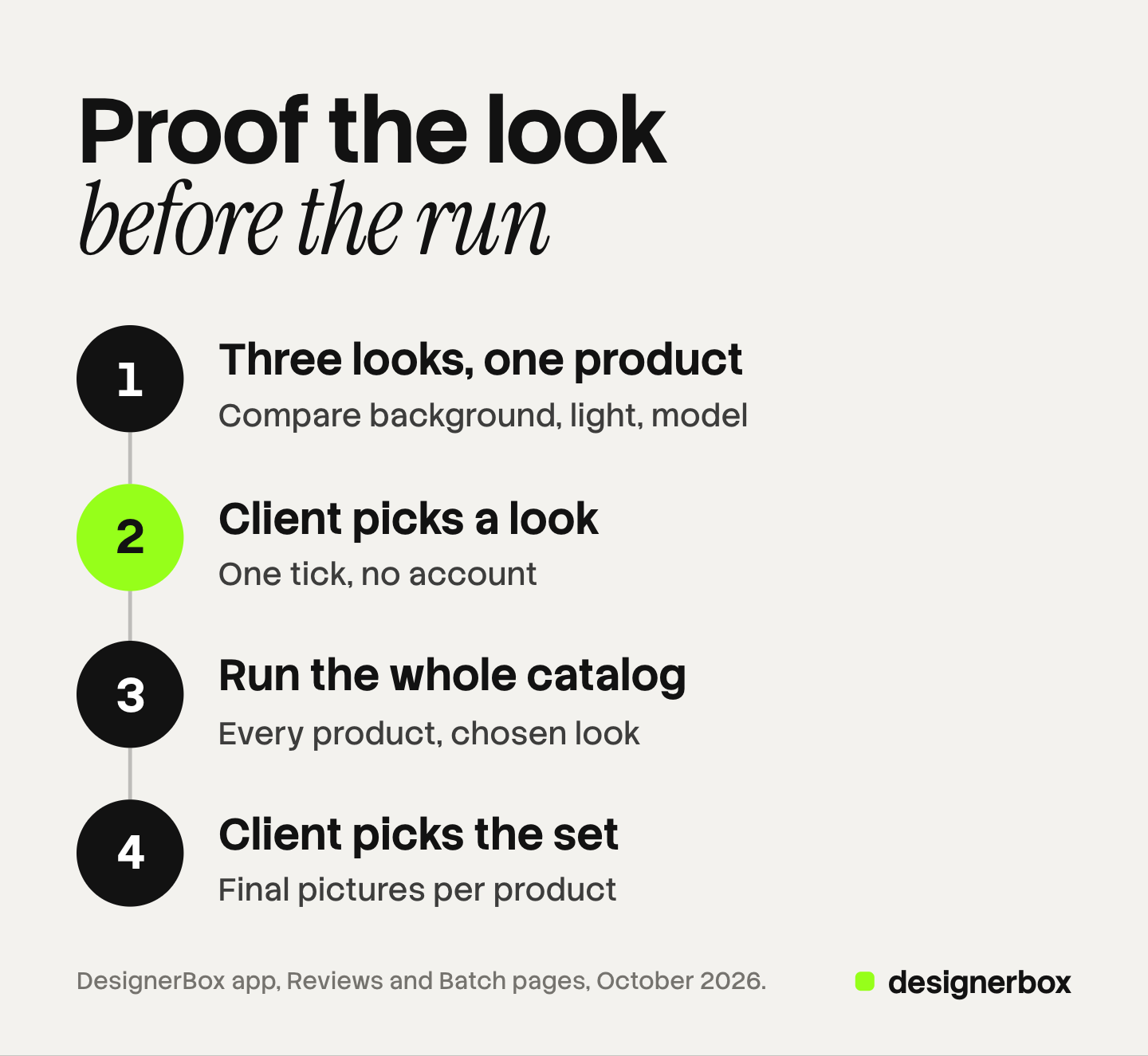
With AI-made product pictures, each new picture is a new run. Running a look on 200 products before the client agrees to it means paying for 200 products of a look they may reject. So the proof moves earlier, and it happens twice.
- The direction proof. Make two or three looks on one product. The client picks one look: the background, the light, the model.
- The set proof. Run the chosen look on every product. Check the product details yourself, then send the set. The client picks the final pictures.
The first proof is small and cheap. The second proof is large, but it holds no surprises, because the client already chose the look. For an on-model set, the look includes the person: our guide to letting the client pick the AI model shows that round. Our guide to white label content explains how studios price and sell those finished sets.
Proofing in DesignerBox
DesignerBox is AI creative production for brands and agencies. You make the pictures, and the proof happens in the same account.
The proofing step is called Reviews. You select pictures in Assets, open an app result, or keep the good results of a batch. Then you press Send for review and copy the link. The client opens it on a phone or a computer, with no account. They tick the pictures they want, add a note and send the choice back.
The Reviews page shows each review with its status, such as Answered or Closed. An open review shows the date the link stops working and a line such as “They chose 4 of 12 pictures”. A review costs no credits, and the link works for 30 days. Our guide to DesignerBox Reviews walks through every screen.
The direction proof and the set proof both fit this flow. Make three looks on one product, send them for review, then run the chosen look on the catalog in a batch. A batch holds up to 200 rows, and you see the cost before the run (DesignerBox batch, October 2026). Anyone can make an AI picture. Making hundreds that still look like your brand is the hard part. The proofs, the review link and the final set stay in one account.
Reviews covers still pictures, so plan video approvals around your current process. There is no comment thread on each picture and no version history. The client chooses and adds one note. Uploading your own photos and the commercial license start on the Pro plan. AI video, virtual try-on, upscaling, the image editor and the video editor start on the Premium plan. Plans and credits are on the pricing page.
The first job, built once
Start from a template, add your brand and your products, and run it. The cost is shown before the run.
FAQ
What is photo proofing?
Photo proofing is the step where a client chooses which unfinished pictures to finish and deliver. You share a private gallery link. The client marks favorites, adds notes and sends the choice. You then retouch and deliver only the chosen pictures.
What is a proof in photography?
A proof is a preview that comes before the final file. A client proof is a picture the client chooses from. A soft proof is a screen check of how colors will look in print. A hard proof is a test print on the real paper.
How many proofs should I send a client?
Send only the pictures you would deliver. For product work, two or three options for each slot is a reasonable start. Every extra picture adds a decision, and more decisions mean a slower answer.
Should proofs have a watermark?
Many photographers add a watermark or send smaller files until the client has chosen and paid. For brand work, the contract usually decides. A private link with downloads turned off does a similar job.
How long should a client have to choose?
Give a clear date and put it in the message. A link with no end date gets answered last. In DesignerBox Reviews the link works for 30 days, and the review page shows the end date.
What is the difference between culling and proofing?
You cull the pictures yourself and remove the ones you would not deliver. The client proofs the pictures that are left and chooses the ones they want. Culling comes first and makes proofing faster.
Can a client proof photos without an account?
Many gallery tools let a client open a private link without signing up. In DesignerBox Reviews the client opens the link with no account, ticks the pictures and sends the choice back.
Sources
- Pixieset blog, How to get started with online photo proofing using Pixieset (blog.pixieset.com, published 18 September 2026, updated October 2026), read October 2026
- ShootProof blog, Soft proofing (shootproof.com, updated May 2024), read October 2026
- PhotoDeck, Client galleries and photo proofing (photodeck.com), read October 2026
- IPA, Global study highlights issues obstructing the development of creative ideas (The BetterIdeas Project with WFA, BetterBriefs and Flood + Partners), March 2025, read October 2026
- DesignerBox app, Reviews page, read October 2026
- DesignerBox Batch page (designerbox.ai/product/batch), October 2026
- DesignerBox pricing page (designerbox.ai/pricing), October 2026
Proofing practice verified from the gallery platforms’ own pages and the IPA study as of October 2026. Individual results vary.