

AI ad generator vs design software is a choice about who builds each file. An AI ad generator makes finished ad creative from a product photo and a brief. Design software gives you a canvas and expects you to build each file. Adobe Creative Cloud, Canva, Figma and DesignerBox all include an AI allowance in their plans, and all of them meter generation.
The category split matters less than it used to, because Photoshop, Canva and Figma all ship AI generation now. The question worth answering is whether generation sits inside a canvas you still operate file by file, or inside a workflow you build once and run on every product.
“AI is fast, design software gives you control” does not settle this choice. It says nothing about how each option meters use or how many files your campaign needs. It also says nothing about week three, when the allowance runs out.
This guide compares how each side meters AI use, from vendor pages read in September 2026. It counts the files one campaign actually requires using the ad platforms’ own published specs, and names the licensing detail that decides whether the output is safe to run.
Key Takeaways
- The category boundary has dissolved. Photoshop, Canva and Figma all generate images now. Comparing “AI” to “design software” compares a feature to a product.
- Canva sells extra AI use as a separate add-on. AI Pass is priced per person, on top of the plan (canva.com/help/ai-pass, September 2026).
- Google publishes the file count. One Demand Gen campaign at Google’s recommended level needs 10 images across three aspect ratios and 9 videos, plus text.
- Running out behaves differently everywhere. Figma blocks you, Canva slows you with pauses, Adobe blocks premium features and leaves standard ones running.
- Adobe indemnifies eligible Firefly output, within limits. Capabilities Adobe marks as powered by non-Adobe models, and beta or trial features, sit outside the cover (helpx.adobe.com, published 27 August 2026).
- The efficiency case is contested. Gartner records marketing labor rising to 24.5% of budget, not falling.
- The repeat decides it. A canvas fixes the first draft. A workflow you build once fixes the twenty files after it, and next month’s twenty for the next product.
What an AI ad generator does
An AI ad generator takes a product image, brand assets and a short brief, then returns ad creative sized for the placements you name. You approve or regenerate. You do not open a layout tool to make the first version.
The category covers three shapes. Platform-native generators sit inside your ad account. Meta’s Advantage+ creative adjusts the media you upload, for example cropping an image or a video so it fits more placements, and shows a personalized variation to each person (facebook.com/business/help, September 2026). Standalone tools sell a subscription and a credit balance. Workflow tools, which is where DesignerBox sits, start from your real product photo. You build the steps once, and the same workflow makes stills, on-model shots, video and ad frames in one workspace. Ad creative for ecommerce sorts these generators by the input each one starts from. For what Meta, Google and TikTok generate inside their ad accounts, and the three jobs worth paying for, see the best AI ad generator in 2026.
The shared trait is that the tool owns the first draft. That is the whole proposition, and it is worth separating from the claim that the draft is finished.
What design software does now
Design software gives you a canvas, layers, type objects and export control. For any file where placement precision matters, that control is the product, and nothing about AI has changed it.

What has changed is that all three major tools now generate. Adobe ships Firefly across Photoshop, Illustrator, InDesign and Premiere, with generative credits metered per plan. Canva sorts its AI tools into Standard, Premium and Ultra tiers with a monthly allowance (canva.com/help/ai-access, September 2026). Figma includes AI credits with every seat and charges them per action, so a small edit draws fewer credits than a larger one (help.figma.com, September 2026).
So in 2026, “traditional design software” means a canvas with a generator attached.
Why “AI ad generator vs design software” stopped being the question
Both options now generate images. The difference is what happens to the image next.
In a canvas tool, generation fills one frame. You still place the type, apply the brand marks, resize for each placement and export every variant. Generate 40 product shots and you have 40 frames to lay out. The generator sped up one step in a sequence you still run by hand.
In a workflow tool, one input drives a set. The product photo becomes the pack shot, the on-model image, the styled scene and the ad frame. You build that sequence once with your brand rules, your product and your framing. Then you run the same workflow again for the next product, and it runs the same way. The unit of work is the run.
That is the choice worth making, and it maps to a real question about your team: is your bottleneck the first draft, or the forty files after it? A canvas fixes the first. A workflow fixes the second. Our breakdown of what a generated image is still missing covers the layout work neither one removes.
AI limits by tool
Each vendor lists its plans and AI allowances on its own pricing page. This table leaves the prices there and compares what each plan is built for and how it meters AI use.
| Tool | Best for | How AI use is metered |
|---|---|---|
| Adobe Creative Cloud Pro | Teams that design across Photoshop, Illustrator, InDesign and Premiere | Monthly generative credits for premium features. Standard features are unlimited |
| Adobe Photoshop single app | Photo editing and compositing in one app | A monthly generative credit allowance |
| Adobe Firefly Standard | Generation-first work inside Adobe | Monthly premium credits. Standard features are unlimited |
| Canva Pro | Solo layout work from templates | Standard AI tools do not use the allowance. Premium and Ultra tools share a monthly allowance, per member |
| Canva Business | Teams that share brand kits in Canva | A larger shared allowance for Premium and Ultra tools, per member |
| Figma Professional, Full seat | Product and interface design teams | Monthly AI credits with each seat, charged per action |
| DesignerBox | Agencies and brand teams that repeat the same creative for each product | Monthly credits by plan, charged per run |
Sources: helpx.adobe.com generative credits FAQ, adobe.com/products/firefly/plans, canva.com/help/ai-access, help.figma.com, September 2026.
Two details matter more than the plan name.
Adobe changed single-app credits. Photoshop on its own carries a much smaller generative credit allowance for anyone who subscribed on or after 17 June 2025 (helpx.adobe.com, September 2026). The same plan can carry a different allowance depending on the signup date.
Canva sells extra AI use separately. AI Pass is a monthly add-on priced per person (canva.com/help/ai-pass, September 2026). Canva allowances are also per member and are not pooled, so the cost grows with headcount rather than with output.
DesignerBox meters AI use in credits. There is a free plan, and it runs on sample products. Uploading your own photos starts on the Pro plan. Plans and credits are on the pricing page. The credit cost of an image depends on the model. AI video starts on the Premium plan, and an 8-second clip costs 40 to 560 credits, depending on the model. You see the cost before you press Run, so you can check a campaign against your credits before it starts. Our guide to how AI ad tools charge for use covers the credit models tool by tool.
How many files one campaign actually needs
The ad platforms publish how many files one campaign needs. For one Google Demand Gen campaign, the recommended count is 19 files: 10 images and 9 videos.
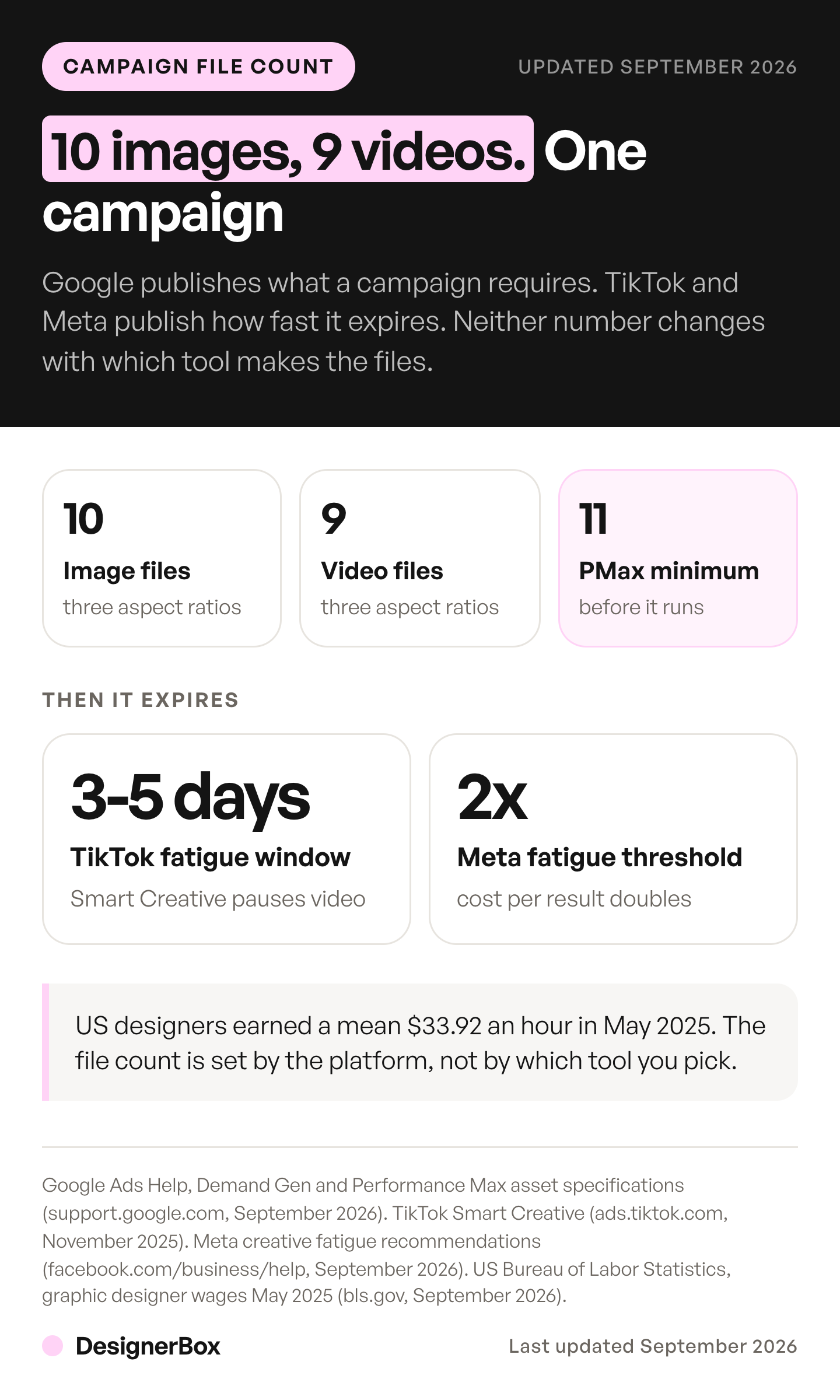
A Google Demand Gen campaign at Google’s own recommended level takes 5 headlines, 3 descriptions, 3 horizontal images, 3 square images, 3 vertical images, 1 logo and 3 videos in each of three orientations (support.google.com, October 2026). That is 10 image files and 9 video files for one campaign. Creative assets: types and counts sets out the upper limits Google puts on one asset group.
Performance Max asks for more images per asset group. Google recommends 4 or more horizontal images, 4 or more square images, 2 or more vertical images and a square logo, which is 11 image files. Horizontal and square images and the square logo are required (support.google.com, September 2026).
Then the set expires. TikTok suggests 3 to 5 different creatives per ad group and 3 to 5 ad groups per campaign (ads.tiktok.com, September 2026). Its Smart Creative system observes new videos for 3 to 5 days and pauses the ones that show signs of fatigue in that time (ads.tiktok.com, September 2026). Meta publishes creative fatigue recommendations in Ads Manager, and describes creative fatigue as what happens when an audience has seen the same creative too many times (facebook.com/business/help, September 2026).
Set that against the labor. US graphic designers earned a median $30.27 an hour, or $62,960 a year, in May 2025 (bls.gov, October 2026). At 19 files per campaign and 30 minutes of layout and export each, one campaign costs roughly 9.5 hours, or about $288 of designer time. That arithmetic is illustrative, not a surveyed figure, and your own rate and file count will move it. The shape holds regardless: the file count is fixed by the platform, the refresh cadence is fixed by fatigue, and neither is negotiable by choosing a different tool.
If the layout work goes to an outside designer, the four ways to outsource graphic design compare the options. The queue math behind unlimited design services shows what a subscription delivers in a month.
What happens when the AI allowance is spent
When the AI allowance runs out, Figma blocks further AI actions. Canva lets Pro and Teams users continue with short pauses. Adobe blocks premium features, and standard generations stay unlimited on its Pro and Firefly plans. The table shows what each tool does at zero.
| Tool | When the allowance is gone | Rollover |
|---|---|---|
| Figma | Blocked. No further AI actions until reset or an admin adds credits | None |
| Canva | Standard tools on paid plans keep running. Pro and Teams users can keep using AI tools with short pauses, or buy more | Resets monthly |
| Adobe | Premium features blocked. Standard generations stay unlimited on Pro and Firefly plans | None |
| DesignerBox | No new runs until the monthly reset, or buy a credit pack on a paid plan | Plan credits do not carry over. Pack credits last for 12 months |
Sources: help.figma.com, canva.com/help/ai-access, helpx.adobe.com generative credits FAQ, September 2026, plus the DesignerBox pricing page.
Figma’s Make feature is the one to check before you commit. Figma publishes approximate credit examples for Make. A large task, such as making an app from a prompt, draws far more credits than a small edit, such as changing a font (help.figma.com, September 2026). Read that page against the allowance on your seat.
The licensing line worth reading before you ship
Adobe offers indemnification on Firefly output, and it is a genuine advantage for teams that need it. The cover has limits, and they are worth reading before you ship.
Adobe’s Firefly product description, published 27 August 2026, applies to customers whose agreement with Adobe links to that page. It excludes “capabilities that Adobe may develop that are denoted in the user interface as being powered or provided by non-Adobe trained models”, and any features designated as “beta” or “trial” (helpx.adobe.com/legal/product-descriptions/adobe-firefly.html, September 2026). Adobe also offers partner models inside some features, such as Generative Fill in Photoshop (adobe.com, September 2026), so check which model made a file.
The cover is tied to an export event. In Photoshop, Illustrator, InDesign and Premiere, that is when a user on a qualifying plan downloads or exports the content. Placing an output on the canvas does not count. So the covered moment is the export, under a qualifying agreement. Adobe Firefly alternatives by team type covers where Adobe says its commercially safe claim stops.
DesignerBox grants a commercial license from the Pro plan. A license is a different mechanism from indemnity, and the two are not equivalent. Read the current terms for whichever tool made the file before you publish a licensing claim of your own. This section is general information, not legal advice.
Whichever you use, the disclosure requirements apply to the output. Our guide to AI ad generators and the rules that govern them covers the labeling side.
How to choose between them
To choose between an AI ad generator and design software, answer four questions in order.

Is your bottleneck the first draft or the file count? If one good concept is the hard part, a canvas with AI in it is enough, and you already own one. If twenty files per campaign is the hard part, a canvas does not help.
How many people need to generate? Canva and Figma meter per member, so the AI bill grows with headcount. A pooled credit balance behaves differently at five seats than at one. In DesignerBox, team features, shared brand kits and white label are on the Ultra plan, and every plan below Ultra is one seat.
Does the output have to be your actual product? A general image model produces a plausible product. A workflow built on your uploaded photo starts from the real one. For ecommerce and paid social this is usually the deciding line, and it is why DesignerBox starts from an upload. Still check every result for warped prints, garbled logos and missing details. In a workflow, critic steps score the results, and best-of-N keeps the best one.
Does the campaign repeat? If next month’s drop needs the same set with a different product, a workflow you built once is worth more than a faster canvas or a cheaper generator. A saved DesignerBox workflow runs the same way on the next product. The Ads from a product photo template is a place to start. The Ad in other sizes app turns one ad into four sizes, so each ad platform gets the size it needs.
Most teams keep both. Generation handles the draft and the volume. The canvas handles the final file.
Two findings are worth holding against the efficiency case. Gartner’s 2026 CMO Spend Survey of 401 marketing leaders found labor claiming a larger share of marketing budget, 24.5% in 2026 against 21.9% in 2025. Gartner said AI value depends on people, skills and execution, not only technology (gartner.com, June 2026). Forrester reported that nine in ten US marketing agencies use generative AI, with analyst Jay Pattisall warning the industry risks “mistaking efficiency for effectiveness” (forrester.com, June 2026). Faster creative is not automatically better creative, and the tool does not settle that.
For the tool-by-tool view, our Canva alternatives comparison covers the wider field. The ranked shortlist of AI ad creative tools puts DesignerBox next to the rest of the field.
If the repeat is what you are buying for, open a template in DesignerBox and set your brand once. The workflow reads your logo, colors and fonts on every run, so the twentieth ad looks like the first. The ads, their sizes and your brand rules sit in one account. See the templates.
FAQ
Is an AI ad generator cheaper than design software?
Not reliably. The plan price rarely decides your bill. Generation volume does, because every tool meters AI use in credits or uses. Each vendor lists its prices on its own pricing page. In DesignerBox the cost is shown before the run, and an 8-second clip costs 40 to 560 credits, depending on the model.
Can I use AI-generated ads commercially?
The answer changes by tool and by plan. Adobe indemnifies eligible Firefly features under qualifying agreements, excluding beta or trial features and capabilities Adobe marks as powered by non-Adobe models (helpx.adobe.com, published 27 August 2026). In DesignerBox, the commercial license starts on the Pro plan. Read the current terms for the tool you use before you rely on them.
Do AI ad generators replace graphic designers?
The evidence points to a change in the work rather than a removal of it. The US Bureau of Labor Statistics projects graphic designer employment to decline 2% from 2025 to 2035. It says automated design tools, such as AI, are projected to make designers more productive and reduce the need for these workers (bls.gov, October 2026). Gartner records marketing labor taking a larger budget share, not a smaller one.
How many ad creatives does one campaign need?
Google recommends 10 image files, including a logo, and 9 videos across three orientations for a Demand Gen campaign, and recommends 11 image files per Performance Max asset group. TikTok recommends 3 to 5 creatives per ad group and 3 to 5 ad groups per campaign. Those are the published figures from each platform.
Does Canva charge extra for AI?
Every paid Canva plan includes an AI allowance, and Canva sells AI Pass separately as a monthly add-on, per person (canva.com/help/ai-pass, September 2026). Allowances are per member rather than pooled, so five people need five allowances.
What happens when I have no AI credits left?
Each tool handles it differently. Figma blocks further AI actions until reset. Canva lets Pro and Teams users keep using AI tools with short pauses, and Standard tools on paid plans do not use the allowance. On Creative Cloud Pro and Firefly plans, Adobe spends credits only on premium features, and standard generations stay unlimited. In DesignerBox, new runs wait for the monthly reset, and paid plans can add a credit pack.
Should I use both an AI generator and design software?
For most teams, yes. Generation covers the draft and the volume the platforms demand. The canvas covers the final file: type you can edit, brand marks, the legal line and the export sizes. The workflow question is where the handoff sits.
Sources
- US Bureau of Labor Statistics, Occupational Outlook Handbook, Graphic Designers, median pay May 2025, projections 2025 to 2035 (bls.gov, accessed October 2026)
- Google Ads Help, Demand Gen campaigns specs and format requirements (support.google.com, accessed October 2026)
- Google Ads Help, Performance Max specs and format requirements (support.google.com, accessed September 2026)
- TikTok Business Help Center, About Smart Creative (ads.tiktok.com, last updated November 2025, accessed September 2026)
- TikTok Business Help Center, Creative best practices for performance ads (ads.tiktok.com, last updated June 2025, accessed September 2026)
- Meta Business Help Center, Creative Fatigue Recommendations (facebook.com/business/help, accessed September 2026)
- Meta Business Help Center, About Advantage+ Creative (facebook.com/business/help, accessed September 2026)
- Gartner, 2026 CMO Spend Survey, 401 marketing leaders surveyed January to March 2026 (gartner.com, 8 June 2026)
- Forrester, The State Of AI Inside US Marketing Agencies, 2026 (forrester.com, 24 June 2026)
- Adobe Firefly plans page, Photoshop Generative Fill page and the generative credits FAQ, last updated 3 September 2026 (adobe.com and helpx.adobe.com, September 2026)
- Adobe Firefly Product Description, indemnity scope, exclusions and export events (helpx.adobe.com, published 27 August 2026)
- Canva Help Center, Understanding your AI usage and Understanding AI Pass (canva.com, September 2026)
- Figma Help Center, How AI credits work (help.figma.com, September 2026)
- DesignerBox pricing page (designerbox.ai/pricing), September 2026
Plan details and platform specifications verified from each vendor’s own documentation as of September 2026. The Bureau of Labor Statistics page and Google’s Demand Gen spec page were re-checked on 2 October 2026. Vendor terms change frequently; check the current page before relying on a figure. Individual results vary.