
The best Adobe Firefly alternative depends on the job your team repeats each week. Photoroom fits ecommerce product stills at volume. Canva fits brand teams and solo founders who need layout as well as generation. Comfy fits studios that want control over every step. DesignerBox fits agencies and brand teams running the same job on every new product.
There is a step most shortlists skip. Firefly is no longer one model. Adobe describes it as a creative space that integrates “Adobe’s generative AI models with additional capabilities from third-party partners” (adobe.com, September 2026), and the partner list now includes Google, OpenAI, Kling AI, ElevenLabs, Luma AI, Runway and Topaz. So “I want better models” is rarely the reason to leave. Model access is the thing Firefly just added.
The reason teams actually leave is narrower, and it sits in Adobe’s own terms. The commercial safety that makes Firefly attractive for client work covers a specific slice of what you do. This guide shows where that slice ends, then matches five alternatives to the eight team types that ask this question most.
Key Takeaways
Model choice is not the reason to switch: Firefly runs partner models from Google, OpenAI, Runway, Luma, Kling, Topaz and ElevenLabs alongside Firefly Image 5 (adobe.com, September 2026) The safety claim is narrower than the marketing: Adobe states indemnification is “limited to generally available Google and OpenAI media generation models” among partners (helpx.adobe.com, September 2026) Editing your result can move it outside the indemnity: Adobe excludes claims arising from “your modification of the Firefly output using any product or service, including edits made with Creative Cloud products/services” (business.adobe.com, September 2026) Indemnification is an enterprise entitlement, not a default: Adobe provides it “for enterprise customers” and says it applies if “you have purchased the appropriate entitlement” (adobe.com and business.adobe.com, September 2026) Match the tool to the repeated job: product stills at volume, layout and brand, step-level control, or one workflow run on every product Check four things before you switch: which model made it, whether the feature is out of beta, whether you edited the result, and who carries the risk
What Adobe Firefly covers in 2026
Firefly is three things at once: a standalone web app, a family of Adobe-trained models, and a set of features inside Creative Cloud apps. Adobe describes it as a space to “create and edit images, videos, audio, and vector graphics from simple text prompts” (adobe.com, September 2026).
Three parts matter for a commercial team.
Adobe’s own models. Adobe states the Firefly models “were trained on a dataset of licensed content, such as Adobe Stock, along with public domain content”, and that Adobe “does not train on any Creative Cloud subscribers’ personal content” (helpx.adobe.com, May 2026). That is the basis of the commercial safety claim, and it is a real advantage for regulated and client-facing work.
Partner models. Firefly now surfaces third-party models inside the same app. Adobe lists Google, OpenAI, Kling AI, ElevenLabs, Luma AI, Runway and Topaz (adobe.com, September 2026). This is why a straight model comparison is the wrong way to shop for a Firefly alternative in 2026.
Custom models and Boards. Adobe describes custom models as generally available, letting a customer train on their own images for consistent style, and Firefly Boards as available (adobe.com, September 2026).
Firefly is strong at all of this. Nothing below argues otherwise.
Where the commercially safe claim stops
This is the part worth reading twice, because it decides whether an alternative is a preference or a requirement. Every quote here is Adobe’s own published wording.
Commercial use is broad, with a per-feature check. Adobe’s FAQ says: “For features without the beta label, you can use Firefly-generated outputs in your commercial projects. For features that are in beta, you can use the Firefly-generated outputs for your commercial projects unless explicitly stated otherwise in the product” (helpx.adobe.com, May 2026). So beta features are not blanket-excluded, but the answer for any given feature lives in the product interface, not in a policy page. Someone has to look.
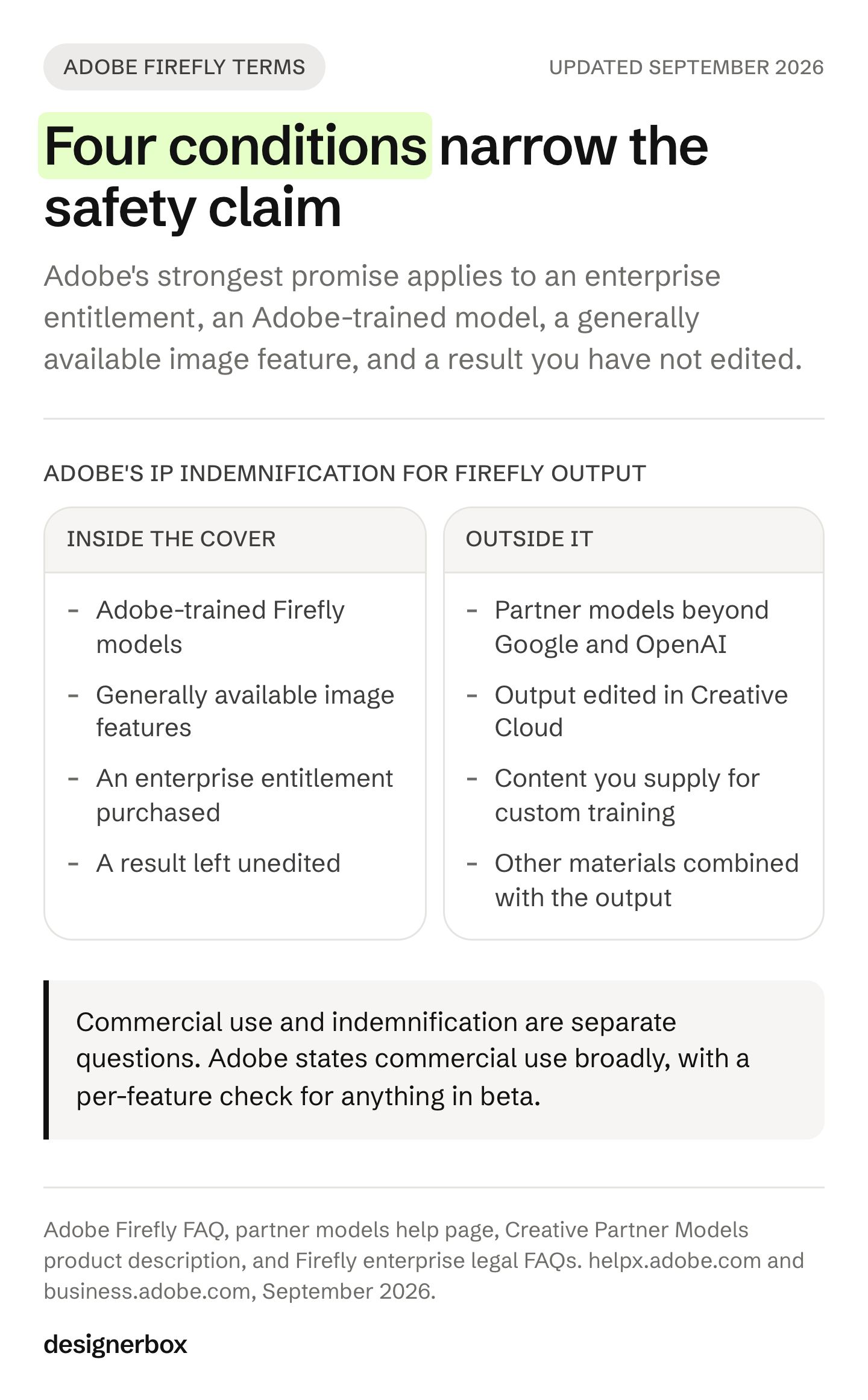
Indemnification is not the same as commercial use, and it is not universal. Adobe states it “provides intellectual property indemnification for enterprise customers for content generated with Adobe Firefly” (adobe.com, September 2026). Its business page says customers “on qualifying plans are eligible for IP indemnification for generated content (terms apply)” (business.adobe.com, September 2026), and its enterprise legal FAQ answers the question directly: yes, “if you have purchased the appropriate entitlement”.
Partner models are treated differently. Adobe’s help page for partner models asks whether all of them are covered the same way and answers: “No. Indemnification is limited to generally available Google and OpenAI media generation models made available through Adobe in Firefly Creative Production for Enterprise” (helpx.adobe.com, September 2026). Adobe’s product description for Creative Partner Models says the same thing from the other side: capabilities that the interface marks as powered or provided by non-Adobe trained models are excluded from the Firefly IP indemnification referenced there (helpx.adobe.com, May 2026).
Editing the result can move it outside the cover. The enterprise legal FAQ lists what the indemnity will not cover, including “your modification of the Firefly output using any product or service, including edits made with Creative Cloud products/services”, any other materials combined with the output, and “any content that you provide for custom training” (business.adobe.com, September 2026).
The scope is images, and generally available features. Adobe states its “Firefly IP indemnity for eligible offers covers Firefly GA features that generate imagery” (business.adobe.com, September 2026).
Read those together and a practical picture appears. The strongest form of the promise applies to an enterprise entitlement, an Adobe-trained model, a generally available image feature, and a result you have not edited. A retoucher opening that file in Photoshop is a normal Tuesday in most teams, and it is also the line Adobe draws.
Firefly publishes this scope clearly, and Adobe documents it more openly than most vendors in this category. It does mean the useful question changes shape. Ask which parts of your week this covers, and what runs the rest.
The 5 best Adobe Firefly alternatives in 2026
Shortlists for this term age badly. Several pages ranking today still recommend products that have been renamed or retired. The five below are current, and each one is here because it does a different job.
1. DesignerBox, for the job you repeat every week
DesignerBox is AI creative production for agencies and brand teams. You build a workflow once with your brand, your products and your rules, then run it on every new product. The cost of a run is shown before you press Run.
The difference from Firefly is the unit of work. Firefly is excellent at making a result. DesignerBox is built around the run, the review and the delivery. Three critic steps score the results of a run and best-of-N keeps the best one, so review sits inside the job rather than after it.
Model choice stays open at the step level, so one workflow can use a different model at each step. There are 68 tools over MCP, plus an API on the Ultra plan, which means an AI chat such as Claude can run the same workflows.
The second difference is reach. Templates, workflows, apps, batch, the image editor, the video editor, brand profiles and your Assets sit in one subscription. The full workflow from the first product photo to the finished ad stays in one place.
Honest limits. The commercial license starts on Pro, virtual try-on and AI video start on Premium, and team collaboration, shared brand kits, white label and API access are on Ultra. Every plan below Ultra is a single seat, which matters for an agency. The free plan cannot make video. Current plans are on the pricing page.
Best for: agencies carrying many client brands, and brand teams producing the same set for every product.
2. Photoroom, for ecommerce product stills at volume
Photoroom describes itself as “the full AI visual solution for e-commerce” and covers AI product photography, background removal, batch editing, an API, a brand kit and marketplace formatting (photoroom.com, September 2026). It says it serves over 1 million businesses (photoroom.com, September 2026).
If your week is product stills for listings, this is the most direct swap on the list. Video editing and campaign concepting sit outside its focus.
Best for: ecommerce and marketplace sellers whose output is a listing image.
3. Canva, for brand teams and solo founders who need layout too
Canva covers design and layout broadly, with AI tools for design, writing and brand, and brand controls that keep output consistent (canva.com, September 2026). For a team of one or two people who need the finished social post, not just the image, that breadth is the point.
Generation is one feature inside a design platform rather than the center of the product. For a catalog-scale production job it is the wrong shape, and for a one-person brand it is often exactly right. Our Canva alternatives guide goes deeper on where it fits.
Best for: solo founders and small brand teams producing social creative and campaign assets.
4. Comfy, for studios that want control of every step
Comfy positions itself as “the AI creation engine for visual professionals who demand control over every model, every parameter, and every output”, built on a node-based graph, with desktop, cloud and enterprise options and the ability to publish workflows as production APIs (comfy.org, September 2026).
It is open where Firefly is managed. That means you own the pipeline and the model choice, and you also own the setup, the maintenance and the rights diligence for whichever models you load. There is no vendor indemnity standing behind an open graph you assembled.
Best for: creative studios and technical teams with someone who wants to own the pipeline.
5. Firefly itself, with a different model policy
The alternative most shortlists never mention is staying put and changing how you use it. If the reason you are shopping is rights rather than results, the fix may be a policy rather than a migration: use Adobe-trained models for client deliverables, keep those features out of beta, and keep the deliverable unedited where the indemnity matters.
That is a real option, and it is cheaper than a migration. It is also a constraint on your creative choices, which is precisely the trade to weigh.
Best for: teams already deep in Creative Cloud whose blocker is legal review, not output.
Which alternative fits your team
The eight teams that ask this question want different things. Here is the routing.
| Your team | What you repeat | Where to look first |
|---|---|---|
| Agencies | The same creative set for many client brands | DesignerBox for one workflow per client, Comfy if you own the pipeline |
| Brand teams | One brand standard on every piece | DesignerBox for brand rules read on every run, Canva for layout |
| Performance marketers | New ad variants from your winners | DesignerBox for variants from an approved result |
| Creative studios | Finished sets sold under your name | Comfy for control, DesignerBox for repeatable delivery |
| Ecommerce brands | The same shot for every product | Photoroom for listings, DesignerBox for a full set per product |
| Fashion brands | On-model sets for every colorway | DesignerBox for on-model and try-on |
| Furniture and homeware | Room scenes from one product photo | DesignerBox for scene placement |
| Solo founders | Your brand, without a designer | Canva for breadth, the DesignerBox free plan to test the job |
Three of those rows deserve a note.

Agencies carry a seat problem on every tool in this category, including ours. Multi-brand separation and team seats tend to sit on the top tier. Price the seats before the features. Our guide to creative for multiple clients covers how that math works, and the DesignerBox page for agencies has the current shape.
Ecommerce and fashion teams should shop on the finished set, not the single image. One great hero is not the job. Forty products, each needing a hero, angles, a lifestyle scene and a marketplace crop, is the job. The best AI product photography tools guide compares that directly, and ecommerce brands and fashion brands each have a page.
Furniture and homeware teams have the thinnest tool coverage of the eight, because room scenes need the product to survive relighting and reframing. We cover that in AI furniture product photography tools.
What to check before you switch
Four questions answer most of the risk, whichever tool you pick. They apply to Firefly and to every alternative above.
- Which model made this result? In a multi-model app the answer changes per generation, and so do the terms attached to it.
- Is the feature out of beta? Adobe says the answer for a beta feature is stated in the product, so the check belongs in your process, not in a policy you read once.
- Did anyone edit the result after it was made? Retouching is normal and it can change which terms apply.
- Who carries the risk if a claim arrives? Vendor indemnity is usually an entitlement on a specific agreement, not a property of the pixels.
Write the answers into your delivery checklist rather than your onboarding doc. A rule that lives in a doc is forgotten within a month. Our guide to image licensing and usage rights covers how to document this for client work, and AI brand consistency covers the input side.

This is general information, not legal advice. Terms change, so read the current ones and have your own counsel review anything that matters.
Cost before the run
Most tool switching in this category comes down to two complaints: a bill that arrives after the work, and a pile of results nobody has time to check.
DesignerBox answers both directly. Every run shows its cost before you start it, so you can price a set before you produce it. Review is part of the workflow rather than a stage after it: critic steps score the results and best-of-N keeps the best one.
Some costs are fixed and easy to plan against. An avatar run returns nine fixed poses for 25 credits. An 8-second clip costs 40 to 560 credits, depending on the model. Clothing catalog turns one garment into four shots: front, three-quarter, back and a fabric close-up. The pricing page carries the current plans.
You can see how it works, the models it runs, and how DesignerBox compares with the other tools here.
A free plan for your first run
Start from a workflow, add your brand and your products, and run it. The cost is shown before the run.
FAQ
What is the best Adobe Firefly alternative?
There is no single best one, because the tools solve different jobs. Photoroom is the closest swap for ecommerce product stills. Canva fits solo founders and small brand teams who need layout as well as generation. Comfy fits studios that want step-level control. DesignerBox fits agencies and brand teams running the same job on every new product.
Is Adobe Firefly output safe to use for client work?
Adobe states that for features without the beta label you can use Firefly output in commercial projects, and that beta features are usable unless the product says otherwise (helpx.adobe.com, May 2026). Commercial use and indemnification are separate questions, and the indemnity has its own conditions. Read the current terms and ask your own counsel.
Do Firefly’s partner models carry the same terms as Adobe’s own models?
No. Adobe states that indemnification is “limited to generally available Google and OpenAI media generation models made available through Adobe in Firefly Creative Production for Enterprise”, and that capabilities powered by non-Adobe trained models are excluded from the Firefly IP indemnification (helpx.adobe.com, September 2026).
Does editing a Firefly image change my cover?
Adobe’s enterprise legal FAQ excludes claims arising from “your modification of the Firefly output using any product or service, including edits made with Creative Cloud products/services” (business.adobe.com, September 2026). If this matters for a deliverable, check the current terms before you retouch.
Is there a free Adobe Firefly alternative?
Yes. Comfy is open source for teams willing to run and maintain it. Canva has a free tier, and DesignerBox has a free plan, enough to test a workflow end to end. The DesignerBox free plan cannot make video.
Can an alternative handle a whole product catalog?
Photoroom offers batch editing and an API for volume work (photoroom.com, September 2026). In DesignerBox a saved workflow runs the same way on the next product, with the cost of each run shown before you start it.
Do I have to leave Creative Cloud to use an alternative?
No. Most teams run both. A common split is Creative Cloud for finishing and layout, and a production tool for the repeated set. DesignerBox also has a Figma plugin, so generation can sit next to the design work.
Sources
- Adobe Firefly product page, for what Firefly is, its model list and partner models (adobe.com, accessed September 2026)
- Adobe Firefly FAQ, for commercial use, beta features, training data and Content Credentials (helpx.adobe.com, accessed September 2026)
- Partner models in Firefly Creative Production for Enterprise, for partner model indemnification scope (helpx.adobe.com, accessed September 2026)
- Creative Partner Models product description, for non-Adobe trained model exclusions (helpx.adobe.com, accessed September 2026)
- Adobe approach to generative AI, for enterprise indemnification (adobe.com, accessed September 2026)
- Firefly Legal FAQs for enterprise customers, for indemnity conditions and exclusions (business.adobe.com, accessed September 2026)
- Photoroom home page, for scope, batch editing, API and business count (photoroom.com, accessed September 2026)
- Canva AI page, for design and brand scope (canva.com, accessed September 2026)
- Comfy home page, for node-based control and deployment options (comfy.org, accessed September 2026)
- DesignerBox pricing and plans (DesignerBox pricing, September 2026)
Adobe Firefly terms, competitor features and model coverage verified from each company’s own published pages as of September 2026. Terms change, so check the current page before you rely on one. Individual results vary.