

The best AI ad generator for most advertisers is the one already in their ad account. Meta Advantage+ creative, Google Asset Studio, and TikTok Symphony generate ad images, video, and text inside the platforms you already buy media on. Paid tools are worth it for three jobs the platform tools are not built for: your product checked in every shot and usable outside one ad account, one standard across every channel and every product, and a choice of model for each shot.
We sell one of the paid tools, so this is an awkward fact for us to publish. For a large share of readers, the right tool costs nothing and needs no new login.
So start there. This guide covers what the platform-native generators produce and the limits their own documentation states. It covers the three jobs that justify paying for something else. It also shows why a price column in a comparison table needs a second check.
Key Takeaways
- Three ad platforms ship AI creative generation to advertisers already. Meta Advantage+ creative, Google Asset Studio, and TikTok Symphony. TikTok’s own documentation calls its tool “free” (ads.tiktok.com, September 2026).
- They each work in one platform only. An asset generated in Google Ads does not appear in your Meta account, your TikTok account, or on your product page. Our guide to Google Ads AI lists what Asset Studio makes and the slots you still fill. Cross-channel reuse is the thing they structurally do not do.
- They can start from your product image. Meta’s image generation can take an image with your product in it and generate new environments for it (facebook.com, September 2026). What they do not give you is a saved build that runs the same way on your next product.
- Pay when you need one of three things: product shots you can check and use on every channel, one build that runs the same way on the next forty products, or control over which model makes each shot.
- Check any price column before you trust it. Four paid tools were checked again in September 2026. Two showed a yearly rate as a per-month figure, one was running a promotion on its yearly and quarterly plans, and one opened on plain monthly billing. This guide prints no competitor prices.
- The model you pick changes the video cost. In DesignerBox an 8-second clip costs 40 to 560 credits, depending on the model.
- Compliance is a selection criterion. TikTok adds an “AI-generated” label to every video exported from Symphony Creative Studio. Google adds SynthID and C2PA metadata to images and videos made with Google Ads tools (as of September 2026).
Which AI ad generator is best to start with?
The best AI ad generator to start with is the one inside your ad account. All three major ad platforms build creative generation into the buying tools. None of them require a separate subscription to start. Creative is only one of the four layers of AI in advertising, and it is the one where your choice of tool still changes the output. For research, copy, bidding and measurement, see the free AI ad tools for each job. For what each ecommerce channel’s campaign type automates, see ecommerce advertising.
Meta Advantage+ creative
Meta’s Advantage+ creative generates new versions of your ads. Its help page describes image generation as “a generative AI feature designed to help you create diverse versions of your original ad creative”. It works in two ways. You give it an image with a product in it, and it generates different environments or ad styles for that product. Or you give it a full image, and it uses that image as a reference for variations (facebook.com, September 2026).
It also generates backgrounds for catalog product images, writes up to five variations of primary text and headline, and crops or expands images to fit more placements (facebook.com, September 2026).
The documented constraints matter more than the feature list. Background generation is only available for Advantage+ catalog ads with a sales objective and a single image, carousel or collection format (facebook.com, September 2026). Image generation is only available for single image ads (facebook.com, September 2026). Meta does not publish a separate fee for these tools; they sit inside Ads Manager.
Google Asset Studio
Asset Studio is Google’s creative hub inside Google Ads, described as “your centralized destination in Google Ads for creating, editing, managing, and sharing your assets, all in one place” (support.google.com, September 2026). It generates images, offers a video builder with trimming and voiceover, and does text asset development.
Two documented details are worth planning around. Generated images “automatically remain in your Asset library for 14 days” unless you use them in a campaign. And Google blocks generation of “branded items and logos not provided as input” (support.google.com, September 2026), which is a direct constraint if your ad concept is your logo on something.
Google also states plainly that “assets created by generative AI aren’t guaranteed to be approved by Ads Policy” (support.google.com, September 2026). Generation and approval are separate steps.
TikTok Symphony
TikTok Symphony Creative Studio is the clearest case. TikTok’s own help documentation calls it “this free creation tool” (ads.tiktok.com, September 2026). It makes videos, static images and avatar videos for TikTok. Free AI tools from Shopify, Google and TikTok compares Symphony with the product image tools in Shopify and Google.
The compliance behavior is the standout feature. TikTok’s guide says: “An AI-generated label is added to all exported videos per TikTok ad policy” (ads.tiktok.com, October 2026).
That matters because TikTok’s ad policy states: “If we identify AI-generated content that has not been disclosed, your ad will be rejected or restricted” (ads.tiktok.com, September 2026). Symphony handles its own disclosure. A file you bring from elsewhere is your responsibility to label. For the full picture on what each platform requires, see what an AI ad generator is and the rules that govern the output.
Where the platform generators stop
Three limits come from how these generators are built.
They are single-channel by design. Each generator lives inside one ad account and produces assets for that platform’s placements. Running the same campaign across Meta, Google, TikTok, and your product detail page means generating it separately in three tools and building the fourth somewhere else. Nothing carries across, and neither does brand consistency.
Each run starts again. Meta can take your product image and generate new scenes around it. The result stays in that ad account, and there is no saved build with your brand rules that runs the same way on the next product. A generated scene can also change a label, a print or a collar, so someone still has to check the product in each result. If a customer receives something that does not match the ad, the ad was the problem.
You do not choose the model. The platform picks. When a shot needs a specific model for text rendering, or fabric texture, or native audio, there is no selector.
None of that makes them the wrong choice. For an advertiser who buys media on one platform and already has good product photography, they are likely the right choice. They also carry no separate fee.
Before you weigh any of them, look at one large study. Working with Taboola, a display ad platform that sells its own AI ad maker, researchers compared 4,633 matched AI-generated and human-made ads across more than 369 million impressions. They found no detectable average click-through disadvantage for AI generated ads (Exner, Hartmann, Ding, Zhang and Netzer, SSRN working paper, last revised 12 August 2026, papers.ssrn.com, accessed October 2026). So judge a tool on your cost per variant, and do not expect the tool alone to lift your CTR.
The three jobs that justify paying

Pay for a tool when at least one of the three statements below is true. If none is, the free option is the answer.
Software advertisers have a different starting problem, since there is no product photo for any of these to render. What a SaaS ad can put in frame covers that case, and B2B ads by buying stage covers the formats for buyers at other businesses.
A fourth option is the design software your team already licenses, since Adobe, Canva and Figma all offer AI generation. That side by side comparison covers what each meters and where each stops.
You need your actual product, checked, in shots you do not have. A generated scene can change a label, a print or a collar. A tool built for product work lets you review the product in each result before it ships. Your product page, email and marketplace listing need those files too, and a generator inside an ad account keeps them in that account.
You need the same standard on the fortieth product as on the first. Paid social, a PDP, an email header and a marketplace listing all pull from the same build. Set the brand rules, the light and the framing once, and a saved build runs the same way on product forty as on product one. Split the work across three ad accounts and it drifts, and the drift stays invisible until someone lines the channels up side by side.
You need to choose the model. Different shots want different models. Text on packaging, fabric drape and video with native audio are different rendering problems. The platform generators pick the model for you. A tool that lets you set the model for each step lets you match the model to the shot.
The reusable version of this: build the job once, then run it again for every product after it. The first ad costs you the decisions. The fortieth costs you the render.
What should an agency check in an ad creative generator?
An agency should check four things that a single brand can skip: a separate brand for each client, seats for the team, the right to hand the result to a client, and the delivery route. The answer to each one is on the vendor’s pricing page or in its terms of service. Read both before a client’s files go in.
Most tools in this group are built for one brand in one account. An agency runs many brands with one team, and it delivers the work to somebody else. The table names the page that answers each check, with examples read on the vendors’ own sites in October 2026.
| Check | Where the answer is | What the vendors’ pages say |
|---|---|---|
| A separate brand for each client | The plan comparison | Creatify lists “Brand Spaces” as a row in its plan comparison (creatify.ai/pricing, October 2026). In AdCreative.ai, each brand holds its own logo, colors and connected ad accounts (adcreative.ai/enterprise, October 2026) |
| Seats for the team | The plan comparison and the terms | The Brief, formerly Creatopy, describes its Team plan as one workspace for 2 to 10 people with shared brand systems and roles (thebrief.ai/pricing, October 2026). Arcads sells one subscription per workspace (arcads.ai/terms, October 2026) |
| The right to hand the result to a client | The terms of service | Canva’s AI terms say “you own your Output”, except where it uses Canva library content (canva.com/policies/ai-product-terms, October 2026). Creatify’s terms say users of the free tier “have limited rights” (creatify.ai/terms, October 2026). Arcads grants “a non-exclusive, personal and non-transferable license” on each video (arcads.ai/terms, October 2026) |
| The delivery route | The feature and API pages | Creatify has an API for UGC ads, avatars and product videos (creatify.ai/api, October 2026). The Brief lists an API and a white-label editor on its pricing page (thebrief.ai/pricing, October 2026) |
The third row decides more than the first two. A license worded as personal is a scope fact, so match it against your client contract before you deliver. A pricing page does not answer this question. Only the terms do, and this is general information, not legal advice.
White label has a narrow meaning. Removing a vendor’s logo from a file does not make a tool white label. White label means the client never sees the vendor at all, and how studios sell finished sets under their own name covers the contract side.
The checks stay the same for every kind of tool. Marketing agency tools by job applies them across the whole stack, the AI ad agency guide covers the stack such an agency runs, and AI UGC video tools for agencies applies them to presenter video. For DesignerBox, the limits list below answers them.
What the paid tools cost, and why that is hard to answer
Here is the uncomfortable part of writing this guide. Four paid tools were checked against their own pricing pages in September 2026. Two showed a yearly rate as a per-month figure. One was running a promotion on its yearly and quarterly plans. One opened on plain monthly billing.
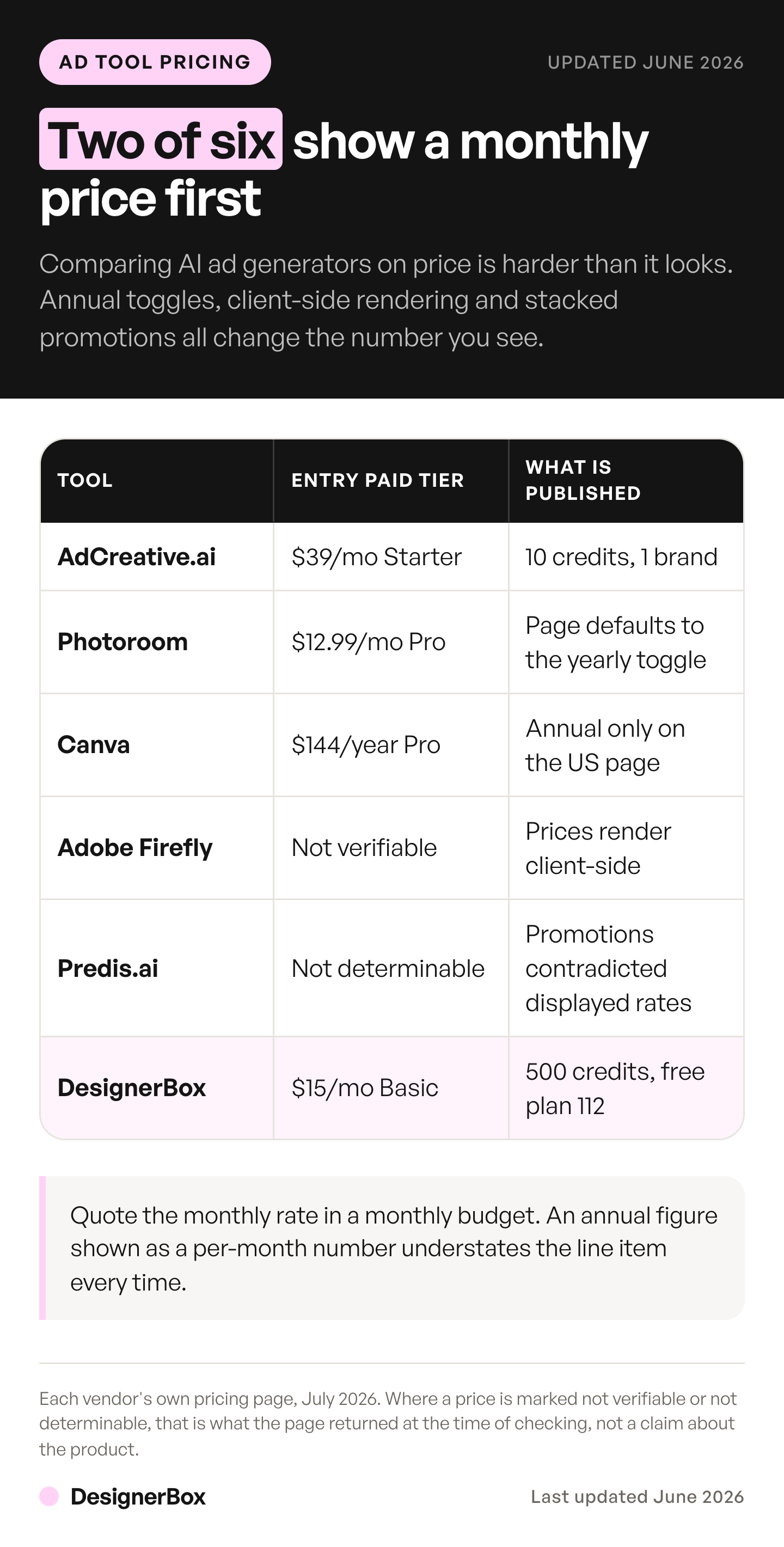
This guide does not print competitor prices. Plans in this category change often, and a number copied into a roundup goes stale fast. The table below shows how each tool counts AI use and where it lists its plans, so you can read the current numbers yourself.
| Tool | How it counts AI use | Where it lists its plans |
|---|---|---|
| AdCreative.ai | Credits on each plan, spent when you download a generated ad creative. Monthly, quarterly and yearly billing | The pricing section of its home page (adcreative.ai, September 2026) |
| Photoroom | A monthly pool of AI credits for tools such as Video Generator and Virtual Model, plus a monthly export allowance. The page opens on yearly billing | photoroom.com/pricing, September 2026 |
| Adobe Firefly | Generative credits that reset each billing cycle and do not roll over. The plan list opens on monthly billing | adobe.com/products/firefly/plans.html, September 2026 |
| Predis.ai | Credits. Every generation uses credits. The page opens on annual billing | predis.ai/pricing, September 2026 |
| DesignerBox | Credits, spent on each run. The pricing page opens on monthly billing and has an annual view | designerbox.ai/pricing, October 2026 |
Annual-first pages and promotions are normal in this category. When a comparison article gives you a tidy price column, check three things. Check the billing period it quotes. Check whether a promotion was running. Check what one credit buys at that tool. A per-month number read from an annual toggle understates the real monthly cost.
For how these pricing models work, AI ad generator pricing covers the cost per finished ad, the Creatify alternatives comparison covers why credits at one tool have no relationship to credits at another, and what AI video generation costs covers the per-second math.
Credits need a close read at every tool. The AdCreative.ai alternatives comparison covers how one tool’s credit allowance and its three billing periods work together.
DesignerBox for the ads you repeat every week
DesignerBox is AI creative production for brands and agencies. It turns the ad work your team repeats every week into a workflow you build once. You set the brand rules, the product and the format in that workflow. It reads them on every run, so the next SKU does not start from a blank prompt. The Ads from a product photo template and the Social media posts template are two places to start, and the static ad templates show the wider set. The Static ad skill in Create makes a first ad from a chat, and Analyze ad reviews an ad you attach. DesignerBox keeps a ranked list of the best AI ad creative tools on its site.
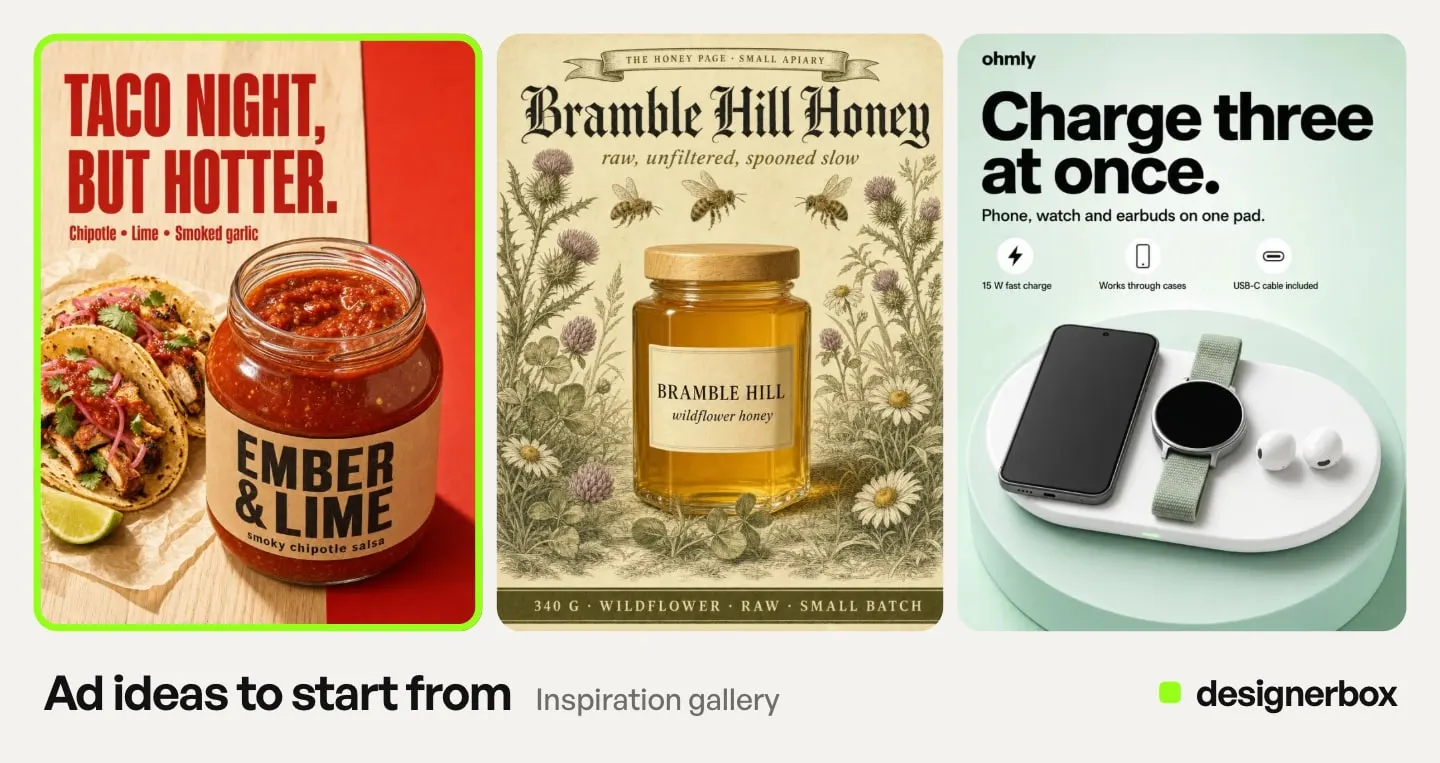
A template is the first step. Save it as your own workflow with your brand. Publish it as an app, and a colleague runs it through a simple form. Batch runs one workflow over a whole sheet of products. The ads, their sizes and your brand rules sit in one account.
You see the cost of each run before you press Run. There is a free plan, and it runs on sample products.
The limits, stated plainly:
- Uploading your own photos and the commercial license start on the Pro plan.
- AI video and the video editor start on the Premium plan. If video ads are the job, Premium is your real starting plan.
Plans and credits are on the pricing page.
If your only job is high-volume talking-actor video, compare the tools built for that job. If your job is the same set of ads for product after product, start from a template and run it on your next product.
How to choose an AI ad generator

Work down this list and stop at the first yes.
- Do you buy media on one platform and already have good product photography? Use that platform’s generator. Meta Advantage+, Asset Studio, or Symphony. It is free or close to it, and it is built into the workflow you already run.
- Do you need the same campaign across several channels and several products? A single-channel generator cannot do this. You need the build in one place, so the second product runs the same way as the first. This is the seasonal case too, where one push has to hit every placement at once, covered in AI tools for a Black Friday and holiday campaign.
- Do you need your real product rendered, not a variation of an existing ad? You need a tool that starts from your product photo.
- Is high-volume talking-actor video the whole job? Price the video specialists directly against your monthly clip count.
- Do you need a specific model per shot? You need a tool that lets you pick the model, which the platform generators do not.
Then check the disclosure rules for the platform you run on before the creative is finished. In July 2026, Google began rolling out an AI label setting in Google Ads, Display & Video 360, Campaign Manager 360, Merchant Center and Google Ads Editor (support.google.com, September 2026). Google also adds SynthID and C2PA metadata to images and videos made with Google Ads tools (support.google.com, September 2026). Meta checks ads for signs of third-party AI, such as C2PA metadata, and adds an “AI info” label when it finds them (facebook.com, September 2026).
TikTok asks you to disclose ads with fully AI-generated or heavily AI-edited media, and it rejects or restricts undisclosed AI ads (ads.tiktok.com, September 2026). Platform rules change often, so check them again before each launch. This is general information, not legal advice.
One more number matters for that decision. IAB found 82% of ad executives believe Gen Z and Millennial consumers feel positive about AI-generated ads, while only 45% of those consumers do. The gap widened from 32 points in 2024 to 37 points in 2026. In the same study, 73% of those consumers said knowing an ad was made with AI would increase or make no difference to their likelihood to buy (iab.com, January 2026). So disclosure may cost less than many advertisers expect.
Test output on your own product before you pick a tool. The best AI product video generators cover the video end of the same decision. Shhots AI alternatives covers one more tool in this bracket, and Canva alternatives covers a design tool many of these teams already use.
FAQ
What is the best AI ad generator?
For most advertisers it is the generator already inside their ad account. Meta Advantage+ creative, Google Asset Studio, and TikTok Symphony all produce ad creative with no separate subscription. A paid tool is worth it when you need your real product rendered accurately, the same standard held across every channel and every product, or control over which model does the rendering.
Is an AI ad maker the same as an AI ad generator?
Yes. Both names describe software that makes ad images, video or text from a prompt, a product photo or a page URL. Vendors choose one name or the other. The checks in this guide apply to both: product accuracy, the same standard on every channel, and the cost per variant.
Is there a free AI ad generator?
Yes. TikTok Symphony Creative Studio is described as “this free creation tool” in TikTok’s own documentation (ads.tiktok.com, September 2026). Meta and Google do not publish a separate fee for Advantage+ creative or Asset Studio; both sit inside the ad platforms. DesignerBox has a free plan, and it runs on sample products.
Can AI ad generators use my actual product?
Some can. Meta’s Advantage+ image generation can take an image with your product in it and generate new environments for it, or use a full ad image as a reference for variations (facebook.com, September 2026). Either way, check the product in every result before the ad runs. If catalog accuracy matters, test that first with your own product.
Do I have to disclose AI-generated ads?
Sometimes. On TikTok, yes, for ads with fully AI-generated or heavily AI-edited media. An undisclosed AI ad “will be rejected or restricted” under its ad policy (ads.tiktok.com, September 2026). Google began rolling out an AI label setting in five advertising products in July 2026. Google says AI rules in the EU, India and New York require labels on some ads with AI-generated or AI-edited assets (support.google.com, September 2026). Meta adds an “AI info” label itself when it finds signs of third-party AI in an ad, such as C2PA metadata (facebook.com, September 2026).
How much does an AI ad generator cost?
The generators inside Meta, Google and TikTok carry no separate fee. Paid tools list their plans on their own pricing pages, and this guide does not print their prices. Compare them with care: many pricing pages open on an annual-billing rate, and some run promotions. Check the billing toggle before you budget. In DesignerBox, the cost of each run is shown before the run. Its plans are on its own pricing page.
Which AI ad generator is best for video ads?
For TikTok placements, TikTok Symphony generates video at no separate fee. For other channels, price video per clip rather than per month. Among paid tools, compare the video specialists against your monthly clip count. In DesignerBox, AI video needs the Premium plan. An 8-second clip costs 40 to 560 credits, depending on the model.
Which AI ad generator is best for agencies?
No single tool fits every agency. Start with four checks: a separate brand for each client, seats for the team, the right to hand the result to a client, and the delivery route. The plan comparison answers the first two. The terms of service answer the third. Read both on the vendor’s own site before a client’s files go in.
Can one tool replace my designer?
No, and treating that as the goal produces bad ads. These tools remove the production bottleneck: the resizing, the background swaps, the fifteen placement variants, the reshoot for a new colorway. Someone still decides what the ad says and whether it is on brand. The output is only as good as that judgment.
Sources
- Meta Advantage+ creative: image generation from a product image or a full image, text generation, image touch-ups, and image generation limited to single image ads: facebook.com/business/help, September 2026
- Meta background generation limited to Advantage+ catalog ads with a sales objective: facebook.com/business/help, September 2026
- Meta AI info labels on ads and detection of third-party AI: facebook.com/business/help, September 2026
- Google Asset Studio scope: support.google.com, September 2026
- Google generated images, the 14-day asset retention, the block on branded items and logos not provided as input, and the ads-policy approval caveat: support.google.com, September 2026
- Google AI label setting across five advertising products: support.google.com, September 2026
- Google on AI rules in the EU, India and New York, and on SynthID and C2PA in images and videos made with Google Ads tools: support.google.com, September 2026
- TikTok Symphony Creative Studio described as a free creation tool, and what it makes: ads.tiktok.com, September 2026
- TikTok AI-generated label on every video exported from Symphony Creative Studio: ads.tiktok.com, page last updated June 2026, accessed October 2026
- TikTok ad policy on undisclosed AI content: ads.tiktok.com, September 2026
- How AdCreative.ai, Photoroom, Adobe Firefly and Predis.ai count AI use and list their plans: (adcreative.ai, photoroom.com/pricing, adobe.com/products/firefly/plans.html, predis.ai/pricing, September 2026)
- Agency checks, read on the vendors’ own pages: brands and Brand Spaces (adcreative.ai/enterprise, creatify.ai/pricing), seats and workspaces (thebrief.ai/pricing, arcads.ai/terms), rights in the result (canva.com/policies/ai-product-terms, creatify.ai/terms, arcads.ai/terms), API and white-label editor (creatify.ai/api, thebrief.ai/pricing), October 2026
- The 37-point gap between ad executive and consumer sentiment on AI-generated ads, and the finding on AI disclosure and purchase likelihood: iab.com, January 2026
- AI-generated display ads with no detectable average click-through disadvantage across 4,633 matched ads and more than 369 million impressions: Exner, Hartmann, Ding, Zhang and Netzer, “AI in Disguise”, SSRN working paper 5096969, last revised 12 August 2026, papers.ssrn.com, accessed October 2026
- DesignerBox plans, credits and feature gating: DesignerBox pricing page (designerbox.ai/pricing), September 2026
Platform capabilities and disclosure policies checked against vendor and platform documentation as of September 2026, except where a line above gives an earlier date. The TikTok Symphony export label and the SSRN abstract were re-checked on 2 October 2026. The agency checks were read on 4 October 2026. This guide does not print competitor prices. Check current plans on each vendor’s own page before budgeting. This is general information, not legal advice.