
Ad creative is everything a shopper sees and hears in an ad: the image or video, the text on it, the headline and the call to action. For an ecommerce store, an ad creative generator is software that makes those parts from something the store already has. Five inputs exist: a product page URL, a product photo, a product feed, existing footage or designs, and ad account data. The input decides what the generator knows about your product.
A store with 40 products and three ad platforms needs a lot of files. Each product needs a square image, a vertical video and several headlines, and each platform asks for its own sizes. Most roundups rank generators by features. That hides the first question, which is what the generator reads before it makes anything.
This guide sorts ecommerce ad creative generators by input. Each section starts with the free generator inside an ad platform and quotes that platform’s own help page. Then it names the paid products that start from the same input, and the label rules that apply to what they make.
Key Takeaways
- Ad creative has four parts. The visual, the text, the format and the call to action. A generator may make one part or all four.
- Sort generators by input. A page URL, a product photo, a product feed, footage or designs, and ad account data. The input sets what the generator knows.
- The ad platforms cover three of the five inputs for free. Google starts from your website, Meta and TikTok from an image, and Meta and Amazon from the catalog.
- A generator that starts from the real product photo has the most to keep true. Check the label, the color and the shape on every result.
- Three label rules apply. Meta adds an AI info label, TikTok has a required disclaimer, and Google Merchant Center asks for a metadata tag on AI images.
- Pay for a generator when the same ad set must run for many products. One product on one platform rarely needs more than the free generators.
What is ad creative?
Ad creative is the part of an ad that people see: the picture or video, the words on it, the headline, the description and the button. The targeting, the bid and the budget are the media side. On most platforms the media side is now automated, so the creative is the part the advertiser still controls.

Ecommerce ad creative has one extra rule. The product in the ad has to be the product the buyer receives. A wrong label color or a changed shape is a reason for a return and for a rejected ad. AI product ads covers what a generator may change in a product ad and what it may not.
The platforms ask for many parts per campaign. One Performance Max asset group takes up to 15 headlines, up to 20 images and up to 15 videos (support.google.com, October 2026). That volume is why generators exist.
Creative also carries a large share of the result. Nielsen wrote in 2017 that a 2006 study, Project Apollo, found that 65% of a brand’s sales lift from advertising came from the creative (nielsen.com, October 2026). The same article says the share that comes from media has grown since then. Both numbers are old, so read them as direction.
Five types of ad creative generator, by input
The table groups generators by what they start from. Every platform row was read on the platform’s own help or product page on 4 October 2026.
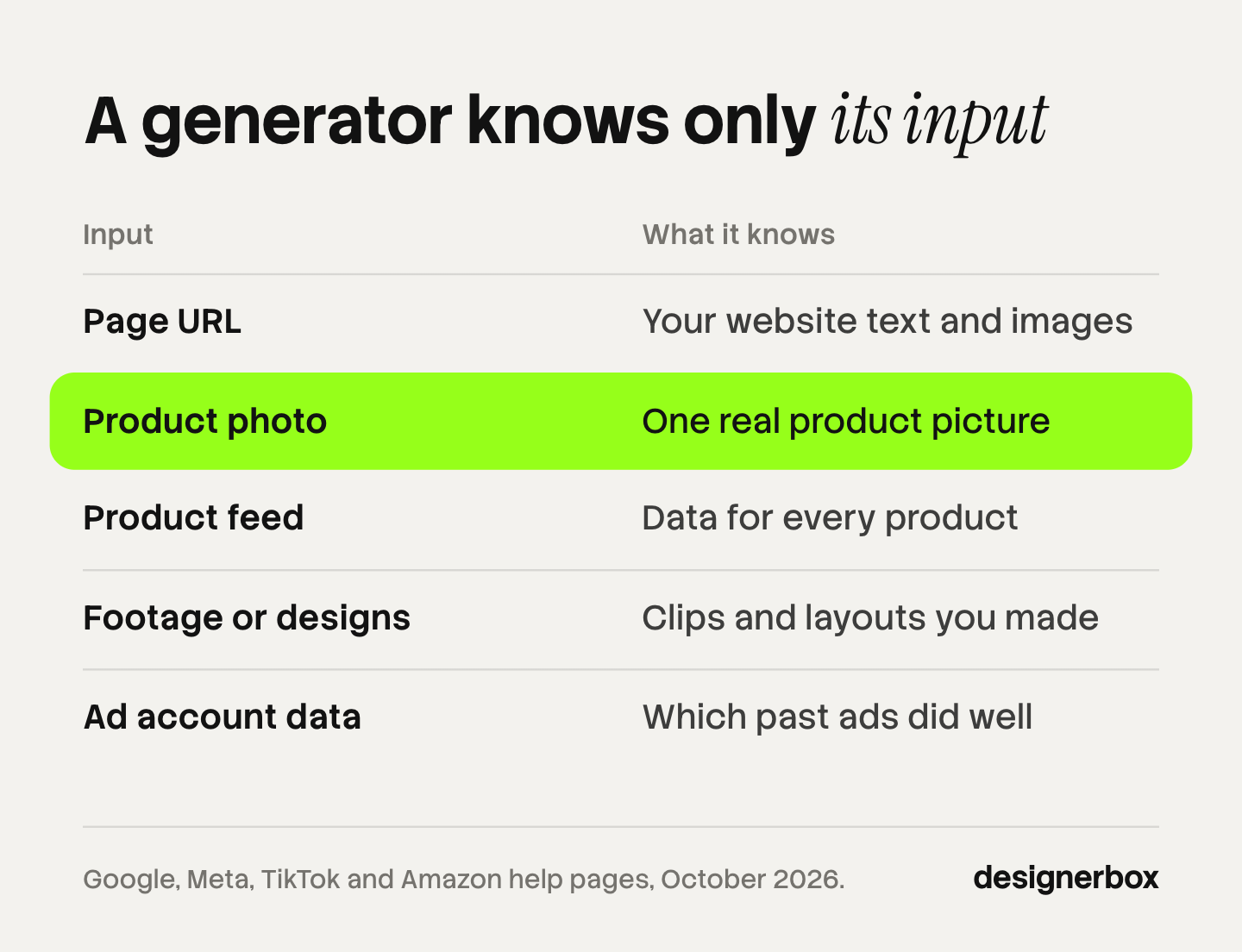
| Input | What the generator knows | Free generator inside a platform |
|---|---|---|
| Page URL | The text and images on your website | Google Performance Max asset generation |
| Product photo | One real picture of the product | Meta image generation, TikTok Symphony Creative Studio |
| Product feed | The data and image for every product | Meta Advantage+ catalog ads, Amazon Ads image and video generators |
| Footage or designs | Clips and layouts you already made | None that covers every platform |
| Ad account data | Which past ads did well | None as a creative generator |
No type is better than the others. They answer different questions. A URL generator is fast for a first ad. A photo generator gives the most control over the scene. A feed generator covers a whole catalog. The last two reuse work and results you already have.
Generators that start from a page URL
A URL generator reads your product page, takes the images and text, and builds ads from them. It is the shortest path from nothing to a first ad.
Google’s version is in Performance Max. Google’s help page says: “Starting with your website, Google AI” can “generate or suggest text, image, logo, and video assets” (support.google.com, October 2026). The same page says a video “may be automatically created using the other assets in the asset group”. So the video is built from your other assets. You do not write a prompt for it.
Paid products with this input include AdCreative.ai and Creatify. AdCreative.ai says its Instant Ads feature scans your webpage and makes banners, texts and videos (adcreative.ai, October 2026). Creatify asks for a product link, then takes the assets and writes the script for a video ad (creatify.ai, October 2026). AdCreative.ai alternatives compares seven products in this group.
The limit is the page itself. A URL generator knows what the page shows. If the page has two photos and a short description, the ads start from two photos and a short description.
Generators that start from a product photo
A photo generator keeps or reads one real picture of the product and makes new scenes, sizes and clips around it.
Meta’s Advantage+ creative includes image generation, image expansion and text generation. The text feature “can generate up to 5 variations of primary text and headline” (facebook.com, October 2026). TikTok’s Symphony Creative Studio takes “an image of a product or app screen” and returns video clips of an avatar that holds or shows the product (ads.tiktok.com, October 2026).
Meta reported in April 2025 that campaigns using image generation in Advantage+ creative saw an 11% higher click-through rate and a 7.6% higher conversion rate (facebook.com, October 2026). That is Meta’s own data about its own feature.
Paid products with this input include Photoroom, which makes product stills, resized formats and video from a product photo (photoroom.com, October 2026). Omneky also starts from product photos and makes image, video and copy (omneky.com, October 2026).
This input has the most to keep true. The generator sees the real product, so compare every result against the photo. Check the label text, the color, the shape and the scale. Best AI ad generator covers where the free platform generators stop.
Generators that start from a product feed
A feed generator reads the catalog: the title, price, image and link for every product. It makes one ad layout and fills it per product.
Meta’s Advantage+ catalog ads show products “dynamically displayed for each person” from the catalog and your pixel or app events (facebook.com, October 2026). One Meta feature belongs to this input only. The help page for Advantage+ creative says of background generation: “This enhancement is only available for Advantage+ catalog ads.” Many guides list it as a feature for every ad type.
Amazon works from the product listing. Its video generator “turns a product ASIN into professional video ads”, and its image generator makes lifestyle images from product ASINs (advertising.amazon.com, October 2026). Amazon lists the countries for each one on that page.
Google Merchant Center has Product Studio for the feed images themselves. Google says the tools “can help you create images, change backgrounds, increase image resolution, remove backgrounds, and generate product videos” (support.google.com, October 2026).
Paid products here work across ad networks. The Brief, which was called Creatopy until October 2025, lists direct publishing and ad serving across more than 40 ad networks (creatopy.com and thebrief.ai, October 2026). Ecommerce advertising explains the two kinds of image a store supplies: the feed image and the uploaded ad.
Generators that start from footage or ad account data
Two smaller groups start from work you already did.
Footage and designs. Some products cut, resize and remix clips and layouts that exist. The Brief accepts PSD and Figma files as a starting point (creatopy.com, October 2026). Icon is a useful example of how fast this group changes. Its homepage says it “originally launched as The AI Admaker” and now makes UGC filmed by people (icon.com, October 2026). A list written six months ago may describe a different product.
Ad account data. These products connect to your ad accounts and use past results when they make new ads. Pencil says it uses “your brand assets, branding guidelines, and performance data” (trypencil.com, October 2026). The Brandtech Group acquired Pencil in 2023. Omneky also connects to ad accounts on Google, Meta, TikTok, LinkedIn and Reddit (omneky.com, October 2026).
A data generator needs data. An account with a few sales a week gives it little to learn from. Ad creative testing shows how many results a test needs before a winner means anything.
AI label rules for generated ad creative
Three platform rules apply to generated ad creative. Check them before you choose a generator, because a product outside the ad platforms does not always add the label for you.
- Meta. Meta says: “We will automatically apply an AI info label when you use features such as Background Generation, Image Generation, or Add Animation.” For other software, Meta uses industry signals such as C2PA to find and label AI content (facebook.com, October 2026).
- TikTok. TikTok Ads Manager lists AI-generated, synthetic or manipulated media under mandatory disclaimers (ads.tiktok.com, October 2026). The advertiser turns the disclaimer on in the ad.
- Google Merchant Center. Google says images made with generative AI “must contain meta data indicating that the image was AI-generated by using the IPTC DigitalSourceType TrainedAlgorithmicMedia metadata tag” (support.google.com, October 2026). Some export steps remove metadata, so check the final file.
These are platform rules, and laws add their own. AI disclosure in advertising covers the EU and US rules.
How to choose an ad creative generator for a store
Start with what you have, then count what you need.
- List your inputs. Good product photos point to a photo generator. A clean feed with hundreds of products points to a feed generator. A thin product page is a weak start for a URL generator.
- Count the files. Multiply products by platforms by formats. Forty products on three platforms in two formats is 240 files before any test version.
- Use the free generator first. If you buy media on one platform, its generator may cover the count. Pay when the same ad set has to run on several platforms or for many products.
- Compare against the product. Run five products through any generator and check each result against the real photo. Count the results you would publish, and ignore the total made.
- Check the label and the license. Read how the product marks AI content and what its terms say about commercial use.
Volume has a second cost. Ads wear out, and ad fatigue explains how to see it in the account before you make more.

Ad creative as a saved workflow
DesignerBox is AI creative production for brands and agencies. It starts from the product photo. Anyone can make an AI picture. Making hundreds that still look like your brand is the hard part.
In DesignerBox you build a workflow once with your brand, your products and your rules. The workflow reads the brand profile on every run, so the fortieth product gets the same light, framing and text style as the first. Batch runs the workflow over a whole sheet of products, and you keep or discard each row. The AI ad generator page shows the ad workflows, and the page for performance marketers shows how a winning ad becomes new versions.
Three steps matter most for ad creative. Winning-ad variations make new versions of an ad that already works. The ad localizer rebuilds one ad in another language and redraws the layout. The ads resizer makes each placement size. The full workflow from the first product photo to the finished ad, in one subscription.
You see the cost of a run before you press Run.
Here are the limits. DesignerBox does not read your ad account data, and it does not publish to an ad account. You download the results, or send them with a webhook or an S3 step. Uploading your own photos and the commercial license start on the Pro plan. AI video, virtual try-on, upscaling, the image editor and the video editor start on the Premium plan. Plans and credits are on the pricing page.
A free plan for your first run
There is a free plan, and it runs on sample products. Start from a template and see the cost before you run it. Get started free
FAQ
What is ad creative?
Ad creative is the part of an ad that people see and hear: the image or video, the text on it, the headline, the description and the call to action. Targeting, bids and budget are the media side of the ad.
What is an ecommerce ad creative generator?
It is software that makes ad images, videos or text from something a store already has. The input is a product page URL, a product photo, a product feed, existing footage or ad account data. The result is sized for placements on platforms such as Meta, Google, TikTok and Amazon.
What are ad creative AI tools?
They are the same five types of generator this guide covers, grouped by input: a page URL, a product photo, a product feed, existing footage or designs, and ad account data. Choose the type by what your store already has. No type is better than the others.
Are there free ad creative generators?
Yes. Google Performance Max makes assets from your website. Meta Advantage+ creative makes image and text versions. TikTok Symphony Creative Studio makes video from a product image. Amazon Ads makes images and video from a product listing. Each one works inside its own platform (support.google.com, facebook.com, ads.tiktok.com and advertising.amazon.com, October 2026).
How many ad creatives does an ecommerce store need?
Count products, platforms and formats. Forty products on three platforms in two formats is 240 files. The platforms accept a lot: one Performance Max asset group takes up to 20 images and up to 15 videos (support.google.com, October 2026). Start with your best-selling products.
Do generated ads keep the product accurate?
It depends on the input and on the check. A generator that places your real photo in a new scene changes less than one that redraws the product. Compare every result against the real photo for label text, color and shape before it goes live.
Do I have to label AI ad creative?
On the main platforms, yes in many cases. Meta adds an AI info label for its own generative features. TikTok requires a disclaimer for AI-generated media in ads. Google Merchant Center requires a metadata tag on AI images (facebook.com, ads.tiktok.com and support.google.com, October 2026).
Where do DesignerBox results go?
To you. DesignerBox makes the ad creative, and you upload it to each ad account. You download the results, or send them with a webhook or an S3 step. The cost of a run is shown before the run.
Sources
- Google Ads, Performance Max asset requirements: headline, image and video limits per asset group: support.google.com, October 2026
- Google Ads, asset generation in Performance Max: support.google.com, October 2026
- Google Merchant Center, Product Studio: support.google.com, October 2026
- Google Merchant Center, AI-generated content policy and the IPTC metadata tag: support.google.com, October 2026
- Meta, About Advantage+ creative: text generation, image generation and background generation for catalog ads: facebook.com, October 2026
- Meta, Advantage+ catalog ads: facebook.com, October 2026
- Meta, AI info labels on ads: facebook.com, October 2026
- Meta, “The creative advantage” (22 April 2025), Meta’s own figures for image generation: facebook.com, October 2026
- TikTok, About Symphony Creative Studio (updated June 2026): ads.tiktok.com, October 2026
- TikTok, ad disclaimers in TikTok Ads Manager: ads.tiktok.com, October 2026
- Amazon Ads, AI creative solutions and country availability: advertising.amazon.com, October 2026
- Nielsen, “When it comes to advertising effectiveness, what is key?” (October 2017): nielsen.com, October 2026
- Vendor product pages for AdCreative.ai, Creatify, Photoroom, Omneky, Pencil, Icon and The Brief (adcreative.ai, creatify.ai, photoroom.com, omneky.com, trypencil.com, icon.com, creatopy.com, thebrief.ai), October 2026
- DesignerBox plans and feature gating: DesignerBox pricing page (designerbox.ai/pricing), October 2026
Platform and vendor features checked against each company’s own pages as of October 2026. This is general information, not legal advice. Individual results vary.