OpenArt and Higgsfield both make AI images and video in one place, and they split on three things that are not model quality. Higgsfield publishes a public API. OpenArt’s help center says it has none. Higgsfield’s terms let you sublicense results to your clients. OpenArt gates commercial use at a tier. OpenArt’s enterprise page says it never trains on your data. Higgsfield’s terms say it may.
Most comparisons of these two run a shot-off. Nine prompts, side by side, a winner called on how cinematic the result looks. That is entertaining and it decides nothing, because both platforms resell most of the same frontier models, so the frames converge. What does not converge is the contract and the plumbing.
This page compares the two on the axes that survive a procurement form. Every claim comes from each company’s own pages, read in September 2026. No prices appear here for either tool, because both publish their own and those pages move faster than this article does.
A note on bias. DesignerBox makes AI creative production software, so we compete with both. The sections below say where each of them is the better buy, and there are several.
Key Takeaways
The API is the cleanest split. Higgsfield publishes a public API, an MCP server, a CLI and editor plugins. OpenArt’s help center states that no public API is available currently, and offers MCP plus a CLI instead.
Higgsfield’s rights clause is the stronger one for client work. Its terms say rights survive cancellation and that you may sublicense results to clients. OpenArt’s terms gate commercial use at the Plus level and above.
OpenArt’s training answer is the stronger one. Its enterprise page says it never trains on your data. Higgsfield’s terms say your inputs and outputs may be used to train its models, unless you hold a separate Enterprise Agreement.
Read the word unlimited carefully. Higgsfield states that unlimited generations apply only on higgsfield.ai and are meant for manual use. Anything through MCP, CLI, Canvas or Supercomputer deducts credits at standard rates.
Character work goes to whichever matches your source. OpenArt’s Character Builder makes a reusable character. Higgsfield’s Soul ID trains one from 20 or more photos.
Neither is built around a repeated catalog job. Both are studios you sit inside. That is a different shape from a workflow that runs itself on the next product.
What each one is built for
They describe themselves in similar words and mean different things by them.
OpenArt calls itself “your all-in-one AI creation platform that brings characters, stories, brands, and worlds to life”, and its homepage FAQ says it “is built for everyday creators” (openart.ai, September 2026). Its named surfaces lean narrative: a Character Builder for reusable characters, Director Mode for laying out a storyboard and shaping each shot through chat, Smart Shot for turning one prompt into three to five cuts, model fine-tuning, a library of community models, voiceover in 30 or more languages with lip sync, and a 3D environment generator called Worlds.
Higgsfield calls itself an AI-native creative suite, and its about page says it serves creators, marketing agencies and filmmakers (higgsfield.ai, September 2026). Its surfaces lean production: Cinema Studio and Marketing Studio, Soul ID for characters, Canvas as a node board that runs models in parallel and saves a set of steps as a reusable template, plus folders, comments, roles and approvals on the team plans.
The short version. OpenArt is aimed at the person making the thing. Higgsfield is aimed at the team shipping it.
Where OpenArt and Higgsfield differ
| OpenArt | Higgsfield | |
|---|---|---|
| Self-description | All-in-one AI creation platform | AI-native creative suite |
| Stated audience | Everyday creators, plus four named business segments | Creators, marketing agencies, filmmakers |
| Public API | None published | Yes |
| MCP and CLI | Yes, OAuth sign-in, no API keys | Yes, plus a CLI |
| Editor plugins | None published | Figma, Photoshop, Premiere Pro, After Effects, DaVinci Resolve, Blender |
| Character tool | Character Builder | Soul ID, trained from 20 or more photos |
| Brand rules | Brand Kit, stated to apply inside Create Image and Text to Video | Higgsfield’s Marketing Studio builds a brand kit from your website URL |
| Commercial use | Terms gate it at the Plus level and above | Terms place no restriction on commercial use |
| Sublicense to clients | Not addressed in the terms | Stated as allowed, and rights survive cancellation |
| Training on your work | Enterprise page says it never trains on your data | Terms say inputs and outputs may be used for training, with an Enterprise Agreement carve-out |
| Named team tiers | Team Plan, Enterprise | Team, Scale, Enterprise |
| Free access | Yes | Yes, a free tier |
Read from openart.ai, openart.ai/suite/terms, higgsfield.ai and higgsfield.ai/terms-of-use-agreement, September 2026.
Rights, training and the two clauses that decide it
Each tool wins one of these. That is the useful finding, and it means the answer depends on which risk your work carries.
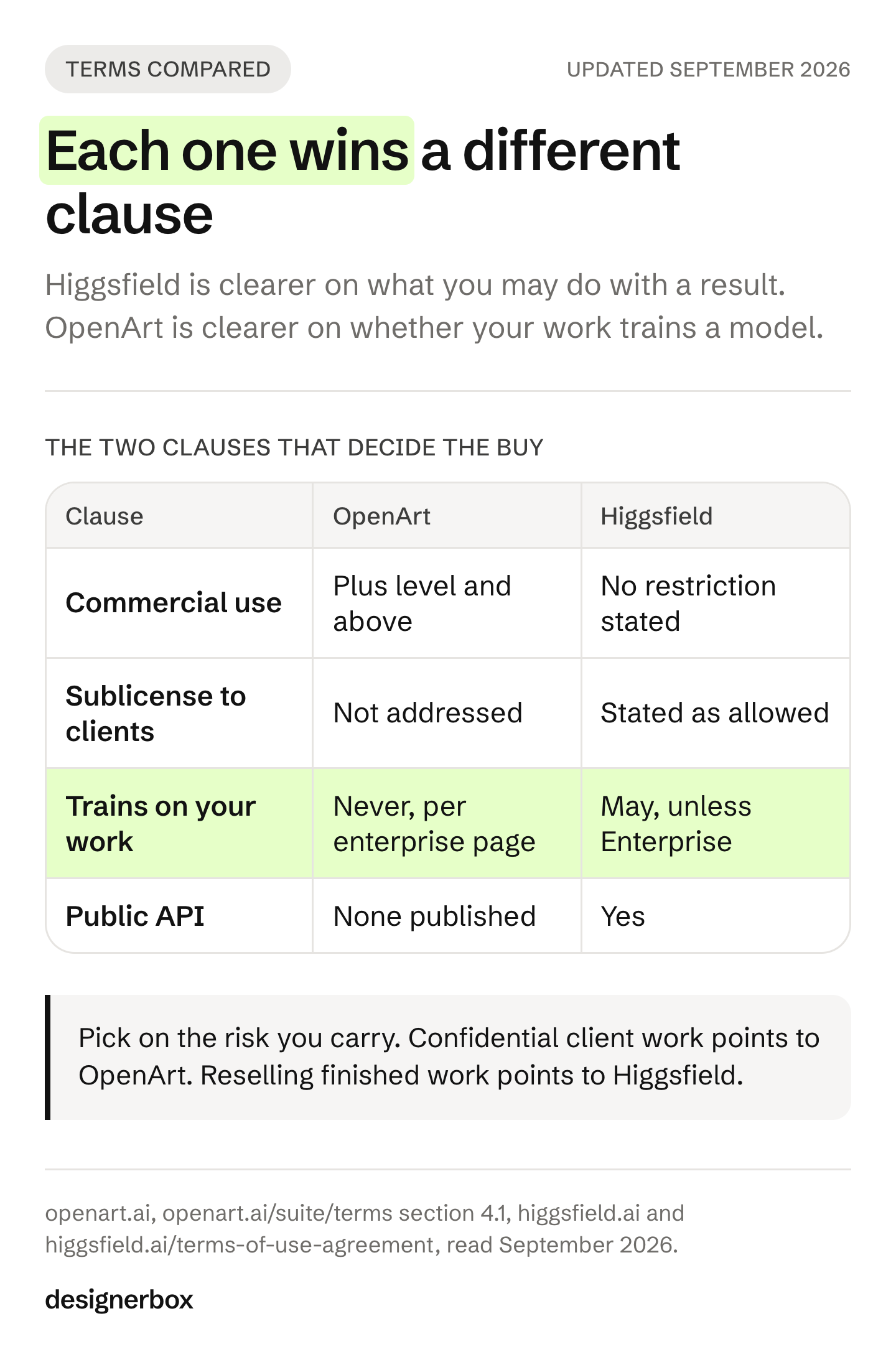
Higgsfield is clearer on what you may do with the result. Its terms say it “does not claim ownership of any of your Inputs or Outputs, nor does it restrict your commercial use of Outputs”, that those rights survive cancellation, and that “you may transfer or sublicense your rights in Outputs to your clients or other third parties” (higgsfield.ai/terms-of-use-agreement, September 2026). For an agency handing finished work to a client, that sublicensing sentence is the job, and most vendors are silent on it.
OpenArt gates the same permission at a tier, and its own pages disagree about it. Its Terms of Service, section 4.1, allow commercial use “for subscription levels at, and above, the Plus level”. Its homepage FAQ states no tier condition at all, saying you can use results “in ads, on social media, in client work”. Its help center adds a third version, allowing commercial use “with proper attribution to OpenArt and/or the human artist when applicable” (openart.ai, September 2026). The Terms are the binding document. Confirm your own tier in writing rather than relying on the FAQ.
OpenArt is clearer on training. Its enterprise page states “We never train on your data”, and adds built-in detection that scans images and video for copyrighted elements plus an indemnification option (openart.ai, September 2026).
Higgsfield’s terms run the other way by default. They say your content, inputs and outputs “may be used by Company to train, develop, enhance, evolve, and improve its (and its affiliates’) AI models”, carving out customers on an Enterprise Agreement, which the terms define as “a separate written agreement between you and Company” (higgsfield.ai/terms-of-use-agreement, September 2026). That carve-out is a negotiation, not a plan you click.
So: if your risk is a client contract that calls their unreleased product confidential, OpenArt’s default answer is better. If your risk is delivering finished work a client will resell, Higgsfield’s clause is better. Working out which one you are is more useful than another prompt shoot-out. We covered the general question in what you actually own after a shoot.
This is general information, not legal advice, and both sets of terms change. Read the current version before you sign.
Automation, the API split and what unlimited means
This is where the two are furthest apart, and it is invisible in a feature grid.
OpenArt’s help center answers the question directly: no public API is available currently. It publishes an MCP server at its own endpoint with OAuth sign-in and states that no API keys are needed, plus a command-line tool (openart.ai, September 2026). You can script against the CLI, and it supports JSON and asynchronous flags, but you are scripting a signed-in session rather than calling a service.
Higgsfield publishes a public API alongside its MCP server and CLI, and lists plugins for Figma, Photoshop, Premiere Pro, After Effects, DaVinci Resolve and Blender (higgsfield.ai, September 2026).
One line to read before you plan around that. Higgsfield states that unlimited access and free generations apply only on higgsfield.ai, that they are intended for manual use, and that anything generated through MCP, CLI, Canvas, Supercomputer or other automated tools deducts credits at standard rates. Its terms add that it may throttle or queue usage that is “automated or materially exceeds typical individual use” (higgsfield.ai and higgsfield.ai/terms-of-use-agreement, September 2026). An unlimited tier and an automated pipeline are two different purchases.
One planning note on models. Higgsfield’s footer lists Sora 2 among its roster, and OpenAI removes sora-2, sora-2-pro and the Videos API from its API on 24 September 2026 (developers.openai.com, September 2026). Check what a roster actually serves on the day you buy.
Teams and seats
Higgsfield sells three team tiers by name. Its help center puts Team at up to 9 seats on the standard queue, says Scale raises the ceiling to 15 seats and moves the workspace to the priority queue with single sign-on and member spend controls, and puts sub-workspaces with their own owner and credit allocation on Enterprise. Credits from each seat pool into a shared workspace balance (higgsfield.ai, September 2026).
OpenArt names a Team Plan for centralized billing and shared assets, and is blunt about what happens without it: multiple seats on basic plans “cannot share content or collaborate; it’s just multiple independent accounts”. Its Enterprise page adds unlimited seats and admin controls over projects, people and spending (openart.ai, September 2026).
Neither names a white-label or reseller concept on its public site. If you sell work under your own brand, ask both about it directly.
Which one to pick
| If your work is | Pick | Why |
|---|---|---|
| Short films, narrative, recurring characters | OpenArt | Director Mode, Character Builder and model fine-tuning are built for it |
| Cinematic ad shots and camera effects | Higgsfield | Higgsfield’s Cinema Studio is the surface built for that look |
| Client delivery where rights transfer | Higgsfield | Its terms state sublicensing to clients and survival after cancellation |
| Confidential client product work | OpenArt | Its enterprise page says it never trains on your data |
| An automated pipeline | Higgsfield | A public API exists. Price the metered path, not the unlimited tier |
| A team of more than a few people | Higgsfield | Named seat ceilings, pooled credits and single sign-on |
| The same product shot repeated weekly | Neither, see below | Both are studios you sit inside |
That last row is the honest one. Both of these are places you go to make something. If your actual problem is that 40 new products landed and each one needs a hero, three angles, a lifestyle frame and a marketplace crop, the studio shape is the wrong shape, whichever studio you pick.
One more name turns up next to these two. Artlist bundles licensed music, licensed footage and AI generation into a single plan, so it answers a different question again. Artlist alternatives separates those three jobs before you compare anything.
Cost before the run
DesignerBox is AI creative production for brands and agencies. You build the job once with your brand, your products and your rules. A saved workflow then runs the same way on the next product.
One workflow, four ways to run it. A template is a workflow somebody already built: open one, add your photo and run it. Your own workflow holds your brand and your products. You publish it as an app, so a colleague completes a form and presses Run without opening the workflow. Batch takes that same workflow over a whole sheet of products, and you review the results in one pass. Nothing is rebuilt between the four. All four sit in one place, next to the image editor, the video editor, the brand record and the Assets library. The full workflow from the first product photo to the finished ad, in one subscription.
Every run shows its cost before you start it. For video, an 8-second clip costs 40 to 560 credits, depending on the model. An avatar run returns nine fixed poses for 25 credits. Three critic steps score the results of a run, and best-of-N keeps the best one. Brand rules are a record the workflow reads on every run, which is the part a per-shot studio cannot do for you.
Our limits, stated plainly. Nothing publishes into a store or a channel on its own, so you download the results or send them with a webhook or an S3 step. The commercial license starts on the Pro plan. AI video and virtual try-on start on the Premium plan. The free plan cannot make video, and its results carry a watermark. Team features, shared brand kits, white label and the API are on the Ultra plan, and every plan below Ultra is one seat. DesignerBox has 68 tools over MCP, so an AI chat such as Claude can run the same workflows. Plans are on DesignerBox pricing.
If the shot itself is the deliverable, Higgsfield is the better buy. If a recurring character carrying a story is the deliverable, OpenArt. The wider field is covered in Higgsfield AI alternatives, OpenArt alternatives and, for agency buyers specifically, Higgsfield alternatives for agencies. Agencies running many client brands should start at DesignerBox for agencies.
The first job, built once
Start from a template, add your brand and your products, and run it. The cost is shown before the run.
FAQ
Is Higgsfield better than OpenArt?
Neither is better across the board. Higgsfield is stronger on cinematic shots, team seats, a public API and rights that transfer to clients. OpenArt is stronger on recurring characters, long-form direction, model fine-tuning and its stated position on not training on your data. Pick on which of those your work depends.
Does OpenArt have an API?
OpenArt’s help center states that no public API is available currently (openart.ai, September 2026). It publishes an MCP server with OAuth sign-in and no API keys, plus a command-line tool. Higgsfield publishes a public API alongside its own MCP server and CLI.
Can I use OpenArt or Higgsfield results commercially?
Higgsfield’s terms place no restriction on commercial use, say the rights survive cancellation, and allow sublicensing to clients. OpenArt’s terms allow commercial use at the Plus level and above, while two other OpenArt pages describe it differently (both companies’ own pages, September 2026). Confirm your tier in writing. This is general information, not legal advice.
Does OpenArt or Higgsfield train on my work?
OpenArt’s enterprise page states that it never trains on your data. Higgsfield’s terms say inputs and outputs may be used to train its models, with a carve-out for customers on a separate written Enterprise Agreement (both companies’ own pages, September 2026). For confidential client work, that difference matters more than any feature.
Which one is better for an agency?
Higgsfield, on the published evidence. It sells named team tiers with seat ceilings, pooled credits and single sign-on, and its rights clause covers handing work to a client. Check the automation line first: unlimited generations are stated to apply only on higgsfield.ai for manual use, and automated routes deduct credits.
Do OpenArt and Higgsfield run the same models?
Largely, yes. Both resell frontier image and video models alongside their own. That is why a prompt shoot-out rarely separates them, and why the contract, the API and the team tier are the deciding factors instead.
Is there a free way to try both?
Both offer free access. OpenArt has a free plan, and its terms note that results on it may carry a visible OpenArt watermark. Higgsfield has a free tier with a limited set of models and states there is no trial period (both companies’ own pages, September 2026).
Sources
- openart.ai homepage, FAQ, Character Builder, Director, Models, MCP, Brand Kit and Enterprise pages, read September 2026
- openart.ai/suite/terms, sections 4.1 and 4.5, last updated 30 July 2026, read September 2026
- openart.ai help center, API access, team plan and credit entries, read September 2026
- higgsfield.ai homepage, about, help center and enterprise pages: plans, seats, Canvas, Soul ID, Marketing Studio, API, MCP, CLI and plugins, read September 2026
- higgsfield.ai/terms-of-use-agreement: ownership, commercial use, sublicensing, training and automated-use clauses, read September 2026
- OpenAI API deprecations: sora-2, sora-2-pro and the Videos API removal on 24 September 2026 (developers.openai.com, September 2026)
- DesignerBox product and pricing pages, September 2026
Both companies’ terms, plans and feature scope verified from their own pages as of September 2026. No prices are published here for either tool. This article is general information, not legal advice. Terms change, so read the current version. Individual results vary.