
The best Artlist alternative depends on which part of Artlist you are replacing. Artlist bundles three separate jobs into one plan: licensed music and sound effects, licensed footage and templates, and AI generation. Each job has a different winner. Name the job first, then shortlist. Replacing the whole plan with a single tool is the mistake most shortlists make.
Artlist sells itself as one product, so most comparison lists treat it as one. They put a music library next to an AI video generator and call both alternatives. That helps nobody. If you cancel Artlist because the AI credits ran out, a royalty-free music site does not solve it. If you cancel because you only ever used the music, an AI video tool is a strange replacement.
This guide splits Artlist into its three jobs and names the tools that fit each one. Every feature was read from the vendor’s own pages in September 2026 and dated. No prices are printed for any tool, so each section names the page to check. We make DesignerBox, which competes in one of the three lanes, so read that entry with the bias in mind.
Key Takeaways
- Artlist is three products in one plan. Licensed music and sound effects, licensed footage and templates, and AI generation. Work out which one you actually use before you shortlist a replacement.
- The music job and the AI job have nothing in common. Epidemic Sound and Uppbeat replace the first. Runway, Freepik and DesignerBox replace the third. A list that mixes them is not a shortlist.
- Artlist now runs reusable AI pipelines. Artlist Flows is a node-based canvas for multi-step generation, and its documentation states each generator node shows its credit cost before you run it (help.artlist.io, September 2026). Reusable steps are no longer a dividing line.
- The dividing line is what the tool is organized around. Artlist is organized around video for creators. Its own mission line is about helping creators worldwide tell their stories through video (artlist.io, September 2026).
- Artlist publishes no ecommerce wording. No SKU, PDP, listing or catalog language appears on its pages, and it lists no virtual try-on or on-model garment feature (artlist.io, September 2026).
- Licensing decides it for client work. Artlist states its Social license cannot be used in paid media, and that stock assets cannot be shared with a client, while AI output can (help.artlist.io, September 2026).
- Only one side runs a product list. Artlist lists no batch or CSV run. DesignerBox batch runs one workflow over a whole sheet of products.
Why teams look for an Artlist alternative
Three reasons come up repeatedly, and they point at different replacements.
The first is that you only use one third of the plan. Teams sign up for the music, then never open the footage library. Teams sign up for the AI generation, then never touch a LUT.
The second is that the job changed. A team that used to cut one brand film a quarter now ships forty product videos a month. That is a different job, and a library of licensed clips is not the constraint any more. What decides the budget then is the cost per finished asset, which we break down in what sets the price of a clip.
The third is licensing. Artlist runs two license types, and its help center states the Social license cannot be used in paid media, while the Pro license covers work made for clients and brands (help.artlist.io, September 2026). Agencies usually discover this at the point they deliver.
What Artlist covers
Artlist is strong at what it was built for, and the catalog is the core of it. Its homepage states it offers over 900,000 digital assets for video creators, covering royalty-free music, sound effects, stock footage, video templates and LUTs (artlist.io, September 2026). It also lists more than 50 plugins for color grading, visual effects and motion graphics, compatible with Premiere Pro, After Effects, Final Cut Pro and DaVinci Resolve (artlist.io/tools, September 2026).
The AI side has grown into a real product. Artlist describes its AI Toolkit as an all-in-one creative workspace covering AI image, video, music and voiceover generation, with a standard mode and a chat-based agent mode (artlist.io, September 2026). Artlist Studio, badged beta on the homepage, is described as an AI production platform organized around casting characters, building locations, framing the scene and directing the shot (artlist.io/studio, September 2026).
Two pieces deserve more attention than most comparisons give them. Artlist Flows is a node-based canvas for building multi-step generation pipelines that you can reuse, connecting a prompt to an image generator to a video generator (help.artlist.io, September 2026). Style Kit saves a brand’s reference images, color palette and guidelines once and applies them to generations (help.artlist.io, September 2026). Artlist also runs an in-house image model, Artlist Original 1.0, which it states is trained exclusively on its own footage catalog (artlist.io/ai, September 2026).
That matters for an honest comparison. Reusable pipelines, a saved brand record, and a cost shown before a run are all things Artlist now does. If a saved brand record is the part you care about, the failure modes are the same everywhere, and we covered them in why AI assets drift off brand.
The three jobs inside one subscription
Here is the split that makes a shortlist useful.
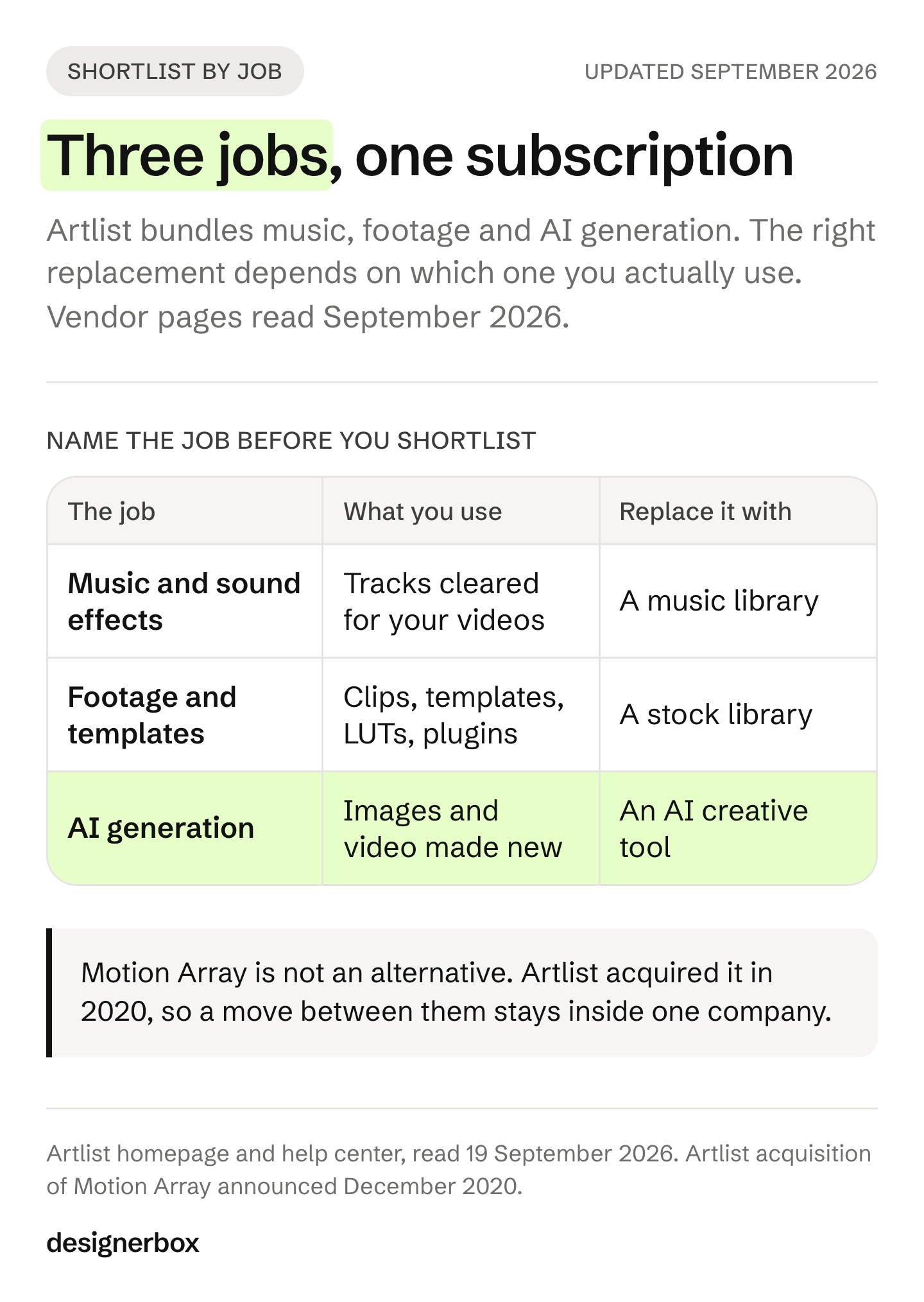
| The job | What you actually use | Replace it with |
|---|---|---|
| Licensed music and sound effects | Tracks and SFX cleared for your videos | A music library |
| Licensed footage and templates | Stock clips, After Effects templates, LUTs, plugins | A stock and template library |
| AI generation | Making images and video that did not exist before | An AI creative tool |
Most teams use one of the three heavily and the other two occasionally. The replacement question is only hard when you try to answer all three at once.
The 7 best Artlist alternatives (2026)
Here is the shortlist, grouped by the job each one replaces. Read the section under it before you pick.
| Tool | Job it replaces | Free tier | Best for |
|---|---|---|---|
| Epidemic Sound | Music, sound effects and AI voice | No, free trial only | Teams whose only real use was the soundtrack |
| Uppbeat | Music, sound effects and some footage | Yes | Teams that want human-made assets and a free tier |
| Envato Elements | Footage, templates and some AI | No | The broadest single library, including templates and fonts |
| Storyblocks | Footage and templates | No | Teams that need a library with no AI-generated assets in it |
| Runway | AI generation | Yes | Directing a shot, and reaching many models in one place |
| Freepik, now Magnific | AI generation, plus stock | Yes | One AI suite across many third-party models |
| DesignerBox | AI generation for product work | Yes | Agencies and brand teams repeating the same job on every product |
One name is missing on purpose. Motion Array is not an Artlist alternative, because Artlist acquired it in 2020 (prnewswire.com, December 2020). Several shortlists still list it as a competing option. Moving between them moves you between two products from the same company.
1. Epidemic Sound
Best for: teams whose real use of Artlist was the music.
Epidemic Sound licenses music and sound effects, and states its catalog can be used for any purpose including commercial projects, with no artist credit required (epidemicsound.com, September 2026). Its own line is that you bring the idea and it brings the sound. It offers a free trial of its plans rather than a permanent free tier, and plans are listed on its own pricing page (epidemicsound.com/pricing, September 2026).
It does generate, but only audio. Its Voices feature makes voiceovers based on recordings by professional voice artists, supports more than 70 languages, and can build a replica of your own voice (epidemicsound.com/tools, September 2026).
Outside scope: no stock footage, no AI image or video generation, no product imagery.
2. Uppbeat
Best for: checking whether a music library covers you before paying.
Uppbeat has a genuinely free tier, which is rare in this category and makes it the cheapest way to test the music job (uppbeat.io, September 2026). It covers more than music: its own description names music, sound effects, motion graphics and LUTs (uppbeat.io, September 2026).
Its position on AI is the clearest in this comparison, and it is the opposite of Artlist’s. Uppbeat states that every asset on it is original, human-made and rights-cleared (uppbeat.io, September 2026). Its Business tier is the one that covers commercial projects, advertising, branded content and client work, which is the tier an agency needs, and Uppbeat Pro covers a freelancer or one-person business (uppbeat.io, September 2026).
Outside scope: no AI image or video generation, no product imagery.
3. Envato Elements
Best for: the widest single library, when you need templates and fonts as well as clips.
Envato Elements covers stock photos, footage, motion graphics, music and stems, sound effects, graphics, fonts, design templates and mockups, video templates, LUTs, 3D models and presentations under one subscription (elements.envato.com, September 2026). It has added an AI generator suite covering image, video, music, sound, voiceover and graphics, and names the models behind it as Nano Banana, Google Gemini Omni, Kling, Runway and ElevenLabs (elements.envato.com, September 2026).
On licensing it states that all stock items carry the same terms for commercial use, including client work and monetization, and that after you cancel, any existing licensed uses stay fully covered. Its AI music carries extra restrictions around standalone use and audio streaming services, so read that separately if music is the point (elements.envato.com, September 2026).
Outside scope: no product catalog workflow, no on-model or try-on work.
4. Storyblocks
Best for: teams that specifically want human-shot stock, not AI-generated clips.
Storyblocks covers stock video, video templates for After Effects, Premiere Pro, DaVinci Resolve and Apple Motion, music, sound effects, images and motion graphics (storyblocks.com, September 2026). Its stated position is to start your story with human-made stock, and it states that every asset in its library is human-made with zero AI-generated content (storyblocks.com, September 2026). That is a real differentiator for brands with disclosure obligations or clients who have ruled AI footage out.
The library has no AI content, but the editor does use AI: Storyblocks states its AI footage editing runs on Runway’s Aleph model and its AI voiceover and voice cloning run on ElevenLabs (storyblocks.com, September 2026).
Check the license tier before an agency commits. Storyblocks states its Individual and Small Business tiers do not include perpetual use once a subscription ends, while its Business tier does and adds broadcast, streaming and feature film coverage (storyblocks.com/license, September 2026).
Outside scope: no AI image or video generation for the library. No product imagery.
5. Runway
Best for: directing a specific shot, where motion and camera control matter most.
Runway’s own line is that it is building real-world intelligence, and its site states it is used by more than 60 million creatives (runway.com, accessed September 2026). Note the domain moved: runwayml.com now redirects to runway.com. Its Gen-4.5 model covers text-to-video and image-to-video, and Runway documents it as handling sequenced instructions such as camera choreography, scene composition and timing of events within a single prompt (help.runwayml.com, accessed September 2026).
Runway is no longer a single-model shop, which matters if that was your reason to look elsewhere. Alongside its own Gen-4.5, Gen-4 Turbo, Aleph 2.0 and Act-Two, its API documentation lists third-party models from Google, ByteDance and ElevenLabs (docs.dev.runwayml.com, accessed September 2026). It has a free plan, and it states that content you create is yours to use commercially (help.runwayml.com, accessed September 2026).
Worth knowing: Runway’s model is also one of the video models available inside DesignerBox, where it runs as one step in a workflow. Picking a model and picking a tool are two different decisions.
Outside scope: music and sound effects licensing, stock footage libraries. For how Runway compares against the other video models rather than against Artlist, see our Veo alternatives comparison.
6. Freepik, now Magnific
Best for: one AI suite spanning many third-party models, with stock attached.
Freepik has become Magnific. The company announced the rebrand in April 2026, and freepik.com now serves the Magnific name while the stock library stays on freepik.com URLs (prnewswire.com, April 2026, and freepik.com, September 2026). It describes itself as covering image, video, audio and 3D across about thirty tools (freepik.com, September 2026).
It is the closest structural match to Artlist in this list, because it pairs AI generation with a stock library. It also answers Artlist Flows directly: it has a node-based canvas called Spaces, and saved workflows can be published as Apps (freepik.com, September 2026). It has a free plan, states that every asset you make belongs to you, and says it does not train on your data (freepik.com and magnific.com, September 2026). Tools aimed specifically at creator-style ad video sit in a different shortlist, compared in our AI UGC video generator roundup.
Outside scope: no music licensing catalog of Artlist’s kind, no catalog-scale product workflow.
7. DesignerBox
Best for: agencies and brand teams producing the same creative work every week across a product range.
We make DesignerBox, so treat this section as our own account and check it. It replaces one third of Artlist only: the AI generation. It licenses no music and no stock footage.
The unit of work is the job you repeat, not the clip. You build a workflow once with your brand, your products and your rules, then hand it to a colleague as an app, which is a workflow with a form. They complete the form and press Run without opening the workflow. The cost is shown before each run.
It covers the product work the general tools do not reach: virtual try-on, ghost mannequin, Dress My Model, and a clothing catalog step that turns one garment into front, three-quarter, back and a fabric close-up. The image editor makes one edit after another and the picture keeps its detail and resolution. The video editor is a real timeline with several tracks, transitions, animated text and audio. The workflow picks the image or video model for each step. DesignerBox has 68 tools over MCP, so an AI chat such as Claude can run the same workflows. The generation lane sits in one subscription. Templates, workflows, apps, batch, the image editor, the video editor, brand records and the asset library are all in it.
Outside scope: licensed music, sound effects, stock footage, After Effects templates, LUTs and editor plugins. If those are what you use Artlist for, this is the wrong replacement and a library is the right one.
The limits, stated plainly. The commercial license starts on the Pro plan. AI video and virtual try-on start on the Premium plan. Team features, shared brand kits, white label and the API are on the Ultra plan, and every plan below Ultra is one seat. Plans and credits are on the pricing page. There is a free plan, and it cannot make video.
Which alternative fits your team
The lane you shortlist depends on the work you repeat. Find your row, then read the section for that lane above.
| Team | What you are really replacing | Which lane to shortlist |
|---|---|---|
| Agencies | Client campaign creative, plus the soundtrack | The AI lane for deliverables. Read the license line first, because stock assets and AI output are treated differently |
| Brand teams | One brand standard on every piece | The AI lane. Compare saved brand records, since Artlist and DesignerBox both hold one |
| Performance marketers | New ad variants from a winner you already have | The AI lane, for static and video from the same source asset |
| Creative studios | Finished sets sold under your own name | The AI lane, and the license question decides it |
| Ecommerce brands | The same shot for every product | The AI lane. This is the job Artlist publishes no catalog wording for |
| Fashion brands | On-model sets for every colorway | The AI lane. Artlist lists no try-on or on-model garment feature |
| Furniture and homeware brands | Room scenes built from one product photo | The AI lane. Artlist lists a Product Lifestyle app that places a product into a scene |
| Solo founders | A bit of all three, without a designer | Start on a free tier in the lane you use most |
The use case splits the same way.
| Use case | What you are really replacing | Which lane to shortlist |
|---|---|---|
| Product imagery | Packshots, on-model shots and scenes | The AI lane |
| Static ads | Still ads in your brand’s look | The AI lane |
| Video ads | A short ad built from one product photo | The AI lane, plus the footage lane if you cut from stock |
| User-generated content | Creator-style clips with a presenter | The AI lane. Artlist lists a UGC product app, avatars and lip sync |
| Social creatives | Carousels and feed posts | The AI lane |
| Campaign concepts | Moodboards and storyboards | The AI lane. Artlist Studio is built around characters and locations |
| Brand assets | Mockups, icons and a brand kit | The AI lane, plus the template lane for editable files |
| Automations | Resizing and translating every ad | The AI lane. Compare reusable pipelines directly |
Two rows carry a real difference rather than a preference. Fashion brands and ecommerce brands are asking for catalog work, and that is the one job this category splits on.
What the license means for client work
This is the part agencies and creative studios should read before any feature table. It is also the part that decides whether a tool survives contact with a client, which is why the DesignerBox page for agencies leads on rights and seats rather than on output.
Artlist runs two license types. Its help center states the Social license is for personal content creators who do not create projects for clients or brands, and that under it you cannot publish your projects in paid media. The Pro license is described as designed for professional creators who create projects for clients and brands, with worldwide coverage (help.artlist.io and artlist.io/help-center, September 2026).
Stock assets and AI output are treated differently, and the difference is the one that catches people. Artlist states you cannot share stock assets with a client, and that clients are not permitted to modify or use those assets independently. For AI generations it states the opposite: you retain the rights to your outputs and can share them with clients, and can use them commercially even after the subscription expires (help.artlist.io, September 2026).
Artlist also states that AI output is non-exclusive, so you may receive outputs similar to those of other users (artlist.io/help-center, September 2026). That is normal across this category and worth knowing before a logo or a hero image depends on it.
In DesignerBox the commercial license starts on the Pro plan. Below that, do not plan on client delivery.
How to switch without breaking your edit
Four steps, in this order.
- Audit one month. List what you actually downloaded or generated. Most teams find one lane dominates.
- Check your published work. Licensed music and footage usually remain licensed under the terms you accepted, but read the terms for your own tier before cancelling.
- Run one real job through two tools. Use your own product or your own brief, not a demo asset. Compare the result, not the feature list.
- Replace one lane at a time. Cancelling all three at once is how a team ends up with no soundtrack the week a campaign ships.
If you want the field laid out rather than a single swap, we keep a running comparison of AI creative tools.
The first job, built once
Start from a template, add your brand and your products, and run it. The cost is shown before the run.
FAQ
Does Artlist do product photography?
Yes, within its AI Toolkit. Artlist lists a Product category of ready-made apps including Product Lifestyle, which places a product into a lifestyle scene, and Packaging Mockup, which turns a product into a lit packaging shot (artlist.io/ai/apps, September 2026). Its Flows templates include Product Visualization and Product Variations (flows.artlist.io/templates, September 2026). What it publishes no wording for is catalog work: running the same shot across a list of products.
What is the best Artlist alternative for product and ecommerce work?
This is the narrowest lane, and it is where the general tools thin out. The question to ask is whether the tool is organized around a clip or around a product. DesignerBox builds from your own product photo and repeats the job on the next product, and it covers virtual try-on and on-model work that Artlist does not list. Freepik and Runway are stronger general-purpose choices if the output is not tied to a product range.
Can I use AI-generated video in paid ads?
Yes, with rules that differ by platform, as of September 2026. TikTok asks advertisers to label ads containing AI-generated or heavily AI-edited media (ads.tiktok.com, accessed September 2026). Meta asks for an advertiser disclosure only in ads about social issues, elections or politics, and labels other ads itself when it detects signals such as C2PA metadata (transparency.meta.com, accessed September 2026). In the EU, the AI Act requires deep fakes to be disclosed at first exposure (ai-act-service-desk.ec.europa.eu, accessed September 2026). A real product shown against an AI-generated background is not a deep fake, as long as the ad does not mislead about the product. Check the current policy before you run. This is general information, not legal advice.
Does cancelling Artlist affect work I already published?
Read your own tier’s terms before you cancel, because the answer differs by asset type. Artlist states that AI-generated outputs are yours and can be used commercially even after the subscription expires (help.artlist.io, September 2026). Licensed stock assets sit under the license terms you accepted, and Artlist states those assets cannot be shared with a client or registered in Content ID or Facebook Rights Manager (artlist.io/help-center, September 2026).
Do any of these tools run a whole product list at once?
One of them does. Artlist lists no batch, CSV or spreadsheet run, and its Flows canvas reuses a pipeline by swapping the inputs by hand (help.artlist.io, September 2026). DesignerBox batch runs one workflow over a whole sheet of products and reviews the results in one pass.
What is the cheapest way to start?
Run one real job on a free tier before you pay for anything. Use your own product or your own brief rather than a demo asset, because demo assets are chosen to flatter the tool. There is a free DesignerBox plan. It cannot make video. Which tools still offer a free tier is covered in our comparison of eleven DesignerBox alternatives.
Sources
- Artlist catalog scope, over 900,000 digital assets covering music, sound effects, footage, video templates and LUTs: (artlist.io, September 2026)
- Artlist plugins and Premiere Pro extensions, compatible with Premiere Pro, After Effects, Final Cut Pro and DaVinci Resolve: (artlist.io/tools, September 2026)
- Artlist AI Toolkit, standard and agent modes, and its generation types: (artlist.io, September 2026)
- Artlist Studio stages, named features and beta badge: (artlist.io/studio and artlist.io, September 2026)
- Artlist Flows node canvas, node types, and the statement that each generator node shows its cost in credits before a run: (help.artlist.io, September 2026)
- Artlist Style Kit, holding reference images, a color palette and guidelines text: (help.artlist.io, September 2026)
- Artlist Original 1.0, described as trained exclusively on Artlist’s own footage catalog: (artlist.io/ai, September 2026)
- Artlist product apps, including Product Lifestyle and Packaging Mockup: (artlist.io/ai/apps, September 2026)
- Artlist Flows templates, including Product Visualization and Product Variations: (flows.artlist.io/templates, September 2026)
- Artlist MCP server, labelled beta: (artlist.io/mcp, September 2026)
- Artlist license types, the paid media restriction on the Social license, client sharing of stock assets versus AI output, commercial use after expiry, and non-exclusivity of AI output: (help.artlist.io and artlist.io/help-center, September 2026)
- Artlist audience wording, including its mission line and its creator figure: (artlist.io, September 2026)
- Artlist acquisition of Motion Array, announced December 2020, and Motion Array’s own announcement of the merger: (prnewswire.com, December 2020, and motionarray.com, September 2026)
- Epidemic Sound catalog scope, commercial use terms, free trial, and its Voices feature with more than 70 languages and voice replication: (epidemicsound.com and epidemicsound.com/tools, September 2026)
- Uppbeat free tier, its catalog of music, sound effects, motion graphics and LUTs, its statement that every asset is human-made, and the tiers covering commercial and client work: (uppbeat.io, September 2026)
- Envato Elements library scope, AI generator suite and the models behind it, commercial license terms, post-cancellation coverage, and AI music restrictions: (elements.envato.com, September 2026)
- Storyblocks library scope, its statement that the library has zero AI-generated content, its AI editing on Runway’s Aleph and voice on ElevenLabs, and its license tiers including perpetual use: (storyblocks.com and storyblocks.com/license, September 2026)
- Runway Gen-4.5 capabilities and prompt handling: help.runwayml.com, accessed September 2026
- Runway company description and scale claim: runway.com, accessed September 2026
- Runway model catalog, including third-party models: docs.dev.runwayml.com, accessed September 2026
- Runway commercial use terms: help.runwayml.com, accessed September 2026
- Freepik becoming Magnific, announced April 2026, its tool coverage, its Spaces canvas and Apps, its free plan and its ownership and training statements: (prnewswire.com, April 2026, and freepik.com and magnific.com, September 2026)
- TikTok advertising policy on AI-generated content disclosure: ads.tiktok.com, accessed September 2026
- Meta ad standards for social issue, election and political ads: transparency.meta.com, accessed September 2026
- EU AI Act Article 50 transparency duties and the advertising example: ai-act-service-desk.ec.europa.eu, accessed September 2026
- DesignerBox plans, credit allocations, feature gating and the free plan: (DesignerBox pricing, September 2026)
Features for Artlist, Epidemic Sound, Uppbeat, Envato Elements, Storyblocks, Runway and Freepik read from each vendor’s own pages as of September 2026. No prices are printed for any tool. Platform and legal claims checked in September 2026, and are general information, not legal advice.