
Higgsfield AI fits a brand or an agency that needs short cinematic video and ad variants made from a product photo or a product link. It is a creative suite: its own tools, such as Cinema Studio, Soul and Marketing Studio, plus a library of outside models under one subscription. Before you commit, read three things in its terms: the default training clause, what Unlimited covers, and how commercial use is worded.
This Higgsfield AI review is written for a business, not for a hobby. If your job is the same ad set for every product in a catalog, AI video ads in DesignerBox covers that route, and a later section explains the difference.
A reel made in ten minutes says little about a tool you will pay for all year. The questions that matter to a brand are different. Which part of Higgsfield does my job? Who owns the result? Can my client’s unreleased product end up in training data? What happens to my credits when I automate?
Higgsfield answers all of these in public, and this review quotes the answers. Every Higgsfield product fact comes from Higgsfield’s own pages, help center, changelog and terms, read on 1 October 2026. It prints no Higgsfield price: the plans are on Higgsfield’s own pricing page. It quotes no user reviews. DesignerBox publishes this article and sells a different product, so read that section with the bias in mind.
Key Takeaways
- Higgsfield is several products under one login. Its own help center sorts them by job: Cinema Studio for cinematic video, Marketing Studio for product ads, AI Influencer for a consistent character, Canvas for chained models.
- You may sublicense results to clients. The terms say you “may transfer or sublicense your rights in Outputs to your clients”.
- The default terms allow training on your content. A no-training term comes with an Enterprise agreement.
- Unlimited has four conditions. It covers specific models on higgsfield.ai only, for a set period, in the standard queue, for manual use.
- Automation always spends credits. Work through MCP, the CLI, Canvas or Supercomputer deducts credits on every plan. Our Higgsfield MCP guide covers the connector.
- Higgsfield shows the cost before a run. Its help center says the credit cost is shown on the button you press to generate, “before you confirm”.
- The API is a separate product. It has its own balance and needs no subscription.
- Its integrations page lists no store connector. It lists plugins for Figma, Adobe apps, DaVinci Resolve and Blender.
What is Higgsfield AI?
Higgsfield describes itself as “an AI-native creative suite” that “combines proprietary tools for video production, character consistency, and ad creation with access to a growing library of AI models under one subscription” (higgsfield.ai help center, October 2026). Its About page names the audience: “creators, marketing agencies, and filmmakers”.

The company was founded in 2023 by Alex Mashrabov, a former Snap executive, and its current suite launched in 2025. In August 2026 it raised a $400 million Series B at a $5.4 billion valuation, led by DST Global (TechCrunch, August 2026). That matters to a buyer for one reason: the product is funded and changing fast. Its changelog had new entries most weeks in September 2026.
Higgsfield builds some models and resells others.
- Its own: Soul 2.0 for images, Soul Cinema, DoP for cinematic video, Genjutsu for motion transfer and restyling, and Cinema Studio. We compare Soul 2.0 and Nano Banana Pro in a separate guide.
- From model vendors: its pages name Seedance, Kling, Veo, Wan, Nano Banana, GPT Image, FLUX and Seedream, among others.
Two details from its own pages are worth knowing about that library.
Models can change. The terms say Higgsfield “may add, modify, substitute, deprecate, retire, or remove any model, model version, or feature at any time” (higgsfield.ai/terms-of-use-agreement, October 2026).
Sora 2 is still listed. OpenAI removed Sora 2 from its API on 24 September 2026 (OpenAI API deprecations, October 2026). On 1 October 2026 Higgsfield’s Sora 2 page was still live and carried no notice. If a workflow of yours depends on one model, check that model before you renew.
Higgsfield AI review by job
Higgsfield’s own help center says which tool does which job: “Use Cinema Studio for cinematic video with camera control, Marketing Studio for product ads and UGC from a URL or image, AI Influencer to build a consistent AI character, Canvas to chain models into one workflow.” This table follows that map and adds the limit Higgsfield states for each.
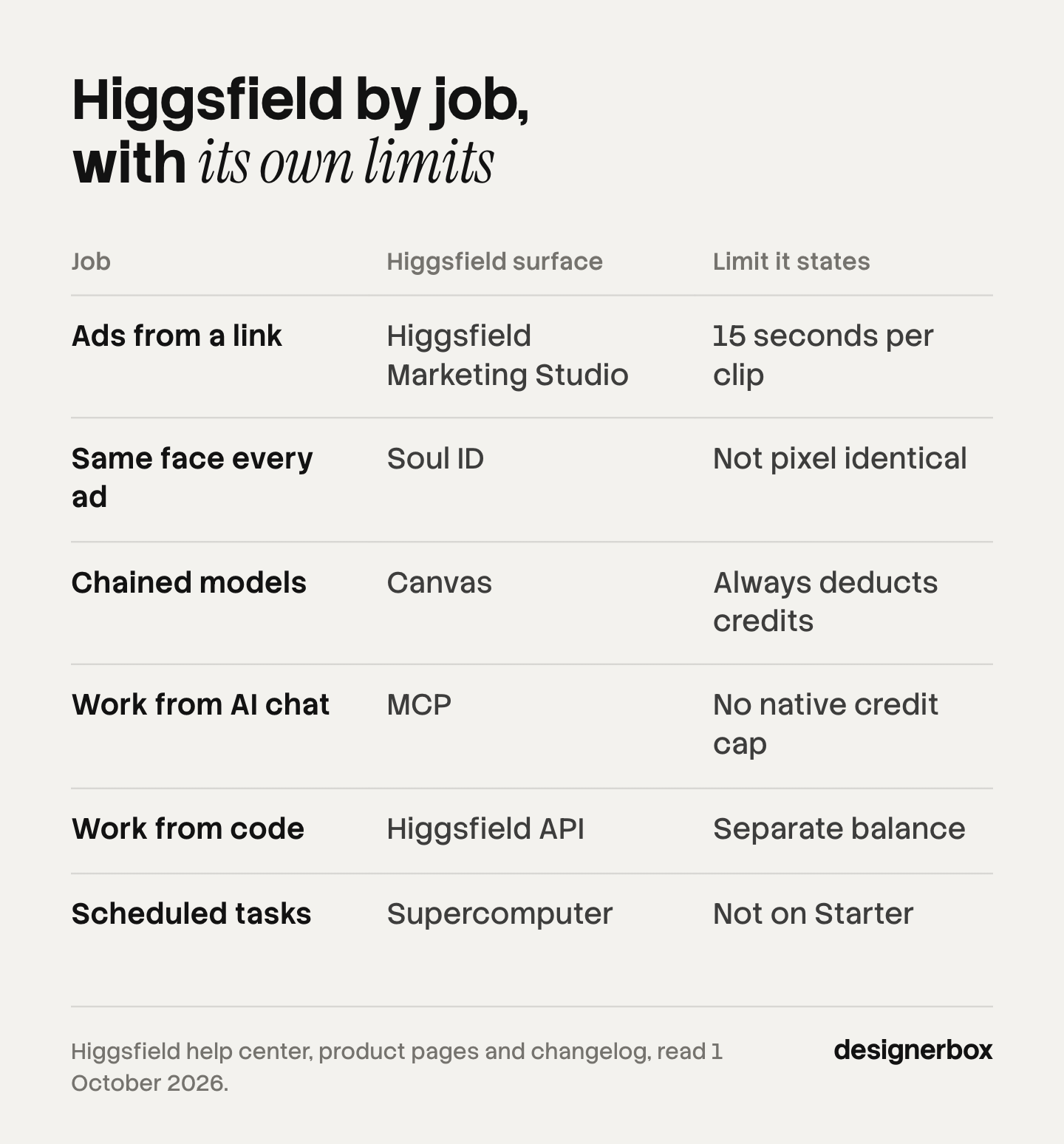
| Your job | Higgsfield surface | What its pages say | A limit it states itself |
|---|---|---|---|
| Cinematic product video | Cinema Studio, Camera Controls | ”camera control, multi-shot scenes, and physics-aware motion” | Which models you get depends on the plan |
| Ads from a product link or photo | Higgsfield Marketing Studio | Templates in six categories, and a Brand Kit built from your site | ”The maximum clip length is 15 seconds per generation” |
| The same face in every ad | Soul ID | Trained “on 20 or more photos of one person" | "clearly the same person” and no pixel-identical face |
| Product photos | AI product photography page | Studio, lifestyle, on-model and detail shots from one image | ”Uploading a few angles improves accuracy” |
| Several models in one board | Canvas | A “node-based infinite board” with reusable templates | ”all generations in Canvas deduct credits regardless of your plan” |
| Talking characters and voice | Lipsync Studio, Audio | Text to speech, voice change and translation | Clone only a voice you have permission to use |
| Scheduled, multi-step work | Supercomputer | An “agentic workspace” with scheduled tasks | Not on the Starter plan |
| Work from an AI chat | MCP, ChatGPT plugin | Images, video and characters from Claude or ChatGPT, and audio from Claude | ”There’s no native credit cap” per session |
| Work from your own code | Higgsfield API | Pay as you go, with an estimate before each request | A separate product with its own balance |
Source: higgsfield.ai help center, product pages and changelog, read 1 October 2026.
Read that table as nine products. A filmmaker uses the first row. A performance marketer uses the second. A fashion brand needs the third and fourth. Whether Higgsfield is worth it for you depends on the row you would use every week.
The rows where Higgsfield goes deepest are the first three. Its Camera Controls page lists named moves such as Dolly In, Crash Zoom In, Crane Up, Bullet Time and 360 Orbit. Soul ID is a trained character, and Higgsfield is plain about its limit: “Expect ‘clearly the same person’ rather than a pixel-identical face across every generation.”
For the product photo row, we have a separate guide to Higgsfield product photography, with seven alternatives by job.
What does Higgsfield Marketing Studio do for a brand?
Marketing Studio is the part of Higgsfield built for ads. Higgsfield updated it on 18 August 2026 and describes it this way: “Pick a template from a library of 1,500+ options organized by task, connect your brand by uploading a product image or pasting a website link, and get a finished, on-brand ad back in one click” (higgsfield.ai help center, October 2026). For static ads Higgsfield has since launched a second tool, covered in our guide to Higgsfield Ads Studio.
What its help page documents:
- Six categories: “Product Shots, Ads, Marketplace, Posters, UGC Videos, and Motion.”
- Three product shot formats: Studio, Lifestyle and With Model.
- A Brand Kit from a URL. Higgsfield says Marketing Studio “extracts the logo, brand colors, fonts, imagery, and tone of voice automatically”, or you fill it in by hand.
- Three UGC formats: “Faceless, Talking Head, and Silent”.
- A Virality Predictor. Higgsfield adds its own caution: “The score is an estimate to guide your choice, not a guarantee of performance on any platform.”
It also documents three limits.
- Clip length. “The maximum clip length is 15 seconds per generation.”
- Editing. “Editing after generation is available only in the Posters category; results in other categories are regenerated, not edited.”
- Agents. Higgsfield says: “The template-based Marketing Studio isn’t available through Supercomputer, MCP, or other agentic channels yet.”
The second limit is the one to plan around. If one frame of a video ad is wrong, you run the ad again. For a team that tests many variants, that is normal. Plan for that when a client must approve one exact ad. Our guide to what AI video ads cost explains why discarded takes belong in the budget.
Who owns the results, and does Higgsfield train on them?
These are the clauses a brand or an agency should read first. This is general information, not legal advice.
Ownership and client work. The terms say: “Company does not claim ownership of any of your Inputs or Outputs, nor does it restrict your commercial use of Outputs.” They add that your rights survive cancellation, “and you may transfer or sublicense your rights in Outputs to your clients or other third parties”. For an agency, that sentence is a strong point.
Training. The default is yes. “Your Content, Inputs, and Outputs may be used by Company to train, develop, enhance, evolve, and improve its (and its affiliates’) AI models”. Higgsfield’s own summary of the terms says: “If your clients require that their data never be used for training, an enterprise agreement can include that.” Its plan table lists “No data training” as an Enterprise row. Deleting content stops future use, and content already used for training “cannot feasibly be disassociated from models already trained”.
Results are not exclusive. “Other users may receive an Output that is similar or possibly identical to yours.”
People. The consent duty is yours. You confirm that you have “all necessary rights, releases, and consents” for any person’s name, likeness or voice.
Disclosure. “Where required by applicable law, you will disclose that Output is artificially generated or manipulated.” The terms also say Higgsfield may embed provenance signals such as C2PA Content Credentials.
Indemnity. The help center says: “Legal indemnification, protection against third-party IP claims, is available on the Enterprise plan only.”
Refunds. You may request one “within seven (7) days of your initial purchase”, “provided no Credits” have been used. Consumers in the EEA and the UK have a 14-day withdrawal right that ends when they start using the purchase.
All quotes are from the Higgsfield terms of use, last updated 26 July 2026, and its help center (higgsfield.ai, October 2026). Our comparison of OpenArt and Higgsfield sets these clauses next to another suite’s.
What do Higgsfield plans include?
Higgsfield lists its plans on its own pricing page (higgsfield.ai/pricing, October 2026). This review prints no price. The structure is what a buyer needs.
Two families. Individual plans are Starter, Plus and Ultra, with a free tier below them. Business plans are Team, Scale and Enterprise. The help center says plans “differ in which models you can access, how many credits you get per month, and how many generations you can run at once”.
The free tier. “You can generate without a paid plan, but access is limited to a small set of models and doesn’t include credits.” Every free generation carries a Higgsfield watermark. There is no trial period. How free video plans compare on credits, watermarks and rights is in our guide to free AI video generator plans.
Commercial use. Higgsfield’s pages say two things here. A recent copy of the pricing table has a “Commercial use” row that marks the free tier as not included. The help center says: “There is no separate commercial license to purchase: commercial use rights follow from the Terms of Use for all users.” A paid plan satisfies both. If you plan to use free results in an ad, ask Higgsfield in writing first.
Unlimited. Read this word with care. The help center defines it: “Unlimited models are specific models where generations don’t deduct credits for a set period.” Four conditions come with it.
- Web only. “Unlimited access applies only on higgsfield.ai: outside it, generations always deduct credits.”
- A set period, and only while the subscription is active.
- The standard queue. “Unlimited generations run in the standard queue, while credit-based generations always run in the priority queue.”
- Manual use. “Automation tools, scripting, credential sharing, and reselling access are strictly prohibited.”
So an agency that plans to automate cannot rely on Unlimited. Anything made “through MCP, CLI, Canvas, Supercomputer, or other automated tools deducts credits at standard rates”.
Cost before the run. Higgsfield shows it. Its help center says the credit cost is shown on the button you press to generate, “before you confirm”. The API has “an estimate endpoint” that “returns the cost of a request before you run it”.
Teams. Team covers 2 to 9 seats and Scale covers 5 to 15, both self-service, with pooled credits and shared Assets. Single sign-on starts on Scale. The no-training term, the indemnity and per-user spend caps are Enterprise rows.
Security wording. The enterprise page says “SOC 2-aligned controls, GDPR compliance, single sign-on”. We found no page that claims a SOC 2 certificate or links a report. Higgsfield says “Security documentation is available for review during procurement”, so ask for it.
Integrations, MCP and the API
Higgsfield connects to creative software and to AI chats more than to stores.
Plugins. Its help center lists “official plugins and integrations for Figma and FigJam, Adobe Photoshop, Adobe Premiere Pro and After Effects, DaVinci Resolve, Blender”. Plugins spend your plan balance at the same rates as the web app.
MCP. Higgsfield has an official MCP server. It “connects to Claude, ChatGPT, Cursor, and other MCP-compatible agents, with no API key”, and “An active paid subscription is required.” Every MCP generation spends credits. Higgsfield notes there is no hard cap per session: you tell the agent your limit, and “This is a prompt-level instruction, not a hard limit.”
The API. Launched on 16 September 2026 as a standalone product. “A subscription on higgsfield.ai and the API are two separate products with separate billing.” It is asynchronous, with polling or a webhook, and “You’re only charged for generations that finish successfully.”
Stores and catalogs. The integrations page lists no Shopify, marketplace, DAM or PIM connector (higgsfield.ai help center, October 2026). Higgsfield’s own blog says “A native, built-in Shopify or WooCommerce connector isn’t a given”, and tells readers to confirm connector support with its team. On tracking a catalog run, it says to keep “the SKU, request ID, template, market, output, cost, and review status in the brand’s own database”, because “this isn’t something Higgsfield stores on its own”.
That last quote is useful for a catalog team. The API can submit many jobs. The record of which product got which result, and who approved it, is yours to build.
Seven checks before a brand commits
Run these before an annual plan. Each one comes from a Higgsfield page quoted above.
- Name your row. Pick the one surface you would use weekly, and test that surface only.
- Read the training clause against your client contracts. If a client bans training on its assets, you need the Enterprise term.
- Price your work without Unlimited if any part of it is automated.
- Get commercial use in writing if you use the free tier at all.
- List the models you depend on, and check each one is still offered before you renew.
- Collect consent for every real face and voice. The terms put that duty on you.
- Decide where the catalog record lives: which product, which result, which approval.
Add one more if you sell on marketplaces. Marketing Studio’s marketplace templates come with Higgsfield’s own advice: “Check the platform’s own requirements before publishing.”

Where Higgsfield is the stronger pick
Five points in Higgsfield’s own documentation stand out.
- Camera and motion control. Named camera moves and its own video models.
- A trained character. Soul ID holds one person across generations. Our guide to Higgsfield’s AI Influencer Studio covers the menu builder that makes the character first.
- Reach into creative software. Plugins for Figma, Photoshop, Premiere Pro, After Effects, DaVinci Resolve and Blender.
- A public API with a cost estimate before each request.
- Self-service team plans with pooled credits.
If your week is campaign video for social, those five decide it. Our guide to Higgsfield AI alternatives covers the tools that go a different way.
The repeated catalog job
Anyone can make an AI picture. Making hundreds that still look like your brand is the hard part.
DesignerBox is AI creative production for brands and agencies. Scale your images, ads and video with AI and keep your brand on every piece: build the workflow once with your brand rules, run it on every product, see the cost before each run, and keep everything from the first product photo to the finished ad in one place.
Higgsfield goes deepest on the single piece: one clip, one ad, one character. It also lists a batch catalog feature and an API for many jobs. DesignerBox is built around the job that repeats. You build a workflow once with your brand rules. Batch runs it over a whole sheet of products. Each row keeps its product, its result and its state, and you keep, discard or re-run one row alone. That covers the product, the result and the keep-or-discard state from Higgsfield’s list.
The full workflow from the first product photo to the finished ad, in one subscription. That covers the product photos, the static ads, the video ads and a video editor with a real timeline.
Here are the limits, because Higgsfield is ahead on several points:
- DesignerBox does not have a public API. It has 68 tools over MCP, so an AI chat such as Claude, ChatGPT or Cursor can run your workflows. Higgsfield has both an API and MCP.
- Seats. Team features, shared brand kits and white label are on the Ultra plan, and every plan below Ultra is one seat. Higgsfield sells self-service team plans.
- Cinematic control. Higgsfield’s camera presets and its own video models go deeper for film-style work.
- Cost before the run is on both products. It is no reason to pick one over the other.
Uploading your own photos and the commercial license start on the Pro plan. AI video, virtual try-on, upscaling, the image editor and the video editor start on the Premium plan. An 8-second clip costs 40 to 560 credits, depending on the model. Plans and credits are on the pricing page. Performance teams can read the page for performance marketers.
Is Higgsfield worth it?
It depends on the team. Read down the list and stop at the first line that fits.
- A filmmaker or a social team making campaign video. Yes. Cinema Studio, the camera controls and the model library are the core of the product.
- A performance marketer who tests many short ads from product links. Yes, with Higgsfield’s Marketing Studio. Plan for the 15-second clip limit and for regenerating instead of editing.
- An agency with client contracts that ban training. Only with an Enterprise agreement.
- A team that wants to automate on an Unlimited plan. Not on Unlimited. Automation spends credits on every plan, so price the credits.
- A brand that needs the same set for every product, with a review record. Use Higgsfield’s API and build the record, or use a workflow tool that keeps it.
- A marketplace seller who needs listing images to spec. Check each platform’s rules yourself. Higgsfield says Marketing Studio’s marketplace templates format imagery and nothing more.
Scale content without limits.
Generate content for your products or services with AI, starting today, and keep your brand on every piece.
FAQ
Is Higgsfield AI worth it?
For cinematic video and fast ad variants, yes. Higgsfield combines its own tools, such as Cinema Studio, Soul ID and Marketing Studio, with a library of outside models. It fits less well when a client bans training on its assets, because the no-training term needs an Enterprise agreement, or when you plan to automate on Unlimited (higgsfield.ai terms and help center, October 2026).
Is Higgsfield AI free?
There is a free tier with “a small set of models”, and it does not include credits. Every free generation carries a Higgsfield watermark. There is no trial period. Paid plans remove the watermark (higgsfield.ai help center, October 2026).
Can I use Higgsfield for commercial work?
The terms say Higgsfield does not “restrict your commercial use of Outputs”, and you may sublicense results to clients. A recent copy of the pricing table marks commercial use as not included on the free tier, while the help center says rights “follow from the Terms of Use for all users”. On a paid plan both statements agree. This is general information, not legal advice.
Does Higgsfield train on my content?
By default, yes. The terms say your content, inputs and outputs “may be used by Company to train, develop, enhance, evolve, and improve” its AI models. Under an Enterprise agreement Higgsfield does not use the customer’s content for training. Deleting content stops future use.
What does Unlimited mean on Higgsfield?
It means specific models do not deduct credits for a set period. It applies on higgsfield.ai only, runs in the standard queue and is for manual use. Work through MCP, the CLI, Canvas or Supercomputer always deducts credits (higgsfield.ai help center, October 2026).
Does Higgsfield have an API and an MCP server?
Yes, both. The Higgsfield API launched on 16 September 2026 as a separate, pay-as-you-go product with its own balance. The MCP server connects Claude, ChatGPT, Cursor and other agents, needs a paid subscription and spends credits on every generation.
Is Higgsfield good for ecommerce product photos?
It has a dedicated page with studio, lifestyle, on-model and detail shots, a batch catalog feature and variant sets. Its integrations page lists no store connector, and Higgsfield says Marketing Studio’s marketplace templates only format the image. Our guide to Higgsfield product photography covers that surface in full.
Sources
Competitor pages are cited by domain and date, not linked.
- Higgsfield’s self-description, the tool-by-job map, Soul ID, Canvas, Supercomputer, Lipsync Studio and Audio: (higgsfield.ai/creator-hub/help-center, October 2026)
- Marketing Studio templates, categories, Brand Kit, Virality Predictor and limits: (higgsfield.ai/creator-hub/help-center, tools section, October 2026). The marketplace template caveat: (higgsfield.ai/blog/new-marketing-studio-higgsfield, August 2026)
- Camera Controls presets: (higgsfield.ai/camera-controls, October 2026). The product photography page: (higgsfield.ai/ai-product-photography, October 2026)
- Ownership, sublicensing, training, exclusivity, likeness consent, disclosure, provenance, model changes and refunds: (higgsfield.ai/terms-of-use-agreement, last updated 26 July 2026, read October 2026)
- Higgsfield’s summary of its terms: (higgsfield.ai/blog/terms-of-use-privacy-policy-update, July 2026)
- Plan families, the free tier, the watermark, commercial use, Unlimited, the cost shown before you confirm, team seats, SSO and the Enterprise rows: (higgsfield.ai/creator-hub/help-center, plans, credits, account and business sections, October 2026). Plans: (higgsfield.ai/pricing, October 2026)
- Enterprise security wording: (higgsfield.ai/enterprise, October 2026)
- Plugins, MCP, the ChatGPT plugin and the API: (higgsfield.ai/creator-hub/help-center, integrations section, October 2026) and (higgsfield.ai/creator-hub/changelog, October 2026). Supercomputer and the Starter plan: (higgsfield.ai/blog/ai-batch-generation-tools-2026, July 2026)
- Store connectors and catalog tracking: (higgsfield.ai/blog/automate-ecommerce-catalog-video-ai, September 2026)
- The Sora 2 page: (higgsfield.ai/sora-2, October 2026). Sora 2 removed from OpenAI’s API on 24 September 2026: OpenAI API deprecations (read 1 October 2026)
- Founding year, the Series B and the lead investor: TechCrunch, Higgsfield raises $400M Series B (17 August 2026)
- DesignerBox plan gates, MCP tools and the cost shown before each run: DesignerBox pricing page and MCP page (designerbox.ai/pricing, designerbox.ai/mcp), October 2026
Higgsfield features, plans and terms verified from Higgsfield’s own pages on 1 October 2026. Its plans and models change often, so check its pages before you buy.