The closest Higgsfield alternatives are DesignerBox for creative work your team repeats every week, OpenArt for one account that makes images, video and sound, Creatify for ads built from a product URL (how DesignerBox and Creatify compare), HeyGen for talking-head video, and Pika for quick video tests. If you only use one model, the model maker’s own app, such as Runway, Kling or Luma, is the other route. Higgsfield itself is still the stronger pick for cinematic shots and camera effects. It now runs a product photography page and a static ad tool, Higgsfield Ads Studio, as well. Every claim below comes from each company’s own pages, checked in September and October 2026 and re-checked on 22 October 2026.
| Tool | Best for | What it covers | Free plan |
|---|---|---|---|
| DesignerBox | The same job run on every new product | Product stills, on-model shots, ads and video through saved workflows | Yes, there is a free plan |
| Higgsfield | Cinematic video, effects, and product stills | Image, video, effects, lipsync and an AI Product Photography page | Yes, per its help center |
| OpenArt | Images, video and sound in one account | Image, video, music video, multi-scene video and consistent characters | A free trial plan with daily credits |
| Creatify | Video ads generated from a product URL | Video and image ads with AI actors | Yes, exports carry a watermark |
| HeyGen | Talking-head and avatar video | Avatar video, localized video and images for video | Yes |
| Pika | Short video experiments | Video, image and audio apps | Yes, with no monthly credits |
| Arcads | UGC-style video ads with AI actors | Video ads, lipsync, translation and image models | Not published |
| Pebblely | Product stills, image only | Product photos on background themes | None listed |
| Photoroom | Background editing and product visuals | Background removal, retouching, AI backgrounds and video | Yes, personal use only |
Kling, Veo 3.1 and Seedance 2.0 are models, and Higgsfield itself runs all three. So does DesignerBox, where a model is one step in a workflow. When two platforms run the same underlying models, the model roster does not separate them.
This guide compares the platforms on what they are built to produce, with every external claim sourced and dated. It covers how Higgsfield sells its plans, where it wins, and where each alternative fits. It prints no competitor prices, because they change often. Check each company’s own pricing page before you buy. For Higgsfield on its own, read our Higgsfield AI review.
Key Takeaways
-
Higgsfield is growing fast. In August 2026 it raised $400 million at a $5.4 billion valuation, and said its users had doubled since January to over 30 million (Reuters via BNN Bloomberg, August 2026).
-
Higgsfield sells Starter, Plus and Ultra plans for individuals, plus Business plans, each with a monthly credit allowance, on monthly or annual billing (higgsfield.ai/pricing, September 2026).
-
Higgsfield does not cap output at 720p. Its own pricing page lists Seedance 2.0 at 4K, Kling 3.0 at 4K and Nano Banana Pro at 4K (higgsfield.ai/pricing, September 2026).
-
Both platforms run many of the same models. Seedance 2.0, Kling, Veo 3.1, Nano Banana Pro, GPT Image and FLUX appear in both catalogs. Model access does not separate them.
-
The split is no longer video against stills. Higgsfield now runs an AI Product Photography page listing AI Variant Sets and an AI Product from Link feature (higgsfield.ai/ai-product-photography, October 2026). DesignerBox is built around one approved job that a saved workflow runs the same way on every new product, and batch runs it over a whole sheet.
-
One tool on this list, Arcads, has no pricing link in its site navigation (arcads.ai, September 2026).
-
The model makers sell other labs’ models too. Runway’s plans list Kling 3.0 and Nano Banana Pro next to its own Gen-4.5, and Luma’s pricing lists Kling 3.0 Omni next to its own Ray3.2 (runwayml.com and lumalabs.ai, October 2026).
Higgsfield AI plans
Higgsfield sells individual plans and Business plans. The individual plans are Starter, Plus and Ultra, and each one comes with a fixed monthly credit allowance. You can pay monthly or annually (higgsfield.ai/pricing, September 2026).
Credits buy different things depending on the model. Higgsfield charges each generation by model, and for video by clip length and resolution too. Its plan table shows which models and resolutions each plan includes. Plus and Ultra carry the 4K rows, and Starter carries a smaller set of models (higgsfield.ai/pricing, September 2026).
Higgsfield’s help center says the credit cost of a generation is shown on the button before you confirm it. Subscription credits do not roll over: they reset with each paid renewal on monthly plans and every 30 days on annual plans. If you cancel, credits you bought stay usable on the free plan until they expire (higgsfield.ai/creator-hub/help-center, updated August 2026).
Higgsfield also adds three notes on its pricing page. Prices exclude VAT. Unlimited usage may be subject to speed adjustments at peak times. Unlimited and free generations work only on higgsfield.ai, and not through its MCP, CLI, Canvas or Supercomputer surfaces (higgsfield.ai/pricing, September 2026).
For the current rates, check higgsfield.ai/pricing directly. This guide does not repeat them.
Higgsfield output resolution
Higgsfield does not cap output at 720p. Higgsfield’s own plan table lists Seedance 2.0 at 4K, Kling 3.0 at 4K and Nano Banana Pro at 4K (higgsfield.ai/pricing, September 2026). Its Plus plan description reads “Access to every model, all features & 4K quality”.
If you planned to switch tools because you read that Higgsfield stops at 720p, check that reason against Higgsfield’s own pricing page first.
Shared models, different jobs
Higgsfield sells access to Kling, Veo 3.1 and Seedance 2.0 as models inside its own plans. Its plan table lists Kling 3.0, Sora 2 Pro, Google Veo 3.1, Seedance 2.0 and 2.5, Wan, Minimax Hailuo, Nano Banana Pro, GPT Image and FLUX.2 (higgsfield.ai/pricing, September 2026). OpenAI removed Sora 2 and Sora 2 Pro from its API on 24 September 2026 (OpenAI API deprecations, accessed September 2026).
In DesignerBox, you pick the model for each step when you build the workflow, and every run after that uses it. A template comes with its model already picked. The overlap with Higgsfield is heavy. Veo 3.1, Seedance 2.0, Kling 2.6 Pro, Nano Banana Pro, GPT Image 2 and FLUX 2 Flex appear on both platforms. You can see the full list on the DesignerBox model list. For the image models alone, Midjourney alternatives sorted by job covers GPT Image, Nano Banana and FLUX.
So “switching from Higgsfield to Veo” is a menu choice inside whichever platform you already pay for. Comparing the two on model count tells you little. To compare the models themselves, use a prompt adherence test. Higgsfield’s roster is larger than ours. It carries Grok Video, Wan, Minimax Hailuo, and its own Soul and DoP models, none of which DesignerBox includes (higgsfield.ai/pricing, September 2026).
What separates these platforms is what they are shaped to produce. That line moved during 2026. Here is what each company’s pages state as of September and October 2026.
Higgsfield started from cinematic output, and that half is still there. Its site offers Effects, Cinema Studio, Lipsync Studio and a Canvas (higgsfield.ai, September 2026). The product half arrived alongside it. Higgsfield now runs a dedicated AI Product Photography page whose own promise is “Turn One Photo into a Full Shoot”. That page lists AI Studio Shots, AI Lifestyle Scenes, AI On-Model Shots, AI Multi Angle, AI Variant Sets and an AI Product from Link feature (higgsfield.ai/ai-product-photography, October 2026). Its Marketing Studio carries Product shot, Motion, UGC, Ads, Posters and Marketplace templates. Its studio list names Cinema Studio, Marketing Studio, Lipsync Studio, Photodump Studio and Fashion Factory (higgsfield.ai, October 2026).
So the old sorting question, cinematic tool or product tool, no longer separates these two. We set out that shift in full, and what it means for a catalog, in Higgsfield for product photography.
DesignerBox is built for the creative work a team repeats every week. You build the job once with your brand, your products and your rules. A saved workflow then runs it the same way on every new product.
The choice now turns on what happens after the first good shot. Ask who holds the brand rules and what the review step is. Both products show the credit cost before you start a generation, so that no longer separates them. Both products are legitimate, and a model-roster comparison shows none of that.
Higgsfield and 8 alternatives, tool by tool

1. DesignerBox: one workflow for every product
Best for: agencies and brand teams producing the same creative work every week across many products Plans: a free plan and paid plans
DesignerBox is AI creative production for brands and agencies. You set the brand rules, the model, the light and the framing once. The workflow reads them on every run. That matters when a drop adds 40 SKUs and each one needs a hero, a set of angles and a marketplace crop. Anyone can make an AI picture. Making hundreds that still look like your brand is the hard part.
One workflow, four ways to run it. A template is a workflow somebody already built: you open one, add your photo and run it. Your own workflow holds your brand and your products. You publish it as an app, so a colleague completes a form and presses Run without opening the workflow. Batch runs that one workflow over a sheet of up to 200 products, and you keep or discard each result. Nothing is rebuilt between the four. Each one widens who can run it. That is how you keep AI brand consistency from one product to the next.
The cost of a run depends on the models in it, and the cost is shown before the run. Critic steps score the results, and best-of-N keeps the best one.
For video, an 8-second clip costs 40 to 560 credits, depending on the model. Read how AI video cost works before you budget a shot list.
The trade-offs: Uploading your own photos starts on the Pro plan. AI video and the video editor start on the Premium plan. Team features and white label are on the Ultra plan, and every plan below Ultra is one seat. For an agency with three people on one account, that is a real limit. Publishing into a store is not built: you download the results, or send them with a webhook or an S3 step. Plans and credits are on the pricing page.
If you produce cinematic video at volume and the shot itself is the deliverable, Higgsfield is the better fit.
2. Higgsfield: cinematic video, effects, and a product photography surface
Best for: studios and teams producing cinematic shorts, effects-led video, and social video at volume, and now product stills as well Plans: Starter, Plus and Ultra for individuals, plus Business plans (higgsfield.ai/pricing, September 2026)
In our reading, Higgsfield is a strong product, and for many jobs it is the right answer. The market agrees: Reuters reported a $400 million funding round in August 2026, led by DST Capital, and more than 30 million users. Its pricing page lists a broad model roster. Its site offers Cinema Studio, Effects, Lipsync Studio, Marketing Studio, a Canvas, and an MCP and CLI surface (higgsfield.ai, September 2026).
If your work is cinematic shots, effects, or high-volume video where the shot is the deliverable, Higgsfield fits, and you may not need the rest of this list.
It also covers product stills. Its AI Product Photography page lists AI Variant Sets, described as every colorway across the line. It also lists an AI Product from Link feature, which pulls a product page into Marketing Studio and makes ad shots from one brief (higgsfield.ai/ai-product-photography, October 2026). On the apparel side its Outfit Shot app turns uploaded clothing images into an avatar photoshoot, and its studio list names Fashion Factory (higgsfield.ai/apps/outfit-shot, September 2026).
Higgsfield’s product photography page lists variant sets and a link-to-ad-shots feature. It names no whole-catalog run (higgsfield.ai/ai-product-photography, October 2026). DesignerBox batch runs one workflow over a whole sheet. If a whole-catalog run is your deciding factor, compare what each one reads as input and what it returns.
3. Creatify: video ads from a product URL
Best for: ecommerce teams that want ads generated straight from a product page Plans: a free plan and paid plans, plus a separate API product (creatify.ai/pricing, September 2026)
Creatify generates video ads from any product URL, which is a different entry point from a prompt box or an upload. Its pricing page speaks to “creators, marketers, and agencies of all sizes” (creatify.ai/pricing, September 2026). Exports on the free plan carry a watermark. It makes image ads as well as video ads (creatify.ai/pricing, September 2026).
Creatify runs a separate API product with its own plans (creatify.ai/pricing, September 2026). Do not mix the two when you budget. If Creatify is the tool you are weighing up, we compared seven alternatives in our guide to Creatify alternatives.
4. HeyGen: talking-head and avatar UGC
Best for: teams producing spokesperson video, localized video, and avatar-led UGC Plans: a free plan and paid plans for individuals and teams (heygen.com/pricing, September 2026)
HeyGen describes its product as a way to “create, localize, scale, and collaborate on video, no camera or crew needed” (heygen.com/pricing, September 2026). It is video-primary. Its plans list stock avatars, custom avatars and photo avatars. HeyGen also lists an AI image generator that makes visuals for use inside its videos (heygen.com/apps/ai-image-generator, September 2026). Its plans center on avatar video, so product-still work sits outside its main scope.
HeyGen’s plans scale by credits, so the plan that fits depends on how much video you make. Read the plan table on heygen.com/pricing before you commit.
5. Pika: short video experiments
Best for: individuals testing video generation on a small scale Plans: a Free plan and paid Starter, Creator and Fancy plans, on monthly or yearly billing (pika.art/pricing, October 2026)
On 17 September 2026 Pika launched a new version of its product, which brings video, image and sound creation into one place (pika.art/blog, October 2026). Its pricing page lists video apps such as Create Video, Product Ad, Reskin Video, Motion Transfer and Extend Video. It runs its own Pika 2.5 and Pikaframes models next to outside models such as Seedance 2.5 and Wan 3.0 (pika.art/pricing, October 2026).
The Free plan has no monthly credits, so you buy a credit pack to generate. The commercial license starts on the Creator plan (pika.art/pricing, October 2026).
6. Arcads: UGC-style ads with AI actors
Best for: performance marketers producing UGC-style video ads at volume Plans: no pricing link in the site navigation
Arcads positions itself as “everything you need to create, refine, and launch video ads with AI”, aimed at D2C brands, mobile app studios, agencies and performance marketers (arcads.ai, September 2026). It is built around a library the company describes as “1,000+ Captivating AI Actors”, with lipsync, text to speech, translation and captions. Its homepage also lists image models, including Nano Banana, Seedream and GPT Image (arcads.ai, September 2026).
Arcads shows no pricing link in its navigation, and its calls to action lead to a sign-up or a demo booking (arcads.ai, September 2026). Ask Arcads for its current plans before you budget. Our Arcads alternatives comparison covers other tools for the same job.
7. Pebblely: product stills, image only
Best for: small stores that need product photos and nothing else Plans: paid plans only, with no free plan listed (pebblely.com/pricing, September 2026)
Pebblely describes its job in one line: “Create AI product photos that help you sell more” (pebblely.com, September 2026). It is image generation only, with no video. Its plans include background themes and custom prompts, and the higher plans add bulk generation (pebblely.com/pricing, September 2026). Pebblely measured against six alternatives covers where that scope runs out.
Its rights position is clearly stated: “You own the images that you have generated” (pebblely.com/faq, September 2026). No plan condition is attached to that sentence, and the FAQ points to Pebblely’s terms for detail. For a small catalog with no video requirement, it is a clean fit.
8. Photoroom: background editing and product visuals
Best for: teams whose main job is background removal and product image cleanup at scale Plans: Pro, Max, Ultra and a custom plan for large brands, with a free trial (photoroom.com/pricing, September 2026)
Photoroom covers background removal, AI shadows, retouching, AI fill, expand and resize, and image enhancement (photoroom.com/pricing, September 2026). Its tool list also includes AI Backgrounds, AI Fashion Models and a Video Generator, so it does reach into video. Batch Processing applies backgrounds, lighting fixes and retouching across a whole set of images (photoroom.com/batch, September 2026).
The licensing detail matters most for commercial work. Photoroom’s help center states that “You cannot use a free account for commercial purposes. Free accounts are limited to personal use only” (help.photoroom.com, September 2026). If you are producing assets for a store or a paid campaign, the free account does not cover you. For the wider set of tools in this category, we compared 13 of them in our Photoroom alternative guide.
9. OpenArt: images, video and sound in one account
Best for: teams that want one account for images, video and sound, and a route in from an AI chat Plans: a free trial plan with daily credits, and paid plans (openart.ai, October 2026)
OpenArt calls itself “an all-in-one AI creation platform” and says it is used by more than 10 million creators, brands and studios (openart.ai, October 2026). Like Higgsfield, it sells many outside models on one account. Its MCP page lists Seedance 2.5, Veo 3.1, Kling 3.0 and GPT Image 2.5 among them. Its Director builds multi-scene videos such as short films, music videos, UGC ads and product ads, and Character Builder keeps one character the same across scenes (openart.ai, October 2026).
OpenArt also works from an AI chat. Its MCP connector runs in Claude, ChatGPT, Cursor and Kimi. You sign in with your OpenArt account, and you need no API key (openart.ai/mcp, October 2026).
Read the terms before client work. OpenArt’s terms allow commercial use from the Plus plan level and up, and output from a free plan may carry a visible watermark that you may not remove (openart.ai/terms, last updated 30 July 2026). Its IP Safety Check screens results for possible conflicts, and the same terms make no warranty on its accuracy. Our guide to AI copyright infringement covers the checks a scan does not replace. For a full tour of the product, read what OpenArt is.
A note on Icon, and why it is not in the table
Icon sells human-made UGC ads, filmed and edited by real creators, with software included. Its own page describes the ads as “no AI / 100% real” (icon.com/pricing, September 2026). The same page says Icon originally launched as The AI Admaker.
We left Icon out of the comparison table on purpose. Human creators filming real footage is a different purchase from an AI tool, and ranking the two side by side would misrepresent both products.
Higgsfield AI alternatives compared
Each cell below comes from the company’s own pages, checked in September and October 2026.
| Tool | Free plan | Image | Video | Same job run again on the next product |
|---|---|---|---|---|
| DesignerBox | Yes, there is a free plan | Yes | Yes, from Premium | Yes, saved workflows |
| Higgsfield | Yes, per its help center | Yes | Yes | Effects presets and Product Placement |
| OpenArt | A free trial plan with daily credits | Yes | Yes | Character Builder and Director projects |
| Creatify | Yes, watermarked | Yes | Yes | From a product URL |
| HeyGen | Yes | For use in video | Yes | Reusable avatars |
| Pika | Yes, no monthly credits | Yes | Yes | Not listed |
| Arcads | Not published | Image models listed | Yes | Not published |
| Pebblely | None listed | Yes | No | Background themes and bulk generation |
| Photoroom | Yes, personal use only | Yes | Yes | Batch Processing |
Credits across platforms
Credits do not compare across platforms. A DesignerBox credit and a Higgsfield credit buy different amounts of work. Both platforms charge a different number of credits per model, and Higgsfield also charges video by clip length and resolution (higgsfield.ai/pricing, September 2026).
There is no single per-image price on either platform. The model you pick moves the bill.
The bigger question is what the image is for. An image made inside a workflow that already holds your brand rules, your product and your framing follows the same standard as the one before it. If you need 600 loose images a month, compare the cost per image on each pricing page. If you need 200 images that all pass the same review, cost per image is only part of the purchase.
Pick the one that matches your job.
What the free plans cover
Free plans in this market carry limits worth reading before you start. Our guide to free AI video generator plans compares credits, watermarks and rights across six providers.
Pika’s Free plan has no monthly credits, so you buy a credit pack to generate, and it has no commercial license (pika.art/pricing, October 2026). It is a fair way to test the mechanic. For a paid ad, you need the Creator plan or higher.
Creatify’s free plan puts a watermark on exports, and its paid plans remove it (creatify.ai/pricing, September 2026).
Pebblely lists no free plan (pebblely.com/pricing, September 2026).
Photoroom’s free accounts are for personal use only, with no commercial use (help.photoroom.com, September 2026). Check this before you make store or ad assets on a free account.
DesignerBox has a free plan. It cannot make video, and its results carry a watermark.
The same pattern holds across these tools. Free plans are for testing the mechanic. The moment work goes in front of a customer, check the license before the price.
Going straight to the model maker
If one model makes most of your shots, its maker’s own app is the other route. You skip the platform in the middle. In 2026 that route has changed, because the model makers now sell other labs’ models as well.
Runway builds its own models, including Gen-4.5, Aleph 2.0 and Act-Two. Its plans also list Kling 3.0, Nano Banana Pro and Seedance 2.0, and it has a Free plan with one-time credits (runwayml.com, October 2026). Runway Dev is its API for developers, with models “from Runway and other labs” (runwayml.com, October 2026).
Kling AI, from Kuaishou, now leads with Kling 4.0. Its site adds a workspace with skills and a step canvas, and an MCP and CLI route for agents (klingai.com, October 2026).
Luma builds the Ray3.2 video model and Uni-1, which it describes as brand intelligence at the model level, with creative agents on top. Its pricing page also lists Kling 3.0 Omni and MiniMax H3 (lumalabs.ai and lumalabs.ai/pricing, October 2026).
So a model maker’s app and a platform like Higgsfield look more alike every month. The deciding question stays the same as in the rest of this guide: which tool holds the job you repeat, with your brand rules and your review step in it.
Higgsfield alternatives by team type
The shortlist changes with who is doing the work, because the deliverable changes. Eight team types appear in this search, and the table sorts them by the job their week is built around.
| Team | The job the week repeats | The Higgsfield surface that covers it |
|---|---|---|
| Agencies | One creative job per client, every week | Cinema Studio for the film. Sub-workspaces and role-based access are Enterprise features |
| Brand teams | One brand standard on every piece | Character Studio trains a brand face from photos. Approvals and comments are Enterprise |
| Performance marketers | New variants from the ads that won | Higgsfield’s Marketing Studio carries Ads, UGC and Posters templates |
| Creative studios | Finished sets delivered under your own name | Cinema Studio, plus a step canvas across a team on Enterprise |
| Ecommerce brands | The same shot for every new product | AI Variant Sets and AI Product from Link, on its product photography page |
| Fashion brands | On-model sets for every colorway | Outfit Shot and Fashion Factory for the avatar photoshoot |
| Furniture and homeware brands | Room scenes from one product photo | AI Lifestyle Scenes and AI Scene Styling |
| Solo founders | A brand kept consistent without a designer | Templates carry most of the setup |
Higgsfield also sells team features. Its Enterprise page lists a shared team workspace with approvals and comments, sub-workspaces, unlimited seats, credit pooling across teams, SSO and SAML, role-based access control, and a Character Studio that trains a brand face from uploaded photos and reuses it across images and video (higgsfield.ai/enterprise, September 2026). Those sit on the Enterprise tier, which is sold through its sales team.
Apply the same test to DesignerBox, and read the Ultra plan limits in its profile above. An agency of three, or a studio reselling under its own name, needs the Ultra plan, because team features and white label are on Ultra. Check that against your headcount before anything else on this page.
Higgsfield surfaces above are named from its own site (higgsfield.ai, higgsfield.ai/ai-product-photography and higgsfield.ai/enterprise, September 2026). The DesignerBox segment pages linked in the left column set out what each team type gets.
If you buy for an agency with many client brands, screen the shortlist on the three contract terms in the next section. If the shortlist is down to two names, OpenArt vs Higgsfield sets them side by side on the API split, who may train on your work, and whether results can be sublicensed to a client.
If the tool you are weighing against Higgsfield is DaVinci AI, note that three unrelated products share that name. We sorted them out in our guide to DaVinci AI alternatives.
Higgsfield for agencies: three contract terms
Features do not sort an agency shortlist. Higgsfield already sells Team, Scale and Enterprise plans, with pooled credits, a brand kit, approvals, an API and an MCP server (higgsfield.ai, September 2026). Three contract terms sort it instead. Ask every vendor about them in writing, and keep the replies with the client file.
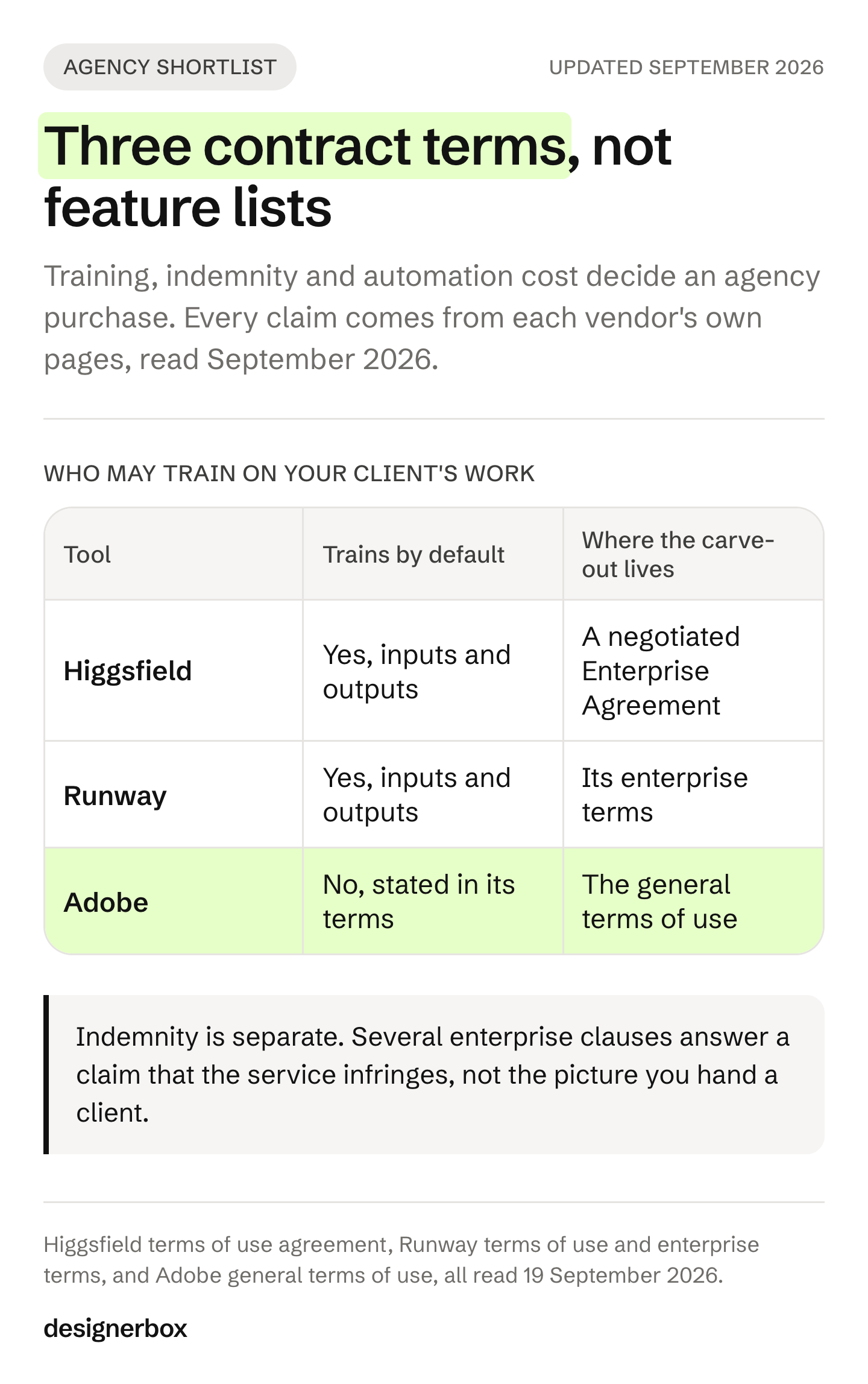
Training on client work. Higgsfield’s terms say inputs and outputs may be used to train its models. The exception applies only under a separate written Enterprise Agreement (higgsfield.ai/terms-of-use-agreement, September 2026). Runway’s public terms carry a similar training clause, and its enterprise terms say it may not use customer content as training data (runway.com/terms-of-use and runway.com/enterprise-terms, September 2026). Adobe’s general terms say it will not use your content to train generative AI models (adobe.com/legal/terms.html, September 2026). DesignerBox’s public terms do not say whether we use your content to train models, so ask us in writing too.
Rights and indemnity. Higgsfield does not claim ownership of outputs, and you may sublicense them to your clients. Those rights survive cancellation (higgsfield.ai/terms-of-use-agreement, September 2026). Indemnification against third-party IP claims is listed on Enterprise (higgsfield.ai, September 2026).
Automation. Higgsfield’s unlimited and free generations apply only on higgsfield.ai. Runs through its MCP, CLI, Canvas or Supercomputer use credits at standard rates (higgsfield.ai, September 2026). In DesignerBox, MCP runs use the same credits as the web app (designerbox.ai/terms, September 2026). Price the automated path, because a job you repeat every week ends up there.
This is general information, not legal advice.
How to pick
Work down this list in order and stop at the first line that describes you.
You need cinematic shots or camera effects. Stay on Higgsfield. Of the tools on this list, it is the one built for that job.
You need talking-head or spokesperson video. HeyGen (heygen.com/pricing, September 2026). Read its plan table before you commit.
You need ads generated from a product page with little setup. Creatify (creatify.ai/pricing, September 2026).
You need product photos and nothing else. Pebblely, or Photoroom if background editing at scale is the job.
You want to test video generation without a subscription. Pika. Its Free plan has no monthly credits, so you buy a credit pack and run a few clips.
You run the same creative job every week across many products. DesignerBox. This is the case it is built for: static ad creative, on-model shots, product stills and video for every new product. The video editor is a real timeline for the cut. The stills, the ads and the cut come from the same account and the same brand rules.
You want one platform that does all of the above perfectly. It does not exist. Running two tools is a reasonable answer. The question worth asking is which one owns your brand-critical work, and which one you rent for a specific job.
If your decision is about cost per asset against a photoshoot, and not against another AI tool, what a product photoshoot costs is the more useful comparison. And if you are not sure which kind of tool you need, the four types of AI ad generator explains each kind before you compare prices.
The AI tool comparisons on DesignerBox cover more tools in this bracket.
If the weekly repeat job is yours, start with one product. Start from a template, add your brand and your product, and run it.
FAQ
Is there a free Higgsfield AI alternative?
Yes. OpenArt has a free trial plan with daily credits (openart.ai, October 2026). Runway has a Free plan with one-time credits (runwayml.com/pricing, October 2026). Pika has a Free plan with no monthly credits, so you buy a credit pack to generate (pika.art/pricing, October 2026). Creatify has a free plan with watermarked exports (creatify.ai/pricing, September 2026). HeyGen has a free plan (heygen.com/pricing, September 2026). DesignerBox has a free plan, and it cannot make video. Photoroom has free accounts, but they are for personal use only (help.photoroom.com, September 2026).
How does Higgsfield AI price its plans?
Higgsfield sells Starter, Plus and Ultra plans for individuals, plus Business plans. Each plan has a fixed monthly credit allowance, and you can pay monthly or annually. Each generation costs credits by model, and video also by clip length and resolution. Output is not capped at 720p: the plan table lists Seedance 2.0, Kling 3.0 and Nano Banana Pro at 4K (higgsfield.ai/pricing, September 2026). This guide does not print competitor prices, so check the live page for the current rates.
Which Higgsfield alternative fits product photos and product ads?
For product photos only, Pebblely is image only, with no video (pebblely.com, September 2026), and Photoroom fits when background removal is the main job (photoroom.com/pricing, September 2026). For ads, Creatify generates them from a product URL (creatify.ai/pricing, September 2026), and Arcads targets UGC-style ads with AI actors (arcads.ai, September 2026). DesignerBox fits when the same stills, on-model shots and ads repeat for every new product. A wider comparison of DesignerBox alternatives covers more options.
What does DesignerBox cost compared with Higgsfield?
On DesignerBox, an image has no flat rate: the cost depends on the model, and it is shown before the run. An 8-second clip costs 40 to 560 credits, depending on the model, and AI video starts on the Premium plan. On Higgsfield, each generation costs credits by model, and video also by clip length and resolution (higgsfield.ai/pricing, September 2026). Neither platform has one video price.
Higgsfield vs DesignerBox: which should I choose?
Choose Higgsfield for cinematic video and effects work. Choose DesignerBox when the job repeats every week across many products and each one has to meet the same standard. Seedance 2.0, Kling, Veo 3.1, Nano Banana Pro, GPT Image and FLUX appear in both catalogs (higgsfield.ai/pricing, September 2026). So a switch changes the workflow around the model, and it rarely changes which model makes your shot.
Do AI creative tools train on the work an agency uploads?
Some do, by default. Higgsfield and Runway both say so in their public terms, and the exception sits in a negotiated enterprise contract. Adobe says in its general terms that it does not train generative AI models on your content (higgsfield.ai, runway.com and adobe.com, September 2026). Ask each vendor in writing before client material goes in.
Is Higgsfield better than OpenArt?
It depends on the job. Higgsfield is the stronger pick for cinematic shots, camera effects and its product photography page. OpenArt fits a team that wants images, video and sound in one account, with multi-scene video in Director and an MCP connector for Claude, ChatGPT, Cursor and Kimi (openart.ai, October 2026). Both sell many of the same outside models, so compare their terms on training, commercial use and watermarks before you choose.
What are the Chinese alternatives to Higgsfield?
Several video models in this market come from Chinese companies: Kling from Kuaishou, Seedance from ByteDance, Hailuo from MiniMax and Wan from Alibaba. Higgsfield itself runs several of them. Kling also sells its own app, which now leads with Kling 4.0 (klingai.com, October 2026). As with any tool, read the terms on training and data before client work goes in.
Do these tools include a commercial license?
Not on every plan. Check per tool, because this is where the differences are sharpest. Photoroom’s free accounts are for personal use only (help.photoroom.com, September 2026). Pebblely states “You own the images that you have generated” (pebblely.com/faq, September 2026). Higgsfield’s plan comparison has a commercial use row, so check which plan includes it (higgsfield.ai/pricing, September 2026). On DesignerBox, the commercial license starts on the Pro plan. Verify the live terms before you ship a paid campaign.
Sources
Accessed September 2026, unless a line gives another date.
- Higgsfield plan names, the free plan, Business plans, billing periods, the model and resolution table including the 4K rows, the Plus plan description, the commercial use row, Lipsync Studio, Product Placement, and the VAT and surface notes: (higgsfield.ai/pricing, September 2026)
- Higgsfield product surfaces, including Cinema Studio, Effects, Marketing Studio, Canvas, MCP and CLI: (higgsfield.ai, September 2026)
- Higgsfield AI Product Photography page: the twelve feature names, AI Variant Sets and AI Product from Link, the Marketing Studio template tabs and the studio list: (higgsfield.ai/ai-product-photography, October 2026)
- Creatify free plan and watermark, image and video ads, audience line, video ads from a product URL, and the separate API product: (creatify.ai/pricing, September 2026)
- HeyGen free plan, product line and avatar features: (heygen.com/pricing, September 2026)
- HeyGen AI image generator for video visuals: (heygen.com/apps/ai-image-generator, September 2026)
- Pika plan names, the Free plan with no monthly credits, billing periods, the app and model lists and the commercial license row: (pika.art/pricing, October 2026). The 17 September 2026 launch post: (pika.art/blog, October 2026)
- Arcads positioning, actor library, feature set, image models, and the absence of a pricing link in the navigation: (arcads.ai, September 2026)
- Pebblely product line, plan features and the absence of a free plan: (pebblely.com and pebblely.com/pricing, September 2026)
- Pebblely image ownership terms: (pebblely.com/faq, September 2026)
- Photoroom tool list and plan names: (photoroom.com/pricing, September 2026)
- Photoroom Batch Processing: (photoroom.com/batch, September 2026)
- Photoroom’s free-account commercial-use restriction: (help.photoroom.com/en/articles/12523455-free-accounts-and-commercial-use, September 2026)
- Icon’s human UGC ads, its “no AI / 100% real” description and its launch as The AI Admaker: (icon.com/pricing, September 2026)
- Higgsfield terms of use: training, ownership, sublicensing to clients and the Enterprise Agreement exception (higgsfield.ai/terms-of-use-agreement, accessed 19 September 2026)
- Higgsfield team plans, indemnification and the unlimited-use surfaces (higgsfield.ai, accessed 19 September 2026)
- Runway public and enterprise terms on training (runway.com/terms-of-use and runway.com/enterprise-terms, accessed 19 September 2026)
- Adobe general terms of use on generative AI training (adobe.com/legal/terms.html, accessed 19 September 2026)
- DesignerBox terms of service on MCP credit use (designerbox.ai/terms, accessed 19 September 2026)
- Sora 2 and Sora 2 Pro API removal: OpenAI API deprecations, accessed September 2026
- DesignerBox plans, credit allocations, the video cost range, and plan gates for video, commercial licensing, team features and seats: DesignerBox pricing page (designerbox.ai/pricing), September 2026
- Higgsfield help center, How do credits work?, updated 3 August 2026: the cost shown before you confirm, credit resets and the free plan after cancellation (higgsfield.ai/creator-hub/help-center/credits/how-credits-work, accessed 22 October 2026)
- Reuters, “Higgsfield’s valuation soars fourfold to US$5.4 billion in six months”, 17 August 2026: bnnbloomberg.ca
- OpenArt homepage, MCP page, Director and Character Builder pages: (openart.ai and openart.ai/mcp, accessed 22 October 2026)
- OpenArt terms of service, last updated 30 July 2026: commercial use from the Plus level, free-plan watermarks and the IP Safety Check disclaimer (openart.ai/terms, accessed 22 October 2026)
- Runway pricing page and homepage: its own models, the third-party models in its plans, the Free plan and Runway Dev (runwayml.com, accessed 22 October 2026)
- Kling AI homepage: Kling 4.0, its skills workspace and the MCP and CLI route (klingai.com, accessed 22 October 2026)
- Luma homepage and pricing page: Ray3.2, Uni-1 and the third-party models listed (lumalabs.ai and lumalabs.ai/pricing, accessed 22 October 2026)
Competitor features and plan structures checked on each company’s own pages in September 2026: higgsfield.ai, creatify.ai, heygen.com, pika.art, arcads.ai, pebblely.com, photoroom.com and icon.com. Pika’s pricing page and launch post were re-checked on 2 October 2026, and its plan names and free-plan terms were updated. Higgsfield’s AI Product Photography page and studio list were re-read on 7 October 2026. On 22 October 2026 we re-read Higgsfield’s help center and added OpenArt, Runway, Kling and Luma from their own pages. This guide prints no competitor prices. Plans in this category change often, so check the live page before you buy. DesignerBox figures are from the DesignerBox pricing page, September 2026.