An AI mascot is a drawn or stylized brand character that you make with an image model and use again in every campaign. It stays the same only if you give the model the same evidence every time: a model sheet with one master image, a turnaround, expressions and named colors. A text prompt on its own describes a type of character. It does not describe your character.
Most AI mascot generators make one good picture in a minute. The hard part starts with the second picture. The ears change shape, the scarf changes color, and by the tenth ad the character is a cousin of itself. A mascot that changes every week earns none of the recognition it was made for.
This guide is for brand teams and the agencies that make creative for them. It covers why a mascot drifts, what to prepare before the first campaign image, the choice between remixing an existing model and using your own references, how to write the prompt, how to make variations, and who owns the result.
Key Takeaways
- The model sheet is the asset. One master image, a turnaround, an expression set and a color chart decide consistency more than the model you pick.
- Text alone drifts. A prompt describes a category of character. References describe one character.
- Remixing is fast and borrowed. A community model or style gives you a look in minutes, but its license and its resemblance to other work come with it.
- Your own references are slower and yours. Current image models take several reference images in one request, so most brands need no training step at all.
- Change one thing per run. Pose, expression, scene or framing. Never two at once, or you cannot tell what moved the character.
- The version you can protect is the one a person finished. The US Copyright Office does not protect purely AI-generated material. A designer’s redraw and the human-made parts can be protected.
What is an AI mascot?
An AI mascot is a recurring brand character, often an animal, an object with a face or a simplified person, that you draw with an image model instead of by hand. The brand uses it on packaging, ads, social posts and the website. It works only when it looks like the same character everywhere, so the work is less about the first image and more about the rules that make the next hundred match it.
Animation studios have a word for this: a character is “on model” when it matches its model sheet. The sheet shows the character from every side, with its proportions, its expressions and its colors. Every artist on the team draws from the same sheet. An AI mascot needs the same thing, because the model is a new artist on every run.
Why a mascot changes from one image to the next
A mascot drifts because the input changed, not because the model forgot. Each run starts again from the words and images you give it. “A friendly orange fox with a green scarf” describes thousands of foxes. The model picks a different one each time, inside what the words allow.
Stylized characters drift in their own places. Watch these five first:
- Proportions. The head-to-body ratio changes. A mascot that is three heads tall slides to four.
- Line and shading. Thick outlines become thin, and flat color picks up soft shading.
- Colors. A color name covers many shades. A “forest green” scarf becomes teal.
- Small marks. A tooth, a patch, a stripe count. The model treats them as optional.
- Eyes. Eye shape and spacing carry much of the character’s personality, and they change between angles.
OpenAI says this directly about its own image models: they “may occasionally struggle to maintain visual consistency for recurring characters or brand elements across multiple generations” (developers.openai.com, accessed September 2026). The fix is the same for every model. Give it pictures, not only words.
The model sheet: what to make before the first campaign image
Make the sheet once, before any campaign work. Every later image uses it.
| Sheet part | What it holds | Why the model needs it |
|---|---|---|
| Master image | One front view on a plain background, the approved version | The single source every other image copies |
| Turnaround | Front, three-quarter, side and back, same pose, same scale | Angles the prompt asks for later |
| Expression set | Four to six faces: neutral, happy, surprised, thinking | Stops the face from changing shape with each emotion |
| Color chart | Each color with a name and a hex code, placed next to the part it colors | Keeps the palette the same, and gives a designer exact values to check |
| Rules card | Three to five lines: “always three whiskers”, “scarf never covers the mouth”. Keep it as text in the prompt, not as an image | The small marks the model treats as optional |
Four rules make the sheet work:
- Plain background. A single flat color. Busy scenes pull detail into the character.
- Same scale. Every turnaround view at the same height, so proportions read the same.
- Final style only. Do not mix a pencil sketch with a finished render. The model copies whatever style it sees.
- High resolution. 1024px or more on the short side, so line weight survives.
Freeze the sheet, name the files, and keep the first version. When you add a new pose, add it to the sheet. Do not replace the master image. The shooting and framing rules for each reference frame are in how to build an AI character reference image.
Remix a model or upload your own references?
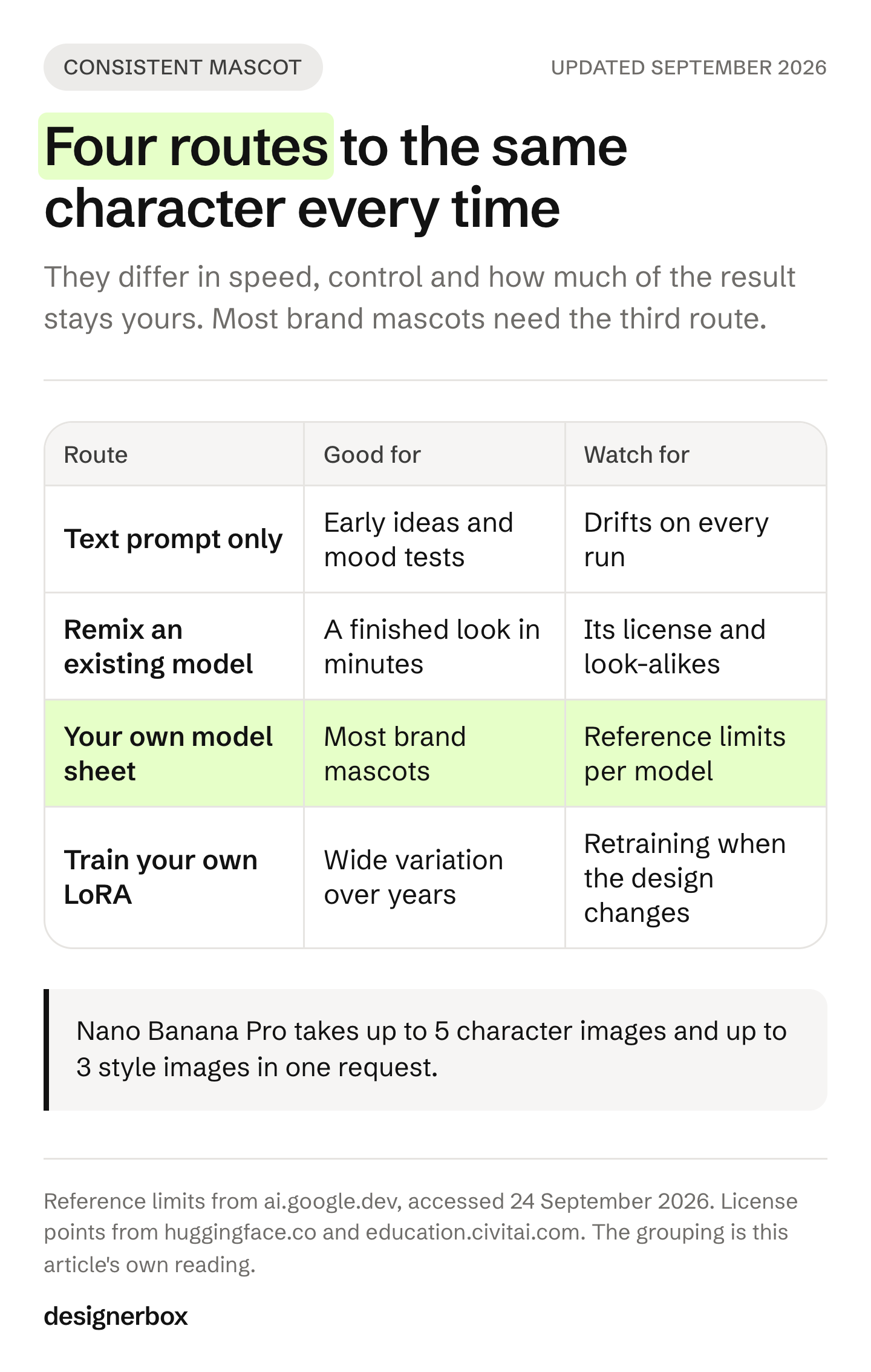
There are four ways to get a consistent character. They differ in speed, control and how much of the result is yours.
| Route | How it works | Good for | Watch for |
|---|---|---|---|
| Text prompt only | Describe the character in words every time | Early ideas and mood tests | Drifts on every run. Not a production method |
| Remix an existing model or style | Use a community-trained model, a shared style or someone else’s image as the starting point | A finished look in minutes | Its license, and how close the result sits to other people’s work |
| Upload your own references | Give the model images from your model sheet in each request | Most brand mascots | Reference limits per model, and more setup per image |
| Train your own LoRA | Fit a small add-on model to a set of images of your character | Very wide variation over years | Time, a training service, and retraining when the design changes |
Remixing: fast, with borrowed terms
Remixing means you start from something someone else trained or made. On community model hubs such as Civitai, each creator sets permissions for their model, and icons on the model page show choices such as “Use without crediting me” and “Sell generated images” (education.civitai.com, March 2024). Read those icons before a mascot goes on packaging.
The base model’s license matters too. The FLUX.1 [dev] license lets you use outputs “for any purpose (including for commercial purposes)”, but it counts running the model “for revenue-generating activity” as outside non-commercial use, which needs a separate commercial license from Black Forest Labs (huggingface.co, accessed September 2026). A community add-on trained on that model sits under the same terms. So the output clause is not the whole answer. How you run the model decides it.
The second risk is resemblance. A shared style was trained on someone’s images. If your mascot comes out close to an existing character, the problem is yours, whatever the tool’s terms say.
Your own references: slower to prepare, and yours
With your own references, the model copies your sheet instead of someone else’s look. Current models take several images in one request:
- Nano Banana Pro takes up to 14 reference images, with up to 5 character images “to maintain character consistency” and up to 3 style reference images (ai.google.dev, accessed September 2026).
- Seedream 5.0 Pro and Seedream 5.0 Flash “support up to 10 reference images” (docs.byteplus.com, accessed September 2026).
- Midjourney’s V8.2 Edit model takes up to 4 image references at once and replaces Omni Reference (updates.midjourney.com, August 2026).
Send fewer images than the cap allows. Start with the master image alone. Add a turnaround view only when the shot needs that angle, and send each view as its own image, not as one grid. For people, ByteDance’s Seedance 2.0 guide advises against multi-view character sheets, because the model can read different angles as different subjects (docs.byteplus.com, accessed September 2026). A mascot has the same risk, so test three shots before you trust a set.
Use a style slot, where the model has one, for a single finished scene in the target style. Keep the character images and the style image apart, or the model mixes the scene into the character.
Training a LoRA: the heaviest route
A LoRA is a small add-on trained on your images. The original method “freezes the pre-trained model weights and injects trainable rank decomposition matrices” into each layer, which cuts the trainable parameters by 10,000 times (arxiv.org, accessed September 2026). That makes training cheap enough for one character. It still needs a training service, a clean image set and a new run each time the design changes. Black Forest Labs, for example, closed its own finetuning API on 31 October 2025 (docs.bfl.ai, accessed September 2026), so check that your service still exists before you plan around it.
For most brand mascots, references are enough. Train only when references stop holding the character across the scenes you need.
How to write an AI mascot prompt
Write the prompt in four lines. Two stay fixed forever. Two change per image.
- Identity line (fixed). The character in one sentence, with the rules card: “Pip, a round orange fox, three heads tall, three whiskers per side, forest-green scarf that never covers the mouth.”
- Style line (fixed). The drawing style in one sentence: “Flat vector illustration, thick even dark-brown outlines, no gradients, no texture.”
- Scene line (changes). What happens in this image: “Pip holds a coffee cup at a café counter.”
- Composition line (changes). Framing and space: “Full body, character in the left third, empty space on the right for a headline, 4:5.”
Copy the two fixed lines word for word into every prompt. One changed adjective moves the character. Keep the lines in a shared file, not in someone’s memory.
Composition needs its own controls, because words alone place things loosely:
- Aspect ratio first. Choose it before you write. A 9:16 story and a 1:1 post need different poses.
- Name the empty space. “Empty space on the right for text” works better than hoping for room.
- Give a layout. A rough sketch or a gray-box layout as an extra input image controls placement better than words.
- Give a pose. A photo or stick figure in the pose you want, used as an input, fixes pose without touching style.
Keep words off the reference images themselves. A label on a reference can appear in the result, so put names and rules in the prompt.
How to make variations without losing the character
Variation is the goal of a mascot. It needs rules.
Change one thing per run. Pose, expression, scene or framing. If you change two and the character drifts, you cannot tell which change caused it.
Check against the master, not the last image. Put every tenth image next to the master at 100%. Compare the eyes, the proportions and the colors. Comparing to the previous image lets small drift add up without anyone seeing it.
Fix, then save. When an image passes, save the exact prompt and references with it. That record is how the next person makes the same character.
Plan the file you need. Packaging and signs need clean edges. OpenAI’s current GPT Image 2.5 models support transparent backgrounds when you set a transparent background with PNG or WebP output (developers.openai.com, accessed September 2026). A logo or print mascot still needs a designer to redraw it as a vector. Image models make pixels, not paths.
The same checks apply when a second character joins the frame. Keeping two characters in one AI image covers the extra failures that brings. Video adds motion drift on top of design drift, which is covered in character consistency in AI video.
Who owns an AI mascot
This is general information, not legal advice. It covers the United States.
Copyright needs a human author. The US Copyright Office says copyright “does not extend to purely AI-generated material, or material where there is insufficient human control over the expressive elements” (copyright.gov, January 2025). It also says “prompts alone do not provide sufficient human control” to make you the author. The courts upheld the Office’s refusal to register a work made entirely by AI, and the Supreme Court declined to hear the appeal on 2 March 2026 (D.C. Circuit opinion, 18 March 2025).
Human work in the result can be protected. The same report says people can own “the creative selection, coordination, or arrangement of material in the outputs, or creative modifications of the outputs”. When a person’s own drawing is the input and “its expressive elements are clearly perceptible in the output”, that drawing stays protected. So a mascot a designer sketched first, or redrew after the AI draft, has a stronger claim than one made from a prompt.
A trademark is a separate right. A trademark can be “any word, phrase, symbol, design, or a combination of these things” that identifies your goods or services (uspto.gov, accessed September 2026). The USPTO’s examination manual says consumers expect goods bearing a business’s own fictional character to come from that business (TMEP 1209.03(x), accessed September 2026). We found no USPTO rule that requires a human author for a trademark. Ask a trademark lawyer before you file.
The practical order for a brand: draft with AI, have a designer finish the master in vector, register what you can, and keep the dated files that show the human work.
For the wider question of what you own from each creative tool, see what you own from AI creative tools.
A mascot workflow for every campaign
Anyone can make an AI picture. Making hundreds that still look like your brand is the hard part. A mascot is that problem in its purest form.
In DesignerBox you build the mascot job once as a workflow. It keeps the same reference files and the same identity and style lines on every run. Your brand profile holds the logos, fonts, palette and rules, and the workflow reads it on every run. A colleague runs the job as an app: they type the scene and press Run. Batch runs the same mascot job across a whole sheet of products, and you review the results in one pass. You see the cost before each run.
Small fixes happen in the image editor. It makes one edit after another, and the picture keeps its detail and resolution. The mascot, the product shots, the ads and the video editor sit in one place. The full workflow from the first product photo to the finished ad, in one subscription.
For agencies, each client gets its own workflow and its own brand profile, so one client’s mascot never borrows another’s colors. The brand assets use case shows the kit around a mascot: mockups, icons and a brand kit.
The commercial license starts on the Pro plan. Plans are on the pricing page.
The first job, built once. Start from a template, add your brand and your products, and run it. The cost is shown before the run. See the templates.
FAQ
How do I keep an AI character looking the same in every image?
Give the model the same pictures every time, not only the same words. Build a model sheet with a master image, a turnaround, expressions and named colors. Send the master image in each request, plus the one view the shot needs. Copy the identity and style lines word for word. Change only the scene or the framing.
Is it better to remix a community model or upload my own references?
Remixing is faster, but it brings someone else’s license and look. Your own references take longer to prepare, and the character stays yours. For a mascot that will sit on packaging and ads for years, use your own references. Use remixing for early mood tests only.
How many reference images does an AI mascot need?
Fewer than you think. Start with the master image, and add one or two views only when the shot needs another angle or expression. Nano Banana Pro takes up to 5 character images in one request (ai.google.dev, September 2026), but more images can make drift worse when the model reads the views as different characters. Keep the full sheet as the record, and send only what each shot needs.
Can I copyright or trademark an AI-generated mascot?
In the US, purely AI-generated material cannot be copyrighted, and a prompt alone does not make you the author (copyright.gov, January 2025). Human drawing, selection and changes can be protected. A trademark is a separate right. A design can be a trademark, and we found no USPTO rule that requires a human author. This is general information, not legal advice.
Can I use a FLUX.1 [dev] model or a Civitai LoRA for a commercial mascot?
Check two licenses. The FLUX.1 [dev] license allows commercial use of outputs, but it treats running the model for revenue as outside non-commercial use (huggingface.co, September 2026). On Civitai, each model shows its own permissions, such as whether you may sell generated images (education.civitai.com, March 2024). If either one says no, do not use that model for the mascot.
Should an AI mascot be a vector file?
For a logo, signs, embroidery or print, yes. Image models make pixel images. Have a designer redraw the approved master as a vector. That redraw also adds human work to the design, which helps the copyright position.
Can the same mascot appear in AI video?
Yes, with the same sheet. Veo 3.1 and Veo 3.1 Fast accept up to three asset images of “a single person, character, or product” (ai.google.dev, accessed September 2026). Expect more drift in video than in stills, because motion changes the shape of the character between frames.
Sources
- OpenAI image generation guide, recurring-character consistency and transparent backgrounds: developers.openai.com (accessed September 2026)
- Nano Banana Pro reference, character and style image limits: ai.google.dev (accessed September 2026)
- Seedream 5.0 Pro and Flash reference image limit: docs.byteplus.com (accessed September 2026)
- Seedance 2.0 guidance on multi-view character sheets: docs.byteplus.com (accessed September 2026)
- Veo 3.1 asset reference images: ai.google.dev (accessed September 2026)
- FLUX.1 [dev] Non-Commercial License v1.1.1, outputs and non-commercial purpose: huggingface.co (accessed September 2026)
- Black Forest Labs finetuning API deprecation, 31 October 2025: docs.bfl.ai release notes (accessed September 2026)
- LoRA method and parameter reduction: arxiv.org/abs/2106.09685 (accessed September 2026)
- Civitai licensing options and permission icons: education.civitai.com, guide dated March 2024
- Midjourney V8.2 Edit model with up to 4 image references: updates.midjourney.com, August 2026
- US Copyright Office, Copyright and Artificial Intelligence, Part 2: Copyrightability: copyright.gov (January 2025)
- Thaler v. Perlmutter, D.C. Circuit: cadc.uscourts.gov (18 March 2025)
- USPTO, what a trademark is: uspto.gov (accessed September 2026)
- USPTO, TMEP 1209.03(x) on fictional characters: tmep.uspto.gov (accessed September 2026)
- DesignerBox plans and feature gating: DesignerBox pricing page (designerbox.ai/pricing), September 2026
Model limits verified from ai.google.dev, docs.byteplus.com and developers.openai.com, licenses from huggingface.co and education.civitai.com, and US copyright and trademark rules from copyright.gov and uspto.gov, as of September 2026. This is general information, not legal advice. Individual results vary.