
To make AI videos fast, approve each frame as a cheap still first, animate only the frames you approved, and save the sequence. Generating one clip takes seconds to minutes: Google lists Veo 3.1 requests at 11 seconds to 6 minutes at peak hours. A finished, on-brand video takes longer. The time goes into re-rolls, keeping the product consistent between shots, and the stitch.
A clip runs 4 to 15 seconds on most current models, and an ad runs 30, so one ad needs several clips. Once the sequence is saved, the second product runs in a fraction of the time.
The fast numbers you see quoted are real, and they measure the wrong thing. Runway’s own guide puts a product demo at 15 minutes and notes that most creators generate three to five versions before they land on their final video (runway.com, November 2025). Both statements are true. Read together, they describe a 15-minute job that runs three to five times, and that is before anyone stitches the clips or checks whether the product looks like the same product in shot two.
So the useful question is not how fast a model generates. The useful question is how many generations stand between a brief and something you would put spend behind, and how few of them you need the second time.
This guide covers where the minutes go, the order of operations that cuts them, what each model’s clip cap does to your edit, and what a run costs.
Key Takeaways
- Generation is already the fast part. Google lists Veo 3.1 request latency at 11 seconds to 6 minutes at peak hours (ai.google.dev, September 2026). The queue between you and a finished video is re-rolls, not render time.
- Count generations, not minutes. Three to five versions per shot is the published norm (runway.com, November 2025). A four-shot ad at that rate is 12 to 20 generations.
- Clip caps decide your edit. Veo 3.1 generates 4, 6, or 8-second clips (ai.google.dev, September 2026). Seedance 2.0 and Kling 3.0 stop at 15 seconds. On these models, a 30-second spot is multiple generations.
- Stills are the cheapest place to be wrong. A still costs less than an 8-second clip on any model. Video costs more with every second, so approve composition as a still first.
- The model you pick moves the price. A re-roll costs the same as the first attempt, so the model choice is a re-roll budget. Draft on a cheaper model, then spend once on the shot you approved.
- Speed compounds only when the setup is reusable. The first product is slow because you are making decisions. The next forty are fast because the decisions are saved.
How long does it take to make an AI video?
One clip: seconds to a few minutes of generation, plus the time to write the prompt and watch the result. One finished 30-second video takes much longer the first time. It needs several clips, each tried three to five times, plus the stitch. Once your references, shot list and prompt patterns are saved, most of the setup time is gone. The gap is re-rolls and continuity work, not compute.
That gap surprises people because the demo and the deliverable get quoted with the same word. A demo is one clip generated once from a prompt someone already knows works. A deliverable is four shots that have to look like the same product, cut together, hold a brand, and survive a review.
The four clocks in making AI videos fast
There are four clocks running on any AI video job, and generation is usually the smallest.
| Clock | What it covers | Typical share of the job |
|---|---|---|
| Setup | Brief, references, shot list, aspect ratio | Large on product one, near zero after |
| Generation | The model producing a clip | Seconds to a few minutes per clip |
| Re-roll | Regenerating shots that missed | The biggest single block |
| Assembly | Stitch, audio, captions, format variants | Fixed, and predictable |
Generation is the clock everyone races. It is also the one clock you cannot meaningfully improve, because a faster model returns a clip you still have to watch, judge, and usually run again.
Re-rolls are where the time sits, and they are the clock you can move. Every re-roll is a decision that was not made before generating. Ambiguous prompt, unclear composition, a product reference the model never received. Fix those upstream and the re-roll count drops without anything getting faster.
Where the time goes
Three specific failures produce most re-rolls, and each has a cheap fix.
The composition was never decided. Prompting a motion description and hoping a good frame comes back means judging composition and motion at the same time, on an asset that costs more with every second. Decide the frame first, as a still.
The product drifts between shots. Shot one and shot three come back as recognizably different objects. This is the most expensive failure because you only see it at the edit, after every clip is paid for. Our guide to keeping a character or product consistent across clips covers what causes drift and which reference inputs stop it.
The clip length did not match the beat. Generating 8 seconds for a 3-second cut wastes 5 seconds of paid output. Length is a prompt-time decision on most models, and getting it wrong is pure waste.
None of these are model problems. All three are order-of-operations problems.
Generate stills before you generate video
This is the fastest single change available, and it is counterintuitive because it adds a step.
A still costs less than an 8-second clip on any model, whichever image model you pick, and it returns in seconds. Video costs more with every second of length, and a clip can take minutes to return. So you should be making every composition, lighting, angle, and product-accuracy decision in the cheap medium, then animating only frames you have already approved.
The working order:
- Write the beats, not the copy. Four compositions for a typical ad: hero, detail, context, offer.
- Generate each beat as a still. From your real product photo, so the object in frame is your object.
- Approve the stills as a set. Same color, same finish, same item in all four. Fix drift here at still rates, not at video rates.
- Animate each approved still. The image-to-video app takes a frame you already trust and adds motion to it, which is a much narrower job than inventing a scene.
- Stitch, then cut format variants.
Steps 1 to 3 feel like a detour. They are the reason step 4 lands on the first or second attempt instead of the fifth. Turning a product photo into a video ad shot by shot walks the same pipeline in more detail, and script to storyboard covers the version that starts from a script rather than a photo.
How to cut re-rolls in half
Re-rolls fall when the model has less to guess. Four levers, in order of effect.
Give it a reference, not a description. A product photo, a character reference, or an approved still removes an entire category of guessing. Text alone asks the model to invent the subject, and it will invent a slightly different one each run.
Write shorter, more specific prompts. Runway’s guidance puts the useful range at 15 to 30 words (runway.com, November 2025). Past that, a prompt reads as a list of competing instructions and the model satisfies some of them. Our breakdown of prompt structure for realistic AI video covers what to include and what to cut.
Pick a model that repeats. Some models return a usably similar result on the same prompt, and some vary widely. Variance is a re-roll multiplier. Six models ranked on what you can plan around covers which ones hold a shot.
Cap the attempts. After five or six similar tries, the prompt is not the problem. Change the input frame, the model, or the beat instead. Runway recommends the same rethink at that point (runway.com, November 2025), and it is the cheapest rule in the list because it caps the downside on any single shot.
Clip caps decide how many generations your video needs
No video model in this table generates a 30-second multi-shot ad in one pass. Published limits, checked September 2026:
| Model | Clip length | Notes |
|---|---|---|
| Veo 3.1 | 4, 6, or 8 seconds | 720p, 1080p, or 4K, with audio always on (ai.google.dev, September 2026) |
| Seedance 2.0 | 4 to 15 seconds | Any whole second in that range, up to 4K (docs.byteplus.com, September 2026) |
| Kling 3.0 | 3 to 15 seconds | 1 to 6 shots in one clip (kling.ai, September 2026) |
| Runway Gen-4.5 | 2 to 10 seconds | 720p, text to video and image to video (docs.dev.runwayml.com, September 2026) |
| Sora 2 Pro | Up to 20 seconds | Removed from OpenAI’s API on 24 September 2026 |
OpenAI removed Sora 2 and Sora 2 Pro from its API on 24 September 2026 (OpenAI API deprecations, accessed September 2026). Google lists 22 October 2026 as the earliest shutdown date for the Veo 3.1 preview models in the Gemini API, and names Gemini Omni Flash as the replacement (Gemini API deprecations, October 2026). Check a model’s shutdown date before you plan new work on it. Our guide to what replaces Sora 2, job by job covers where to move.
Read that as a planning constraint. A 30-second spot is at least two generations, and four to six on the 8-second models, plus a stitch, whatever the marketing says about speed. Budget the edit, not just the render.
It also explains why “make it longer” is the wrong instruction. A long single-shot clip holds one camera position, so a 15-second single shot reads as a slow zoom rather than an ad. Most cuts come from separate generations. Seedance 2.0 and Kling 3.0 can cut between shots inside one generation, but they still stop at 15 seconds. One model outside the table runs longer: ByteDance’s Seedance 2.5 generates up to 30 seconds in a single pass (seed.bytedance.com, October 2026). The models DesignerBox runs, with what each does, are on the AI models page.
A worked example: one 30-second product ad
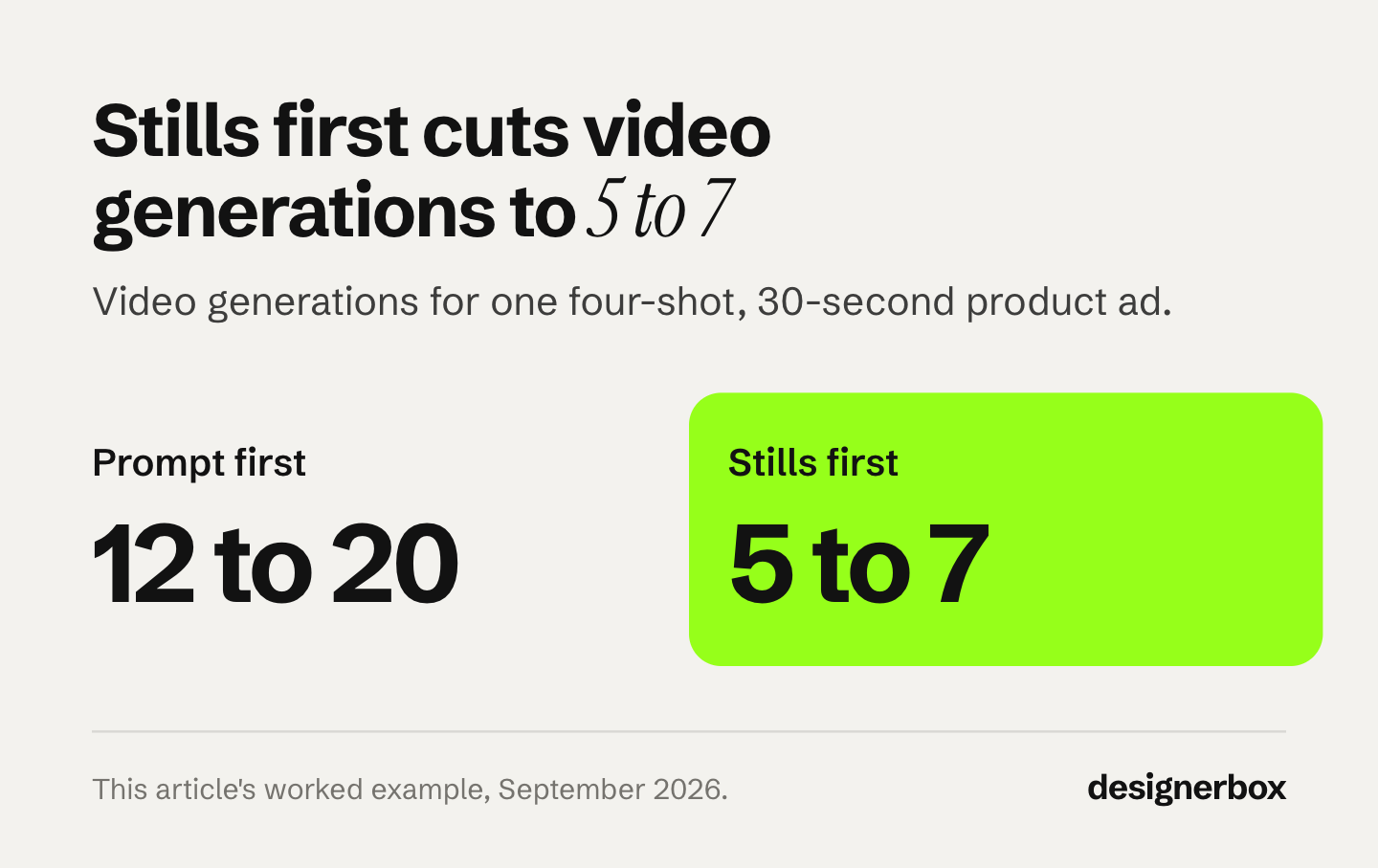
Numbers make the trade obvious. Here is the same four-shot ad produced two ways, counted in generations rather than minutes.
| Step | Prompt-first | Stills-first |
|---|---|---|
| Compositions decided | In video, per attempt | 4 stills, approved as a set |
| Video generations needed | 12 to 20 | 5 to 7 |
| Where mistakes surface | At the edit, after paying | At the still, before paying |
| Continuity check | Shot by shot, late | Once, on the approved set |
| Re-roll exposure | Every miss bills at video rate | Most misses bill at still rates |
The stills-first column is not faster per clip. Each generation takes the same time on the same model. It is faster overall because it needs roughly a third as many video generations, and it moves the failures into the medium where being wrong is cheap.
Run the same ad for a second product and the setup column disappears. That is the real speed gain, and it only arrives once the sequence is saved as something you can run again.
Cost of drafts and re-rolls
The model and the length set the price of a clip, and you see that price before you run it. An 8-second clip costs 40 to 560 credits, depending on the model. A re-roll costs the same as the first attempt.
Use that spread. Draft a shot on a cheaper model, then run the approved version once on a premium model. Stills work the same way: decide the frame on a cheaper image model, then finish on the model that holds your product best.
Uploading your own photos and the commercial license start on the Pro plan. AI video, virtual try-on, upscaling, the image editor and the video editor start on the Premium plan. Plans and credits are on the pricing page. What AI video costs in credits works through the arithmetic.
When fast is the wrong target
Speed pays on volume work: ad variants, format cuts, seasonal refreshes, listing videos. Those jobs have a known-good sequence and the only variable is throughput.

Speed does not pay on the first version of anything. A launch film, a new brand look, or a hero spot needs decisions made slowly and then locked, because everything downstream inherits them. Rush the first one and you rush all fifty that copy it.
The practical split: spend the time once, on the setup, then run it. Build the sequence on one product, get it right, and save it as a workflow. The winning-ad variations template is one place to start that kind of workflow. A saved workflow runs the same way on the next product: the same beats, the same references, the same model and the same clip lengths. Batch runs it over the whole sheet at once. Your review is the step that stays.
That is where AI video gets fast: on the second product. The full workflow from the first product photo to the finished ad, in one subscription. You set the brand once. Every run after that reads the same record. Speed then does not cost you the look, because clip forty reads like clip one.
Start from a template, add your product photo, and run it.
FAQ
How long does it take to make an AI video?
A single clip generates in seconds to a few minutes. Google puts Veo 3.1 request latency between 11 seconds and 6 minutes at peak hours (ai.google.dev, September 2026). A finished 30-second video with multiple shots takes much longer the first time, because of re-rolls and assembly. It gets faster once your references and prompts are reusable. The variable is the number of generations, not the speed of any one of them.
What is the fastest way to make an AI video?
Start from an image, not a text prompt. Generate your compositions as stills, which cost less than an 8-second clip on any model, approve them, then animate the approved frames. This removes most re-rolls because the model is adding motion to a decided frame rather than inventing the subject and the motion at the same time.
Why does my AI video need so many re-rolls?
Usually because the prompt is doing two jobs at once, describing both what is in frame and how it moves. Split them: fix the frame as a still, then prompt only the motion. Missing reference images are the other common cause, since text alone lets the model reinvent the subject on every run.
Can AI generate a 30-second video in one go?
On most models, no. Veo 3.1 generates 4, 6, or 8-second clips, and Seedance 2.0 and Kling 3.0 stop at 15 seconds (ai.google.dev, docs.byteplus.com and kling.ai, September 2026). Sora 2 Pro reached 20 seconds until OpenAI removed it from its API on 24 September 2026. ByteDance’s Seedance 2.5 generates up to 30 seconds in a single pass (seed.bytedance.com, October 2026). On the other models, a 30-second ad is several clips stitched together.
Is it faster to start from text or from an image?
From an image, for anything involving a real product. Text to video invents the subject, which means judging the subject and the motion on every attempt. Image to video fixes the subject first, so re-rolls only test motion. Text to video is faster only when the subject genuinely does not matter.
Does generating at a lower resolution make it faster?
Somewhat, and it is a reasonable way to test a shot before committing. On some models a lower resolution also costs fewer credits. Generate a draft to check composition and motion, then rerun the approved version at delivery resolution.
How many credits does a re-roll cost?
The same as the original, which is why the re-roll count and the model choice are the two numbers worth managing. The spread across models runs from 40 credits to 560 for eight seconds. Drafts on a cheaper model plus one final pass on a premium model cost less than several premium attempts, and you see each cost before you run it.
Sources
- Runway, How to Make AI Videos Fast: 15 minutes for a product demo, 3 to 5 versions, 15 to 30 word prompts, rethink after 5 to 6 attempts (runway.com, published 12 November 2025, accessed September 2026)
- Veo 3.1 clip lengths, resolutions, audio and request latency (ai.google.dev, September 2026)
- Seedance 2.0 clip lengths and resolutions (docs.byteplus.com, September 2026)
- Seedance 2.5 at up to 30 seconds in a single pass (seed.bytedance.com, October 2026)
- Veo 3.1 preview models, earliest shutdown date of 22 October 2026 (Gemini API deprecations, October 2026)
- Kling 3.0 clip lengths and shots per clip (kling.ai, September 2026)
- Runway Gen-4.5 clip lengths (docs.dev.runwayml.com, September 2026)
- Sora 2 and Sora 2 Pro API removal on 24 September 2026 (OpenAI API deprecations, September 2026)
- DesignerBox plan allocations and video gating (DesignerBox pricing page, designerbox.ai/pricing, September 2026)
Production timings are ranges, not guarantees. Individual results vary.