
An AI product video generator is one of four different machines, and the right one depends on what you start from. A product URL fits an ad builder such as Creatify or Topview. A product photo fits an image-to-video tool such as Photoroom, Runway or Luma. A script fits an avatar tool such as HeyGen or Synthesia. Clips and templates fit an editor such as Canva or VEED.
A shop adds 40 products this season, and each one needs three clips. That is 120 video files, as illustrative arithmetic. A tool that makes one good clip does not answer that problem. A tool that makes the same clip for every product does.
This guide explains the four types, with ten tools as examples. It is not a ranking. Every feature was read on the vendor’s own page in October 2026, and no prices are printed. We make DesignerBox, which is one of the ten examples.
Key Takeaways
- Four machines share one name. A product video generator can start from a product URL, a product photo, a script or a template. Each start gives a different kind of video.
- Photo tools keep your product in frame one. Runway’s Gen-4.5 uses your image as the first frame and makes clips of 2 to 10 seconds. The model draws every later frame.
- URL tools build a whole ad. Creatify reads a product link, writes the script and returns a video ad. You review what the tool chose.
- Avatar tools make a presenter, and editors draw nothing new. HeyGen and Synthesia turn a script into a person who talks. Canva and VEED cut the clips you bring.
- TikTok asks for a label. Ads with AI-made or heavily AI-edited media need the AIGC label or your own clear disclaimer.
What is an AI product video generator?
An AI product video generator is a tool that makes a product clip without a film shoot. The name covers four machines. One reads your product page and builds an ad. One animates a product photo. One turns a script into a talking presenter. One gives you templates and stock footage to cut.
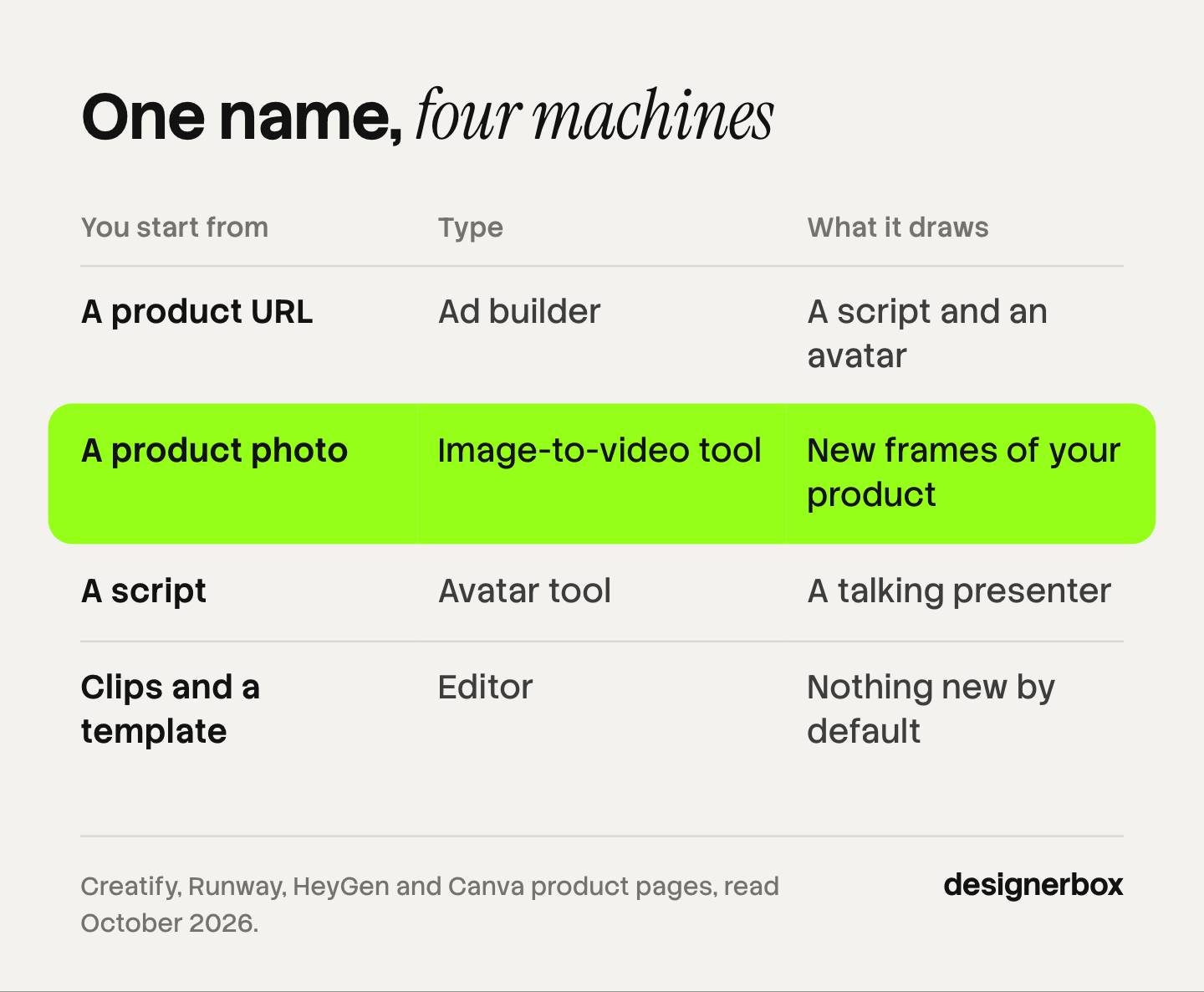
The split matters because each machine treats your product in a different way. An editor shows the photo or clip you add, unchanged. An image-to-video model starts from your photo and then draws new frames. In those new frames, a logo or a label can change.
The four types of product video generator, with examples
The table sorts ten example tools by what you give them, in no ranked order. The third column says what the tool draws, because that decides how much you have to check.
| Tool | You start from | What the tool draws | Editing after the first result |
|---|---|---|---|
| Creatify | A product URL | A script and an avatar, around assets from your page | A customize step |
| Topview | A product URL, a script or a reference video | Scenes that its agent plans and makes | Each shot stays editable on its Canvas |
| Photoroom | 1 to 4 product images | Motion from a template, a prompt or both | A new template or prompt |
| Runway | One image as the first frame | Every frame after the first | Cut the clip in an editor |
| Luma | Keyframes and a prompt | The motion between your keyframes | Reframe changes the aspect ratio |
| HeyGen | A script or a photo | A talking presenter with lip sync | Built-in AI video editor |
| Synthesia | A script, a file or a link | An AI avatar and a voiceover | Edits update shared links and embeds |
| Canva | Your clips, photos and a template | Nothing new by default | Timeline with trim, crop and merge |
| VEED | Your videos, photos and music | Nothing new by default | Editor with captions and resize presets |
| DesignerBox (this is us) | A product photo | A clip from the photo, by the model for that step | Video editor with a timeline |
The source for each row is in the sections below. For a ranked list, see the shortlist of AI product video generators on the main site.
Which tools start from a product URL?
URL tools build a whole ad from a link. You paste the address of a product page. The tool reads the page, writes a script and returns a finished video. This path fits ad testing, where you need many versions of one message. For ads, the same split has five inputs: see AI video ad generators.
Creatify turns a product link into a video ad. Its page says it pulls your assets, writes the script and delivers the ad. You paste the URL, choose an AI avatar, then customize the result. It can render an ad again in 75+ languages (creatify.ai/features/url-to-video, October 2026). A separate Product Video feature starts from one product image (creatify.ai/features/product-video, October 2026). Tools for the same avatar-led job are sorted in Creatify alternatives.
Topview works as a video agent. You describe an idea, or you add a script, a reference video or a product URL. Topview says its agent plans the scenes, selects the models and makes the assets. Each shot stays editable on its Canvas (topview.ai, October 2026).
Scope: In both tools, the software chooses the script and the scenes. Check each shot of your product before you export.
Which tools start from a product photo?
Photo tools animate a still. You add a product photo, and a video model draws the motion: a slow turn, a camera move or light that changes. It is also the path where the product can change, because the model draws new frames.

Photoroom’s AI Video Generator is built for ecommerce product images. You pick one of 300+ video templates, write a prompt, or use both. You add 1 to 4 product images and choose an aspect ratio. The result is an MP4 file (photoroom.com/tools/video-generator, October 2026). The page does not state the clip length or the resolution.
Runway is a model vendor. Its Gen-4.5 model takes text or one image. The image becomes the first frame, and the API accepts only a first frame. Clips run from 2 to 10 seconds (Runway API reference, accessed October 2026). You join the shots in an editor.
Luma’s Ray3.2 model lets you place up to 16 keyframes in one clip. Luma says it makes clips up to 20 seconds long at 1080p. Its Reframe feature changes the aspect ratio afterward (lumalabs.ai/news/introducing-ray-3-2, October 2026).
Google’s Veo 3.1 is a fourth example, outside the table. It takes up to three reference images of one person, character or product, in clips of 8 seconds (Gemini API docs, accessed October 2026). Google lists 22 October 2026 as the earliest shutdown date for the Veo 3.1 preview models in the Gemini API (Gemini API deprecations, accessed October 2026). How the models compare on product detail is in AI image to video for ecommerce.
Which tools start from a script?
Script tools make a presenter. You type the words, and an AI avatar says them on screen. This path fits a how-to or a product demo. The subject of the video is the person, so it fits a product beauty shot less well.
HeyGen turns a script into avatar video. Its image-to-video page says it animates a photo from a motion prompt. It also makes a talking photo with lip sync. Voices cover 177+ languages and dialects, and an AI video editor changes motion, captions and music after the first render (heygen.com/tool/image-to-video, October 2026). Tools for the same job are in HeyGen alternatives.
Synthesia makes videos with AI avatars and voiceovers in 140+ languages. You can add a file or paste a URL, and its Assistant turns that into a video (synthesia.io, October 2026).
Scope: Synthesia’s terms prohibit stock avatars in content made for paid advertising on social media. Custom avatars are allowed for business promotion (help.synthesia.io, October 2026). Check the avatar type before a video runs as an ad.
Which product video makers start from a template?
Template tools are editors. You bring clips and photos, or you take stock footage, and you cut them on a timeline. A model draws nothing in the frame unless you add an AI feature. So the product stays accurate, and the footage has to exist first.
Canva’s product video maker starts from a video template or a blank layout. You upload clips and photos, or you use stock footage from its library. You crop, trim and merge on a timeline, and the export is an MP4 file (canva.com/create/product-videos, October 2026).
VEED has a product demo video maker with three steps. You upload videos, photos and music, edit, then export. The page lists templates, resize presets for each platform, a brand kit, auto captions and translation (veed.io/create/product-video-maker, October 2026).
For a screen recording of software, a text-based editor is another route. Descript says you edit the video by editing its transcript, and it includes a screen recorder (descript.com, October 2026). How to cut generated clips into one ad is in editing AI-generated video.
How do you test a product video generator on your own product?
Run one product through the tool, then apply four checks: product fidelity, clip length, audio, and rights and labels. Use a product with a logo and small label text. A clip from an editor needs only the last check.
- Product fidelity. Pause the clip on the frame with the most motion. Compare it with your photo. Read every letter of the logo and the label. Check the shape, the color and the number of parts. A clip that changes the product does not go into an ad.
- Clip length. One generation is short. Runway’s Gen-4.5 runs 2 to 10 seconds. Veo 3.1 makes clips of 4, 6 or 8 seconds. Luma says Ray3.2 reaches 20 seconds. A longer ad is several clips cut together, so the product must match in every one. The shot plan is in product photo to video ad.
- Audio. Some models add sound and some do not. Google says Veo 3.1 makes audio with every video. Decide before the run where the sound comes from.
- Rights and labels. Check that your plan allows commercial use before a clip runs as an ad. Then check the platform’s AI rule.
TikTok allows ads with AI-made or heavily AI-edited media when you add the AIGC label or your own clear disclaimer. If TikTok finds AI content with no disclosure, it rejects or restricts the ad (TikTok ads policy, accessed October 2026).

Meta adds an “AI info” label itself when it detects that a third-party AI tool made or edited an ad. It uses signals such as C2PA metadata, and it says the feature may not be available in every region (Meta Business Help Center, accessed October 2026). This is general information, not legal advice. The wider rules are in AI disclosure in advertising. The rules for a generated clip are in AI product video, and the shots that still need a phone are in product video without a studio.
One video workflow for every product
DesignerBox is AI creative production for brands and agencies. You build a workflow once with your brand rules, then run it on every product.
For product video, the route starts from a photo. The Animate an image app takes one picture and a line of text. It returns a five-second clip at 1280 by 720. The UGC product video app takes a product photo and a short brief. It returns one vertical video at 1080 by 1920 (DesignerBox apps, October 2026). The presenter in that clip is generated, so the clip is not a customer review.
The video editor is a real timeline, with several tracks, transitions, animated text and audio. What a finished video ad needs is on the AI video ads page.
Anyone can make an AI picture. Making hundreds that still look like your brand is the hard part. You set the brand once, and the workflow reads it on every run. A saved workflow runs the same way on the next product, and batch runs it over the whole sheet at once. The full workflow from the first product photo to the finished ad, in one subscription.
The cost is shown before each run. An 8-second clip costs 40 to 560 credits, depending on the model. Uploading your own photos and the commercial license start on the Pro plan. AI video, virtual try-on, upscaling, the image editor and the video editor start on the Premium plan. Plans and credits are on the pricing page.
The free plan runs on sample products and cannot make video. Every plan below Ultra is one seat. DesignerBox does not post to your store or your ad account: you download the results, or send them with a webhook or an S3 step. If your only job is a talking avatar from a product link, a URL tool fits better.
Start from a template, add your brand and your products, and run it. See the templates
FAQ
Which AI product video generator fits my product?
It depends on what you start from. A product URL fits a tool such as Creatify or Topview. A product photo fits Photoroom, Runway, Luma or DesignerBox. A script with a presenter fits HeyGen or Synthesia. Clips you already filmed fit an editor such as Canva or VEED.
Can AI make a product video from one photo?
Yes. Image-to-video tools start from a product photo and draw the motion. Runway’s Gen-4.5 uses the photo as the first frame and makes a clip of 2 to 10 seconds. Compare the paused clip with your photo.
What is the difference between a product video maker and a product video generator?
A product video generator makes new footage with AI, from a link, a photo or a script. A product video maker is the wider group. It includes editors such as Canva and VEED, where you cut clips and photos you bring. Check which part of the video the tool draws.
Which tool works as a product demo video maker?
For software, a demo is often a screen recording with a voice. VEED has a product demo video maker with captions and translation. Descript edits a recording through its transcript. Synthesia and HeyGen add an AI presenter who explains the product from a script.
Do I have to label an AI product video ad?
On TikTok, yes, when the ad has AI-made or heavily AI-edited media. Add the AIGC label or your own clear disclaimer. Meta adds an “AI info” label itself when it detects signals from a third-party AI tool. Read each platform’s policy in the month the ad runs.
Sources
- Creatify, URL to video page (creatify.ai/features/url-to-video) and Product Video page (creatify.ai/features/product-video), read October 2026
- Topview, homepage (topview.ai), read October 2026
- Photoroom, AI Video Generator page (photoroom.com/tools/video-generator), read October 2026
- Runway, API reference, image to video with Gen-4.5, accessed October 2026
- Luma, Ray3.2 announcement (lumalabs.ai/news/introducing-ray-3-2), 9 June 2026, read October 2026
- Google, Gemini API Veo documentation and Gemini API deprecations, accessed October 2026
- HeyGen, image-to-video page (heygen.com/tool/image-to-video), read October 2026
- Synthesia, homepage (synthesia.io) and platform integrity page (help.synthesia.io/en/articles/8330564-platform-integrity), read October 2026
- Canva, product video maker page (canva.com/create/product-videos), read October 2026
- VEED, product demo video maker page (veed.io/create/product-video-maker), read October 2026
- Descript, homepage (descript.com), read October 2026
- TikTok, ads policy on misleading and false content, accessed October 2026
- Meta Business Help Center, AI info labels on ads, accessed October 2026
- DesignerBox, Animate an image and UGC product video apps, the video editor and pricing, October 2026
Tool features verified on each vendor’s own pages as of October 2026. Plans and features change often, so check the vendor’s page before you buy.