A clipping path is a closed vector outline drawn around a product. Everything inside the outline stays visible, and everything outside is hidden. The edge is hard, so a clipping path fits rigid products such as boxes, bottles and phone cases. Hair, fur and glass need a mask, which stores a level of transparency for every pixel.
Three methods cut a product from its background. A person draws a clipping path with the pen tool. A person or a tool paints a mask. An AI model predicts a mask in seconds. All three produce a product cutout, and they do not produce the same edge.
This guide matches each product edge to a method and to a file format, checked against Adobe’s documentation and the format specifications in October 2026.
Key Takeaways
- A clipping path is vector. It is a set of anchor points and curves, so the edge stays sharp at any size.
- A mask is pixels. It is a grayscale image, and an 8-bit mask holds 256 levels between hidden and visible.
- The edge decides the method. Hard, smooth edges fit a path. Hair, fur, fringe and glass need a mask.
- An AI cutout is a mask. A model predicts it and does not draw a path.
- JPEG cannot store transparency. Adobe’s format page says so. PNG, WebP and TIFF can.
- A web page does not read a path. A clipping path helps in a layout or a print file. A store listing needs a flattened image or a transparent PNG.
What is a clipping path?
A clipping path is a vector shape that crops an image. Adobe’s InDesign help gives the short version: “Clipping paths crop part of the artwork so that only a portion of the artwork appears through the shape or shapes you create” (helpx.adobe.com, last updated May 2023, read October 2026).
An editor draws the path by hand with the pen tool. Each click places an anchor point, and handles on the point bend the line into a curve. Adobe’s file format specification describes the stored data the same way. Each point on a path holds an anchor and two control points for the curves on both sides (Adobe Photoshop File Formats Specification, November 2019).
Two things follow from that structure.
The edge is hard. A pixel is inside the path or outside it. There is no half-visible pixel. Photoshop’s help describes a vector mask, the layer version of the same idea, as “a resolution independent path that clips out the contents of the layer” (helpx.adobe.com, last updated May 2023).
The path is editable. It is a list of points. A retoucher can open the file later and move one point without redrawing the rest.
How is a clipping path different from a mask?
A mask stores the cutout as pixels. Adobe’s Photoshop help says “masks are stored in alpha channels” and that “masks and channels are grayscale images” (helpx.adobe.com, last updated May 2023). Each pixel in the mask is black, white or a gray in between. Black hides the image pixel, white shows it, and gray shows part of it.

That gray range is the whole difference. An 8-bit mask has 256 levels, so one pixel can be 40 percent hair and 60 percent background. A path has two states only.
The same data has three names, and the name depends on where it lives:
- Layer mask. The mask attached to one layer in a working file. You paint on it to hide or show parts of the layer.
- Alpha channel. The mask saved as an extra channel beside red, green and blue. InDesign’s help calls it “an invisible channel that defines transparent areas of a graphic”.
- Transparency. What the viewer sees when a format such as PNG carries that channel to a web page.
Image masking is the service name for this work. An editor refines the mask with brushes and checks each strand at full zoom.
| Clipping path | Mask or alpha channel | AI cutout | |
|---|---|---|---|
| What it stores | Anchor points and curves | A grayscale image, one value per pixel | A grayscale image, predicted by a model |
| Edge | Hard | Soft or hard | Soft or hard |
| Who makes it | A person with the pen tool | A person with brushes and channels | A segmentation model |
| Scales without loss | Yes | No, it has a pixel size | No, it has a pixel size |
| Typical weak point | Hair, fur, glass | Time per image | Low contrast and fine detail at the edge |
Where does an AI cutout fit?
An AI cutout is a mask that a model predicts. A segmentation model reads the photo and gives each pixel a value from hidden to visible. The result is an alpha channel, the same kind of data a person paints by hand.
An AI cutout is a faster way to make a mask, and it fails where a mask is hard to make. Our guide to the four kinds of image that break AI background removal lists them: fine hair and fur, transparent and reflective materials, low contrast at the edge, and motion blur.
A model does not draw a vector path. Software can trace a path from tones afterward. InDesign’s version is named Detect Edges, and Adobe says it “works best when the subject is set against a solid white or black background”.
The practical split is speed against control. A model returns a mask in seconds. A pen-drawn path takes a person’s time for every image, and the person decides where every point sits. If you want to compare tools for the fast route, we sorted nine AI background removers by job.
Which product edges need which method?
Look at the edge of the product at full zoom, then pick the method. The table matches the common product edges to a method and to a file format that keeps the result.
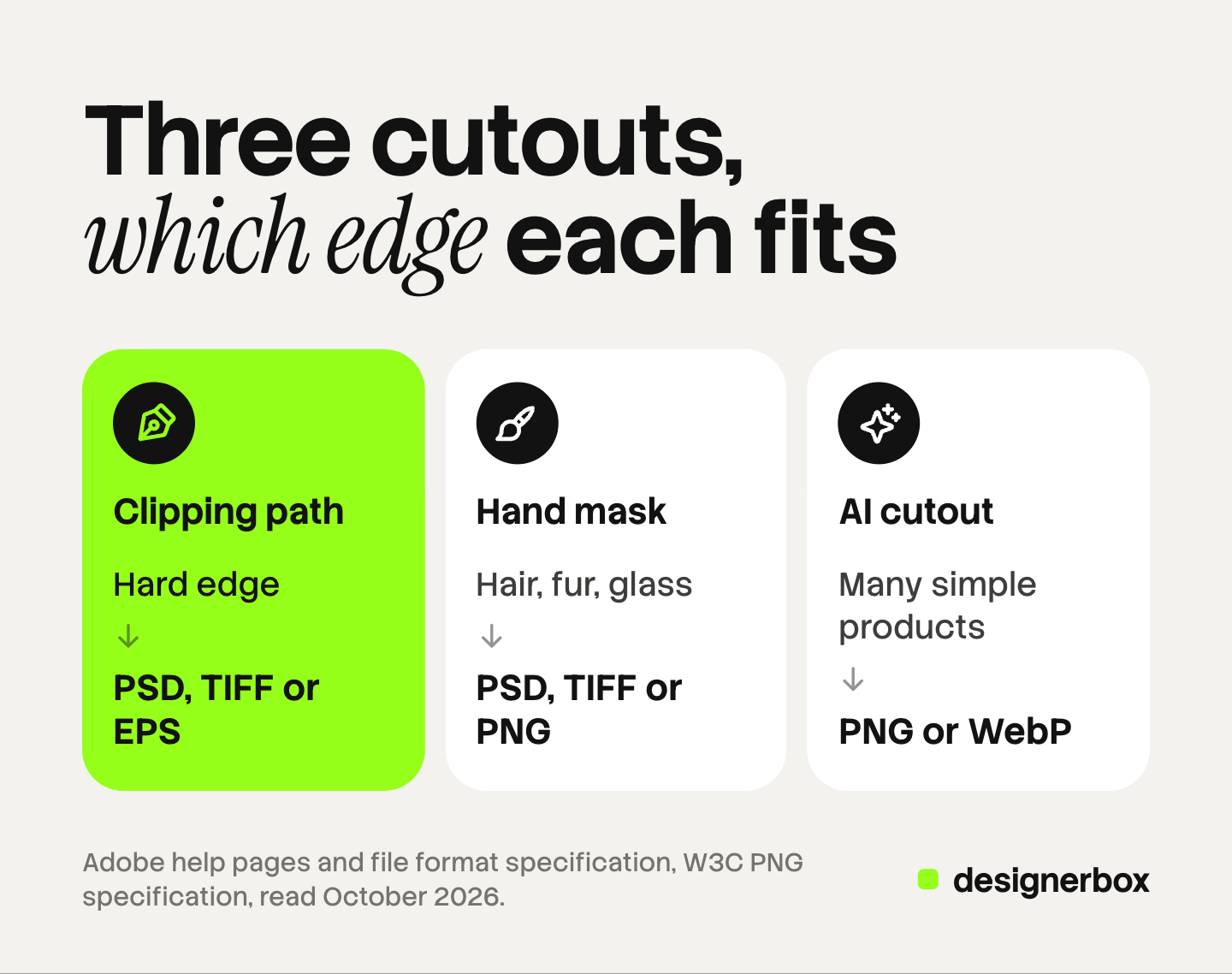
| Edge type | Example products | Method | File format for the master |
|---|---|---|---|
| Hard, straight or smooth curve | Boxes, books, phone cases, furniture, ceramics | Clipping path | PSD or TIFF with the path saved. EPS for a print layout |
| Hard, with gaps inside | Bag handles, chair legs, a mug handle, a chain | Clipping path with inner paths | PSD or TIFF with the path saved |
| Soft fiber | Hair, fur, wool, feathers, fringe, brush bristles | Mask | PSD or TIFF with the mask. PNG for the web |
| Transparent or partly transparent | Glass, clear plastic, tulle, lace, sheer fabric | Mask with gray values | PSD or TIFF with the mask. PNG or WebP for the web |
| Mixed: a hard body with a soft part | A boot with a fur collar, a toy with hair, a brush | Path for the body, mask for the soft part | PSD with both |
| Out of focus | A product shot with shallow depth of field | Mask | PSD or TIFF with the mask |
| Many simple products, needed today | A catalog of boxed goods on a plain backdrop | AI cutout, then a look at each result | PNG, with the source file kept |
Three notes on the table.
Shiny metal is a hard edge. A ring or a steel bottle reflects the room, but its outline is sharp. A path cuts it cleanly. Our guide to jewelry product photography covers how to control the reflections at the shoot.
Glass is the opposite. The outline of a bottle is hard, so a path cuts the outside. The body is see-through, so the old background still shows inside it. Only a mask with gray values lets a new background show through the glass.
One file can hold both. A layered PSD keeps a path for the rigid body and a mask for the soft part.
Which file formats keep a clipping path or an alpha channel?
Save in the wrong format and the path or the mask is gone.
| Format | Saved path | Alpha channel or transparency | Use it for |
|---|---|---|---|
| PSD | Yes | Yes, with layers and masks | The working master |
| TIFF | Yes | Yes | A master to hand to a printer or a layout team |
| EPS | Yes, with a named clipping path | No soft transparency | Print layouts |
| JPEG | A path can be stored in the file | No | A flattened image on a set background |
| PNG | Not used on a web page | Yes | A transparent cutout for the web |
| WebP | Not used on a web page | Yes, 8-bit | A smaller transparent cutout for the web |
| GIF | No | On or off only | Simple graphics, not product photos |
Here is the evidence for each row.
Paths. Adobe’s file format specification says image resource blocks are “the basic building unit of several file formats, including Photoshop’s native file format, JPEG, and TIFF”. It says they store “non-pixel data associated with images, such as pen tool paths”. The same document reserves one resource for “the name of the clipping path to use with this image when saving it as an EPS file” (Adobe Photoshop File Formats Specification, November 2019). InDesign “can crop an imported EPS, TIFF, or Photoshop graphic using the clipping path or alpha channel saved with the file”.
JPEG. Adobe’s format page says JPEG “does not support transparency” (helpx.adobe.com, last updated March 2026). A JPEG can still hold a saved path. Only software that reads it uses the path. A browser shows the full rectangle.
PNG. The PNG specification stores an alpha sample for each pixel: “zero means fully transparent and the maximum value means fully opaque” (W3C PNG Specification, Third Edition, June 2025, read October 2026).
WebP and GIF. Google’s documentation says “WebP supports 24-bit RGB color with an 8-bit alpha channel, compared to GIF’s 8-bit color and 1-bit alpha” (Google for Developers, October 2026). One bit means a pixel is on or off, so a GIF edge is always hard.
TIFF. Photoshop’s TIFF options include Save Transparency, which “preserves transparency as an additional alpha channel when the file is opened in another application” (helpx.adobe.com, last updated April 2024).
A marketplace or a web page never reads a clipping path. Amazon, for example, accepts JPEG, TIFF, PNG and non-animated GIF files, recommends JPEG, and asks for a pure white background on the main image (Amazon Seller Central, October 2026). So you apply the path or the mask, place the product on white, and export a flat file. Keep the PSD or the TIFF as the master. Our guide to ecommerce edits in a batch covers the export sizes for each channel.
When to use a clipping path service
A clipping path service is a team of editors who draw paths and masks by hand and send the files back. It fits three cases.
- A printer or a layout team asks for an embedded path. Catalogs, packaging and magazine ads are built in layout software that reads a saved path. A transparent PNG from an AI tool does not meet that brief.
- The product is hard for a model. White on white, black on dark gray, fine chains and clear glass often need a person.
- The edge has to be exact. A large print shows every pixel of the edge.
When you brief a service, state four things: the file format you want back, whether the path must be saved and named in the file, the background color for the flattened copy, and how to treat shadows. Our guide to product photo editing services lists what else to ask before you send a batch.
How to check a cutout before it ships
The check is the same for a path, a hand mask and an AI cutout.
- Zoom to 100 percent. Follow the whole edge once. A path that looks clean at screen size can cut a corner at full size.
- Change the background color. Put the cutout on a color that contrasts with the original backdrop. A gray halo is hard to see on gray and easy to see on a strong color.
- Look inside the gaps. Check the space in a handle, between chair legs and inside a chain. The old background often stays there.
- Check the soft parts. Hair and fur should end in thin strands. A flat, shaved line means a hard path was used where a mask was needed.
- Check the hard parts. A box edge should be a straight line.
- Open the delivered file. Confirm the format, and confirm the path or the alpha channel is in it.
A path edge can also look too sharp. Photoshop’s vector mask has a Feathering slider for this. For the edits that follow the cutout, read how to edit product photos.

The cutout inside a DesignerBox workflow
DesignerBox is AI creative production for brands and agencies. It makes images, ads and video, and a product photo is one of the inputs. Background removal is one step in a workflow there, beside the steps that build the scene, the ad and the clip.
Anyone can make an AI picture. Making hundreds that still look like your brand is the hard part. The same holds for cutouts. The real job for a brand or an agency is two hundred products with the same white, the same margin and the same shadow.
You save the steps once as a workflow. A batch then runs that workflow over a sheet, one product per row, up to 200 rows a sheet. Row one and row two hundred go through the same steps. The cost is shown before the run. When the run ends, you download the results, or send them with a webhook or an S3 step.
The full workflow from the first product photo to the finished ad, in one subscription.
Two honest limits apply. The cutout step predicts a mask, so the hard cases in this guide still need a look from a person. And if a printer asks for a file with an embedded clipping path, a path drawn in Photoshop or by a clipping path service is the right route.
Uploading your own photos and the commercial license start on the Pro plan. AI video, virtual try-on, upscaling, the image editor and the video editor start on the Premium plan. Plans and credits are on the pricing page.
There is a free plan, and it runs on sample products. Get started free
FAQ
What is a clipping path in simple terms?
A clipping path is an outline drawn around a product with the pen tool. The image editor shows what is inside the outline and hides what is outside. The outline is a vector shape with a hard edge.
What is the difference between a clipping path and image masking?
A clipping path is a vector outline with a hard edge. Image masking builds a grayscale mask, where each pixel can be hidden, visible or partly visible. A path fits rigid products. Masking fits hair, fur, fringe and glass.
Is an AI background remover the same as a clipping path?
No. An AI background remover predicts a mask, which is pixel data with soft edges where needed. It does not draw a vector path. For a print layout that needs an embedded path, a person draws the path with the pen tool.
Which file format keeps a clipping path?
PSD, TIFF and EPS are the usual choices. Adobe’s file format specification also lists JPEG as a format that can store pen tool paths in its Photoshop data. A web browser does not use a stored path, so a store listing needs a flattened image or a transparent PNG.
Can a JPEG have a transparent background?
No. Adobe’s format page says JPEG does not support transparency. Save a transparent cutout as PNG or WebP. For a marketplace that wants white, place the product on white first and then export the JPEG.
Do I need a clipping path for Amazon or Shopify photos?
You need a clean cutout, and the method is your choice. A marketplace reads the flat image and ignores any path in the file. Amazon asks for a pure white background on the main image. A path, a hand mask or an AI cutout can each produce that image.
Sources
- Adobe InDesign help, “Clipping paths”: the definition, the alpha channel definition, EPS, TIFF and Photoshop graphics, Detect Edges (helpx.adobe.com/indesign/using/clipping-paths.html, last updated May 24, 2023, read October 2026 in a web.archive.org copy)
- Adobe Photoshop help, “Edit vector masks”: a vector mask as a resolution independent path, the Feathering slider (helpx.adobe.com/photoshop/using/masking-layers-vector-masks.html, last updated May 24, 2023, read October 2026 in a web.archive.org copy)
- Adobe Photoshop help, “Save selections and alpha channel masks”: masks stored in alpha channels as grayscale images (helpx.adobe.com/photoshop/using/saving-selections-alpha-channel-masks.html, last updated May 24, 2023, read October 2026 in a web.archive.org copy)
- Adobe Photoshop help, “Image file formats supported in Photoshop”: JPEG, PNG, GIF and EPS (helpx.adobe.com, last updated March 27, 2026, read October 2026 in a web.archive.org copy)
- Adobe Photoshop help, “Save files in graphics formats”: the TIFF Save Transparency option (helpx.adobe.com/photoshop/using/saving-files-graphics-formats.html, last updated April 17, 2024, read October 2026 in a web.archive.org copy)
- Adobe Photoshop File Formats Specification, November 2019: image resource blocks in PSD, JPEG and TIFF, saved paths, the clipping path name for EPS, anchor and control points (adobe.com/devnet-apps/photoshop/fileformatashtml, read October 2026 in a web.archive.org copy)
- W3C, Portable Network Graphics (PNG) Specification, Third Edition, W3C Recommendation 24 June 2025: the alpha sample (w3.org, read October 2026)
- Google for Developers, WebP frequently asked questions: 8-bit alpha in WebP, 1-bit alpha in GIF (developers.google.com, read October 2026)
- Amazon product image guide: supported file formats, JPEG recommended, pure white main image (sellercentral.amazon.com, read October 2026)
- DesignerBox batch: up to 200 rows a sheet: DesignerBox batch page (designerbox.ai/product/batch), October 2026
- DesignerBox pricing page (designerbox.ai/pricing), October 2026
File format facts verified against Adobe’s help pages and file format specification, the W3C PNG specification and Google’s WebP documentation in October 2026. The 256 levels of an 8-bit mask are arithmetic. Software and format support change, so check the current documentation before you set a delivery spec.