The best AI background remover is the one that fits what the file does next. For one listing photo, a free web tool works if its download is big enough. For hundreds of products, pick a tool with a stated batch size. For your own system, pick an API. For hair, glass and jewelry, pick a tool with a manual editor. Test your six hardest photos first.
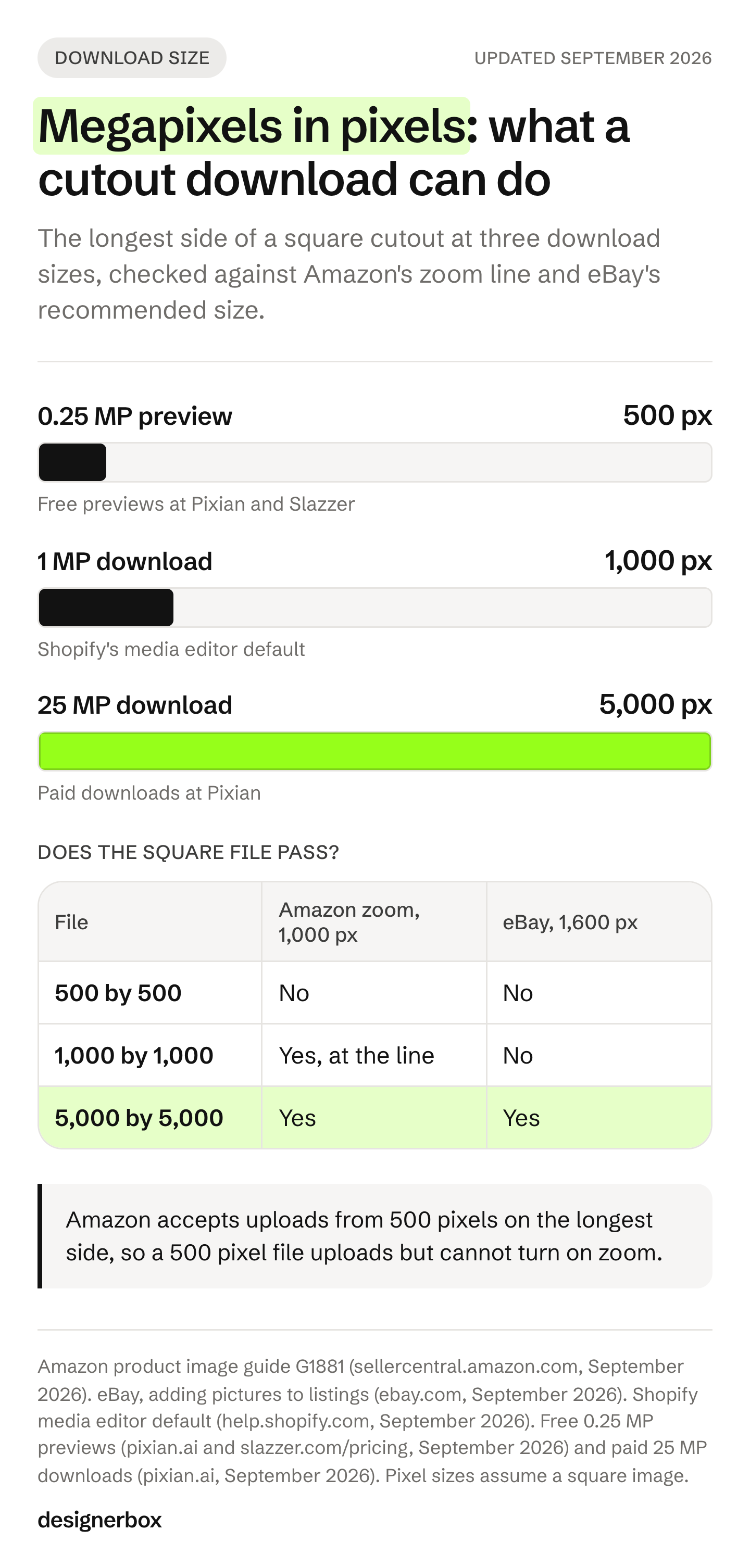
Most roundups of these tools compare them on price per image. That number says little about the file you get back. Some free tiers download a preview of 0.25 megapixels. On a square image, that is 500 by 500 pixels. Amazon accepts an image that size, and it turns on zoom only from 1,000 pixels on the longest side.
The tool that many lists put first is also moving. remove.bg says its standalone website closes on 1 December 2026, and its self-service API stops accepting requests the same day (remove.bg/faq, September 2026). This guide sorts nine tools by the job each one is built for. It gives you a six-photo test to run before you pay, and the size and background rules for Amazon, Google and eBay. It is written for brands with 20 to 500 products and the agencies that make their listing images.
Key Takeaways
- Pick by the job first. One listing photo, hundreds of photos, an API inside your own system, and hard edges fixed by hand need different tools.
- remove.bg is moving to Canva. Its standalone website closes on 1 December 2026 at 9:00am CET. API access moves to Leonardo.ai, and the Photoshop plugin ends that day (remove.bg/faq, September 2026).
- Check the pixels you download. A 0.25 megapixel preview is 500 by 500 pixels when square. Amazon turns on zoom from 1,000 pixels on the longest side.
- Stated batch sizes differ a lot. Pixelcut lists up to 10,000 images in one batch, Slazzer’s desktop app up to 2,000, and Photoroom up to 250 at once (vendor pages, September 2026).
- Test six hard photos before you pay. Hair, glass, shiny metal, white on white, a gap inside the product, and a garment on a mannequin.
- Read the license on a free file. Some free plans cover personal use only. Check before a free cutout goes into a listing or an ad.
- Removing a background needs no AI label in TikTok ads. TikTok’s ads policy lists it as an edit that does not need one (ads.tiktok.com, September 2026).
How to choose the best AI background remover
Choose the best AI background remover by answering four questions in order. Where does the file go next? How many files do you have? Does the removal need to run inside your own system? Which of your photos are hard to cut out? Each answer points to a different kind of tool. A tool that is right for one listing photo can be wrong for a catalog of 400 products.
| The job | What to check first | Tools that list it |
|---|---|---|
| One listing photo, today | The download size, and whether the free license covers commercial use | Adobe Firefly, Photoroom, Pixelcut, Slazzer |
| Hundreds of photos at once | Images per batch, and whether file names survive the export | Pixelcut, Slazzer, Photoroom, Clipping Magic, Canva, PhotoScissors |
| Removal inside your own system | API documentation, a batch endpoint and a free test mode | Claid, Pixian, Photoroom, Pixelcut, Slazzer |
| Hard edges you fix by hand | A manual editor and support for large files | Clipping Magic |
| The cutout goes straight into a design | Layout and templates in the same app | Canva, Adobe Express |
Background removal is usually the first step, and the shot list that follows it matters more. If you are choosing a tool for the whole product image, the comparison of AI product photography tools covers what each one does after the cutout.
Six photos to test before you pay
Most tools here let you try a cutout free, as a free plan, free previews or a free API test mode. Use that to test your own products before you commit. Pick six photos from your catalog, one for each case below. Your own products tell you more than a demo photo.
- Hair, fur or knit. A wool sweater, a brush or a faux-fur collar. Fine fibers are part product and part background.
- Glass or clear plastic. A bottle or a jar. The old background shows through the product itself.
- Shiny metal. A ring, a watch or a steel bottle. Reflections carry the room into the product.
- White on white. A white mug on a white backdrop. Low contrast at the edge gives the tool little to work with.
- A gap inside the product. A bag handle or the space between chair legs. The background inside the gap must go too.
- A garment on a mannequin or a hanger. This shows what the tool treats as the product and what it removes.
Then judge each result the same way:
- Look at the edges at 100% zoom on a color that contrasts with the original background. A gray halo is hard to see on gray and easy to see on white.
- Download at the size you will pay for. An edge that looks clean at 500 pixels can show a halo at 5,000.
- Check the file type. A PNG keeps the transparent background. A JPG cannot store transparency.
- Count the clean results. A tool that passes five of six is a different tool from one that passes two.
The four kinds of image that break AI background removal explain why these cases fail. The edge between product and background is where every tool has the least information. A plain backdrop in a color that is different from the product gives any tool a clearer edge to find.
The best AI background removers in 2026, by job
Every feature below comes from the vendor’s own page, read in September 2026. No prices appear here. Each vendor lists its plans on its own pricing page, and those pages change often.
Photoroom
Photoroom is built for product photos for online stores. Its API page says background removal “detects complex edges, handles transparency” and runs next to steps for shadows, generated backgrounds and ghost mannequin images (photoroom.com/api, September 2026). On the web, its batch tools run on one image or up to 250 images at once (photoroom.com/batch, September 2026).
Photoroom connects to Shopify, Zapier, Figma and Google Drive, and it has an MCP server (photoroom.com/integrations, September 2026). It has a free plan. Its terms license free accounts for “personal, non-commercial purposes” (photoroom.com/legal/terms-and-conditions, September 2026).
Best for: marketplace sellers who want the cutout, the shadow and a new background in one app.
Pixelcut
Pixelcut is built for sellers with many product photos. Its bulk editor processes up to 10,000 images in a single batch (pixelcut.ai/bulk, September 2026). It has APIs for background removal, upscaling, generated backgrounds and try-on, and it offers AI shadows (pixelcut.ai/api, pixelcut.ai/t/ai-shadows, September 2026).
Pixelcut offers a free version, and its pricing page lists the commercial license under a paid plan (pixelcut.ai/pricing, September 2026).
Best for: a catalog of hundreds or thousands of photos that all need the same cutout.
Canva
Canva is a design app, and its background remover works inside a design. remove.bg, which has been part of Canva since 2021, says Canva’s Background Remover “uses the same background-removal technology as remove.bg” (remove.bg/faq, September 2026). The same page says Canva offers bulk background removal in its web app and its desktop app, and that you need a Canva Pro subscription to use the feature.
The cutout lands in a Canva design, next to the templates you use for posts, listings and ads.
Best for: small teams that turn the cutout into a finished post or ad in the same app.
Adobe Firefly and Adobe Express
Adobe’s background remover page carries the Adobe Firefly name. Adobe says you can remove backgrounds in Firefly free with an Adobe account (adobe.com/express/feature/image/remove-background, September 2026). It accepts JPEG, PNG and WEBP files up to 100 MB, and it downloads a PNG that keeps the transparent background.
After the cutout, you can generate a new background, upscale the image or open it in Photoshop. Adobe says batch background removal is offered to enterprise users (adobe.com, September 2026).
Best for: teams already in Creative Cloud who finish the image in Photoshop.
Claid.ai
Claid is built for ecommerce teams that process images through an API. Its batch endpoint takes a cloud storage folder as input (docs.claid.ai, September 2026). Next to background removal, Claid lists APIs for shadows, generated backgrounds, upscaling, light correction and AI fashion models (claid.ai, September 2026).
Claid offers a free trial (claid.ai/pricing, September 2026). Its terms say it claims no ownership rights over your content (claid.ai/terms, September 2026).
Best for: a developer who wants a folder of files cut out without anyone opening a browser.
Clipping Magic
Clipping Magic pairs AI removal with a manual editor, including a hair clipping tool (clippingmagic.com, September 2026). It supports images up to 25 megapixels and 80 MB. It can export a TIFF with the clipping path embedded, for more work in Photoshop.
Its bulk mode has “no pre-set limit on the number of files you can upload” (clippingmagic.com/bulk, September 2026), and it has an API. You can upload and preview free, and a subscription is required to download without a watermark (clippingmagic.com/pricing, September 2026).
Best for: the hard photos from your test, where you want to fix an edge by hand.
Slazzer
Slazzer offers the same cutout on the web, in a desktop app, through an API and in plugins. Its desktop app takes up to 2,000 images in total for batch processing (slazzer.com/background-remover-app, September 2026). Slazzer builds its own plugins for Photoshop (CC 2018 and above), Figma and WooCommerce, and it connects to Shopify through Zapier (slazzer.com/tools-api, September 2026).
Free previews download at up to 0.25 megapixels, and its free plan is recommended “for personal use and evaluation” (slazzer.com/pricing, September 2026).
Best for: WooCommerce stores and Photoshop users who want the cutout inside a tool they already use.
Pixian.AI
Pixian is a background remover with a web app and an API. Its web app states free use at 0.25 megapixels and paid use at 25 megapixels (pixian.ai, September 2026). Developers can integrate and test the API free, and test results carry a watermark (pixian.ai/api, September 2026).
Best for: a developer who wants to test the API on real product files before buying anything.
PhotoScissors
PhotoScissors runs in the browser and as a desktop app for Windows and Mac. The online version takes JPG, PNG and WebP files up to 10 MB and 4.2 megapixels (photoscissors.com, September 2026). The desktop app has a batch processing mode for many images, and free downloads come in standard definition (photoscissors.com/tutorials, photoscissors.com/pricing, September 2026).
Best for: a batch job on a Windows or Mac computer.
If a photo fails in every tool, a person can still cut it by hand. A product photo editing service takes the files and sends back finished cutouts.
What changes for remove.bg users on 1 December 2026
remove.bg’s own FAQ page now carries the title “remove.bg is moving to Canva” (remove.bg/faq, September 2026). From 1 December 2026 at 9:00am CET, its standalone website will no longer be available. Background removal moves to Canva, and API access moves to Leonardo.ai, which is also part of Canva. Enterprise API contracts continue.
Four changes on that date matter to a team that uses remove.bg today:
- The website. remove.bg points single-image and bulk users to Canva’s Background Remover.
- The self-service API. It “will stop accepting requests from 1 December 2026”. remove.bg points API users to Leonardo.ai and publishes a migration guide.
- The Photoshop plugin. It “won’t be available after 1 December 2026”.
- Other integrations and plugins. remove.bg says these “will be discontinued on 1 December 2026”.
If a Zapier step, a store script or a desktop batch calls remove.bg today, it needs a new tool before that date. List every place your team calls it, then run the six-photo test on the replacement.
Batch background removal: what each tool can take at once
Batch background removal means you upload many photos and get every cutout back in one action. The tools state the size of a batch in different ways, and some do not state it at all. Check the stated number against your catalog, then test that the export keeps your file names, so each cutout still matches its product.
| Tool | Where the batch runs | Stated batch size (September 2026) |
|---|---|---|
| Pixelcut | Web bulk editor | Up to 10,000 images in one batch |
| Slazzer | Desktop app | Up to 2,000 images in total |
| Photoroom | Web batch tools | Up to 250 images at once |
| Clipping Magic | Bulk clipping | No preset limit on uploads |
| Claid | API batch endpoint | One cloud storage folder |
| Canva | Web app and desktop app | Not stated |
| PhotoScissors | Desktop app | Not stated |
| Adobe Firefly | Enterprise users | Not stated |
Batch size is where the check starts. Three more things decide whether a batch saves time. Does every file come back with the same crop and margin? Does a failed file get flagged, or does it pass silently? Can you re-run one file without re-running the whole batch?
What size and background each marketplace needs
A cutout is ready for a marketplace only when its background and its pixel size meet that marketplace’s rules. Amazon wants pure white behind the main image, and at least 500 pixels on the longest side. Google recommends white or transparent. eBay recommends about 1,600 by 1,600 pixels. Check the size of the file you download, because some free tiers limit it.
| Where the image goes | Background rule | Size rule | Source |
|---|---|---|---|
| Amazon main image | Pure white, RGB 255, 255, 255. The product fills 85% of the image | 500 to 10,000 pixels on the longest side. Zoom turns on from 1,000 | sellercentral.amazon.com |
| Google Merchant Center | White or transparent is recommended. No borders, watermarks or promotional text | 100 by 100 minimum (250 by 250 for clothing), rising to 500 by 500 on 31 January 2027. Under 64 megapixels and 16 MB | support.google.com |
| eBay | No stock photos for used, damaged or defective items | About 1,600 by 1,600 recommended | ebay.com |
All three rules were read in September 2026. Google’s 2027 minimum comes from its own announcement (support.google.com, September 2026). Google also accepts lifestyle images that show the product clearly, and those extra images can carry a styled background in place of white.
What the download size means in pixels
Megapixels tell you the total pixel count. On a square image, 0.25 megapixels is 500 by 500 pixels. 1 megapixel is 1,000 by 1,000, and 25 megapixels is 5,000 by 5,000. eBay’s recommended 1,600 by 1,600 needs about 2.6 megapixels.
So a 0.25 megapixel preview uploads to Amazon but cannot turn on zoom. Shopify’s own media editor can remove a background or make it transparent, and it saves at 1 megapixel by default (help.shopify.com, September 2026). That reaches Amazon’s zoom line on a square image, and it stays under eBay’s recommendation. A 25 megapixel download clears all three. If the source photo is small to begin with, fix the resolution before the cutout.
AI labels on a background removal
TikTok’s ads policy lists “Removing or modifying backgrounds” as an edit that needs no AI label (ads.tiktok.com, September 2026). Meta adds an AI info label to ads made with its own tools, such as Background Generation. Minor edits such as resizing or color correction get no label (facebook.com/business/help, September 2026).
On Amazon, a staff member replied on the seller forums that “simple AI retouching, like background removal” is treated like normal photo editing (sellercentral.amazon.com, September 2026). That is a forum reply, not a policy page. Platform rules change, so check each page before a campaign.
Background removal and ghost mannequin are two different jobs
A background remover keeps what it sees as the subject. On a garment shot on a mannequin, the mannequin is part of that subject, so it can stay in the cutout. Removing the mannequin and filling in the inside of the collar is a separate edit, called a ghost mannequin image.
This matters for clothing on Amazon. The main image for adult clothing must show the item on a standing model, with no part of a mannequin (sellercentral.amazon.com, September 2026). Photoroom lists a ghost mannequin step in its API (photoroom.com/api, September 2026), and DesignerBox has one too. The ghost mannequin photography guide covers the shoot, the edit and what each method costs.
The cutout step in DesignerBox
We make DesignerBox, so this section is not neutral. The DesignerBox comparison pages set out what it covers next to other tools. DesignerBox is AI creative production for brands and agencies. Background removal is one step in a workflow there, next to relighting, upscaling and ghost mannequin.
The step helps when the same job repeats on every new product. You build the workflow once: remove the background, place the product on white or on your brand background, relight it and upscale it. You set the brand once. The workflow reads it on every run. A saved workflow runs the same way on the next product, and the cost is shown before the run. Start from the clean white background template, make a copy, and add your own steps.
The image editor makes one edit after another. The picture keeps its detail and resolution. When the run ends, you download the results, or send them with a webhook or an S3 step. The cutout, the relight, the upscale and the export are steps in one subscription, which is the difference between a remover and a production workflow.
A dedicated remover is the better choice in three cases:
- The transparent PNG is the whole job. Nothing else happens to the file after the cutout.
- The cutout belongs inside a tool you already use. A Photoshop plugin or a step inside a Canva design saves a round trip when the layout happens there.
- You want to fix one hard edge by hand. A manual editor such as Clipping Magic is built for that.
The commercial license starts on the Pro plan, and plans and credits are on the pricing page. There is a free plan, and it adds a watermark. Get started free.
FAQ
What is the best AI background remover for product photos?
It is the tool that fits the job the file does next. For one photo, pick a tool whose download meets your marketplace’s pixel size. For hundreds of photos, pick a tool with a stated batch size, such as Pixelcut or Photoroom. For an automated system, pick an API such as Claid or Pixian. Test your six hardest photos in two or three tools before you pay.
Is there a free AI background remover?
Yes. Adobe says you can remove backgrounds in Firefly free with an Adobe account, and Photoroom, Pixelcut and Slazzer have free plans (vendor pages, September 2026). Before you use a free file in a listing, check two things. First, check the download size. Second, check whether the free license allows commercial use. For example, Photoroom’s terms license free accounts for personal, non-commercial purposes, and Slazzer recommends its free plan for personal use and evaluation.
How do I remove backgrounds from hundreds of photos at once?
Use a tool with batch processing. Pixelcut lists up to 10,000 images in one batch, Slazzer’s desktop app up to 2,000, and Photoroom up to 250 at once (vendor pages, September 2026). For a system that runs without a browser, Claid’s API batch endpoint takes a cloud storage folder as input. Check that file names survive the export, so each cutout still matches its product.
What happens to remove.bg after 1 December 2026?
remove.bg says its standalone website will no longer be available from 1 December 2026 at 9:00am CET. Background removal moves to Canva, and API access moves to Leonardo.ai, also part of Canva. The self-service API stops accepting requests that day, and the Photoshop plugin and other integrations end. Enterprise API contracts continue (remove.bg/faq, September 2026).
Should a product cutout have a white or a transparent background?
Use pure white, RGB 255, 255, 255, for the Amazon main image. Google Merchant Center recommends white or transparent. Keep a transparent PNG as your master file, then export a white version for each marketplace that needs one. A JPG cannot store a transparent background.
Do I need an AI label after removing a background?
Not in TikTok ads. TikTok’s ads policy lists removing or modifying backgrounds as an edit that needs no AI label. Meta adds its AI info label to ads made with its own tools, such as Background Generation, and not for minor edits such as resizing. Rules change, so check each platform’s page before a campaign (ads.tiktok.com and facebook.com/business/help, September 2026).
Can an AI background remover handle hair, glass and jewelry?
These are the hardest cases for any tool, because the edge is partly product and partly background. Put one of each into your six-photo test. For photos that fail, use a tool with a manual editor, such as Clipping Magic, or send them to a photo editing service that cuts them by hand.
Sources
Platform and marketplace rules (hyperlinked)
- Amazon product image guide G1881 (sellercentral.amazon.com, accessed September 2026)
- Amazon seller forums, staff reply on AI retouching (sellercentral.amazon.com, accessed September 2026)
- Google Merchant Center image requirements (support.google.com, accessed September 2026)
- Google Merchant Center image size change for 2027 (support.google.com, accessed September 2026)
- eBay, adding pictures to your listings (ebay.com, accessed September 2026)
- eBay picture policy (ebay.com, accessed September 2026)
- Shopify Help Center, media generation in the file editor (help.shopify.com, accessed September 2026)
- TikTok ads policy, misleading and false content (ads.tiktok.com, accessed September 2026)
- Meta Business Help Center, AI info labels on ads (facebook.com, accessed September 2026)
Tool pages (named, not linked)
- remove.bg FAQ, “remove.bg is moving to Canva” (remove.bg/faq, September 2026)
- Photoroom API, batch, integrations and terms (photoroom.com/api, photoroom.com/batch, photoroom.com/integrations, photoroom.com/legal/terms-and-conditions, September 2026)
- Pixelcut bulk editor, API and pricing page (pixelcut.ai/bulk, pixelcut.ai/api, pixelcut.ai/pricing, September 2026)
- Adobe Firefly background remover (adobe.com/express/feature/image/remove-background, September 2026)
- Claid batch API, homepage, pricing page and terms (docs.claid.ai, claid.ai, claid.ai/pricing, claid.ai/terms, September 2026)
- Clipping Magic homepage, bulk clipping and pricing page (clippingmagic.com, clippingmagic.com/bulk, clippingmagic.com/pricing, September 2026)
- Slazzer desktop app, tools and pricing page (slazzer.com/background-remover-app, slazzer.com/tools-api, slazzer.com/pricing, September 2026)
- Pixian.AI web app and API (pixian.ai, pixian.ai/api, September 2026)
- PhotoScissors online tool and pricing page (photoscissors.com, photoscissors.com/pricing, September 2026)
DesignerBox
- DesignerBox pricing (designerbox.ai/pricing, September 2026)
Tool features verified on each vendor’s own pages, and marketplace and platform rules verified on Amazon, Google, eBay, Shopify, TikTok and Meta help pages, as of September 2026. Features and plans change often, so check each page before you buy.