A clothing design app is a phone, tablet or browser program for drawing, planning or selling a garment. The best one depends on your device and on the file you need at the end. Procreate and Adobe Fresco suit sketching on an iPad. Concepts and Linearity Curve export vector files a factory can read. FLYP makes and ships your design for you.
Most lists of clothing design apps mix phone apps with desktop programs that need a strong computer. A reader with an iPad downloads a sketching app, draws a full collection, and then learns that the factory wants a vector flat sketch. Procreate cannot export one. Its export list holds picture formats and 3D files, and no SVG or AI file (help.procreate.com, September 2026).
This guide sorts 18 apps by the device they run on and by the file that leaves them. Every fact comes from the maker’s own page or official store listing, checked on 24 September 2026. It lists no prices: each maker publishes its own plans. It is written for a founder starting a first clothing line, and for a small brand that designs a few styles a season. Desktop programs for patterns and 3D are in the guide to fashion design software for beginners.
Key Takeaways
- Pick by the file: a sketch app exports a picture. A factory needs a vector flat sketch and a tech pack. Check the export list before you draw a collection.
- On an iPad: Procreate and Adobe Fresco for sketches. Illustrator on iPad, Concepts or Linearity Curve for vector flats.
- On Android: Sketchbook, Infinite Painter, ibis Paint X and Concepts run on phones and tablets. Krita runs on Android tablets, still in beta.
- In a browser: Tailornova makes sewing patterns. Commercial plans add DXF-AAMA files for factories.
- Design-and-sell apps: FLYP makes, ships and sells your design. Its creator terms say you own the design.
- AI designs: the US Copyright Office says prompts alone do not make you the author of an AI result.
What is a clothing design app?
A clothing design app is software on a phone, a tablet or in a browser that helps you design a garment. Some apps draw sketches. Some draw technical flats in vector form. Some draft sewing patterns, and some print and ship the garment for you. No single app covers every step from idea to sample.
The US Bureau of Labor Statistics says fashion designers “must be able to use computer-aided design (CAD) programs and be familiar with graphics editing software” (BLS Occupational Outlook Handbook, accessed September 2026). Apps cover the first steps of that work well. Pattern grading and 3D fit simulation still run mostly on computers.
Four terms appear below:
- Croquis: the figure template you draw a garment on.
- Flat sketch: a drawing of the garment laid flat, front and back, with seams and details.
- Raster and vector: a raster file is made of pixels, like a photo. A vector file is made of lines and shapes, so it stays sharp at any size.
- Tech pack: the document a factory builds your garment from.
Which clothing design app should you use?
Use the app that runs on the device you already own, and that exports the file your next person needs. For ideas and color, any drawing app works. For the flat sketch that goes to a factory, you need an app with vector export. For a finished product with no factory of your own, a design-and-sell app does the making.
| Your device | Sketch and color | Vector flat sketch | Mood board |
|---|---|---|---|
| iPad | Procreate, Adobe Fresco, Tayasui Sketches, Prêt-à-Template | Illustrator on iPad, Concepts, Linearity Curve | Freeform, Pinterest, Canva |
| iPhone | Procreate Pocket, Adobe Fresco, Sketchbook, ibis Paint X | Concepts, Linearity Curve | Freeform, Pinterest, Canva |
| Android phone or tablet | Sketchbook, Infinite Painter, ibis Paint X, Krita (tablets, beta) | Concepts | Pinterest, Canva |
Browser apps do other jobs. Tailornova drafts sewing patterns, and Style3D AI renders garment designs from a sketch. Both have their own sections below.
What file does each clothing design app export?
The export list decides who can use your work. A picture file is fine for you and for a freelancer. A factory and a pattern maker need a vector file or a pattern file. So check the export list in the maker’s help pages before you draw a whole collection in one app.
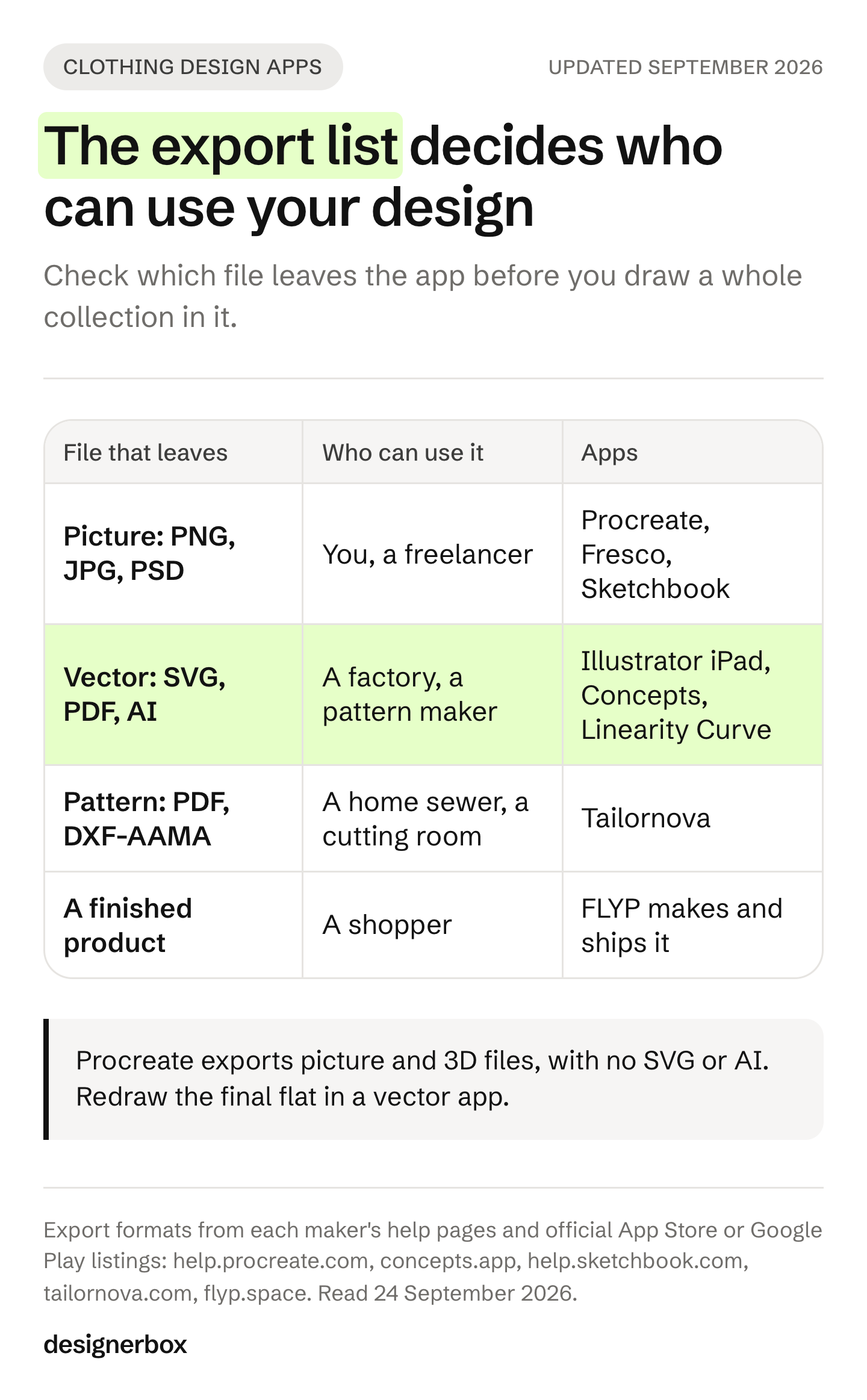
| App | Runs on | Exports | Who can use the file |
|---|---|---|---|
| Procreate | iPad (Pocket on iPhone) | PSD, PDF, JPEG, PNG, TIFF, GIF, MP4, and OBJ and USDZ for 3D | You, a freelancer |
| Adobe Fresco | iPad, iPhone, Windows | Picture files. Vector work goes to Illustrator | You, a freelancer |
| Sketchbook | iOS, Android, Windows, macOS | TIFF, PSD, PNG, JPG. PDF needs the Premium Bundle | You, a freelancer |
| Tayasui Sketches | iPhone, iPad | PNG and layered PSD, both in Pro | You, a freelancer |
| ibis Paint X | iPhone, iPad, Android | PNG, JPEG, PSD | You, a freelancer |
| Infinite Painter | iPhone, iPad, Android, Chromebooks | JPG, PNG, WEBP, layered PSD | You, a freelancer |
| Illustrator on iPad | iPad | SVG, PDF, PNG, PSD | A factory, a pattern maker |
| Concepts | iOS, Android, Windows, ChromeOS | SVG, DXF, vector PDF, PSD, PNG. The free tier exports JPG only | A factory, a pattern maker |
| Linearity Curve | iPad, iPhone, Mac | SVG, AI, PDF, PNG, JPG, TIFF | A factory, a pattern maker |
| Tailornova | Browser | PDF. Commercial plans add PLT, DXF and DXF-AAMA | A home sewer, a cutting room |
Sources: each maker’s help pages and official App Store or Google Play listings, September 2026. Prêt-à-Template, Clothify and FLYP do not name export formats on their listings, so they are not in the table.
Clothing design apps for iPad
The iPad has the widest choice, because an Apple Pencil works like a pen on paper. Start with one sketching app and one vector app. Add a mood board app if you collect references.
Procreate is a painting app for iPad, with Procreate Pocket for iPhone. You buy it once. Its maker states “No generative AI” and “Your work belongs to you” (procreate.com, September 2026). Use it for croquis sketches, prints and colorways. Draw the flat in a vector app.
Adobe Fresco is free on iPad and iPhone, and Adobe also lists it for Windows. Adobe calls it “a free, professional drawing and painting app” (App Store listing, September 2026). Its vector brushes draw clean lines. The listing says you can “send your layered vector illustrations directly to Illustrator” for the flat.
Illustrator on iPad is Adobe’s vector app for tablets. It exports SVG, PDF, PNG and PSD (App Store listing, September 2026). It is included in Creative Cloud plans that cover Illustrator. Its repeat tools make radial, grid and mirror patterns, which helps with prints.
Concepts is a sketching app with vector strokes and an infinite canvas. Paid options export SVG, DXF and vector PDF. The maker calls DXF “a vector format usable in CAD software” (concepts.app, September 2026). Its measuring tools draw at real-world scale, which suits flats with exact sizes.
Linearity Curve is a free download for iPad, iPhone and Mac. It exports SVG, AI, PDF, PNG, JPG and TIFF. Its Auto Trace feature turns a sketch into vector lines (App Store listing, September 2026). Check Linearity’s own pricing page for which features need a plan.
Tayasui Sketches is a free drawing app for iPhone and iPad, with a Pro Bundle as an in-app purchase. PNG and layered PSD export are part of Pro (tayasui.com, September 2026). It is a light app for quick ideas.
Prêt-à-Template is made for fashion drawing. Its listing describes “linework templates that include front, side, and back guides”, a mood board workspace and a fabric and trims library (App Store listing, September 2026). It is free to download, and full access needs a subscription. It now includes AI features too.
Clothing design apps for iPhone and Android
A phone screen is small for detailed flats, and it works for ideas, color tests and references. Android users have fewer fashion-specific apps than iPad users. Four drawing apps run well on Android phones and tablets.
- Sketchbook is free on iOS and Android. PDF export needs the Premium Bundle (help.sketchbook.com, September 2026).
- Infinite Painter runs on Android phones and tablets, Chromebooks, iPhone and iPad. Its free tier gives three layers. It has pattern projects that repeat without a visible edge, for prints (Google Play listing, September 2026).
- ibis Paint X is free with ads on Android, iPhone and iPad, with in-app purchases (Google Play listing, September 2026).
- Krita is free and open source. Its Android version is “still beta” and is “meant to run on chromebooks and tablets only” (krita.org, September 2026). There is no iPhone or iPad version.
Concepts also runs on Android, so an Android tablet user can export vector flats. On a phone, keep the app for sketches and notes. Draw the final flat on a tablet or a computer.
Browser apps for clothing design
A browser app needs no install, so it runs on a laptop you already own. Three do different jobs for a clothing line.
Tailornova drafts sewing patterns in the browser. Its FAQ says “Tailornova is 100% web-based and no installation is required”, and it is sold only by subscription. The Personal plan downloads PDF patterns. Commercial plans add PLT, DXF and DXF-AAMA files and a commercial and reseller license (tailornova.com, September 2026). For desktop pattern systems used by factories, see the guide to pattern software sorted by job.
Style3D AI renders garment designs. It says it creates “fashion visuals from an idea, sketch, or product photo”, and its sketch tool outputs a “rendered garment design” (style3d.ai, September 2026). It runs in the browser, with a Mac download. A rendered design helps you decide on an idea. It does not replace a flat sketch or a pattern.
Canva has a free plan and runs in the browser and on Mac, Windows, iOS and Android (canva.com, September 2026). Use it for mood boards and line sheets. Read its content license before you sell: you may not use Canva content in a trademark or logo, or on its own on print-on-demand t-shirts (Canva Content License Agreement, section 9, September 2026).
For mood boards, Pinterest and Apple’s Freeform are free. Freeform runs on iPhone, iPad and Mac and exports a board as a PDF (support.apple.com, September 2026). The guide to mood board generators covers the AI tools for this step.
Apps that design and sell clothes for you
Some apps skip the factory. You design on a 3D garment, and the app prints, makes and ships each order. These apps suit a first test of demand. Read the terms, because they decide who owns the design.
FLYP runs on iPhone, iPad and Mac. You design in a 3D studio, and the listing says “We handle everything - manufacturing, fulfillment, and customer service” (App Store listing, September 2026). Designs sell through FLYP and TikTok Shop. Its creator terms say “you shall be the owner of all rights in the Designs”, and FLYP receives a license to sell and promote them. You also promise that the design does not copy another person’s work (flyp.space/terms/creator, September 2026).
Clothify is a free Android app with ads. You recolor 3D t-shirts, hoodies and pants and add patterns, text or a logo (Google Play listing, September 2026). The listing names no export format and no terms for commercial use. Use it to test color ideas, and draw the real flat elsewhere.
The guide to AI tools for print on demand covers the wider print-on-demand route. The guide on how to start a clothing brand compares print on demand with blanks and cut and sew.
Can AI design clothes?
AI can make images of clothing ideas, and some apps render a sketch as a finished-looking garment. Style3D AI, Prêt-à-Template, FLYP and Canva all include AI features. Procreate is the one app on this list that says it refuses generative AI. An AI image is an idea, and a pattern maker and a real sample still decide the fit.
Ownership is the harder question. The US Copyright Office says “copyright does not extend to purely AI-generated material”. It adds that “prompts alone do not provide sufficient human control” to make you the author (US Copyright Office, Copyright and Artificial Intelligence, Part 2, published 29 January 2025). Human selection, arrangement and changes can still be protected, case by case.
Garment shapes have limited protection in the US anyway. In Star Athletica v. Varsity Brands, the Supreme Court said the law “does not protect useful articles as such”. A design feature, such as a print, can be protected only if it works as art on its own (Supreme Court opinion, 2017, accessed September 2026). So your print may be protectable, and the cut of a garment usually is not. This is general information, not legal advice.
Free clothing design apps
14 of the 18 apps in this guide have a free download or a free tier. Most free versions have limits, such as fewer layers, fewer export formats, or ads. Procreate, Illustrator on iPad and Tailornova are paid. Style3D AI’s free terms could not be confirmed on its site.
| App | Free version | Limit on the free version |
|---|---|---|
| Adobe Fresco | Free | None stated for drawing |
| Krita | Free, open source | Android version in beta, tablets only |
| Free | None stated | |
| Freeform | Free | None stated for basic use |
| Canva | Free plan | Content license limits for sale |
| Sketchbook | Free on mobile | PDF export needs Premium |
| Concepts | Free tier | JPG export only |
| Infinite Painter | Free tier | Three layers |
| ibis Paint X | Free | Ads |
| Tayasui Sketches | Free | PNG and PSD export in Pro |
| Linearity Curve | Free download | Check its pricing page |
| Prêt-à-Template | Free download | Full access by subscription |
| Clothify | Free | Ads, no export format named |
| FLYP | Free download | Selling runs through FLYP Pro |
A free start on an iPad is Adobe Fresco for sketches and the free tier of Concepts for practice. On Android, Sketchbook and Infinite Painter cover sketches. For the final vector flat, plan on a paid option or a free desktop program such as Inkscape.
Product photos after the sample
The design apps stop at the sample. Then every style needs product photos in every color: front, back, a detail and a shot on a model. The guide to photographing clothes to sell covers the camera route. The AI route starts from one photo of the finished garment.
DesignerBox is AI creative production for brands and agencies. It does not draw flats or draft patterns. It makes the images you sell with.
- Clothing catalog turns one garment into four shots: front, three-quarter, back and a fabric close-up.
- Dress my model puts the garment on a model. The guide on putting clothes on a model with AI shows the steps.
- Sketch to photo turns a garment sketch into a photo-style image for review. Use it to decide on a design. Use photos of the real sample on your store.
Anyone can make an AI picture. Making hundreds that still look like your brand is the hard part. You set the brand once, and the workflow reads it on every run. A saved workflow runs the same way on the next style, with the same light and framing. Batch runs it over a whole sheet of styles at once. The cost is shown before the run.
The image editor, the video editor, your brand rules and your Assets sit in the same place. The full workflow from the first product photo to the finished ad, in one subscription. The commercial license starts on the Pro plan. Virtual try-on starts on the Premium plan. Plans are on the pricing page. See what DesignerBox does for fashion brands.
A free plan for your first run
Start from a template, add your brand and your products, and see the cost before you run it.
FAQ
What is the best app for clothing design?
It depends on your device and the file you need. On an iPad, Procreate or Adobe Fresco suits sketches, and Illustrator on iPad, Concepts or Linearity Curve suits vector flats. On Android, Sketchbook and Infinite Painter suit sketches, and Concepts exports vector files. Tailornova drafts patterns in a browser.
Is there a free app to design clothes?
Yes. Adobe Fresco, Pinterest and Freeform are free, and Krita is free and open source on Android tablets. Sketchbook, Concepts, Infinite Painter, ibis Paint X and Canva have free versions with limits. Concepts’ free tier exports JPG only, so vector export needs a paid option.
Can I design clothes on my phone?
Yes, for sketches, color tests and mood boards. Sketchbook, ibis Paint X, Infinite Painter and Procreate Pocket run on phones. A phone screen is small for a detailed flat sketch. Draw the final flat on a tablet or a computer.
What app do fashion designers use on the iPad?
Many use Procreate for sketching and Illustrator on iPad for vector flats. Adobe Fresco is a free sketching option. Concepts and Linearity Curve also export vector files such as SVG. Prêt-à-Template offers fashion linework templates with front, side and back guides.
Can I send a Procreate drawing to a factory?
You can send it as a reference, and most factories also need a vector flat sketch and a tech pack. Procreate exports picture formats such as PNG, PSD and PDF, and 3D files. It does not list SVG or AI export. Redraw the final flat in a vector app.
Do I own clothing designs made with an AI app?
It depends on how much you created yourself and on the app’s terms. The US Copyright Office says prompts alone do not make you the author of an AI result. Your own drawing, selection and changes can still be protected. Read each app’s terms before you sell. This is general information, not legal advice.
Is there a 3D clothing design app for the iPad?
FLYP runs on iPad and lets you design on 3D garments, and FLYP makes and ships each order. Procreate can paint on 3D models and exports OBJ and USDZ files. Full 3D fit simulation, such as CLO, runs on Windows and Mac computers.
Sources
- Fashion designers and CAD use: US Bureau of Labor Statistics, Occupational Outlook Handbook, Fashion Designers, accessed 24 September 2026
- AI and copyright: US Copyright Office, Copyright and Artificial Intelligence, Part 2: Copyrightability, published 29 January 2025
- Useful articles and garment design: Star Athletica, L.L.C. v. Varsity Brands, Inc., Supreme Court of the United States, 2017, accessed 24 September 2026
- Freeform export: Apple Support, Export a board as a PDF in Freeform, accessed 24 September 2026
- Procreate export formats and AI statement (help.procreate.com, procreate.com/ai), and App Store listings for Procreate and Procreate Pocket, September 2026
- Adobe Fresco and Illustrator on iPad, App Store listings, September 2026
- Sketchbook export help (help.sketchbook.com), September 2026
- Tayasui Sketches help (tayasui.com) and App Store listing, September 2026
- Concepts export manual (concepts.app) and App Store listing, September 2026
- Linearity Curve, Prêt-à-Template and FLYP, App Store listings, September 2026
- FLYP creator terms (flyp.space/terms/creator), September 2026
- ibis Paint X, Infinite Painter and Clothify, Google Play listings, September 2026
- Krita 5.3.1.1 release notes and downloads (krita.org), September 2026
- Tailornova FAQ and plans (tailornova.com), September 2026
- Style3D AI (style3d.ai), September 2026
- Canva downloads and Content License Agreement (canva.com), September 2026
- Search results for “clothing design app”: Google US organic results, checked 24 September 2026
App platforms, export formats and terms verified from each maker’s pages and official store listings as of September 2026. Apps change often, so check the listing before you commit to one.