



A moodboard generator is a tool that builds a visual reference board for a brand or campaign, either by collecting real images or by generating new ones from a written description. Brand teams use one to agree a direction before anything expensive gets made. Consumer sites that shuffle random aesthetic images for a character or a vibe are a different product with the same name.
A team has six people, four Pinterest boards and a shared folder called FINAL_refs_v3. The photographer reads one board, the freelancer reads another, and the campaign arrives in two color temperatures. The WFA and LIONS Clients and Creativity 2026 study, built on interviews with over 160 senior marketers, found three in 10 say their teams consistently work to deliver creative excellence (wfanet.org, September 2026).
This guide compares six tools on two things a roundup usually skips: exactly where each free plan stops, and whether a board is private by default. It splits them by whether they collect real references or generate new ones, then covers what you own in a generated board and how to feed an approved one forward. Venngage and Creately get a short note beside the six. It is written for brand and creative leads who approve a direction and then have to make production match it. No prices appear in this guide. Each vendor publishes its prices on its own page. Making production match the board is the harder half. How the four stages fit together shows that part.
Key Takeaways
- Two products share this name. One builds a reference board a team can sign off. The other shuffles aesthetic images for a personal feed.
- Free plan caps differ from tool to tool. Milanote allows 100 notes, images or links plus 10 file uploads, Miro 3 editable boards, and Venngage 5 designs and 6 image uploads with public link sharing only (milanote.com/plans, miro.com/pricing and venngage.com/pricing, September 2026).
- Read the billing unit before the number. Miro charges per member, Milanote per person and Figma per seat, and several of them price annual billing differently from monthly, so two quoted figures are often not the same thing (miro.com/pricing, milanote.com/plans, figma.com/pricing and canva.com/pricing, September 2026).
- US policy: generated board images carry no copyright, but your arrangement can. The US Copyright Office holds that AI-determined expressive elements are not protected and must be disclaimed on registration, while a human’s creative selection and arrangement of that material can be an original work (copyright.gov, September 2026).
- References pulled from Pinterest may already be generated. Pinterest applies a Gen AI label when a Pin’s metadata or its own classifiers indicate AI involvement (help.pinterest.com, September 2026).
- An approved board is worth more as an input than a document. Fed back as reference images, it sets light, color and framing on everything generated afterwards.
What is a moodboard generator?
A moodboard generator assembles a single reference board out of images, color, type and notes. Two kinds exist. Collection tools give you a canvas and a stock library, and you place real references on it. Generation tools take a written description and produce the imagery. Both end in the same artifact: one page a team can agree on before production starts.
The name covers a second, larger audience. Sites like perchance.org and Toyhouse generate aesthetic image sets for a character or a personal feed. That is a different job from a board a brand team approves, so they sit outside this comparison. The brand version has a narrower job: survive being sent to a freelancer, a supplier and a client, and still mean the same thing three weeks later.
Which moodboard maker fits a brand team?
A brand team should pick a moodboard maker on three facts. Does the tool collect real references or generate new ones. Where exactly does its free plan stop. Can a client open the board without paying for a seat. The table points at each vendor’s own pricing page, because several of these plans price annual billing differently from monthly.
| Tool | Images | Free plan cap | Where the price is published | Sharing and notes |
|---|---|---|---|---|
| Milanote | Collects, 3M Pexels photos built in | 100 notes, images or links, plus 10 file uploads | milanote.com/plans, September 2026 | Private by default, read-only links, PDF export |
| Collects | Free to use, no paid tier for saving Pins | pinterest.com, September 2026 | Save Pins to a board and share it, Gen AI labels on Pins detected as AI | |
| Figma and FigJam | Collects, template-led | Free plan with template access, limited FigJam files | figma.com/pricing, September 2026 | FigJam included with all seats on every plan |
| Canva | Both | 1.6M+ templates, 4.7M+ assets, Brand Kit at 3 colors, 5GB | canva.com/pricing, September 2026 | A business tier sits above the personal one |
| Adobe Firefly Boards | Generates and collects | Free plan, limited daily generations | adobe.com/products/firefly/plans.html, September 2026 | Unlimited Boards access on every paid tier |
| Miro | Generates from a text description | 3 editable boards, unlimited members | miro.com/pricing, September 2026 | Private board sharing starts at Starter |
We verified every cell in September 2026 on the vendor’s own pricing and product pages.
Which tools collect real references?
Milanote, Pinterest and Figma’s FigJam start from images you already have or find. You drag files onto a canvas, arrange them and share the result. The board is built from real photographs, which matters when it stands for an actual garment or an actual material, because a generated stand-in quietly changes the brief.
Milanote is built for this job specifically. Its moodboard product ships over 100 free templates, integrates Pexels for about 3 million free photos, and supports read-only share links that need no signup (milanote.com/product/moodboarding, September 2026).
Pinterest is free, and its job on this list is collection: you save Pins to a board and you share the board. Read the Gen AI label before a Pin becomes your reference for a real fabric. Pinterest analyzes Pin metadata against the IPTC Metadata Standard, and it runs classifiers that flag generated content with no obvious markers (help.pinterest.com/en/article/gen-ai-labels, September 2026). Move the pins that won into whatever tool holds the brief, so the references and the sign-off sit in one place.
Figma covers the case where the board sits next to the design work. FigJam is included with all seats on every Figma plan, so a board built there needs no second subscription. Figma also publishes a free mood board template and kit with layouts plus slides for presenting the concepts (figma.com/figjam and figma.com/templates/moodboard-maker, September 2026). What Figma’s built-in AI and its plugins add covers the rest of that toolset.
Which tools generate the images from a prompt?
Adobe Firefly Boards, Miro and Venngage can produce the imagery from a written description rather than only collecting it. That earns its place when the direction does not exist yet as a photograph. The output is a look rather than a record, so generated frames set direction and never prove a material or a colorway.
Adobe describes Firefly Boards as an AI-powered workspace where you upload or generate images, remix ideas, and apply image style references to carry one look across a board (adobe.com/products/firefly/features/moodboard.html, September 2026). Every paid tier lists unlimited Boards access, so board use is not metered, though generating inside it spends generative credits. Adobe publishes its tiers and what each one includes on its own plans page (adobe.com/products/firefly/plans.html, September 2026). For Firefly as a whole, see Adobe Firefly alternatives by team type.
Miro takes a text description and generates custom images, and it reads existing board elements such as sticky notes, sketches and reference images as creative context (miro.com/ai/moodboard, September 2026). AI generation is metered per member per month, and the allowance differs by plan (miro.com/pricing, September 2026).
Canva straddles both halves. It still ships a dedicated mood board maker, a template-led editor free to start (canva.com/create/mood-boards, September 2026). Its free plan carries 1.6 million templates, 4.7 million photos, videos, graphics and audio, one Brand Kit limited to 3 colors and 5GB of storage (canva.com/pricing, September 2026). Check that 3-color Brand Kit limit against your own palette before a team commits to the free plan.
Venngage ships an AI Moodboard Generator. It states that moodboards made with its AI tools are copyright-free and usable for personal and commercial purposes, while noting that externally sourced content still has to be cleared separately (venngage.com/ai-tools/moodboard-generator, September 2026). That is its position on its own product, and the next section covers the US Copyright Office view. Venngage publishes its plans on its own pricing page (venngage.com/pricing, September 2026).
Creately fits when the board sits alongside diagrams: a moodboard maker on an infinite canvas with drag-and-drop, templates, collaboration and export (creately.com/lp/mood-board-maker, September 2026).
Is there a free moodboard generator?
Yes. The six tools in the table all run a free tier, and the caps differ from tool to tool. Milanote allows 100 notes, images or links plus 10 file uploads with no time limit (milanote.com/plans, September 2026). Miro allows 3 editable boards with unlimited members (miro.com/pricing, September 2026). Venngage allows 5 designs and 6 image uploads (venngage.com/pricing, September 2026). Figma and Canva both run free plans with template access (figma.com/pricing and canva.com/pricing, September 2026).
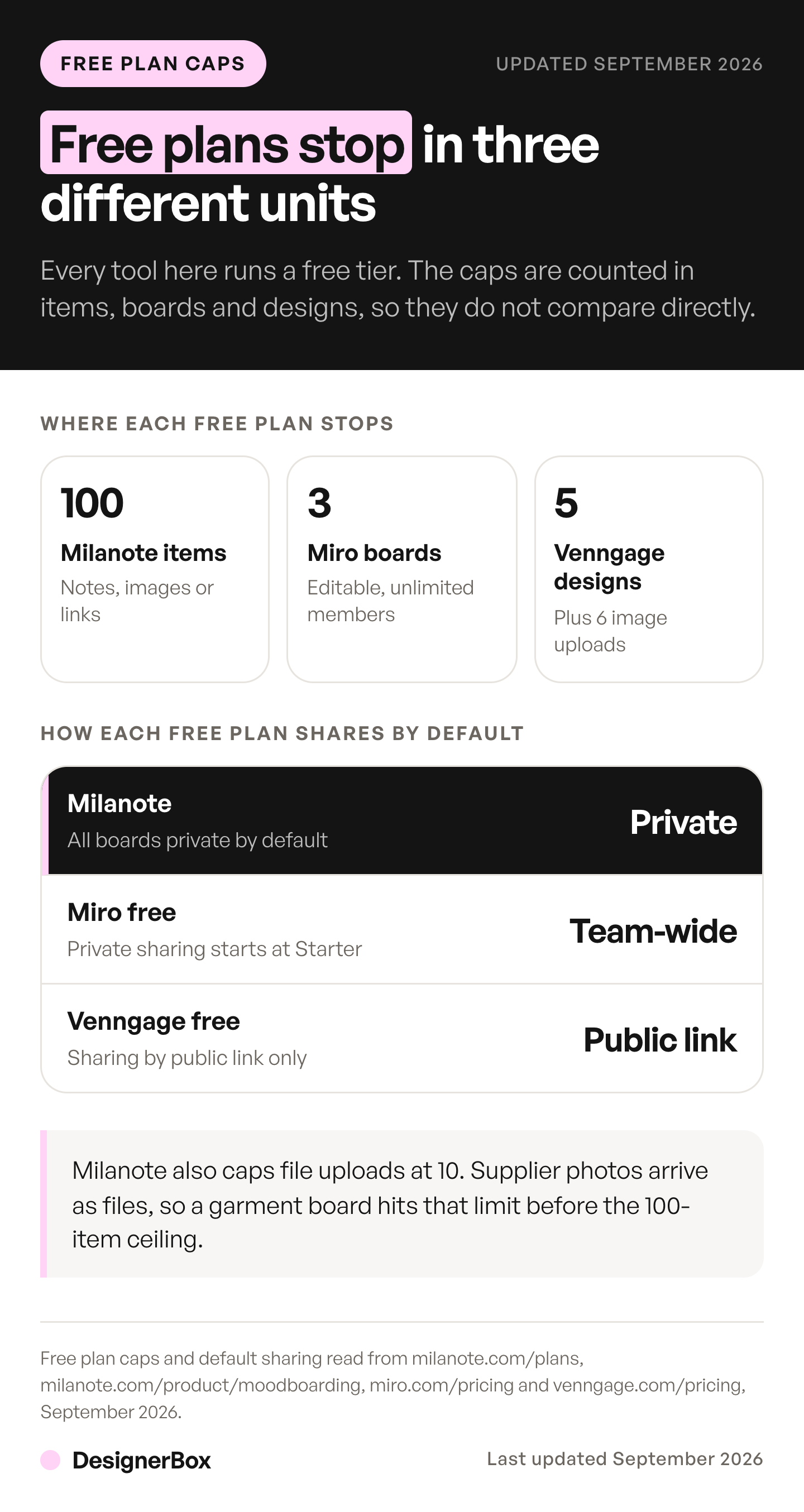
Privacy is the free-tier decision nobody makes on purpose. On Miro’s free plan every board is accessible to all team members by default, and private board sharing starts at Starter (miro.com/pricing, September 2026). Venngage’s free plan shares by public link only (venngage.com/pricing, September 2026). Milanote keeps all boards private by default (milanote.com/product/moodboarding, September 2026). For client work under an NDA, that difference outranks the feature list.
Read the upload cap, not the board count. A garment board with 30 supplier photos fits inside Milanote’s 100-item ceiling. It still stops at the 10-file upload limit, because supplier images arrive as files, not links.
What should a brand moodboard include?
Five things: a color palette with real values, the typefaces in use, reference imagery split into what to copy and what to avoid, one line naming the feeling, and the format the work will run in. The avoid pile is the one teams skip, and skipping it is why the board gets re-argued at the review.
Color and type belong on the board as values: hex codes, font names, and the ratio you want between them. A board that says “warm neutrals” comes back as a different warm from every supplier who reads it. A board carrying five hex values comes back as one.
Format belongs there too. A board that ends as square PDP stills and vertical social cuts should show both crops, because a wide reference sets an expectation the vertical cut cannot keep. When the campaign includes film, the board feeds a shot list, and an AI storyboard generator turns the script into one frame per shot. Scan a gallery of finished results before you collect new references.
The board is the first half of a brand kit. What the board fixes becomes a rule that every later tool reads. A brand guidelines template lists the sections that kit needs. Where brand drift starts sets out that argument.
Can you use an AI-generated moodboard commercially?
Partly, and the split is the useful part. Under US Copyright Office policy, when an AI system determines the expressive elements of its output, that material is not the product of human authorship. Copyright does not protect it, and a registration application has to disclaim it. A human’s creative selection and arrangement of that material can still be an original work, and copyright then protects the human-authored aspects only.
That is a statement of policy effective 16 March 2023, published at 88 Fed. Reg. 16190 (copyright.gov/ai, September 2026). The Office also records a February 2023 decision on a graphic novel that combined human text with images from the AI service Midjourney. The graphic novel was copyrightable, but the individual images could not be protected.
The layout you built and the pairings you argued for are yours in a way the generated frames inside are not. Anything you register carries a duty to disclose the AI-generated content and explain the human author’s contributions. A generated board makes a weak client deliverable and a strong direction document.
A vendor’s terms govern what that vendor permits, as Venngage’s do. They do not settle what a copyright office will register.
This is general information, not legal advice. Copyright rules differ by country, and a lawyer should read your own registration before you file it.
How do you turn an approved board into a reusable reference set?
Treat the approved board as an input rather than a finished document. Pull out the frames that carry the direction, name what each controls (light, color, framing, material), and feed them back as reference images on every generation that follows. The campaign assets then inherit the board instead of re-interpreting a written brief weeks later.
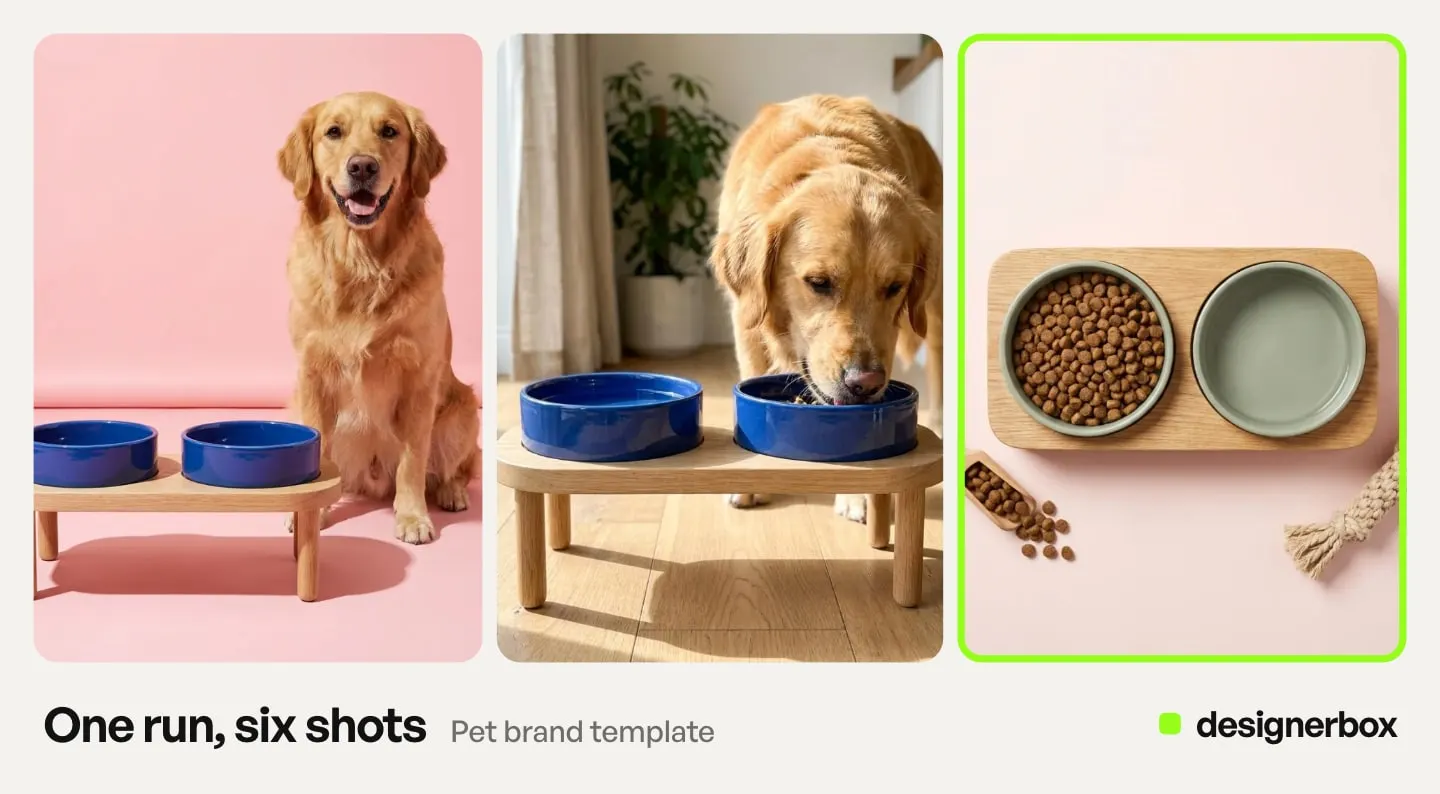
This is a real mechanism. Black Forest Labs states that FLUX.1 Kontext preserves unique elements of an image, such as a reference character or object, across multiple scenes. It also generates novel scenes while preserving the style of a reference image (bfl.ai, September 2026). Kontext Multi is one of the image models built into DesignerBox, and it reads several references at once. When the frames carry type, a price card or a packaging panel, ByteDance’s Seedream 5 is the model in that catalog built around text-dense output.
The model you pick for each step sets what a run costs. DesignerBox shows the total for a 12-frame reference set before you press Run. Uploading your own photos and the commercial license start on the Pro plan. Plans and credits are on the pricing page. The reference set is a one-time build, and every asset generated afterwards reads it. That only works if people can find the set next quarter, which is the brand asset management half of the job.
Naming what each frame controls makes the set reusable. One frame for light, one for color, one for crop and one for material beats twelve that all say “the mood”. Each frame then has one job, and you can swap it on its own. The same discipline holds a person consistent, covered in how a character reference image works.
Lock the settings once the set works. A saved template pins the prompt, the model, the aspect ratio and the number of results. That stops the second product drifting from the first, the shape described in what a template locks in. DesignerBox publishes a concept frame moodboard template that runs the board-to-frames step as one repeatable job. A campaign saved as a workflow runs the same way on the next product.
The board then stops being a slide and becomes what production reads. Build the job once against the approved references, then run the same job on the next product, and the one after that, until the catalog is covered. The light, the color and the framing you signed off on item one are the ones item two hundred gets, because the workflow reads the references rather than a person remembering them. What creative automation is explains that build-once, run-many pattern.
Stills built from the same references land in product photography, and the formats a launch needs are set out in what a campaign asset set includes.
Anyone can make an AI picture. Making hundreds that still look like your brand is the hard part. The board is where that starts. In DesignerBox you save the approved frames in Brand, which holds up to 12 reference pictures beside your logo, colors, fonts, voice and rules. Every workflow reads them on every run, so nobody uploads them again. The templates, the workflows and the editors sit in the same account. For an in-house team, see DesignerBox for brand teams.
FAQ
What is the best tool to create a mood board?
The best tool depends on what the board has to do. For a private client board with sign-off, Milanote holds boards private and exports a PDF. For a board next to design files, FigJam is included on every Figma seat. For imagery that does not exist yet, Adobe Firefly Boards and Miro both produce images from a written description.
What is the best free moodboard maker?
Each free plan stops at a different cap. Milanote’s free plan allows 100 notes, images or links plus 10 file uploads, and keeps boards private by default. Miro allows 3 editable boards, but every free board is accessible to all team members by default. Venngage allows 5 designs and shares by public link only. For client work, privacy decides it.
How do you make your own mood board?
Put five things on one board. Add a color palette with hex values, the typefaces in use, and reference images split into what to copy and what to avoid. Add one line that names the feeling, and the format the work will run in. Share it with the people who approve the direction before production starts.
Can AI create a moodboard, or does it only collect images?
Both exist as separate products. Miro generates custom images from a text description and can read existing board elements as context. Adobe Firefly Boards generates and remixes inside the board itself. Milanote, Pinterest and FigJam collect real references instead. Generated frames set a direction; collected frames prove a real material, color or product exists.
How many images should a moodboard have?
Fewer than instinct suggests. Twelve to twenty frames, each doing one job, beats fifty that repeat each other. Give every frame a stated purpose: light, color, crop, material, styling. Add a short avoid pile of three or four references the work should not resemble, because agreement on the negative stops a review reopening the direction.
Is a moodboard the same as a reference board?
They overlap and they get used at different points. A moodboard argues a direction to people and can be loose. A reference board feeds a photographer or a model and has to be precise about one variable per frame. The step that pays is tightening the approved moodboard into that reference board before production starts.
Do you have to label a moodboard made with AI?
Labeling rules attach to what you publish, not to an internal direction document. Two facts matter here. Pinterest applies a Gen AI label when it detects generated or modified Pins, so references pulled from it may already carry one. And the US Copyright Office requires disclosure of AI-generated content in any work you submit for registration.
Sources
- Vendor pricing and product pages, read September 2026: canva.com/pricing, canva.com/create/mood-boards, milanote.com/plans, milanote.com/product/moodboarding, miro.com/pricing, miro.com/ai/moodboard, figma.com/pricing, figma.com/figjam, figma.com/templates/moodboard-maker, adobe.com/products/firefly/plans.html, adobe.com/products/firefly/features/moodboard.html, venngage.com/pricing, venngage.com/ai-tools/moodboard-generator, creately.com/lp/mood-board-maker
- US Copyright Office: Copyright Registration Guidance for Works Containing AI-Generated Material, 88 Fed. Reg. 16190, September 2026
- Pinterest Help Center: Gen AI labels on Pins, September 2026
- WFA and LIONS, Clients and Creativity 2026, published 17 June 2026
- Black Forest Labs: FLUX.1 Kontext, September 2026
- DesignerBox pricing and models (designerbox.ai/pricing and designerbox.ai/models, September 2026)
Tool pricing, free-plan caps, copyright policy and platform labeling verified from each vendor’s own pricing and product pages, the US Copyright Office, Pinterest, WFA and Black Forest Labs as of September 2026. Individual results vary.