To start a clothing brand, pick your production model first: print on demand, blank garments you decorate, or cut and sew. That choice decides every app after it. Then you name the brand, design the garment, make a sample, add the labels the law asks for, open a store and photograph every style. Each step uses one app and hands one file to the next step.
In this order, the store comes seventh. A founder who opens Shopify first has a theme and no product, and a founder who orders 300 hoodies before a trademark search can end up with 300 hoodies under a name they cannot keep.
This guide goes through the eight steps in order, for a first drop of five to twenty styles. Each step names the file you finish with, the apps that make it, and the steps a print-on-demand brand can skip. The last steps cover product photos for every style, which is where DesignerBox for fashion brands fits.
Key Takeaways
- Pick the production model first. Print on demand, blanks you decorate and cut and sew each need different apps. Print-on-demand products are made after they are bought, so there are no order minimums (printful.com, September 2026).
- Search the name before you design the logo. The USPTO trademark search is public. Canva’s content license does not let you use its stock content as part of a trademark or business name (canva.com, September 2026).
- A tech pack is the file a factory quotes from. Print on demand needs a print file instead.
- US clothing labels carry three things: fiber content, country of origin and who made or sold it. Online listings must also say “Made in U.S.A.” or “Imported” (FTC, September 2026).
- An EIN is free. The IRS says you never have to pay a fee for one.
- Plan the store around variants. Shopify allows up to three options and 2,048 variants per product.
- Every style needs a photo set before launch. Google asks for clothing images of products worn by people.
How to start a clothing brand in eight steps
A clothing brand starts in eight steps: choose how the clothes are made, clear the name, design the garment, write the spec file, approve a sample, add labels and register the business, open the store, and photograph every style. Each step ends with one file. The next step cannot start without that file. The apps change by step, and some steps change by production model.
| Step | You finish with | Apps that make it |
|---|---|---|
| 1. Pick the production model | A decision: print on demand, blanks or cut and sew | A spreadsheet of styles, sizes and colors |
| 2. Name and logo | A name that clears a search, a vector logo | USPTO Trademark Search, Illustrator or Inkscape |
| 3. Design | Sketches and flat drawings of each style | Procreate, Illustrator |
| 4. Spec file | A tech pack, or a print file for print on demand | Techpacker, Illustrator |
| 5. Sample and production | A sample you approved, and a maker | Printful, Printify, Maker’s Row, Sewport |
| 6. Labels and business setup | Sewn-in labels, an EIN, a business structure | IRS EIN application, FTC RN database |
| 7. Store | A product page per style, with sizes and colors | Shopify, Etsy |
| 8. Photos | A listing set for every style and color | A camera, or an AI photo workflow |
The order matters more than the apps. Step 2 before step 3 saves a logo redesign. Step 4 before step 5 saves a sample round, because a factory builds what the spec file says and not what you meant.
Which production model fits your first drop?
The production model is how the clothes get made. It decides whether you hold stock, whether you need a tech pack, and which app does the making. Choose it before you design, because a print-on-demand brand designs a print for a blank garment, and a cut-and-sew brand designs the garment itself.
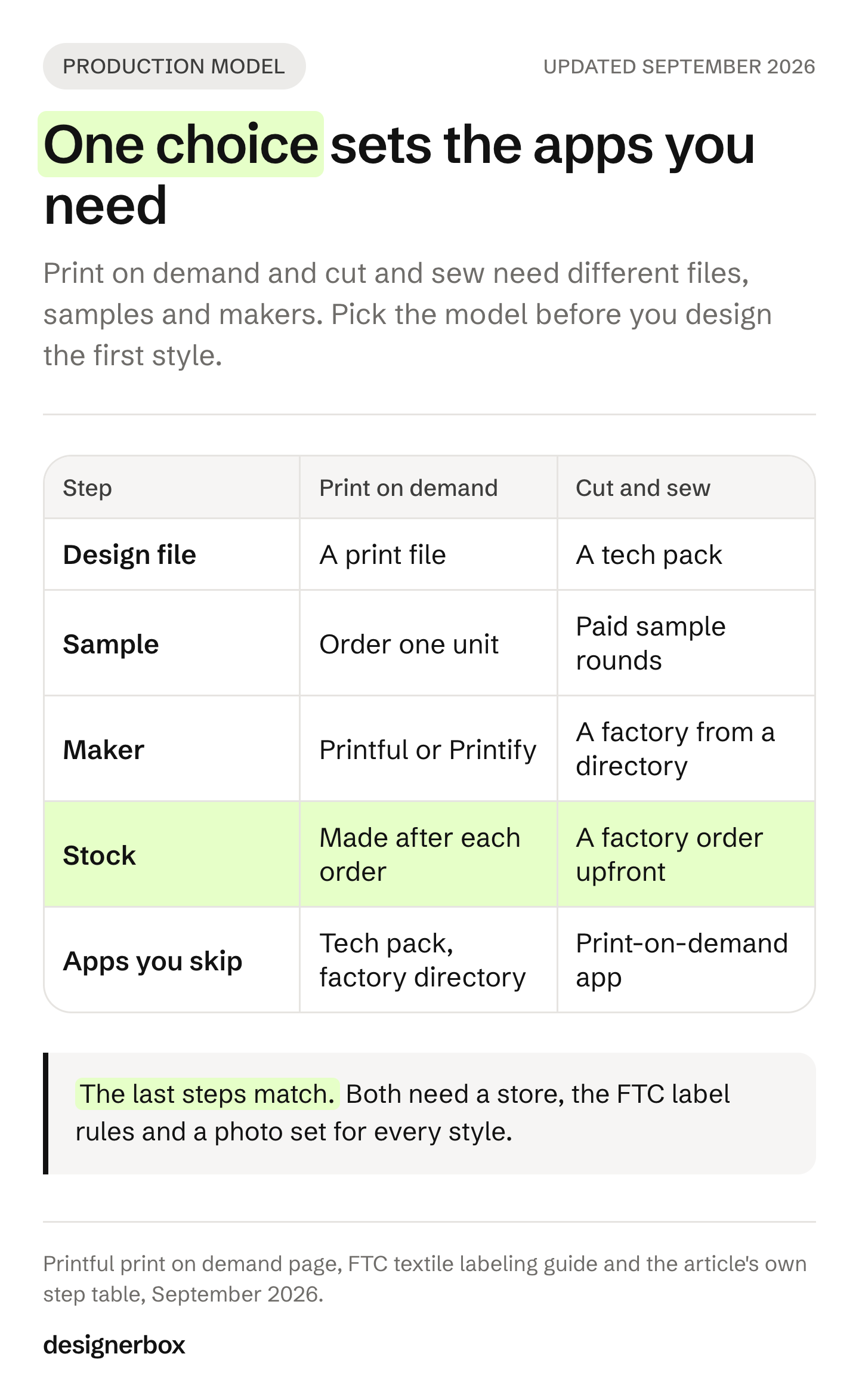
| Model | What you make | Stock before the first sale | Apps you need | Apps you skip |
|---|---|---|---|---|
| Print on demand | A print on a supplier’s blank garment | None. Each product is made after it is bought | Printful or Printify, a store app | Tech pack, factory directory |
| Blanks you decorate | Your print or embroidery on bought blanks | The blanks you buy | A design app, your printer or embroidery machine, a store app | Factory directory |
| Cut and sew | Your own garment from your own pattern | A factory order | Tech pack app, factory directory, a store app | Print-on-demand app |
Printful describes print on demand in one line: “each product is made after it’s bought, so there are no order minimums” (printful.com, September 2026). That makes it the lowest-risk start. You control the print, and the blank, the fit and the fabric come from the supplier’s catalog.
Cut and sew is the opposite. You control the fit and the fabric, and you pay for sample rounds and a first factory order before anything sells. You can test demand with print on demand or blanks first, then move your best styles to cut and sew.
The model also changes what Etsy lets you sell. Etsy accepts “sellers’ original designs produced by a production partner”, and says sellers “must disclose that an item is made by a production partner”. It lists “resold blank items that are ready to use without craft intervention, such as blank t-shirts” as items that do not qualify (Etsy Creativity Standards, September 2026). A blank with your own print on it is your design. A blank with nothing added is resale.
Apps for the brand name and logo
The brand name comes before the logo, and the search comes before the name. A name you cannot register is a name you might have to change after the labels are printed.
- USPTO Trademark Search. The USPTO’s search page points applicants to a clearance search for similar trademarks before they file, because a mark that is likely to be confused with an existing one can be refused. The search tool is public (USPTO, September 2026). Search the exact name, then close variants.
- Your state’s business registry. The SBA explains that an entity name, a trademark, a DBA and a domain name are four separate registrations, and that a DBA gives no legal protection (SBA, September 2026).
- A vector app for the logo. Draw the logo as a vector in Illustrator or Inkscape, a free open-source app. A vector file scales from a neck label to a hoodie back without losing detail.
One trap sits in the design apps many founders open first. Canva’s content license lists this as a prohibited use of its free and Pro content: “use any of the Content as part of a trade-mark, design-mark, trade-name, business name or service mark (excluding fonts)” (canva.com/policies/content-license-agreement, September 2026). The same license also bars showing its content “on a standalone basis” on on-demand products such as t-shirts. Canva works for mood boards, hang tags and social posts. Draw the logo and the garment prints yourself, or have a designer draw them. The six brand decisions to lock before any photo are in apparel branding.
Apps for design and the tech pack
The design step ends with flat drawings: front and back views of each garment, drawn to scale. The tech pack step turns those flats into the spec file a factory quotes from.
- Procreate for sketching on an iPad, with an Apple Pencil.
- Adobe Illustrator for flats and print files. Flats are vector drawings, and most tech pack templates expect them.
- Techpacker for the tech pack itself. It is a tech pack editor for organizing specs (techpacker.com, September 2026).
- CLO for 3D samples, later. It makes sense when fit problems start to cost you sample rounds.
A tech pack lists every size’s measurements, the fabric, the trims, the stitching, the label position and each colorway. Without one, the factory guesses. The guide to fashion design software for beginners compares these apps, including which ones are free. For a tablet or a phone, see clothing design apps for iPad, iPhone and Android.
A print-on-demand brand skips the tech pack. It needs a print file instead: artwork at the size and resolution the supplier asks for, placed on the supplier’s blank. AI tools for print on demand covers print file sizes and which marketplaces allow AI designs.
Apps for samples and production
The production app depends on the model. Order a sample before you list anything, whichever model you picked.
- Printful and Printify print your design on a blank after each order and ship it to the buyer. Printify connects to Etsy, Shopify, TikTok and Amazon, and has its own mockup generator (printify.com, September 2026). Order one unit of each style to check the print, the color and the fit.
- Maker’s Row is a directory of US manufacturers. Brands browse factories and post projects (makersrow.com, September 2026).
- Sewport lets brands get quotes from clothing manufacturers (sewport.com, September 2026).
For cut and sew, send the tech pack to two or three makers, compare the quotes and the minimum order, and pay for a sample from the one you pick. Expect more than one sample round. Each round should change the tech pack, so the file and the garment stay the same.
What labels does a clothing brand need?
In the US, a clothing label must show three things: the fiber content, the country of origin, and the maker or seller, as a company name or an RN number. The FTC also sets where it goes and what an online listing must say. This is general information, not legal advice. Check the rules for every country you sell in.
The rules come from two FTC guides:
- Fiber content. “The generic fiber names and percentages by weight of each constituent fiber must be listed in descending order of predominance” (FTC textile guide, September 2026).
- Position. On a garment with a neck, attach the label “either midway between the shoulder seams or close to another label attached to the inside center of the neck”.
- Online listings. Internet advertising must include a clear statement that the item was “made in U.S.A.,” “imported” or both. Put it in every product description.
- RN number. An RN is an FTC number you can use on the label instead of your company name. The FTC says “an RN is not required in order to do business in the U.S.”
- Care label. A separate rule asks for care instructions on a label that is “attached permanently” and stays “legible during the useful life of the product” (FTC care labeling guide, September 2026).
The business setup sits in the same step. The SBA says a sole proprietorship “is easy to form”, and that its owner “can be held personally liable for the debts and obligations of the business”. It says an LLC protects “your personal assets” in most instances (SBA, September 2026). For the tax ID, the IRS says you can get an EIN online “in minutes for free”, and adds: “You never have to pay a fee for an EIN” (IRS, updated 19 August 2026).
Which store app should a new clothing brand use?
Most new clothing brands choose between their own store on Shopify and a marketplace shop on Etsy. Many use both. The store app matters less than how it handles sizes and colors, because every style is a grid of variants.
Shopify. A product can have up to three options, such as size, color and material, and “up to 2,048 variants” (Shopify Help Center, September 2026). A tee in five sizes and four colors is 20 variants on one product page. Plan the three options before you add the first product, because a fourth option does not fit. Shopify apps for clothing stores covers the apps for size charts, returns, reviews and email.
Etsy. Etsy is a marketplace with buyers already on it, and its rules are tied to how the item is made. A print-on-demand brand has to disclose the production partner, and a hand-embroidered or hand-altered garment counts as made by the seller (Etsy Creativity Standards, September 2026). Etsy also says listings for items made by a seller “must use original photo or video content of the final product”.
Product photos for every style
Every style needs photos before it goes live, and every color needs its own. A first drop of ten styles in three colors is 30 colorways. A common set per colorway is a front, a back, a detail and a shot on a model. Google Merchant Center asks you to “provide images of products worn by people for clothing (apparel) products” (Google Merchant Center, September 2026).
There are two routes. The camera route is covered in clothing product photography: setup, lighting and the shot list each marketplace asks for. The AI route starts from one photo of each finished garment. If you use AI images, keep their metadata: Google says images made with generative AI must carry metadata that says so, and not to remove it. Labeling AI-generated fashion images covers the other platforms.
DesignerBox is AI creative production for brands and agencies. Scale your images, ads and video with AI and keep your brand on every piece: build the workflow once with your brand rules, run it on every product, see the cost before each run, and keep everything from the first product photo to the finished ad in one place.
DesignerBox does not draw flats, write tech packs, print or ship. It makes the images you sell with:
- Clothing catalog turns one garment into four shots: front, three-quarter, back and a fabric close-up.
- Dress My Model puts the garment on a model. AI models for clothing brands shows how to test AI models on ten products before you switch a whole catalog.
- Batch runs one workflow over a whole sheet of styles, and you keep or discard each row.
Anyone can make an AI picture. Making hundreds that still look like your brand is the hard part. You set the brand once, and the workflow reads it on every run, with the same model, light and framing on the next style. The full workflow from the first product photo to the finished ad, in one subscription.
The honest limits: the commercial license starts on the Pro plan, and virtual try-on and AI video start on the Premium plan. Plans and credits are on the pricing page. Photograph the real sample too, because an AI image shows the garment you gave it, and a buyer compares the parcel with the photo. See what DesignerBox does for fashion brands.
Apps to add after the first orders
The first orders bring new jobs: emails to past buyers, reviews, size questions and returns. Add one app per job when the job appears, not before launch.
- Email. Shopify Email or Klaviyo, for a welcome email and a new-drop announcement.
- Social media. Start with Instagram and TikTok. Social media marketing for clothing brands covers the posts each garment needs and the rules for creator posts.
- Reviews. A review app that asks buyers for a photo of the garment on them.
- Size and returns. A size chart on every product page first. A fit or returns app once returns start to cost you money.
The list gets longer as the catalog grows: 30 styles become 120 colorways and 720 SKUs. Fashion business automation tools sorts those apps by the count they handle.
Scale content without limits.
Generate content for your products or services with AI, starting today, and keep your brand on every piece.
FAQ
How much does it cost to start a clothing brand?
It depends on the production model. Print on demand has the lowest upfront cost, because each product is made after it is bought and there are no order minimums. Blanks cost the blanks you buy. Cut and sew costs the most before the first sale: sample rounds, then a first factory order. Some steps cost nothing, such as the USPTO search and the EIN.
Do I need an LLC to start a clothing brand?
No. The SBA says a sole proprietorship is easy to form, but its owner can be held personally liable for the business’s debts. An LLC protects your personal assets in most instances. Which one fits depends on your state and your risk, so check with an accountant or a lawyer.
Can you start a clothing brand for free?
Several steps are free. The USPTO trademark search is public, the IRS gives an EIN for free, and print-on-demand suppliers have no order minimums, so you pay for a product only after a buyer pays you. You still pay for a sample of each style and for your store, and those are costs you should plan for.
What is the best app to start a clothing brand?
No single app covers every step. Most brands use a store app (Shopify or Etsy), a production app (Printful or Printify for print on demand, or a factory directory for cut and sew), a design app such as Illustrator, and a way to make product photos. The production model decides which apps you need.
Do I need a tech pack for print on demand?
No. A tech pack is the spec file a factory needs to make your own garment. Print on demand prints your artwork on the supplier’s blank, so it needs a print file at the size and resolution the supplier asks for. You need a tech pack when you move a style to cut and sew.
Can I use Canva to design my clothing brand logo?
Canva’s content license does not allow its stock content, such as icons, illustrations or templates, to be used as part of a trademark or business name. Fonts are excluded from that rule. Draw the logo yourself in a vector app, or hire a designer, so you own every part of it.
Can I use AI photos for my clothing listings?
Yes, with checks. Photograph the real sample too, so you can check that the AI image matches it. Google Merchant Center asks you to keep the metadata that says an image was made with AI. Etsy says listings for items made by a seller must use original photos of the final product.
Sources
- FTC, Threading Your Way Through the Labeling Requirements Under the Textile and Wool Acts, accessed 24 September 2026. Fiber content, country of origin, identity, label position, online advertising and the RN.
- FTC, Clothes Captioning: Complying with the Care Labeling Rule, accessed 24 September 2026.
- IRS, Get an employer identification number, last updated 19 August 2026, accessed 24 September 2026.
- SBA, Choose a business structure and Register your business, accessed 24 September 2026.
- USPTO, Search our trademark database, last updated 8 April 2026, accessed 24 September 2026.
- Etsy, Creativity Standards, last updated 10 June 2025, accessed 24 September 2026.
- Shopify Help Center, Adding variants, accessed 24 September 2026.
- Google Merchant Center, Image requirements, accessed 24 September 2026.
- Canva content license agreement (canva.com/policies/content-license-agreement), accessed 24 September 2026.
- Printful print on demand page (printful.com/print-on-demand), Printify site and integrations (printify.com), Maker’s Row (makersrow.com), Sewport (sewport.com) and Techpacker (techpacker.com), all read 24 September 2026.
- DesignerBox features and plan gating: DesignerBox pricing page (designerbox.ai/pricing), September 2026.
Labeling, tax and business rules verified against FTC, IRS, SBA and USPTO pages, and marketplace and app facts against each company’s own pages, as of September 2026. This article is general information, not legal advice. Individual results vary.