AI tools for print on demand do five jobs: they make the artwork, set the lettering, turn the image into a print file, place it on a mockup and build the listing images. No single tool does all five well. Choose each tool by three checks. Does the file print at full size? Can you stop someone copying the design? Does your marketplace accept it?
How good a picture looks is the easy part to judge. A t-shirt design that looks sharp on screen can still print soft, belong in part to the tool that made it, or get blocked for looking like somebody else’s character.
This guide sorts 12 tools by the job each one does, with each tool’s output format, transparency, upscaling and ownership terms read from its own pages in September 2026. It also covers the print file sizes Amazon Merch on Demand, Printful and Printify ask for, what the US Copyright Office says about AI designs, and the AI rule on each marketplace. It is written for the one-person or small-team print on demand shop that sells designs, not for someone printing one shirt for themselves. Where print on demand sits against blanks and cut and sew is covered in how to start a clothing brand.
Key Takeaways
- Five jobs, not one tool. Artwork, lettering, print file, mockup and listing images. Expect to use two or three tools. The weak link is usually the print file.
- No generator makes a full-size print file on its own. OpenAI’s image models stop at 8.3 megapixels and FLUX.2 at 4. A Merch on Demand design at 300 DPI can need 24 megapixels, so an upscaler is part of the job.
- Free plans can cost you the design. On Recraft’s free tier, Recraft owns the images. On Leonardo’s free plan, ownership passes to Leonardo. Read the terms before you design on a free plan.
- An AI-only image has no US copyright. The US Copyright Office says prompts alone are not enough. What you add by hand, such as the lettering and the layout, can be protected.
- Etsy is the only big marketplace with a written AI rule. You must say in the listing description that an item was made with AI. Amazon Merch, Redbubble, TeePublic and Society6 say nothing about AI on their public policy pages.
- Trademarks block more AI designs than bad pixels. Printify blocks AI designs that closely resemble existing IP, even if you created the design yourself.
What do AI tools for print on demand do?
AI tools for print on demand cover five separate jobs. A generator makes the artwork. A type or vector tool sets the lettering. A background remover, an upscaler and a vectorizer turn the image into a print file. A mockup tool places the design on a product. Then the listing needs its own images. Each job has different tools, and a tool that does one well often skips the next.
| Job | What the result must be | Tools in this guide that do it |
|---|---|---|
| Artwork | An original image in your style | Midjourney, Ideogram, Leonardo.Ai, Adobe Firefly, Canva, Printify AI, OpenAI and Google models |
| Lettering | Correct words, set cleanly | Ideogram, Kittl, Recraft, Adobe Firefly text to vector |
| Print file | Transparent PNG or vector at print size | Vectorizer.AI, Kittl, Recraft, Leonardo.Ai, Photoroom, Printful Smart Image Tool |
| Mockup | The design on the product | Placeit, Kittl, Recraft, Printful Design Maker, Printify Product Creator |
| Listing images | A set of images that looks like one shop | See print on demand product images |
The first three jobs decide whether the product can be sold. The last two decide whether it sells. This article covers the first three in depth and points to the listing side at the end.
How big does a print file need to be?
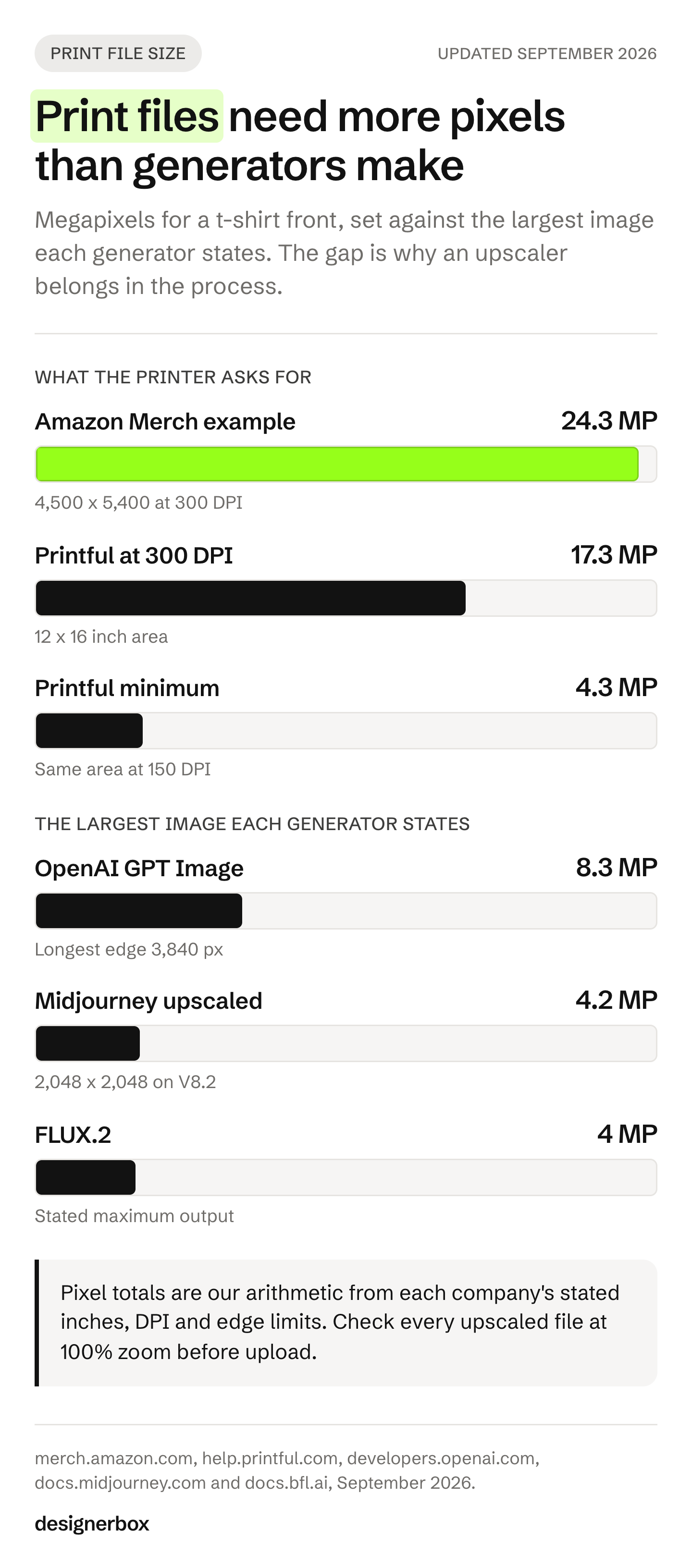
A print file needs enough pixels to fill the print area at the printer’s resolution. For a t-shirt front, that is roughly 4 to 24 megapixels depending on the printer and the size you print. Most AI image generators stop at 4 to 8 megapixels, so a full-size design almost always needs an upscaler before you upload it.
Here is what three print services ask for, from their own pages in September 2026:
| Service | File type | Resolution rule | What it means in pixels |
|---|---|---|---|
| Amazon Merch on Demand | PNG, RGB, under 25 MB | At least 485 x 485 pixels to upload. Amazon recommends 100% of the print size at 300 DPI, starting at 4,500 pixels or more | Its own worked example is 4,500 x 5,400 pixels, or 24.3 megapixels. The pullover hoodie uses 4,500 x 4,050 |
| Printful | PNG or JPEG, sRGB | At least 150 DPI. 150 to 300 DPI is ideal | The 12 x 16 inch t-shirt area is 1,800 x 2,400 pixels (4.3 megapixels) at 150 DPI and 3,600 x 4,800 (17.3 megapixels) at 300 DPI |
| Printify | JPEG, PNG or SVG. PNG and JPEG up to 100 MB, SVG up to 20 MB | 300 DPI recommended. 120 to 150 DPI for large items such as blankets and tapestries | Print areas vary by product and appear in Printify’s Product Creator |
Sources: Merch on Demand artwork tips and Merch FAQs, September 2026; Printful DPI help and Printful print file guide (help.printful.com and printful.com/blog, September 2026); Printify print file help (help.printify.com, September 2026). The pixel sizes are our arithmetic from the stated inches and DPI.
Now compare that with what the generators give you:
- OpenAI’s image models allow a longest edge of 3,840 pixels and at most 8,294,400 pixels in total. OpenAI calls sizes above 2,560 x 1,440 experimental (OpenAI image generation guide, September 2026).
- FLUX.2 produces up to 4 megapixels (Black Forest Labs FLUX.2 overview, September 2026).
- Google’s Gemini image models output 1K, 2K and 4K images (Gemini API image generation, September 2026).
- Midjourney starts at 1,024 x 1,024 pixels and its upscalers reach 2,048 x 2,048 on V8.2, about 4.2 megapixels (docs.midjourney.com, September 2026).
- Ideogram upscales by up to 2x on paid plans, to 2,048 x 2,048 at a 1:1 ratio (docs.ideogram.ai, September 2026).
So a Printful shirt at its 150 DPI minimum is within reach of most generators. A Merch on Demand design at 300 DPI is not. Amazon also rejects “designs with blurred lines, unclean backgrounds, or watermarks” (Merch on Demand product quality guide, September 2026), so an upscaler that invents soft edges is a problem too. Check every upscaled file at 100% zoom before you upload it.
Vector is the other route. A vector file (SVG, PDF or EPS) has no pixel limit, so it prints sharp at any size. Flat designs, lettering and badges suit vector well. Painterly or photographic designs do not, and a vectorizer will turn them into flat color shapes.
The 12 AI tools for print on demand, by job
Every tool below was checked against its own site in September 2026. We list no prices. Each tool shows its plans on its own pricing page, and plan terms change often. Where a tool’s terms change who owns the image on a free plan, we say so, because that decides whether you can sell the design.
| Tool | Main job | Vector output | Transparent PNG | Who owns the result |
|---|---|---|---|---|
| Midjourney | Artwork | Not stated | Through its Editor | You, with a condition for companies above a revenue threshold |
| Ideogram | Artwork with text | Not stated | Yes, a native endpoint in its API | You, commercial use not restricted |
| Recraft | Vector artwork | Yes, SVG | Yes, through its remover | Paid plans: you. Free tier: Recraft |
| Kittl | Lettering, layout, mockups | Yes, SVG export and a vectorizer | Yes, on premium plans | Pro, Expert and Max: you. Free plan: not for commercial use |
| Leonardo.Ai | Artwork, upscaling | Not stated | Yes, native, PNG only | Paid plans: you. Free plan: Leonardo |
| Adobe Firefly | Artwork, vector | Yes, text to vector SVG | Not stated on the pages we read | You |
| Canva | Artwork inside a design tool | Not stated | Yes, on paid plans | You, except output that includes licensed content |
| Printify AI Image Generator | Artwork inside a POD platform | No | Through a separate remover | No exclusive rights, per Printify’s terms |
| Printful Design Maker | Layout and mockups | Not stated | Through a remover | Not stated for AI output |
| Placeit | Mockups | No | Free background remover | License allows merchandise, not exclusive |
| Vectorizer.AI | Raster to vector | Yes, SVG, PDF, EPS, DXF | Not applicable | The company makes no claim to results |
| Photoroom | Background removal | No | Yes | Free accounts: personal, non-commercial use only |
1. Midjourney
Midjourney is known for strong, stylized artwork, and many sellers use it for illustration-led designs. Its V8.2 images start at 1,024 x 1,024 pixels, and its Creative and Subtle upscalers take them to 2,048 x 2,048. Its Editor can save “a transparent PNG of the areas you erased” (docs.midjourney.com, September 2026).
Its terms say you own what you create. Companies above a revenue threshold set in the terms must be on the Pro or Mega plan to own their images, and the terms forbid using the service to violate others’ intellectual property (docs.midjourney.com, Terms of Service effective 27 May 2026). Vector export is not stated.
2. Ideogram
Ideogram’s own page says it “excels at integrating text into images for logos, branding, POD” (ideogram.ai, September 2026). That makes it a common pick for text-led shirts, where a misspelled word ruins the design. Its API has a dedicated endpoint that generates images with a transparent background.
Its terms do not restrict commercial use of your results (ideogram.ai/legal/tos, September 2026). Upscaling is on paid plans, by up to 2x, to 2,048 x 2,048 at 1:1 (docs.ideogram.ai, September 2026).
3. Recraft
Recraft turns a text prompt into “a production-ready SVG” (recraft.ai, September 2026). That is the rare generator that skips the vectorizer step, which suits flat designs, logos and stickers. It also has a background remover that exports transparent PNG, and a mockup generator.
Recraft changed its terms on 11 August 2026. On a paid plan you own the images, and they may not be used to train AI models. On the free tier, “no commercial use of Free Tier Assets is permitted” and those assets are owned by Recraft (recraft.ai/terms, September 2026). Design your sellable work on a paid plan. Free-tier output is one of five clauses to check in any creative tool, and creative tool lock-in covers all five.
4. Kittl
Kittl is a design tool built around lettering, badges and merch layouts, with AI inside it. Its vectorizer is free on every plan, its upscaler reaches 4,096 pixels on the longer side, and it exports SVG. Background removal and quality optimization at export are premium features (help.kittl.com and kittl.com/help, September 2026).
On the Pro, Expert and Max plans you own full rights to AI images, and Pro and Expert cap each design at 500,000 printed copies. On the Free plan, AI images join Kittl’s shared content library and cannot be used commercially on their own. Kittl also blocks prompts for public figures, recognizable characters and brands (help.kittl.com, AI usage rules, September 2026).
5. Leonardo.Ai
Leonardo generates images with a native transparent background, saved as PNG, and its help page lists “prints on items such as shirts or mugs” as a use. Its Universal Upscaler reaches 20 megapixels, and its Pro Upscaler reaches 105 megapixels as a JPEG (docs.leonardo.ai and intercom.help/leonardo-ai, September 2026). A JPEG has no transparency, so the largest upscale needs a background removal step after it.
On a paid plan, ownership of your images vests in you. On a free plan, it “will vest in us upon creation”, meaning Leonardo (leonardo.ai/terms-of-service, updated 19 January 2026).
6. Adobe Firefly
Firefly can generate vectors from a text prompt and download them as SVG, and it upscales images by 2x or 4x (helpx.adobe.com, September 2026). Adobe says “you own your content” and describes safeguards at the prompt and output stages. Its intellectual property indemnification applies to enterprise customers (adobe.com, Firefly approach page, September 2026).
Adobe’s generative AI guidelines prohibit content that violates third-party copyright or trademark (adobe.com, updated 15 May 2026). A transparent PNG export was not stated on the pages we read.
7. Canva
Canva puts image generation inside the same editor sellers already use for layouts. Its AI terms say “you own your Output”, except output that modifies or includes Canva’s licensed content (canva.com/policies/ai-product-terms, effective 26 June 2026). A transparent background download is on Pro, Teams and other paid plans.
Two limits matter for print. The background remover downscales any upload above 10 megapixels to 10 megapixels. Canva’s own help also says you may not have exclusive rights to AI output and need permission to use brands or characters (canva.com/help, September 2026).
8. Printify AI Image Generator
Printify’s generator sits inside its Product Creator, so the design goes straight onto a product and into your store. Each attempt makes one 1,024 x 1,024 image, and Printify says it will “automatically upscale the image to meet the requirements when sending the order to production” (help.printify.com, September 2026).
Its terms are strict about rights. You “acquire no exclusive rights in AI-Generated Content” and must review, edit and approve it before you publish (printify.com/terms-of-service, updated 17 September 2026). Its AI tool terms add that Printify “does not undertake to review or screen every Output” (printify.com/third-party-ai-tool-terms-of-use, September 2026).
9. Printful Design Maker
Printful’s Design Maker lays out a design on a product and pushes it to your connected store, with mockups to download (help.printful.com, September 2026). Its Smart Image Tool “doubles the DPI of low-resolution images”, which helps with files just under the 150 DPI floor (help.printful.com, updated 23 September 2026).
Printful’s content rules require that you own the content or have the rights to use and resell it (printful.com/policies, September 2026). We could not verify the terms of Printful’s AI image generator, so we make no claim about them.
10. Placeit
Placeit is a mockup library first, with AI-generated images, videos and mockups offered as templates made by its content team (placeit.net, September 2026). It is useful for the mockup job once the design exists.
Its license allows you to use a customized product for merchandising. Placeit does not offer exclusive rights, so another seller can use the same template (placeit.net/license and help.placeit.net, September 2026).
11. Vectorizer.AI
Vectorizer.AI does one job: it converts a raster image into SVG, PDF, EPS or DXF (vectorizer.ai, September 2026). It fits flat, high-contrast designs, where a clean vector means the file prints sharp at any size.
Its terms say “The Company makes no claims to these Results” (vectorizer.ai/policies/terms, effective 23 October 2025). It offers a free interactive preview.
12. Photoroom
Photoroom removes backgrounds and exports PNG, JPEG or WEBP (photoroom.com, September 2026). For print on demand it is a clean-up step, used between the generator and the print file.
Its terms limit free accounts to “personal, non commercial purposes” (photoroom.com/legal/terms-and-conditions, effective 29 July 2026). Customers own their content (help.photoroom.com, September 2026). For store designs, use a plan that allows commercial use.
For more background removal options, see the best AI background removers.
Which AI models sit underneath?
Several tools above run image models made by a few companies. You can also reach those models directly or through other apps. They differ on the two things print on demand needs most: text and size.
| Model family | What its maker states | Source |
|---|---|---|
| OpenAI GPT Image | Transparent background with PNG or WEBP output. Longest edge 3,840 pixels. Text placement can still be imprecise | OpenAI image generation guide, September 2026 |
| Google Gemini image (Nano Banana) | 1K, 2K and 4K output, legible stylized text, and a SynthID watermark on every image | Gemini API docs, September 2026 |
| Black Forest Labs FLUX.2 | Up to 4 megapixels. The flex model is “specialized for typography” | FLUX.2 overview, September 2026 |
| ByteDance Seedream | Seedream 4.0 up to 4K. Seedream 4.5 claims clear, readable small text | Seedream 4.0 and Seedream 4.5, September 2026 |
One date matters if you use an older setup. OpenAI removes gpt-image-1 from its API on 23 October 2026, with gpt-image-2 as the replacement (OpenAI deprecations, September 2026). A shop that runs an app or a script on the old model needs to switch before then.
Can you copyright an AI-generated t-shirt design?
Not the AI part. The US Copyright Office says copyright does not cover purely AI-generated material, and that prompts alone do not give enough control to make you the author. It does protect what a person adds: the lettering you set, the way you arrange elements, and changes you make by hand. For a print on demand shop, that decides whether you can stop a copy.
The Office’s report is direct. “Copyright does not extend to purely AI-generated material, or material where there is insufficient human control over the expressive elements.” And: “prompts do not alone provide sufficient control.” Human authors are entitled to copyright in “the creative selection, coordination, or arrangement of material in the outputs, or creative modifications of the outputs” (US Copyright Office, Copyright and Artificial Intelligence, Part 2, 29 January 2025).
The courts agree so far. In Thaler v. Perlmutter, the D.C. Circuit held that the Copyright Act “requires all eligible work to be authored in the first instance by a human being” (opinion via GovInfo, 18 March 2025). The same opinion says the rule “does not prohibit copyrighting work that was made by or with the assistance of artificial intelligence”. The Supreme Court denied the petition on 2 March 2026 (docket 25-449).
What that means in practice for a design shop:
- An AI-only design can be copied. If another seller copies a design that is pure AI output, you may have no copyright to enforce.
- Your additions are the protectable part. Set the words yourself, compose the layout, redraw or change the image by hand, and keep the layered working file.
- Registration asks you to disclose AI. The Office’s guidance says applicants must disclose AI-generated content in a work and exclude any AI content that is more than de minimis (registration guidance, March 2023).
- Tool ownership and copyright are separate. A tool that says “you own the output” gives you its rights, not a copyright the law does not grant. Printify’s AI terms say this directly: you “may not be able to claim copyright ownership in Outputs generated solely by an AI system” (printify.com, September 2026).
This is general information about US law, not legal advice. Other countries treat AI authorship differently. For how usage rights work on photographs and generated images, see image licensing and usage rights.
Which marketplaces allow AI designs?
All the big print on demand marketplaces allow AI-assisted designs, and only Etsy has a written AI rule. On Etsy you must say in the listing description that an item was made with AI. The other marketplaces we checked do not mention AI on their public policy pages. Every one of them makes you responsible for copyright and trademark rights in the design.
| Marketplace or service | Written AI rule | Rights rule |
|---|---|---|
| Etsy | ”Sellers must disclose within their listing description if an item is created with the use of AI.” AI prompt bundles are not allowed as “designed by a seller” items | Sellers must have the rights to their content. Repeat IP notices can end selling privileges |
| Amazon Merch on Demand | None found in its content policies | IP rules cover the design, the product name, the description, the bullet points and the brand name |
| Redbubble | None found in its content guidelines or user agreement | Removes any work found to infringe copyright or trademark |
| TeePublic | None found in its content rules or terms | You warrant that you own the copyright or have permission |
| Society6 | None found in its terms | You must be the owner or have all rights |
| Printify | You get no exclusive rights in AI content and must review it before publishing | Blocks AI designs that closely resemble existing IP |
| Printful | None found | You must own the content or have the rights to resell it |
Sources, all read in September 2026: Etsy Creativity Standards (updated 10 June 2025), Etsy Seller Policy (updated 10 September 2026), Etsy IP policy, Merch on Demand content policies and Merch FAQs, Redbubble content guidelines and user agreement, TeePublic terms, Society6 terms, printify.com/terms-of-service, help.printify.com and printful.com/policies.
“None found” means the public pages we read did not mention AI in September 2026. It does not mean a marketplace allows anything. Redbubble and Amazon Merch did not ask for AI disclosure on any of their own pages we read. Check the current policy before you list.
Etsy has two more rules for print on demand sellers. Your own designs printed by a partner such as Printful or Printify fall under “Designed by a seller”, and you must disclose the production partner. Etsy also allows a stock photo mockup for an original design printed by a production partner (Etsy listing image requirements, September 2026). For the full Etsy image rules, see Etsy product photos.
How do you avoid trademark blocks on AI designs?
Check the words and the subject before you generate, not after. An AI model can reproduce a famous character or a registered phrase without being asked, so the check belongs in your process.
Printify lists “AI-generated designs that closely resemble existing IP” and “trademarked names, phrases, or slogans” among its common reasons for a block, and says a block “can happen even if you created the design yourself” (help.printify.com, September 2026). Amazon’s Merch FAQ says its IP rule applies to “your design for a product” and also to “the product name, the product description, the bullet points, and the ‘brand’ name you select”. It adds: “If you choose to use trademarked content, your design may be rejected” (Merch FAQs, September 2026).
The USPTO defines trademark infringement as use “in a manner that is likely to cause confusion, deception, or mistake about the source” of goods (USPTO, about trademark infringement, updated 28 January 2025). Three habits help:
- Search the phrase. Before you print a slogan, search it in the USPTO trademark database for clothing.
- Keep names out of prompts. Do not prompt with a brand, a character, a franchise or a living artist’s name. Kittl blocks these prompts, and Canva says you need permission from the rights holder.
- Look at the result as a stranger would. If the design reminds you of a known character or logo, do not list it.
A workflow from prompt to listing
A print on demand design goes through seven steps, and AI helps with four of them. The order matters because each step fixes a problem the next one cannot. Here is the order we recommend, with the check at each step.
- Check the idea. Search the phrase for trademarks and read your marketplace’s rules. This takes minutes and prevents most blocks.
- Generate the artwork. Use the largest size your model allows and a transparent background where the tool offers one. Keep the prompt and the seed with the file.
- Set the lettering yourself. Put the words on in a vector or type tool. The text reads correctly, and it is the part you can protect.
- Clean up the file. Remove stray background pixels, then vectorize a flat design or upscale a painterly one.
- Check at 100% zoom. Look for soft edges, artifacts and leftover background. Then check the pixel size against the printer’s table above.
- Export. PNG in RGB with a transparent background for Merch on Demand, sRGB for Printful. Keep the layered working file as your record of what you added.
- Make the listing images. Mockup first, then the rest of the set. On Etsy, add the AI disclosure to the description.
Steps 1, 3 and 5 are yours. No tool in this guide does them for you.
Listing images for every design
The design is one file. The listing needs a set of images for every design, and a shop with 200 designs needs 200 sets that look like one shop. Anyone can make an AI picture. Making hundreds that still look like your brand is the hard part.
DesignerBox is built for that side of the job. You build a workflow once with your brand rules: the background, the light, the framing and the crop. Then batch runs it over your whole sheet of designs, and you review the results in one pass. You see the cost before each run. The image editor removes backgrounds and makes one edit after another. The picture keeps its detail and resolution.
Templates, workflows, apps, batch, the image editor and the video editor are all in one subscription. For vector lettering, finish the design in one of the vector tools above. You download the results, and DesignerBox does not publish them to Etsy or Printify for you. The commercial license starts on the Pro plan. Plans and credits are on the pricing page. For shop-specific setups, see DesignerBox for Etsy sellers.
The first job, built once
Start from a template, add your brand and your products, and run it. The cost is shown before the run.
FAQ
What is the best AI tool for print on demand designs?
It depends on the job. For vector designs, Recraft and Adobe Firefly generate SVG files directly. For text-led shirts, Ideogram and Kittl focus on lettering. For artwork that stays inside your store platform, Printify has a generator in its Product Creator. A full setup combines a generator, a vector or upscaling tool and a mockup tool.
Is AI art allowed on Etsy?
Yes. Etsy allows “seller-prompted AI creations” under its “Designed by a seller” category. You must disclose in the listing description that the item was created with the use of AI. Etsy does not allow AI prompt bundles as “designed by a seller” items (Etsy Creativity Standards and Seller Policy, September 2026).
Can I sell AI-generated designs on Amazon Merch on Demand?
Amazon’s Merch on Demand content policies did not mention AI when we read them in September 2026. They do ban content that uses trademarks, copyrights or the name or likeness of others without rights, and the rule covers your title, description and brand name too. Files must also meet Amazon’s quality rules.
What resolution does an AI design need for a t-shirt?
It depends on the printer. Printful asks for at least 150 DPI, which is 1,800 x 2,400 pixels for its 12 x 16 inch t-shirt area. Amazon recommends 300 DPI at full print size, and its worked example is 4,500 x 5,400 pixels. Most generators need an upscaler to reach the larger size.
Can I copyright an AI t-shirt design?
Not the parts that AI made on its own. The US Copyright Office says prompts alone are not enough for authorship. Your own lettering, arrangement and hand changes can be protected.
Can I use a free AI tool for designs I sell?
Check the terms first. Recraft’s free tier gives ownership to Recraft and forbids commercial use. Leonardo’s free plan gives ownership to Leonardo. Photoroom’s free accounts are for personal, non-commercial use. Kittl’s free plan does not allow commercial use of AI images on their own.
Do I need to label AI designs in the EU?
Article 50 of the EU AI Act has applied since 2 August 2026. Its image disclosure duty covers deep fakes: content that falsely appears authentic, such as a realistic image of a real person or event (European Commission FAQ, September 2026). A stylized t-shirt graphic is usually not a deep fake, but a photorealistic design of a real person may be. This is general information, not legal advice.
Sources
- Amazon Merch on Demand: artwork tips, FAQs, content policies and product quality guide, accessed September 2026
- Etsy: Creativity Standards, Seller Policy, IP policy and listing image requirements, accessed September 2026
- Redbubble: Community and Content Guidelines and User Agreement, accessed September 2026
- TeePublic: Terms, accessed September 2026
- Society6: Terms, accessed September 2026
- US Copyright Office: Copyright and Artificial Intelligence, Part 2 (29 January 2025) and registration guidance for works containing AI-generated material (March 2023)
- Thaler v. Perlmutter: D.C. Circuit opinion via GovInfo (18 March 2025) and Supreme Court docket 25-449
- USPTO: About trademark infringement, accessed September 2026
- European Commission: FAQ on Article 50 transparency obligations, accessed September 2026
- OpenAI: image generation guide and deprecations, accessed September 2026
- Google: Gemini API image generation, accessed September 2026
- Black Forest Labs: FLUX.2 overview, accessed September 2026
- ByteDance Seed: Seedream 4.0 and Seedream 4.5, accessed September 2026
- Tool pages, read as bare text: docs.midjourney.com (Terms of Service, Upscalers, Editor); ideogram.ai/legal/tos and docs.ideogram.ai; recraft.ai and recraft.ai/terms; help.kittl.com and kittl.com/help; leonardo.ai/terms-of-service, docs.leonardo.ai and intercom.help/leonardo-ai; adobe.com and helpx.adobe.com (Firefly); canva.com/policies/ai-product-terms and canva.com/help; help.printify.com, printify.com/terms-of-service and printify.com/third-party-ai-tool-terms-of-use; help.printful.com, printful.com/blog and printful.com/policies; placeit.net/license and help.placeit.net; vectorizer.ai and vectorizer.ai/policies/terms; photoroom.com/legal/terms-and-conditions and help.photoroom.com. All accessed September 2026
- DesignerBox: image editor and plans (DesignerBox product and pricing pages, September 2026)
Tool features, terms, print file rules and marketplace policies verified from each company’s own pages as of September 2026. Individual results vary.