
Agent orchestration is the set of rules that decides which AI step runs, in what order, and who chooses the next step. Either your saved path chooses, or the model chooses. Five patterns appear in the published guides: prompt chaining, routing, parallelization, orchestrator and workers, and evaluator and optimizer. For repeated creative work, a fixed path with one check and one human approval is the usual place to start.
This guide is written for a person who runs creative operations at a brand or an agency. You do not need to write code to use the ideas. It defines the patterns from the vendors’ own documentation, builds one creative job in six steps, and states the limits with their sources.
Key Takeaways
- Orchestration answers one question. Who decides the next step: your saved path, or the model.
- Five patterns cover most systems. Prompt chaining, routing, parallelization, orchestrator and workers, and evaluator and optimizer.
- Four of the five follow a fixed path. Only orchestrator and workers lets a model plan the subtasks.
- Vendors use different names for the same shapes. Microsoft’s sequential pattern is Anthropic’s prompt chaining.
- A creative build needs six steps. Brief, product data, image step, critic step, human approval and delivery.
- Autonomy has a cost. Anthropic names higher costs and compounding errors. A fixed workflow is the better choice for a job you can write down.
What is agent orchestration?
Agent orchestration is how a system coordinates its AI steps. OpenAI’s documentation gives a short definition: “Orchestration refers to the flow of agents in your app. Which agents run, in what order, and how is the next step decided?” (OpenAI Agents SDK documentation, October 2026).
The same page names two ways to do it. In the first, the model makes the decisions. In the second, your code decides the flow. OpenAI says the second way “makes tasks more deterministic and predictable, in terms of speed, cost and performance”.
For a creative team, the “agents” are the steps of a job. One step reads the brief. One step makes the image. One step checks it. Orchestration is the plan that connects them. Agentic workflows covers the stages of such a chain in more detail.
Workflow or agent: who decides the next step?
Anthropic’s guide “Building effective agents” separates two kinds of system. It says: “Workflows are systems where LLMs and tools are orchestrated through predefined code paths.” Agents “are systems where LLMs dynamically direct their own processes and tool usage” (Anthropic, published December 2024, read October 2026).
So a workflow follows a path a person wrote. An agent chooses its own path.
The difference matters for a creative team because of review. With a workflow, you know which steps ran, so you know where to look when a result is wrong. With an agent, the path may change from run to run.
Google’s Agent Development Kit makes the same split. Its template workflows run “without consulting an AI model for assistance with the orchestration”, and Google says this gives “deterministic and predictable execution patterns” (Agent Development Kit documentation, October 2026).
The five agent orchestration patterns
Anthropic’s guide describes five patterns. The pattern names and definitions are Anthropic’s. The creative examples are ours.
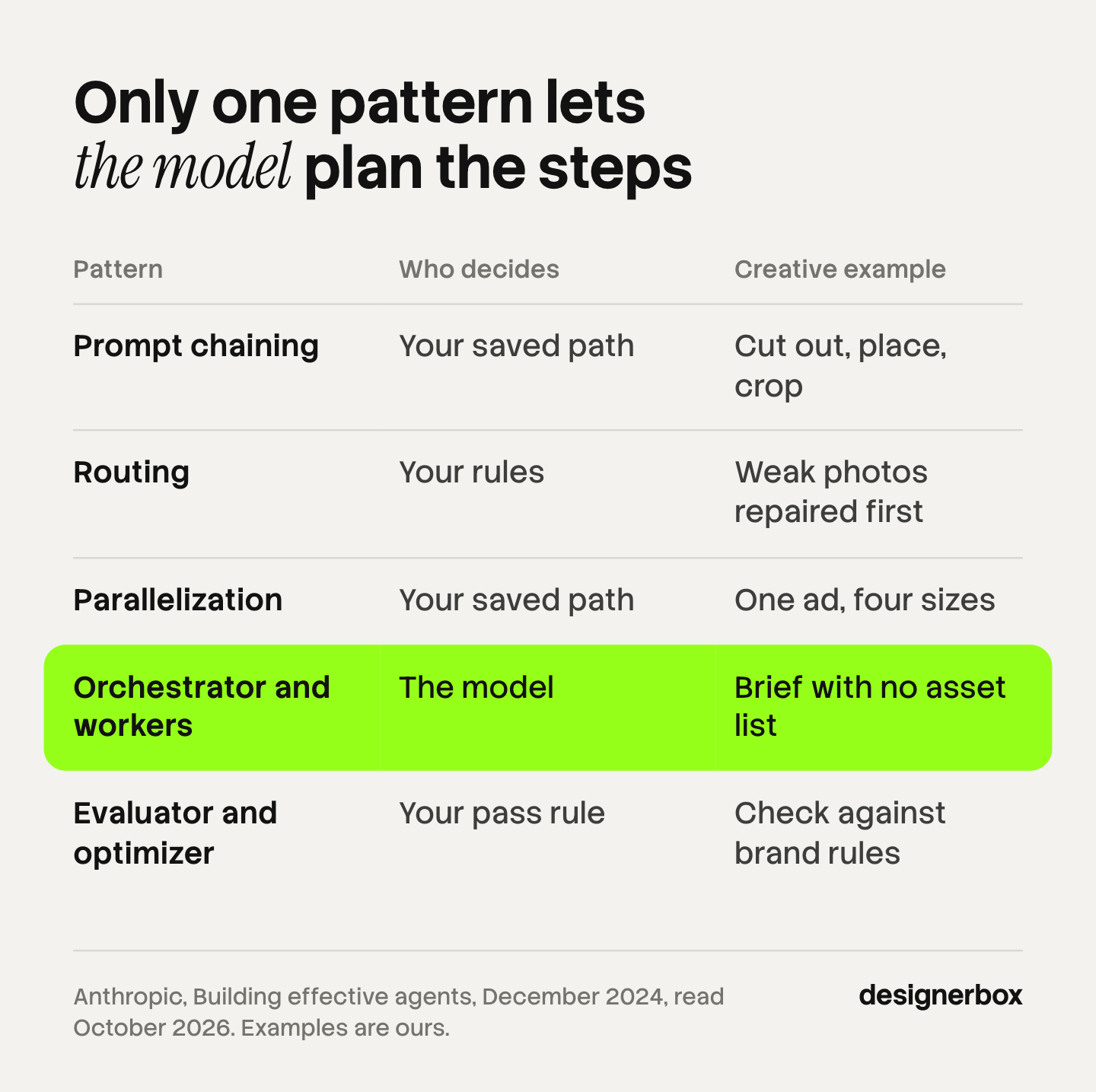
| Pattern | How it works | Who decides the next step | Creative example |
|---|---|---|---|
| Prompt chaining | Each step uses the result of the step before | Your saved path | Cut out the product, place it in a scene, crop it per placement |
| Routing | A first step sorts the input and sends it down one of several paths | Your rules | A photo on white goes to the scene step. A phone photo goes to a repair step first |
| Parallelization | Several steps run at the same time on independent parts | Your saved path | One product in six colors, or one ad in four sizes |
| Orchestrator and workers | A central model breaks the task into subtasks and hands them to workers | The model | A campaign brief with no fixed list of assets |
| Evaluator and optimizer | One step makes a result, a second step scores it, and the loop repeats | Your pass rule | Make an image, compare it with the brand rules, try again on a miss |
Three details from the guide help when you choose. Prompt chaining allows a check between two steps, and Anthropic’s own example is a marketing one: write the copy, then translate it. Parallelization has two forms. Sectioning splits a task into independent parts, and voting runs the same task several times to get different results.
The third detail is about the check loop. Anthropic says the evaluator and optimizer pattern works best “when we have clear evaluation criteria”. A color value is a clear criterion. Whether a photo feels expensive is not.
In orchestrator and workers, the subtasks are not written in advance. That makes the pattern flexible and harder to review.
How vendors name the same multi agent workflow patterns
The four vendors describe similar shapes with different words. This table maps the names, so a document from one vendor reads clearly next to another.
| Anthropic | OpenAI Agents SDK | Google Agent Development Kit | Microsoft |
|---|---|---|---|
| Prompt chaining | Chaining in code | Sequential workflow | Sequential orchestration |
| Routing | Handoffs | Agent routing | Handoff orchestration |
| Parallelization | Parallel runs | Parallel workflow | Concurrent orchestration |
| Orchestrator and workers | Agents as tools | Collaborative workflow | Magentic orchestration |
| Evaluator and optimizer | Evaluator loop | Loop workflow | Maker-checker loop |
The match is approximate. Microsoft’s own page confirms two of the rows. It says sequential orchestration “is also known as a pipeline, prompt chaining, or linear delegation”. It says maker-checker loops “are also known as evaluator-optimizer, generator-verifier, critic loops, or reflection loops” (Microsoft Learn, October 2026).
If you plan to compare products that build these patterns for you, AI agent builders for marketing teams lists them. Agentic marketing platforms covers the larger suites.
How to build agentic workflows: a creative job in six steps
The job in this example is the same shot for every product. A brand has 40 new products. Each one needs a hero image in the brand’s light and framing. The build uses three patterns: a chain, a check loop and one human gate.
- Write the brief as rules. List what must be true in every image: background, light direction, framing, text style and the sizes you need. A rule a step can check is better than a mood word. AI creative agents explains how to brief a model this way.
- Prepare the product data. Make one row per product: the name, the source photo, the color and any text that must stay readable. Clean inputs matter more than a clever plan. A routing step can send weak photos to a repair step first.
- Add the image step. This step takes one row and the brief, and it makes the image. Keep it to one task. If you also need a crop per placement, make that a separate step in the chain.
- Add the critic step. A second step scores each image against the rules from step one. This is the evaluator and optimizer pattern. Give it a clear pass rule and a limit on tries. Microsoft’s guide says: “Set an iteration cap to prevent infinite refinement loops.”
- Add the human approval. A person approves or rejects each image before anything leaves the system. Microsoft’s guide says to “identify which points require human input” and to decide whether that input is optional or mandatory. For brand work, make it mandatory.
- Deliver the files. Send the approved images to the place the next team uses: a folder, a storage bucket or a webhook. Name the files by product so nobody sorts them by hand.
Run the build on three products first. Then run it on ten. Fix the brief each time a wrong image passes the critic step. AI workflow builders compares the visual canvases where you can build this chain without code.

Where the Model Context Protocol fits
Orchestration decides the order of steps. The Model Context Protocol, or MCP, decides how an AI application reaches the tools that do the steps. The MCP documentation calls it “an open-source standard for connecting AI applications to external systems” (modelcontextprotocol.io, October 2026).
In practice, MCP lets an AI chat such as Claude, ChatGPT or Cursor call an image service, a file store or a product database. The chat is where you start a run, and the connected service does the work. MCP does not choose a pattern for you. How to make your AI agent creative shows the connection steps for image and video work.
Limits: cost, compounding errors and when a fixed workflow wins
The same sources state the limits of orchestration. Three of them matter for a creative team.

Cost. More steps mean more model calls. Microsoft’s guide says: “Multiagent orchestrations multiply model invocations, and each agent consumes tokens for its instructions, context, reasoning, and tool interactions.” A loop with no limit on tries can repeat the most expensive step many times.
Compounding errors. Anthropic writes: “The autonomous nature of agents means higher costs, and the potential for compounding errors.” Microsoft’s comparison table says of the sequential pattern: “Failures in early stages propagate.” Here is an illustrative calculation. If each of six steps is right 95% of the time, the whole chain is right about 74% of the time. This is an example, and it measures no product.
Complexity you do not need. Anthropic recommends “finding the simplest solution possible, and only increasing complexity when needed”. It adds that this “might mean not building agentic systems at all”. Microsoft says the same: “Use the lowest level of complexity that reliably meets your requirements.”
A fixed workflow wins when the task is well defined. Anthropic says that “workflows offer predictability and consistency for well-defined tasks”. Agents fit tasks where you cannot predict the steps. A catalog shot is a well-defined task. The steps are the same for product one and product forty.
Microsoft lists the opposite mistake too: “Using nondeterministic patterns for workflows that are inherently deterministic.” For repeated creative work, start with a chain, add a check, and keep a person at the approval step.
Orchestration as a saved workflow
DesignerBox is AI creative production for brands and agencies. It uses the fixed-path side of this guide. You build a workflow once with your brand, your products and your rules, and each step does one task. Anyone can make an AI picture. Making hundreds that still look like your brand is the hard part.
The workflow reads the brand profile on every run. Three critic steps score the results, and best-of-N keeps the best one. That is the check from step four of the build. Batch runs the workflow over a whole sheet of products, and you keep or discard each row. That is the human approval from step five. The workflows page shows how the steps connect.
An AI chat such as Claude, ChatGPT or Cursor can run DesignerBox over its MCP server. The chat calls a workflow you saved, so the path stays fixed while the request is in plain words. DesignerBox does not have a public API. The full workflow from the first product photo to the finished ad, in one subscription.
You see the cost of a run before you press Run.
Here are the limits. DesignerBox does not send results to an ad account or a store on its own. You download the results, or send them with a webhook or an S3 step. Every plan below Ultra is one seat. Uploading your own photos and the commercial license start on the Pro plan. AI video, virtual try-on, upscaling, the image editor and the video editor start on the Premium plan. Plans and credits are on the pricing page.
One workflow for every client catalog
An agency builds the workflow once per client and runs it on each new product list. See DesignerBox for agencies
FAQ
What does agent orchestration mean?
It means the rules that decide which AI steps run, in what order, and who chooses the next step. OpenAI’s documentation describes it as “the flow of agents in your app” (openai.github.io, October 2026). The path is either written in advance or chosen by a model during the run.
What is the orchestrator worker pattern?
It is a pattern where one central model splits a task into subtasks, gives them to worker models and combines their results. Anthropic says the subtasks “aren’t pre-defined, but determined by the orchestrator based on the specific input” (anthropic.com, read October 2026). It fits tasks where you cannot list the steps in advance.
What is the difference between a workflow and an agent?
A workflow follows a path a person wrote in advance. An agent decides its own steps and its own use of tools. Anthropic’s guide makes this distinction and recommends workflows for well-defined tasks (anthropic.com, read October 2026).
What are some agentic workflow examples for a creative team?
Three common ones: a chain that cuts out a product, places it in a scene and crops it per placement. A parallel run that makes one ad in several sizes. A check loop that compares each image with the brand rules and tries again on a miss.
Do I need several agents for one creative job?
Often no. Microsoft’s guide says to use “the lowest level of complexity that reliably meets your requirements” and lists a single model call and a single agent with tools before multi-agent orchestration (learn.microsoft.com, October 2026).
Can an AI chat run a saved DesignerBox workflow?
Yes. An AI chat such as Claude, ChatGPT or Cursor runs DesignerBox over MCP. The chat starts a workflow you saved, and the cost of the run is shown before the run.
Sources
- Anthropic, “Building effective agents” (published 19 December 2024): workflows and agents, the five patterns, costs and compounding errors: anthropic.com, October 2026
- OpenAI Agents SDK documentation, “Agent orchestration”: orchestrating via LLM and via code: openai.github.io, October 2026
- Google, Agent Development Kit documentation, template workflows (sequential, loop, parallel): google.github.io, October 2026
- Google, Agent Development Kit documentation, workflow types including collaborative workflows and agent routing: google.github.io, October 2026
- Microsoft Learn, Azure Architecture Center, “AI agent orchestration patterns”: pattern names, cost, reliability and human participation: learn.microsoft.com, October 2026
- Model Context Protocol documentation, “What is the Model Context Protocol (MCP)?”: modelcontextprotocol.io, October 2026
- DesignerBox plans and feature gating: DesignerBox pricing page (designerbox.ai/pricing), October 2026
Vendor documentation checked against each company’s own pages as of October 2026. The pattern mapping across vendors is our reading, and the match is approximate. Individual results vary.