
A DesignerBox app is a workflow with a form. Someone on your team builds the workflow once, with your brand, your products and your rules, then publishes it as an app. A colleague completes the form and presses Run. The colleague never opens the workflow, and the run follows the same steps every time. You find DesignerBox apps on the apps page.
You have 40 new products this month. Each one needs listing angles, a clean cutout for the marketplace, a lifestyle shot for the product page, ad sizes for paid social, and a short clip.
That is five jobs, and every one of them comes back next month for the next products. Apps exist so the person who knows the job builds it once, and the rest of the team runs it. Apps are one part of the app we rebuilt, and the new DesignerBox explains every other part. The full workflow from the first product photo to the finished ad, in one subscription. The stills, the ad sizes and the clip never leave the workspace. This guide covers where apps sit in DesignerBox, the jobs you can start from, what a run costs, and what apps do not do.
Key Takeaways
- An app is a workflow with a form. A colleague completes the form and presses Run, and never opens the workflow.
- Apps are the third of four ways to run one workflow: template, workflow, app, and batch.
- The cost of a run depends on the models the workflow uses, and it is shown before you press Run.
- An avatar run has a fixed price: nine fixed poses for 25 credits.
What DesignerBox apps are
A DesignerBox app is the third of four ways to run one workflow. Nothing is rebuilt between the four. Each one widens who can run it.
| Stage | What it is | Who runs it | Status |
|---|---|---|---|
| Template | A workflow somebody already built. Open one, add your photo, run it | Anyone | Live |
| Workflow | Your own set of steps, built once with your brand and run again | The person who set it up | Live |
| App | A workflow with a form. A colleague completes it and presses Run | A colleague who never opens the workflow | Live |
| Batch | One workflow over a whole sheet of products, reviewed in one pass | One person, once | Live |
Step one is one photo. Step four is the whole catalog. The How it works page walks through all four.
You usually start from a template, which is a job someone has already built. You make a copy and change it into your own workflow, with your brand and your products. Then you publish it as an app: the same workflow behind one simple form. A colleague runs that app and never sees the steps underneath.
The trade is deliberate. You pick the model and the settings for each step when you build the workflow, and every run after that uses them. A template comes with its model already picked. The person who runs the app only completes the form. So a colleague who has never chosen a model can run the job, and the run follows the same steps on the first product and the fortieth.
You set the brand once in a brand profile, and the workflow reads it on every run. Every result lands in Assets.
Jobs you can start from
These are jobs DesignerBox runs today, as of September 2026. Some start as templates and some as apps. Any of them can become your own workflow, and any workflow can be published as an app.
| Job | The result | Start from |
|---|---|---|
| Multi-angle views | More angles of the same product from one photo | A multi-angle template |
| Relighting | The same product photo with new light | A relighting template |
| Background removal and replacement | A clean cutout, or the product on a new background | A white background template |
| Flat lay | A top-down styled composition | A garment flat lay template |
| Styled scene | The product in a lifestyle scene, with up to four references | A product scene template |
| Skin retouch | A finishing pass on portraits and on-model shots | A skin retouch template |
| Dress my model | Your garment on a model | The Dress my model app |
| Virtual try-on | A garment shown worn | A virtual try-on template |
| Clothing catalog | One garment as four shots: front, three-quarter, back and a fabric close-up | The templates page |
| Fashion video | A garment photo turned into a short clip | A fashion video template |
| Ads resizer | One ad in every size the ad platforms need | Your own workflow today. The ads resizer app is being built |
| Ad localizer | One ad rebuilt in another language, with the layout redrawn | The templates page |
| Brand storyboard | A campaign storyboard before anything runs at volume | The brand storyboard app |
| Avatars | Nine fixed poses of one person | The templates page |
What an app run costs
The cost of a run is shown before you press Run. For a run on 40 products, you read that number before you spend any credits.
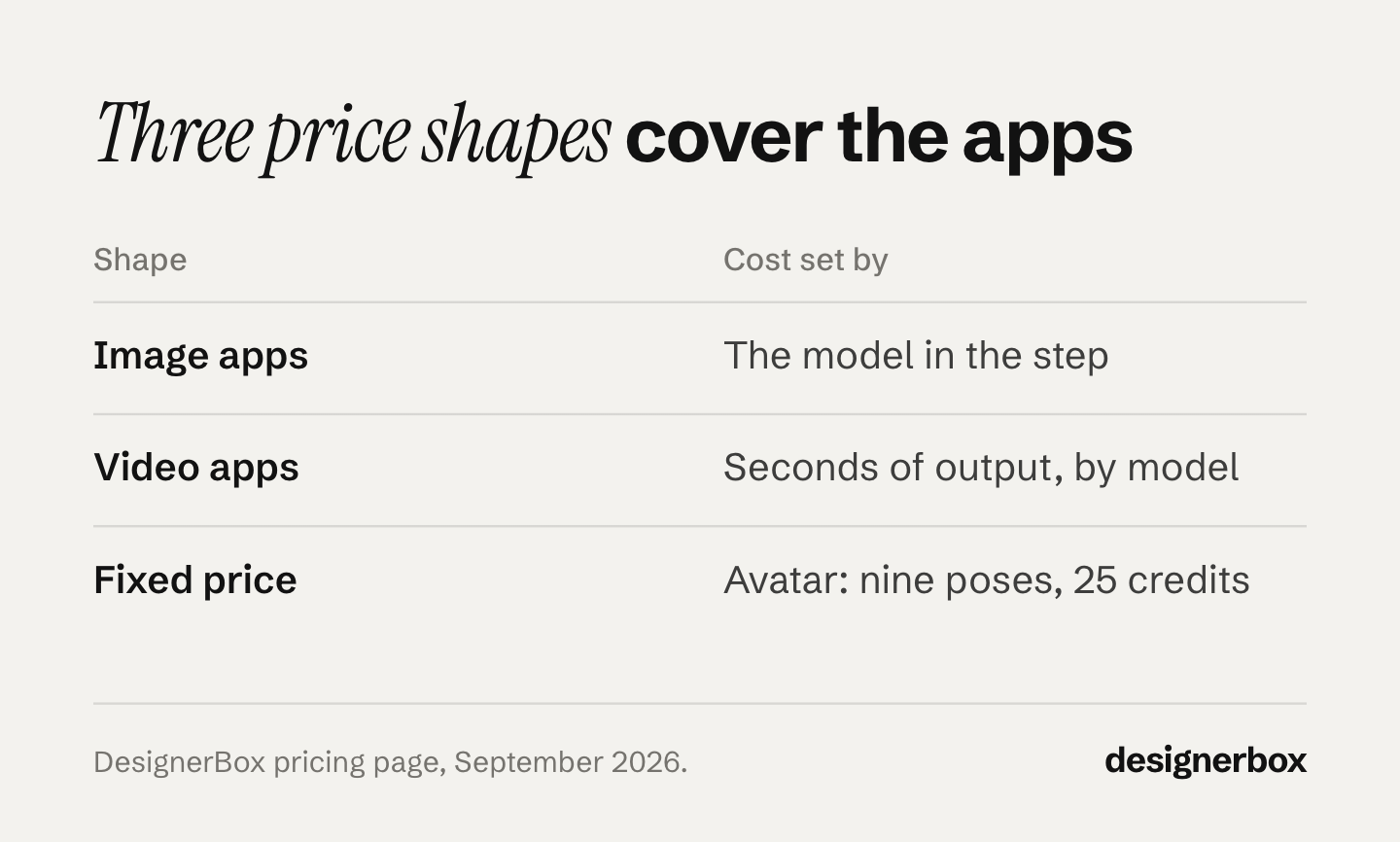
Image steps cost what their model costs. Two apps that do the same job on different models cost different amounts.
Video depends on the model too. An 8-second clip costs 40 to 560 credits, depending on the model.
Some operations have a fixed price. An avatar run returns nine fixed poses for 25 credits.
Our guide to AI ad generator pricing covers how AI tools present the same kind of rate in different ways.
Results on the free plan carry a watermark. Read the plan choice as a volume decision: check the cost of your first run against your monthly allocation. Plans and credits are on the pricing page.
Product photo jobs

Multi-angle views, relighting, background removal, flat lays and styled scenes cover the still-image jobs a studio day is often booked for.
A sequence that fills a listing: remove the background for the clean cutout, make the extra angles, relight if the source light is flat, then place the product in a styled scene for the product page. Save that sequence as one workflow, and it runs the same way on the next product. Which images break at the first step, and what each marketplace allows behind the product, is covered in our guide to AI background removal.
The image editor makes one edit after another. The picture keeps its detail and resolution.
Set that against a shoot. Shopify’s guide to product photography pricing puts per-image pricing at $50 to $350 and a photographer’s day at $500 to $3,000 (shopify.com, January 2026, accessed September 2026). We broke the quote down in what a product photoshoot really costs.
Skin retouch is the finishing pass on portraits and on-model shots.
Fashion brands get more. Clothing catalog turns one garment into four shots: front, three-quarter, back and a fabric close-up. The Dress my model app puts your garment on a model, and virtual try-on shows it worn. Fashion video turns a garment photo into a short clip.
Ad creative jobs
The ads resizer makes one ad in every size the ad platforms need. The sizes themselves are listed in our guide to image ad specs on five platforms. The ad localizer rebuilds one ad in another language. It redraws the layout. Winning-ad variations start from an ad that already works, and a competitor ad research step can sit inside the same workflow.
For the moving version, the video editor is a real timeline, with several tracks, transitions, animated text and audio. Our guide to the image editor and the video editor covers both.
The reason these jobs matter together is volume. Paid social needs a steady supply of new creative, and the cost of one more variant decides how many you test.
Brand and campaign apps

The brand storyboard app runs before the shoot. A product photo and a line about the campaign become four scenes, so the campaign direction is agreed before anything runs at volume.
Brand profiles hold your voice, logos, fonts, palette and rules. Keeping all of this consistent across a team is the harder problem. Our guide to brand consistency in AI creative covers it.
First job by team
| If you are | Start with | Why |
|---|---|---|
| An agency running several brands | One workflow per brand, published as an app | Each brand keeps its own rules and products |
| A brand filling a catalog | Multi-angle views | One photo gives you the extra angles |
| A marketplace seller | Background removal | Main listing images often need a clean background |
| A fashion or apparel label | Clothing catalog | One garment becomes four shots |
| Running paid social | Ads resizer | One ad in every size the platforms need |
| Planning a campaign | Brand storyboard | Agree the direction before you run at volume |
For each job in a real week, from the catalog run to agency delivery, see how teams use DesignerBox.
If your team works in an AI chat such as Claude, ChatGPT or Cursor, the chat can run DesignerBox apps through MCP. DesignerBox has 68 tools over MCP. We covered the launch in the DesignerBox MCP launch, and the MCP page covers the setup.
Limits of apps
Planning around a gate you did not know about is the expensive mistake. These are the limits as of September 2026.
- A colleague cannot switch the model. When a shot needs a different model, change that step in the workflow.
- AI video, virtual try-on, upscaling, the image editor and the video editor start on the Premium plan. They are not on Basic or Pro, and the free plan cannot make video.
- Uploading your own photos and the commercial license start on the Pro plan. Check your plan before a result goes into a paid ad.
- Team features, shared brand kits and white label are on the Ultra plan. Every plan below Ultra is one seat, so an agency running work for several brands needs the Ultra plan.
- An app runs one form at a time. When the job is a whole catalog, run the same workflow through batch over a sheet of products instead.
- Delivery is a download or an outbound step. You download the results, or send them with a webhook or an S3 step. Nothing lands in a store listing on its own.
In short, an app is the quickest way to give a job to a colleague, and the least flexible way to change it. Most weeks that trade is right. When it is not, open the workflow behind the app, change the step, and publish it again. The workflows page covers building your own. Our guides to DesignerBox workflows and DesignerBox batch cover the next two stages.
Start from a template, add your brand and your products, and run it. See the templates.
FAQ
Where do I find DesignerBox apps?
On the apps page at designerbox.ai/apps. An app is a workflow with a form, so your team can also make its own: make a copy of a template or build a workflow, then publish it as an app.
How much does a DesignerBox app cost to run?
It depends on the models the workflow behind the app uses. The cost of a run is shown before you press Run. An 8-second video clip costs 40 to 560 credits, depending on the model. Some apps have a fixed price, such as the avatar.
Do I need my own product photo?
For most product jobs, yes, and that is deliberate. Multi-angle views, relighting, flat lays, styled scenes and background removal all start from your actual product, which is why the result shows your product. The brand storyboard app starts from a product photo too, plus a line about the campaign. Uploading your own photos starts on the Pro plan, and the free plan runs on sample products.
Can I use app results in paid ads?
The commercial license starts on the Pro plan. Check the current terms on the pricing page before a result goes into a campaign.
Which apps produce video?
Any app whose workflow has a video step, such as fashion video. AI video starts on the Premium plan. The video editor then lets you cut the clips on a real timeline.
Are apps different from workflows?
Yes. An app is a workflow with a form. The person who builds the workflow picks the steps and the models. A colleague who runs the app completes the form and presses Run, and never opens the workflow. Nothing is rebuilt between the two.
Can I run the apps from an AI chat such as Claude, ChatGPT or Cursor?
Yes. DesignerBox has 68 tools over MCP, so an AI chat such as Claude, ChatGPT or Cursor can run DesignerBox, apps included.
Sources
- DesignerBox apps page (designerbox.ai/apps), October 2026
- DesignerBox How it works page (designerbox.ai/how-it-works), September 2026
- DesignerBox pricing page (designerbox.ai/pricing), September 2026: plans, credits and the plan gates
- DesignerBox MCP page (designerbox.ai/mcp), September 2026
- Shopify blog, product photography pricing (shopify.com/blog/product-photography-pricing), 27 January 2026, accessed September 2026
App roles and plan gates checked against designerbox.ai as of September 2026, and the apps page re-checked on 2 October 2026. The cost of a run depends on the models the workflow uses. Plans and limits change, so check the figure shown before you run a large job. Individual results vary.