Runway alternatives split into two groups, and the right group depends on why you are leaving. The first group is other video models. You can reach many of those without leaving Runway, because its developer API already runs Veo 3.1, Seedance 2.0, Wan 3 and Hailuo 3 alongside its own Gen-4.5. The second group is a different system around the model, for teams that make the same creative work every week.
If you left because one clip looked wrong, try a different model first. If you have 40 products to shoot every week, the system around the model matters more than the model. Runway has its own system for that, node-based Workflows, so compare it too.
This article sorts the options by the job. It uses Runway’s own published API rates, checked in September 2026, and it says plainly where Runway is the better pick.
Key Takeaways
- Runway is not a single-model tool. Its developer API runs Gen-4.5, Gen-4 Turbo, Aleph 2.0, Veo 3.1, Seedance 2.0 and 2.5, Wan 3, Hailuo 3, Grok Imagine 1.5, HappyHorse 1.0 and Gemini Omni Flash (Runway API pricing, September 2026). Switching model rarely means switching tool.
- Gen-4.5 lists at $0.12 a second on that API, so an 8-second clip is $0.96. Gen-4 Turbo lists at $0.05 a second, and Veo 3.1 with audio at $0.40 (Runway API pricing, September 2026).
- Gen-4.5 delivers ProRes, 10-bit masters, true HDR with HDR10 metadata, and OpenEXR sequences for ACES pipelines (Runway models, September 2026). Those are finishing formats for film and VFX work.
- If your finished file is a product listing, a static ad or a social post, you will not need those formats.
- Runway also has node-based Workflows and plugins for Premiere Pro and After Effects. It connects to AI chats over MCP, and it has virtual try-on (runway.com, September 2026). Do not pick a tool for features Runway already has.
- Runway says it has more than 60 million users (runway.com, September 2026). It is a mature product, and “alternative” here means different fit, never worse.
- In DesignerBox a model is one step in a saved workflow, and batch runs that workflow over a whole sheet of products.
Why people look for a Runway alternative
There are four common reasons. Most of them are about fit.

The first is cost at volume. One clip is cheap. Sixty clips for a catalog drop is a budget line. The total depends on seconds and retakes, so it is hard to predict before you start.
The second is the unit of work. A product team needs a set for every item: a hero, three angles, a lifestyle frame and a marketplace crop. The question is how that set runs across a whole catalog, and how the brand stays the same on every item.
The third is who runs it. The person who needs the asset may be a merchandiser or a client services lead. That person needs a form with the brand rules already in it.
The fourth is model fit for one shot. That one is about the model, and it usually has the simplest answer.
What Runway does well
Runway was early in this category. It says its Gen-1 was the first publicly available video generation model (runway.com, December 2025).
Runway calls Gen-4.5 a frontier model. At launch, Runway reported that Gen-4.5 ranked first on the Artificial Analysis text-to-video leaderboard, at 1,247 Elo, as of 30 November 2025 (runway.com, December 2025). Leaderboards change often. Treat that as a launch-date reading, and check the current board before you quote it.
Three things stand out for anyone doing film, advertising or VFX work.
Finishing formats. Gen-4.5 outputs ProRes with selectable profiles, PNG and OpenEXR frame sequences, 10-bit Rec.709 masters, and true HDR graded into BT.2020 with measured HDR10 metadata. The EXR delivery reads as scene-referred ACEScg for ACES 1.3 pipelines (Runway models, September 2026).
Editing an existing shot. Aleph 2.0 takes video plus text or an image and edits the footage you already have. Runway describes changing a frame and applying it across the rest of the video (runway.com, September 2026). That is a different job from making a new clip. The other tools that change clothes in existing footage are compared in AI video clothes changer tools.
Where the work already lives. Runway ships plugins for Premiere Pro and After Effects, so generation happens inside the edit (runway.com, September 2026).
If your finished file goes to a colorist, a broadcast spec or a timeline in After Effects, Runway is the better fit.
What Runway’s API costs a second
Runway Dev bills in credits, and it sells them at $0.01 each in the developer portal (Runway API pricing, September 2026). The table converts the published rates to dollars so you can price a shot.
| Model on Runway Dev | Rate a second | One 8-second clip |
|---|---|---|
| Gen-4 Turbo | $0.05 | $0.40 |
| Gen-4.5 | $0.12 | $0.96 |
| Aleph 2.0 | $0.28 | $2.24 |
| Veo 3.1, no audio | $0.20 | $1.60 |
| Veo 3.1, with audio | $0.40 | $3.20 |
| Veo 3.1 Fast, with audio | $0.15 | $1.20 |
| Wan 3, 720p | $0.10 | $0.80 |
| Wan 3, 1080p | $0.20 | $1.60 |
| Hailuo 3, 768p | $0.10 | $0.80 |
| Gemini Omni Flash | $0.10 | $0.80 |
| HappyHorse 1.0, 720p | $0.15 | $1.20 |
| Seedance 2.0, 1080p | $0.40 | $3.20 |
| Seedance 2.0, 4K | $1.50 | $12.00 |
Source: Runway API pricing, accessed September 2026. Rates are per second of generated video on the developer API. Runway’s model list names the Hailuo 3 model MiniMax H3. Aleph 2.0 carries a minimum charge per generation, and the professional and HDR output formats add a surcharge on top of the model rate. These are API rates, not the subscription plans in the Runway app. Runway lists those on its own pricing page (runway.com/pricing, September 2026).
The table shows two things.
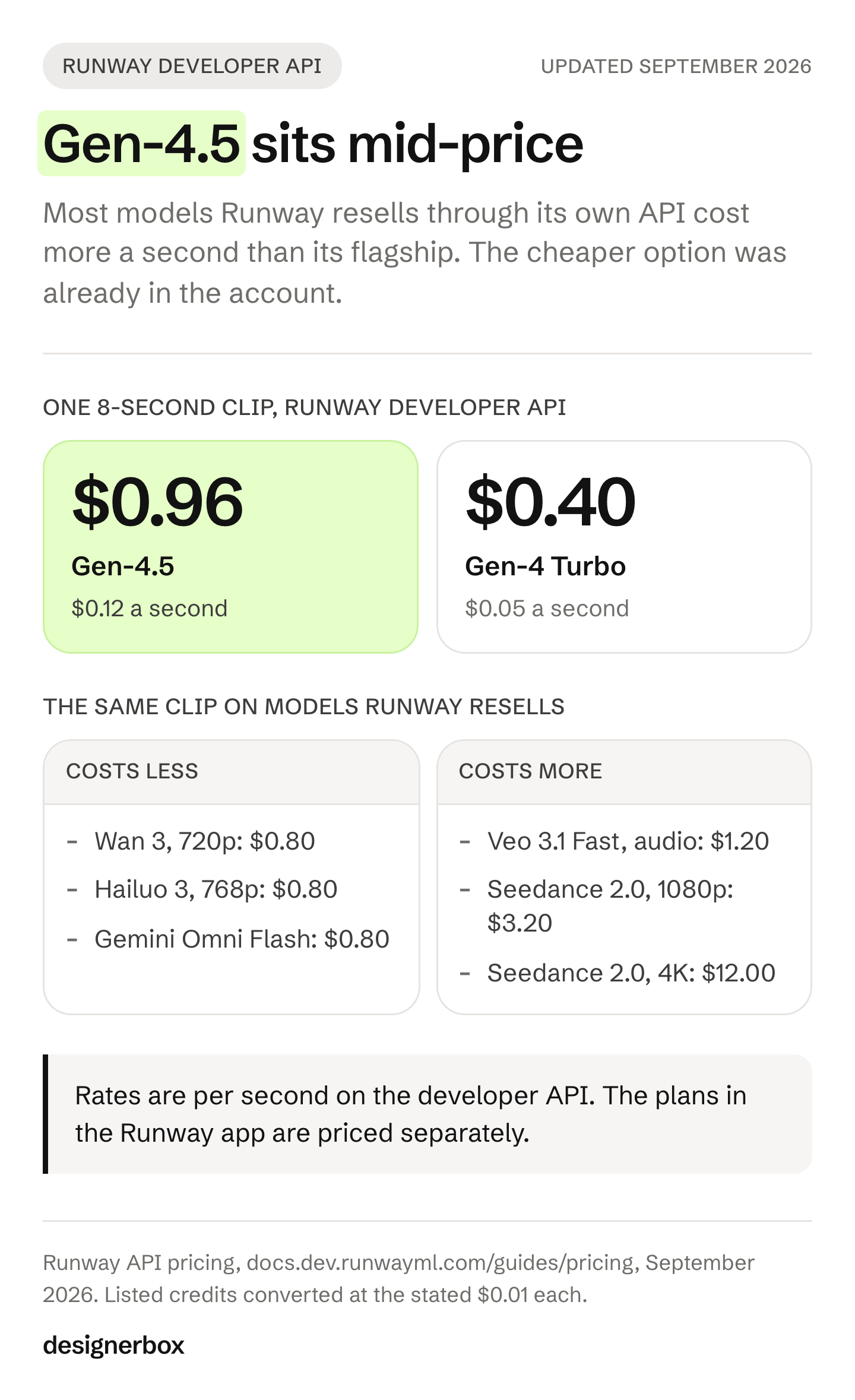
Gen-4.5 is mid-priced on its own platform. Veo 3.1, Seedance 2.0 and HappyHorse 1.0 all cost more a second. Gen-4 Turbo, Wan 3 at 720p and Gemini Omni Flash cost less. If you are leaving because of cost, a cheaper model is already in the account. For Alibaba’s own prices on the older Wan versions, see our Wan 2.5 API pricing guide.
A full shot list is where the cost grows. One 8-second Gen-4.5 clip is under a dollar. For example, 60 clips with three discarded takes each make 240 generations, or $230.40 at the Gen-4.5 rate.
The shot list sets the bill more than the per-clip rate does. We work through it in what AI video costs.
The two meanings of “alternative”
Sort your own case before you shortlist anything.
You want a different model. Choose by the shot. The shot may need a longer continuous take, sound from the same generation, a set aspect ratio, or a reference image that holds. We compare the video models on published specs in Veo alternatives and Seedance alternatives, and on reference inputs and per-second rates in the AI video generator comparison. To test a model on your own shots, the best AI video model test gives a five-prompt pass or fail check.
OpenAI removed Sora 2 from its API on 24 September 2026 (OpenAI API deprecations, October 2026), and Sora alternatives lists the models that took over its jobs. Runway’s API carries several of these models already, so a switch of model is often a setting inside Runway.
You want a different system. The model is fine. The problem is everything around it: the same brand rules on every item, a colleague who needs to run the job without learning the tool, a review pass over hundreds of results, and knowing the cost before you commit. No model choice fixes any of that.
Runway’s own Workflows chain several models and save as templates for a team (runway.com, September 2026). So compare the systems as well as the models.
What to use for each job
The table sorts the common jobs. The right-hand column shows where to look, and for several rows it is Runway.
| The work | Where to look |
|---|---|
| A short video ad from one product photo | AI video ads |
| A ranked shortlist of product video tools | Best AI product video generators |
| Creator-style clips with a presenter | AI UGC |
| Product imagery: packshots, on-model shots and scenes | AI product photography |
| Static ads in your brand’s look | AI ad generator |
| Resize and translate every ad | Automations |
| The same shot for every product in a store | DesignerBox for ecommerce brands |
| New ad variants from your winners | DesignerBox for performance marketers |
| One workflow for each client’s brand | DesignerBox for agencies |
| A different model for one shot | Often inside Runway’s own API: Veo 3.1, Seedance, Wan 3 or Hailuo 3 |
| A film or broadcast deliverable, ProRes, HDR or ACES | Runway Gen-4.5 |
| An AI change inside footage you already shot | Runway Aleph 2.0 |
| Generation inside Premiere Pro or After Effects | Runway plugins |
| One strong clip, now and then | Any single model, including Runway |
The last five rows matter as much as the rest. A tool that says it wins every row is not describing a real product.
Work that repeats every week
DesignerBox is AI creative production for brands and agencies. It sells the run, the review and the delivery. Templates, workflows, apps, batch, the image editor, the video editor, brand and Assets sit in one account, so the stills, the clips and the finished ads share the same brand rules. The comparison pages set DesignerBox next to other tools, one at a time.
The spine is one workflow with four ways to run it. A template is a workflow somebody already built, so you open it, add your photo and run it. A workflow is your own set of steps, built once with your brand and run again.
An app is a workflow with a form, so a colleague completes it and presses Run without opening the workflow. Batch runs one workflow over a whole sheet of products. Nothing is rebuilt between the four. Each one widens who can run it.
Three things follow from that shape. Check them in any system you compare, Runway’s Workflows included.
Brand rules are a saved record. You set the brand once, with voice, logos, fonts, palette and rules. The workflow reads it on every run, so the tenth product starts from the same brand rules as the first. Pasting a style paragraph into a prompt box each time cannot hold that.
The cost appears before you press Run. An 8-second clip costs 40 to 560 credits, depending on the model. You choose the model with that number in front of you.
Review is part of the workflow. Critic steps score the results of a run, and best-of-N keeps the best one. With batch you keep or discard item by item, and re-run a single row on its own.
DesignerBox and Runway overlap in several places. Both run a catalog of models. Both save multi-step workflows for a team to run again.
In DesignerBox, you pick the model for each step when you build the workflow, and every run after that uses it. A template comes with its model already picked. Runway Gen-4.5 is in that catalog.
Both connect to an AI chat over MCP, and DesignerBox has 75 tools over MCP. Both have virtual try-on. None of that is the reason to pick either one.
DesignerBox has limits too. Publishing out is not built, so you download the results or send them with a webhook or an S3 step. Every plan below Ultra is one seat, which is real friction for an agency. The free plan cannot make video.
Uploading your own photos and the commercial license start on the Pro plan. AI video, the image editor and the video editor start on the Premium plan. Plans are on the pricing page.
If you need a broadcast master, an ACES sequence or an AI change inside footage you already shot, Runway is the better fit.
How to choose in one pass
Answer three questions, in order, to get a shortlist.
- What is the finished file? A ProRes or HDR master points at Runway. A PDP image, a listing video, a static ad or a feed post points at a production setup.
- How many of them, this month? One or two a month means any single model is fine. Forty products with four assets each means the system around the model decides your week.
- Who presses the button? A designer or editor can drive a generation tool. A merchandiser or an account manager needs a form with your rules already in it.
Question two often settles it.

A free plan for your first run
Pick the job closest to yours in the table above. Start from a template for that job and see the cost before you run it. You can start on the free plan.
FAQ
Can you use other video models inside Runway?
Yes. Runway resells other vendors’ models through its developer API, including Veo 3.1, Seedance 2.0, Wan 3 and Hailuo 3. It bills each at that model’s rate (Runway API pricing, September 2026). Trying a different model is usually a setting inside Runway rather than a move to another product.
What does Runway Gen-4.5 cost?
On the developer API, Gen-4.5 lists at $0.12 a second, so an 8-second clip is $0.96. Gen-4 Turbo lists at $0.05 a second (Runway API pricing, September 2026). Professional and HDR output formats add a surcharge. The subscription plans in the Runway app are priced separately, and Runway lists them on its own pricing page (runway.com/pricing, September 2026).
Is there a free Runway alternative?
Some video tools offer a free tier, and free tiers change often, so check each vendor’s page in the week you need it. DesignerBox has a free plan, and it cannot make video. We cover the free options in free AI video generation.
Does DesignerBox replace Runway?
For catalog and ad production, it does a different job. It runs a saved workflow with your brand on every product, and it shows the cost first. For film finishing, VFX and AI changes inside existing footage, it does not replace Runway. Runway Gen-4.5 is one of the video models DesignerBox runs.
Which alternative handles the longest clip?
Clip ceilings move with each model release. Check the vendor’s own documentation in the week you choose. We compare published limits in Veo alternatives and Seedance alternatives. Hailuo AI alternatives adds MiniMax H3, Wan 3.0 and LTX-2.5 to that comparison.
What should an agency with many clients use?
Look for brand rules saved per client and applied automatically, and for a way to hand a junior a form instead of a workflow. In DesignerBox, team features, shared brand kits and white label are on the Ultra plan, and every plan below Ultra is one seat.
Sources
- Runway Gen-4.5 research announcement, Runway, December 2025, accessed September 2026
- Runway API pricing, Runway, accessed September 2026
- Runway models and output formats, Runway, accessed September 2026
- Runway product page, Runway, accessed September 2026
- Runway Workflows, Runway, accessed September 2026
- OpenAI API deprecations, Sora 2 removal on 24 September 2026, OpenAI, accessed October 2026
- DesignerBox pricing and plans, DesignerBox, September 2026