





The Sora alternatives that replace Sora 2 depend on the job. Veo 3.1 and Kling 3.0 cover short clips with native audio. Seedance 2.5 covers takes of up to 30 seconds in one generation. Seedance 2.0 and 2.5 take the most reference images for product ads, and Runway Gen-4.5 animates a first frame without sound. OpenAI removed Sora 2 and Sora 2 Pro from its API on 24 September 2026.
The notice on OpenAI’s deprecations page covers the Videos API itself, sora-2, sora-2-pro and their dated snapshots (OpenAI API deprecations, accessed September 2026). OpenAI has not named a replacement video model. If your agency has a pipeline that calls the Sora endpoint, that pipeline needs a new model now. The clips booked for next week still have to ship. What that leaves inside the chat product is covered in can ChatGPT make videos.
This guide is for agency leads and performance marketers who ran Sora in production. It sorts the replacements by job: product ads, UGC-style clips, clips with native audio, longer takes, and image to video from a product photo. Then it gives a seven-step checklist for moving an API pipeline. Every spec and price comes from the vendor’s own documentation, read on 24 September 2026.
Key Takeaways
- No successor from OpenAI. The deprecations page lists no recommended replacement for the Videos API, sora-2 or sora-2-pro. The replacement comes from another vendor.
- Short clips with audio. In the Gemini API, Veo 3.1 generates audio on every clip, in 4, 6 or 8 seconds, at up to 4K. Kling 3.0 adds native audio as an option, from 3 to 15 seconds. Google lists 22 October 2026 as the earliest shutdown date for the Veo 3.1 preview models in the Gemini API.
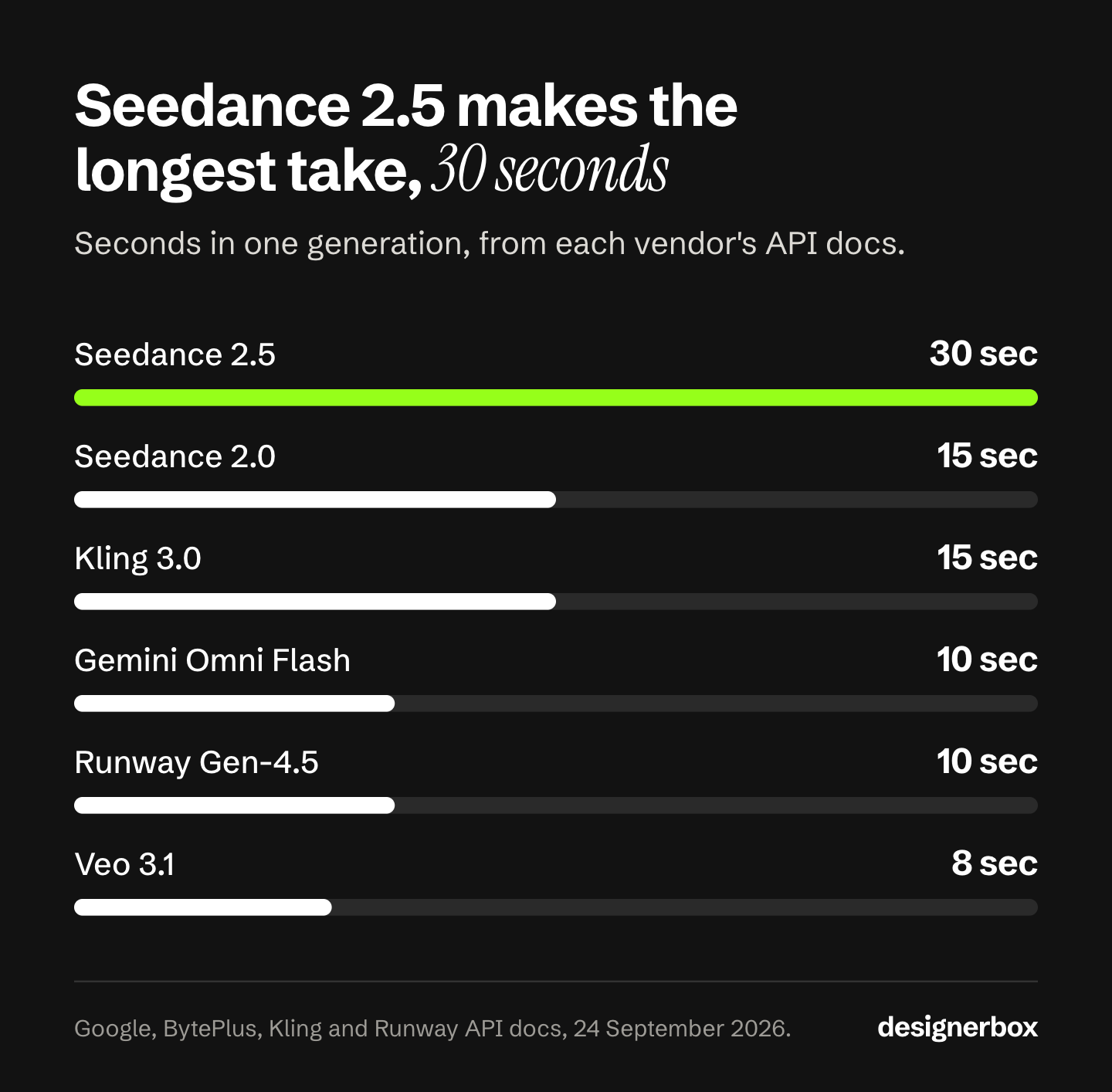
- Long takes. Seedance 2.5 generates 4 to 30 seconds in one generation, the longest single take among the models compared here. Sora 2 stopped at 20.
- Product ads. Seedance 2.5 accepts up to 30 reference images and Seedance 2.0 up to 9. Kling 3.0 takes up to 3 Elements, and Veo 3.1 up to 3 reference images of a product. Sora worked from one input image used as the first frame.
- Price per second. API list prices run from $0.04 a second (Seedance 2.0 Mini at 480p) to $0.78 (Seedance 2.0 at 4K). Sora 2 Pro listed $0.30 to $0.70, so most 1080p replacements cost less per second.
- Migration is mostly mapping. Clip length, output size, audio, dialogue format and people rules all change. Sora’s pixel sizes become an aspect ratio plus a resolution on most replacements.
- In DesignerBox, the model is one step in a workflow. You change the model in that step, and the cost is shown before the run.
Sora alternatives compared
Four vendors publish API documentation for video models that cover the jobs Sora 2 did: Google (Veo 3.1 and Gemini Omni Flash), ByteDance (Seedance 2.0 and 2.5), Kuaishou (Kling 3.0 and 2.6) and Runway (Gen-4.5). They differ most on clip length, audio and price per second. Decide which of the three the job needs first, then read that column.
| Model | Vendor | One generation | Audio | Highest resolution | API list price per second |
|---|---|---|---|---|---|
| Sora 2 Pro, for reference | OpenAI | Up to 20 sec | Synced audio | 1080p | $0.30 to $0.70, until its removal on 24 September 2026 |
| Veo 3.1 | 4, 6 or 8 sec | Always on | 4K | $0.40 to $0.60 | |
| Veo 3.1 Fast | 4, 6 or 8 sec | Always on | 4K | $0.10 to $0.30 | |
| Veo 3.1 Lite | 4, 6 or 8 sec | Always on | 1080p | $0.05 to $0.08 | |
| Gemini Omni Flash | 3 to 10 sec | Yes | 4K, by upscaling | About $0.10 at 720p | |
| Seedance 2.0 | ByteDance | 4 to 15 sec | On by default, mono | 4K | $0.07 to $0.78 |
| Seedance 2.5 | ByteDance | 4 to 30 sec | On by default, mono | 1080p | $0.103 to $0.569 |
| Kling 3.0 | Kuaishou | 3 to 15 sec | Optional, off by default | 4K | $0.084 to $0.42 |
| Kling 2.6 | Kuaishou | 5 or 10 sec | At 1080p only | 1080p | $0.042 to $0.168 |
| Runway Gen-4.5 | Runway | 2 to 10 sec | No audio setting in the API | 720p | $0.12 |
Sources: OpenAI Sora 2 Pro model page, Gemini API Veo guide, Gemini API pricing, Gemini Omni Flash model page, BytePlus ModelArk video API, BytePlus ModelArk pricing, Kling capability map, Kling API pricing, Runway API reference, Runway API pricing. All accessed 24 September 2026. BytePlus prints its Seedance rates as estimates for a 5-second 16:9 clip and bills per million tokens. The Veo audio column describes the Gemini API. Runway’s API sells Veo 3.1 with or without audio.
Two cheaper Seedance 2.0 versions are not in the table. Seedance 2.0 Fast lists $0.06 and $0.12 a second, and Seedance 2.0 Mini lists $0.04 and $0.08, both at 480p and 720p only. Google also names a new default. Its Gemini API docs tell developers to use Gemini Omni Flash as the default video model. They keep Veo 3.1 for scene extension, last-frame control and older pipelines (Gemini API video overview, accessed September 2026).
Veo 3.1 now has a date of its own. Google lists 22 October 2026 as the earliest shutdown date for the Veo 3.1 preview models in the Gemini API, and names Gemini Omni Flash as the replacement (Gemini API deprecations, October 2026). On Google Cloud, the generally available Veo 3.1 models list a retirement date of 17 November 2026 or later. Check both dates before you move a Sora pipeline to Veo 3.1.
What OpenAI removed on 24 September 2026
On 24 September 2026, OpenAI removed the Videos API and every Sora 2 model from its API: sora-2, sora-2-pro and their three dated snapshots. OpenAI first told developers about the removal on 24 March 2026. The deprecations table lists no recommended replacement for any of them, and OpenAI’s models page lists no other video model. Any code that calls the Videos API now needs a different vendor.
The numbers a replacement has to cover come from what Sora did. Until its removal, Sora 2 generated clips of up to 20 seconds with synced audio. Sora 2 Pro added 1080p exports at 1920x1080 and 1080x1920. An input image acted as the first frame, and it had to match the output size. A finished clip could be extended up to six times, to a maximum of 120 seconds (OpenAI video generation guide, accessed September 2026).
OpenAI also limited what went in. Input images with human faces were rejected. Real people, including public figures, could not be generated. Character uploads that showed a human likeness were blocked by default, and one video took up to two characters. A pipeline built around those rules meets different rules on each replacement, and the checklist below covers them.
Which Sora alternative fits product ads?
For product ads, the deciding input is the reference image, because the clip has to show your real product. Seedance 2.0 takes up to 9 reference images, 3 reference videos and 3 audio clips in one request. Seedance 2.5 takes up to 30 images. Veo 3.1 and Veo 3.1 Fast take up to 3 reference images of a person, character or product. Kling 3.0 takes up to 3 Elements.
Sora worked from one input image, used as the first frame. A first frame fixes the opening shot. It tells the model nothing about the side of the pack the camera has not seen yet. A reference image works on the whole clip: Google’s Veo guide says reference images “preserve the subject’s appearance in the output video” (Gemini API Veo guide, accessed September 2026).
Three limits apply. Veo 3.1 needs the full 8-second length when you use reference images, and Veo 3.1 Lite takes none. Seedance runs reference images and first-frame mode as separate modes, so one request cannot mix them. Kling 3.0 can: its image-to-video request takes a first frame and up to 3 Elements together.
Seedance 2.0 and 2.5 do not accept reference images or videos that contain real human faces (BytePlus ModelArk video API, accessed September 2026). A product-only ad never meets that rule. An ad with a presenter does, and the next section covers it.
Format comes next. Ad placements ask for vertical, square and wide cuts. Kling 3.0 and Seedance 2.0 both offer 1:1 in their API settings, and Seedance adds 4:3, 3:4 and 21:9. Veo 3.1 offers 16:9 and 9:16 only. The same models are compared on price per second and reference input in our Seedance alternatives guide. Hailuo AI alternatives compares clip length across more models.
Which model replaces Sora for UGC-style clips?
A UGC-style clip needs a person who speaks to the camera, usually in 9:16, with the voice in sync. Veo 3.1 and Kling 3.0 both generate speech with the picture, and both offer 9:16. Kling lists spoken dialogue in Chinese, English, Japanese, Korean and Spanish for Kling 3.0 (Kling VIDEO 3.0 user guide, accessed September 2026). Seedance 2.0 generates voice, sound effects and music by default. The deciding factor is often the people rule of each vendor, because Sora’s rules no longer apply.
Sora rejected input images with human faces. So a Sora pipeline could not animate a real presenter from a photo. A Sora UGC clip with a person had to start from a text prompt. Each replacement sets its own rules.
Veo 3.1 allows people from a text prompt. With an input image or reference images, it allows adults only. In EU, UK, Swiss and MENA locations, the adults-only setting is the only one allowed (Gemini API Veo guide, accessed September 2026).
Seedance 2.0 and 2.5 do not accept reference images or videos of real faces as a direct upload. ByteDance offers three other routes. You can use a preset digital character from its library. You can reuse a clip with a face that Seedance made in your account in the last 30 days. Or the real presenter completes a verification and gives consent, and their photos, video and voice go into your asset library (BytePlus ModelArk portrait guide, accessed September 2026).
Plan the script to the clip length. At 8 seconds, one Veo 3.1 generation holds a short hook and one claim. Kling 3.0 and Seedance 2.0 reach 15 seconds, which leaves room for a call to action in the same take. Kling 3.0 is silent unless you set its audio to native (Kling API docs, accessed September 2026). Tools made for UGC-style video are compared in AI UGC video tools for agencies.
Which Sora alternatives generate audio with the video?
Veo 3.1, Veo 3.1 Fast and Veo 3.1 Lite generate audio on every clip, and the Gemini API has no setting to turn it off. Seedance 2.0 and 2.5 generate audio by default, in mono. Kling 3.0 generates native audio when you ask for it. Kling 2.6 generates audio at 1080p only. Runway’s API lists no audio setting for Gen-4.5.
Gemini Omni Flash also returns video with audio from a text description (Gemini Omni Flash guide, accessed September 2026). BytePlus states that every Seedance clip with audio is mono, whatever the input audio was. That matters if the ad goes to a placement where stereo sound is part of the brief.
The route to the model changes the audio too. Through Runway’s API, Veo 3.1 has an audio setting. A silent Veo 3.1 clip there lists $0.20 a second, against $0.40 with audio (Runway API pricing, accessed September 2026). On the Gemini API, a pipeline that always replaced the sound still pays for the audio.
Audio on by default changes the edit less than it seems. A Sora clip arrived with synced sound. A pipeline that muted it and added a voiceover keeps working the same way on Veo or Seedance. A pipeline that used the generated sound needs Veo, Gemini Omni Flash, Seedance, Kling 3.0 or Kling 2.6 at 1080p. On Runway Gen-4.5 it needs a separate audio pass. Veo’s own tiers are priced and compared against the others in Veo alternatives, by price per second.
Which Sora alternative makes the longest clips?
Among the models compared here, Seedance 2.5 makes the longest single take: 4 to 30 seconds in one generation, at up to 1080p. Seedance 2.0 and Kling 3.0 reach 15 seconds. Gemini Omni Flash and Runway Gen-4.5 reach 10, and one Veo 3.1 generation stops at 8. Sora 2 reached 20 seconds before its removal on 24 September 2026.
Length can also come from extension. In the Gemini API, Veo 3.1 extends a Veo clip by 7 seconds at a time, up to 20 times, for up to 148 seconds, at 720p only. Sora’s extensions reached 120 seconds. BytePlus lists editing and extending videos as tasks for Seedance 2.0 and 2.5 too.
Kling 3.0 takes another route. One clip can hold 1 to 6 shots, and the prompt sets the length of each shot (Kling API docs, accessed September 2026). For an ad, several short clips joined in an editor often beat one long take. You control each beat, and you can make one shot again without paying for the whole take.
How to animate a product photo without Sora
Every replacement in the table takes a still image as input. Veo 3.1 (all three tiers), Seedance 2.0, Seedance 2.5 and Kling 3.0 also take a last frame, so the clip can end on the pack shot you choose. Runway Gen-4.5 takes a first frame only. Crop the photo to the target ratio before the call, because some models take the ratio from the image.
Sora required the input image to match the output size exactly. Seedance 2.5 works the other way. In first-frame mode it keeps the aspect ratio of the image you send, and it does not accept another ratio. Seedance 2.0 takes a ratio, and it crops a photo with a different shape from the center (BytePlus ModelArk video API, accessed September 2026). Kling 3.0 image-to-video has no ratio setting at all. So crop the photo yourself before the request, or the model decides the frame for you.
Kling 3.0 image-to-video takes a first frame, a last frame and up to 3 Elements in one request (Kling API docs, accessed September 2026). Kling 2.6 first-and-last-frame clips are silent and run at 1080p only. For the shot types that work best from a product photo, see image to video for ecommerce. If Runway is the tool you are leaving as well, Runway alternatives, sorted by job covers the rest of its toolset.
How to move a Sora API pipeline to a new model
Moving a Sora pipeline takes seven changes, and most of them are mapping rather than code. Replace the job call first. Then map clip length, output size, audio, dialogue format and people rules. Last, price the clip per second and test the new model on shots you already shipped. The checklist follows that order.

- Replace the job call. Sora’s Videos API created a job, and your code checked its status or waited for a webhook. Veo 3.1 in the Gemini API returns an operation that your code checks until it is done. Kling 3.0 and Seedance also start a task, and both take a callback URL that they call when the status changes. Download each file in time: the Gemini API keeps a Veo clip for 2 days, and a Seedance video URL works for 24 hours. Runway’s API serves Veo 3.1, Seedance 2.0 and Seedance 2.5 next to Gen-4.5, which keeps several models under one API key (Runway API pricing, accessed September 2026).
- Map the clip length. Sora took 4, 8, 12, 16 or 20 seconds. Veo 3.1 takes 4, 6 or 8, and it needs 8 for 1080p, 4K or reference images. Seedance 2.0 takes any whole number from 4 to 15, Seedance 2.5 from 4 to 30, Kling 3.0 from 3 to 15 and Runway Gen-4.5 from 2 to 10. A 12-second Sora clip fits Seedance or Kling 3.0 in one take. A 16 or 20-second clip moves to Seedance 2.5, or becomes two clips joined in the edit.
- Map the output size. Sora used pixel sizes such as 1280x720 and 1080x1920. Veo 3.1 and Seedance take an aspect ratio plus a resolution, Kling 3.0 takes 16:9, 9:16 or 1:1, and Runway Gen-4.5 takes a ratio such as 1280:720. Sora 2 Pro’s 1792x1024 and 1024x1792 sizes have no exact match. The nearest is 16:9 or 9:16 at 1080p.
- Decide the audio for each model. In the Gemini API, Veo always generates audio. For a silent Veo clip, use the Runway route in the audio section above. Seedance generates audio by default, and its “generate_audio” setting turns it off. Kling 3.0 is silent unless audio is set to native. Runway Gen-4.5 has no audio setting, so a clip that needs sound needs a second pass.
- Rewrite the dialogue. OpenAI’s Sora guide put dialogue in a separate block below the prose description (Sora 2 prompting guide, accessed September 2026). Google’s Veo guide asks for specific speech in quotes, and BytePlus recommends double quotes for Seedance dialogue. Kling 3.0 multi-shot prompts use their own format: shot number, seconds and the shot prompt, separated by semicolons. The rest of the prompt is covered in our AI video prompting guide.
- Check the people rules again. Sora rejected real faces in input images, and it blocked character uploads with a human likeness by default. Veo allows adults only in image-to-video and reference modes. Seedance 2.0 and 2.5 reject real faces in reference images and videos uploaded directly, and offer the three routes in the UGC section above. Test one clip with a person before you move a UGC workflow.
- Price the clip and test it. Use your last Sora invoice as the baseline, not a list price. Price each model on the route you will use, because the rate changes with the route. Seedance 2.0 at 720p lists $0.36 a second on Runway, and BytePlus estimates about $0.15. Then run five shots you already shipped through two candidate models, on the same brief. Keep the model that needs the fewest re-runs, because a re-run is billed like the first run. We ranked which models give the same shot twice if repeatability is the main concern.
What a clip costs after the move
At API list prices on 24 September 2026, an 8-second clip costs $0.40 on Veo 3.1 Lite at 720p and $3.20 on Veo 3.1 at 1080p. A 15-second take costs about $1.89 on Kling 3.0 at 720p with audio, and about $2.25 on Seedance 2.0 at 720p. A 20-second take on Seedance 2.5 at 720p costs about $4.62. The table shows the arithmetic.
| Clip length | Model and setting | List rate | One clip |
|---|---|---|---|
| 8 sec | Veo 3.1 Lite, 720p, audio | $0.05/sec | $0.40 |
| 8 sec | Veo 3.1 Fast, 1080p, audio | $0.12/sec | $0.96 |
| 8 sec | Runway Gen-4.5, 720p, no audio | $0.12/sec | $0.96 |
| 8 sec | Veo 3.1, 1080p, audio | $0.40/sec | $3.20 |
| 15 sec | Kling 3.0, 720p, audio | $0.126/sec | $1.89 |
| 15 sec | Seedance 2.0, 720p, audio | $0.15/sec | $2.25 |
| 15 sec | Kling 3.0, 1080p, audio | $0.168/sec | $2.52 |
| 20 sec | Seedance 2.5, 720p, audio | $0.231/sec | $4.62 |
| 20 sec | Seedance 2.5, 1080p, audio | $0.569/sec | $11.38 |
Sources: Gemini API pricing, Kling API pricing, BytePlus ModelArk pricing, Runway API pricing, accessed 24 September 2026. The Seedance rows multiply BytePlus’s own per-second estimates, so they are illustrative. Runway bills through prepaid credits at $0.01 each, which puts Gen-4.5 at $0.12 a second.
The baseline is what Sora listed. Sora 2 was $0.10 a second at 720p, and Sora 2 Pro $0.30 at 720p and $0.70 at 1080p (OpenAI Sora 2 Pro model page, accessed September 2026). So an 8-second Sora 2 Pro clip at 1080p listed $5.60, and a 20-second one $14.00. Against that, Veo 3.1 at 1080p is $3.20 for 8 seconds, and Seedance 2.5 at 1080p about $11.38 for 20.
The list price is only half of the bill. The other half is re-runs. A model at half the rate that needs three tries for a usable clip costs more than a more expensive model that works on the first try. Count the tries per usable clip in your test, then multiply. Ways to cut those re-runs are in how to make AI videos fast. The wider campaign arithmetic is in our guide to what AI video generation costs.
Swapping the model in a workflow step
In DesignerBox, a model is one step in a workflow. The workflow holds the rest: your brand rules, the product photo, the prompt, the format and the edit. So the migration is small. You open the step, pick a new video model, and run it. The other steps stay the same.
Sora 2 Pro is no longer one of the video models DesignerBox runs. The models page lists Veo 3.1, Veo 3.1 Fast, Seedance 2.0, Kling 2.6 Pro and Runway Gen-4.5 among them (DesignerBox models, September 2026). The first four return clips with sound. Runway Gen-4.5 returns video only.
You see the cost before each run. An 8-second clip costs 40 to 560 credits, depending on the model. So a change of model is a change you can price before you press Run.
Video starts on the Premium plan. Team features, shared brand kits and white label are on the Ultra plan, and every plan below Ultra is one seat. Plans and credits are on the pricing page.
The model swap is the easy part of a Sora migration. Anyone can make an AI picture. Making hundreds that still look like your brand is the hard part. You set the brand once, and the workflow reads it on every run. A saved workflow runs the same way on the next product, and batch runs it over the whole sheet at once.
The clips then go into the video editor, a real timeline with several tracks, transitions, animated text and audio. The full workflow from the first product photo to the finished ad, in one subscription. If the job is a short ad from a product photo, the AI video ads page shows the finished result. An AI chat such as Claude, ChatGPT or Cursor can run DesignerBox: it has 68 tools over MCP. The comparison pages set DesignerBox next to other tools, one at a time.
Start from a template, add your brand and your products, and run it. See the templates.
FAQ
Is the Sora 2 API still available?
No. OpenAI removed the Videos API, sora-2, sora-2-pro and their dated snapshots from its API on 24 September 2026. It told developers on 24 March 2026, and its deprecations page lists no recommended replacement (developers.openai.com, accessed September 2026). A pipeline that called the Videos API needs a model from another vendor.
What is the closest alternative to Sora 2?
The closest match is the one that covers the part of Sora you used. Short clips with synced audio at 1080p go to Veo 3.1 or Kling 3.0. Google lists 22 October 2026 as the earliest shutdown date for the Veo 3.1 preview models in the Gemini API (ai.google.dev, October 2026). Takes of 16 to 20 seconds in one generation go to Seedance 2.5, which reaches 30. Every model here can animate a product photo, and Runway Gen-4.5 does it from a first frame without audio.
Which Sora alternative makes 20-second clips?
Seedance 2.5 generates 4 to 30 seconds in one generation, at up to 1080p (docs.byteplus.com, accessed September 2026). Seedance 2.0 and Kling 3.0 stop at 15 seconds. In the Gemini API, Veo 3.1 can extend a Veo clip 7 seconds at a time, up to 148 seconds at 720p. Two shorter clips joined in an editor also work.
Does OpenAI have a new video model?
Not in its API. The replacement column on the deprecations page is empty for every removed Sora model, and OpenAI’s models page lists no other video model (developers.openai.com, accessed September 2026). Plan new video work on a model from Google, ByteDance, Kuaishou or Runway, and check each vendor’s own docs before you build on it.
Can I use real people in the replacement models?
Yes, with limits. Veo 3.1 allows adults only when you give it an image, and in EU, UK, Swiss and MENA locations adults-only is the only setting (ai.google.dev, accessed September 2026). Seedance 2.0 and 2.5 do not accept real faces uploaded directly. ByteDance offers preset digital characters, or a real person who is verified and gives consent (docs.byteplus.com, accessed September 2026). Sora itself rejected real faces in input images.
How much does a Sora alternative cost per second?
At API list prices in September 2026, the rates run from $0.04 a second for Seedance 2.0 Mini at 480p to $0.78 for Seedance 2.0 at 4K. Veo 3.1 Lite lists $0.05 at 720p with audio, Kling 3.0 from $0.084, and Runway Gen-4.5 $0.12. For comparison, Sora 2 Pro listed $0.30 to $0.70 a second. Compare against your last Sora invoice, and count re-runs as well as the rate.
Can I change the video model in DesignerBox without rebuilding the workflow?
Yes. Each model is one step in a workflow, so you change the model in that step and run the workflow again. Your brand rules, prompts and edit stay as they are. Video starts on the Premium plan.
Sources
Accessed 24 September 2026, unless a line gives another date.
- Sora 2, Sora 2 Pro and Videos API removal, and the empty replacement column: OpenAI API deprecations
- Sora 2 durations, 1080p sizes, first-frame input, extensions, characters and face rules: OpenAI video generation guide and, for the 4 to 20 second duration values, the Sora 2 prompting guide
- Sora 2 Pro output sizes, synced audio, and the Sora 2 and Sora 2 Pro prices per second: OpenAI Sora 2 Pro model page
- OpenAI video models listed: OpenAI models page
- Sora dialogue format: Sora 2 prompting guide
- Veo 3.1 durations, resolutions, aspect ratios, audio, reference images, extension, dialogue prompts, people rules and the 2-day file storage: Gemini API Veo guide
- Veo 3.1 and Gemini Omni Flash prices: Gemini API pricing
- Veo 3.1 preview models, earliest shutdown date of 22 October 2026 and the named replacement: Gemini API deprecations, accessed 2 October 2026
- Veo 3.1 generally available models on Google Cloud, retirement date of 17 November 2026 or later: Google Cloud Veo 3.1 model page, accessed 2 October 2026
- Gemini Omni Flash as Google’s default video model: Gemini API video overview
- Gemini Omni Flash output spec and audio: Gemini Omni Flash model page and Gemini Omni Flash guide
- Seedance 2.0 and 2.5 durations, resolutions, aspect ratios, audio, references, first-frame behavior, image cropping and the callback URL: BytePlus ModelArk video API
- Seedance real-face rule, preset digital characters, trusted outputs, verified real-person assets and the 24-hour video URL: BytePlus ModelArk portrait guide
- Seedance per-second estimates: BytePlus ModelArk pricing
- Kling 3.0, 3.0 Turbo and 2.6 lengths, resolutions, audio and frame controls: Kling capability map
- Kling 3.0 aspect ratios, audio setting, multi-shot format and callback URL: Kling 3.0 text-to-video API
- Kling 3.0 spoken dialogue languages: Kling VIDEO 3.0 user guide
- Kling 3.0 first frame, last frame and Elements: Kling 3.0 image-to-video API
- Kling per-second rates: Kling API pricing
- Runway Gen-4.5 duration, ratios and first-frame input: Runway API reference
- Runway credit price, Gen-4.5 rate, the other models on its API, Veo 3.1 with and without audio, and Seedance 2.0 on Runway: Runway API pricing
- DesignerBox video models, which ones return sound, plan gates and the video cost range: DesignerBox models page (designerbox.ai/models) and DesignerBox pricing (designerbox.ai/pricing), September 2026
Model specifications and prices verified against OpenAI, Google, ByteDance, Kuaishou and Runway documentation as of September 2026. The Veo 3.1 shutdown dates were re-checked on 2 October 2026. Model specifications in this category change monthly. Individual results vary.


