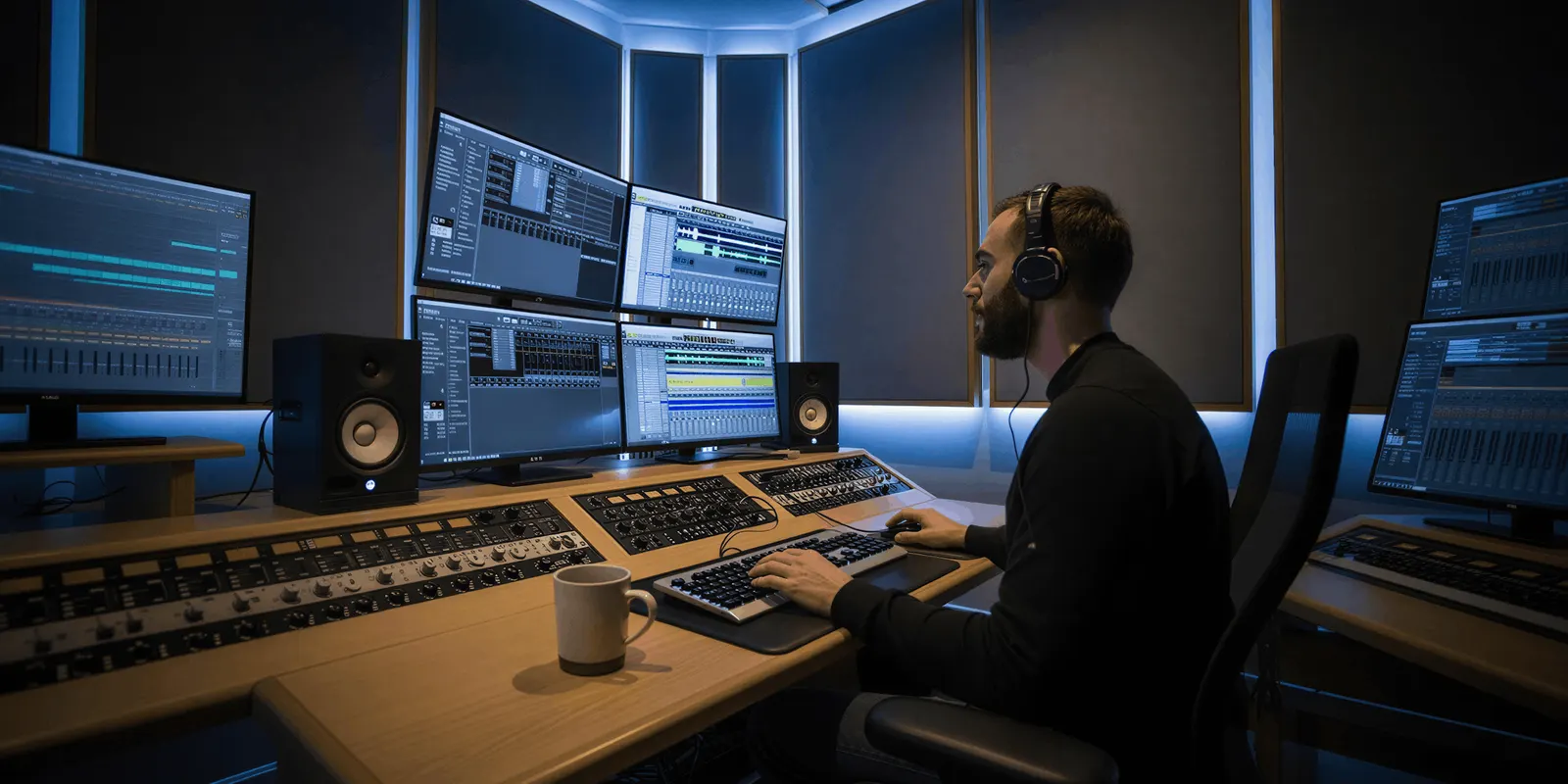
The most reliable AI video generator is the one whose behavior you can predict before you spend the credits. This AI video generator comparison scores six models on that test, and Veo 3.1 leads. Google publishes its resolutions, durations, reference limits, extension math and per-second price in full (ai.google.dev, September 2026). Peak output quality moves every month. What a provider documents is what you can plan a shot list against.
You have a campaign that needs nine clips by Thursday. The first take of shot three is perfect. The second take, same prompt, same model, gives you a different room, a different jacket, and a hand that arrives from the wrong side of frame. Now you are not producing a campaign. You are gambling with a credit balance.
That gap between one good take and nine usable ones is what “reliable” has to mean for a team on a deadline. This article scores six models on it, using only specs their providers publish, and shows why a leaderboard cannot answer the question.
Key Takeaways
- Reliability is planability, not peak quality. A model you cannot brief twice and get the same shot from is unreliable however good its best take looks.
- Veo 3.1 publishes the most complete spec sheet. Resolutions, durations, extension limits, reference-image count and per-second price are all documented (ai.google.dev, September 2026). None of the other five matches that.
- Leaderboards are a snapshot, not a fact. Artificial Analysis recomputes its video ratings hourly (artificialanalysis.ai, September 2026). A ranking cited in December does not describe September.
- Reference images beat adjectives. Veo 3.1 accepts up to three reference images, Seedance 2.0 accepts up to nine images plus three video and three audio clips. That input surface controls consistency more than prompt wording does.
- Some specs are published somewhere other than the model’s own page. Seedance 2.0’s resolutions and per-second price sit on BytePlus ModelArk, not on seed.bytedance.com; Runway’s Gen-4.5 durations sit in a help-center spec table, not on the model page. Kling publishes 2.6’s durations and API prices in its developer docs rather than in the launch release. All are real numbers, and the Seedance and Runway ones are tabulated in Seedance alternatives.
- Reliability has a credit price, and the model you pick moves it.
- Sora 2 Pro is not in the ranking. OpenAI removed Sora 2 and Sora 2 Pro from its API on 24 September 2026 (OpenAI API deprecations, accessed September 2026).
What an AI video generator comparison should measure
A reliable AI video generator produces the shot you briefed, again, on the second and third attempt. Three things create that: published limits you can design a shot list against, input controls that pin down subject and framing, and a price per second you can multiply by a take count. Output quality is a separate question. It is subjective, and it changes with every model release.
Two clips from the same prompt will not match. Video models sample noise on every run. Google’s Veo API accepts a seed value, and Google says the seed “doesn’t guarantee determinism, but slightly improves it” (ai.google.dev, September 2026). So reliability is a narrow enough spread between takes that shot three still cuts against shot two.
That spread is controlled at the input. A prompt that says “a woman in a jacket” hands the model every decision you did not make. A reference image plus a first frame plus a stated lens and light direction hands it almost none. The models that give you more of those levers are the ones you can produce on.
Reliability is not what the leaderboards measure
The public video arenas rank preference, not repeatability. In the Artificial Analysis arena, users compare two clips from the same prompt and pick one. Artificial Analysis aggregates the votes with a Bradley-Terry maximum-likelihood fit and rescales the result into an Elo-like number (artificialanalysis.ai/video/methodology, September 2026). A voter sees two clips and picks the one they like. Nobody is asked whether the second take matched the first.
The refresh rate matters more than the methodology. That page states ratings are recomputed hourly. Runway’s own Gen-4.5 research post cited a first-place position on that arena at 1,247 Elo, as of 30 November 2025 (runway.com/research, September 2026). Reading the same arena’s text-to-video-with-audio pool on 29 July 2026 returned a different top of table, led by Gemini Omni Flash at 1,245 with Seedance 2.0 at 1,226. Gemini Omni Flash is a Google model that has been generally available since 27 August 2026 (ai.google.dev, September 2026). Both readings are accurate for their date. Neither is a durable fact.
The arenas also split their pools by modality, so silent and audio-generating models are never compared head to head. A number lifted out of one pool and pasted into a buying decision is not describing what you think it is.
Use the leaderboards to notice that a new model exists. Do not use them to pick the model your Thursday depends on. For a prompt adherence test on your own shots, see the best AI video model.
How the six models were scored
Four axes, all of them things a provider either publishes or does not.
| Axis | What it answers |
|---|---|
| Published spec completeness | Can you read the resolution, duration and limits before you spend anything? |
| Input control | How many reference images, first and last frames, or identity tools does it accept? |
| Length control | What is the longest single take, and is extension documented? |
| Price predictability | Is there a published per-second or per-credit rate you can multiply out? |
This is not a ranking of which model looks best. Output quality is subjective, it moves monthly, and any verdict published here would be stale by the next release. Every claim below comes from the provider’s own documentation, checked September 2026.

The 6 AI video models ranked on reliability
| Rank | Model | Max take | Native audio | Reference inputs | Published price |
|---|---|---|---|---|---|
| 1 | Veo 3.1 | 8s, extendable | Yes, always on | Up to 3 images, plus first and last frame | $0.40/sec (720p, 1080p), $0.60/sec (4K) |
| 2 | Veo 3.1 Fast | 8s, extendable | Yes, always on | Up to 3 images, plus first and last frame | $0.10/sec (720p), $0.12/sec (1080p) |
| 3 | Seedance 2.0 | 4 to 15s multi-shot | Yes, mono in the API | Up to 9 images, 3 video clips, 3 audio clips | $0.07 to $0.78/sec by resolution (BytePlus estimate) |
| 4 | Kling 3.0 | 3 to 15s, 1 to 6 shots | Yes, speech in five languages | Up to 3 Elements, each from 2 to 4 images or a video | $0.084 to $0.168/sec by resolution and audio, $0.42/sec at 4K (Kling API) |
| 5 | Kling 2.6 Pro | 5 or 10s | Yes, at 1080p only | First frame, optional last frame | $0.042 to $0.14/sec by resolution and audio (Kling API) |
| 6 | Runway Gen-4.5 | 2 to 10s | Not documented as shipped | Text or first frame | $0.12/sec (Runway API) |
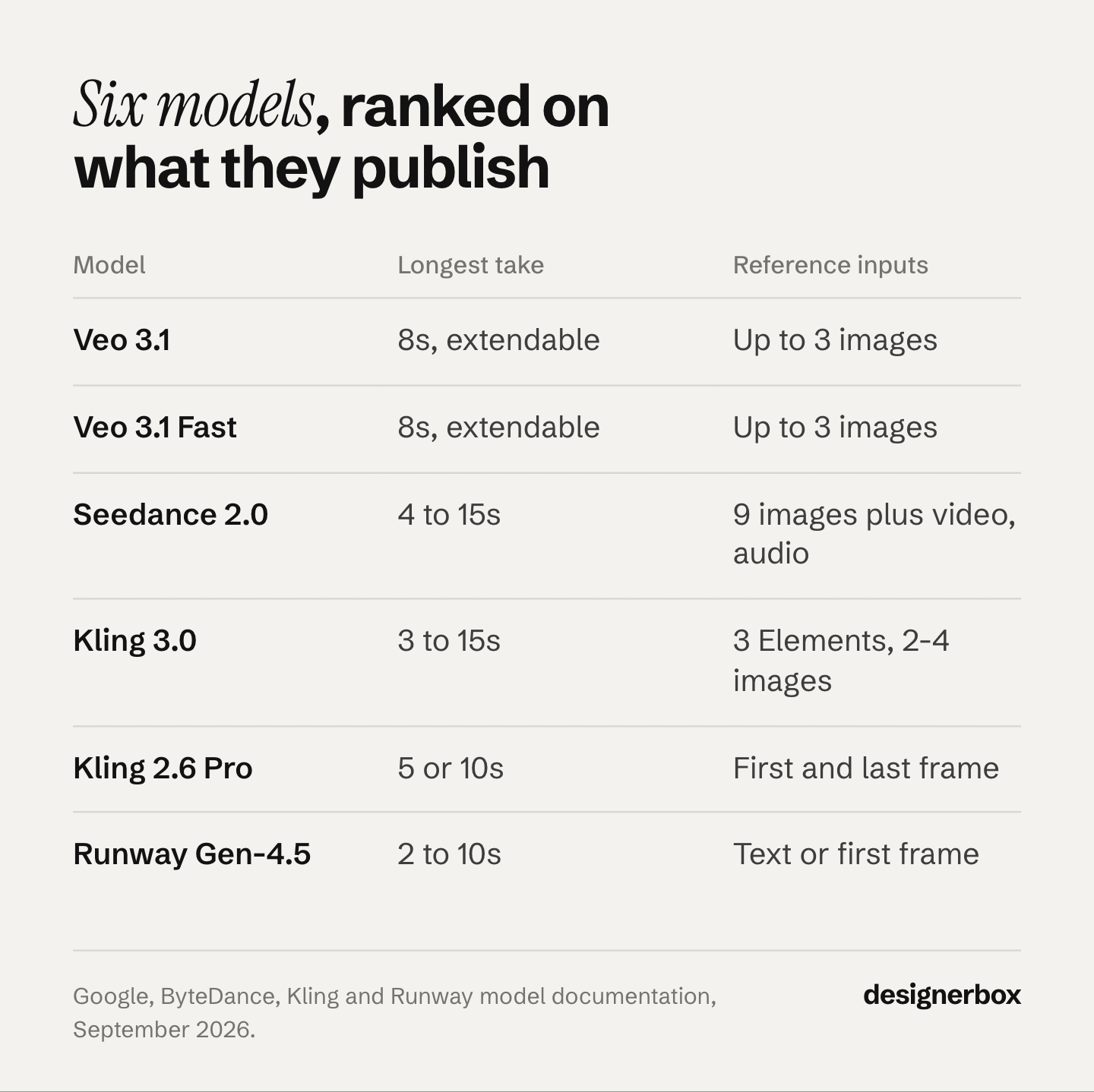
Prices are provider API rates, not DesignerBox credit costs. The cost section below covers what a take costs in DesignerBox.
Sora 2 Pro is left out of the ranking because OpenAI removed it from its API on 24 September 2026, and OpenAI has not named a replacement video model (OpenAI API deprecations, accessed September 2026). Do not plan new work around it. For a model that fits each job Sora did, read which models replace Sora 2.
1. Veo 3.1, the one you can plan a shot list against
Veo 3.1 generates audio natively alongside the video, and Google’s prompt guide covers dialogue, sound effects and ambient sound. DeepMind lists improved prompt adherence as a goal for the model (deepmind.google/models/veo, September 2026). For consistency the API is direct about the mechanism: you can provide up to three asset images of a single person, character or product (ai.google.dev, September 2026).
The reason it ranks first is arithmetic you can do in advance. Durations are 4, 6 or 8 seconds, with 8 seconds required for 1080p, 4K, reference images or extension. In the Gemini API, extension adds 7 seconds per pass, up to 20 passes, at 720p. Resolution options and the per-second price for each are on Google’s pricing page (September 2026). You can build a nine-shot list, cost it, and know the constraints before you generate anything.
Two changes to know about. Google now names Gemini Omni Flash its default video model, and keeps Veo 3.1 for scene extension, last-frame control and existing pipelines (ai.google.dev, September 2026). Google lists 22 October 2026 as the earliest shutdown date for the Veo 3.1 preview models in the Gemini API, and names Gemini Omni Flash as the replacement (Gemini API deprecations, October 2026). On Google Cloud, the generally available Veo 3.1 models list a retirement date of 17 November 2026 or later (docs.cloud.google.com, October 2026). Check those dates before you plan a long project on Veo 3.1.
Best for: final delivery, and any shot where you need the audio and the picture to come out of the same generation.
2. Veo 3.1 Fast, the draft loop
Same documented control surface as Veo 3.1, same reference-image behavior, at $0.10 per second for 720p (ai.google.dev, September 2026). That is a quarter of the standard rate.
This is what makes an iteration budget work. Block the shot on Fast until the framing, motion and light direction are right, then run the approved brief once on Veo 3.1 for the finish. The habit matters more than the model choice, and it is covered in the cost section below.
Best for: blocking, framing tests, and any shot you expect to run more than twice.
3. Seedance 2.0, the widest input surface published
Seedance 2.0 accepts up to nine images, three video clips and three audio clips as references alongside the text instruction, and outputs up to 15 seconds of multi-shot video with audio (seed.bytedance.com, September 2026). The launch post describes the audio as dual-channel, but BytePlus says the API returns mono audio. ByteDance describes the model as preserving subject appearance and voice, with stable subject consistency across complex stories.
That reference input is the widest among the video models in the DesignerBox catalog, and it is exactly the lever that controls variance between takes. ByteDance’s newer Seedance 2.5, which DesignerBox does not carry, takes up to 30 images, 10 video clips and 10 audio clips as references (seed.bytedance.com, October 2026). If a shot needs a product, a model, a location plate and a motion reference all pinned at once, Seedance 2.0 is the one built for it.
The specs are published on a second site. ByteDance’s launch material on seed.bytedance.com covers the reference surface and skips the numbers; the numbers live on BytePlus ModelArk, ByteDance’s own developer platform. There, Seedance 2.0 is documented at 480p, 720p, 1080p and 4K with 10-bit 4K encoding, 24fps, and any whole number of seconds from 4 to 15 (docs.byteplus.com, September 2026). BytePlus lists per-second estimates of $0.07, $0.15, $0.37 and $0.78 as resolution climbs, for a 5-second 16:9 clip, and bills per million tokens (docs.byteplus.com, September 2026).
Best for: shots that need a product, a person and a location held in place at the same time.
4. Kling 3.0, long takes with cuts inside one clip
Kuaishou announced Kling 3.0 on 5 February 2026. It makes clips of 3 to 15 seconds, with 1 to 6 shots inside one clip (kling.ai, September 2026). Kuaishou added native 4K on 23 April 2026 (kling.ai, September 2026). The model generates speech in English, Chinese, Japanese, Korean and Spanish (PR Newswire, September 2026).
For consistency, Kling 3.0 takes up to 3 Elements per clip. You build each Element from 2 to 4 reference images or from a video (kling.ai, September 2026). Its API price runs from $0.084 to $0.168 a second by resolution and audio, and $0.42 a second at 4K (kling.ai, September 2026). You can cost a shot list against those numbers before you run anything.
It ranks fourth because Seedance 2.0 takes more reference files in one run, including audio clips.
Best for: takes longer than 8 seconds that need a cut inside the clip and a subject held by reference.
5. Kling 2.6 Pro, audio and picture in one pass
Kling 2.6 generates speech, dialogue, narration, singing, ambient sound and mixed effects in one pass with the video. Kuaishou released it on 3 December 2025 as Kling’s first model with native audio (PR Newswire, September 2026). Clips are 5 or 10 seconds. Audio needs 1080p, and at 720p the model makes silent video only (kling.ai, September 2026).
Kling is specific about its limits in a way that helps you. Voice output currently supports Chinese and English only (kling.ai, September 2026). Kling 2.6 takes a first frame and an optional last frame, and no reference images (kling.ai, September 2026). Its API price runs from $0.042 a second for 720p silent video to $0.14 a second for 1080p with audio (kling.ai, September 2026). Those are published constraints you can plan for at brief time instead of discovering them at delivery. The missing reference input is why it ranks fifth: you cannot pin a subject the way you can on Veo 3.1, Seedance 2.0 or Kling 3.0.
Best for: short clips where dialogue timing has to sit inside the generation rather than be fixed in the edit.
6. Runway Gen-4.5, one flat API rate
Runway describes Gen-4.5 as delivering state-of-the-art motion quality, prompt adherence and visual fidelity, with objects carrying realistic weight, momentum and force (runway.com/research, September 2026). For animating a still cleanly with believable physics, those are the right claims to be making. Runway also publishes the limits, including a success bias that removes visible effort from human action, which is the core problem in realistic AI human movement.
Its price is the simplest of the six in one respect: Runway’s API lists Gen-4.5 at one flat rate of $0.12 a second, with no resolution tiers to reconcile (docs.dev.runwayml.com, September 2026).
Runway does publish the specs, in a “Gen-4.5 spec details” table inside its help center rather than on the model’s marketing page: 2 to 10 second durations, 720p output, 24 or 25fps, and six aspect ratios for image-to-video, including 1:1 and 21:9 (help.runwayml.com, September 2026). Audio is the open question. Runway announced native audio for Gen-4.5 in December 2025, but its current spec table and API list no audio output. The help page describes the model as offering text-to-video and image-to-video “with support for additional inputs coming soon”. It ranks sixth on planability for two reasons: it takes a first frame and no reference images, and its audio output is not documented as shipped. The durations are published. Runway’s own API also runs other vendors’ models, and Runway alternatives sorted by job covers when to switch model and when to switch tool.
Cost of a take in credits
In DesignerBox, the model and the clip length set the cost of a take. An 8-second take costs 40 to 560 credits, depending on the model. The cost is shown before the run. A longer take and a premium model both raise the same bill.
Uploading your own photos and the commercial license start on the Pro plan. AI video, virtual try-on, upscaling, the image editor and the video editor start on the Premium plan. Plans and credits are on the pricing page.
This leads to a sequencing rule: block on the cheaper take, and finish on the premium one. Blocking nine shots on Veo 3.1 Fast and finishing only the approved ones on Veo 3.1 costs far less than running all nine straight to Veo 3.1 before the framing was locked. Your plan’s credit allocation decides how many finishes a month can carry, and what each model charges sets out the providers’ per-second prices in full.
Four habits that raise your hit rate more than switching models
Model choice sets your ceiling. These set how often you reach it. A run that returns nothing at all is a different problem, covered in AI video generation failed.
- Fix the frame before you animate it. Anatomy errors, wrong light direction and a bad crop all survive into video and cost a full take to discover. Generate a still, approve it, then animate from it.
- Brief all seven layers, not just the subject. Subject, camera and lens, light direction, motion, what stays consistent, color grade, delivery format. Anything you leave out, the model fills with its average. The full method is in the seven layers of a realistic AI video prompt, and the documented prompt structure for each model tells you what order to brief those layers in for each model. Handing that briefing job to an AI chat is covered in Claude as a video generator.
- Pin identity with a reference image, not an adjective. “The same woman” is not a specification. A reference image is, and every model above that accepts one is measurably easier to hold steady. See how to keep a character consistent across shots.
- Run a shot three times before you judge a model. One take tells you nothing about variance. Three takes on the same brief tell you whether the model is producing a style or a lottery.
Reliability in a DesignerBox workflow
DesignerBox is AI creative production for brands and agencies. You pick the model for each step when you build the workflow, and every run after that uses it. A template comes with its model already picked. You can block a shot on Veo 3.1 Fast and finish it on Veo 3.1, as two steps in the same workflow. The full workflow from the first product photo to the finished ad, in one subscription. The model list shows what every model in the catalog does.
That setup matters most on the second product. Build the shot once with your product photo, your brand rules and the model that held it, then save it as a workflow. A saved workflow runs the same way on the next SKU. The tenth clip gets the standard the first one set, because nobody rewrites the brief between them.
Reliability decides how many re-rolls you pay for, and re-rolls are the most expensive way to fix anything. That is why the cheapest AI video generator is measured by cost per usable clip. Re-rolls also cost time, which is the argument in a realistic time budget for making AI videos fast. The full ordering, from source still to finishing pass, is in UGC video quality ranked by cost. The ecommerce-specific model pick covers turning a product still into a PDP clip. If the clip is headed for LinkedIn instead, seven tools compared by the format you post most narrows the field before you pick a model. If the brand is activewear or supplements, what each fitness video tool is built for splits the presenter tools from the product-in-motion ones.
Start from a template and run your own reliability test on one shot before you commit a shot list to one model.
FAQ
What is the most reliable AI video generator in 2026?
Veo 3.1, judged on what you can plan around. Google publishes its resolutions, durations, reference-image limits, extension math and per-second price in full (ai.google.dev, September 2026), so you can cost and constrain a shot list before generating anything. None of the other five models compared here documents its behavior that completely. Google now names Gemini Omni Flash its default video model, and keeps Veo 3.1 for scene extension and last-frame control. Google lists 22 October 2026 as the earliest shutdown date for the Veo 3.1 preview models in the Gemini API (ai.google.dev, October 2026).
Does a higher leaderboard rank mean a model is more reliable?
No. Video arenas measure which of two clips a voter prefers, not whether a second take matches the first. Artificial Analysis recomputes its ratings hourly and splits its pools by modality, so audio and silent models never meet directly (artificialanalysis.ai, September 2026). A rank is a snapshot of taste on a date, not a repeatability score.
Can you get the exact same clip twice from the same prompt?
Not reliably. Video models sample noise on every generation. Google’s Veo API accepts a seed, but Google says it does not guarantee determinism (ai.google.dev, September 2026). What you can control is the spread between takes, by adding reference images, a first frame, a stated lens and a stated light direction so fewer decisions are left to the model.
Which AI video model holds a character across multiple shots?
Veo 3.1 accepts up to three reference images of a single person, character or product (ai.google.dev, September 2026). Seedance 2.0 accepts up to nine images plus three video and three audio references, the widest published input surface of the six (seed.bytedance.com, September 2026). Kling 3.0 takes up to 3 Elements per clip, each built from 2 to 4 images or a video (kling.ai, September 2026). Reference images do more for consistency than prompt wording.
How many takes should I budget per usable clip?
No survey we found measures this. Measure your own rate: run three takes of one representative shot, count the keepers, and use that ratio. It will differ by shot type more than by model.
Is Veo 3.1 Fast good enough for final delivery?
It generates native audio and takes the same reference inputs as Veo 3.1 at $0.10 per second for 720p (ai.google.dev, September 2026). Whether it is good enough for your shot is your call to make. The safe pattern is to block and iterate on Fast, then run the approved brief once on the standard model for the finish.
How much more does AI video cost than an AI image?
Video costs more with every second of length, while an image costs one run, and both vary by model. In DesignerBox, an 8-second clip costs 40 to 560 credits, depending on the model. A still costs less than that on any model. Every extra second, every resolution step and every retake adds to the bill. So sequencing cheap drafts before expensive finishes changes the bill more than any single model choice does.
Sources
- Veo 3.1 and Veo 3.1 Fast resolutions, durations, extension math, reference-image limits and the seed note: (ai.google.dev, September 2026)
- Veo 3.1 and Veo 3.1 Fast per-second prices: (ai.google.dev, September 2026)
- Gemini Omni Flash as Google’s default video model, and its general availability date: (ai.google.dev and ai.google.dev, September 2026)
- Veo 3.1 preview models, earliest shutdown date of 22 October 2026 in the Gemini API: (Gemini API deprecations, October 2026). Veo 3.1 retirement date of 17 November 2026 or later on Google Cloud: (docs.cloud.google.com, October 2026)
- Veo native audio and the stated prompt-adherence goal: (deepmind.google, September 2026)
- Sora 2 and Sora 2 Pro API removal on 24 September 2026, with no named replacement: (OpenAI API deprecations, September 2026)
- Seedance 2.0 reference surface of nine images plus three video and three audio clips, 15 second multi-shot output and the launch post’s dual-channel audio wording: (seed.bytedance.com, September 2026)
- Seedance 2.0 resolutions (480p, 720p, 1080p, 4K 10-bit), 24fps, 4 to 15 second durations and mono API audio: (docs.byteplus.com, September 2026)
- Seedance 2.0 per-second price estimates of $0.07 / $0.15 / $0.37 / $0.78: (docs.byteplus.com, September 2026)
- Seedance 2.5 and its reference limit of 30 images, 10 video clips and 10 audio clips: (seed.bytedance.com, October 2026)
- Kling 3.0 durations and 1 to 6 shots per clip: (kling.ai, September 2026)
- Kling 3.0 native 4K from 23 April 2026: (kling.ai, September 2026)
- Kling 3.0 announcement and speech in five languages: (PR Newswire, September 2026)
- Kling 2.6 release on 3 December 2025 with native audio: (PR Newswire, September 2026)
- Kling 2.6 durations, 1080p audio, first and last frame input, and no reference images; Kling 3.0 Elements: (kling.ai, September 2026)
- Kling 2.6 Chinese and English voice limit: (kling.ai, September 2026)
- Kling 2.6 and Kling 3.0 API per-second prices: (kling.ai, September 2026)
- Runway Gen-4.5 motion and fidelity claims and the Elo position as of 30 November 2025: (runway.com, September 2026)
- Runway Gen-4.5 API price of $0.12 a second: (docs.dev.runwayml.com, September 2026)
- Runway Gen-4.5 spec table: 2 to 10 second durations, 720p output, 24 or 25fps, and six aspect ratios: (help.runwayml.com, September 2026)
- Video arena methodology, the Bradley-Terry fit, hourly recomputation and modality-split pools: (artificialanalysis.ai/video/methodology, September 2026)
- The text-to-video-with-audio table reading: (artificialanalysis.ai, 29 July 2026)
- DesignerBox plan gates, the video cost range and the model catalog (DesignerBox pricing page, designerbox.ai/pricing, September 2026)
Model capabilities, limits and prices re-checked against provider documentation as of September 2026. The Veo 3.1 shutdown dates and the Seedance 2.5 reference limit were re-checked on 2 October 2026. Provider specifications change frequently, re-check before budgeting. Individual results vary.