Seedream 5 is ByteDance’s image model, and it is best at readable text on a product or a graphic. The vendor builds its page around text-dense graphics and editing driven by sketches and boxes drawn on the source image. The page also covers photographic lighting, skin texture and native generation in more than a dozen languages. ByteDance sells three versions: Seedream 5.0 Pro, Seedream 5.0 Flash and Seedream 5.0 Lite. Their limits differ.
A 40-SKU drop needs a pack shot, a listing hero and three ad frames per product, and label copy that stays readable at thumbnail size. The pack shots alone are 40 frames, before the hero or the ad frames exist. Pick the wrong model for the job and you regenerate the whole set.
This guide covers what ByteDance publishes about the model, where it sits among the other image models in the catalog, where you can run it, how to brief it, and when a different model is the right call. It is written for agencies and brand teams choosing a model for catalog and ad work.
Key Takeaways
- Text is the headline strength. ByteDance builds the model page around high-density infographics and text-rich images, and the multilingual section shows a poster in four languages generated natively.
- Editing is annotation-driven. The vendor documents edits that respond to spatial annotations and sketch guidance drawn onto the source image, plus layer separation.
- Three versions, two sets of limits. ByteDance’s BytePlus docs list Seedream 5.0 Pro and Seedream 5.0 Flash at 1K, 1.5K or 2K with up to 10 reference images. They list Seedream 5.0 Lite at 2K, 3K or 4K with up to 14. The product page prints none of these numbers.
- Nano Banana Pro documents a 4K ceiling. Google lists 1K, 2K and 4K output, up to 6 high-fidelity object images and up to 5 character images.
- The commercial license starts on the Pro plan. If the frames run on a live listing or a paid ad, that is the floor.
- Pick the model once, then run it. In DesignerBox a model is one step in a workflow. Set the model, the light and the framing inside a workflow once. The saved workflow runs the same way on the next product.
What is Seedream, and who makes it?
Seedream is a family of image generation models from ByteDance’s Seed research team. The 5.0 Pro page describes a multimodal image generation model with advanced reasoning, efficient content creation and professional production capabilities. Four capability blocks sit on that page: high-density infographics, interactive editing, photographic visual quality, and native multilingual generation. Earlier pages for the 4.0 and 4.5 releases are still published alongside it. The 5.0 line now has three models: Seedream 5.0 Lite, Seedream 5.0 Pro and Seedream 5.0 Flash. ByteDance added Flash in September 2026. It has the same features as Pro and costs less (docs.byteplus.com, accessed September 2026). ByteDance launched the Pro version on 8 July 2026 (Seedream 5.0 Pro launch post, September 2026).
That lineage matters when you read a spec sheet. ByteDance keeps separate pages per release (the 4.0 release page on seed.bytedance.com, September 2026), and third-party sites carrying the name in their own domain are access points, not the vendor. When a capability claim decides your shoot, read the vendor page for the exact release your tool runs.
Seedream vs Nano Banana Pro, GPT Image 2 and FLUX 2 Flex
Four image models in the catalog are strong on type. They differ on what their vendors are willing to put in writing, which is the only fair basis for a comparison. Every figure below comes from the vendor’s own documentation, checked in September 2026. Where a vendor publishes no number, the table says so rather than filling the gap.
| Model | Provider | Vendor-stated strength | Published resolution ceiling |
|---|---|---|---|
| Seedream 5 | ByteDance | Text-rich images, sketch and annotation editing, layer separation, more than a dozen languages | 5.0 Pro and 5.0 Flash: 2K. 5.0 Lite: 4K (BytePlus docs) |
| Nano Banana Pro | Legible stylized text for infographics, menus, diagrams and marketing assets | 1K, 2K and 4K | |
| GPT Image 2 | OpenAI | Transparent backgrounds in preview, improved text rendering | 3840x2160, above 2560x1440 is experimental |
| FLUX 2 Flex | Black Forest Labs | Typography and fine detail, a steps parameter that trades quality against speed | Up to 4MP |
ByteDance’s BytePlus docs list Seedream 5.0 Pro and Seedream 5.0 Flash at 1K, 1.5K or 2K with up to 10 reference images. They list Seedream 5.0 Lite at 2K, 3K or 4K with up to 14 (docs.byteplus.com, September 2026). Google documents 1K, 2K and 4K output for Nano Banana Pro, with up to 14 reference images, including up to 6 high-fidelity object images and up to 5 character images (ai.google.dev, September 2026). OpenAI says the maximum supported resolution is 3840x2160 and resolutions above 2560x1440 are experimental. The same page lists text placement among the known limits of GPT Image models (developers.openai.com, September 2026). OpenAI released GPT Image 2.5 on 8 September 2026 (developers.openai.com, September 2026). Black Forest Labs states output up to 4MP, and FLUX.2 [flex] takes up to 8 reference images through its API (docs.bfl.ai, September 2026). For Google’s two models, see Nano Banana 2 vs Nano Banana Pro.
The ceiling column matters most at volume. On one frame, the four models feel interchangeable. On two hundred frames, the limit that decides is the one your channel needs: a PDP zoom, a transparent cutout, or copy that reads at thumbnail size.
What is Seedream 5 best at?
Seedream 5 is best at type on a surface. The vendor page leads with high-density infographics and text-rich images for education and professional scenarios, then shows a safety poster in four languages, a medical poster translated into Arabic with a right-to-left layout, and a menu translated in place. For a brand team, that maps to packaging copy, spec panels, price cards, and regional listing variants that have to read correctly rather than look like text.
Two of the four capability blocks are about control rather than aesthetics. Interactive editing responds to spatial annotations and sketch-based guidance, and layer separation is called out as a supported behavior (seed.bytedance.com, September 2026). BytePlus adds the detail: on Seedream 5.0 Pro you mark an edit with coordinates, selection boxes or arrows. One image also splits into a base image and up to 16 layers. Drawing six boxes on a room photo and writing what each one should become is a different working method from rewriting a prompt and hoping. Room photos are their own market, and what virtual staging costs per photo prices the tools built for that job alone.
The photographic block is narrower than it sounds. ByteDance describes recreating authentic physical lighting, shadows and human skin textures. That covers the model shot and the retouch pass, not a claim about product materials.
Where can you use Seedream 5?
ByteDance ships the model through its own surfaces and its cloud platform. The 5.0 Pro model page carries Try Now and Get API actions, and the release has its own tutorial in BytePlus ModelArk, the company’s cloud developer documentation. Run it anywhere else and you are reading a platform’s implementation of the model, not the vendor. To compare the platforms, see best AI product photography tools for ecommerce.
The ModelArk tutorial is the vendor-side reference for how to call it (docs.byteplus.com, September 2026). In DesignerBox, you pick the model for each step when you build the workflow, and every run after that uses it. A template comes with its model already picked. Seedream 5 is one of the image models you can pick. Other image models in the catalog include Nano Banana Pro, GPT Image 2, FLUX 2 Flex and Kontext Multi. The model list is the current set. To try one frame, open Generate. You choose the model, the aspect ratio and the number of pictures, and a picture takes up to 5 reference pictures. A single-image template also runs one prompt.
The practical difference for a team is the second run. You pick Seedream 5 for the frames where copy has to read and Nano Banana Pro for the PDP hero, once. Nobody repeats that choice per product.
Cost of a catalog drop
Each image model has its own cost in DesignerBox, so there is no single price per image. You see what a run costs before you start it.
There is a free plan, and every plan’s credits reset each month. Plans and credits are on the pricing page. Your brand rules and Assets sit in the same subscription. The image editor and the video editor start on the Premium plan. On that plan you can edit and deliver a frame in the same place you made it.
Put that against a real catalog job. Forty products with a pack shot, a listing hero and three ad frames each is 200 frames. Regenerating a third of them after a brand review adds about 67 more. Budget for the revision pass as well as the first pass, because the retry rate sets how many frames you pay for twice. Read what a credit buys before a drop. Automating a 200-SKU catalog starts with choosing the right model for each shot.
How do you brief Seedream 5 for product photography?
Brief Seedream 5 by naming the surface, then the copy, then the material. A prompt that says “pack shot on a plain white sweep, the front label reading Sea Salt and Rosemary in a condensed sans, 4:5” gives the model the three things the four capability blocks are built to handle. Vague adjectives about mood produce output you then have to fix by hand.

Use the annotation path for revisions rather than rewriting the prompt. Mark the region that is wrong on the exported frame and write the instruction next to it. That keeps the parts you approved as they are, instead of regenerating the whole frame. For a worked example of prompt structure on another model, see Nano Banana Pro prompts for product images.
Keep one reference image per attribute. A packaging photo for the label, a material swatch for the finish, a lighting reference for the shadow. Bundling all three into one collage reference is how a brand color drifts two shades between shots. Building that set out of an approved board is a step of its own, covered in how a moodboard becomes a reusable reference set. Real examples of the output shape are in this set of AI product photography examples.
When is another model the better pick?
Choose a different model when the constraint is a number the vendor publishes. If a PDP needs a 4K hero for zoom, Google states 4K output for Nano Banana Pro. If you need a transparent cutout for a listing template, OpenAI documents transparent backgrounds in preview for GPT Image 2. If a shot needs many references held together, Google documents up to 14 for Nano Banana Pro. Black Forest Labs documents up to 8 for FLUX.2 [flex] through its API.
| The job | Reach for | Why |
|---|---|---|
| Label copy readable at thumbnail size, or one listing in six languages | Seedream 5 | Text-rich output and more than a dozen native languages are what the vendor page is built around |
| 4K hero for a PDP zoom | Nano Banana Pro | Google publishes 1K, 2K and 4K |
| Transparent cutout for a listing template | GPT Image 2 | OpenAI put transparent backgrounds in preview on 20 August 2026 |
| Eight references held consistent in one output | FLUX 2 Flex | Black Forest Labs documents up to 8 reference images through its API |
| A character carried across several edits | Kontext Multi | Black Forest Labs says Kontext keeps a character consistent across edits, and its API takes up to 4 input images |
Test the same brief through two models before you commit a drop to one. A related read on how two general-purpose models differ on the same prompt is the image generation comparison.
What ByteDance does not publish
The 5.0 Pro product page on seed.bytedance.com states no resolution figure, no aspect-ratio list and no input-image limit. Those numbers sit in ByteDance’s developer docs on BytePlus instead. Seedream 5.0 Pro runs at 1K, 1.5K or 2K, takes up to 10 reference images and returns one image per request. Seedream 5.0 Flash has the same resolution levels and the same reference limit. Seedream 5.0 Lite runs at 2K, 3K or 4K and takes up to 14 reference images (docs.byteplus.com, accessed September 2026). The 4.0 page describes uploading multiple reference images to generate several outputs at once, and BytePlus lists 4.0 at 1K, 2K or 4K. The 4.5 page describes enhanced typography and dense text rendering, and multi-image editing that preserves reference detail, with results measured on an internal evaluation called MagicBench.
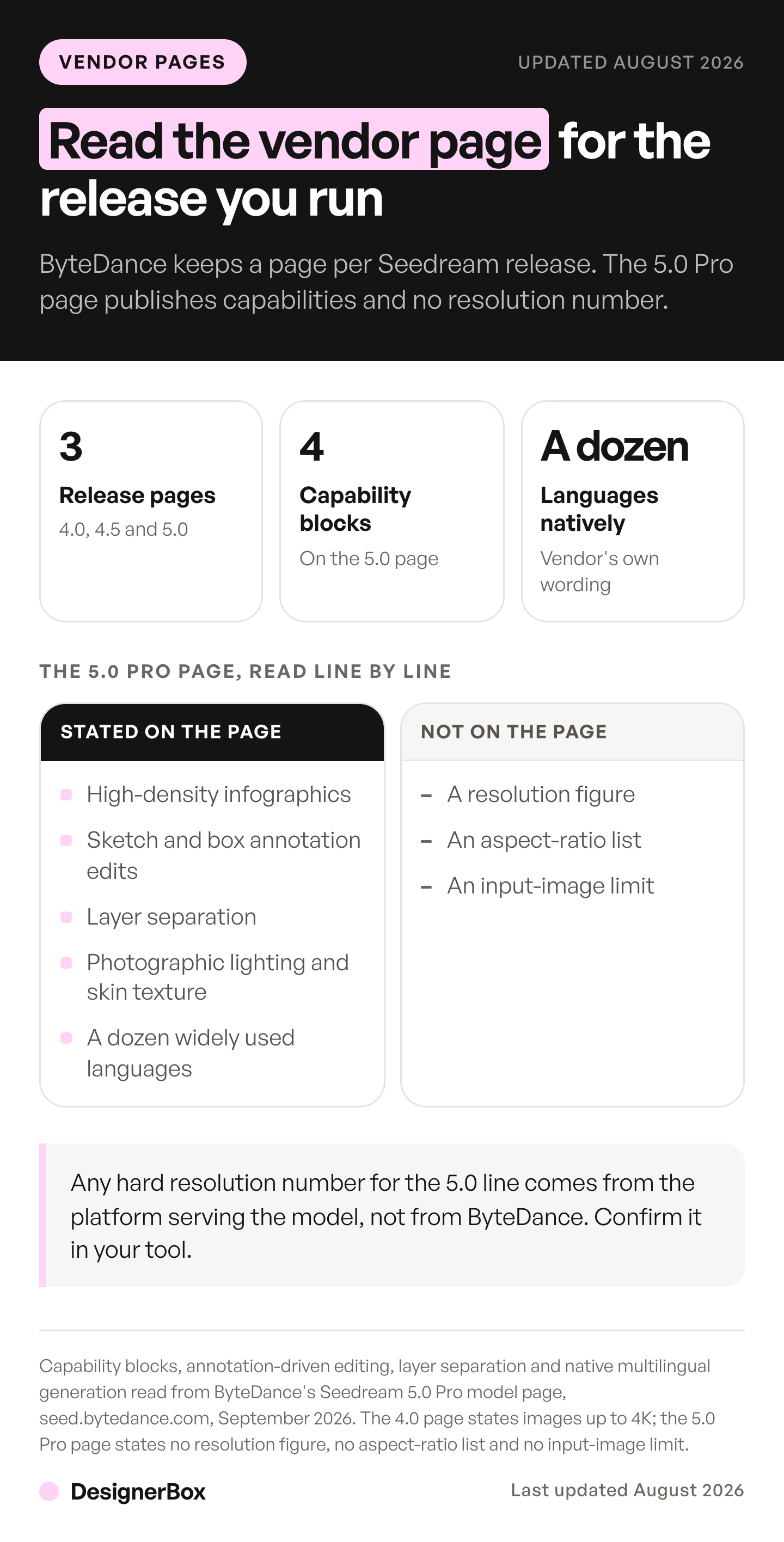
So ByteDance publishes at two levels of detail: product pages with capability blocks, and developer docs with the numbers. A hard resolution number for the 5.0 line should name the version: Pro, Flash or Lite. A platform that serves the model can also set its own limits. Check which page you are reading, and re-check it when the model version changes.
Picking the model once, for the whole drop
Model choice is a real decision on the first product and a setting on every one after it. Pick Seedream 5 for the frames where copy has to read. Pick the model whose vendor publishes a number when the constraint is resolution, a cutout, or many references held together. Then save that pairing inside a workflow. The saved workflow runs the same way on the next product, with the same model, light and crop. You set the brand once, and the workflow reads your brand rules on every run. That is what keeps a 40-SKU drop looking like one drop instead of forty separate decisions. AI product photography covers the catalog version of the job.
Start from the templates, choose the model for each step, and run it.
FAQ
Is Seedream free to use?
Seedream has no single price, because each platform that serves it sets its own. ByteDance publishes Try Now and Get API actions on its own model page and documents API access through BytePlus ModelArk. Inside DesignerBox there is a free plan, and it runs on sample products. Uploading your own photos starts on the Pro plan. To try one frame, open a single-image template and run it.
Is it the same team that makes Seedance?
Both come from Seed, ByteDance’s AI research team. Seedream covers images and Seedance covers video, and ByteDance publishes a separate model page for each. ByteDance launched Seedance 2.5 on 31 July 2026. DesignerBox runs Seedream 5 as one of its image models and Seedance 2.0 as one of its video models.
What changed between Seedream 4 and 5?
The 4.0 page describes a unified generation and editing architecture with up to 4K output and multi-reference batch generation. The 5.0 Pro page describes advanced reasoning, high-density infographics, editing that responds to sketches and box annotations, layer separation, photographic lighting and skin texture, and native generation in more than a dozen languages. ByteDance also split the 5.0 line into Pro and Lite, with different resolution and reference limits. In September 2026 it added Flash, with the same limits as Pro.
Can I use the output in paid ads?
Inside DesignerBox the commercial license starts on the Pro plan. Check the license terms of whichever platform you run it on, because they differ by vendor and by plan. Re-read them before the media spend starts.
Is it better than Nano Banana Pro for product photos?
They are strong at different things and both are in the catalog. Google publishes 1K, 2K and 4K output and up to 6 high-fidelity object images for Nano Banana Pro, which suits a high-resolution PDP hero. ByteDance leads on text-rich output and annotation-driven editing, which suits packaging copy and multilingual listing variants.
What resolution does it output?
ByteDance’s BytePlus docs list Seedream 5.0 Pro and Seedream 5.0 Flash at 1K, 1.5K or 2K, and Seedream 5.0 Lite at 2K, 3K or 4K. The seed.bytedance.com product page prints no figure. A platform that serves the model can set its own limits, so confirm the resolution in the tool you run before you plan a print job.
How many credits does each DesignerBox plan include?
The DesignerBox pricing page lists the credits each plan includes every month. Each model has its own cost, and DesignerBox shows the cost of a run before you start it.
Sources
All accessed September 2026.
- 5.0 Pro capability blocks: high-density infographics, interactive editing that responds to spatial annotations and sketch-based guidance, layer separation, photographic lighting and skin textures, and native support for a dozen widely used languages: seed.bytedance.com
- The 4.0 release: a unified generation and editing architecture, and batch input and output from multiple reference images: seed.bytedance.com
- Seedream 5.0 Pro, Flash and Lite resolution levels and reference-image limits, Seedream 4.0 resolution levels, Pro edit locations and layer decomposition: docs.byteplus.com
- The three Seedream 5.0 models, Pro, Flash and Lite, and the September 2026 Flash release: docs.byteplus.com and docs.byteplus.com, accessed September 2026
- Seedream 5.0 Pro launch, 8 July 2026: seed.bytedance.com
- Seedance 2.5 launch, 31 July 2026: seed.bytedance.com
- The 4.5 release: enhanced typography and dense text rendering, multi-image editing that preserves reference detail, and results on the internal MagicBench evaluation: seed.bytedance.com
- The vendor-side API tutorial published in BytePlus ModelArk: docs.byteplus.com
- Nano Banana Pro 1K, 2K and 4K output, legible stylized text for infographics, menus, diagrams and marketing assets, and up to 14 reference images including up to 6 high-fidelity object images and up to 5 character images: ai.google.dev
- GPT Image 2 maximum supported resolution of 3840x2160, resolutions above 2560x1440 marked experimental, and the listed limit on text placement: developers.openai.com
- GPT Image 2 transparent backgrounds in preview (20 August 2026) and the GPT Image 2.5 release (8 September 2026): developers.openai.com
- FLUX.2 output up to 4MP and the FLUX.2 flex steps parameter trading quality against speed: bfl.ai
- FLUX.2 up to 8 reference images through the API: docs.bfl.ai
- FLUX.1 Kontext character consistency and up to 4 input images through BFL’s API: docs.bfl.ai
- DesignerBox plan gates, credits and feature gating: DesignerBox pricing page (designerbox.ai/pricing), September 2026
- DesignerBox image and video models: DesignerBox model list (designerbox.ai/models), September 2026
Model capabilities verified from ByteDance, Google, OpenAI and Black Forest Labs documentation as of September 2026. DesignerBox plans from the DesignerBox pricing page, September 2026. Individual results vary.