The best AI product photography tools in 2026 are Photoroom for high-volume listing work, Pixelcut for everyday editing, Pebblely for backgrounds and scenes, Claid for a strict product mode, Flair.ai for custom-model shoots, Adobe Firefly inside Photoshop, and DesignerBox for running one approved setup on each new product. Pick on the unit each one meters in.
Every one of these will turn a product photo into something you can put on a listing. Anyone can make an AI picture. Making hundreds that still look like your brand is the hard part.
Two things separate them at that scale. One is what each tool covers past the background. The other is whether the setup you approved for SKU one can be applied to SKU 200 without rebuilding it. Buying on the strength of one image is how brands end up with 400 photos that do not match each other.
This compares the seven on what each is built for, using feature claims taken from each vendor’s own pages in September 2026. It also gives you a way to pick that does not depend on the advertised starting price. We sell DesignerBox, so treat the DesignerBox lines as our own case, and each section says which job another tool does better. Before you pick any of them, check which of your products generate cleanly, because that decides more than the tool does.
Key Takeaways
- Starting prices do not compare. Pebblely meters in images a month. Pixelcut, Photoroom, Claid and DesignerBox meter in credits, and Photoroom also sets an export limit. Adobe meters in Generative Credits. Flair.ai meters in generations plus custom models. These units do not convert into each other.
- Check the billing toggle before you quote a price. The same page can show two different numbers.
- Convert everything to cost per finished image at the volume you actually ship. It is the only unit that survives the comparison.
- On DesignerBox the model you pick changes what the run costs, so the model is a budget decision as well as a look decision.
- Commercial rights depend on the tier. Pixelcut includes a commercial license on its paid plans. DesignerBox grants one from Pro up. Photoroom’s free plan does not allow commercial use.
- The deciding question is repeatability. A tool that makes one good image and a tool that applies one approved setup to the next 200 products are sold the same way and are not the same purchase.
What an AI product photography tool does
An AI product photography tool takes a photo of a real product and produces new images from it: a clean packshot, a different background, a styled scene, a flat lay, or the same product on a model. The better ones keep the product itself unchanged while everything around it changes. What they cannot do is invent a product they have never seen, which is why every one of them still needs one accurate photo to start from.

That last point sets the ceiling on all seven tools. The source photo governs the output, so checking a generated product photo for accuracy matters more than the tool you picked.
The 7 best AI product photography tools in 2026
1. DesignerBox
DesignerBox is AI creative production for brands and agencies. It is built to repeat a result on the next product. You set the brand rules, the model, the light and the framing once. Then you run the same workflow on the next product, or on up to 200 rows in Batch, without writing the brief again. It covers product stills, flat lays, styled scenes, on-model shots and video from the same source photo, and it saves every result in Assets. The White background photos template and the Product in several places template cover the first two shots, and the Pictures for a listing app makes six marketplace pictures from one photo. The stills, the on-model shots and the ads come from the same account and the same brand rules. The model list shows the image and video models a workflow step can use. DesignerBox keeps a ranked version of this list on its site: the best AI product photography tools.
There is no flat per-image price. What a run costs depends on the model you pick for that step. DesignerBox shows the cost before the run, so you choose the spend before you make it. Video is wider still: an 8-second clip costs 40 to 560 credits, depending on the model.
Uploading your own photos and the commercial license start on the Pro plan. AI video, virtual try-on, upscaling and the image editor start on the Premium plan. Plans and credits are on the pricing page, and credits reset every month.
If you would rather not write prompts, start from a template. What an AI photo template locks in covers which settings stay fixed across a drop.
Best for: brands and agencies who ship the same shot across many products and need it to look the same on all of them.
2. Photoroom
Photoroom is built for volume listing work, and its pricing page offers “listing-ready product visuals in seconds” (photoroom.com/pricing, September 2026). The same page lists a Video Generator on Max and above, AI Fashion Models on every paid tier, and API and MCP access.
Photoroom lists its plans on its own pricing page (photoroom.com/pricing, September 2026). This guide quotes no price for any tool here. Read the page yourself, and check whether the rate on screen is the monthly one or the yearly one.
Photoroom’s free plan limits AI generations and exports, and it does not allow commercial use (help.photoroom.com, September 2026). If your choice is between Photoroom and a design app, Photoroom vs Canva for product photos compares the two on listing jobs.
Best for: high-volume marketplace and catalog work where the listing image is the deliverable. For that job it fits better than DesignerBox. In Photoroom the listing image is the whole job. In DesignerBox it is one step in a workflow.
If Amazon is the marketplace in question, the choice narrows further, because for most product types a generated scene does not meet Amazon’s main image rules. The tool comparison for Amazon sellers sorts these options by which listing slot each one can fill.
3. Pixelcut
Pixelcut has a free plan, and its paid plans are metered in AI credits, with monthly and yearly billing. Pixelcut lists its plans on its own pricing page (pixelcut.ai/pricing, September 2026).
Its paid plans include a commercial license, unlimited background removal and upscaling, batch export, and team seats. Pixelcut also names the image and video models its credits cover, and it offers an API.
The thing to work out is the credit unit. A credit allowance is only a useful number once you know what your specific operation costs, and that is the same homework every credit-based tool on this list demands.
Best for: small teams who want editing, batch work and team seats. For that job Pixelcut fits better than DesignerBox.
4. Pebblely
Pebblely is the most focused tool here. It sells product photos on backgrounds and in scenes, and its pricing page reads “Get beautiful product photos in seconds” (pebblely.com/pricing, September 2026).
Pebblely meters its plans in images a month, with monthly and yearly billing. Pebblely lists its plans on its own pricing page (pebblely.com/pricing, September 2026), and that page lists no free tier.
Because Pebblely meters in images rather than credits, it is the only tool on this list where cost per image needs no conversion. That alone makes it the easiest of the seven to budget. Bulk generation sits on its higher plans (pebblely.com/pricing, September 2026). Its pricing page does not list AI video, on-model imagery, a choice of third-party models, or an API, so treat those as outside its scope. Our review of Pebblely against six live alternatives compares what each one covers past the background.
Best for: brands who need backgrounds and scenes, know their monthly image count, and want the math done for them.
5. Claid
Claid lets you choose how much the product may change. Its AI Photoshoot has two modes. Precise mode “keeps its exact shape and angle”, and Creative mode lets you “experiment with different angles and compositions” (claid.ai/product/ai-photoshoot, September 2026). Claid’s own advice is to use Precise mode for products with text or logos.
Around that sit the tools a listing team needs next: background removal, upscaling, object removal, image expansion, AI Fashion for on-model shots, and image to video. Claid meters in credits, and each operation spends a different number of them. It offers a free trial, and it runs the same operations through an API (claid.ai/pricing, September 2026).
Best for: teams that want a strict mode for the main image and a freer mode for mood shots, in the same tool. For the hard product-fidelity switch, Claid fits better than DesignerBox. See our Claid AI review.
6. Flair.ai
Flair.ai covers branded product photography with custom models, on-model photography, and video. Flair.ai has a free plan, and it lists its plans on its own pricing page (flair.ai/pricing, September 2026).
The free tier lets you try a custom model, image generation and video. Paid tiers raise the custom model count and the generation quotas, and Flair lists its own API.
Check the billing toggle when you read the price: the page offers an annual discount, and its tier prices sit under a “Per month” label. Our Flair AI alternatives comparison goes deeper on its quota structure and the custom-model workflow, and the DesignerBox and Flair.ai comparison sets the two side by side.
Best for: teams who want a trained model of their own product or look and will invest the setup images to get it. For that job Flair.ai fits better than DesignerBox.
7. Adobe Firefly in Photoshop
Adobe Firefly is the choice for retouchers who already work in Photoshop. Adobe describes Generative Fill as a tool “powered by Firefly” that adds and removes content “nondestructively using simple text prompts”. Generative Expand extends the canvas and fills the new space (adobe.com, September 2026). For product work, that means a new background, a longer crop for a banner, or a prop removed, all on layers you control.
Adobe says the Firefly model was trained on licensed content, such as Adobe Stock, and on public domain content (adobe.com, September 2026). The same page says Photoshop desktop can also run Google’s Nano Banana Pro and FLUX.2 pro inside Generative Fill. Adobe meters this work in Generative Credits, included with a membership or a free trial.
Check the terms before a paid ad. Adobe’s commercial terms differ between its own models and partner models. Its Generative Fill FAQ carries a line that limits commercial use of content made in the Photoshop app. Our Adobe Firefly alternatives guide covers the rights question in detail.
Best for: one image at a time, with pixel-level control, by someone who already knows Photoshop. For that job Firefly in Photoshop fits better than DesignerBox.
The tools compared, side by side
| Tool | Best for | What it meters in | Free plan | Video | On-model |
|---|---|---|---|---|---|
| DesignerBox | One approved setup, applied to the next product | Credits | Yes | Yes, Premium and up | Yes, virtual try-on from Premium |
| Photoroom | Listing-ready visuals at volume | Credits and exports | Yes, limited, no commercial use | Yes, Max and up | Yes, AI Fashion Models |
| Pixelcut | Everyday editing and batch work | Credits | Yes | Yes, video models on credits | Not listed |
| Pebblely | Backgrounds and scenes | Images a month | No | Not listed | Not listed |
| Claid | Strict product mode plus a creative mode | Credits, per operation | Free trial | Yes, image to video | Yes, AI Fashion |
| Flair.ai | Custom-model branded shoots | Generations and custom models | Yes | Yes | Yes |
| Adobe Firefly in Photoshop | Pixel-level edits on one image | Generative Credits | Free trial | Not in Photoshop’s Generative Fill | Not listed |
Features and free-plan facts taken from each vendor’s own pages, September 2026. No price appears in this article: every vendor prints its own on its own pricing page.
The unit behind each price
An entry price column compares nothing, which is why this one does not have one.
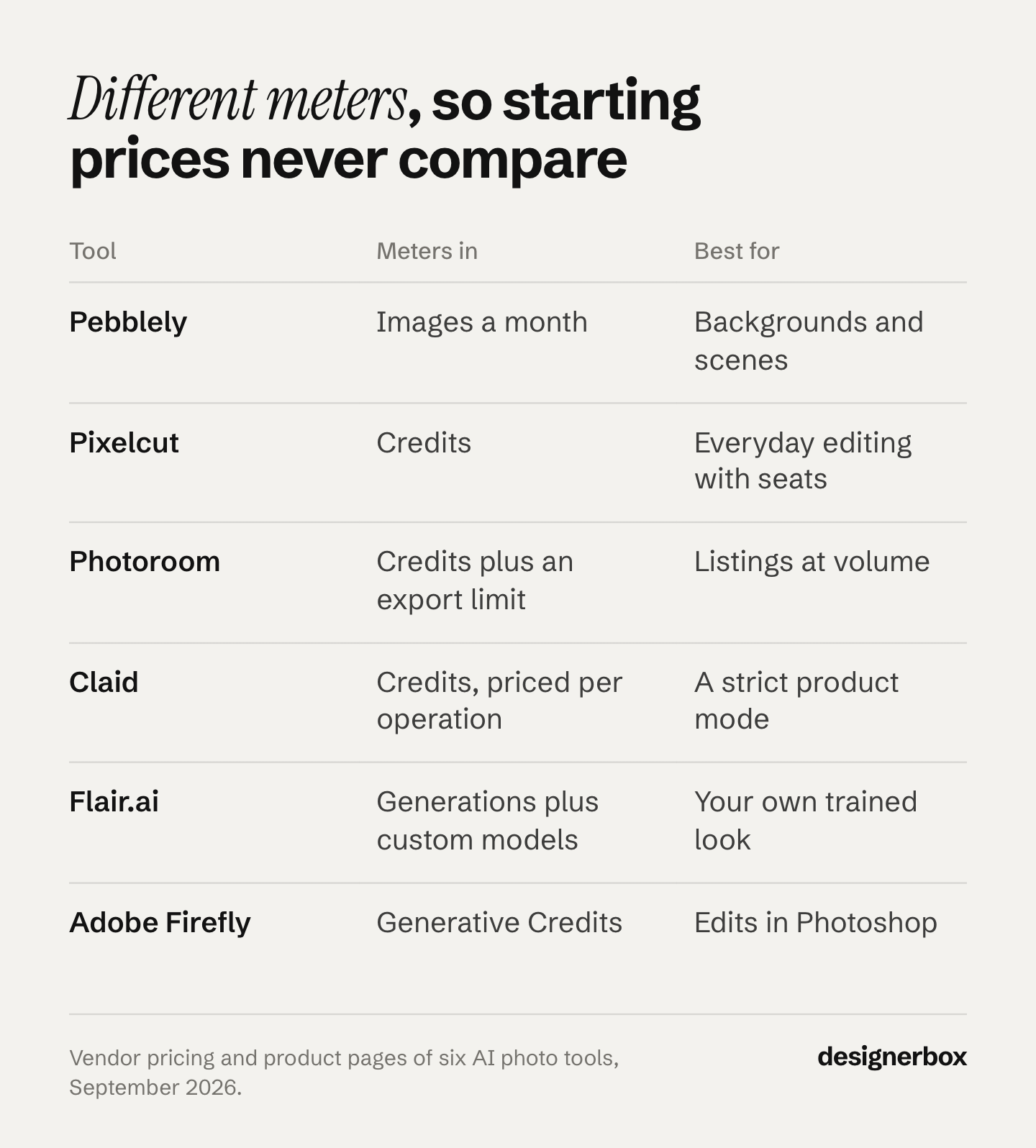
Each vendor meters a different unit. Pebblely sells a set number of images a month. Pixelcut, Photoroom, Claid and DesignerBox sell credits, and a credit buys different work in each. Claid prices each operation in its own number of credits. Photoroom also sets an export limit. Adobe sells Generative Credits. Flair sells a generation quota plus custom model slots. Seven numbers from different units in one column produce a ranking that means nothing.
Then there is the billing toggle. Several pricing pages show a yearly-billed rate under a per-month label. You cannot pay that number month to month.
DesignerBox has a billing toggle too. Its pricing page shows the annual rate per month on the annual view. Check which view is selected before you compare it with anything.
Take your real monthly image count, convert each tool’s unit into cost per finished image at that volume, and check which tier includes the rights and the features you need. A tool that looks cheaper at the top of the page can cost more once you price the plan that does your actual job. The same arithmetic applies when you price a six-tool AI stack.
Repeatability at 200 SKUs
Cost per image is the right unit. Repeatability is the right question, because every tool demos well on one product.

Run a shortlist through three checks before you look at a price again.
- Can you save the setup? Brand rules, model, light, framing and crop, held as a record the tool reads on the next product, not a prompt you paste again and edit slightly. A prompt you retype is a new decision every time, and 200 small new decisions is where a catalog stops matching.
- Does the standard hold on the two hundredth product? Ask for the same shot on ten unrelated SKUs, put the results side by side, and count how many you would ship without a fix. That number, not the best single result, is your real throughput. The grid test for consistent product images shows how to score that side-by-side check by layer.
- Can you see the cost before the run? On a credit-metered tool, the same operation can cost several times more depending on the model behind the step. A tool that shows the run cost first is a tool you can budget against.
Those three checks separate a good first test from a working system. Building product images in bulk is a different job from making one hero shot. Automating product photography covers what the repeat pass looks like once the first result is approved. They also sort the video-first suites that ship product photography pages, which is the test applied in Higgsfield product photography.
What to feed an AI product photography tool
Every tool on this list starts from your photo, so the input sets the ceiling. A sharp, evenly lit photo of the real product, taken straight on, gives the model the most to keep. A blurry or heavily angled photo gives it the most to guess.
Four habits help with every one of the seven:
- Shoot the product, not the scene. A plain background and soft, even light. The tool adds the scene later.
- Keep the true color. Set a white balance and do not add a filter. A model copies the color it sees.
- Show the detail you must keep. Labels, logos and stitching need to be sharp in the source. Claid, for example, suggests its Precise mode at its 2MP output setting for products with text or logos (claid.ai/product/ai-photoshoot, September 2026).
- Shoot every angle you will sell. A tool can invent a back view, and the invented one may not match the real product. If a back view goes on the listing, photograph it.
Then check each result against the real product at 100% zoom before it ships. Compare the color, the label text and the shape, in that order. How an AI photoshoot builds a listing set from one source photo covers the step order.
How to choose for your catalog
Scope first, price second. Work down this list and stop at the first one that describes you.
- You need one thing done well. Backgrounds and scenes, nothing else, with a known monthly volume. Pebblely meters in images and needs no conversion.
- You need everyday editing and a team. Cutouts, upscales, batch exports, a few seats, a commercial license included. Pixelcut covers that in one paid tier.
- You ship listings at volume. Marketplace specs, big batches, an API. Photoroom is built for that shape of work.
- You need a trained look of your own. A custom model of your product or aesthetic, and you will spend the setup images. Flair.ai.
- The product must not change at all. Logos, labels and exact shape, with a looser mode for mood shots. Claid’s Precise mode is built for that.
- You retouch one image at a time in Photoshop. Backgrounds, crops and clean-up on layers. Adobe Firefly inside Photoshop.
- One approved shot has to run on every new product. You need the on-model shot, the ad and the video around the product, on brand. You also need the same setup on every new SKU without rebuilding it. That is DesignerBox, and the gain grows with the number of products you run it on.
One job sits outside that list. If you are fixing photos you already have rather than generating new ones, you want a retoucher. The retouching tools sorted by portrait, enhance, and campaign work covers which one fits. For general editing, such as removing objects or extending a frame, the AI photo editor comparison sorts ten tools by job.
Before shortlisting anything, it helps to know which shot types you actually need to ship. Our graded examples of AI product photography works through seven of them and where each one is allowed to be published.
Once you have a shortlist, test it on your own products. The guide to an AI proof of concept for product images gives the sample size and the pass line.
Check the job before the shortlist, too. Applying a flat design to a blank product and restaging a real product are different tasks that share a keyword. Which AI product mockup job you have decides which half of this market you should be comparing at all.
If you sell apparel or cosmetics, the shortlist changes shape, because on-model and video move from optional to required. The AI tool stack for fashion and beauty brands covers that case stage by stage. Furniture has its own shortlist too. The AI furniture product photography tools comparison scores eight tools on the five shots a furniture listing needs.
Two more questions decide it in practice. Does your catalog churn? A tool’s monthly cost is often small next to what a reshoot cycle costs when a colorway changes. And do you need people in the shot? On-model work is a real dividing line, and only four of these seven list it. Our AI fashion model generators comparison covers that specific job.
If you want the head-to-head against a specific tool rather than the field, the Photoroom alternatives breakdown and DesignerBox’s own tool-by-tool comparisons go further than a roundup can.
DesignerBox also runs inside an AI chat. It has 75 tools over MCP, so an AI chat such as Claude, ChatGPT or Cursor can run a workflow you built in the browser. To see how it works before you pay, open a ready-made template and run it. The free plan runs on sample products.
FAQ
What is the best AI product photography tool in 2026?
There is no single answer, because these tools do not do the same job. Pebblely is best for backgrounds and scenes at a known volume, Pixelcut for everyday editing with team seats, Photoroom for high-volume listing work, Claid for a strict product mode, Flair.ai for custom-model shoots, Adobe Firefly for pixel-level edits in Photoshop, and DesignerBox for running one approved setup on each new product. Pick on scope, then check cost per finished image.
How do you compare these tools on cost?
Convert every tier into cost per finished image at the volume you ship each month. Each vendor meters a different unit, so headline numbers are not comparable, and several pricing pages open on annual billing under a per-month label. Read each vendor’s own pricing page, switch the toggle to monthly, and check that the tier you priced includes the commercial rights and the features your job needs.
Is there a free AI product photography tool?
Several offer free plans. DesignerBox has one, and it runs on sample products. Flair.ai’s free tier lets you try a custom model and video. Photoroom has a free plan with limited generations and no commercial use. Pixelcut has one. Claid and Adobe offer free trials rather than free plans. Pebblely does not list a free tier (vendor pages, September 2026).
Which AI product photography tool works at catalog scale?
The one that lets you save a setup and apply it to the next product. Test it by running the same shot on ten unrelated SKUs and counting how many you would ship without a fix. Photoroom and Pixelcut both handle batch work on the editing side. DesignerBox saves the whole setup, brand rules included, and reruns it on the next product.
Can I use AI product photos commercially?
The tool and the tier decide it, so check before you run a paid ad. Pixelcut includes a commercial license on its paid plans (pixelcut.ai/pricing, September 2026). DesignerBox grants one from the Pro tier up. Photoroom’s free plan does not allow commercial use (help.photoroom.com, September 2026). Never assume the free tier carries rights.
Do AI product photography tools replace a photoshoot?
Not entirely, because every one of them needs at least one accurate photo of the real product to work from. What they replace is the repeat visits: the reshoot when a colorway lands, the restyle when a marketplace changes its spec, the extra angle nobody asked for until launch week. The first photo still has to exist.
Can I use AI product photos on Amazon?
Amazon’s image rules apply to the image, whichever tool made it. The main image must be “a realistic, professional-quality image” on a pure white background (RGB 255, 255, 255), and the product should fill 85% of the frame (Amazon Seller Central, September 2026). A generated lifestyle scene fails that test for the main image. It can still work in the extra image slots, and where each channel takes a lifestyle photo covers the other channels. The Amazon tool comparison sorts the tools by which slot each one can fill.
Sources
- Photoroom tiers, credit and export metering and stated features (photoroom.com/pricing, September 2026) and free plan limits (help.photoroom.com, September 2026)
- Pixelcut tiers, commercial license, team seats and model list (pixelcut.ai/pricing, September 2026)
- Pebblely tiers, image metering and billing (pebblely.com/pricing, September 2026)
- Flair.ai tiers, free-tier contents and billing toggle (flair.ai/pricing, September 2026)
- Claid AI Photoshoot modes and advice on text and logos (claid.ai/product/ai-photoshoot, September 2026) and tiers, credit metering and free trial (claid.ai/pricing, September 2026)
- Adobe Generative Fill, Generative Expand, training data, partner models and Generative Credits (adobe.com/products/photoshop/generative-fill.html, September 2026)
- Amazon main image rules (Amazon Seller Central, product image requirements, September 2026)
- DesignerBox plans, model list, feature gating and MCP tools (designerbox.ai/pricing, designerbox.ai/models and designerbox.ai/mcp, October 2026)
Competitor features were read from each vendor’s own published pages in September 2026, and no competitor price is quoted here. Plans change often, so check the page and the billing toggle before you buy. Individual results vary.