




Virtual staging AI furnishes an empty room in a photograph instead of in the house. Four rooms is the working listing, so the unit that decides your bill is the price of one staged photo. The tools sell that unit in four different shapes: a monthly photo allowance, a monthly credit allowance, coins bought up front, and a flat rate per image.
Run the numbers on a four-room listing and the spread is the story. HomeGuide’s 2026 cost guide puts individual room staging at $300 to $700 a room, so four rooms of real furniture is $1,200 to $2,800 before any rental charges (homeguide.com, September 2026). A digital pass buys a file instead of furniture and a stylist, so read its price on a different scale.
This guide sets out what each tool with a public pricing page covers, how it meters use, and how fast it returns a staged room. It then sets the whole category against real furniture. The second half covers the disclosure rules that now attach to an altered listing photo.
Key Takeaways
- Two pricing shapes. AI tools sell a monthly photo or credit allowance. Human-edited services sell a per-image job. Convert both to a price per photo or the numbers do not line up.
- The headline prices are billed annually. Every subscription tool here lists its headline rate as a yearly charge. Read the billing period on the vendor’s page before you budget.
- Physical staging is a different order of cost. NAR’s 2025 Profile of Home Staging puts the median at $1,500 through a staging service and $500 when the agent does it.
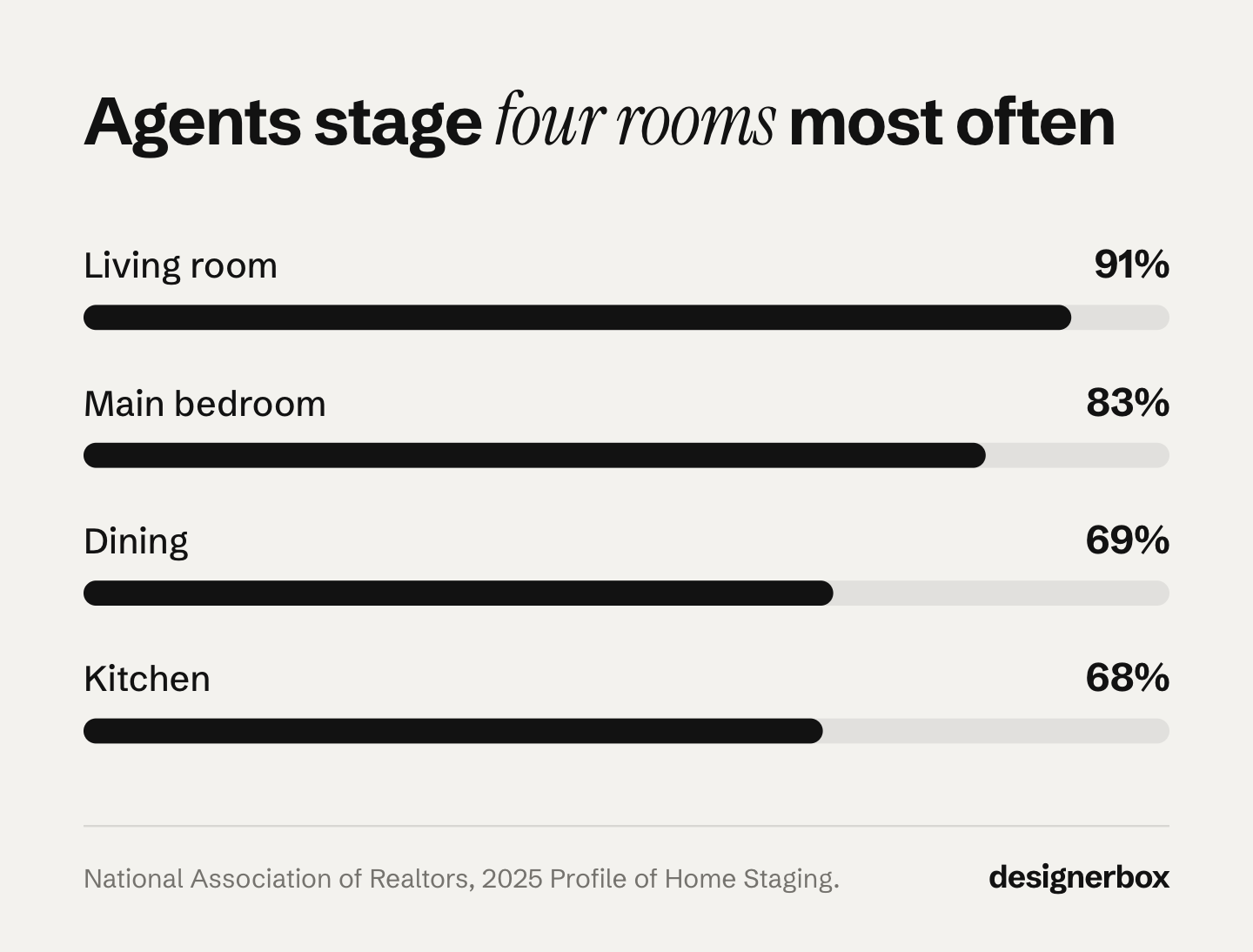
- Four rooms covers most listings. Agents stage the living room 91% of the time, the primary bedroom 83%, dining 69% and kitchen 68%.
- Disclosure is written into law in two states we checked. California AB 723 has applied since 1 January 2026, and Wisconsin Act 69 takes effect on 1 January 2027. New York’s Department of State has warned under existing law.
- DesignerBox has no named staging feature. It has the Furniture in a room template, workflows, an image editor, and 75 tools over MCP so an AI chat can run it. The model you pick sets what a pass costs, and the cost is shown before the run.
- Set the pass up once, then run it on every listing. A saved workflow runs the same way on the next listing, with the same model, light direction and framing. That consistency is what a reviewer notices across a portfolio.
How much does virtual staging AI cost per photo?
Work it out per photo, because that is the unit a four-room listing consumes. Each vendor lists its own rates on its own pricing page. They meter use in four different ways, so the headline number is not comparable until you divide it by photos. Physical staging sits far above all of them at a $1,500 median, because it buys real furniture and a stylist rather than a file.
| Service | What it covers | How it meters use | Turnaround stated |
|---|---|---|---|
| Virtual Staging AI | Staging, furniture removal, no watermark, API on the top tier | A monthly photo allowance, four tiers | 10 seconds |
| Collov AI | Staging, furniture removal, a one-click staging disclaimer, a commercial photo license from the entry tier | A monthly credit allowance, plus a per-photo add-on rate | 10 seconds |
| ApplyDesign | One-click auto staging, item removal included | Coins bought up front, spent per staged image | 15 minutes |
| VirtualStaging.com | Human-edited staging, renovation, 3D floor plans | A flat rate per image, with a bulk rate | 24 hours at the bulk rate |
| BoxBrownie | Human-edited staging, item removal, virtual renovation | A flat rate per image | Not listed |
| DesignerBox | No named staging feature: the Furniture in a room template, workflows and the image editor | A monthly credit allowance, with the cost shown before each run | Not listed |
Sources in row order: virtualstagingai.app/prices, collov.ai/pricing, applydesign.io/pricing, virtualstaging.com/pricing and boxbrownie.com/pricing, all September 2026. Every subscription headline on those pages is a yearly charge shown as a monthly figure, so read the billing period before you budget.
Which AI staging tools do real estate marketers use in 2026?
We found no public data that ranks these tools by how many agents run them, so a popularity claim about any of them is not something you can check. What is checkable is which vendors publish current pricing and what that pricing buys. Five do, and they price in four different units: photos a month, credits a month, coins bought up front, and a flat rate per image. Convert everything to a price per photo before you compare.
Virtual Staging AI meters use by photo count, across four plans. Every plan lists unlimited renders, furniture removal, no watermark and a 10 second turnaround, and the top plan adds API access (virtualstagingai.app/prices, September 2026).
Collov AI sells photo credits rather than photos, with a per-photo add-on rate on top. Its entry tier lists a commercial photo license, no watermark, unlimited regeneration, a furniture removal tool, a one-click staging disclaimer and a 10 second turnaround, alongside a free trial with a watermark (collov.ai/pricing, September 2026).
ApplyDesign prices in coins, which suits agents who stage in bursts rather than monthly. One-click auto staging spends coins per 2D image. It lists a free trial image, item removal is included, and the stated turnaround is 15 minutes (applydesign.io/pricing, September 2026).
BoxBrownie and VirtualStaging.com are the human-edited tier, and their price lists carry the most line items, because each lists staging, item removal and virtual renovation separately (boxbrownie.com/pricing, September 2026). VirtualStaging.com also lists a bulk rate with a 24-hour turnaround, renovation priced per interior image, and 3D floor plans (virtualstaging.com/pricing, September 2026).
A 2026 tested roundup in the trade press shortlists REimagine Home, Collov AI, Trolto, Apply Design, AI HomeDesign, Styldod and RoOomy (housingwire.com, September 2026). They differ mainly in scope: some sell staging alone, others bundle renovation and floor plans.
Is AI virtual staging free?
Free here mostly means a capped trial. Collov shows a free trial with a watermark (collov.ai/pricing, September 2026). ApplyDesign lists a free trial image (applydesign.io/pricing, September 2026). DesignerBox has a free plan. It runs on sample products, and it watermarks what that plan makes. Use a free tier to judge whether a staged room is usable. The four limits to check on any free AI photo tool are in AI for product photography: a beginner’s guide.
The watermark is the line that matters, because a watermarked render is fine for an internal check and unusable on a live listing. Read the license terms alongside it. In DesignerBox, uploading your own photos and the commercial license start on the Pro plan, so a live listing starts there.
What does physical staging cost, and does it pay back?
HomeGuide’s cost guide, which pools home staging prices across the US, puts physical staging at $150 to $600 for a consultation, $300 to $700 a room, and $1,500 to $4,000 for whole-home staging in the first month. A vacant home with rented furniture is $3,000 to $6,000 or more, and furniture rental is charged on top of that for large homes (homeguide.com, September 2026). NAR’s 2025 Profile of Home Staging puts the median for a staging service at $1,500, against $500 when the agent handles it.
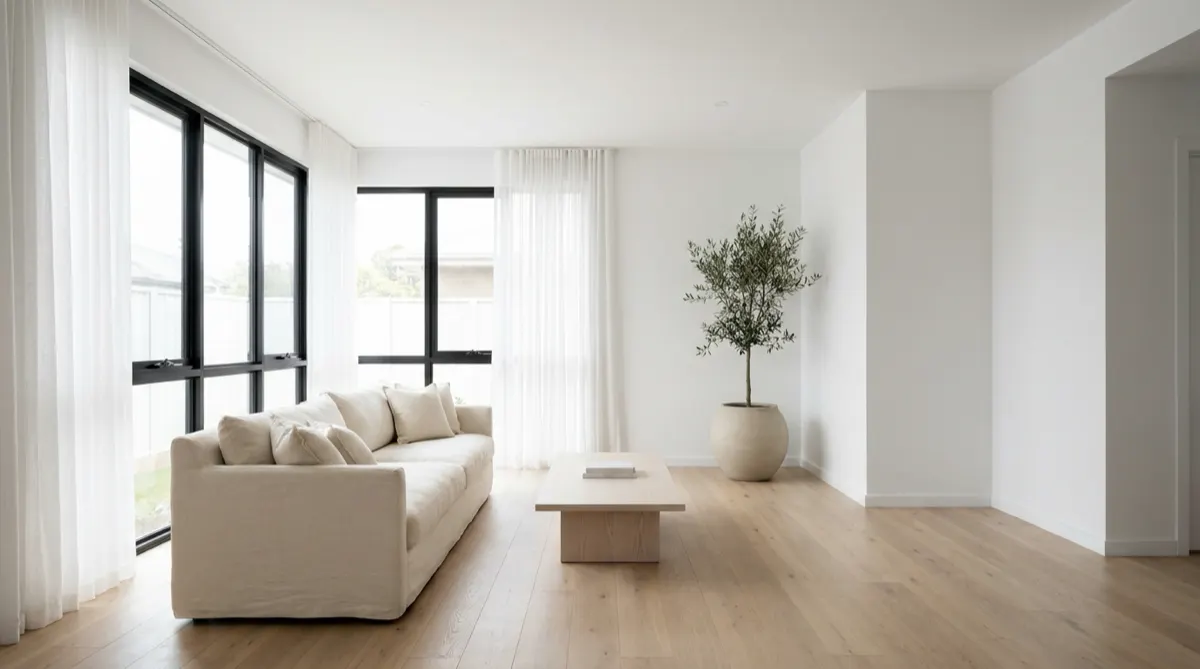
The payback evidence in that NAR report is worth reading before you call staging optional. 83% of buyers’ agents said staging made it easier for a buyer to picture the property as a future home, 29% of agents reported a 1% to 10% increase in the dollar value offered, and 49% of sellers’ agents observed a reduction in time on market. NAR surveyed 49,806 Realtors in February 2025 and received 1,266 usable responses, a 2.5% response rate (nar.realtor, September 2026).
Read those findings carefully. Every one is about staging a room, not a furnished photograph of an empty room. The report does not test whether a digitally staged photo moves an offer the way real furniture does. The cost comparison is solid. The outcome comparison is an assumption.
Which rooms should you stage, and how many photos?
Four rooms covers what agents actually stage. NAR’s 2025 profile records the living room at 91%, the primary bedroom at 83%, the dining room at 69% and the kitchen at 68%, with guest and children’s bedrooms at 22% each. Four staged photos is the working number for a standard listing, which is why price per photo matters more than the plan ceiling.
At four photos a listing, the arithmetic is simple to run yourself. Take the plan’s yearly charge and divide it by the cost of four per-image edits. The result is the number of listings a year the plan has to cover before it costs less than paying per image. Below that number of listings a year, a per-image service costs less and asks for nothing the rest of the year. Above it, the plan wins, and the only question left is which tier your volume needs.
How fast is AI staging compared with a human editing service?
Both subscription tools in the table state a 10 second turnaround. ApplyDesign states 15 minutes. VirtualStaging.com states 24 hours at its bulk rate, because a human editor does the work. The gap matters less than it looks, because the clock that binds is your review pass rather than the render.
Ten seconds means you regenerate a room until the furniture sits right, which is what unlimited regeneration is for. Twenty-four hours means you brief once and accept what comes back, so you write a more careful brief. Teams shipping listings on a fixed day can absorb a 24-hour turnaround. Teams reacting to a same-day price drop cannot. The same clock decides whether you book a listing videographer or generate the clip yourself.
Do you have to disclose a virtually staged listing photo?
In California, yes, under AB 723 since 1 January 2026. In Wisconsin, yes from 1 January 2027 under Act 69, where the alteration creates a false or misleading impression. In New York, the Department of State has warned that AI-generated listing pictures may breach existing advertising rules. Everywhere else, NAR’s Code of Ethics binds NAR members, your own MLS rules apply, and so does federal advertising law. This is general information, not legal advice.
California AB 723 adds Section 10140.8 to the Business and Professions Code. A licensee who includes a digitally altered image in an advertisement must include a statement disclosing the alteration. The advertisement must also carry a link to a publicly accessible website, URL or QR code that identifies the original image. If the posting sits on a site the licensee controls, the unaltered images must be included in that posting, or linked from it (leginfo.legislature.ca.gov, September 2026). The statute covers changes to fixtures, furniture, flooring, walls, paint color, hardscape, facade and views through windows. It expressly excludes lighting, white balance, color correction, angle, cropping and exposure when they do not change how the property is represented. Staging is inside that definition. Ordinary exposure work is not.
The MLS rule that puts it into practice is CRMLS Rule 11.5.2, effective the same day, and CRMLS states plainly that AI-altered images count (kb.crmls.org, September 2026). The rule text, published by Bay East, requires you to submit the original unaltered version, make sure it is displayed immediately after the altered image, and mark the altered image in a reasonably conspicuous manner as “altered”, “digitally altered” or “AI altered” (bayeast.org, September 2026). CRMLS’s own guide says the original must appear right before or right after the altered image, and it lists “virtually staged” as an acceptable label (kb.crmls.org, October 2026). The guide allows virtual staging with the label and the paired original. It does not allow AI-generated landscaping images or changes to real parts of the property, such as walls, flooring or cabinets.
Keep the penalties separate, because they come from three places. CRMLS says a violation brings a warning first and a $250 fine if it is not corrected in time, which is an MLS fine. The California Department of Real Estate says citation fines for licensees can range up to $2,500 a case, and a citation can include an Order of Correction (dre.ca.gov, September 2026). We found no penalty written into AB 723 itself.
Wisconsin Act 69 creates Wis. Stat. 452.136(1m): a licensee shall in all advertising disclose if the advertising has been altered using technology, including artificial intelligence, to add, remove or change elements of the property in a way that creates a false or misleading impression. Section 9 sets the effective date at 1 January 2027 (docs.legis.wisconsin.gov, September 2026). The Wisconsin REALTORS Association’s FAQ says the trigger is the misleading impression rather than the use of AI. It also says virtual staging that adds furnishings not present when the photo was taken requires disclosure. It says the ad should state that the image has been virtually staged (wra.org, October 2026).
New York issued a trend alert on 13 November 2025 about a rise in artificially generated listing pictures. The alert cites Real Property Law section 441-c, 19 NYCRR section 175.25(c)(9) on honest and accurate depiction, and General Business Law sections 349, 350 and 350-a on deceptive acts (ny.gov, September 2026).
Two national floors sit under all of that. NAR’s Code of Ethics Article 12 requires members to present a true picture in their advertising. Standard of Practice 12-10 prohibits manipulating listing content in a way that produces a deceptive or misleading result, including misleading images (nar.realtor, September 2026). We found no AI-specific standard in the Code. In September 2024, then FTC Chair Lina Khan said “there is no AI exemption from the laws on the books” (ftc.gov, September 2026).
Can buyers tell a listing photo was virtually staged?
We found no published study that measures whether buyers detect digitally staged listing photos. The closest evidence is peer-reviewed work on AI-generated imagery in service advertising. It found customers prefer hospitality services advertised with real images, and in interviews they described companies using AI images as less credible and potentially misleading. That research covers hospitality, not real estate.
The study is Belanche and colleagues in the International Journal of Information Management, volume 85, 2025 (doi.org, September 2026). The negative effect was stronger for highly involved customers, and a home purchase is about as high-involvement as consumer decisions get. Treat it as a reason for care, not a finding about listing photos.
Craft closes the gap in practice. Three failure modes give a staged room away: furniture at the wrong scale against door frames and window sills, light falling on the furniture from a different direction than the light in the room, and reflections missing from the floor or the glass. Check all three before publishing, and check the room reads consistently across the whole set, which is the discipline behind keeping a location consistent across shots. NAR’s own consumer guidance says enhancements that materially alter the property should be disclosed.
Staging inside a general AI image tool
A general image tool prices the operation instead of the service, and the price moves with the model in the step. In DesignerBox the cost of a pass is shown before you run it, so you price a listing before you commit to it. There is no named staging feature in the product. What exists is the Furniture in a room template, workflows, the image editor and MCP. Which model you pick changes the edit pass. ByteDance documents annotation and sketch editing for Seedream 5.0 Pro, and the Seedream 5 guide covers it.
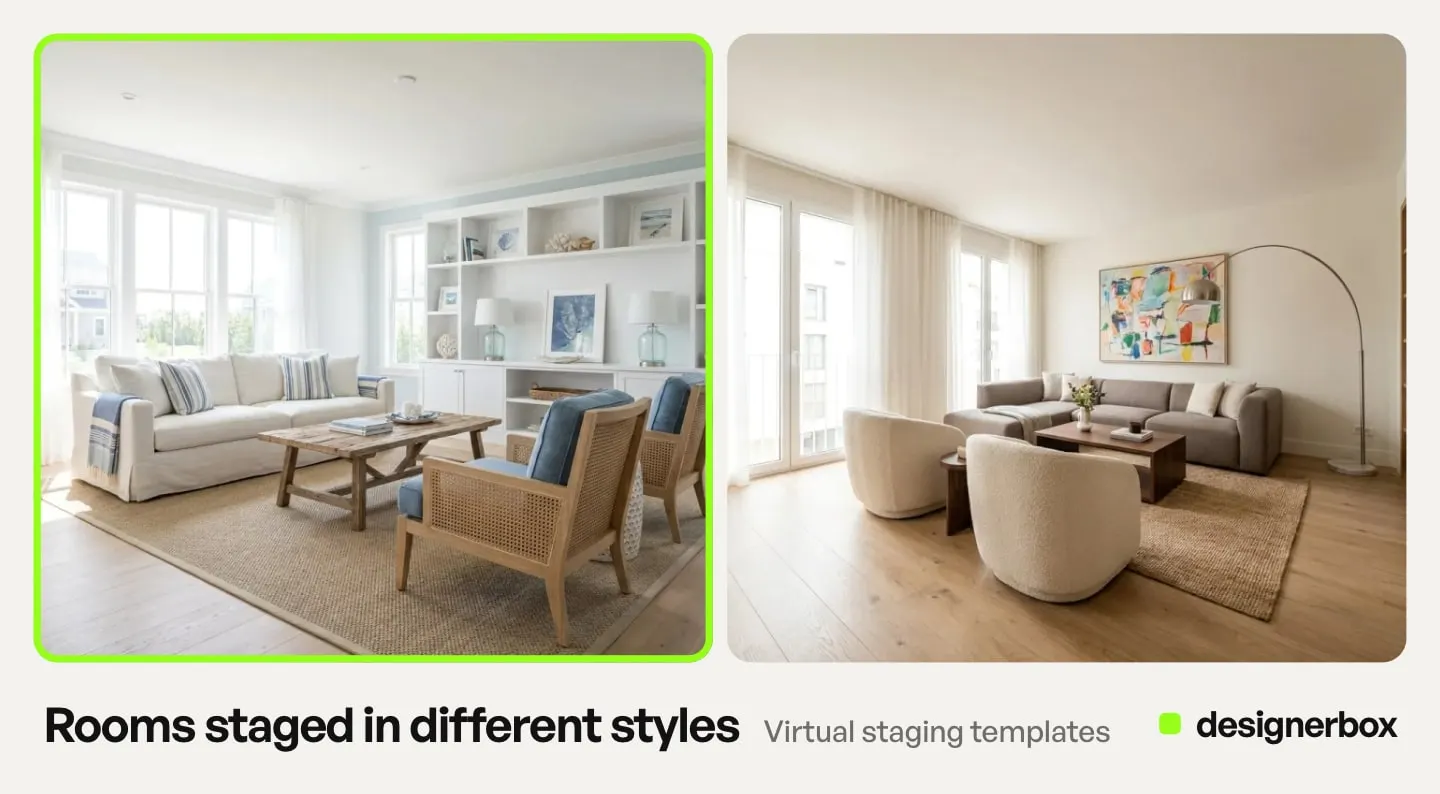
Those surfaces are what a listing workflow uses: the Furniture in a room template, 75 tools over MCP so an AI chat such as Claude, ChatGPT or Cursor runs the same job, and workflows that save the passes you run on every listing.
Keep the unaltered original of every photo you stage, because California and CRMLS require the original to appear with, or be linked from, the altered image. The image editor makes one edit after another, and the picture keeps its detail and resolution. That matters when one photo has to survive a relight and a furniture pass before it reaches the MLS. The image editor starts on the Premium plan.
Build that set of passes once and every new listing is a rerun rather than a rebuild, which is creative automation applied to a listing instead of a campaign. You set the model, the light direction and the framing once, and the workflow reads them on every run. The tenth staged room then matches the first. The listing photos, the staging passes, the video frames and the agent’s social creative all come from the same account and the same brand rules.
A dedicated tool wins in one case. If furnishing empty rooms is the only job, a staging plan with furniture removal built in does it in fewer steps and prices per photo more predictably. A general tool earns the subscription when the same plan also has to produce the frames for a listing video, the agent’s social creative and the brochure images. Video is priced on a different meter and starts on the Premium plan: an 8 second clip costs 40 to 560 credits, depending on the model, so the cost of one shipped video ad is a duration and model question rather than a per image one. That is the consolidation question behind every AI real estate marketing stack.
If staging photos is the job you repeat every week, the shape to build is a workflow rather than a habit: one model, one light direction, one framing, saved once and run again on the next listing. Start from a template, add your listing photos, and run it.
FAQ
How much does virtual staging AI cost per month?
Each vendor publishes its own plans, and every headline on those pages is a yearly charge shown as a monthly figure. The tiers are built on a photo allowance, a credit allowance, coins bought up front, or a flat rate per image, so divide the yearly charge by the photos it buys before you compare anything (vendor pricing pages, September 2026).
Is AI virtual staging free?
The staging tools’ free tiers are trials rather than plans. Collov shows a free trial with a watermark. ApplyDesign lists a free trial image. A watermarked render cannot go on a live listing, so treat any free tier as an evaluation budget, then price the paid plan you need.
How long does AI virtual staging take?
Virtual Staging AI and Collov AI both state a 10 second turnaround on their pricing pages. ApplyDesign states 15 minutes. VirtualStaging.com states 24 hours at its bulk rate, because a human editor does the work. In practice your own review pass sets the pace, because you check scale, light and reflections on every room before it goes live.
Which rooms should you virtually stage on a listing?
Start with the four rooms agents stage most. NAR’s 2025 Profile of Home Staging records the living room at 91%, the primary bedroom at 83%, the dining room at 69% and the kitchen at 68%. Guest and children’s bedrooms sit at 22% each. Four staged photos is the working number for a standard listing.
Do MLS rules require disclosing a virtually staged photo?
Some do. The California Regional MLS (CRMLS) requires it under Rule 11.5.2, which took effect on 1 January 2026 (kb.crmls.org, October 2026). It requires you to submit the original unaltered image, display it immediately after the altered one, and mark the altered image in a reasonably conspicuous manner as altered, digitally altered or AI altered. CRMLS’s own guide also allows the original right before the altered image. Other MLSs vary, so read your own rules.
Is virtual staging legal?
The rules we read do not ban virtual staging of furniture. They require disclosure, and in California the original photo too. California AB 723 requires a disclosure statement plus access to the original image (leginfo.legislature.ca.gov, September 2026). Wisconsin Act 69 requires disclosure from January 2027 where the change creates a misleading impression (docs.legis.wisconsin.gov, September 2026). New York’s Department of State has warned that AI listing images may breach existing advertising law (ny.gov, September 2026). In September 2024 the then FTC Chair said there is no AI exemption from the laws on the books (ftc.gov, September 2026). This is general information, not legal advice.
What gives away a virtually staged room?
Scale, light direction and reflections are three common tells. Furniture that ignores door frames and window sills, light on the sofa falling from a different direction than the light in the room, and a floor or a pane of glass carrying no reflection under the new furniture. We found no published study that measures whether buyers spot any of it, so check all three before publishing.
Sources
- California AB 723, adding Business and Professions Code section 10140.8, chaptered 10 October 2025. leginfo.legislature.ca.gov
- CRMLS Digitally Altered Image guidance and Rule 11.5.2, effective 1 January 2026, guide updated 24 July 2026, accessed 7 October 2026. kb.crmls.org
- Bay East Association of Realtors, digitally altered MLS photo rule text. bayeast.org
- 2025 Wisconsin Act 69, sections 4 and 9. docs.legis.wisconsin.gov
- Wisconsin REALTORS Association, 2027 Practice Change FAQs, Advertising Enhanced by Technology (PDF), current as of 29 June 2026, accessed 2 October 2026. wra.org
- New York Department of State trend alert on AI-generated listing images, 13 November 2025. ny.gov
- California Department of Real Estate citation policy and fine limits. dre.ca.gov
- NAR Code of Ethics 2026, Article 12 and Standard of Practice 12-10. nar.realtor
- NAR 2025 Profile of Home Staging: cost median, outcome figures and room percentages. nar.realtor
- NAR consumer guide to staging a house for sale. nar.realtor
- FTC, Operation AI Comply announcement, September 2024. ftc.gov
- Belanche, Ibanez-Sanchez, Jordan and Matas (2025), International Journal of Information Management 85, article 102954. doi.org
- HomeGuide, home staging cost guide, 2026, read September 2026. homeguide.com
- Virtual Staging AI plan pricing (virtualstagingai.app/prices, September 2026)
- Collov AI plan pricing (collov.ai/pricing, September 2026)
- ApplyDesign coin pricing (applydesign.io/pricing, September 2026)
- VirtualStaging.com pricing (virtualstaging.com/pricing, September 2026)
- BoxBrownie pricing (boxbrownie.com/pricing, September 2026)
- Tested staging app roundup (housingwire.com, September 2026)
- DesignerBox plans, credits and feature gating: DesignerBox pricing page (designerbox.ai/pricing), September 2026
Pricing, statutes and MLS rules verified from vendor pricing pages, California AB 723, CRMLS, Wisconsin Act 69, the New York Department of State, NAR and the FTC as of September 2026. The Wisconsin REALTORS Association FAQ was re-checked on 2 October 2026 at its new address, and the CRMLS guide was re-read on 7 October 2026. This is general information, not legal advice. Individual results vary.