




For product photos, start with Nano Banana 2, and switch to Nano Banana Pro for shots with small label text or a complex layout. That is our reading of Google’s own guidance: Nano Banana 2 “should be your go-to image generation model”, and Pro is “designed for professional asset production and complex instructions”. Per image, Pro costs twice as much at 1K and about 1.3 times as much at 2K.
So the choice between Nano Banana Pro vs Nano Banana 2 is a choice per shot. One catalog can use both. In DesignerBox, both are among the image models a workflow can use, and each step picks its own.
A brand needs the same five shots for every product: the white background image, the angles, the scene, the on-model shot and the detail. Each of those shots asks for something different from the model. A packshot needs the product kept exact. A label close-up needs readable small text. A tall banner needs an unusual shape.
This guide reads Google’s own pages on 1 October 2026: the Gemini API image guide, the pricing page, both model pages, the model cards and the terms. Where two Google pages disagree, it names the page. It contains no test images of ours, because a side-by-side from one prompt proves little. DesignerBox publishes this article and runs both models, so read that section with the bias in mind.
Key Takeaways
- Nano Banana 2 is Gemini 3.1 Flash Image. Nano Banana Pro is Gemini 3 Pro Image. Both have been generally available since 28 May 2026, and Google sells both.
- Google’s default is Nano Banana 2. Its guide calls it “the best all around performance and intelligence to cost and latency balance”.
- Prices per image: Nano Banana 2 costs $0.067 at 1K, $0.101 at 2K and $0.151 at 4K. Pro costs $0.134 at 1K or 2K and $0.24 at 4K.
- Pro charges the same for 1K and 2K. If you use Pro, ask for 2K.
- Nano Banana 2 takes more product references: up to 10 object images with high fidelity, against up to 6 for Pro, in Google’s API guide.
- Pro is Google’s pick for text and layout. Its model page names “high-fidelity product mockups” and “accurate text rendering”.
- Both models can change a product. Both model cards list small text and imperfect consistency as limits, and Google tells you to check every image.
Nano Banana 2 vs Nano Banana Pro: what each one is
Nano Banana is Google’s family name for the image models inside Gemini. Google’s API guide lists four of them today (Gemini API image generation guide, October 2026).
| Name | Model | Status on 1 October 2026 |
|---|---|---|
| Nano Banana 2 Lite | Gemini 3.1 Flash Lite Image | Generally available since 30 June 2026 |
| Nano Banana 2 | Gemini 3.1 Flash Image | Generally available since 28 May 2026 |
| Nano Banana Pro | Gemini 3 Pro Image | Generally available since 28 May 2026 |
| Nano Banana (original) | Gemini 2.5 Flash Image | Listed to shut down on 2 October 2026 at the earliest |
Source: Gemini API image guide, changelog and deprecations page, read 1 October 2026. A note on the same deprecations page calls the Gemini 2.5 models “not deprecated”, so read the 2 October date as the earliest possible one.
Two things in that table are often written wrong.
Nano Banana 2 did not replace Pro. Pro launched in preview on 20 November 2025, and Nano Banana 2 followed on 26 February 2026. Google’s model page calls Nano Banana 2 “the high-efficiency counterpart to Gemini 3 Pro Image”. The two are sold side by side.
There is no Nano Banana 3. Google’s text models have moved to later versions. On 1 October 2026 the models page, the changelog and Google DeepMind’s model hub list no Nano Banana 3 and no new Pro.
Google describes each model in one line. Nano Banana 2 is “the most versatile model, generalist workhorse model for all tasks”. Nano Banana Pro is “the premium choice for the most complex visual tasks, offering the highest level of world knowledge, advanced localization, accurate brand consistency, and precision creative control”.
When does Google say to use each model?
Google’s own model selection advice is short, and it favors Nano Banana 2 for most work.
- Nano Banana 2: “should be your go-to image generation model, as the best all around performance and intelligence to cost and latency balance.”
- Nano Banana Pro: “is designed for professional asset production and complex instructions.”
The Pro model page adds the detail a product team needs: “Nano Banana Pro is best for complex graphic design, high-fidelity product mockups, and factual data visualizations that require accurate text rendering and real-world grounding via Google Search” (Gemini 3 Pro Image model page, October 2026).
Google’s launch post for Nano Banana 2 gives the split in one sentence: “Nano Banana Pro for high-fidelity tasks requiring maximum factual accuracy, or Nano Banana 2 for rapid generation, precise instruction following and integrated image-search grounding” (Google blog, Nano Banana 2, February 2026).
On speed, Google gives words and no numbers. It says Pro is for “tasks where accuracy is more important than speed”. It publishes no latency in seconds for either model, so treat any exact speed figure you read as someone else’s test.
Nano Banana Pro vs Nano Banana 2: specs side by side
These are the specs from Google’s Gemini API pages. The rows that matter most for product photos are the reference images and the aspect ratios.
| Spec | Nano Banana 2 | Nano Banana Pro |
|---|---|---|
| Output sizes | 512px, 1K, 2K, 4K | 1K, 2K, 4K |
| Aspect ratios | 14, including 1:4, 4:1, 1:8 and 8:1 | 10 |
| Reference images in total | 14 | 14 |
| Object references, high fidelity | Up to 10 | Up to 6 |
| Character references | Up to 4 | Up to 5 |
| Style references | Not listed | Up to 3 |
| Google Search grounding | Yes | Yes |
| Google Image Search grounding | Yes | No |
| Thinking levels | Minimal or high | No level control listed |
| Video as input | Yes | No |
| Batch API | Yes | Yes |
Source: Gemini API image guide and model pages, read 1 October 2026.
Google’s own pages disagree on three of these rows, so we name the page we used. The API guide’s table gives Pro 6 object references, and its limitations list says 5. The Nano Banana 2 launch post says 5 characters and 14 objects, against 4 and 10 in the API guide. Google Cloud’s model page lists more aspect ratios for Pro than the API guide does. The table above follows the API guide.
What the specs mean for a catalog:
Reference images are how a product stays the same. You pass the model your real product photos, and it uses them. Nano Banana 2 takes up to 10 object images with high fidelity. For a product with a front, a back, a side and four detail photos, that covers the set in one request.
Both models reach 4K. A 4K square is 4096 x 4096 pixels, which leaves room to crop and zoom.
The extreme shapes are Nano Banana 2 only in the API guide. The 1:4 and 4:1 shapes fit tall and wide banners.
Thinking is always on. Google’s guide says the feature “cannot be disabled in the API”. The model makes up to two draft images first. Google adds that thinking tokens are billed, and that the draft images are “not charged”.
How much do Nano Banana 2 and Nano Banana Pro cost?
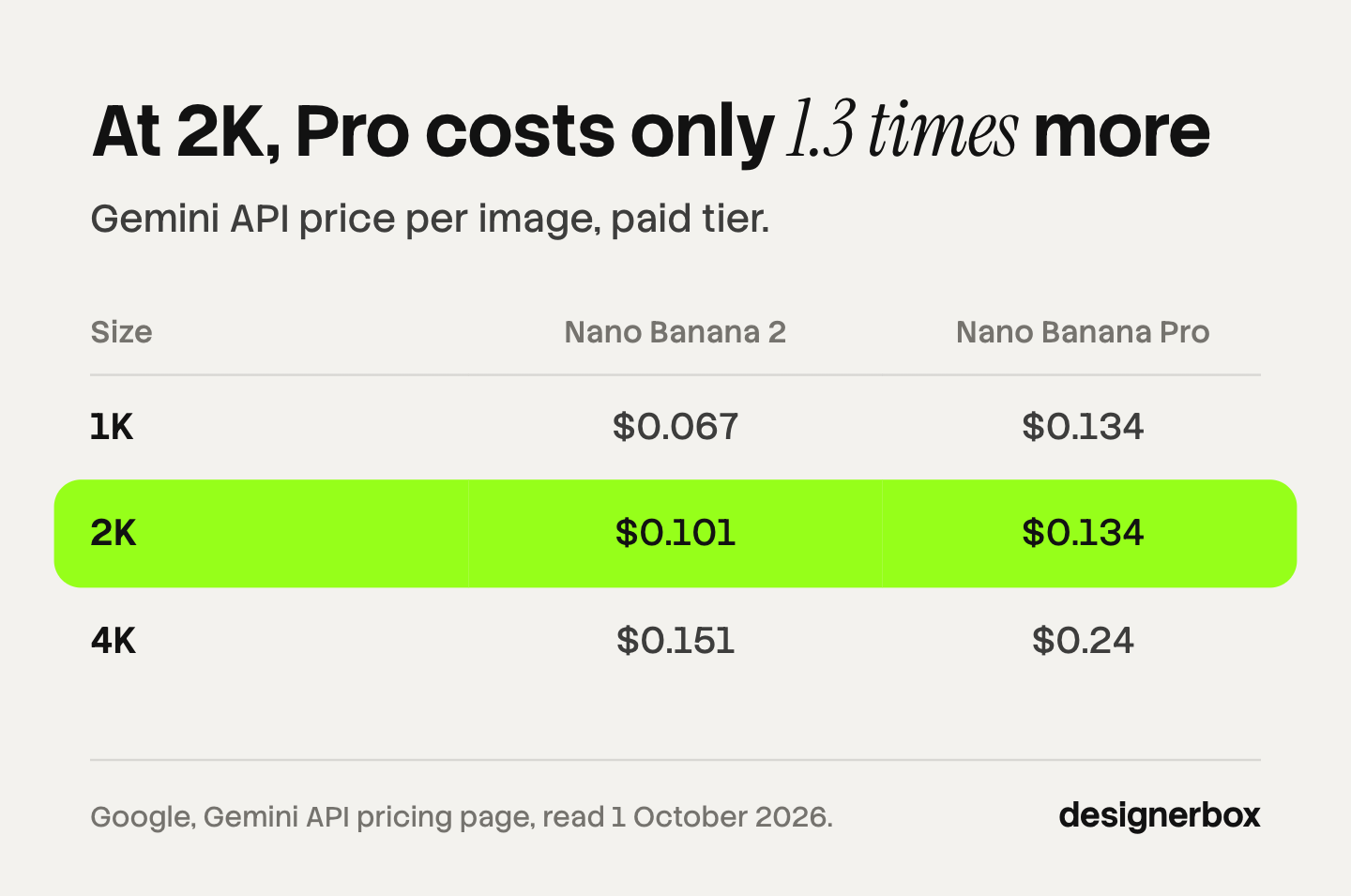
Google publishes a price per image for both models on its Gemini API pricing page. Neither model has a free API tier (Gemini API pricing, October 2026).
| Size | Nano Banana 2 | Nano Banana Pro | Pro costs |
|---|---|---|---|
| 512px | $0.045 | Not offered | |
| 1K | $0.067 | $0.134 | 2 times as much |
| 2K | $0.101 | $0.134 | About 1.3 times |
| 4K | $0.151 | $0.24 | About 1.6 times |
| 1K, Batch API | $0.034 | $0.067 | 2 times as much |
Source: Gemini API pricing, paid tier, read 1 October 2026. Output images only.
Three things follow from the table.
Pro charges one price for 1K and 2K. Google’s page says images “from 1024x1024px (1K) and up to 2048x2048px (2K) consume 1120 tokens”. So a 2K image from Pro costs the same as a 1K one.
The gap is smallest at 2K. For 1,000 images at 2K, the output cost is $101 on Nano Banana 2 and $134 on Pro. At 4K it is $151 against $240.
The Batch API halves both. Google lists a “50% cost reduction”, with “a turnaround of up to 24 hours”.
Add three smaller lines to an estimate. Your product photos count as input: Pro charges $0.0011 per input image, and Nano Banana 2 charges $0.50 per million input tokens. Text and thinking output is billed at $3 per million tokens on Nano Banana 2 and $12 on Pro. Search grounding is free for the first 5,000 requests a month, then $14 per 1,000.
For the wider cost picture, our guide to the GPT Image 2 API lists OpenAI’s prices the same way.
Which model fits which product shot?
This table is our reading of Google’s specs and guidance, shot by shot. It is not a test result. Run your own product through both before you fix a choice.
| Shot | Start with | Why, from Google’s pages |
|---|---|---|
| White background packshot | Nano Banana 2 | The default model. Up to 10 object references with high fidelity |
| Angle set from several photos | Nano Banana 2 | More object references, and Google says to “include previously generated images” for consistency |
| Lifestyle scene | Nano Banana 2 | ”Rapid generation” and the lower price suit many variants |
| On-model garment | Either | Pro takes 5 character references, Nano Banana 2 takes 4 |
| Label or packaging close-up | Nano Banana Pro | Google names “accurate text rendering” |
| Ad with a headline and a logo | Nano Banana Pro | Google names “complex graphic design” and up to 3 style references |
| The same ad in another language | Nano Banana Pro | Google names “advanced localization” |
| Tall or wide banner | Nano Banana 2 | The 1:4, 4:1, 1:8 and 8:1 shapes are in its list |
| Many draft ideas | Nano Banana 2 | 512px at $0.045 an image |
The pattern is simple. Use Nano Banana 2 where the product is the subject and the volume is high. Use Pro where text, layout or several brand elements must come out right in one image.

Google’s prompt guide has a section for this work: “Product mockups & commercial photography. Perfect for creating clean, professional product shots for ecommerce, advertising, or branding.” Its template starts “A high-resolution, studio-lit product photograph of a [product description] on a [background surface/description]”. Our guide to creating product images with AI compares that template with the ones from OpenAI and Black Forest Labs.
What limits does Google list for both models?
Both models can change details in an image, and Google says so in three places.
The model cards. The cards for both models list the same limits: “Text rendering: poor in small text (often blurry in 1k model), long paragraphs, page length” and “Character consistency is not always perfect between input images and generated output image” (Gemini 3.1 Flash Image model card, October 2026).
Google DeepMind’s model pages. “Not every image Gemini generates will be perfect – it can still struggle with small faces, accurate spelling, and fine details in images.” The same pages warn that “major lighting changes (like day to night), or blending multiple images may sometimes produce unnatural results”.
The instruction to check. “You should always carefully check images you create – including text in images – for accuracy.”
These lines are about characters, spelling and fine details. A label, a print or a logo is a fine detail too, so we read them as a risk for products.
Google’s guide also gives methods that help:
- Describe what must not change. “To ensure critical details (like a face or logo) are preserved during an edit, describe them in great detail along with your edit request.”
- Edit one thing at a time. “Using the provided image, change only the [specific element]” and “Keep everything else in the image exactly the same”.
- Work in small steps. “Don’t expect a perfect image on the first try.”
- Write the text first. Gemini “works best if you first generate the text and then ask for an image with the text”.
No Google page we read publishes a product accuracy rate for either model. So the review step stays with you. Our guide to AI product photo accuracy lists the checks: the label, the color, the print and the shape.
Watermarks, rights and data
Read these before a paid campaign. This is general information, not legal advice.
Every image carries SynthID. Google’s guide says: “All generated images include a SynthID watermark.” SynthID is invisible. On Google Cloud, images from both models also get C2PA Content Credentials.
The visible mark depends on where you run the model. In the Gemini app, a setting controls “whether visible watermarks appear on AI-generated content”. In India, South Korea and Vietnam, only AI Ultra subscribers get that setting (Gemini Apps Help, October 2026). Our comparison of ChatGPT and Gemini image generation covers the app side.
Paid API use is not used to improve Google’s products. On the paid tier, “Google doesn’t use your prompts” or responses “to improve our products”. On free use, it does, and “human reviewers may read, annotate, and process your API input and output” (Gemini API terms, October 2026). Users in the European Economic Area, Switzerland and the UK get the paid-tier data terms on free use too.
Google does not claim your images. “Google won’t claim ownership over that content.” It also says it “may generate the same or similar content for others”.
Indemnity is a Google Cloud matter. The Gemini API terms contain no indemnity. Google Cloud’s terms cover unmodified output from generally available Gemini models, and they exclude claims “based on a trademark-related right” from use “in trade or commerce” (Google Cloud service terms, October 2026). A product image with a logo is close to that exclusion.
Marketplaces and ad platforms have their own label rules. Our guides to AI product photos and marketplace rules and commercial use of AI images cover them.
Where can you run each model?
Both models are in the Gemini API, Google AI Studio and Google Cloud. They differ in Google’s own apps.
| Place | Nano Banana 2 | Nano Banana Pro |
|---|---|---|
| Gemini API and AI Studio | Yes | Yes |
| Google Cloud | Yes | Yes |
| Gemini app | The default image model, on every plan | A redo option for paid subscribers |
| Flow | ”The standard model” | The default for AI Ultra subscribers |
| Google Ads | Suggestions in campaign creation | Asset Studio |
| Google Slides and Vids | Not named | Yes |
Source: Gemini Apps Help, Flow Help and Google’s blog, read 1 October 2026.

One limit in the Gemini app matters for volume: “If you reach your daily quota of Nano Banana 2 images, you can’t redo any additional images with Nano Banana Pro.” A daily quota limits volume in the app.
Other tools run the same models. Google’s Pomelli uses “Nano Banana image generation” for its Photoshoot feature, without naming the version. Our guide to Google Pomelli covers it. Photoroom says it uses Google’s Nano Banana “for select image editing and generation features” next to its own models (photoroom.com/blog/photoroom-vs-gemini, October 2026). So the model is only part of the answer. The tool around the model decides what happens to your product photo.
The model as one step, picked per shot
Anyone can make an AI picture. Making hundreds that still look like your brand is the hard part.
DesignerBox is AI creative production for brands and agencies. Scale your images, ads and video with AI and keep your brand on every piece: build the workflow once with your brand rules, run it on every product, see the cost before each run, and keep everything from the first product photo to the finished ad in one place.
Both Nano Banana 2 and Nano Banana Pro are among the image models a DesignerBox workflow can use. The model is one step. A workflow for a product can use one model for the packshot and another for the label close-up, and you set that once. Your brand rules are read on every run. Batch runs the workflow over a whole sheet of products, and you keep or discard each row.
Critic steps help with the review. Three critic steps score the results of a run, and best-of-N keeps the best one. A person still checks the label and the color.
The full workflow from the first product photo to the finished ad, in one subscription. That covers the product photos, the ads and the video made from them.
Know the limits before you choose this route:
- DesignerBox does not have a public API. It has 68 tools over MCP, so an AI chat such as Claude, ChatGPT or Cursor can run your workflows. If your software must call Nano Banana directly, use the Gemini API.
- You pay in credits, and you do not see Google’s raw price. The cost of a run is shown before you run it.
- Plan gates apply. Uploading your own photos and the commercial license start on the Pro plan. AI video, virtual try-on, upscaling, the image editor and the video editor start on the Premium plan. Plans and credits are on the pricing page.
How to choose
Read down the list and stop at the first line that fits.
- You make packshots, angles and scenes at volume. Start with Nano Banana 2, at 2K.
- Your product has small text that must stay readable. Use Nano Banana Pro at 2K or 4K for that shot, and read every label.
- You build ads with a headline, a logo and a product. Use Pro.
- You need 4K for print or zoom. Either model. Nano Banana 2 costs $0.151 an image and Pro costs $0.24.
- You need 20 rough ideas before a shoot. Nano Banana 2 at 512px.
- You are not sure. Run one shot for each of 10 products through both at 2K. That costs about $2.35 in output, and your own product decides it.
Scale content without limits.
Generate content for your products or services with AI, starting today, and keep your brand on every piece.
FAQ
Is Nano Banana 2 better than Nano Banana Pro?
For most image work, Google’s own guidance favors it. Its guide says Nano Banana 2 “should be your go-to image generation model”. Google names complex graphic design, product mockups with text and localization as work for Pro. Google gives no accuracy score for either model, so test both on your own product.
Which is cheaper, Nano Banana 2 or Nano Banana Pro?
Nano Banana 2. It costs $0.067 per 1K image, $0.101 per 2K image and $0.151 per 4K image. Nano Banana Pro costs $0.134 per 1K or 2K image and $0.24 per 4K image. The Batch API halves these prices for both models (Gemini API pricing, October 2026).
Is Nano Banana 2 the same as Gemini 3.1 Flash Image?
Yes. Nano Banana 2 is Google’s name for Gemini 3.1 Flash Image. Nano Banana Pro is Gemini 3 Pro Image. Both became generally available on 28 May 2026 (Gemini API changelog, October 2026).
Can Nano Banana keep my product identical in every image?
Not with a guarantee. Both model cards say “Character consistency is not always perfect between input images and generated output image”, and Google DeepMind says the models can struggle with “fine details in images”. Reference images help: Nano Banana 2 takes up to 10 object images with high fidelity, and Pro takes up to 6. Google tells you to check every image for accuracy.
Do Nano Banana images have a watermark?
Every image has an invisible SynthID watermark. A visible mark depends on the place. The Gemini app has a setting for it. Google’s API guide describes only SynthID for API images. On Google Cloud, images also carry C2PA Content Credentials.
Is there a free tier for Nano Banana 2 or Nano Banana Pro?
Not in the Gemini API. The pricing page lists the free tier as “Not available” for both models. In the Gemini app, Nano Banana 2 is on every plan, including no plan, with a daily quota. Nano Banana Pro in the app needs a paid Google AI plan.
What happened to the original Nano Banana?
The original model is Gemini 2.5 Flash Image. Google’s deprecations page lists its shutdown for 2 October 2026, as the earliest possible date. Google recommends moving to Nano Banana 2 Lite, which went generally available on 30 June 2026.
Sources
Competitor pages are cited by domain and date, not linked.
- The four Nano Banana models, model selection advice, output sizes, aspect ratios, reference image counts, thinking, grounding, the product photography template, detail preservation and the limitations list: Gemini API image generation guide (read 1 October 2026)
- Per-image and Batch prices, input prices, the grounding fee and the free tier: Gemini API pricing (read 1 October 2026)
- General availability on 28 May 2026 and the preview launch dates: Gemini API changelog (read 1 October 2026)
- The shutdown row for Gemini 2.5 Flash Image: Gemini API deprecations (read 1 October 2026)
- “High-fidelity product mockups” and the Pro description: Gemini 3 Pro Image model page (read 1 October 2026)
- “High-efficiency counterpart” and the new aspect ratios: Gemini 3.1 Flash Image model page (read 1 October 2026)
- The launch split between the two models: Google blog, Nano Banana 2 (26 February 2026)
- Limits on small text and consistency: Gemini 3.1 Flash Image model card and Google DeepMind, Gemini image models (read 1 October 2026)
- Data use on paid and free tiers, and ownership of output: Gemini API additional terms (read 1 October 2026)
- Indemnity for generated output and its exclusions: Google Cloud service terms and Google Cloud generative AI indemnified services (read 1 October 2026)
- The Gemini app’s models, plans and daily quota: Gemini Apps Help, generate images (read 1 October 2026). The visible watermark setting: Gemini Apps Help, watermarks (read 1 October 2026)
- Flow’s image models: Flow Help (read 1 October 2026)
- Pomelli Photoshoot and Nano Banana: Google blog, Pomelli Photoshoot (19 February 2026)
- Photoroom’s description of how it uses Nano Banana: (photoroom.com/blog/photoroom-vs-gemini, October 2026)
- DesignerBox plan gates, MCP tools and the cost shown before each run: DesignerBox pricing page and MCP page (designerbox.ai/pricing, designerbox.ai/mcp), October 2026
Google’s models, prices and terms verified from Google’s own pages on 1 October 2026. Model specs change often, so check the source before you plan a catalog on them.

