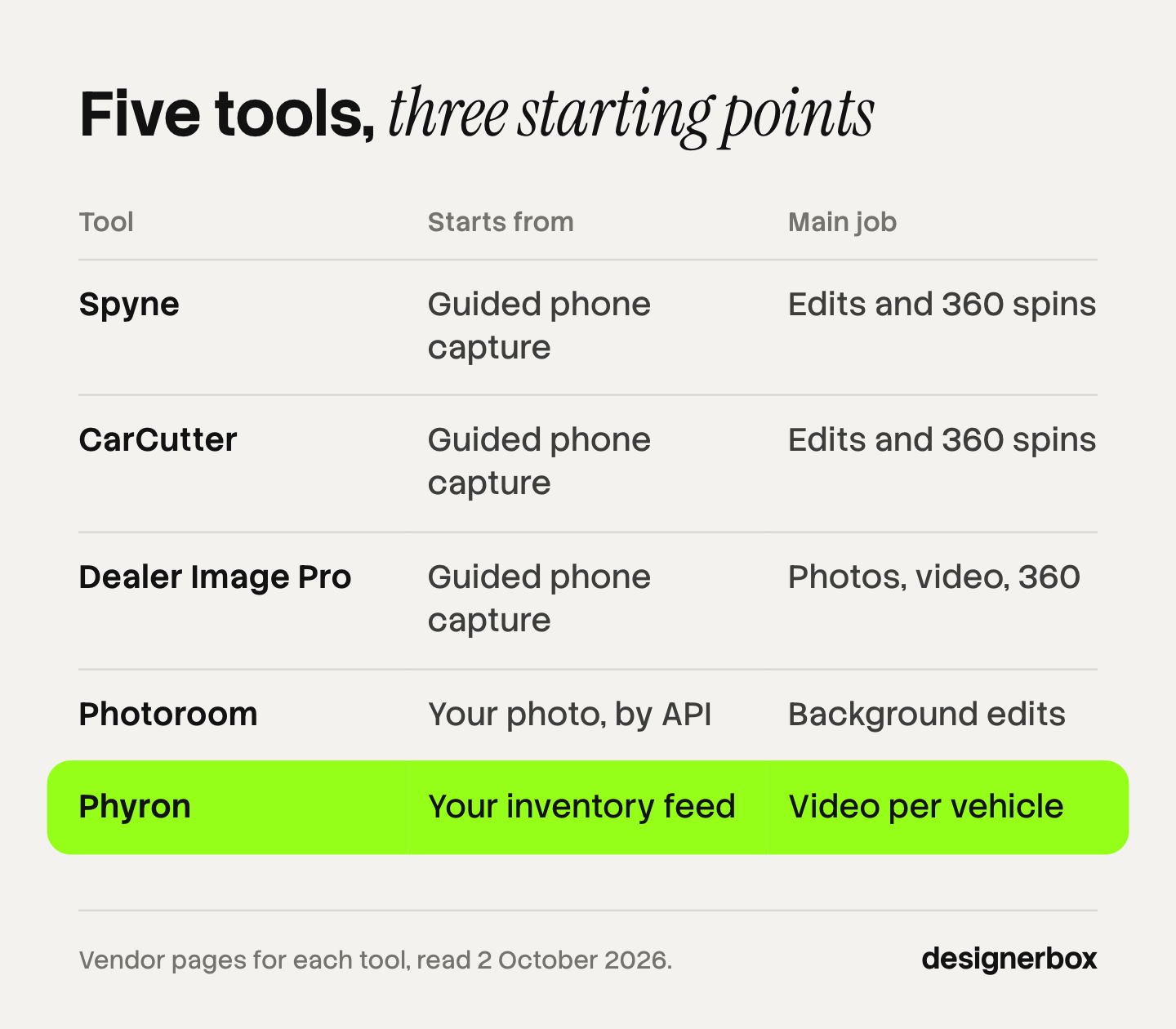
AI car photography tools edit the photos a dealer takes of each vehicle. They cut the car out, replace the background, add a shadow, and build 360 spins and videos. Spyne, CarCutter and Dealer Image Pro guide the capture and edit the result. Photoroom edits through an API. Phyron makes video from an inventory feed. Choose by the job that breaks first in your process.
A group with eight stores and 1,200 vehicles in stock needs about 14,400 photos at 12 a car. New stock arrives every week, so the work never ends. One person editing by hand cannot keep up, and two stores rarely frame a car the same way.
This guide sorts five dealer tools by the five jobs they do, then gives a test you can run before you sign. Every feature was read on the vendor’s own pages on 2 October 2026. We sell DesignerBox, so read its lines as our own case. It is the last section, and it is not a dealer inventory tool.
Key Takeaways
- A photo tool does up to five jobs. Guided capture, background edits, 360 spins, video and delivery to your inventory system. No tool here lists all five on the pages we read.
- Choose by where the photo breaks today. Uneven photos between stores is a capture problem. A slow editing queue is an edit problem.
- AI may change the scene and should not change a used car. A cutout keeps the car’s own pixels. A generative edit makes new ones.
- Google discourages two edits these tools sell. Its vehicle image guidelines discourage logos or branding in the background, and a modified license plate.
- Two narrow tools can replace one suite. An edit API with a video tool covers a group whose photos already arrive in a consistent form.
- Test on your hardest cars. Black paint, chrome, glass and a car with real damage show problems first.
What does an AI car photography tool do?
An AI car photography tool takes a phone photo of a real vehicle and prepares it for a listing. It removes the lot behind the car, places the car on a clean background, adds a floor shadow and reduces reflections in the glass. Some tools also guide the person taking the photo, build a 360 spin, make a video or send the files to your inventory system.
The demand comes from dealers and from buyers. In Cox Automotive’s 2025 Car Buyer Journey Study, 63% of auto dealers said investing in AI tools now is critical. The study surveyed 2,300 buyers, and 25% of new-vehicle buyers used AI tools while shopping (Cox Automotive, January 2026).
Most of the sale still happens in person. In the same study, 7% bought completely online and 53% completed every step at the dealership. The buyer sees the photo first and the car second, so the edited photo has to match the car on the lot. Car dealership photography covers the shots each vehicle needs.
The five jobs a dealership photo tool does
A dealer photo tool does up to five jobs. Most products are strong in two or three, so a list of jobs is more useful than a list of features.
- Guided capture. A phone app shows the person on the lot where to stand and which angle comes next. This fixes uneven photos between stores.
- Background and cleanup edits. The tool cuts the car out, replaces the background, adds a shadow and reduces reflections.
- 360 spins. A set of exterior photos becomes a view the shopper can turn. Interior views need a 360 camera.
- Video. The tool builds a short video for each vehicle from its photos and data.
- Delivery. The finished images go to your inventory or dealer management system without a manual upload.
Find the job that breaks first. If stores shoot different angles, no editing step repairs that, and you need capture. If the photos are consistent and the editing queue is slow, you need the edit job and an API or a bulk upload. Batch editing photos covers that second case for any product.
AI car photography tools compared
The table shows what each vendor’s own pages listed on 2 October 2026. “Not listed” means the pages we read did not state the feature that day. It does not mean the product cannot do it. Ask the vendor.
| Tool | Guided capture | Background edits | 360 spins | Video | Delivery to your system |
|---|---|---|---|---|---|
| Spyne | Yes | Yes | Yes | Spin videos | Not listed |
| CarCutter | Yes | Yes | Yes | Not listed | Yes, to dealer management systems |
| Dealer Image Pro | Yes | Yes | Yes | Yes | Not listed |
| Phyron | No, it starts from your feed | Not listed | Not listed | Yes | Yes, publishes automatically |
| Photoroom | Not listed | Yes | Not listed | Not listed | Yes, through an API |
No price appears in this guide. Each vendor lists or quotes its own plans.
Spyne
Spyne covers capture and editing in one app. Its guided photoshoot suggests angles and distances. Its editing replaces the background, adds shadows, tints windows to reduce reflections and masks the license plate. It lists more than 100 backgrounds and a 360 spin (spyne.ai, October 2026).
Best for a dealer who wants capture, editing and spins from one vendor.
CarCutter
CarCutter is built around a guided capture app that tells the photographer where to stand and how to hold the phone. It removes the background, places the car in a 3D virtual showroom, and lists 360 spins with interactive hotspots and branded plate replacement. It says photos go from the app to dealer management systems (car-cutter.com, October 2026).
Best for a group whose first problem is uneven capture across stores.
Dealer Image Pro
Dealer Image Pro describes itself as an end-to-end service for photos, video, 360 views and window stickers. Its Photo Assistant uses a wireframe guide for each angle. It lists AI background removal with shadows, and 360 interior capture with Insta360 and RICOH cameras (dealerimagepro.com, October 2026).
Best for a dealer who wants interior 360 views and printed window stickers from the same vendor.
Phyron
Phyron makes video. It reads your inventory feed, combines each vehicle’s images and data, and builds a video for that vehicle. It says it publishes and updates those videos automatically (phyron.com, October 2026). Capture and background editing are outside its scope, so it sits after a photo tool.
Best for a dealer whose photos are already good and whose listings have no video.
Photoroom
Photoroom is a general photo editor with an automotive offer. Its automotive page lists an API that removes and replaces backgrounds, reduces reflections on glass and chrome, and balances interior light. It says the vehicle stays pixel-accurate (photoroom.com/industry/automotive, October 2026). A guided capture app for the lot is not listed on that page.
Best for a group or a marketplace with developers, where photos already arrive in a consistent form.
What are the alternatives to Spyne?
The alternatives to Spyne depend on which of its jobs you use. For guided capture with editing, CarCutter and Dealer Image Pro cover the same ground. For editing alone through an API, Photoroom fits a team with developers. For video from an inventory feed, Phyron does that one job. A dealer can also pair two narrow tools.

Three questions sort the choice:
- Who takes the photos? Lot staff with phones need a guided app. A contracted photographer does not.
- Where do the photos go? If the answer is Google vehicle ads, check the branded background and the license plate settings against Google’s guidelines.
- Who checks the result? Someone has to compare the edited photo with the original on used cars. Ask each vendor how its review step works.
How much may AI change a used-car photo?
AI may change what is around the car: the background, the floor, the light on the scene. It should not change the car. Paint color, wheels, trim and damage are facts about one vehicle, and a buyer relies on them. A tool that cuts out the real car and places it on a new background keeps those facts. A tool that redraws the car can lose them.
You can test the difference. A cutout keeps the original pixels of the car and replaces the rest. A generative edit makes new pixels, and it can smooth a dent, change a wheel design or shift a color without telling you. How AI background removal works explains the cutout step.
The listing channels point the same way. Google disapproves a generic or stock image that is not the actual car, and allows a stock image for a new car of the same make, model and color. It disapproves overlaid watermarks and superimposed logos or text. It discourages logos or branding in the background and a modified license plate (Google Merchant Center Help, accessed October 2026). Several tools above sell branded backgrounds and plate replacement, so decide where each photo goes before you turn those on for every car.
eBay Motors says “Do not use stock photos” and asks for close-ups of any dings, dents and stains. It suggests blue masking tape to mark damage (eBay Motors, accessed October 2026). On a used car, showing the flaw is part of the listing.
The FTC has not published a rule on AI-edited vehicle photos. It does act on dealer advertising. In March 2026 it sent letters to 97 auto groups about advertised prices, and its list of illegal practices included “advertising unavailable or non-existent vehicles” (FTC, March 2026). Applying that to photos is our reading. This is general information, not legal advice.
How to test an AI car photography tool
Run a test before you sign. Ten cars are enough, and the choice of cars matters more than the number.
- Pick the hard cars. A black car, a white car in bright sun, one with chrome trim, one with tinted glass and one with visible damage.
- Shoot them the way your lot staff shoot. Use the same phones, the same time of day and the same people.
- Run every car through each tool. Keep the original files.
- Compare each result with its original at full size. Check the wheels, the badges, the paint color and the gaps around mirrors and antennas.
- Find the damage. The scratch you photographed has to be in the edited photo.
- Check the settings against your channels. Turn off the branded background and plate replacement for anything that goes to Google vehicle ads, then look again.
- Time one car from photo to listing. Include the upload to your inventory system.
What to test in a background remover lists the edge cases that apply to any cutout, and AI disclosure rules for advertising covers when an ad with a generated scene needs a label.

Brand scenes and ads for a dealer group
DesignerBox is AI creative production for brands and agencies. It is not a dealer inventory tool. It has no guided capture app for the lot, no 360 spin and no connection to a dealer management system. For listing photos of used cars, one of the five tools above is the better fit.
Its job starts where the listing photo ends. An agency that runs marketing for a dealer group makes the same ads every week: the new model line, the service offer, the weekend event, each in four formats. Anyone can make an AI picture. Making hundreds that still look like your brand is the hard part.
You build that job once as a workflow, with the group’s brand rules, and the workflow reads them on every run. A colleague runs it as an app, which is a workflow with a form. Batch runs it over a sheet of up to 200 rows, with the same standard on row one and row two hundred, and you keep or discard each result. Critic steps score the results of a run, and best-of-N keeps the best one. The cost is shown before the run.
The limits, stated plainly (DesignerBox pricing, October 2026):
- Generated scenes are for ads, not for used-car listings. A step that redraws the picture can change details of the car. Check every result against the original.
- Delivery is a download. You can also send results with a webhook or an S3 step. Nothing lands in your inventory system on its own.
- Team features are on the Ultra plan. Shared brand kits and white label are there too, and every plan below Ultra is one seat.
- The free plan runs on sample products. It cannot make video.
Uploading your own photos and the commercial license start on the Pro plan. AI video, virtual try-on, upscaling, the image editor and the video editor start on the Premium plan. Plans and credits are on the pricing page.
The templates, the workflows, batch, the editors, the brand profiles and the Assets library sit together, so the full workflow from the first product photo to the finished ad is in one subscription. The twelve product photography backgrounds show the kinds of scene a run can place a product in, and running creative for several clients covers the agency side. For a dealer group’s ad work, see DesignerBox for agencies.
FAQ
What is the best AI car photography tool for a dealership?
It depends on the job. For guided capture with editing in one app, Spyne, CarCutter and Dealer Image Pro all list both. For editing through an API, Photoroom fits a team with developers. For video from an inventory feed, Phyron does that job. Test each one on ten of your own cars before you sign.
Can AI replace the background of a car photo?
Yes. Every editing tool in this guide lists background removal or replacement for vehicles. The tool cuts the car out and places it on a studio floor or a virtual showroom. Check the edges around mirrors, antennas and glass, and check that the car itself is unchanged.
Can you use AI-edited photos in Google vehicle ads?
Google’s vehicle ads image guidelines do not mention AI. They require an image of the actual car, with no overlaid watermark and no superimposed logo or text. A replaced background is not on the disapproval list. Google does discourage logos or branding in the background and a modified license plate.
Do AI tools hide scratches and dents?
A cutout tool should not, because it keeps the car’s own pixels. A generative edit can smooth a dent or change a detail. Compare each edited photo with the original on used cars. eBay Motors asks sellers for close-ups of damage, so a photo that hides it works against the listing.
Is Photoroom an alternative to Spyne?
For the editing job, yes. Photoroom’s automotive page lists background removal and replacement, reflection cleanup and interior light balance through an API. A guided capture app and a 360 spin are not listed on that page, and Spyne lists both. A group that needs capture should compare CarCutter and Dealer Image Pro as well.
Can DesignerBox edit dealer inventory photos?
DesignerBox is not built for dealer inventory. It has no capture app, no 360 spin and no dealer management system connection. It fits the ad and brand work around the inventory, where a saved workflow runs the same way on every asset and you see the cost before each run.
Sources
- Google Merchant Center Help, Vehicle ads image guidelines (accessed October 2026)
- eBay Motors, How to sell a vehicle: take photographs (accessed October 2026)
- Cox Automotive, 2025 Car Buyer Journey Study (January 2026)
- FTC, FTC warns 97 auto dealership groups about deceptive pricing (March 2026)
- Spyne guided capture, editing and 360 spin pages (spyne.ai, October 2026)
- CarCutter app and dealership pages (car-cutter.com, October 2026)
- Dealer Image Pro homepage and background removal page (dealerimagepro.com, October 2026)
- Phyron homepage and automotive video page (phyron.com, October 2026)
- Photoroom automotive page (photoroom.com/industry/automotive, October 2026)
- DesignerBox plan gates, batch and delivery (DesignerBox pricing and DesignerBox batch, October 2026)
Platform rules verified from Google and eBay Motors pages, and tool features from each vendor’s own pages, on 2 October 2026. No competitor price appears in this guide. Rules and features change often, so check each page before you buy. Individual results vary.