




The GPT Image 2 API bills by token, and OpenAI publishes the result per image. A standard size costs from $0.005 at low quality to $0.211 at high quality, and the Batch API halves that. Since 8 September 2026 OpenAI recommends GPT Image 2.5 for new work, at the same token rates. For a product catalog, the price of one image is the small number. The number of images you keep decides the bill.
That is the short answer for anyone who plans to build on OpenAI’s image API. If you want the finished job instead of the endpoint, AI product photography in DesignerBox runs the same shots as a saved workflow.
A catalog is a different job from one good image. Forty new products with five images each is 200 images that must show the same product, in the same light, at the same crop. The API gives you a strong model and a price list. It leaves the batch logic, the review and the storage to you.
This guide reads OpenAI’s own pages, all on 1 October 2026: the pricing page, the image generation guide, the Batch guide, the data controls page and the service terms. Every price below is OpenAI’s and carries its source. DesignerBox publishes this article and sells a different route, so read that section with the bias in mind.
Key Takeaways
- GPT Image 2 is still live, and it is no longer the model OpenAI recommends. GPT Image 2.5 Sunburst and GPT Image 2.5 Flare shipped on 8 September 2026. For new integrations, OpenAI’s guide says to “use one of the GPT Image 2.5 models”.
- The price per image is published. A 1024 x 1024 image from GPT Image 2 costs $0.006 at low quality, $0.053 at medium and $0.211 at high. High costs about 35 times low.
- The Batch API halves it. OpenAI lists “50% lower costs” and a 24-hour turnaround, and the image endpoints are on the list.
- The free tier cannot call the image models. Tier 1 allows 5 images a minute, and Tier 5 allows 250.
- OpenAI lists four limits: latency, text rendering, consistency and composition control. The consistency line names “brand elements”.
- Batch means independent requests. Each line in a batch file is its own request. OpenAI documents no template, brand kit or shared style across requests.
- You own the output, and OpenAI does not train on API data by default. The output indemnity excludes trademark claims based on use in trade or commerce.
What is the GPT Image 2 API, and is it still the current model?
The GPT Image 2 API is OpenAI’s endpoint for making and editing images with the model GPT Image 2 (model ID gpt-image-2), released on 21 April 2026. It is still available, and OpenAI’s deprecations page does not list it. OpenAI no longer recommends it for new work. OpenAI released GPT Image 2.5 Sunburst and GPT Image 2.5 Flare on 8 September 2026, and its guide now tells new builders to start there (OpenAI image generation guide, October 2026).
OpenAI describes the two new models by job. “Choose Sunburst for workflows where editing precision matters most, and Flare for fast, high-quality everyday image generation.” Its prompting guide adds that Flare is the small model, “with image quality comparable to GPT Image 2”, and that Sunburst is the base model, “with higher image quality than GPT Image 2” (OpenAI image prompting guide, October 2026).
The older models have end dates. If your build still calls one of them, the date is the deadline.
| Model | Released | Status on 1 October 2026 |
|---|---|---|
| DALL-E 2 and DALL-E 3 | Earlier | Removed from the API on 12 May 2026 |
| gpt-image-1 | 23 April 2025 | Shuts down on 23 October 2026 |
| gpt-image-1-mini | 6 October 2025 | Shuts down on 1 December 2026 |
| gpt-image-1.5 | 16 December 2025 | Shuts down on 1 December 2026 |
| gpt-image-2 | 21 April 2026 | Live, not deprecated |
| gpt-image-2.5-sunburst and gpt-image-2.5-flare | 8 September 2026 | Live, recommended for new work |
Source: OpenAI API changelog and OpenAI API deprecations, read 1 October 2026.
That is four image model generations in about 17 months. A build tied to one model name needs a plan for the next one.
How much does the GPT Image 2 API cost per image?
OpenAI prices its image models by token: $8.00 per million image input tokens and $30.00 per million image output tokens, with text input at $5.00 per million (OpenAI API pricing, October 2026). It then publishes what that means per image for GPT Image 2, by quality and size.
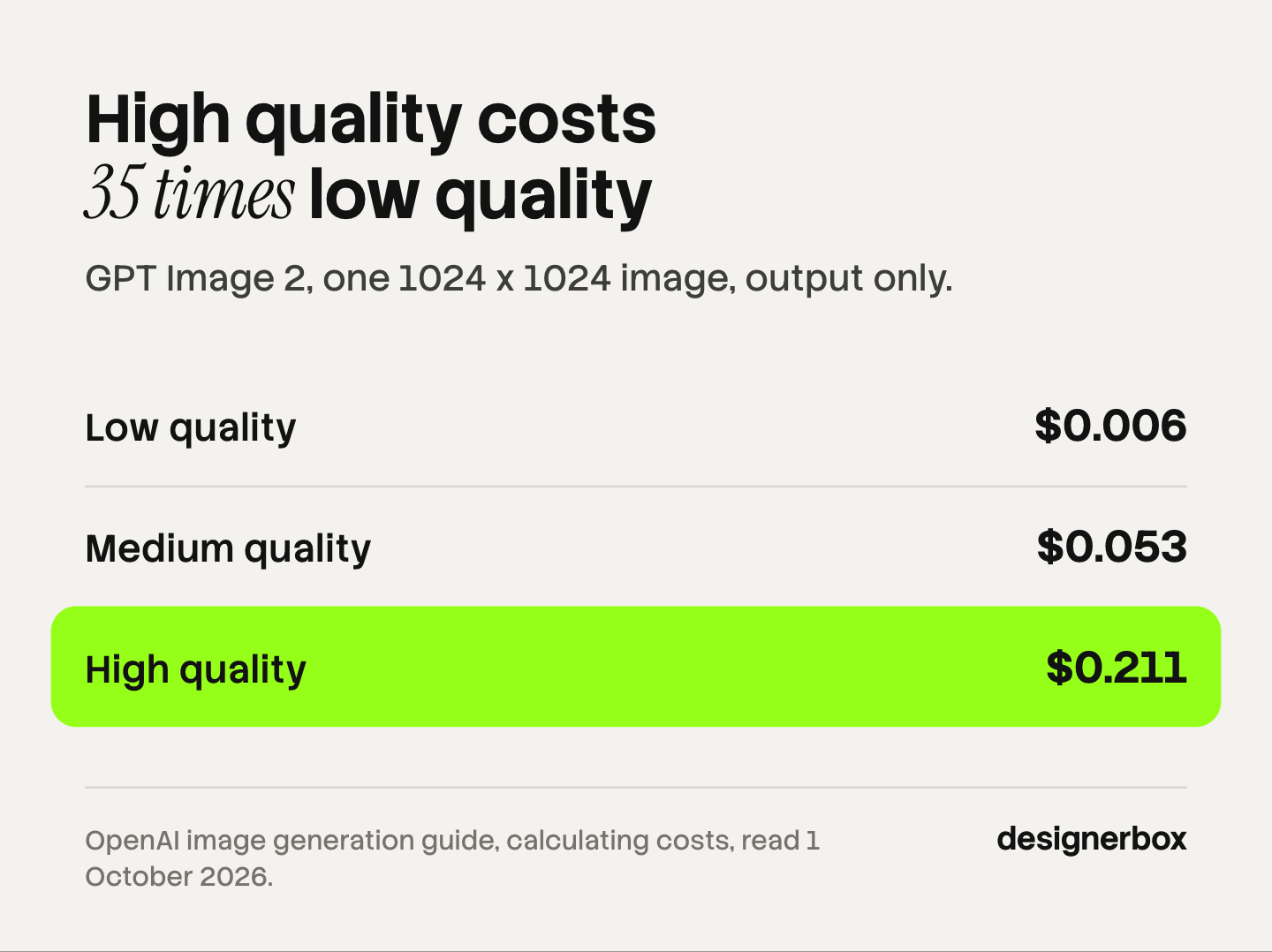
| Quality | 1024 x 1024 | 1024 x 1536 or 1536 x 1024 |
|---|---|---|
| Low | $0.006 | $0.005 |
| Medium | $0.053 | $0.041 |
| High | $0.211 | $0.165 |
Source: OpenAI image generation guide, “Calculating costs”, read 1 October 2026. Output cost only.
Three things in that table surprise people.
The portrait size costs less than the square. OpenAI explains it: “A larger non-square resolution can sometimes produce fewer output tokens than a smaller or square resolution at the same quality setting.”
Quality moves the price far more than size does. A high quality square costs about 35 times a low quality one.
The table is the output only. OpenAI says: “You should still account for text and image input tokens when estimating the total cost of a request.” An edit that starts from your product photo also pays for that photo as input, at $8.00 per million tokens. OpenAI’s docs do not print how many tokens one reference image uses on GPT Image 2 or 2.5, so the full cost of an edit call comes from your own usage data.
Four more lines belong on the estimate:
- Batch is half price. Image input $4.00, image output $15.00 per million tokens.
- Streaming previews cost extra. Each partial image adds 100 image output tokens.
- The Responses API adds the chat model’s tokens on top of the image cost.
- Regional processing adds 10% for models released on or after 5 March 2026.
What does GPT Image 2.5 cost?
GPT Image 2.5 uses the same token rates as GPT Image 2. OpenAI’s changelog says both new models “use GPT Image 2 token rates”. The cost per image can still differ, and OpenAI says so: “Equal token rates don’t mean equal cost per image: token consumption can differ by model and quality setting.”
OpenAI publishes no per-image table for 2.5. Its pricing page points to a calculator in the image generation guide. On 1 October 2026 that calculator showed a low quality 1024 x 1024 image from GPT Image 2.5 at 196 output tokens, which is $0.00588.
We ran the calculator’s own formula for the other settings. It reproduces every published GPT Image 2 price above, so we trust the reading. Treat the 2.5 figures as estimates from OpenAI’s calculator. They are not a price list, and they cover output only. OpenAI’s model pages add a caution of their own: “The GPT Image 2 calculator does not estimate GPT Image 2.5 token consumption.”
| Quality | GPT Image 2, 1024 x 1024 | GPT Image 2.5, 1024 x 1024 (calculator estimate) |
|---|---|---|
| Low | $0.006 | $0.006 |
| Medium | $0.053 | $0.013 |
| High | $0.211 | $0.053 |
| Xhigh | Not offered | $0.094 |
| Max | Not offered | $0.211 |
Source: OpenAI’s cost calculator in the image generation guide, run on 1 October 2026. Output cost only.
The pattern is that the labels moved. In the calculator, “high” on 2.5 uses the token count that “medium” used on GPT Image 2, and “max” uses the old “high”. OpenAI gives a related warning: “The same quality label does not imply the same image quality or response time across models.”
The calculator treats Sunburst and Flare as one option, and the guide says the models “can use different token counts for the same quality setting”. So follow OpenAI’s own instruction before you set a budget. It tells builders to read the usage field in each response and measure token consumption for their own prompts, sizes and quality settings.
What does a 200-image product drop cost?
Take a drop of 40 products with five images each. That is 200 finished images. The arithmetic below is illustrative. It uses OpenAI’s published GPT Image 2 output prices for a 1024 x 1536 image and excludes input tokens.
| Setting | 200 images, every one kept | 200 kept, three made for each |
|---|---|---|
| Medium, $0.041 | $8.20 | $24.60 |
| High, $0.165 | $33.00 | $99.00 |
| High, Batch API | $16.50 | $49.50 |
Two readings matter here.
The generation bill is small. Even at high quality with two discarded images for each one you keep, the drop costs under $100 in output tokens. For comparison, our guide to what a product photoshoot costs shows what the same set costs from a studio.
The keep rate is the real variable. The right unit is the cost of an accepted image. If you keep one image in three, the cost per accepted image triples, and somebody had to look at all 600 to find the 200. That review time is the larger cost. Our guide to bulk product images covers the review step in detail.
Speed has a limit too. OpenAI’s model pages list rate limits by usage tier: 5 images a minute at Tier 1, then 20, 50, 150 and 250 at Tier 5. At Tier 1, 600 images take two hours through the standard endpoint. The Batch API uses a separate pool and returns within 24 hours.
What limits does OpenAI list for product images?
OpenAI’s image generation guide has a section called “Limitations”. It lists four, and each one maps to a catalog job.
| OpenAI’s limit, in its words | What it means for a catalog |
|---|---|
| ”Complex prompts may take up to 2 minutes to process.” | A live tool that waits on the API needs a queue |
| ”the model can still struggle with precise text placement and clarity” | Check every label, size chart and ingredient list |
| ”may occasionally struggle to maintain visual consistency for recurring characters or brand elements across multiple generations” | The same product can drift between image one and image five |
| ”may have difficulty placing elements precisely in structured or layout-sensitive compositions” | A fixed crop or a marketplace frame needs a check after the run |
Source: OpenAI image generation guide, “Limitations”, read 1 October 2026.
The third row matters most to a brand. OpenAI names “brand elements” itself. A logo, a print or a bottle shape that changes a little between images is the failure a catalog cannot ship. Our guide to AI product photo accuracy lists the checks that catch it.
The same guide documents what helps:
- Reference images. An edit call takes up to 16 input images.
- Input fidelity. GPT Image 2 “processes every image input at high fidelity automatically”. OpenAI’s docs do not yet say how Sunburst and Flare treat this setting.
- Masks are guidance. “The model uses the mask as guidance, but may not follow its exact shape with complete precision.”
- Sizes. Each edge must be a multiple of 16 and at most 3840 pixels, and resolutions above 2560 x 1440 are “experimental”.
- Transparent backgrounds. Supported on GPT Image 2.5. On GPT Image 2 the support is “in preview”.
OpenAI’s prompting guide even carries a product recipe: “Extract the product from the input image and isolate it on a fully transparent background”, with the instruction to “Preserve product geometry and label legibility exactly.” For the wider method, see how to create product images with AI from a six-line brief.
What does the API leave for you to build?
The API answers one request at a time, with up to 10 images in each. A catalog needs six more things around that request. OpenAI’s docs cover the request, and these six jobs stay with you.
| Catalog job | What the API gives | What you build |
|---|---|---|
| Run many products | A Batch file of up to 50,000 requests | One request line per image, each with full settings |
| Keep one look | No template or brand kit in the API docs | Your own prompt store and reference set |
| Match results to products | ”the output line order may not match the input line order” | A mapping by the custom ID on each line |
| Handle failures | A separate error file | Retry logic and a re-run queue |
| Store files | Base64 in the response, never a URL | Storage, names and versions |
| Review | Nothing | A screen where a person keeps or discards each image |
Source: OpenAI Batch API guide and the image API reference, read 1 October 2026.

OpenAI’s advice on consistency is to repeat. Its prompting guide says “Repeat requests to measure consistency” and, for a recurring subject, “Repeat the appearance constraints so the character stays consistent.”
None of this is hidden, and none of it is a flaw. OpenAI sells a general model to developers, and a general model has no opinion about your brand. A team with engineers and an unusual need can build all six parts. A team without engineers will meet them one at a time.
Rights, data and labels on the OpenAI image API
These are the contract points a brand or an agency should read before the first paid campaign. This is general information, not legal advice.
You own the output. OpenAI’s services agreement says the customer “owns all Output”, and adds that “Output may not be unique” (OpenAI services agreement, October 2026).
API data is not used for training by default. OpenAI’s data page says “data sent to the OpenAI API is not used to train or improve OpenAI models (unless you explicitly opt in to share data with us)” (OpenAI data controls, October 2026).
Abuse logs are kept for up to 30 days. Zero Data Retention is possible on the image models, and it is “subject to prior approval by OpenAI”.
There is an output indemnity, with exclusions. OpenAI’s service terms cover API customers for claims that output infringes a third party’s intellectual property. The cover has exclusions. One applies where the output “was modified, transformed, or used in combination with products or services not provided by or on behalf of OpenAI”. Another applies where the claim is about “trademark or related rights” based on use “in trade or commerce” (OpenAI service terms, October 2026). A product image with a logo on it is close to that second exclusion.
People need consent. The service terms say: “You may not use Visual Capabilities to reproduce the likeness of any person without express consent and all necessary rights.”
Images carry provenance signals. OpenAI says supported images made with the API include “C2PA metadata and SynthID watermarks”, and that coverage can vary by model and file type. Its system card describes the SynthID layer as invisible. Marketplaces and ad platforms can read that metadata. Our guide to commercial use of AI images covers the six rights checks, and AI product photos and marketplace rules covers what each channel asks.
Three routes to the same catalog
There are three ways to use an OpenAI image model for a catalog. They differ in who builds the six parts above.
Build on the API. You get full control and the published token price. You also own the batch logic, the storage, the review screen and the next model migration. This fits a company whose product is the image feature itself.
Buy a product photo platform. Tools such as Photoroom sell a finished system for listing images. Photoroom says its platform runs its own models and “can integrate select external models where needed”, and that it offers batch editing in its web app and its API (photoroom.com/blog/photoroom-vs-openai, October 2026). This fits a team that wants an image API with the catalog parts built in.
Run the model as one step in a workflow. This is the route DesignerBox sells, and the next section describes it.
The ChatGPT app is a fourth, smaller option for a handful of images. Our comparison of ChatGPT and Gemini image generation covers where the apps stop at 40 products.
The model as one step in a workflow
Anyone can make an AI picture. Making hundreds that still look like your brand is the hard part.
DesignerBox is AI creative production for brands and agencies. Scale your images, ads and video with AI and keep your brand on every piece: build the workflow once with your brand rules, run it on every product, see the cost before each run, and keep everything from the first product photo to the finished ad in one place.
In DesignerBox, GPT Image 2 is one of the image models a workflow step can use. You build the workflow once: the shot list, the light, the crop and your brand rules. Batch runs it over a whole sheet of products. You keep or discard each row, and you re-run one row alone.
That covers the batch run, the single look, the matching by row and the review without code. The full workflow from the first product photo to the finished ad, in one subscription.
Know the limits before you choose this route:
- DesignerBox does not have a public API. It has 68 tools over MCP, so an AI chat such as Claude, ChatGPT or Cursor can run your workflows. If your own software must call an image endpoint, the OpenAI API or a platform API is the right route.
- You do not get the raw token price. You see the cost of a run before you run it, in credits.
- Results are downloaded, or sent with a webhook or an S3 step. Nothing is published to a store for you.
- Plan gates apply. Uploading your own photos and the commercial license start on the Pro plan. AI video, virtual try-on, upscaling, the image editor and the video editor start on the Premium plan. Plans and credits are on the pricing page.
How to decide
Read down the list and stop at the first line that fits.
- The image feature is your product. Build on the API. Start with GPT Image 2.5, as OpenAI advises, and measure tokens from the usage field in each response.
- Your own software must call an image endpoint for thousands of listings. Use the API or a product photo platform with an API.
- You have engineers and one unusual need. Build, and budget for the six parts, not only for the tokens.
- You are a brand or an agency with no engineers. Run the model as a step in a saved workflow, and review by row.
- You need ten images this month. Use the ChatGPT app and check each image yourself.
Whichever route you take, count accepted images. A price per generated image tells you what the model costs. A price per accepted image tells you what the catalog costs.
Scale content without limits.
Generate content for your products or services with AI, starting today, and keep your brand on every piece.
FAQ
Is the GPT Image 2 API free?
No. OpenAI’s model pages list the free usage tier as “Not supported” for its image models. Tier 1 starts after a $5 payment and allows 5 images a minute. OpenAI also says you “may need to complete the API Organization Verification” before you use GPT Image models (OpenAI image generation guide, October 2026).
How much does GPT Image 2 cost per image?
OpenAI publishes the output cost for a 1024 x 1024 image: $0.006 at low quality, $0.053 at medium and $0.211 at high. A 1024 x 1536 image costs $0.005, $0.041 and $0.165. The Batch API is half those prices. Input tokens for your prompt and reference photos are extra (OpenAI image generation guide and pricing page, October 2026).
What is the difference between GPT Image 2 and GPT Image 2.5?
GPT Image 2.5 shipped on 8 September 2026 as two models. Sunburst is the base model for editing precision. Flare is the smaller, faster model, with quality OpenAI calls “comparable to GPT Image 2”. Both use GPT Image 2 token rates and add the “xhigh” and “max” quality settings. OpenAI recommends 2.5 for new integrations.
Can the GPT Image 2 API keep my product identical across images?
Not with a guarantee. OpenAI’s own limitations list says the model “may occasionally struggle to maintain visual consistency for recurring characters or brand elements across multiple generations”. Reference images help, and GPT Image 2 processes them at high fidelity. Plan a review step that checks the label, the color and the shape on every image.
Does OpenAI train on images sent to the API?
Not by default. OpenAI says API data “is not used to train or improve OpenAI models (unless you explicitly opt in to share data with us)”. The image endpoints keep abuse monitoring logs for up to 30 days. Zero Data Retention needs OpenAI’s prior approval (OpenAI data controls, October 2026).
Do GPT Image 2 API images have a watermark?
They carry provenance signals. OpenAI says supported images made with the API include C2PA metadata and a SynthID watermark, and it describes that watermark as invisible. Coverage can vary by model and file type. You can ask for a visible disclosure in the prompt. OpenAI adds that metadata “can sometimes be removed by platforms, editing tools, or file conversions”.
Can I batch edit product photos with the OpenAI API?
You can send up to 50,000 requests in one Batch file at half price, with results inside 24 hours. Each line is an independent request with its own settings, and results can return in a different order. OpenAI’s docs describe no shared template or brand kit across requests, so the logic that keeps one look is yours to build.
Sources
Competitor pages are cited by domain and date, not linked.
- GPT Image 2.5 Sunburst and Flare, the recommendation for new integrations, per-image output costs, the “Limitations” list, masks, input fidelity, sizes, streaming costs and organization verification: OpenAI image generation guide (read 1 October 2026)
- Flare and Sunburst quality against GPT Image 2, quality labels across models, the product cut-out recipe and the consistency advice: OpenAI image prompting guide (read 1 October 2026)
- Token prices for image and text input and output, Batch prices and the regional uplift: OpenAI API pricing (read 1 October 2026)
- Release dates and the “GPT Image 2 token rates” line: OpenAI API changelog (read 1 October 2026)
- Shutdown dates for gpt-image-1, gpt-image-1.5 and gpt-image-1-mini: OpenAI API deprecations (read 1 October 2026)
- Rate limits by usage tier and the free tier: OpenAI GPT Image 2 model page (read 1 October 2026). Usage tier qualification: OpenAI rate limits guide (read 1 October 2026)
- Batch discount, 24-hour window, 50,000 requests per file, independent request lines and output order: OpenAI Batch API guide (read 1 October 2026)
- Up to 16 input images per edit, transparent backgrounds and base64 output: OpenAI image API reference (read 1 October 2026)
- Training, 30-day abuse monitoring logs and Zero Data Retention: OpenAI data controls (read 1 October 2026)
- Ownership of output: OpenAI services agreement (effective 1 January 2026; read 1 October 2026 through a page extractor, with the clause text checked against archived copies of 26 and 30 September 2026)
- Output indemnity, its exclusions and the likeness clause: OpenAI service terms (updated 12 June 2026; read 1 October 2026 through a page extractor)
- C2PA metadata and SynthID on API images: OpenAI Help Center, C2PA in ChatGPT Images (read 1 October 2026 through a page extractor). SynthID described as invisible: OpenAI system card, ChatGPT Images 2.5 (read 1 October 2026)
- Photoroom’s description of its own platform, models and batch editing: (photoroom.com/blog/photoroom-vs-openai, October 2026)
- DesignerBox plan gates, MCP tools and the cost shown before each run: DesignerBox pricing page and MCP page (designerbox.ai/pricing, designerbox.ai/mcp), October 2026
OpenAI prices, models and terms verified from OpenAI’s own pages on 1 October 2026. The GPT Image 2.5 per-image figures are estimates from OpenAI’s calculator. Prices and models change often, so check the source before you budget.

