




Amazon A+ Content (Amazon A plus content) is the rich media block under Product description on a listing. Basic gives you five module slots per ASIN, chosen from 14 module types. Premium gives seven, chosen from 19. Most modules carry a published image size, from 135 x 135 pixels in a quadrant block up to 970 x 300 for a full-width text overlay. It is free for eligible sellers.
The layout is the easy part. A 60-SKU catalog needs 60 module sets. Every image has to clear a minimum pixel size and a 2 MB file cap. Amazon’s guidelines also say the images cannot be the ones already in your listing gallery. The production bill lands per ASIN, not per brand.
This covers the module types Amazon publishes and the image size each one asks for. It also covers what to upload instead of the minimum, who qualifies, the copy rules that send a set back, and why you should read the specs inside your own account before briefing anyone. It is written for ecommerce and brand teams producing these at catalog volume, not for a single listing.
Key Takeaways
- Basic allows five modules per project, Premium seven, Brand Story nineteen. Amazon’s own types sheet counts 14 Basic module types, 19 Premium and 4 Brand Story (m.media-amazon.com, accessed September 2026).
- Published image sizes run from 135 x 135 to 970 x 300 across the 14 standard modules on Amazon’s asset-creation template sheet.
- Two Amazon sources give different numbers for the same module. Read the spec in A+ Content Manager before you brief a shoot, because module availability varies by account and changes.
- The minimum is a floor, not the size to upload. Amazon’s design guide warns that resized images can lead to blurriness and unreadable text.
- Files must be jpg or png in RGB, under 2 MB, at least 72 dpi, and never animated. CMYK is not supported.
- The images have to be new. Amazon’s guidelines say A+ images and text must be unique, and tell you to avoid reusing the listing gallery shots.
- The feature is free, and the Professional selling account it needs is $39.99 a month plus selling fees (sell.amazon.com, accessed September 2026). Brand Registry is one route to eligibility; generic products also qualify.
What is Amazon A+ Content?
Amazon A+ Content is a Seller Central tool that adds images, formatted text, comparison charts and video to a product detail page. Amazon describes it as a way to showcase products and share a brand’s story on detail pages by adding videos, enhanced images, customized text placements and shoppable comparison charts. It was previously called Enhanced Brand Content, and older seller guides still use that name.
Content is built in A+ Content Manager, reached from the Advertising menu in Seller Central. You pick a content type, add modules, apply the document to your brand-owned ASINs, then submit it for review (sell.amazon.com, accessed September 2026).
Two bands exist on the page and they are separate products. The enhanced product description sits under the Product description heading. Brand Story sits under From the brand and repeats across every listing you apply it to.
What is the difference between Basic, Premium and Brand Story?
Basic carries images, text placements and shoppable comparison charts. Premium adds larger images, video, interactive hotspots, clickable carousels and Q&A modules, and it includes everything Basic does. Brand Story is the separate band under From the brand. The module allowance differs sharply: five per project on Basic, seven on Premium, nineteen on Brand Story.
| Basic A+ | Premium A+ | Brand Story | |
|---|---|---|---|
| Where it appears | Product description | Product description | From the brand |
| Max modules per project | 5 | 7 | 19 |
| Module types available | 14 | 19 | 4 |
| Image size | Varied | Varied | 362 x 453 |
| Amazon says it suits | Getting started, or simple products | Products for shoppers to compare, or products with a lot of details or tech specs | Building brand awareness, or a brand story connected to your products |
Source: Amazon, Types of A+ Content (m.media-amazon.com, accessed September 2026).
Only one enhanced product description type can be live on a listing at a time, so a listing runs Basic or Premium, never both. Amazon’s design guide describes Premium video as integrated 720p video, and states Premium is available to registered brands that meet certain criteria, without publishing what those criteria are (sell.amazon.com, accessed September 2026). Amazon’s Premium A+ module guide accepts video as .mp4 files only, up to 200 MB (m.media-amazon.com, September 2026). Log in and read your own qualification status rather than a summary of it, including this one.
What image size does each A+ Content module need?
Every standard image module has a published image size. They run from 135 x 135 pixels in the four-image quadrant module to 970 x 300 in the two full-width overlay modules. Amazon publishes these in an asset-creation template sheet for standard modules, which lists 14 of them and matches the 14 Basic module types on the types sheet. Two of the fourteen take no image at all.
| Module | Published image size | Images |
|---|---|---|
| Image & Dark Text Overlay | 970 x 300 | 1 |
| Image & Light Text Overlay | 970 x 300 | 1 |
| Four Image Highlights | 400 x 400 | 2 |
| Single Image & Sidebar | 300 x 400 main, 350 x 175 sidebar | 2 |
| Single Left Image | 300 x 300 | 1 |
| Single Right Image | 300 x 300 | 1 |
| Single Image & Highlights | 300 x 300 | 1 |
| Single Image & Specs Detail | 300 x 300 | 1 |
| Three Images & Text | 300 x 300 | 3 |
| Four Images & Text | 200 x 200 | 1 to 4 |
| Four Images / Text Quadrant | 135 x 135 | 4 |
| Comparison Chart | 150 x 300 | Up to 6 |
| Technical Specifications | Text only | 0 |
| All Text | Text only | 0 |
Source: Amazon, A+ Content Standard Modules asset guide (m.media-amazon.com, accessed September 2026).

Technical Specifications takes a minimum of four spec rows and a maximum of sixteen. Four Image Highlights is the one row worth reading twice: the sheet gives 400 x 400 for the first image and leaves the second image’s size as an unfilled placeholder. Amazon’s own template does not resolve it. Character limits are not on the sheet either, and A+ Content Manager shows the limit on each text field as you fill it.
Why should you not take module dimensions from a blog post?
Blog tables of A+ module dimensions go wrong for three reasons. Module availability varies by account. The module set changes over time. And the published tables disagree with each other, Amazon’s own included.
Search for A+ content image sizes and you will find articles with confident pixel tables. Such tables can describe modules that Amazon no longer offers, and none of them can see which modules your account has.
The disagreement is not only a third-party problem. When we compared Amazon’s Selling Partner API documentation with Amazon’s standard-modules asset sheet for this guide, they used different names for overlapping modules, and at least two dimensions differed between them. The table above comes from the asset sheet because that is the document Amazon publishes to brief asset creation, and it is dated so you can check it.
There is one authoritative source for your account and it is inside Seller Central: the A+ Content Manager, reached from the Advertising menu. Open the module selector, pick the module you intend to use, and read the specification it displays. That is the spec for your account, on today’s date.
Do this before you brief anyone, whether the images are being shot, designed or generated. Handing a designer a dimension from a blog post is how a set gets rebuilt after upload. Put the real numbers into your creative brief with the module names next to them.
Should you upload the minimum image size?
No. Treat the published number as a floor. Amazon renders these modules at different widths on desktop and on a phone, and its own design guide warns that resized images can lead to blurriness and unreadable text. Match the module’s aspect ratio, go well above the minimum, and stay under the 2 MB file cap.
Read the ratios, not the raw numbers. A 300 x 300 slot is square, a 970 x 300 overlay is a wide banner, a 300 x 400 sidebar is portrait.
The file rules are short and they are enforced. Supported types are jpg and png in the RGB colorspace, CMYK is not supported, each file stays under 2 MB, resolution should be at least 72 dpi, and animated images such as GIFs are prohibited (kdp.amazon.com, accessed September 2026).
One more rule changes how you brief a shoot. Amazon’s design guide says to avoid embedding text in images so mobile customers can read the details on smaller screens. Put the words in the module’s text field instead, and write to the box: the layout truncates long copy at its own width, not at your word count.
Who is eligible, and what does A+ Content cost?
The feature is free. Amazon states plainly that A+ Content is free for sellers who meet eligibility requirements. Eligibility is a Professional selling account, plus either a Brand Representative or Reseller role assigned to a brand enrolled in Amazon Brand Registry, or generic products in your catalog. Amazon says you can only apply A+ Content to your brand-owned ASINs (sell.amazon.com, accessed September 2026).
The Professional selling account is $39.99 a month plus selling fees (sell.amazon.com, accessed September 2026), so the entry cost is an account most brands already hold. Amazon also lets you generate text and image fields with AI inside A+ Content Manager.
On the sales claim, read the footnote. Amazon says Basic can increase sales by up to 8% and well-implemented Premium by up to 20%, and marks both with a footnote reading “Amazon internal data” (sell.amazon.com, accessed October 2026). Those are ceilings from Amazon’s own measurement, not an average you should put in a forecast. The honest planning assumption is that A+ Content helps and that the size of the help depends on what the page looked like before. Measure your own before and after.
Why does A+ Content get rejected?
Amazon’s A+ Content Guidelines start with a short list of common rejection reasons. Every item on it is about the copy: pricing or promotional details, customer reviews, time-sensitive wording and publication quotes. Image faults appear further down the same page. They cover blurry files, watermarks, animated GIFs and text too small to read on a phone. A rejected set is fixed and resubmitted, so this costs time rather than money.

The specifics matter because they are unintuitive:
- Promotional and pricing language. No pricing, promotional details or discounts, no words such as “affordable” or “free”, and no “buy now” or “add to cart” phrasing.
- Time-sensitive wording. No now, new, latest, yet, on sale now, or holiday references.
- Unsubstantiated claims. Certification and award claims need the certifying or awarding body, the study or publication, and the year written into the text.
- Competitor references. Comparing your product with a competitor’s is not permitted, regardless of how the competitor is mentioned.
- Off-Amazon contact details. References to off-Amazon customer service or contact information are prohibited.
- Weak alt text. Alt text that does not describe the image, and would not help a customer using a screen reader, can get the content rejected.
Those rules come from the A+ Content Guidelines, which Amazon publishes on the KDP side of the same system because the Seller Central copy sits behind a login. Confirm the seller wording in your own account.
The last group catches teams who write A+ copy the way they write their own product page. The reuse rule catches everyone else: images and text must be unique to A+, and Amazon tells you to avoid reusing images already published in the listing image gallery. Budget for new images, not crops of old ones. The images that carry the listing itself sit under a separate specification. The gallery runs on a separate rule set, covered in what Amazon requires of listing images.
What does a module set need from you, and what does it cost to produce?
Three kinds of asset, and the mix is what sets the cost.
Product images on a clean background. Used in the feature modules and the comparison chart, usually square and usually small. Highest volume, most repetitive.
Lifestyle or in-context images. Used in the 970 x 300 banner slots. One or two per ASIN, and the most expensive to shoot because they need a setting.
Text that fits the layout. Amazon pairs every image slot with a fixed text area, so the copy is written to a shape rather than to a word count.
The comparison chart deserves separate attention. It takes a 150 x 300 thumbnail for each of up to six products, which means a six-way comparison needs six thumbnails made the same way. Consistency across those six matters more than the quality of any one of them. The chart shows them side by side, and a mismatch in crop, scale or lighting reads immediately.
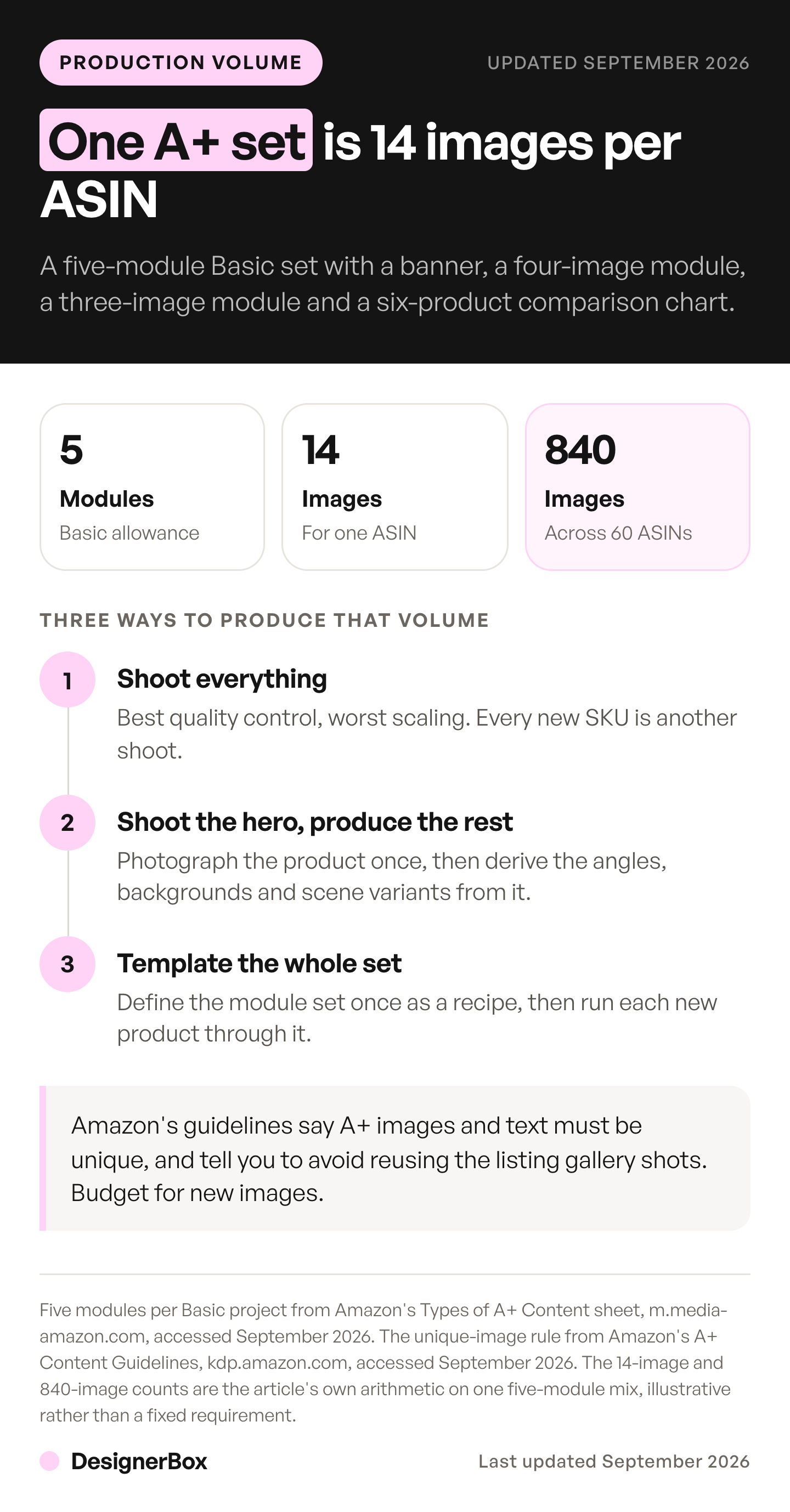
Now count the volume. A five-module Basic set built from a full-width overlay, a four-image module, a three-image module and a six-product comparison chart needs 14 images. That is one ASIN. Multiply by your SKU count and the answer picks the method for you. The same count for a full shoot is in catalog photoshoot: count the images before you shoot.
- Shoot everything. Best quality control, worst scaling. Every new SKU is a shoot, or an addition to one.
- Shoot the hero, produce the rest. Photograph the product once properly, then derive the angles, backgrounds and scene variants from it. This is where most catalogs land.
- Template the whole set. Define the module set once as a repeatable template, then run each new product through it.
Option three matches the shape of the work, because A+ Content is the same layout every time and only the product changes. At 60 ASINs the 14-image set becomes 840 images following identical rules, which makes it a bulk production job rather than a creative one. Work in that shape is what a store hands to an AI agent, and five creative jobs worth handing over covers each one.
Generating the set from the product photo you already have avoids a shoot for every SKU, and the bill depends on one choice. There is no flat per-image price in DesignerBox, because the image model in the step sets the rate. The model list shows the image models DesignerBox runs. The cost is shown before the run, so price one ASIN first, read the number, then multiply it by your SKU count. Uploading your own photos and the commercial license start on the Pro plan. The Ads from a product photo template is one place to start the module images and the wide banner slots. An app for A+ module images is not live yet (designerbox.ai/apps/a-plus-content, October 2026), so build the job as a workflow. The Amazon listing images guide shows the steps for the main image on plain white, the other angles, the feature shots and a size shot.
That is the point at catalog volume. Anyone can make an AI picture. Making hundreds that still look like your brand is the hard part. Build the module set once on your first ASIN, save it as a workflow, and run it again for every SKU after it. A saved workflow runs the same way on the next product, and you set the brand once so the workflow reads it on every run. Batch runs that workflow over a sheet of up to 200 rows, and you keep or discard each result. You download the results and upload them in A+ Content Manager yourself.
The module images, the main images and your brand rules sit in the same account, so ASIN 60 follows the rules of ASIN 1. Plans and credits are on the pricing page. Start from a template, add your product photo, and run it.
Whichever route you pick, the rules change shape by channel, as the ecommerce product photography specs for five channels show. The Shopify image rules are a different specification again, so build the Amazon set to Amazon’s numbers and resize from there.
What should you build first?
Build one A+ Content set first, not all 60. Publish it, and read the result before you commit the catalog to a layout. One proven set becomes the template for everything after it. The first submission is where the copy rules affect you most, so it is cheaper to meet them on one ASIN than on sixty. The same one-first test for an image tool is set out in AI proof of concept for product images.
- Pick the ASIN with the most sessions. Not your favorite product. A conversion change appears fastest where there is already traffic.
- Choose the modules in A+ Content Manager and write down the specs it shows you. Your account is the authority on which modules you have and what each field allows.
- Produce one complete set at the real dimensions. Keep the source files and the crops, because this set becomes the template. Where those approved files live afterwards is brand asset management, and at 60 ASINs it decides whether anyone finds the template next quarter.
- Submit, then fix the copy rejections. Expect the first pass to catch promotional or time-sensitive wording.
- Wait for enough sessions to mean something. Amazon’s claim is a ceiling of 8%, so a small sample will not separate the effect from noise.
- Then template it and run the rest. The layout is proven and the work left is production.
Doing it in that order means the 59 repeats are built on something you have evidence for, rather than on a guess reproduced 59 times. Teams reaching for an AI tool for Amazon imagery usually arrive at step six, once the set is settled and the only question left is throughput.
FAQ
What are the image dimensions for Amazon A+ Content?
Each module has its own published minimum on Amazon’s standard-modules asset sheet. The full-width text overlays are 970 x 300, four image highlights is 400 x 400, the sidebar module is 300 x 400 with a 350 x 175 sidebar, most single and multi-image modules are 300 x 300, four images with text is 200 x 200, the quadrant is 135 x 135, and comparison chart thumbnails are 150 x 300.
How many modules can you add to A+ Content?
Basic allows five modules per project, Premium allows seven, and Brand Story allows nineteen. Basic offers 14 module types to choose from, Premium 19, and Brand Story 4. Only one enhanced product description type can be live on a listing at a time, so a listing runs Basic or Premium, never both together.
Is Amazon A+ Content free?
Yes. Amazon states that A+ Content is free for sellers who meet eligibility requirements, and there is no per-module charge. The costs sit elsewhere: the Professional selling account at $39.99 a month plus selling fees (sell.amazon.com, accessed September 2026), and the production of new images and copy for every ASIN you apply the content to.
How many images do I need for A+ Content?
It depends on the modules you pick, and you should plan per ASIN rather than per brand. A five-module Basic set using a full-width banner, a four-image module, a three-image module and a six-product comparison chart comes to 14 images. Multiply that by your SKU count to get the real production volume before choosing a method.
What is the difference between A+ Content and Enhanced Brand Content?
They are the same feature. Enhanced Brand Content, often shortened to EBC, was the earlier name for what Amazon now calls A+ Content. Older seller guides and agency pages still use the old term, which is why both names return results for the same tool. Amazon’s current documentation uses A+ Content throughout.
Can you reuse your listing gallery images in A+ Content?
Amazon’s guidelines say images and text must be unique to A+ and tell you to avoid reusing images already published in the listing image gallery. The section is meant to show aspects of the product the gallery does not. Plan a separate image set per ASIN rather than crops of the main photos.
Can you use AI-generated images in A+ Content?
We found no rule in Amazon’s A+ Content guidelines about how an image is produced (kdp.amazon.com, September 2026). The rules they do set apply either way: jpg or png under 2 MB, no blurry images, no watermarks, no small text that is unreadable on mobile, and alt text that describes the image. One image rule does turn on how the image was made. Amazon asks sellers to tag any image that shows a photorealistic person made fully by AI, using the keyword contains-synthetic-performer in the XMP dc:subject field before upload (sellercentral.amazon.com, September 2026). Check the AI disclosure rules now in force before putting a generated model into a module.
Sources
- Amazon, A+ Content tool page (sell.amazon.com, accessed September 2026)
- Amazon, A+ Content Design Guide (sell.amazon.com, accessed September 2026)
- Amazon, Types of A+ Content (m.media-amazon.com, accessed September 2026)
- Amazon, A+ Content Standard Modules asset guide (m.media-amazon.com, accessed September 2026)
- Amazon, A+ Content Guidelines (kdp.amazon.com, accessed September 2026)
- Amazon, Premium A+ module guide, video file rules (m.media-amazon.com, accessed September 2026)
- Amazon, product image guide, AI-generated people tag (sellercentral.amazon.com, accessed September 2026)
Module specifications, image limits, eligibility, cost and rejection rules verified from Amazon’s seller, marketing-toolkit and KDP documentation as of September 2026. Amazon’s A+ Content tool page was re-checked on 2 October 2026. DesignerBox plans and credits from the DesignerBox pricing page (designerbox.ai/pricing), September 2026. Module availability and field limits vary by account. Confirm current specs in A+ Content Manager. Individual results vary.