
Ecommerce product photography is the image set that sells a product on a listing page: the white-background main image, detail shots, in-scale shots, lifestyle scenes, and on-model shots. Every channel accepts a version of that same set, and the specs conflict. Amazon wants the product filling 85% of the frame. Walmart Canada wants a white border around it.
Good lighting and a white background help. What gets a listing suppressed is a number.
This guide is the number sheet. What each channel requires, where two requirements contradict each other, the one master file that clears all five, how many images a listing needs, and what the set costs to produce.
Key Takeaways
- Amazon’s main image asks for the product to fill 85% of the frame on a pure white background, RGB 255, 255, 255 (sellercentral.amazon.com, as of September 2026). Treat the 85% as a floor.
- Walmart’s white border is a Walmart Canada rule. Walmart US asks for a seamless white background, a crop close to the product, and 1500 x 1500 pixels as the minimum for zoom (marketplacelearn.walmart.com, as of September 2026).
- One master file covers all five channels. 2,200 x 2,200 px, sRGB, JPEG, under 5 MB, pure white, product at 85% to 95% fill. Every channel’s recommendation sits below that ceiling.
- Etsy’s image help sets no background rule, and recommends photos at least 2,000 pixels wide and tall (help.etsy.com, as of September 2026). A white packshot in position one on Etsy is compliant, and often a weak choice.
- TikTok Shop’s floor is 600 x 600 px, square, and its main image must be a pure white front view of the product (seller-us.tiktok.com, as of September 2026).
- Walmart Canada’s seller guide says images count for 15% of the Content Quality Score.
- Lifestyle shots do not travel. Walmart Canada wants them cropped full bleed to a square with no border, which is the opposite of its own silo crop.
What is ecommerce product photography?
Ecommerce product photography is any image made to represent a product for sale online. It splits into five working types: the main packshot on white, detail close-ups, in-scale shots, lifestyle scenes, and on-model images. Each one answers a different buyer question, and each channel treats them differently.
The buyer cannot hold the product. The image set carries the entire burden of proof, and shoppers use it to answer questions the copy never gets asked. In Baymard Institute’s 2017 research, 42% of users tried to work out a product’s physical size from its images, and 28% of the 60 large sites Baymard benchmarked gave them no in-scale image to do it with (baymard.com, published May 2017, accessed September 2026).
That is why “how many images” is the wrong first question. The right one is “which questions does this product raise”, then you count. A phone case raises size. A ceramic mug raises capacity and glaze texture, which is why home decor product photography leans so hard on the detail crop. A jacket raises fit and fabric weight. The seven product photography angles cover the general case, and your hardest product decides how far past them you go. Whether you can generate those frames or have to shoot them is a separate question, answered by whether AI product photography works on your materials. Some categories have the answer decided for them: intimates imagery is constrained by what each platform permits before styling gets a say. Fragrance is constrained by a different authority again, since perfume photography has to satisfy cosmetic claim rules and a flammable-goods classification on top of the usual specs.
The image spec for five channels
Here is what each channel asks for on the main product image. Slot counts are a separate question, and how many listing images each marketplace shows covers those. This table is about what the file has to look like.
All figures accessed September 2026.
| Channel | Main image background | Frame rule | Pixels | Aspect | Max file |
|---|---|---|---|---|---|
| Amazon | Pure white, RGB 255, 255, 255 | Product fills 85% of the frame | 500 px minimum on the longest side, 1,000 px or more to turn on zoom | Not fixed | Not published |
| Walmart US | Seamless white, RGB 255, 255, 255 | Crop close to the product | 2,200 x 2,200, minimum 1500 x 1500 for zoom | 1:1 | 5 MB |
| Etsy | No requirement | No requirement | At least 2,000 px wide and tall recommended | Landscape or square first photo | Not published |
| TikTok Shop | Pure white | Front physical view of the product | 600 x 600 minimum | 1:1 | Not published for images |
| Your Shopify store | Your call | Your call | 2,048 x 2,048 recommended | Keep it consistent | 20 MB |
One caveat on the Walmart row. Walmart US publishes 2,200 x 2,200 px, and some third-party guides still quote 2,000 x 2,000. Build to 2,200 and the question stops mattering.
Three things in that table decide most of the work.
The background rule is not universal. Amazon, Walmart and TikTok Shop all ask for white on the main image. Etsy does not, so a white packshot as image one on Etsy is compliant, and a styled scene is an option too.
The pixel floors are trivially low and the recommendations are not. Amazon’s 1,000 px turns zoom on, and it is not a target. Walmart’s 2,200 x 2,200 is the highest recommendation of the five, which makes it the one to build to.
The file size ceiling is 5 MB, set by Walmart. TikTok Shop’s 5 MB limit applies to the listing video. Shopify accepts 20 MB. Build to 5 and you never think about it again.
One footnote that saves an argument: Walmart Canada specifies 300 ppi. That number does not change a single pixel. PPI is a metadata tag that matters when a file goes to print. At 2,200 x 2,200 the tag does not matter on any of the five channels.
The two rules that fight
Amazon asks for the product to fill 85% of the image frame.
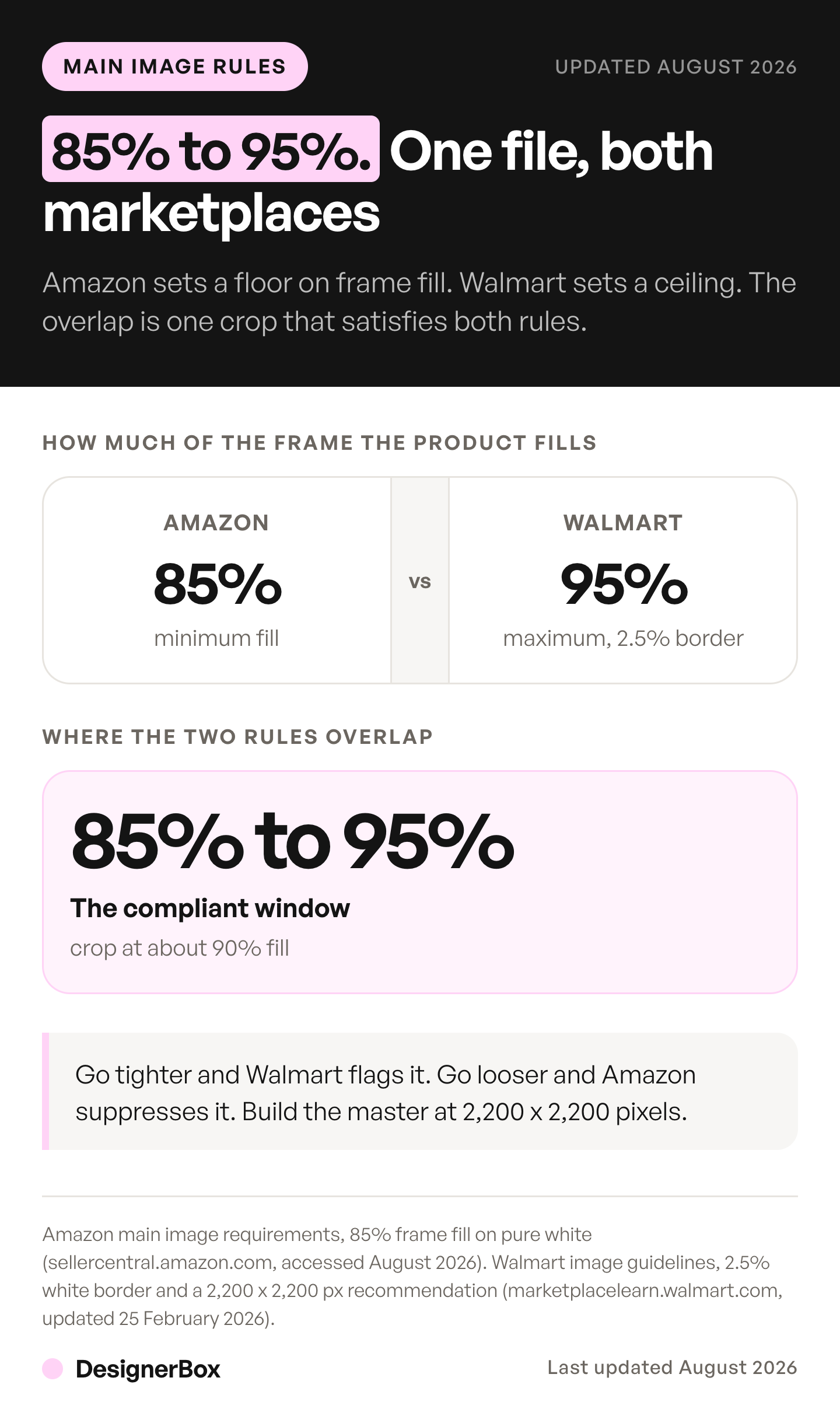
Walmart Canada asks for a 2.5% white border, so the product does not touch the edge of the frame (marketplacelearn.walmart.com, Walmart Canada, as of September 2026). Walmart US does not publish that border. It asks sellers to crop close to the product.
Read the two as one instruction and they look incompatible. They are not. Treat Amazon’s 85% as a floor on how much of the frame the product occupies. The Canadian border sets a ceiling, because 2.5% on each side caps the product at 95% of each dimension.
The safe window is 85% to 95% fill. Center the product, crop so it occupies roughly 90% of the frame, and one file clears Amazon and both Walmart regions. Go tighter and you break the Walmart Canada border. Go looser and the main image falls short of Amazon’s 85%, and Amazon may remove a listing from search until the main image complies.
One master file, five uploads
Build to this spec and you upload the same main image everywhere:
| Attribute | Master spec | Why |
|---|---|---|
| Dimensions | 2,200 x 2,200 px | Walmart’s recommendation, the highest of the five |
| Aspect ratio | 1:1 square | Required by Walmart and TikTok Shop, and Etsy accepts a square first photo |
| Color space | sRGB | Walmart Canada specifies it, every browser assumes it |
| Format | JPEG | Accepted everywhere, smallest at this size |
| File size | Under 5 MB | Walmart caps images at 5 MB |
| Background | Pure white, RGB 255, 255, 255 | Amazon, Walmart and TikTok Shop all ask for it |
| Product fill | 85% to 95% of the frame | The only window that clears Amazon and Walmart Canada together |
Downscaling from that master is safe. Upscaling into it is not, and a 900 px product photo stretched to 2,200 px reads as a cheap listing before a shopper consciously registers why. If that is the position you are in, fix the source or reshoot rather than interpolate.

What does not travel
The main packshot is the easy one. Four things still have to be made per channel.
Lifestyle shots. Walmart Canada asks for lifestyle images cropped full bleed to a square, filling the frame and touching all edges, with no border. That is the opposite of the border it asks for on silo images. One asset cannot satisfy both, by design.
Graphics and infographics. Feature callouts, dimension diagrams and scale avatars carry text, and text is channel-specific. Amazon’s main image shows the product on pure white, and the few product types allowed a lifestyle main image must carry no text or extra logos. TikTok Shop allows no added text or graphics on any product image. Walmart Canada classes anything meant to be read as a Graphics image.
Vertical crops. TikTok Shop listings take square images, and the video and creative around them are vertical. A square master does not crop to 9:16 without losing the product. Both exports, and the two pixel minimums TikTok publishes for the same field, are covered in TikTok Shop product images.
Etsy’s first image. Etsy crops thumbnails into square, portrait and landscape views, and asks for a landscape or square first photo with space around the product. Treat position one on Etsy as its own shot.
How many images a listing needs
Channel maximums are not targets, and the maximums vary a lot. Amazon requires one main image and recommends at least six more images and one video. Walmart Canada’s guide works in four image types: silo, lifestyle, graphics and detail. TikTok Shop advises at least five across a maximum of nine. Etsy allows 20 photos and 2 videos per listing, and Shopify allows 250 media files per product.
The number that matters is how many distinct files you have to produce, and that is higher than any single channel’s ceiling because the same shot gets remade. Which formats those files have to cover is set out in the types of product photography. Video, 360 spins, 3D and AR sit beside those stills, and visual commerce covers the rule for each.
If the products are not yours to photograph, the count is the same but the sourcing is not. Dropshipping product photos covers working from a supplier’s image pack without inheriting everyone else’s listing.
Two things sit behind those numbers. Amazon’s clothing guide allows up to eight extra images per SKU. And eBay, which is not in the list above, allows 24 pictures. Both, plus the main-image restrictions that disqualify half a typical shot list from slot one, are covered in what each marketplace shows for AI product listing images.
Work one SKU through it. Say you sell on Amazon, Etsy and your own Shopify store.
You build a master set of eight: front, back, three-quarter, side, top, detail, in-scale, in-use. Seven of the eight travel with a crop. You add one lifestyle shot for Etsy’s first position and two graphics for Amazon’s feature callouts. That is eleven files for one SKU, of which eight came from one shoot or one generation run.
At 40 SKUs it is 440 files. That is the number to price against.
Shopify moves the goalposts again, because the count follows variants rather than products. If your colors each need their own gallery, run the Shopify variant math before you commit to a tool or a shoot.
Self-hosted platforms change the arithmetic in the other direction, because they derive sizes from what you upload rather than enforcing a spec. WooCommerce product photography covers its three image sizes and the main image it deliberately never crops, and PrestaShop product images covers the single-master rule that makes the upload the only quality gate you get. For the upload itself, see how to import product images into WooCommerce. Magento resizes twice, once at upload and once in the theme, and the Magento image guide follows a photo through both.
Which shots to make first
Order matters more than volume, on the page and in the production queue. PDP gallery sequence covers what goes where. Apparel is the one category where the order is published for you, and the clothing photography shot list sets it out. All of them can come out of one properly shot frame, and what that source shot has to get right decides whether they do. For production, build in this order:
- The white packshot. It is the compliance asset, the search thumbnail, and the ad creative. Nothing ships without it.
- The in-scale shot. The single most commonly missing image, and the one that prevents a size-related return.
- The detail crop. Texture, finish, stitching, closure. This is where a real product beats a rendered one.
- The in-use or lifestyle shot. Etsy’s first position, Walmart’s lifestyle slot, and most of your paid social. Large-format categories lean hardest on this one, and the room scenes a furniture listing needs are covered in furniture product photography.
- Back and side. Cheap once the product is already set up.
- On-model, for anything worn. Usually the most expensive shot, and the one a shopper uses to judge fit.
What the set costs
The benchmark is a market one. VSCO’s photography pricing guide, published in November 2023 and updated in September 2026, puts typical product photography at $25 to $175 an image and commercial day rates at $800 to $5,000 (vsco.co, accessed September 2026). Product photoshoot cost breaks down what those quotes leave out, and shipping, retouching and usage rights are all on that list. If you plan to hire a studio, ecommerce photography services covers per-image tiers, order minimums and the extras billed separately. Large-format categories break that benchmark entirely, and what furniture photography costs prices the studio day against CGI and generated alternatives.
Generating the set prices differently. In DesignerBox the plan sets the monthly ceiling, and the cost of a run is shown before you start it.
Uploading your own photos and the commercial license start on the Pro plan. AI video, virtual try-on, upscaling, the image editor and the video editor start on the Premium plan. Plans and credits are on the pricing page.
Run the 440-file example through both. At $25 to $175 an image it is a five-figure production program. In DesignerBox the same 440 files use the credits in your plan. Either way the constraint moves from the budget to review time, because somebody still has to look at 440 images.
Budget that review. It is the step that decides whether a catalog looks shot or looks assembled. In DesignerBox, packshots, in-scale shots, styled scenes and on-model work all start from the same source photo. The full workflow from the first product photo to the finished ad, in one subscription. No file moves to a second tool between the shot and the listing. Anyone can make an AI picture. Making hundreds that still look like your brand is the hard part. You set the brand once, and the workflow reads it on every run. DesignerBox for ecommerce brands shows how photos of each new product become the packshot, the scenes and the ad sizes.
That is the part worth building once. You set the treatment on the first SKU: the 85% to 95% crop, the white value, the light and the model choice. A saved workflow then runs the same way on the next product, so SKU forty gets the same spec as SKU one. That is what a listing audit checks for. Start from a template, add your brand and your products, and run it.
What to check before you upload
Four checks, in order.

Color. Compare the image against the physical product under neutral light. A shifted color is the fastest route to a return and a review that says “not as pictured”. Product photo accuracy has the full check.
Resolution at the crop. Zoom to 100% on the detail shot. If it softens, the master was too small.
Fill percentage. Eyeball the border. If the product touches an edge, it breaks the Walmart Canada border. If the product fills less than 85% of the frame, it falls short of Amazon’s main image rule. Amazon lists “Product too small” among its image suppression issues, and the Amazon image requirements guide covers the rest of that list.
Policy. If the image was generated or significantly edited, the rules differ by channel, and TikTok Shop does not allow digital renderings in any product image (seller-us.tiktok.com, as of September 2026). Marketplace rules and disclosure covers all five channels and the EU rule that has applied since 2 August 2026.
There is more on the tooling side in which tools fit which catalog, and worked examples of shots that pass and fail these checks applies these checks one shot type at a time.
FAQ
What is ecommerce product photography?
Ecommerce product photography covers every image that sells a product online: the white-background main image, detail close-ups, in-scale shots, lifestyle scenes and on-model images. Each type answers a different buyer question, and each sales channel sets its own specification for the main image.
What size should ecommerce product photos be?
Build one master at 2,200 x 2,200 px, sRGB, JPEG, under 5 MB. That clears Walmart’s 2,200 x 2,200 recommendation, Etsy’s 2,000 px recommendation, Shopify’s 2,048 x 2,048, Amazon’s 1,000 px zoom threshold and TikTok Shop’s 600 x 600 floor in one file. On your own store the master is only the input, because Shopify re-encodes and crops what it serves.
Can I use the same product photo on Amazon and Walmart?
Yes, if the product fills between 85% and 95% of the frame. Amazon asks for 85% fill. Walmart Canada asks for a 2.5% white border, which caps the product at about 95% of each dimension. Walmart US asks for a crop close to the product. Crop inside that window and one file satisfies all three.
How many product images does each channel allow?
Amazon recommends a main image plus at least six more images and one video. Walmart Canada sorts listing images into silo, lifestyle, graphics and detail. TikTok Shop allows up to nine and advises at least five. Etsy allows 20 photos and 2 videos per listing. Shopify allows 250 media files per product. The full slot-by-slot breakdown sits in what each marketplace shows.
Do I need a professional camera for ecommerce product photography?
No. A recent phone in even, indirect daylight produces a file well above every channel’s pixel floor. The camera is rarely the constraint. Consistent lighting across a catalog and a clean white background are the two things that separate a listing that looks shot from one that looks improvised.
Can AI-generated images be used as listing photos?
It depends on the channel, and the answer is not the same on all five. Amazon judges the finished image, and asks you to tag a photorealistic AI person with the keyword contains-synthetic-performer before you upload. Walmart says AI images must be truthful, accurate and not misleading. Etsy requires original photos of the actual product, and does not accept renderings or stock photos in their place, with two exceptions for mockups. TikTok Shop does not allow digital renderings in any product image. We found no AI image rule in Shopify’s Acceptable Use Policy, and Shopify’s terms make you responsible for your store content. Check the rules per channel before you upload.
What does a full image set cost per SKU?
At the typical product photography rates in VSCO’s pricing guide, $25 to $175 an image, a seven-shot set runs roughly $175 to $1,225 before retouching, shipping and usage rights. Generated from one source photo, the cost depends on the models the workflow uses, and DesignerBox shows it before the run starts.
Sources
All accessed September 2026.
- Amazon product image guide: pure white RGB 255, 255, 255, the product shown as 85% of the image, a lifestyle main image allowed for only a few product types and with no text or extra logos, removal from search until a compliant main image is provided, 500 px minimum and 1,000 px on the longest side to turn on zoom, the contains-synthetic-performer tag, and a main image plus at least six more images and one video: (sellercentral.amazon.com, September 2026)
- Amazon clothing image guide, up to eight alternate images per SKU: (sellercentral.amazon.com, September 2026)
- Walmart US image requirements, 2,200 x 2,200 px, 1500 x 1500 minimum for zoom, 1:1 aspect, RGB, 5 MB maximum, JPEG, PNG or BMP, the seamless white background, the crop close to the product, and the line that AI images must be truthful, accurate and not misleading: (marketplacelearn.walmart.com, September 2026)
- Walmart Canada image guidelines, the 2.5% white border on silo images, sRGB, 300 ppi, the four image types, the full-bleed lifestyle crop, the Graphics classification, and images at 15% of the Content Quality Score: (marketplacelearn.walmart.com, September 2026)
- Etsy image requirements and best practices, photos at least 2,000 pixels wide and tall, a landscape or square first photo, and thumbnails cropped to square, portrait and landscape views: (help.etsy.com, September 2026)
- Etsy listing limits, 20 photos and 2 videos per listing: (help.etsy.com, September 2026)
- Etsy Listing Image Requirements, original photos of the actual product with two exceptions for mockups: (etsy.com, September 2026)
- TikTok Shop Product Listing Policy, 600 x 600 px minimum, up to nine square images, a pure white main image showing the front physical view, no added text or graphics, no digital renderings, and the 5 MB video limit: (seller-us.tiktok.com, September 2026)
- TikTok Shop listing best practices, at least five images per product: (seller-us.tiktok.com, September 2026)
- Shopify product image guidance, 2,048 x 2,048 px recommended for square images, 20 MB file limit, and 250 media files per product: (help.shopify.com, September 2026)
- Shopify Acceptable Use Policy and Terms of Service: (shopify.com, shopify.com, September 2026)
- eBay, up to 24 pictures per listing: (ebay.com, September 2026)
- Baymard Institute, published May 2017, 42% of users gauging product size from images and 28% of 60 large sites providing no in-scale image: (baymard.com, September 2026)
- VSCO photography pricing guide, published November 2023 and updated September 2026, product photography at $25 to $175 an image and commercial day rates of $800 to $5,000: (vsco.co, September 2026)
- DesignerBox plan gates, the Pro-tier commercial license and virtual try-on from Premium: DesignerBox pricing page (designerbox.ai/pricing), September 2026
Channel specifications verified from Amazon Seller Central, Walmart Marketplace Learn (US and Canada), Etsy Help, TikTok Shop Seller Center and Shopify Help as of September 2026. Product page research from Baymard Institute. Photography rates from VSCO’s photography pricing guide. DesignerBox plan gates from the DesignerBox pricing page, September 2026. Marketplace image specifications change and vary by product category. This is general information, not legal advice. Individual results vary.